
[转]WinForm如何调用Web Service
1、建立项目WebService和WinForm项目,这里起名为WinFormInvokeWebService,如图所示,
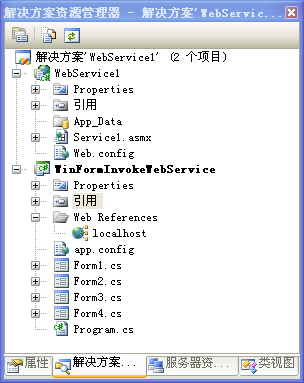
2、Service1.asmx代码为:(这部分其实和上篇的代码是一样的)
using System;

using System.Collections.Generic;

using System.Linq;

using System.Web;

using System.Web.Services;

using System.Data;

namespace WebService1

{

    /// <summary>

    /// Service1 的摘要说明

    /// </summary>

    [WebService(Namespace = "http://tempuri.org/")]

    [WebServiceBinding(ConformsTo = WsiProfiles.BasicProfile1_1)]

    [System.ComponentModel.ToolboxItem(false)]

    // 若要允许使用 ASP.NET AJAX 从脚本中调用此 Web 服务,请取消对下行的注释。

    [System.Web.Script.Services.ScriptService]

    public class Service1 : System.Web.Services.WebService

    {

        //无参方法

        [WebMethod]

        public string HelloWorld()

        {

            return "Hello World";

        }

        //有参方法1

        [WebMethod]

        public int Add(int a, int b)

        {

            return a + b;

        }

        //有参方法2

        [WebMethod]

        public int Sum(int x)

        {

            int sum = ;

            for (int i = ; i <= x; i++)

            {

                sum += i;

            }

            return sum;

        }

        // 返回一个复合类型

        [WebMethod]

        public  Student GetStudentByStuNo(string stuNo)

        {

            if(stuNo=="")

                return new Student { StuNo = "", StuName = "张三" };

            if(stuNo=="")

                return new Student { StuNo = "", StuName = "李四" };

            return null;

        }

        //返回返回泛型集合的

        [WebMethod]

        public List<Student> GetList()

        {

            List<Student> list = new List<Student>();

            list.Add(new Student() { StuNo = "", StuName = "张三" });

            list.Add(new Student() { StuNo = "", StuName = "李四" });

            list.Add(new Student() { StuNo = "", StuName = "王五" });

            return list;

        }

        //返回DataSet

        [WebMethod]

        public  DataSet GetDataSet()

        {

            DataSet ds = new DataSet();

            DataTable dt = new DataTable();

            dt.Columns.Add("StuNo", Type.GetType("System.String"));

            dt.Columns.Add("StuName", Type.GetType("System.String"));

            DataRow dr = dt.NewRow();

            dr["StuNo"] = ""; dr["StuName"] = "张三";

            dt.Rows.Add(dr);

            dr = dt.NewRow();

            dr["StuNo"] = ""; dr["StuName"] = "李四";

            dt.Rows.Add(dr);

            ds.Tables.Add(dt);

            return ds;

        }

    }

    public class Student

    {

        public string StuNo { get; set; }

        public string StuName { get; set; }

    }

}
3、在WebService的web.config文件的system.web节下面加上以下配置。如果不添加在运行手工发送HTTP请求调用WebService(利用GET方式)时,总是出现“远程服务器返回错误: (500) 内部服务器错误。”就是这个该死的错误,让我浪费2个多小时
<webServices>

        <protocols>

            <add name="HttpPost" />

            <add name="HttpGet" />

        </protocols>

</webServices>
4、在WinForm应用程序里添加Web引用,有人会发现选择WinForm项目里只能添加服务引用,我当初也是这么认为后来,后来发现在做异步的调用的时候有些方法实在点不出来,所以这里说下如何添加Web引用,选择项目WinFormInvokeWebService右键->添加服务引用,弹出以下对话框
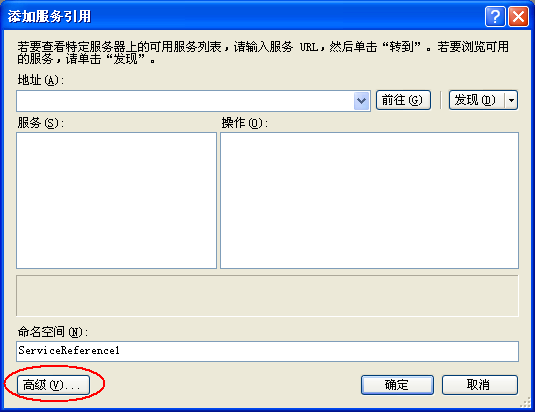
(1)选择高级

(2)选择添加web引用
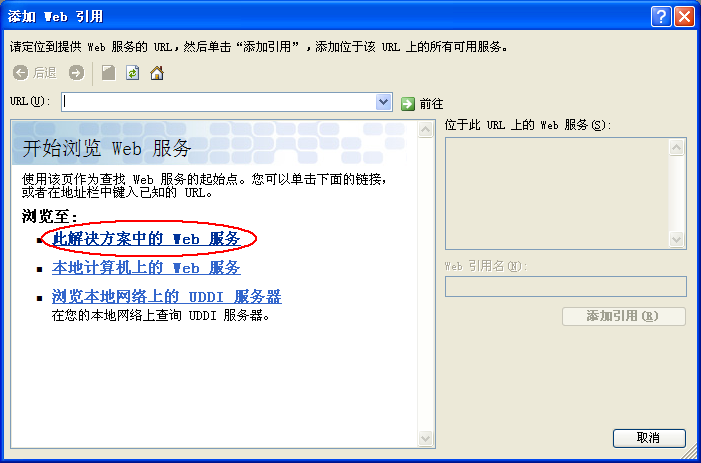
(3)选择“此解决方案中的Web服务”
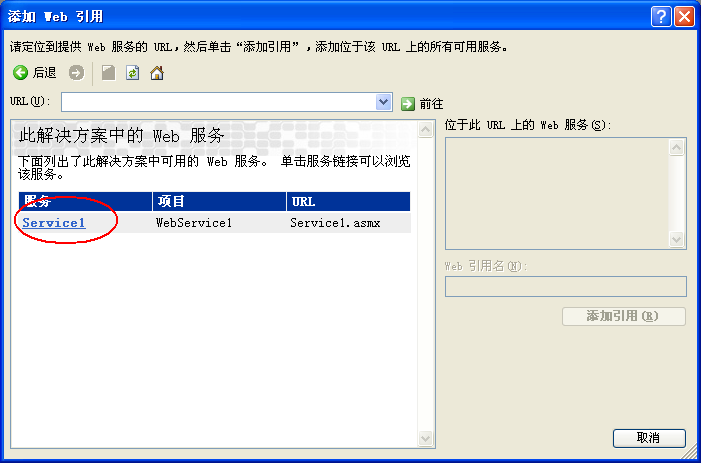
(4)选择Service1
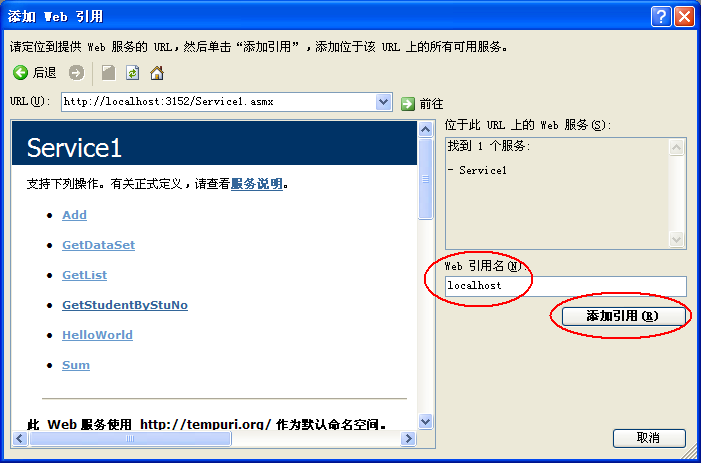
(5)在web引用名里输入一个服务名称,这里使用默认的名称localhost,点添加引用
5、添加3个Windows窗体,
(1)Form1拖放的控件为:
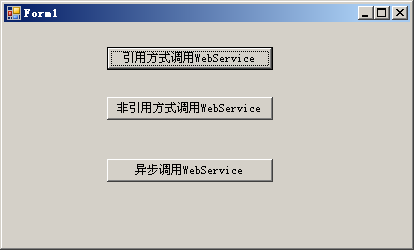
Form1的代码为:
using System;

using System.Collections.Generic;

using System.ComponentModel;

using System.Data;

using System.Drawing;

using System.Linq;

using System.Text;

using System.Windows.Forms;

namespace WinFormInvokeWebService

{

    public partial class Form1 : Form

    {

        public Form1()

        {

            InitializeComponent();

        }

        private void button1_Click(object sender, EventArgs e)

        {

            localhost.Service1 service = new localhost.Service1();

            localhost.Student s = service.GetStudentByStuNo("");

            MessageBox.Show("学号:" + s.StuNo + ",姓名:" + s.StuName);

        }

        private void button2_Click(object sender, EventArgs e)

        {

            new Form2().Show();

        }

        private void button3_Click(object sender, EventArgs e)

        {

            new Form3().Show();

        }

    }

}
(2)Form2拖放的控件为:

Form2的代码为:
using System;
using System.Collections.Generic;
using System.ComponentModel;
using System.Data;
using System.Drawing;
using System.Linq;
using System.Text;
using System.Windows.Forms;
//导入此命名空间
using System.Net;
using System.Xml;
using System.IO;
using System.Web; //先添加System.Web引用再导入此命名空间
namespace WinFormInvokeWebService
{
public partial class Form2 : Form
{
public Form2()
{
InitializeComponent();
}
//手工发送HTTP请求调用WebService-GET方式
private void button1_Click(object sender, EventArgs e)
{
//http://localhost:3152注意你的地址可能和我的不一样,运行WebService看下你的端口改下
string strURL = "http://localhost:3152/Service1.asmx/GetStudentByStuNo?stuNo=";
strURL += this.textBox1.Text;
//创建一个HTTP请求
HttpWebRequest request = (HttpWebRequest)WebRequest.Create(strURL);
//request.Method="get";
HttpWebResponse response = (System.Net.HttpWebResponse)request.GetResponse();
Stream s = response.GetResponseStream();
XmlTextReader Reader = new XmlTextReader(s);
Reader.MoveToContent();
string strValue = Reader.ReadInnerXml();
strValue = strValue.Replace("<", "<");
strValue = strValue.Replace(">", ">");
MessageBox.Show(strValue);
Reader.Close();
}
//手工发送HTTP请求调用WebService-POST方式
private void button2_Click(object sender, EventArgs e)
{
//http://localhost:3152注意你的地址可能和我的不一样,运行WebService看下你的端口改下
string strURL = "http://localhost:3152/Service1.asmx/GetStudentByStuNo";
//创建一个HTTP请求
HttpWebRequest request = (HttpWebRequest)WebRequest.Create(strURL);
//Post请求方式
request.Method = "POST";
//内容类型
request.ContentType = "application/x-www-form-urlencoded";
//参数经过URL编码
string paraUrlCoded = HttpUtility.UrlEncode("stuNo");
paraUrlCoded += "=" + HttpUtility.UrlEncode(this.textBox1.Text);
byte[] payload;
//将URL编码后的字符串转化为字节
payload = System.Text.Encoding.UTF8.GetBytes(paraUrlCoded);
//设置请求的ContentLength
request.ContentLength = payload.Length;
//获得请求流
Stream writer = request.GetRequestStream();
//将请求参数写入流
writer.Write(payload, , payload.Length);
//关闭请求流
writer.Close();
//获得响应流
HttpWebResponse response = (HttpWebResponse)request.GetResponse();
Stream s = response.GetResponseStream();
XmlTextReader Reader = new XmlTextReader(s);
Reader.MoveToContent();
string strValue = Reader.ReadInnerXml();
strValue = strValue.Replace("<", "<");
strValue = strValue.Replace(">", ">");
MessageBox.Show(strValue);
Reader.Close();
}
}
}
(3)Form3拖放的控件为:

Form3的代码为:
using System;

using System.Collections.Generic;

using System.ComponentModel;

using System.Data;

using System.Drawing;

using System.Linq;

using System.Text;

using System.Windows.Forms;

namespace WinFormInvokeWebService

{

    public partial class Form3 : Form

    {

        public Form3()

        {

            InitializeComponent();

        }

        //利用Backgroundworker对象

        private void button1_Click(object sender, EventArgs e)

        {

            BackgroundWorker backgroundworker = new BackgroundWorker();

            // 注册具体异步处理的方法

            backgroundworker.DoWork += new DoWorkEventHandler(back_DoWork);

            // 注册调用完成后的回调方法

            backgroundworker.RunWorkerCompleted += newRunWorkerCompletedEventHandler(back_RunWorkerCompleted);

            // 这里开始异步调用

            backgroundworker.RunWorkerAsync();

            //调用服务的同时客户端处理并不停止

            ChangeProcessBar();

        }

        //完成事件

        void back_RunWorkerCompleted(object sender, RunWorkerCompletedEventArgs e)

        {

            if (e.Error != null)

                throw e.Error;

            progressBar1.Value = progressBar1.Maximum;                              //调用完成了,把客户端进度条填充满

            localhost.Student s = e.Result as localhost.Student;                    //获取处理结果

            MessageBox.Show("学号:" + s.StuNo + ",姓名:" + s.StuName);            //显示从服务器获取的结果值

        }

        //调用方法

        void back_DoWork(object sender, DoWorkEventArgs e)

        {

            // Web Service代理类

            localhost.Service1 service = new localhost.Service1();

            // 调用Web方法GetClass1,结果赋值给DoWorkEventArgs的Result对象

            e.Result = service.GetStudentByStuNo("");

        }

        /// <summary>

        /// 界面的进度条显示

        /// </summary>

        void ChangeProcessBar()

        {

            for (int i = ; i < ; i++)

            {

                progressBar1.Value = i;

                System.Threading.Thread.Sleep();

            }

        }

        //调用WebMethod的Async方法

        private void button2_Click(object sender, EventArgs e)

        {

            // Web Service代理类

            localhost.Service1 service = new localhost.Service1();

            //这里开始异步调用

            //service.GetProductPriceAsync("001");

            service.GetStudentByStuNoAsync("");

            // 注册调用完成后的回调方法

            service.GetStudentByStuNoCompleted += newlocalhost.GetStudentByStuNoCompletedEventHandler(GetStudentByStuNoCompleted);

            //调用同时客户端处理不停止

            ChangeProcessBar();

        }

        //完成事件

        void GetStudentByStuNoCompleted(object sender, localhost.GetStudentByStuNoCompletedEventArgs e)

        {

            if (e.Error != null)

                throw e.Error;

            progressBar1.Value = progressBar1.Maximum;                              //调用完成了,把客户端进度条填充满

            localhost.Student s = e.Result as localhost.Student;                    //获取处理结果

            MessageBox.Show("学号:" + s.StuNo + ",姓名:" + s.StuName);            //显示从服务器获取的结果值

        }

    }

}
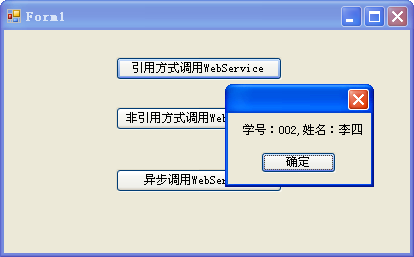
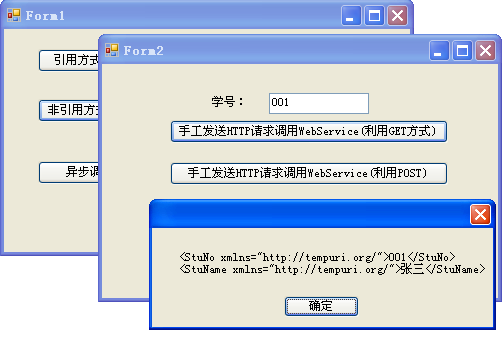
运行结果:

[转]WinForm如何调用Web Service的更多相关文章
- C#之VS2010ASP.NET页面调用Web Service和winform程序调用Web Service
一:用ASP.NET调用Web Service 打开VS2010,打开“文件-新建-网站”,选择“ASP.NET网站” 选好存储位置,语言后点击确定,进入默认页面.然后先添加Web引用,把WebSer ...
- WinForm如何调用Web Service
参考地址 今天看了李天平关于WinForm调用Web Service的代码,我自己模仿做一个代码基本都是复制粘贴的,结果不好使.郁闷的是,又碰到那个该死的GET调用Web Service,我想肯定又是 ...
- ORACLE存储过程调用Web Service
1. 概述 最近在ESB项目中,客户在各个系统之间的服务调用大多都是在oracle存储过程中进行的,本文就oracle存储过程调用web service来进行说明.其他主流数据库,比如mysql和sq ...
- C#开发和调用Web Service
http://blog.csdn.net/h0322/article/details/4776819 1.1.Web Service基本概念 Web Service也叫XML Web Service ...
- php5调用web service
工作中需要用php调用web service接口,对php不熟,上网搜搜,发现关于用php调用web service的文章也不多,不少还是php4里用nusoap这个模块调用的方法,其实php5里已经 ...
- 通过ksoap2-android来调用Web Service操作的实例
import java.io.IOException; import org.ksoap2.SoapEnvelope;import org.ksoap2.serialization.SoapObjec ...
- 使用Android应用调用Web Service
Java本身提供了丰富的Web Service支持,比如Sun公司指定的JAX-WS 2规范,还有Apache开源组织所提供的Axis1.Axis2.CXF等,这些技术不仅可以用于非常方便地对外提 ...
- Dynamic CRM 2013学习笔记(二十五)JS调用web service 实现多条记录复制(克隆)功能
前面介绍过如何克隆一条当前的记录: Dynamic CRM 2013学习笔记(十四)复制/克隆记录 , 主要是通过界面上加一个字段,单击form上的clone 按钮时,改变这个字段的值以触发插件来实现 ...
- ASP.NET调用Web Service
1.1.Web Service基本概念 Web Service也叫XML Web Service WebService是一种可以接收从Internet或者Intranet上的其它系统中传递过来的请求, ...
随机推荐
- Linux下的I/O复用与epoll详解
前言 I/O多路复用有很多种实现.在linux上,2.4内核前主要是select和poll,自Linux 2.6内核正式引入epoll以来,epoll已经成为了目前实现高性能网络服务器的必备技术.尽管 ...
- [可拖动DIV]刚开通博客顺便就写了点东西!
说说我自己的思路 首先需要一个初始div div { border: 1px #333 solid; width: 200px; height: 50px; } <div id="od ...
- msSQL数据库备份还原小结
MSSQL自带了一个样例数据库pubs,就拿这个举例好了. 首先,来一次完全备份.对于数据量很大的数据库,这样的操作当然很费时间.所以我们采用每天凌晨4点一次完全备份,每个小时一个差异备份,每分钟一次 ...
- MVC 弹出提示框
第一种弹框成功后要刷新界面 [HttpPost] public ActionResult Add(Maticsoft.Model.Project.ProjectMoneyPlan model) { m ...
- mac下如何查看指定端口被谁占用并且杀死该进程
在本地部署 Web 应用时我有遇到过某网络端口已经被其他程序占用的情况,这时候就需要先退出占用该端口的进程,我们可以通过“终端”来实现结束占用某特定端口的进程 1.打开终端,使用如下命令: lsof ...
- ACE 6.2.0 AIX 编译
注:ace只能使用gnu的make 一.IBM AIX版本 $unameAIX$oslevel6.1.0.0$ ACE+TAO+CIAO-6.2.0.tar 二.GNU make版本:make-3. ...
- discuz 重新定义jquery的$
最近做个小插件 发现加了这个代码不执行: $.ajax({ url:'plugin.php?id=register:regeist_jiangsu', type:'post', data:{ 'mob ...
- 021,lambda 表达式
021,lambda 表达式 匿名函数: 快速定义单行的最小函数,是从lisp借用来的,可以用在任何需要函数的地方 >>> def ds(x): return 2*x + ...
- Vijos P1061 迎春舞会之三人组舞 DP
题目链接:https://vijos.org/p/1061 n个人选出3*m人,排成m组,每组3人. 站的队形——较矮的2个人站两侧,最高的站中间. 从对称学角度来欣赏,左右两个人的身高越接近,则这一 ...
- I2C总线模拟(郭天祥视屏)
电路图 思路 1.向EEPROM中通过I2C总线写入一个字节 2.通过I2C总线读出写入的字节 3.如果写入和读出成功点亮发光二极管 程序 #include <REGX51.H> #def ...