
C# 动态创建出来的窗体间的通讯 delegate2
附件:http://files.cnblogs.com/xe2011/CSharp_WindowsForms_delegate02.rar
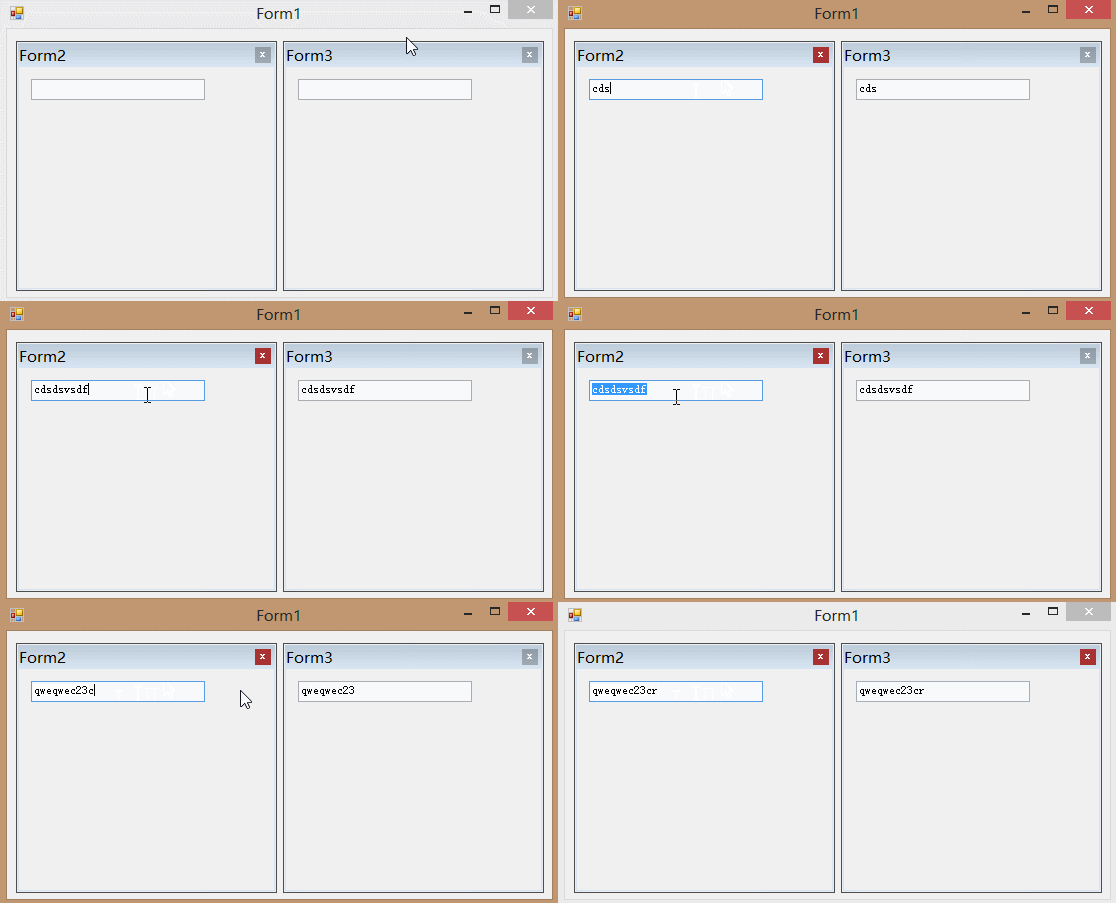
窗体2 和窗体3 都是动态创建出来的
现在 FORM3.TEXT要即时 = FORM2.TEXT
FORM1窗体代码
        Form2 f2 = new Form2();

        Form3 f3 = new Form3();

        private void Form1_Load(object sender, EventArgs e)

        {

            f2.XYZ += new Form2.CallBack(GetForm2TextBox1Text);

            f2.Dock = DockStyle.Fill;

            f2.TopLevel = false;

            f2.FormBorderStyle = FormBorderStyle.FixedToolWindow;

            f2.Parent = panel1;

            f2.Show();

            f3.Dock = DockStyle.Fill;

            f3.TopLevel = false;

            f3.FormBorderStyle = FormBorderStyle.FixedToolWindow;

            panel2.Controls.Add(f3);

            f3.Show();

        }

        private void GetForm2TextBox1Text(string s)

        {

            f3.textBox1.Text = s;

        }
FORM2窗体代码
        public delegate void CallBack(string s);

        public event CallBack XYZ;

        private void textBox1_TextChanged(object sender, EventArgs e)

        {

            XYZ(textBox1.Text);

        }
FORM3窗体代码
无
FORM1窗体代码
using System;

using System.Collections.Generic;

using System.ComponentModel;

using System.Data;

using System.Drawing;

using System.Linq;

using System.Text;

using System.Windows.Forms;

namespace WindowsFormsApplication1

{

    public partial class Form1 : Form

    {

        public Form1()

        {

            InitializeComponent();

        }

        Form2 f2 = new Form2();

        Form3 f3 = new Form3();

        private void Form1_Load(object sender, EventArgs e)

        {

            f2.XYZ += new Form2.CallBack(GetForm2TextBox1Text);

            f2.Dock = DockStyle.Fill;

            f2.TopLevel = false;

            f2.FormBorderStyle = FormBorderStyle.FixedToolWindow;

            f2.Parent = panel1;

            f2.Show();

            f3.Dock = DockStyle.Fill;

            f3.TopLevel = false;

            f3.FormBorderStyle = FormBorderStyle.FixedToolWindow;

            panel2.Controls.Add(f3);

            f3.Show();

        }

        private void GetForm2TextBox1Text(string s)

        {

            f3.textBox1.Text = s;

        }

    }

}
FORM2窗体代码
using System;

using System.Collections.Generic;

using System.ComponentModel;

using System.Data;

using System.Drawing;

using System.Linq;

using System.Text;

using System.Windows.Forms;

namespace WindowsFormsApplication1

{

    public partial class Form2 : Form

    {

        public Form2()

        {

            InitializeComponent();

        }

        public delegate void CallBack(string s);

        public event CallBack XYZ;

        private void textBox1_TextChanged(object sender, EventArgs e)

        {

            XYZ(textBox1.Text);

        }

    }

}
FORM3窗体代码
using System;

using System.Collections.Generic;

using System.ComponentModel;

using System.Data;

using System.Drawing;

using System.Linq;

using System.Text;

using System.Windows.Forms;

namespace WindowsFormsApplication1

{

    public partial class Form3 : Form

    {

        public Form3()

        {

            InitializeComponent();

        }

    }

}
C# 动态创建出来的窗体间的通讯 delegate2的更多相关文章
- C# 动态创建出来的窗体间的通讯 delegate3
附件1:http://files.cnblogs.com/xe2011/CSharp_WindowsForms_delegate03.rar 一个RTF文件管理器 描述 Form2,Form3,For ...
- C# 动态创建出来的窗体间的通讯 delegate1
附件 http://files.cnblogs.com/xe2011/CSharp_WindowsForms_delegate01.rar 需要每个窗体是独立存在,禁止相与引用窗体 这样干净并且可以反 ...
- 自定义事件实现不同窗体间的通讯Delphi篇
要实现子窗体与父窗体之间的通讯,有多种方法(比如:重载子窗体的构造函数,将父窗体的引用作为参数传递给子窗体).下面我要介绍的是利用自定义事件的方法,它能够最大程度的避免模块之间的耦合,充分体现面向对象 ...
- C#窗体间传值的简便方法/工具
一.问题:窗体间传值必须需要窗体之间有联系,具体有如下方式 窗体间传值涉及到窗体A必须拥有窗体B,这样才可以实现A-B之间传值 窗体A与窗体B在窗体/实例C中,A-B可互相通讯 其他方式,不细讨论,复 ...
- C# 学习笔记(一) Winform利用Assembly反射动态创建窗体
1. 添加Reflection //添加对Reflection程序集引用 using System.Reflection; // 引用窗体创建方法CreateForm,传入参数 private voi ...
- Delphi中动态创建窗体有四种方式
Delphi中动态创建窗体有四种方式,最好的方式如下: 比如在第一个窗体中调用每二个,主为第一个,第二个设为动态创建 Uses Unit2; //引用单元文件 procedure TForm1.But ...
- c#反射动态创建窗体
根据窗体的名称动态创建窗体 Assembly assembly = Assembly.GetExecutingAssembly(); // 实例化窗体 try { Form f ...
- DELPHI动态创建窗体
//第一种方式 procedure TForm1.btn1Click(Sender: TObject); begin With TForm2.Create(Application) do Try Sh ...
- winform 用户控件、 动态创建添加控件、timer控件、控件联动
用户控件: 相当于自定义的一个panel 里面可以放各种其他控件,并可以在后台一下调用整个此自定义控件. 使用方法:在项目上右键.添加.用户控件,之后用户控件的编辑与普通容器控件类似.如果要在后台往窗 ...
随机推荐
- 《疯狂java讲义》笔记 1-5章
1.编译语言和解释语言理解,摘自李刚老师的<疯狂Java讲义>第三版: 就是说,Java和.net都是编译型有事解释型语言.编译型就是根据不同平台编译成不同的可执行机器码,编译过程中会进行 ...
- python学习之--内置函数:
Python内置函数: Python内置了很多有用的函数,我们可以直接调用.要调用一个函数,需要知道函数的名称和参数,比如求绝对值的函数abs,只有一个参数. 1. 内置函数调用之--abs()函数: ...
- bzoj 1964: hull 三维凸包 计算几何
1964: hull 三维凸包 Time Limit: 1 Sec Memory Limit: 64 MBSubmit: 54 Solved: 39[Submit][Status][Discuss ...
- VisualStudio替换所有空行
[一篮饭特稀原创,转载请注明出自http://www.cnblogs.com/wanghafan/p/3371620.html] Ctrl+Shift+H 查找内容\r\n\r\n //如果要替换 ...
- 李洪强iOS开发Swift篇—06_流程控制
李洪强iOS开发Swift篇—06_流程控制 一.swift中的流程控制 Swift支持的流程结构如下: 循环结构:for.for-in.while.do-while 选择结构:if.switch 注 ...
- Android Studio 打包及引用 aar
Android Studio 打包及引用 aar 1. 简述 在比较大的 Android 项目的开发中,我们经常会遇到工程.jar 包等等之间相互引用的方式.一般我们通过在 gradle 文件中配置依 ...
- Android JNI使用方法
经过几天的努力终于搞定了android JNI部分,下面将我的这个小程序和大家分享一下.android JNI是连接android Java部分和C/C++部分的纽带,完整使用JNI需要Java代码和 ...
- vs2010创建和使用动态链接库(dll)
本文将创建一个简单的动态链接库,并编写一个应用台控制程序使用该动态链接库,并提出了与实现相关的几个问题,供初学者交流. 本文包含以下内容: 创建动态链接库项目 向动态链接库添加类 创建引用动态链接库的 ...
- Linux 日常使用指令大全
001.日常维护常用查询命令 #top 显示系统进程 #clear 清理屏幕信息 #cat /etc/redhat-release 查看系统版本信息 #cat /proc/version ...
- BZOJ_3196_二逼平衡树_(树套树,线段树+Treap)
描述 http://www.lydsy.com/JudgeOnline/problem.php?id=3196 可以处理区间问题的平衡树. 3196: Tyvj 1730 二逼平衡树 Time Lim ...