
从字符串总分离文件路径、命名、扩展名,Substring(),LastIndexOf()的使用;替换某一类字符串,Replace()的用法
一:从字符串总分离文件路径、命名、扩展名,上图

二:代码
using System;

using System.Collections.Generic;

using System.ComponentModel;

using System.Data;

using System.Drawing;

using System.Linq;

using System.Text;

using System.Windows.Forms;

namespace FilePathString

{

    public partial class Frm_Main : Form

    {

        public Frm_Main()

        {

            InitializeComponent();

        }

        private void btn_Openfile_Click(object sender, EventArgs e)

        {

            if (openFileDialog1.ShowDialog() == DialogResult.OK)//判断是否选择了文件

            {

                string P_str_all = openFileDialog1.FileName;//记录选择的文件全路径

                string P_str_path = //获取文件路径

                    P_str_all.Substring(, P_str_all.LastIndexOf("\\") + );//从最后一个/开始---到从最后一个/开始最后一个\的长度

                string P_str_filename = //获取文件名

                    P_str_all.Substring(P_str_all.LastIndexOf("\\") + , //从最后一个/开始---到从最后一个/开始最后一个.的长度

                    P_str_all.LastIndexOf(".") -

                    (P_str_all.LastIndexOf("\\")+));

                string P_str_fileexc = //获取文件扩展名

                    P_str_all.Substring(P_str_all.LastIndexOf(".") + ,//从最后一个.开始----到从最后一个.开始最后的长度

                    P_str_all.Length - P_str_all.LastIndexOf(".")-);

                lb_filepath.Text = "文件路径: " + P_str_path;//显示文件路径

                lb_filename.Text = "文件名称: " + P_str_filename;//显示文件名

                lb_fileexc.Text = "文件扩展名: " + P_str_fileexc;//显示扩展名

            }

        }

    }

}
三:替换某一类字符串,上图
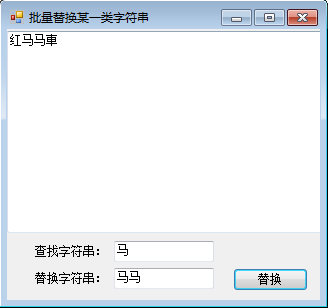
四:代码
using System;

using System.Collections.Generic;

using System.ComponentModel;

using System.Data;

using System.Drawing;

using System.Linq;

using System.Text;

using System.Windows.Forms;

namespace ReplaceString

{

    public partial class Frm_Main : Form

    {

        public Frm_Main()

        {

            InitializeComponent();

        }

        private void btn_replace_Click(object sender, EventArgs e)

        {

            txt_str.Text = //使用字符串对象的Reaplce方法替换所有满足条件的字符串

                txt_str.Text.Replace(txt_find.Text, txt_replace.Text);

        }

    }

}
从字符串总分离文件路径、命名、扩展名,Substring(),LastIndexOf()的使用;替换某一类字符串,Replace()的用法的更多相关文章
- ListView 根据 文件路径 或 扩展名 显示系统文件图标
private void 获取文件button1_Click(object sender, EventArgs e) { folderBrowserDialog1 ...
- 使用任意的输入流(InputStream)实例,包括字符串形式的文件路径或者 file:// 的 URL 形式的文件路径来配置
mybatis – MyBatis 3 | 入门 http://www.mybatis.org/mybatis-3/zh/getting-started.html 从 XML 中构建 SqlSessi ...
- 【技术宅3】截取文件和url扩展名的N种方法
//截取文件扩展名的N种方法 //第1种 //strrchr() 函数查找字符在指定字符串中最后一次出现的位置,如果成功,则返回其后面的字符串 //返回带有点的扩展名 function get_e ...
- NO21 Llinux的文件种类与扩展名--文件权限--软硬链接--Linux删除文件原理
Linux的文件种类与扩展名 一.文件种类:1.普通文件(regular file)第一个字符为[ - ]包括:①纯文本档(ASCII):这是Linux系统中最多的一种文件类型,称为纯文本档.是因为内 ...
- linux 常用命令: basename 去掉路径和扩展名
basename: 去掉路径和扩展名 /bin/basename coreutils-8.4-9.el6.x86_64 basename命令用于去掉路径信息,返回纯粹的文件名,如果指定的文件的扩展 ...
- win7系统中如何使文件显示出扩展名
win7系统中如何使文件显示出扩展名-------------------- 1.点击计算机-->>点击组织,然后选择"文件夹及搜索选项"-->> ---- ...
- win7系统中如何使文件显示出扩展名或显示文件后缀名
win7系统中如何使文件显示出扩展名-------------------- 1.点击计算机-->>点击组织,然后选择“文件夹及搜索选项”-->> -------------- ...
- windows服务器设置文件属性设置去掉隐藏已知文件类型的扩展名(即文件后缀名可见)
摘要: 1.文件后缀名不可见,系统运维过程容易发生同名不同后缀的文件操作混淆的情况 2.windows系统默认是文件后缀名不可见 3.所以需要更改一下配置. 4.操作步骤如下图: (1)点击组织-文件 ...
- System.IO.Path 文件名、路径、扩展名 处理
string filePath =@"E:/Randy0528/中文目录/JustTest.rar"; 更改路径字符串的扩展名.System.IO.Path.ChangeExten ...
随机推荐
- Nuget 相关
1:服务器搭建 1.1:创建空的Web Application 1.2:引用NuGet.Server 包:NuGet.Server 安装完成后的界面 web.config 已经被重写了,里面存在一些配 ...
- Android图表引擎AChartEngine之折线图使用
最近在帮老师做一个课题,其中app端需要显示折线图以便直观地看数据波动,上网查了些资料后发现了这款图标引擎,另外感谢李坤老师的博客,帮助很大. 废话不多说,下面写代码. 一.AChartEngine是 ...
- Activity和Fragment生命周期变化
情形一:启动应用加载Activity和Fragment Activity::onCreate Fragment::onAttach Fragment::onCreate Fragment::onCre ...
- 监听polygon变化
Polygons are made of Paths which are just MVCArrays (in this case, they're a list of LatLng objects) ...
- php函数serialize()与unserialize()
serialize()和unserialize()在php手册上的解释是: serialize — Generates a storable representation of a value ser ...
- 【POJ1417】【带标记并查集+DP】True Liars
Description After having drifted about in a small boat for a couple of days, Akira Crusoe Maeda was ...
- CSS的inherit与auto使用分析
一个很显浅的寓言,千年老树,电打雷劈,屹立不倒,却毁于蝼蚁的侵袭之下.自以为精通CSS的人,常常被一些小问题搞到头晕脑胀. 通常是一个很小的数值,经过层层放大歪曲后,整个布局就走形了.CSS是一门很简 ...
- nginx——rewrite模块
1.什么是Nginx的Rewrite规则? Rewrite主要的功能就是实现URL的重写,Nginx的Rewrite规则采用PCRE(Perl Compatible Regular Expressio ...
- PuTTY + Xming 远程使用 Linux GUI
from http://www.zw1840.com/blog/zw1840/2008/10/putty-xming-linux-gui.html 在家里的PC上用VMWare做了一个Oracle E ...
- WinPcap编程(一)
0. 按着文档顺序写的. 开发环境:win10+VS2013. 配置WinPcap环境就不多说.直接给网址:http://blog.sina.com.cn/s/blog_57432f380101qh3 ...