
Android_listView_exc
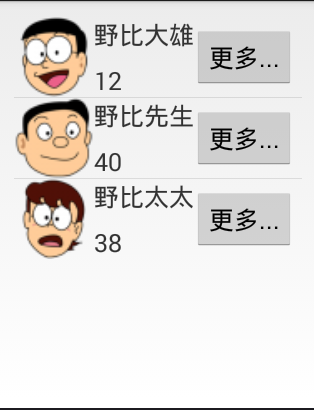
listView布局:
<RelativeLayout xmlns:android="http://schemas.android.com/apk/res/android"

    xmlns:tools="http://schemas.android.com/tools"

    android:layout_width="match_parent"

    android:layout_height="match_parent"

    android:paddingBottom="@dimen/activity_vertical_margin"

    android:paddingLeft="@dimen/activity_horizontal_margin"

    android:paddingRight="@dimen/activity_horizontal_margin"

    android:paddingTop="@dimen/activity_vertical_margin"

    tools:context="com.example.homework04.MainActivity" >

    <ListView

        android:id="@+id/listview"

        android:layout_width="match_parent"

        android:layout_height="match_parent" />

</RelativeLayout>
item布局
<?xml version="1.0" encoding="utf-8"?>

<RelativeLayout xmlns:android="http://schemas.android.com/apk/res/android"

    android:layout_width="match_parent"

    android:layout_height="match_parent" >

    <!-- 图像 -->

    <ImageView

        android:id="@+id/image"

        android:layout_width="100dp"

        android:layout_height="100dp"

        android:src="@drawable/image1"

        />

    <!-- 姓名 -->

    <TextView

        android:id="@+id/text_name"

        android:layout_width="100dp"

        android:layout_height="wrap_content"

        android:layout_toRightOf="@id/image"

        android:textSize="20sp"

        android:layout_marginTop="10dp"

        android:text="名侦探柯南"/>

    <!-- 年龄 -->

    <TextView

        android:id="@+id/text_age"

        android:layout_width="wrap_content"

        android:layout_height="wrap_content"

        android:layout_toRightOf="@id/image"

        android:layout_alignBottom="@id/image"

        android:textSize="20sp"

        android:layout_marginBottom="10dp"

        android:text="17"/>

    <!-- 按钮 -->

    <Button

        android:id="@+id/button"

        android:layout_width="wrap_content"

        android:layout_height="50dp"

        android:layout_toRightOf="@id/text_name"

        android:layout_marginTop="25dp"

        android:text="更多"

        />

</RelativeLayout>
源代码:
package com.example.homework04;

import java.util.ArrayList;

import java.util.HashMap;

import java.util.List;

import java.util.Map;

import android.app.Activity;

import android.os.Bundle;

import android.view.Menu;

import android.view.MenuItem;

import android.widget.ListView;

import android.widget.SimpleAdapter;

public class MainActivity extends Activity {

    private ListView listview;

    private SimpleAdapter adapter;

    @Override

    protected void onCreate(Bundle savedInstanceState) {

        super.onCreate(savedInstanceState);

        setContentView(R.layout.activity_main);

        // 初始化adapter

        adapter = new SimpleAdapter(

                MainActivity.this, // 第一个参数:上下文

                getData(),// 第二个参数:listview中显示的数据

                R.layout.item,// 第三个参数:每行的布局

                new String[]{"image", "name", "age", "button"},// 第四个参数:字符串数组 Map中的key的值

                new int[]{R.id.image, R.id.text_name, R.id.text_age, R.id.button}); // 第五个参数:item.xml中每个控件的id

        listview = (ListView) findViewById(R.id.listview);

        listview.setAdapter(adapter);

    }

    // 生成listview显示的数据
private List<Map<String, ?>> getData() {
// TODO Auto-generated method stub
List<Map<String,?>> list = new ArrayList<Map<String,?>>();
int[] image = {R.drawable.image1,R.drawable.image2,R.drawable.image3};
String[] name={"野比大雄","野比先生","野比太太"};
String[] age={"12","40","38"};
for (int i = 0; i < age.length; i++) {
Map<String,Object> map = new HashMap<String, Object>();
map.put("image", image[i]);
map.put("text_name", name[i] );
map.put("text_age", age[i] );
map.put("button", "更多");
list.add(map);
}
return list;
    }

}
Android_listView_exc的更多相关文章
随机推荐
- apache开源项目--nutch
Nutch 是一个开源Java 实现的搜索引擎.它提供了我们运行自己的搜索引擎所需的全部工具.包括全文搜索和Web爬虫. Nutch的创始人是Doug Cutting,他同时也是Lucene.Hado ...
- JAVASCRIPT中RegExp.$1是什么意思
RegExp 是javascript中的一个内置对象.为正则表达式. RegExp.$1是RegExp的一个属性,指的是与正则表达式匹配的第一个 子匹配(以括号为标志)字符串,以此类推,RegExp. ...
- 从零开始学习jQuery (六) AJAX快餐
一.摘要 本系列文章将带您进入jQuery的精彩世界, 其中有很多作者具体的使用经验和解决方案, 即使你会使用jQuery也能在阅读中发现些许秘籍. 本篇文章讲解如何使用jQuery方便快捷的实现A ...
- [备忘]WCF中使用MessageContract的一些注意点
准备使用WCF完成上传文件,以取代之前HTTP POST的方式. 但是调试了很久一直报错,后来经过一些修改终于通过,以下是一些可能需要注意的地方: 1.在WCF服务的OperatorContract ...
- iPhone丢失后通过iccid找回流程
切记,丢失IPHONE第一时间要去补卡,免得小偷刷机用你的卡激活,这样你查到的号码只会是你自己的号码找iphone有2个方法:ICCID和维修换机.两者之间没任何直接联系,请不要混淆!下面是总体流程图 ...
- Oracle 新增表空间文件
ALTER TABLESPACE users ADD DATAFILE 'D:/oracle/oradata/orcl/users.dbf' SIZE 500M AUTOEXTEND ON NEXT ...
- 【原】Spark Standalone如何通过start-all.sh启动集群
1.start-all.sh脚本分析 图1 start-all.sh部分内容 我们可以从start-all.sh脚本源文件中看到它其实是start-master.sh和start-slaves.sh两 ...
- 解决Mac下Sequel Pro 1.1 连接 Homebrew安装Mysql5.7.8的问题 Sequel Pro 1.1 encountered an unexpected error
解决Mac下Sequel Pro 1.1 连接 Homebrew安装Mysql5.7.8的问题 Sequel Pro encountered an unexpected error Sequel Pr ...
- Phonegap3.4 教程
英文原扯:http://coenraets.org/blog/cordova-phonegap-3-tutorial/ 我只是对着原文学习一遍,记录在这里,一来为了加深印象(边翻译边学习),二来为了自 ...
- 韦东山yy公开课笔记(1)--各种杂的问题
1,第四期的智能猫眼会有打电话和发短信的功能吗? 答:会有打电话功能,硬件上支持打电话就会支持发短信,只是软件上是否实现发短信现在未定.因为短信延迟太严重,不是可靠的. 2,请问关于makefil ...