
Spring中使用事务搭建转账环境 转账操作,
演示不使用事务出现异常情况
Dao层两个方法lessMoney()和moreMoney()
package com.swift;

import org.springframework.jdbc.core.JdbcTemplate;

public class AccountDao {

    private JdbcTemplate jdbcTemplate;

    public void setJdbcTemplate(JdbcTemplate jdbcTemplate) {

        this.jdbcTemplate = jdbcTemplate;

    }

    //少钱的方法

    public void lessMoney(String from,double number) {

        String sql="update account set money=money-? where username=?";

        jdbcTemplate.update(sql, number,from);

    }

    //多钱的方法

    public void moreMoney(String to,double number) {

        String sql="update account set money=money+? where username=?";

        jdbcTemplate.update(sql, number,to);

    }

}
Service层调用两个方法
package com.swift;

public class AccountService {

    private AccountDao accountDao;

    public void setAccountDao(AccountDao accountDao) {

        this.accountDao = accountDao;

    }

    public void moneyTransfer(String from,String to,double number) {

        accountDao.lessMoney(from,number);

        int i=10/0;

        accountDao.moreMoney(to,number);

    }

}
但是两个操作减与加之间,如果出现异常,则会导致转账钱已经转了,但对方却没有到账的bug,可能服务器突然故障等引起
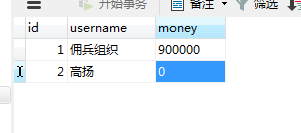
解决添加事务,出现异常进行回滚操作
下面使用配置文件的方法进行事务管理
没有改变的测试类
package com.swift;

import java.io.IOException;

import javax.servlet.ServletException;

import javax.servlet.annotation.WebServlet;

import javax.servlet.http.HttpServlet;

import javax.servlet.http.HttpServletRequest;

import javax.servlet.http.HttpServletResponse;

import org.springframework.context.ApplicationContext;

import org.springframework.context.support.ClassPathXmlApplicationContext;

@WebServlet("/test")

public class ServletTest extends HttpServlet {

    private static final long serialVersionUID = 1L;

    public ServletTest() {

        super();

    }

    protected void doGet(HttpServletRequest request, HttpServletResponse response) throws ServletException, IOException {

        response.setCharacterEncoding("utf-8");

        response.setContentType("text/html;charset=utf-8");

        response.getWriter().append("Served at: ").append(request.getContextPath());

        //使用JdbcTemplat的queryForObject方法

        ApplicationContext context=new ClassPathXmlApplicationContext("c3p0.xml");

        AccountService accountService= (AccountService) context.getBean("accountService");

        accountService.moneyTransfer("佣兵组织", "高扬", 100000);

    }

    protected void doPost(HttpServletRequest request, HttpServletResponse response) throws ServletException, IOException {

        doGet(request, response);

    }

}
使用配置文件进行事务处理步骤如下:

<?xml version="1.0" encoding="UTF-8"?>

<beans xmlns="http://www.springframework.org/schema/beans"

    xmlns:xsi="http://www.w3.org/2001/XMLSchema-instance" xmlns:context="http://www.springframework.org/schema/context"

    xmlns:aop="http://www.springframework.org/schema/aop" xmlns:tx="http://www.springframework.org/schema/tx"

    xsi:schemaLocation="

        http://www.springframework.org/schema/beans http://www.springframework.org/schema/beans/spring-beans.xsd

        http://www.springframework.org/schema/context http://www.springframework.org/schema/context/spring-context.xsd

        http://www.springframework.org/schema/aop http://www.springframework.org/schema/aop/spring-aop.xsd

        http://www.springframework.org/schema/tx http://www.springframework.org/schema/tx/spring-tx.xsd">

    <!-- c3p0连接池得到dataSource -->

    <bean id="dataSource" class="com.mchange.v2.c3p0.ComboPooledDataSource">

        <property name="driverClass" value="com.mysql.jdbc.Driver"></property>

        <property name="jdbcUrl" value="jdbc:mysql://localhost:3306/sw_database"></property>

        <property name="user" value="root"></property>

        <property name="password" value="root"></property>

    </bean>

    <!-- 第一步 配置事务管理器 -->

    <bean id="transactionManager"

        class="org.springframework.jdbc.datasource.DataSourceTransactionManager">

        <!-- 注入dataSource -->

        <property name="dataSource" ref="dataSource"></property>

    </bean>

    <!-- 第二步 配置事务增强 -->

    <tx:advice id="txadvice" transaction-manager="transactionManager">

        <!-- 做事务操作 -->

        <tx:attributes>

            <!-- 事务操作的方法匹配规则 -->

            <tx:method name="money*" propagation="REQUIRED"/>

        </tx:attributes>

    </tx:advice>

    <!-- 第三步 配置切面 -->

    <aop:config>

    <!-- 切入点 -->

    <aop:pointcut expression="execution(* com.swift.AccountService.*(..))" id="pointcut1"/>

    <!-- 切面 -->

    <aop:advisor advice-ref="txadvice" pointcut-ref="pointcut1"/>

    </aop:config>

    <bean id="jdbcTemplate" class="org.springframework.jdbc.core.JdbcTemplate">

        <property name="dataSource" ref="dataSource"></property>

    </bean>

    <bean id="accountDao" class="com.swift.AccountDao">

        <property name="jdbcTemplate" ref="jdbcTemplate"></property>

    </bean>

    <bean id="accountService" class="com.swift.AccountService">

        <property name="accountDao" ref="accountDao"></property>

    </bean>

</beans>
分三个步骤 管理 增强和切面
虽然还是会有异常,但是数据库中不会出错,不会钱转出了,却没有到账
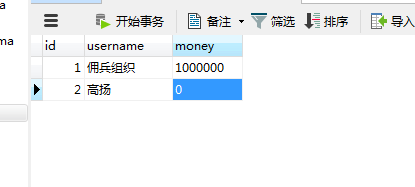
工具类Account
package com.swift;

public class Account {

    private int id;

    private String username;

    private String money;

    public int getId() {

        return id;

    }

    public void setId(int id) {

        this.id = id;

    }

    public String getUsername() {

        return username;

    }

    public void setUsername(String username) {

        this.username = username;

    }

    public String getMoney() {

        return money;

    }

    public void setMoney(String money) {

        this.money = money;

    }

    public Account(int id, String username, String money) {

        this.id = id;

        this.username = username;

        this.money = money;

    }

    public Account() {

        super();

        // TODO Auto-generated constructor stub

    }

    @Override

    public String toString() {

        return "Account [id=" + id + ", username=" + username + ", money=" + money + "]";

    }

}
Spring事务中的传播行为如下:
Require:支持当前事务,如果没有事务,就建一个新的,这是最常见的;
Supports:支持当前事务,如果当前没有事务,就以非事务方式执行;
Mandatory:支持当前事务,如果当前没有事务,就抛出异常;
RequiresNew:新建事务,如果当前存在事务,把当前事务挂起;
NotSupported:以非事务方式执行操作,如果当前存在事务,就把事务挂起;
Never:以非事务方式执行,如果当前存在事务,则抛出异常。
Nested:新建事务,如果当前存在事务,把当前事务挂起。与RequireNew的区别是与父事务相关,且有一个savepoint。
其中,Require、Supports、NotSupported、Never两个看文字也就能了解,就不多说了。而Mandatory是要求所有的操作必须在一个事务里,较Require来说,对事务要求的更加严格。
RequireNew:当一个Require方法A调用RequireNew方法B时,B方法会新new一个事务,并且这个事务和A事务没有关系,也就是说B方法出现异常,不会导致A的回滚,同理当B已提交,A再出现异常,B也不会回滚。
Nested:这个和RequireNew的区别是B方法的事务和A方法的事务是相关的。只有在A事务提交的时候,B事务都会提交。也就是说当A发生异常时,A、B事务都回滚,而当B出现异常时,B回滚,而A回滚到savepoint;
Spring事务的隔离级别,事务隔离级别如下:
Serializable:最严格的级别,事务串行执行,资源消耗最大;
Repeatable Read:保证了一个事务不会修改已经由另一个事务读取但未提交(回滚)的数据。
Read Committed:大多数主流数据库的默认事务等级,保证了一个事务不会读到另一个并行事务已经修改但未提交的数据。适用于大多数系统。
Read Uncommitted:保证了读取过程中不会读取到非法数据。
想要理解这四个级别,还需要知道三种不讨人喜欢的事情:
dirty reads:脏读,就是说事务A未提交的数据被事务B读走,如果事务A失败回滚,将导致B所读取的数据是错误的。
non-repeatable reads:不可重复读,就是说事务A中两处读取数据,第一次读时是100,然后事务B把值改成了200,事务A再读一次,结果就发现值变了,造成A事务数据混乱。
phantom read:幻读,和不可重复读相似,也是同一个事务中多次读不一致的问题。但是不可重复读的不一致是因为它所要取的数据集被改变了,而幻读所要读的数据不一致却不是他所要读的数据改变,而是它的条件数据集改变。比如:Select id where name="ppgogo*",第一次读去了6个符合条件的id,第二次读时,由于事务B把第一个贴的名字由"dd"改成了“ppgogo9”,结果取出来7个数据。
Spring中使用事务搭建转账环境 转账操作,的更多相关文章
- Spring中使用事务搭建转账环境方法二 相对简便的注解方法 ——配置文件注入对象属性需要setter方法 注解方法,不需要生成setter方法
XML配置文件代码如下: <?xml version="1.0" encoding="UTF-8"?> <beans xmlns=" ...
- Spring中的事务操作
事务的特性 原子性:强调事务的不可分割. 一致性:事务的执行的前后数据的完整性保持一致. 隔离性:一个事务执行的过程中,不应该受到其他事务的干扰. 持久性:事务一旦结束,数据就持久化到数据库. 如果不 ...
- (转)Spring中的事务操作
http://blog.csdn.net/yerenyuan_pku/article/details/70024364 事务的回顾 什么是事务 事务是逻辑上的一组操作,组成这组操作的各个逻辑单元,要么 ...
- Spring 中的事务操作、注解、以及 XML 配置
事务 事务全称叫数据库事务,是数据库并发控制时的基本单位,它是一个操作集合,这些操作要么不执行,要么都执行,不可分割.例如我们的转账这个业务,就需要进行数据库事务的处理. 转账中至少会涉及到两条 SQ ...
- Spring中@Transactional事务回滚
转载: Spring中@Transactional事务回滚 一.使用场景举例 在了解@Transactional怎么用之前我们必须要先知道@Transactional有什么用.下面举个栗子:比如一个部 ...
- SSM-Spring-23:概念《Spring中的事务是什么?》
------------吾亦无他,唯手熟尔,谦卑若愚,好学若饥------------- 本篇博客会详细讲述Spring中的事务,会展开来用语言解释,用于了解概念和准备面试 事务的概念: 一个或者一组 ...
- Spring中的事务管理
事务简介: 事务管理是企业级应用程序开发中必不可少的技术,用来确保数据的完整性和一致性 事务就是一系列的动作,它们被当作一个单独的工作单元.这些动作要么全部完成,要么全部不起作用 事务的四个关键属性( ...
- Spring中的事务管理详解
在这里主要介绍Spring对事务管理的一些理论知识,实战方面参考上一篇博文: http://www.cnblogs.com/longshiyVip/p/5061547.html 1. 事务简介: 事务 ...
- Spring,SpringMvc配置常见的坑,注解的使用注意事项,applicationContext.xml和spring.mvc.xml配置注意事项,spring中的事务失效,事务不回滚原因
1.Spring中的applicationContext.xml配置错误导致的异常 异常信息: org.apache.ibatis.binding.BindingException: Invalid ...
随机推荐
- 蓝桥杯T37(nim博弈)
题目链接:http://lx.lanqiao.cn/problem.page?gpid=T37 题意:中文题诶- 思路:nim博弈 个人感觉这题最难的地方是将题目转换为博弈模型,如果能将之转换为博弈模 ...
- uoj#388. 【UNR #3】配对树(线段树合并)
传送门 先考虑一个贪心,对于一条边来说,如果当前这个序列中在它的子树中的元素个数为奇数个,那么这条边就会被一组匹配经过,否则就不会 考虑反证法,如果在这条边两边的元素个数都是偶数,那么至少有两组匹配经 ...
- JavaScript进阶 - 第2章 你要懂的规则(JS基础语法)
第2章 你要懂的规则(JS基础语法) 2-1什么是变量 什么是变量? 从字面上看,变量是可变的量:从编程角度讲,变量是用于存储某种/某些数值的存储器.我们可以把变量看做一个盒子,盒子用来存放物品,物品 ...
- css中的各类问题
1.水平垂直居中 一.水平居中 (1)行内元素解决方案 只需要把行内元素包裹在一个属性display为block的父层元素中,并且把父层元素添加如下属性即可: .parent { text-align ...
- Windows3
windows安装后的配置 没有网络适配器, 将USB中的驱动精灵的安装程序安装在win上, 启动精灵, 提示无法连接到网络, 使用Android类型的手机中的QQ浏览器扫码下载 win会有一些开机自 ...
- 数据库2_sqlHelper
封装一个受影响的行 public static int ExcuteNonQuery(string sqlText,params SqlParameter[] parameters) { using ...
- Log4j输出格式log4j的PatternLayout参数含义
摘自:http://logging.apache.org/log4j/docs/api/org/apache/log4j/PatternLayout.html 参数 说明 例子 %c 列出logger ...
- Spring中统一相同版本的api请求路径的一些思考
Spring中统一相同版本的api请求路径的一些思考 问题场景 当我们在实际开发中,可能会遇到开发相同同版本的api, 假设相同版本的api请求路径为/v1/functionA,/v1/functio ...
- Java基础语法(练习)
Java基础语法 今日内容介绍 u 循环练习 u 数组方法练习 第1章 循环练习 1.1 编写程序求 1+3+5+7+……+99 的和值. 题目分析: 通过观察发现,本题目要实现的奇数(范围1-100 ...
- 模态框的理解 ,jQ: loading,进度条, 省级联动 表单验证 插件
模态框: 打开一个弹框 不关闭它就不能做框外的操作 必须关闭或弹出另外的弹框 加载延迟loading + 进度条只要有请求 就处理一下监控ajax 全局事件jquery: $('#box').ajax ...