
python - 接口自动化测试 - TestRecharge - 充值接口测试用例
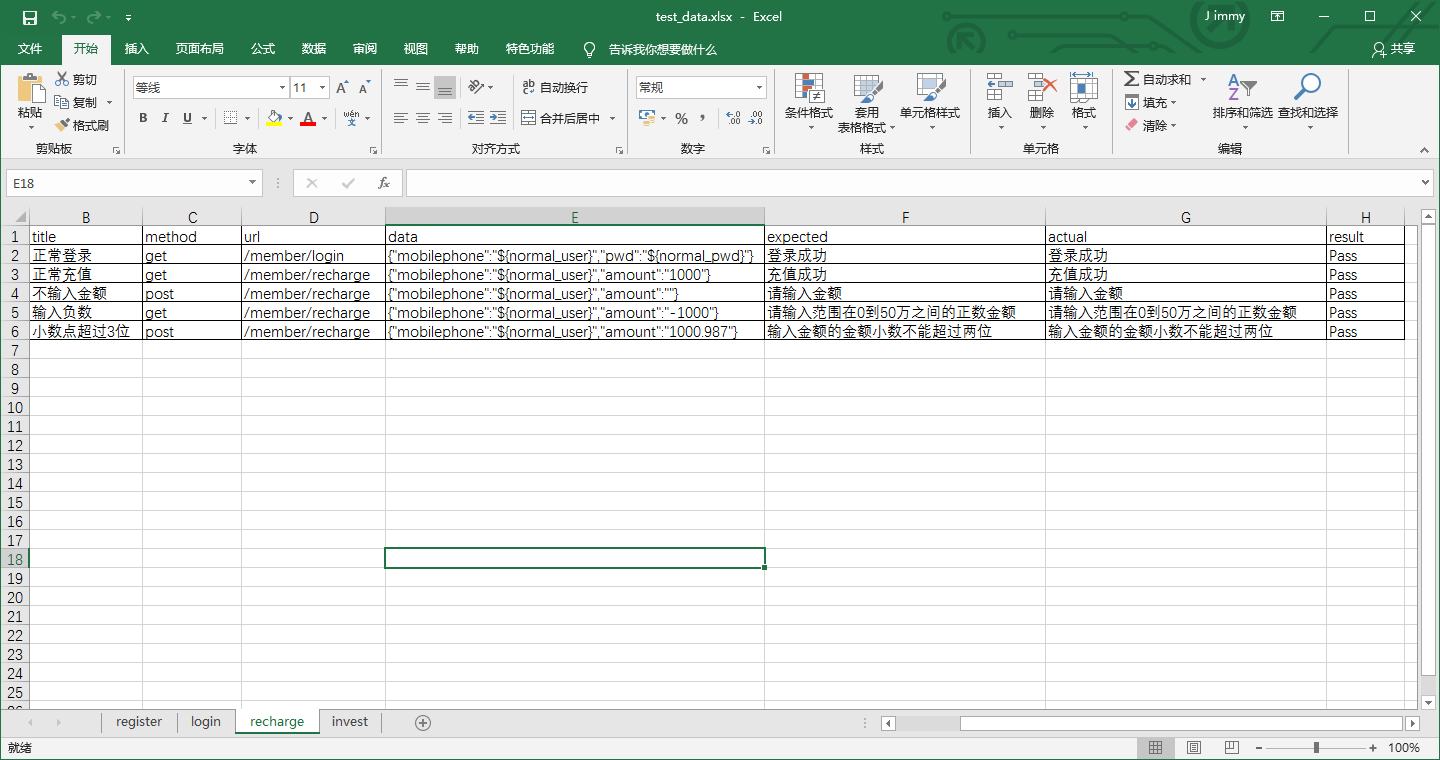
# -*- coding:utf-8 -*-

'''

@project: ApiAutoTest

@author: Jimmy

@file: test_recharge.py

@ide: PyCharm Community Edition

@time: 2018-12-27 10:07

@blog: https://www.cnblogs.com/gotesting/

'''

import unittest

import os

from ddt import ddt,data

from Common.http_request import HttpRequest

from Common.read_excel import ReadExcel

from Common.read_config import ReadConfig

from Common.contants import *

from Common.basic_data import DoRegex,Context

from Common.get_logger import GetLog

import json

# 读取配置文件,获取当前URL前缀,用于灵活更换测试服务器地址

read_config = ReadConfig()

url_pre = read_config.get_config_str('api','url_pre')

# 读取excel,获取login测试数据

data_dir = os.path.join(data_dir,'test_data.xlsx')

read_excel = ReadExcel(data_dir)

recharge_cases = read_excel.get_cases('recharge')

get_log = GetLog()

@ddt

class TestRecharge(unittest.TestCase):

    def setUp(self):

        print('Test Start')

    def tearDown(self):

        print('Test End')

    @data(*recharge_cases)

    def test_recharge(self,case):

        url = url_pre + case.url

        # 通过正则表达式 查找/替换,将excel读出来的${normal_user}及${normal_pwd}替换为配置文件中读取出的normal_user及normal_pwd的值

        data = DoRegex.replace(case.data)

        # 将替换后的字符串转换成字典

        data = json.loads(data)

        # 判断Context中是否存在登录成功的cookies,若存在,则获取cookie,用于接口请求;若不存在,赋值为None

        if hasattr(Context,'cookies'):

            cookies = getattr(Context,'cookies')

        else:

            cookies = None

        # 记录当前测试case信息

        get_log.log_info('''Test Case Info:

        case_id : {0}

        title   : {1}

        method  : {2}

        url     : {3}

        data    : {4}

        expected: {5}

        '''.format(case.case_id,case.title,case.method,url,data,case.expected))

        response = HttpRequest(method=case.method,url=url,data=data,cookies=cookies)

        # 判断接口请求响应是否存在cookies,若存在,放入Context中

        if response.get_cookies():

            setattr(Context,'cookies',response.get_cookies())

        actual = response.get_json()['msg']

        # 记录当前测试case接口响应信息

        get_log.log_info('''Test Case Request Response Result:

        response : {0}

        actual   : {1}

        '''.format(response.get_json(),actual))

        try:

            self.assertEquals(case.expected,actual)

            read_excel.write_result('recharge',case.case_id,actual,'Pass')

            get_log.log_info('Test Result is Passed ! case_id is {0},title is {1} '.format(case.case_id,case.title))

        except Exception as e:

            read_excel.write_result('recharge',case.case_id,actual,'Fail')

            get_log.log_info('Test Result is Failed ! case_id is {0},title is {1} '.format(case.case_id,case.title))

            get_log.log_error('Error msg :{0}'.format(e))

            raise e
python - 接口自动化测试 - TestRecharge - 充值接口测试用例的更多相关文章
- 使用python进行接口自动化测试,批量执行测试用例
工作中,使用python的requests库进行接口自动化测试是一个比较不错的选择,今天就以某网站的免费接口为例,展示以get请求进行批量执行测试用例.话不多说直接开讲 分析一下接口信息, 请求地址: ...
- python - 接口自动化测试 - TestLogin - 登录接口测试用例
# -*- coding:utf-8 -*- ''' @project: ApiAutoTest @author: Jimmy @file: test_login.py @ide: PyCharm C ...
- python - 接口自动化测试 - TestRegister - 注册接口测试用例
# -*- coding:utf-8 -*- ''' @project: ApiAutoTest @author: Jimmy @file: test_register.py @ide: PyChar ...
- python web自动化测试框架搭建(功能&接口)——测试用例执行和结果收集
由于unittest框架中结果收集在不同文件中,所以此处重写结果收集方法,加入执行时间,失败信息,失败截图等 TestRunner.py # coding=utf-8 import sys impor ...
- python web自动化测试框架搭建(功能&接口)——接口用例实现
测试用例基类: # coding=utf-8 import unittest import Logger log = Logger.Loger() class BaseCase(unittest.Te ...
- python web自动化测试框架搭建(功能&接口)——接口公共方法
接口公共方法有:数据引擎.http引擎.Excel引擎 1.数据引擎:获取用例.结果检查.结果统计 # -*- coding:utf-8 -*- from XlsEngine import XlsEn ...
- python web自动化测试框架搭建(功能&接口)——接口测试模块
Python接口测试采用python读取excel的方法,通过requests库发送请求和接收响应.模块有: Data:用于存放excel用例的,用例格式: iutil: 接口公共方法,数据引擎.ht ...
- python web自动化测试框架搭建(功能&接口)——功能测试模块
功能测试使用selenium,模块有: 1.futil: 公共方法,如元素高亮显示 # coding=utf-8 """高亮显示元素""" ...
- python web自动化测试框架搭建(功能&接口)——通用模块
1.通用模块: config.conf: 公共配置文件,配置报告.日志.截图路径,以及邮件相关配置 [report] reportpath = E:\workspace\WebAutomation\s ...
随机推荐
- tf warning等级
from:http://blog.csdn.net/tsinghuahui/article/details/72938764 tf讨厌的warning 2017-08-03 10:02:52.0990 ...
- 如何在SAP Server Side JavaScript里消费destination
在SAP云平台里打开SAP HANA Web-Based Development Workbench进行服务器端JavaScript的开发. 创建一个新的package: 创建一个新的applicat ...
- PHP:isset()-检测变量是否被设置
isset()-检测变量是否被设置 bool isset(mixed $var [, mixed $...]),检查变量是否被设置,并且不是NULL.var,要检测的变量,...其他变量,允许有多个变 ...
- 手把手教你用Docker部署一个MongoDB集群
MongoDB是一个介于关系数据库和非关系数据库之间的产品,是非关系数据库当中最像关系数据库的.支持类似于面向对象的查询语言,几乎可以实现类似关系数据库单表查询的绝大部分功能,而且还支持对数据建立索引 ...
- 【BZOJ3940】[USACO2015 Feb] Censoring (AC自动机的小应用)
点此看题面 大致题意: 给你一个文本串和\(N\)个模式串,要你将每一个模式串从文本串中删去.(此题是[BZOJ3942][Usaco2015 Feb]Censoring的升级版) \(AC\)自动机 ...
- python基础一 day16 内置函数
# 数据类型 :int bool ...# 数据结构 : dict list tuple set str reversed()l = [1,2,3,4,5]l.reverse()print(l)l = ...
- C#事件与接口编程实例
很多初学c#的朋友对于事件与接口感到迷惑不解,不明白它们之间的关系,下面我就用实例来简单的分析讲解一下. 事件,用event修饰符来代表一个事件,我们要创建一个C#事件必须按以下顺序来扫行: 1,创建 ...
- 深入理解Java GC
一.概述 GC(Carbage Collection)垃圾收集器,由JVM自动回收已死亡的对象垃圾. 这也是Java与C++等语言的主要区别之一. 二.如何确认对象已死 1. 引用计数算法 引用计数法 ...
- ORA-04031: Unable To Allocate 32 Bytes Of Shared Memory
记录一次生产库遇到的4031错误,后来通过调整sga大小将问题解决了 报错信息: ORA-04031: 无法分配 32 字节的共享内存 ("shared pool","s ...
- JS:字符串转成json数据,和json转成字符串方法 iframe获取父级传过来的数据
字符串转成json数据,和json转成字符串方法 //转为JSON adinfo=JSON.parse(adinfo) //转为字符串 adinfo=JSON.stringify(adinfo) 大概 ...