
Jquery | 基础 | 项目实践
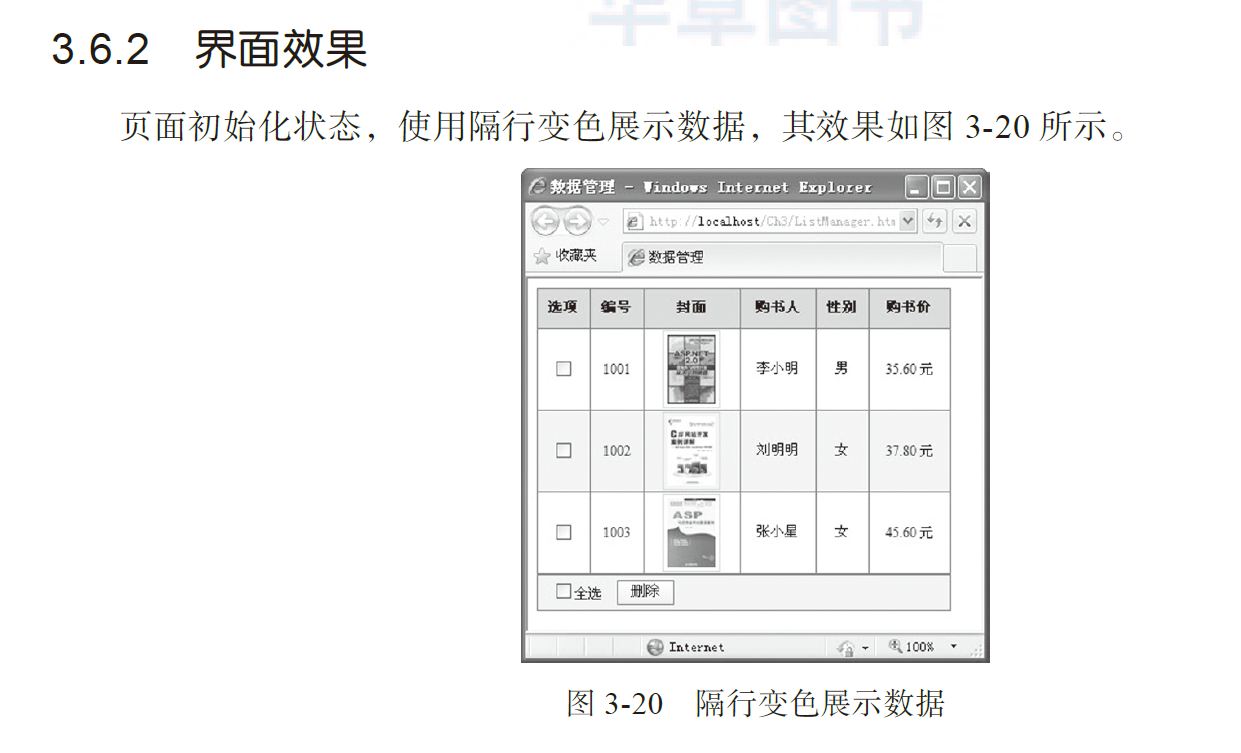
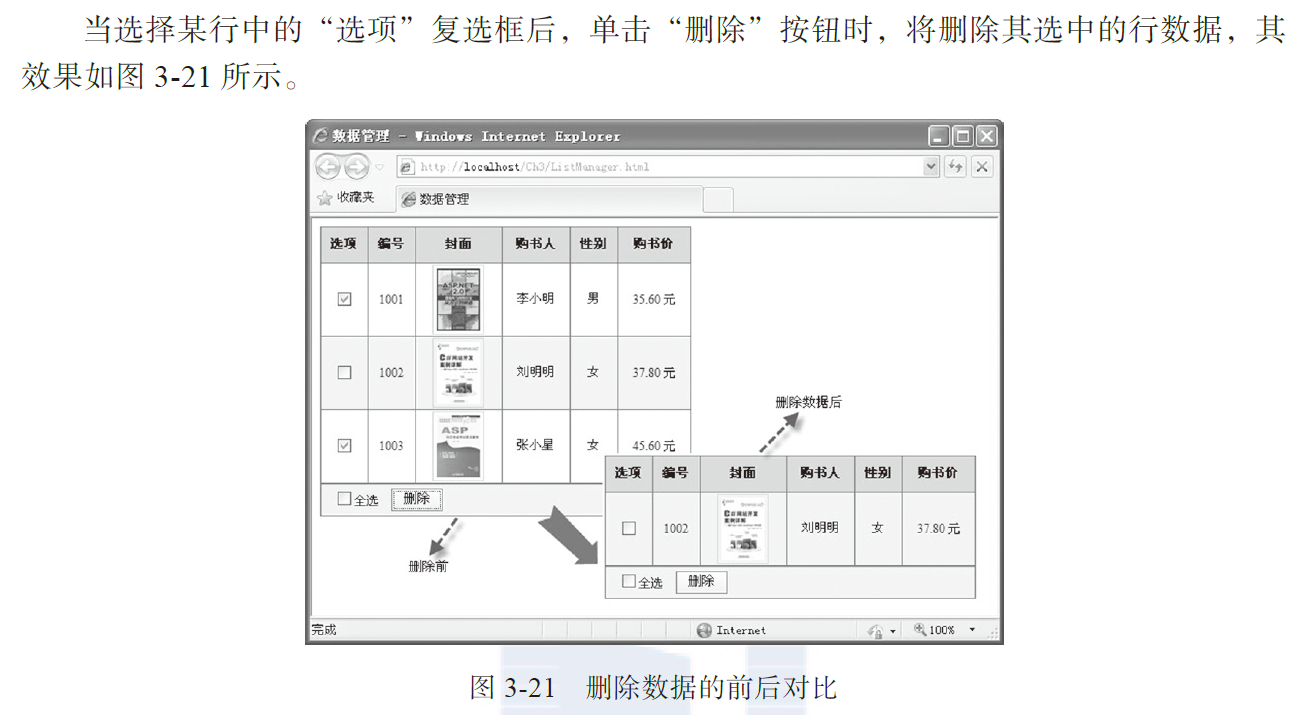
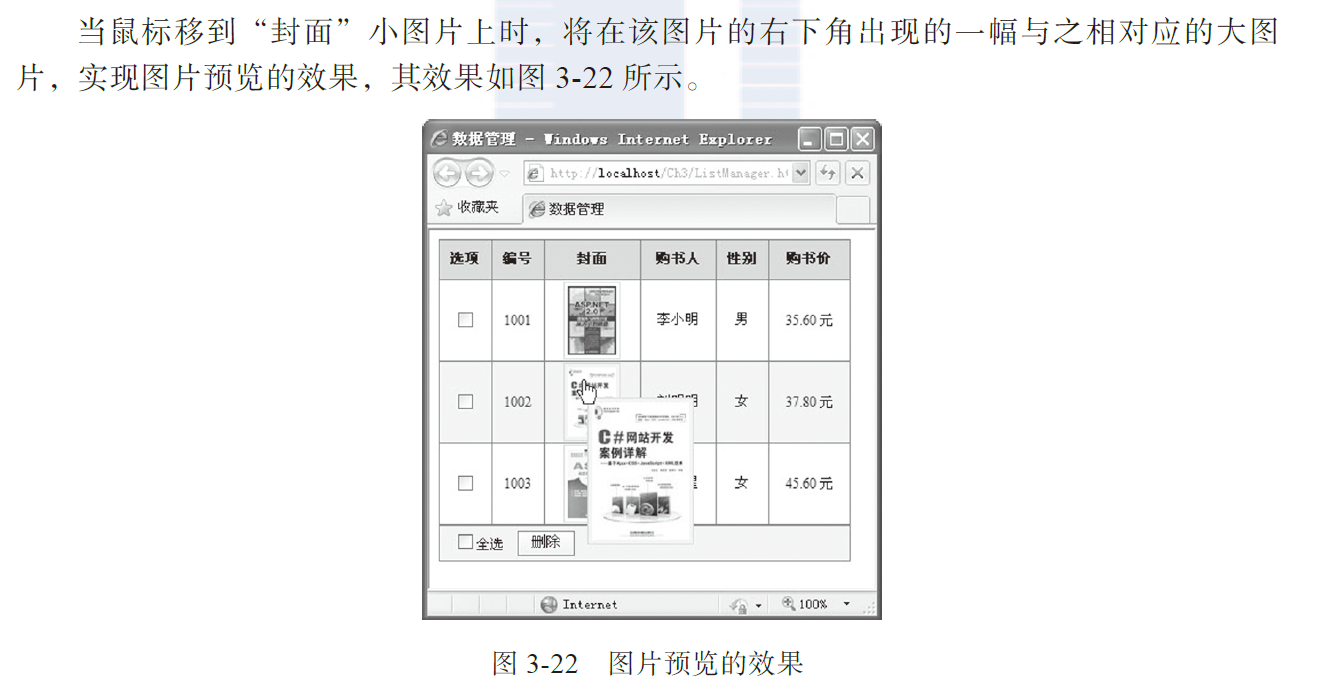
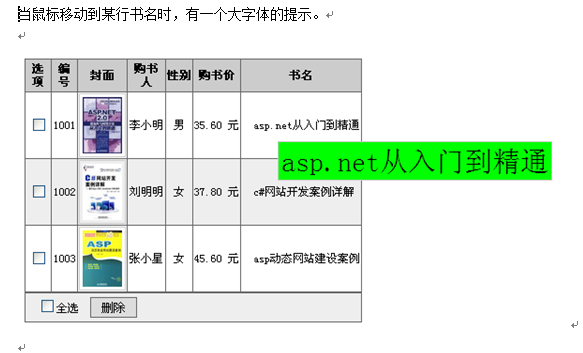
 <!DOCTYPE html PUBLIC "-//W3C//DTD XHTML 1.0 Transitional//EN"

 "http://www.w3.org/ TR/xhtml1/DTD/xhtml1-transitional.dtd">

 <html xmlns="http://www.w3.org/1999/xhtml">

 <head>

     <meta charset="utf-8">

     <title> 数据管理 </title>

     <script type="text/javascript" src="jquery-1.8.2.min.js">

     </script>

     <style type="text/css">

         body {

             font-size: 12px

         }

         table {

             width: 360px;

             border-collapse: collapse

         }

         table tr th,

         td {

             border: solid 1px #666;

             text-align: center

         }

         table tr td img {

             border: solid 1px #ccc;

             padding: 3px;

             width: 42px;

             height: 60px;

             cursor: hand

         }

         table tr td span {

             float: left;

             padding-left: 12px;

         }

         table tr th {

             background-color: #ccc;

             height: 32px

         }

         .clsImg {

             position: absolute;

             border: solid 1px #ccc;

             padding: 3px;

             width: 85px;

             height: 120px;

             background-color: #eee;

             display: none

         }

         .clsSpan {

             position: absolute;

             border: solid 1px #ccc;

             padding: 3px;

             width: 80px;

             background-color: rgba(93, 184, 146, 0.884);

             display: none

         }

         .btn {

             border: #666 1px solid;

             padding: 2px;

             width: 50px;

             filter: progid:DXImageTransform.Microsoft .Gradient(GradientType=0, StartColorStr=#ffffff,

                 EndColorStr=#ECE9D8);

         }

     </style>

     <script type="text/javascript">

         $(function () {

             $("table tr:nth-child(odd)")

                 .css("background-color", "#eee"); // 隔行变色

             /** 全选复选框单击事件 **/

             $("#chkAll").click(function () {

                 if (this.checked) {// 如果自己被选中

                     $("table tr td input[type=checkbox]")

                         .attr("checked", true);

                 }

                 else {// 如果自己没有被选中

                     $("table tr td input[type=checkbox]")

                         .attr("checked", false);

                 }

             })

             /** 删除按钮单击事件 **/

             $("#btnDel").click(function () {

                 var intL = $("table tr td  input:checked:not('#chkAll')").length;

                 // 获取除全选复选框外的所有选中项

                 if (intL != 0) {// 如果有选中项

                     $("table tr td input[type=checkbox]:not('#chkAll')")

                         .each(function (index) {// 遍历除全选复选框外的行

                             if (this.checked) {// 如果选中

                                 $("table tr[id=" + this.value + "]").remove();

                                 // 获取选中的值,并删除该值所在的行

                             }

                         })

                 }

             })

             /** 小图片鼠标移动事件 **/

             var x = 5; var y = 15;// 初始化提示图片位置

             $("table tr td img").mousemove(function (e) {

                 $("#imgTip")

                     .attr("src", this.src)// 设置提示图片 scr 属性

                     .css({

                         "top": (e.pageY + y) + "px",

                         "left": (e.pageX + x) + "px"

                     })// 设置提示图片的位置

                     .show(30);// 显示图片

             })

             /** 小图片鼠标移出事件 **/

             $("table tr td img").mouseout(function () {

                 $("#imgTip").hide();// 隐藏图片

             })

             // 文本值

              $("table tr td div").mousemove(function (e) {

                 $("#spanTip")

                     .text($(this).text())

                     .css({

                         "top": (e.pageY + y) + "px",

                         "left": (e.pageX + x) + "px"

                     })// 设置提示图片的位置

                     .show(30);// 显示图片

             })

             /** 文本鼠标移出事件 **/

             $("table tr td div").mouseout(function () {

                 $("#spanTip").hide();// 隐藏图片

             })

         })

     </script>

 </head>

 <body>

     <table>

         <tr>

             <th> 选项 </th>

             <th> 编号 </th>

             <th> 封面 </th>

             <th> 购书人 </th>

             <th> 性别 </th>

             <th> 购书价 </th>

             <th>书名</th>

         </tr>

         <tr id="0">

             <td><input id="Checkbox1" type="checkbox" value="0" /></td>

             <td>1001</td>

             <td><img src="Images/img03.jpg" alt="" /></td>

             <td> 李小明 </td>

             <td> 男 </td>

             <td>35.60 元 </td>

             <td><div>ASP.NET</div> </td>

         </tr>

         <tr id="1">

             <td><input id="Checkbox2" type="checkbox" value="1" /></td>

             <td>1002</td>

             <td><img src="Images/img04.jpg" alt="" /></td>

             <td> 刘明明 </td>

             <td> 女 </td>

             <td>37.80 元 </td>

             <td><div>C#网站开发</div> </td>

         </tr>

         <tr id="2">

             <td><input id="Checkbox3" type="checkbox" value="2" /></td>

             <td>1003</td>

             <td><img src="Images/img08.jpg" alt="" /></td>

             <td> 张小星 </td>

             <td> 女 </td>

             <td>45.60 元 </td>

             <td> <div>ASP</div>  </td>

         </tr>

     </table>

     <table>

         <tr>

             <td style="text-align:left;height:28px">

                 <span><input id="chkAll" type="checkbox" /> 全选 </span>

                 <span><input id="btnDel" type="button" value=" 删除 " class="btn" /></span>

             </td>

         </tr>

     </table>

     <img id="imgTip" class="clsImg" src="Images/img03.gif" />

     <div id="spanTip" class="clsSpan" style="font-size:20px;"></div>

 </body>

 </html>
Jquery | 基础 | 项目实践的更多相关文章
- 《Spring Boot 入门及前后端分离项目实践》系列介绍
课程计划 课程地址点这里 本课程是一个 Spring Boot 技术栈的实战类课程,课程共分为 3 个部分,前面两个部分为基础环境准备和相关概念介绍,第三个部分是 Spring Boot 项目实践开发 ...
- 【微信小程序项目实践总结】30分钟从陌生到熟悉 web app 、native app、hybrid app比较 30分钟ES6从陌生到熟悉 【原创】浅谈内存泄露 HTML5 五子棋 - JS/Canvas 游戏 meta 详解,html5 meta 标签日常设置 C#中回滚TransactionScope的使用方法和原理
[微信小程序项目实践总结]30分钟从陌生到熟悉 前言 我们之前对小程序做了基本学习: 1. 微信小程序开发07-列表页面怎么做 2. 微信小程序开发06-一个业务页面的完成 3. 微信小程序开发05- ...
- Hangfire项目实践分享
Hangfire项目实践分享 目录 Hangfire项目实践分享 目录 什么是Hangfire Hangfire基础 基于队列的任务处理(Fire-and-forget jobs) 延迟任务执行(De ...
- jQuery基础课程
环境搭建 搭建一个jQuery的开发环境非常方便,可以通过下列几个步骤进行. 下载jQuery文件库 在jQuery的官方网站(http://jquery.com)中,下载最新版本的jQuery文件库 ...
- JQuery基础总结上
最近在慕课网学习JQuery基础课程,发现只是跟随网站的课程学习而不去自己总结扩展的话,很难达到真正学会理解的地步. 于是先在网站上草草过了一遍课程,然后借着今天的这个时间边记录边重新整理学习一下. ...
- Hangfire项目实践
Hangfire项目实践分享 Hangfire项目实践分享 目录 Hangfire项目实践分享 目录 什么是Hangfire Hangfire基础 基于队列的任务处理(Fire-and-forget ...
- MVC项目实践,在三层架构下实现SportsStore-05,实现导航
SportsStore是<精通ASP.NET MVC3框架(第三版)>中演示的MVC项目,在该项目中涵盖了MVC的众多方面,包括:使用DI容器.URL优化.导航.分页.购物车.订单.产品管 ...
- MVC项目实践,在三层架构下实现SportsStore-06,实现购物车
SportsStore是<精通ASP.NET MVC3框架(第三版)>中演示的MVC项目,在该项目中涵盖了MVC的众多方面,包括:使用DI容器.URL优化.导航.分页.购物车.订单.产品管 ...
- Spring cloud项目实践(一)
链接地址:http://sail-y.github.io/2016/03/21/Spring-cloud%E9%A1%B9%E7%9B%AE%E5%AE%9E%E8%B7%B5/ 什么是Spring ...
随机推荐
- 在iOS平台使用ffmpeg解码h264视频流(转)
在iOS平台使用ffmpeg解码h264视频流,有需要的朋友可以参考下. 对于视频文件和rtsp之类的主流视频传输协议,ffmpeg提供avformat_open_input接口,直接将文件路径或UR ...
- windows64位安装mysql-5.7.12,图文
linux下安装mysql教程一大片,我就不说了,再此说下windows 下如何安装这个5.7版本,并且有些坑已踩! 一:进入mysql下载地址:http://www.mysql.com/downlo ...
- 基于BASYS2的VHDL程序与仿真——50%占空比8分频器
转帖请注明转自http://www.cnblogs.com/connorzx/p/3547673.html 一.新建工程 1.点击File->New Project, 2.点击Next 注:此处 ...
- HTML(DOM)与JavaScript嵌套数组之间相互转换
html2ja:将html目标元素解析为JavaScript数组字面量,每项的值为tagName, className, id等CSS选择器组合: showJa:将html2ja生成的数组缩进格式化显 ...
- 理解HTML解析过程
浏览器解析html的过程是:接受网络数据->将二进制码变成字符->将字符变为unicode code points.->tokenizer ->tree constructor ...
- Lucene小例子
package org.itat.test; import java.io.File; import java.io.FileReader; import java.io.IOException; i ...
- hdu 1029 Ignatius and the Princess IV(排序)
题意:求出现次数>=(N+1)/2的数 思路:排序后,输出第(N+1)/2个数 #include<iostream> #include<stdio.h> #include ...
- 我的CSDN博客
从csdn搬过来的: csdn地址:http://blog.csdn.net/WR_technology
- AndroidStudio设置“自动导入包”
setting –-> Editor –-> General –-> Auto Inport 勾选这两项 单击 Apply –-> ok
- ftp主要流程
判断是否是root用户,若不是则提示并退出. 建立server socket. 等待用户连接,并建立相应用户的子进程.