
spring-cloud - 基础环境搭建
spring-cloud中文文档:https://springcloud.cc/
spring-cloud中文导航:http://springcloud.fun/
文章纯属用于个人学习的一个归纳,哪里不对希望大哥们能指出,如果你帮助到你一点点那也是我的荣幸(对于小白还是有点用的- -)。
————————————————————————————————————————————————————————————————————————————————————
那么Spring Boot和和Spring Cloud 功能区别是什么呢?
- Spring Boot 它内嵌Web服务器(tomcat/jetty)的可执行程序的框架。你开发的web应用不需要作为war包部署到web服务器中[例如:把war包扔到tomcat app下],Spring Boot 直接作为一个可启动程序,直接把Web启动起来加载起来。
- Spring Cloud是一套微服务开发和治理框架,来自Netflex的OSS,包含了微服务运行的功能,可以通过Spring-boot 项目集成很多功能比如 RabbitMQ,ES,Ribbon,负载均衡,限流等。
spring-cloud基本架构图:
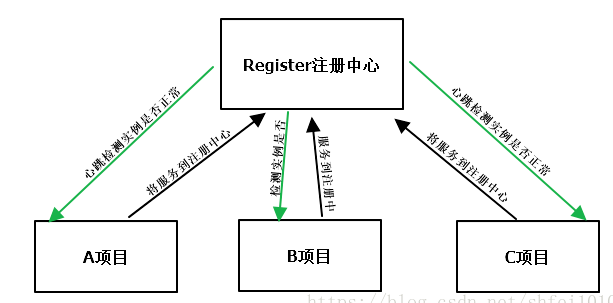
图片来源网络
下面开始搭建基础项目,环境:
jdk1.8
eclipse
一、搭建注册中心(即服务发现中心) :
创建一个maven-project

创建好的目录层次结构:
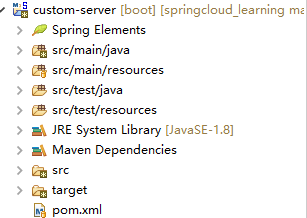
pom文件:
 <project xmlns="http://maven.apache.org/POM/4.0.0"

     xmlns:xsi="http://www.w3.org/2001/XMLSchema-instance"

     xsi:schemaLocation="http://maven.apache.org/POM/4.0.0 http://maven.apache.org/xsd/maven-4.0.0.xsd">

     <modelVersion>4.0.0</modelVersion>

     <groupId>custom-server</groupId>

     <artifactId>custom-server</artifactId>

     <version>0.0.1-SNAPSHOT</version>

     <!-- 引入spring boot的依赖 -->

     <parent>

         <groupId>org.springframework.boot</groupId>

         <artifactId>spring-boot-starter-parent</artifactId>

         <version>2.0.7.RELEASE</version>

     </parent>

     <dependencies>

         <!-- Eureka-server依赖 -->

         <dependency>

             <groupId>org.springframework.cloud</groupId>

             <artifactId>spring-cloud-starter-netflix-eureka-server</artifactId>

         </dependency>

         <!-- 密码配置依赖 -->

         <dependency>

             <groupId>org.springframework.boot</groupId>

             <artifactId>spring-boot-starter-security</artifactId>

         </dependency>

     </dependencies>

     <!-- 引入spring cloud的依赖,不能少,主要用来管理Spring Cloud生态各组件的版本 -->

     <dependencyManagement>

         <dependencies>

             <dependency>

                 <groupId>org.springframework.cloud</groupId>

                 <artifactId>spring-cloud-dependencies</artifactId>

                 <version>Finchley.SR2</version>

                 <type>pom</type>

                 <scope>import</scope>

             </dependency>

         </dependencies>

     </dependencyManagement>

     <!-- 添加spring-boot的maven插件,不能少,打jar包时得用 -->

     <build>

         <plugins>

             <plugin>

                 <groupId>org.springframework.boot</groupId>

                 <artifactId>spring-boot-maven-plugin</artifactId>

             </plugin>

         </plugins>

     </build>

 </project>
这里使用的是Finchley.SR2版本,这是在网上找了许多后选择了一个相对较新的版本。
security库不用理会,后面写注册中心时会有说明,其他spring-boot、eureka、spring-cloud都是必须的库
在resources编写application.yml配置文件:
server:

  port: 8080

spring:

eureka:

  instance:

    hostname: localhost

  client:

    # 是否要注册到其他Eureka Server实例

    register-with-eureka: false

    # 是否要从其他Eureka Server实例获取数据

    fetch-registry: false

    service-url:

      # 下面俩种方式随便一种都可以,但是后缀【eureka】必不可少

      #defaultZone: http://{hostname}:{server.port}/eureka/

      defaultZone: http://localhost:8080/eureka/
spring.security.user.name跟password先不用理会,后面讲述注册中心会有提到。
建包编写入口类(入口类必须放在顶级的包下面,否则会无法扫描自动注入):
package com.server;

import org.springframework.boot.SpringApplication;

import org.springframework.boot.autoconfigure.SpringBootApplication;

import org.springframework.cloud.netflix.eureka.server.EnableEurekaServer;

@SpringBootApplication    //    spring-boot启动注解

@EnableEurekaServer        //    eureka组件服务注解

public class ServerApplication {

    public static void main(String[] args) {

        SpringApplication.run(ServerApplication.class, args);

    }

}
编写好后的注册中心整体结构:
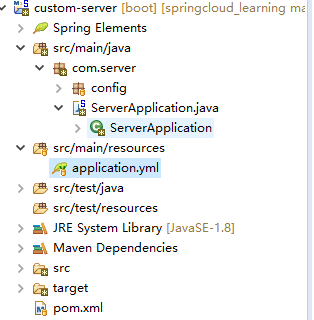
运行ServerApplication后,访问localhost:8080如果看到下面画面就说明注册中心搭建好了:
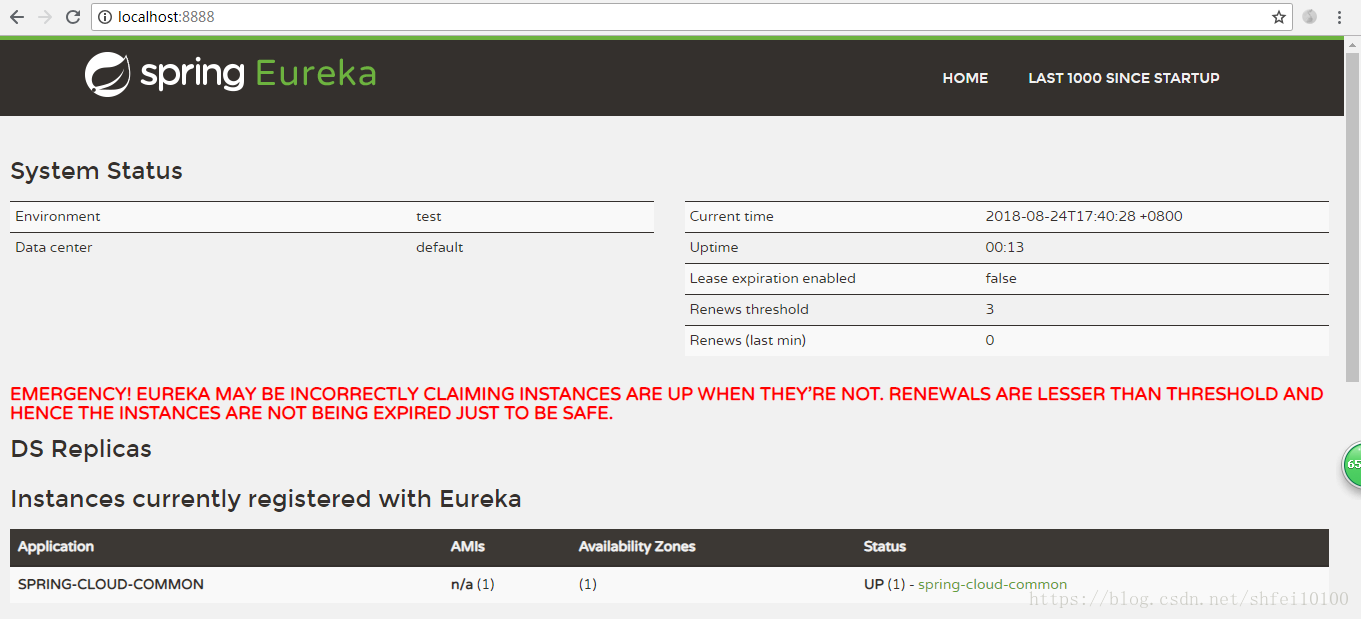
红色字体先不用理会,现在没有使用账号跟密码,任何服务都能注册到注册中心,下面创建一个服务注册到注册中心。
二、搭建一个服务注册到注册中心:
同样创建一个名为custom-client的maven-project
pom文件:
 <project xmlns="http://maven.apache.org/POM/4.0.0"

     xmlns:xsi="http://www.w3.org/2001/XMLSchema-instance"

     xsi:schemaLocation="http://maven.apache.org/POM/4.0.0 http://maven.apache.org/xsd/maven-4.0.0.xsd">

     <modelVersion>4.0.0</modelVersion>

     <groupId>custom-client</groupId>

     <artifactId>custom-client</artifactId>

     <version>0.0.1-SNAPSHOT</version>

     <!-- 引入spring boot的依赖 -->

     <parent>

         <groupId>org.springframework.boot</groupId>

         <artifactId>spring-boot-starter-parent</artifactId>

         <version>2.0.7.RELEASE</version>

     </parent>

     <properties>

         <project.build.sourceEncoding>UTF-8</project.build.sourceEncoding>

         <java.version>1.8</java.version>

     </properties>

     <dependencies>

         <dependency>

             <groupId>org.springframework.boot</groupId>

             <artifactId>spring-boot-starter-web</artifactId>

         </dependency>

         <!-- eureka服务组件 -->

         <dependency>

             <groupId>org.springframework.cloud</groupId>

             <artifactId>spring-cloud-starter-netflix-eureka-client</artifactId>

         </dependency>

     </dependencies>

     <!-- 引入spring cloud的依赖,不能少,主要用来管理Spring Cloud生态各组件的版本 -->

     <dependencyManagement>

         <dependencies>

             <dependency>

                 <groupId>org.springframework.cloud</groupId>

                 <artifactId>spring-cloud-dependencies</artifactId>

                 <version>Finchley.SR2</version>

                 <type>pom</type>

                 <scope>import</scope>

             </dependency>

         </dependencies>

     </dependencyManagement>

     <!-- 添加spring-boot的maven插件,不能少,打jar包时得用 -->

     <build>

         <plugins>

             <plugin>

                 <groupId>org.springframework.boot</groupId>

                 <artifactId>spring-boot-maven-plugin</artifactId>

             </plugin>

         </plugins>

     </build>

 </project>
application.yml:
 server:

   port: 8001

 spring:

   application:

     # 指定注册到eureka server上的服务名称

     name: custom-client

 eureka:

   client:

     service-url:

       # 指定eureka server通信地址,注意/eureka/小尾巴不能少

       defaultZone: http://localhost:8080/eureka/

   instance:

     # 是否注册IP到eureka server,如不指定或设为false,那就会注册主机名到eureka server

     prefer-ip-address: true
*Application.java:
 package com.client;

 import org.springframework.boot.SpringApplication;

 import org.springframework.boot.autoconfigure.SpringBootApplication;

 import org.springframework.context.annotation.Bean;

 import org.springframework.web.client.RestTemplate;

 @SpringBootApplication

 @EnableEurekaClient    //    eurekaClient注解

 public class UserClientApplication {

     public static void main(String[] args) {

         SpringApplication.run(UserClientApplication.class, args);

     }

 }
编写完成好启动UserClientApplication类,然后访问注册中心,查看服务是否注册到了中心,访问localhost:8080:
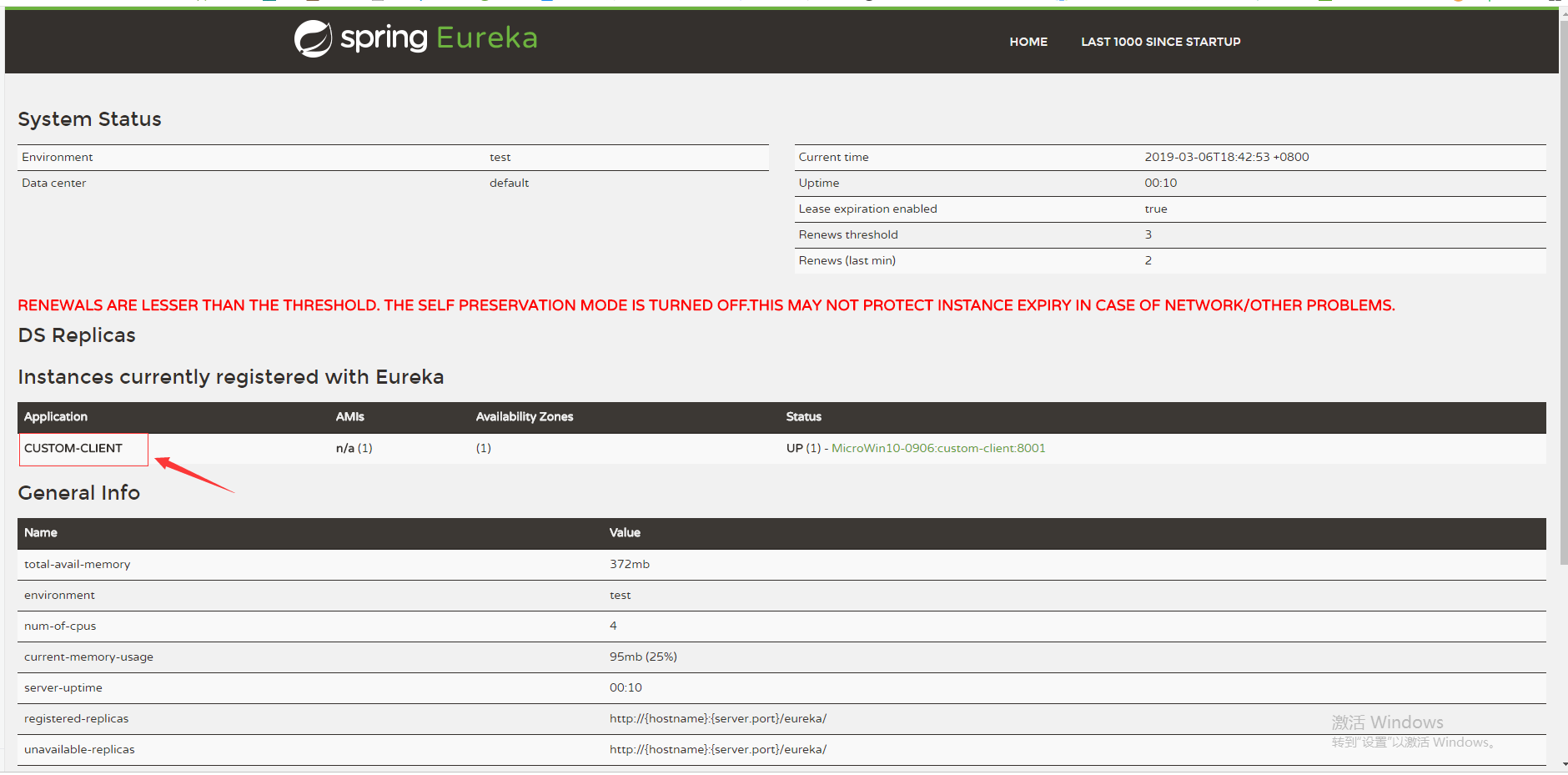
图上标注的就是刚才启动并注册的服务,一个最基本的架构已经完成了,后面陆续添加其他微服务的基础篇章,大家一起学习、一起进步。
spring-cloud - 基础环境搭建的更多相关文章
- Spring Cloud Alibaba环境搭建
前言:Spring Cloud Alibaba是目前主流的分布式微服务架构,本文主要讲解了在IDEA中如何搭建Spring Cloud Alibaba环境,以及介绍Spring Cloud Aliba ...
- 【译文】用Spring Cloud和Docker搭建微服务平台
by Kenny Bastani Sunday, July 12, 2015 转自:http://www.kennybastani.com/2015/07/spring-cloud-docker-mi ...
- 手把手教你使用spring cloud+dotnet core搭建微服务架构:服务治理(-)
背景 公司去年开始使用dotnet core开发项目.公司的总体架构采用的是微服务,那时候由于对微服务的理解并不是太深,加上各种组件的不成熟,只是把项目的各个功能通过业务层面拆分,然后通过nginx代 ...
- Spring Cloud 入门教程 - 搭建配置中心服务
简介 Spring Cloud 提供了一个部署微服务的平台,包括了微服务中常见的组件:配置中心服务, API网关,断路器,服务注册与发现,分布式追溯,OAuth2,消费者驱动合约等.我们不必先知道每个 ...
- spring cloud+.net core搭建微服务架构:服务注册(一)
背景 公司去年开始使用dotnet core开发项目.公司的总体架构采用的是微服务,那时候由于对微服务的理解并不是太深,加上各种组件的不成熟,只是把项目的各个功能通过业务层面拆分,然后通过nginx代 ...
- Spring Cloud和Docker搭建微服务平台
用Spring Cloud和Docker搭建微服务平台 This blog series will introduce you to some of the foundational concepts ...
- spring cloud+dotnet core搭建微服务架构:Api网关(三)
前言 国庆假期,一直没有时间更新. 根据群里面的同学的提问,强烈推荐大家先熟悉下spring cloud.文章下面有纯洁大神的spring cloud系列. 上一章最后说了,因为服务是不对外暴露的,所 ...
- spring cloud+dotnet core搭建微服务架构:配置中心(四)
前言 我们项目中有很多需要配置的地方,最常见的就是各种服务URL地址,这些地址针对不同的运行环境还不一样,不管和打包还是部署都麻烦,需要非常的小心.一般配置都是存储到配置文件里面,不管多小的配置变动, ...
- spring cloud+.net core搭建微服务架构:配置中心(四)
前言 我们项目中有很多需要配置的地方,最常见的就是各种服务URL地址,这些地址针对不同的运行环境还不一样,不管和打包还是部署都麻烦,需要非常的小心.一般配置都是存储到配置文件里面,不管多小的配置变动, ...
- spring cloud+.net core搭建微服务架构:Api网关(三)
前言 国庆假期,一直没有时间更新. 根据群里面的同学的提问,强烈推荐大家先熟悉下spring cloud.文章下面有纯洁大神的spring cloud系列. 上一章最后说了,因为服务是不对外暴露的,所 ...
随机推荐
- python3通过Beautif和XPath分别爬取“小猪短租-北京”租房信息,并对比时间效率(附源代码)
爬虫思路分析: 1. 观察小猪短租(北京)的网页 首页:http://www.xiaozhu.com/?utm_source=baidu&utm_medium=cpc&utm_term ...
- arm的开发工具
网上有free的ide可以开发arm cortex的芯片,可以参考List of ARM Cortex-M development tools,Wikipedia,里面有emIDE,embitz等,虽 ...
- 【HIHOCODER 1142】 三分·三分求极值
描述 这一次我们就简单一点了,题目在此: 在直角坐标系中有一条抛物线y=ax^2+bx+c和一个点P(x,y),求点P到抛物线的最短距离d. 输入 第1行:5个整数a,b,c,x,y.前三个数构成抛物 ...
- WPF使用异步+绑定的方式处理大数据量
WPF的优势在于界面处理,即使是这样,在面对大数据量的时候也免不了界面假死,同一个线程里处理界面跟大数据量,这是不可避免的.解决办法还是有的,可以使用分页加载,虚拟加载,动态加载,增加条件限制... ...
- HDU 4348 To the moon 主席树
题意: 给出一个长度为\(n(n \leq 10^5)\)的序列,最开始时间\(t=0\),支持下面几个操作: \(C \, l \, r \, d\):将区间\([l,r]\)每个数都加上\(d\) ...
- JavaScript简单继承
很多C#或C++开发人员习惯使用继承来开发项目,所以当他们想学习JavaScript语言时,第一个问题一般是:“我怎么在JavaScript中使用继承?”. 实际上JavaScript使用了一种不同于 ...
- tensorflow笔记
1.Estimator 进行编程的概览 要根据预创建的 Estimator 编写 TensorFlow 程序,您必须执行下列任务: 创建一个或多个输入函数. 定义模型的特征列. 实例化 Estimat ...
- 01-python进阶-拾遗
列表复习append(x)追交到链尾extend(L)追加一个列表 等价于 +=insert(i,x)在位置i处插入xremove(x) 删除一个值为x的元素 如果没有抛出异常sort() 直接修改列 ...
- python学习-- Django根据现有数据库,自动生成models模型文件
Django引入外部数据库还是比较方便的,步骤如下 : 创建一个项目,修改seting文件,在setting里面设置你要连接的数据库类型和连接名称,地址之类,和创建新项目的时候一致 运行下面代码可以自 ...
- struts转换器详解
struts转换器:在B/S应用中,将字符串请求参数转换为相应的数据类型,是MVC框架提供的功能,而Struts2是很好的MVC框架实现者,理所当然,提供了类型转换机制. 一.类型转换的意义 对于一个 ...