
iOS 瀑布流封装
一、效果预览

功能描述:WSLWaterFlowLayout 是在继承于UICollectionViewLayout的基础上封装的带头脚视图的瀑布流控件。目前支持竖向瀑布流(item等宽不等高、支持头脚视图)、水平瀑布流(item等高不等宽 不支持头脚视图)、竖向瀑布流( item等高不等宽、支持头脚视图)三种样式的瀑布流布局。
- 前言 :近几个月一直在忙公司的ChinaDaily和国务院项目,没有抽出时间来写,现在终于算是告一段落了,抽出时间来更一篇
二、实现:主要是重写父类的几个涉及布局属性的方法,在对应的布局属性方法中根据需求自定义视图布局属性信息。详情看示例
/** 初始化 生成每个视图的布局信息*/

-(void)prepareLayout;

/** 决定一段区域所有cell和头尾视图的布局属性*/

-(NSArray<UICollectionViewLayoutAttributes *> *)layoutAttributesForElementsInRect:(CGRect)rect ;

/** 返回indexPath位置cell对应的布局属性*/

-(UICollectionViewLayoutAttributes *)layoutAttributesForItemAtIndexPath:(NSIndexPath *)indexPath;

/** 返回indexPath位置头和脚视图对应的布局属性*/

- (UICollectionViewLayoutAttributes *)layoutAttributesForSupplementaryViewOfKind:(NSString *)elementKind atIndexPath:(NSIndexPath *)indexPath;

//返回内容高度

-(CGSize)collectionViewContentSize;
三、 用法:注意遵循WSLWaterFlowLayoutDelegate协议,代理方法和TableView、collectionView的代理方法用法相似。
下面是WSLWaterFlowLayout.h中的属性方法和代理方法,含义注释的还算清晰:
typedef enum {

    WSLVerticalWaterFlow = 0, /** 竖向瀑布流 item等宽不等高 */

    WSLHorizontalWaterFlow = 1, /** 水平瀑布流 item等高不等宽 不支持头脚视图*/

    WSLVHWaterFlow = 2,  /** 竖向瀑布流 item等高不等宽 */

    WSLLineWaterFlow = 3 /** 线性布局 待完成,敬请期待 */

} WSLFlowLayoutStyle;//样式

@class WSLWaterFlowLayout;

@protocol WSLWaterFlowLayoutDelegate <NSObject>

/** 竖向瀑布流 item等宽不等高 */

-(CGFloat)waterFlowLayout:(WSLWaterFlowLayout *)waterFlowLayout heightForItemAtIndexPath:(NSIndexPath *)indexPath itemWidth:(CGFloat)itemWidth;

/** 水平瀑布流 item等高不等宽 */

-(CGFloat)waterFlowLayout:(WSLWaterFlowLayout *)waterFlowLayout widthForItemAtIndexPath:(NSIndexPath *)indexPath itemHeight:(CGFloat)itemHeight;

/** 竖向瀑布流 item等高不等宽  列数、行数无用 */

- (CGSize)waterFlowLayout:(WSLWaterFlowLayout *)waterFlowLayout sizeForItemAtIndexPath:(NSIndexPath *)indexPath;

/** 头视图Size */

-(CGSize )waterFlowLayout:(WSLWaterFlowLayout *)waterFlowLayout sizeForHeaderViewInSection:(NSInteger)section;

/** 脚视图Size */

-(CGSize )waterFlowLayout:(WSLWaterFlowLayout *)waterFlowLayout sizeForFooterViewInSection:(NSInteger)section;

@optional  //以下都有默认值

/** 列数*/

-(CGFloat)columnCountInWaterFlowLayout:(WSLWaterFlowLayout *)waterFlowLayout;

/** 行数*/

-(CGFloat)rowCountInWaterFlowLayout:(WSLWaterFlowLayout *)waterFlowLayout;

/** 列间距*/

-(CGFloat)columnMarginInWaterFlowLayout:(WSLWaterFlowLayout *)waterFlowLayout;

/** 行间距*/

-(CGFloat)rowMarginInWaterFlowLayout:(WSLWaterFlowLayout *)waterFlowLayout;

/** 边缘之间的间距*/

-(UIEdgeInsets)edgeInsetInWaterFlowLayout:(WSLWaterFlowLayout *)waterFlowLayout;

@end

@interface WSLWaterFlowLayout : UICollectionViewLayout

/** delegate*/

@property (nonatomic, weak) id<WSLWaterFlowLayoutDelegate> delegate;

/** 瀑布流样式*/

@property (nonatomic, assign) WSLFlowLayoutStyle  flowLayoutStyle;

@end
初始化仅三行代码,只需设置代理和样式,item的大小、头脚视图的大小、行列数以及间距都可以在对应样式的代理方法中自定义,然后设置为UICollectionView的自动流水布局样式,并结合UICollectionView的用法使用,详情看示例:
 WSLWaterFlowLayout * _flow = [[WSLWaterFlowLayout alloc] init];

    _flow.delegate = self;

    _flow.flowLayoutStyle = WSLVerticalWaterFlow;
四、项目结构:
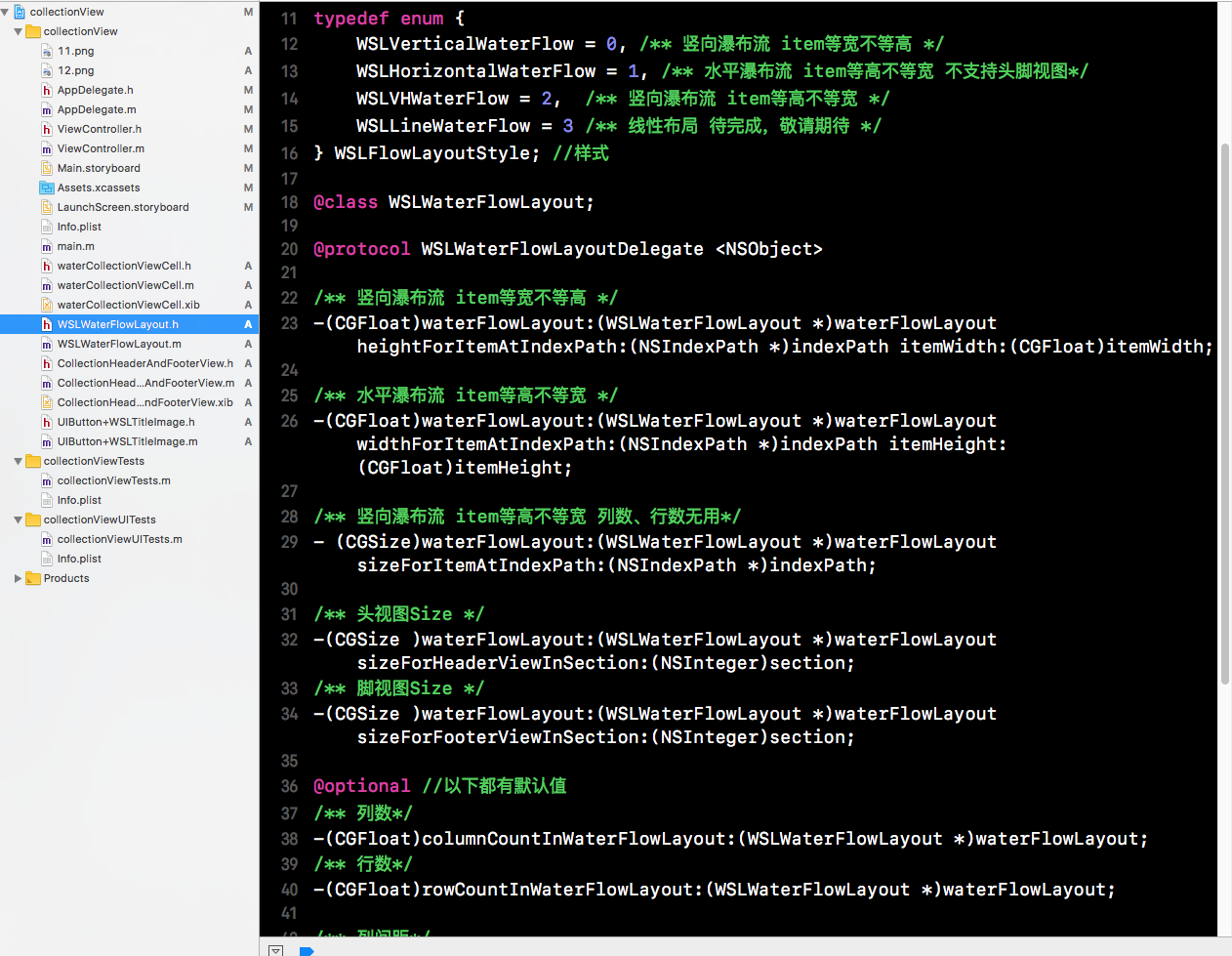
iOS 瀑布流封装
注:本文著作权归作者,由demo大师代发,拒绝转载,转载需要作者授权
iOS 瀑布流封装的更多相关文章
- iOS 瀑布流之栅格布局
代码地址如下:http://www.demodashi.com/demo/14760.html 一 .效果预览 二.确定需求 由下面的需求示意图可知模块的最小单位是正方形,边长是屏幕宽除去边距间隔后的 ...
- IOS 瀑布流UICollectionView实现
IOS 瀑布流UICollectionView实现 在实现瀑布流之前先来看看瀑布流的雏形(此方法的雏形 UICollectionView) 对于UICollectionView我们有几点注意事项 它和 ...
- 瀑布流封装(仿写UITableView)
本篇文章将会仿照苹果系统提供的UITableView类,封装一个瀑布流效果的控件!!! 该控件和系统的UITableView是相同级别的 (继承自系统的UIScrollView) GitHub中Dem ...
- iOS瀑布流实现(Swift)
这段时间突然想到一个很久之前用到的知识-瀑布流,本来想用一个简单的方法,发现自己走入了歧途,最终只能狠下心来重写UICollectionViewFlowLayout.下面我将用两种方法实现瀑布流,以及 ...
- IOS 瀑布流
本篇博客应该算的上CollectionView的高级应用了,从iOS开发之窥探UICollectionViewController(一)到今天的(五),可谓是由浅入深的窥探了一下UICollectio ...
- iOS 瀑布流的Demo
/** * 瀑布流Demo的主要代码,若想看完整的代码请到下面链接去下载 * * 链接: https://pan.baidu.com/s/1slByAHB 密码: r3q6 */ #import &l ...
- iOS 瀑布流的基本原理
/** * 源代码链接 * 链接: https://pan.baidu.com/s/1nvLamEX 密码: kya5 */ #import <UIKit/UIKit.h> @interf ...
- ios 瀑布流的那些事情
转载: 屎壳郎情调-成长日记 首先要知道:瀑布流的核心就是要获取到图片的长宽 网上的很多例子都是加载本地图片的 对于新手而言 改成加载网络图片的确是有点压力的 因为本地的图片 我们是很容易就能获取到 ...
- ios瀑布流
http://blog.csdn.net/shenjx1225/article/details/9037631
随机推荐
- NOIP 2016 滚粗记
Day -∞ 听说要去晋城一中去考试. MMP,我在省会城市,为什么要去一个偏远的小城市去考NOIP 就是因为几年前它们那里出了一个金牌吗?都怪我们太菜了. Day 0 坐着长途大巴车去考试,其他人都 ...
- 初识laytpl
laytpl-精致巧妙的JavaScript模板引擎 这两天在做一个mui项目,列表需要循环很多的数据.在公司同事的指引下认识了这个新的模板--laytpl.我只想说,很好用们很巧妙. 废话不多说,直 ...
- 洛谷 [P4301] 新Nim游戏
线性基 +博弈论 先手必胜当且仅当先手取完之后留下的序列无论如何组合,异或和都不为 0 也就是剩下的整数线性无关,所以我们对所有整数排序,由高往低的贪心的插入线性基, 无法插入的就有先手取出,容易发现 ...
- about coroutine
co 有协作的意思,是让多个 routine 合作来完成某件或者某几件事情,它主要解决的问题就是合理安排一些耗时长的工作的执行时间,让其他的工作有机会得到执行.
- HTTP调试工具:Fiddler介绍
原文发布时间为:2010-08-25 -- 来源于本人的百度文章 [由搬家工具导入] 这个工具我已经使用比较长时间了,对我的帮助也挺大,今天我翻译的微软的文章,让更多的朋友都来了解这个不错的工具,也是 ...
- AJAX在VS2005中的简单应用 使用ajaxpro.2.dll[点击按钮执行事件不刷新]
原文发布时间为:2008-10-21 -- 来源于本人的百度文章 [由搬家工具导入] 1.下載ajaxpro.dll或AjaxPro.2.dll 放在Bin文件夹中2.配置web.config 3.u ...
- 《Linux命令行与shell脚本编程大全 第3版》Linux命令行---27
以下为阅读<Linux命令行与shell脚本编程大全 第3版>的读书笔记,为了方便记录,特地与书的内容保持同步,特意做成一节一次随笔,特记录如下:
- linux内核情景分析之强制性调度
从系统调用返回到用户空间是否调度,从ret_with_reschedule可看出,是否真正调度,取决于当前进程的pcb中的need_resched是否设置为1,那如何设置为1取决于以下几种情况: 时间 ...
- 00.mp4v2工具的用法
1.交叉编译mp4v2库# ./configure --prefix=/usr/local/mp4v2-2.0.0 --host=arm-hisiv300-linux CC=arm-hisiv300 ...
- 如何证明一个数的数根(digital root)就是它对9的余数?
数根就是不断地求这个数的各位数之和,直到求到个位数为止.所以数根一定和该数模9同余,但是数根又是大于零小于10的,所以数根模9的余数就是它本身,也就是说该数模9之后余数就是数根. 证明: 假设有一个n ...