
AspNetCore容器化(Docker)部署(三) —— Docker Compose容器编排
一.前言
上一篇部署了一个最基础的helloworld应用,创建了两个容器和一个network,还算应付得过来。
如果该应用继续引入mysql、redis、job等若干服务,到时候发布一次得工作量之大就可想而知了,这时候就需要用到Docker Compose。
Docker Compose是一个用于定义和运行多容器Docker应用程序的工具。使用Compose,可以使用YAML文件来配置应用程序的服务,然后使用一条命令就可以从配置中创建并启动所有服务。
Docker Compose概述及命令使用 https://docs.docker.com/compose/reference/overview/
二.安装Compose
Windows下安装Docker Desktop时已经附带安装了Docker Compose
PS C:\Users\Administrator> docker-compose version

docker-compose version 1.23.2, build 1110ad01

docker-py version: 3.6.0

CPython version: 3.6.6

OpenSSL version: OpenSSL 1.0.2o  27 Mar 2018
Linux下需要自行安装
root@VM-16-9-ubuntu:~# apt install docker-compose
三.使用Compose
1.编排服务
在解决方案下创建docker-compose.yml文件
version: '3.4'

services:

  helloworld:

    image: helloworld:v2.0

    build: #镜像构建

      context: . #工作目录

      dockerfile: HelloWorld/Dockerfile #Dockerfile位置

    environment: #环境变量

      - ASPNETCORE_ENVIRONMENT=Development

    ports: #端口映射

      - "81:80"

    container_name: netcore_helloworld #容器名

    deploy:

      restart_policy: #重启策略

        condition: on-failure

        delay: 5s

        max_attempts: 3

    networks: #指定network

      - default

      - newbridge

  mynginx:

    image: mynginx:v2.0

    build:

      context: MyNginx

      dockerfile: Dockerfile

    ports:

      - "80:80"

      - "801:801"

    container_name: mynginx

    deploy:

      restart_policy:

        condition: on-failure

        delay: 5s

        max_attempts: 3

    networks:

      - default

networks:

  default: #定义一个docker中已存在的network

    external:

      name: mybridge

  newbridge: #新的network

    #name: newbridge  #compose版本3.5开始才支持自定义名称
2.启动容器
https://docs.docker.com/compose/reference/up/
docker-compose up [options] [--scale SERVICE=NUM...] [SERVICE...]
docker-compose up指令包含了docker-compose build,当yml文件services中配置的image(helloworld:v2.0和mynginx:v2.0)不存在时会先build这两个镜像,再创建container,
如果image已存在,则直接创建container
PS C:\Users\Administrator> cd C:\Users\Administrator\source\repos\AspNetCore_Docker

PS C:\Users\Administrator\source\repos\AspNetCore_Docker> docker-compose up -d

WARNING: Some services (helloworld, mynginx) use the 'deploy' key, which will be ignored. Compose does not support 'deploy' configuration - use `docker stack deploy` to deploy to a swarm.

Creating network "aspnetcore_docker_newbridge" with the default driver

Creating netcore_helloworld ... done

Creating mynginx            ... done
PS C:\Users\Administrator\source\repos\AspNetCore_Docker> docker images

REPOSITORY                             TAG                 IMAGE ID            CREATED             SIZE

mynginx                                v2.0                9c18561d7ab3        27 minutes ago      109MB

helloworld                             v2.0                c42e9f575fc4        24 hours ago        265MB

nginx                                  latest              62c261073ecf        9 days ago          109MB

mcr.microsoft.com/dotnet/core/sdk      2.2-stretch         e4747ec2aaff        3 weeks ago         1.74GB

mcr.microsoft.com/dotnet/core/aspnet   2.2-stretch-slim    f6d51449c477        3 weeks ago         260MB

docker4w/nsenter-dockerd               latest              2f1c802f322f        8 months ago        187kB

PS C:\Users\Administrator\source\repos\AspNetCore_Docker> docker ps -a

CONTAINER ID        IMAGE               COMMAND                  CREATED             STATUS              PORTS                                      NAMES

66ff08eda2ae        helloworld:v2.0     "dotnet HelloWorld.d…"   11 minutes ago      Up 11 minutes       0.0.0.0:81->80/tcp                         netcore_helloworld

5357b641a7b1        mynginx:v2.0        "nginx -g 'daemon of…"   11 minutes ago      Up 11 minutes       0.0.0.0:80->80/tcp, 0.0.0.0:801->801/tcp   mynginx
3.删除容器
PS C:\Users\Administrator\source\repos\AspNetCore_Docker> docker-compose down

WARNING: Some services (helloworld, mynginx) use the 'deploy' key, which will be ignored. Compose does not support 'deploy' configuration - use `docker stack deploy` to deploy to a swarm.

Stopping mynginx            ... done

Stopping netcore_helloworld ... done

Removing mynginx            ... done

Removing netcore_helloworld ... done

Network mybridge is external, skipping   #外部的bridge不会被删除,直接跳过

Removing network aspnetcore_docker_newbridge
四.远程镜像仓库
docker官方的只能创建一个免费私有仓库,国内各大云服务器商都有提供免费的、无限量的镜像仓库。
1.登录到远程registry
docker login --username=[username] ccr.ccs.tencentyun.com
PS C:\Users\Administrator> docker login --username=你的用户名 ccr.ccs.tencentyun.com

Password:

Login Succeeded
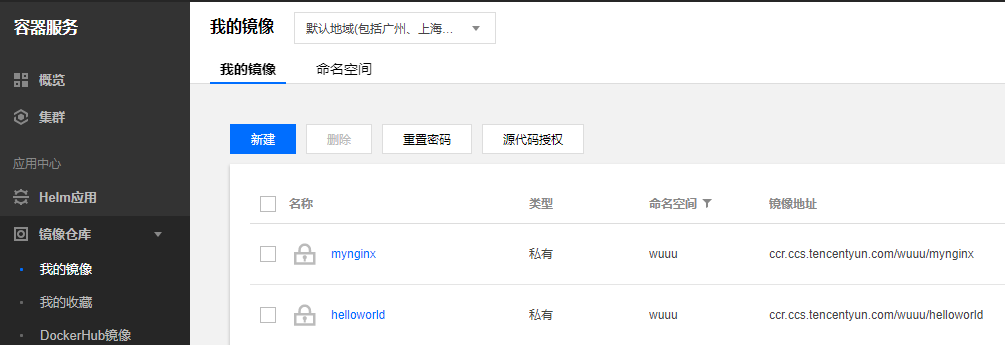
2.上传镜像
docker tag [ImageId] ccr.ccs.tencentyun.com/[namespace]/[ImageName]:[镜像版本号]
PS C:\Users\Administrator> docker tag c42e9f575fc4 ccr.ccs.tencentyun.com/wuuu/helloworld

PS C:\Users\Administrator> docker tag 9c18561d7ab3 ccr.ccs.tencentyun.com/wuuu/mynginx

PS C:\Users\Administrator> docker images

REPOSITORY                               TAG                 IMAGE ID            CREATED             SIZE

ccr.ccs.tencentyun.com/wuuu/mynginx      latest              9c18561d7ab3        2 days ago          109MB

mynginx                                  v2.0                9c18561d7ab3        2 days ago          109MB

ccr.ccs.tencentyun.com/wuuu/helloworld   latest              c42e9f575fc4        3 days ago          265MB

helloworld                               v2.0                c42e9f575fc4        3 days ago          265MB

nginx                                    latest              62c261073ecf        12 days ago         109MB

mcr.microsoft.com/dotnet/core/sdk        2.2-stretch         e4747ec2aaff        3 weeks ago         1.74GB

mcr.microsoft.com/dotnet/core/aspnet     2.2-stretch-slim    f6d51449c477        3 weeks ago         260MB

docker4w/nsenter-dockerd                 latest              2f1c802f322f        8 months ago        187kB

PS C:\Users\Administrator>
docker push ccr.ccs.tencentyun.com/[namespace]/[ImageName]:[镜像版本号]
PS C:\Users\Administrator> docker push ccr.ccs.tencentyun.com/wuuu/helloworld

The push refers to repository [ccr.ccs.tencentyun.com/wuuu/helloworld]
...

latest: digest: sha256:d991fe759257905f727593cc09d8299462e20e31ada3a92023a48fbc130f7484 size: 1581

PS C:\Users\Administrator> docker push ccr.ccs.tencentyun.com/wuuu/mynginx

The push refers to repository [ccr.ccs.tencentyun.com/wuuu/mynginx]
...
latest: digest: sha256:0eda000278411f5b6e034944993f6f5b94825125124f67cc7caf4e684aad5a85 size: 1155

PS C:\Users\Administrator>
2.通过远程镜像启动容器
在原yml文件基础上移除build项,修改image地址。
docker compose up会从远程仓库pull镜像并启动容器,如果是私有仓库,需要提前登录到远程registry。
version: '3.4'

services:

  helloworld:

    image: ccr.ccs.tencentyun.com/wuuu/helloworld

    environment: #环境变量

      - ASPNETCORE_ENVIRONMENT=Development

    ports: #端口映射

      - "81:80"

    container_name: netcore_helloworld #容器名

    deploy:

      restart_policy: #重启策略

        condition: on-failure

        delay: 5s

        max_attempts: 3

    networks: #指定network

      - default

      - newbridge

  mynginx:

    image: ccr.ccs.tencentyun.com/wuuu/mynginx

    ports:

      - "80:80"

      - "801:801"

    container_name: mynginx

    deploy:

      restart_policy:

        condition: on-failure

        delay: 5s

        max_attempts: 3

    networks:

      - default

networks:

  default: #定义一个docker中已存在的network

    external:

      name: mybridge

  newbridge: #新的network

    #name: newbridge  #compose版本3.5开始才支持自定义名称
示例代码Github地址:https://github.com/wwwu/AspNetCore_Docker
- AspNetCore容器化(Docker)部署(一) —— 入门
- AspNetCore容器化(Docker)部署(二) —— 多容器通信
- AspNetCore容器化(Docker)部署(三) —— Docker Compose容器编排
- AspNetCore容器化(Docker)部署(四) —— Jenkins自动化部署
AspNetCore容器化(Docker)部署(三) —— Docker Compose容器编排的更多相关文章
- 研发环境容器化实施过程(docker + docker-compose + jenkins)
目录 背景介绍 改造思路 容器构建 基础准备 中间件容器 外部依赖容器 业务应用容器 容器整合 自动构建容器 Maven相关 非Maven项目 总结 背景介绍 目前公司内部系统(代号GMS)研发团队, ...
- zabbix容器化安装及监控docker应用
一.zabbix agent2 介绍 从Zabbix 4.4之后,官方推出了Zabbix Agent 2,意味着zabbix 不在只是物理机监控的代名词,现在你可以使用Go为Zabbix编写插件,来监 ...
- docker部署多个mysql容器,并使用java连接
测试springboot多个数据源配置时,需要安装多个mysql容器,由于资源限制,当前只有一台虚拟机,如果在一台机器上安装多个mysql实例,是可以的,但步骤比较繁琐,使用docker来安装MySQ ...
- Docker部署 Mysql .Net6等容器
Centos8安装Docker 1.更新一下yum [root@VM-24-9-centos ~]# yum -y update 2.安装containerd.io # centos8默认使用podm ...
- docker 实践三:操作容器
在学习了 docker 镜像的内容后,我们在来看 docker 的另一个核心点:容器. 注:环境为 CentOS7,docker 19.03 docker 的容器是镜像的一个运行实例.docker 镜 ...
- 容器化-Docker-1-速查手册-Docker常用命令
目录 备注 常用命令 Docker镜像管理(操作对象是镜像) Docker容器管理(操作对象是容器) 容器外挂目录(宿主目录映射到容器中) 这篇文章的目的就是把最常用的命令列出来,没时间看速查命令使用 ...
- Spring Boot 项目转容器化 K8S 部署实用经验分享
转载自:https://cloud.tencent.com/developer/article/1477003 我们知道 Kubernetes 是 Google 开源的容器集群管理系统,它构建在目前流 ...
- 基于【 Docker】三 || Docker的基本操作
一.Docker常用命令 1.搜索镜像:docker search 镜像名称 2.下载镜像:docker pull 镜像名称:版本号 3.查看镜像:docker images 4.删除镜像:docke ...
- docker学习(三) - docker理解及命令
Docker 包括三个基本概念 镜像(Image) 容器(Container) 仓库(Repository) 镜像 Docker 镜像就是一个只读的模板. 例如:一个镜像可以包含一个完整的 ubunt ...
随机推荐
- http协议之基础概念篇(1)
内容概述: 该篇主要内容概述 a.http相关术语解析 b.http的基本原理与工作流程 c.相关工具的使用(Wireshark) 作用介绍 绝大多数的web开发,都是构建在http协议之上的. HT ...
- [Xcode 实际操作]九、实用进阶-(1)隐藏顶部的状态栏
目录:[Swift]Xcode实际操作 本文将演示隐藏顶部的状态栏. 在项目导航区,打开项目配置文件[Info.plist] 每个程序都拥有自己的项目配置文件,用来存储各种配置信息. 鼠标右键[Add ...
- 【MySQL】全量+增量的备份/恢复
生产环境中,有时需要做MySQL的备份和恢复工作.因MySQL是在运行过程中的,做全量备份需要时间,全量备份完成后又有数据变动,此时需要增量备份辅助.如果想恢复数据到一个空库(例如数据迁移或者上云等更 ...
- 分布式集群环境下,如何实现session共享五(spring-session+redis 实现session共享)
这是分布式集群环境下,如何实现session共享系列的第五篇.在上一篇:分布式集群环境下,如何实现session共享四(部署项目测试)中,针对nginx不同的负载均衡策略:轮询.ip_hash方式,测 ...
- 002-tomcat安装与配置
1.创建目录 [root@bogon tomcat]#mkdir /usr/local/java/tomcat 2.上传压缩包并解压 [root@bogon tomcat]# tar xvf apac ...
- Promise.then(a, b)与Promise.then(a).catch(b)问题详解
原文: When is .then(success, fail) considered an antipattern for promises? 问题 我在bluebrid promise FAQ上面 ...
- Linux之文本处理命令
Sort 将文件的每一行作为一个单位,相互比较,比较原则是从首字符向后,依次按ASCII码值进行比较,最后将他们按升序输出. -u 在输出行中去除重复行 -r 改为降序(默认升序) ...
- SDIO学习
https://baijiahao.baidu.com/s?id=1561100856106707&wfr=spider&for=pc http://www.eepw.com.cn/a ...
- mybatis(错误) 项目启动时报“Result Maps collection already contains value forxxx”的解决方案
使用逆向工程生成代码时,一定要将原来的代码删除干净,如果覆盖的话,不是真正的覆盖,在原来的代码上增加重复的代码,导致出错
- 2019/05/11 JAVA虚拟机原理
所谓虚拟机,就是一台虚拟的机器.他是一款软件,用来执行一系列虚拟计算指令,大体上虚拟机可以分为 系统虚拟机和程序虚拟机, 大名鼎鼎的Visual Box.Vmare就属于系统虚拟机,他们完全是对物理计 ...