
SilverLight:布局(1) Border(边框)对象、Grid(网格)对象
| ylbtech-SilverLight-Layout:布局(1) Border(边框)对象、Grid(网格)对象 |
- A, Border(边框)对象
- B, Grid(网格)对象
- C, Grid(网格)对象之合并行、和并列
| 1.A, Border(边框)对象返回顶部 |
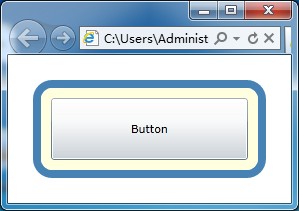
<Border BorderBrush="SteelBlue" Margin="25" Background="LightYellow" BorderThickness="8" CornerRadius="15">

            <Button Content="Button" Margin="10" />

</Border>
3,Margin,
Background, BorderBrush[边框颜色], BorderThickness[边框宽度], CornerRadius[圆角半径]
| 1.B, Grid(网格)对象返回顶部 |
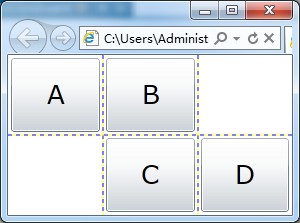
<Grid ShowGridLines="True" Background="White">

    <!--定义表格的行和列 begin-->

    <Grid.RowDefinitions>

        <RowDefinition></RowDefinition>

        <RowDefinition></RowDefinition>

    </Grid.RowDefinitions>

    <Grid.ColumnDefinitions>

        <ColumnDefinition></ColumnDefinition>

        <ColumnDefinition></ColumnDefinition>

        <ColumnDefinition></ColumnDefinition>

    </Grid.ColumnDefinitions>

    <!--定义表格的行和列 end-->

    <!--A 按钮位于第一行第一列-->

    <Button Grid.Row="0" Grid.Column="0" Content="A" Margin="3" FontSize="26"/>

    <Button Grid.Row="0" Grid.Column="1" Content="B" Margin="3" FontSize="26"/>

    <Button Grid.Row="1" Grid.Column="1" Content="C" Margin="3" FontSize="26"/>

    <Button Grid.Row="1" Grid.Column="2" Content="D" Margin="3" FontSize="26"/>

</Grid>
3,ShowGridLine[现实网格线], background,
Grid.RowDefinitions[定义网格行], Grid.ColumnDefinitions[定义网格列],
RowDefinition[行定义], ColumnDefinition[列定义],
Grid.Row[坐标行], Grid.Column[坐标列]
| 1.C, Grid(网格)对象之合并行、和并列返回顶部 |
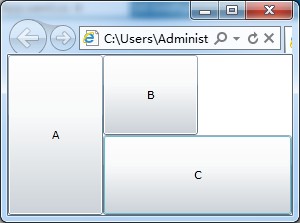
<Grid ShowGridLines="False" Background="White">

    <!--定义表格的行和列 begin-->

    <Grid.RowDefinitions>

        <RowDefinition></RowDefinition>

        <RowDefinition></RowDefinition>

    </Grid.RowDefinitions>

    <Grid.ColumnDefinitions>

        <ColumnDefinition></ColumnDefinition>

        <ColumnDefinition></ColumnDefinition>

        <ColumnDefinition></ColumnDefinition>

    </Grid.ColumnDefinitions>

    <!--定义表格的行和列 end-->

    <Button Grid.Row="0" Grid.Column="0" Grid.RowSpan="2" Content="A"/>

    <Button Grid.Row="0" Grid.Column="1" Content="B"/>

    <Button Grid.Row="1" Grid.Column="1" Grid.ColumnSpan="2" Content="C"/>

</Grid>
3, 同上文B.3
+, Grid.RowSpan[合并行], Grid.ColumnSpan[和并列]
| 1.D,返回顶部 |
| 1.E,返回顶部 |
| 1.F,返回顶部 |
 |
作者:ylbtech 出处:http://ylbtech.cnblogs.com/ 本文版权归作者和博客园共有,欢迎转载,但未经作者同意必须保留此段声明,且在文章页面明显位置给出原文连接,否则保留追究法律责任的权利。 |
SilverLight:布局(1) Border(边框)对象、Grid(网格)对象的更多相关文章
- 轻松上手CSS Grid网格布局
今天刚好要做一个好多div格子错落组成的布局,不是田字格,不是九宫格,12个格子这样子,看起来有点复杂.关键的是笔者有点懒,要写那么多div和css真是不想下手啊.多看了两眼,这布局不跟网格挺像吗?c ...
- CSS Grid 网格布局全解析
介绍 CSS Grid(网格) 布局使我们能够比以往任何时候都可以更灵活构建和控制自定义网格. Grid(网格) 布局使我们能够将网页分成具有简单属性的行和列.它还能使我们在不改变任何HTML的情况下 ...
- SilverLight:布局(2)GridSplitter(网格分割)垂直分割、水平分割
ylbtech-SilverLight-Layout: 布局(2)GridSplitter(网格分割)垂直分割.水平分割 A, Splitter(分割)对象之 GridSplitter(网格分割)1: ...
- CSS Grid网格布局全攻略
CSS Grid网格布局全攻略 所有奇技淫巧都只在方寸之间. 几乎从我们踏入前端开发这个领域开始,就不停地接触不同的布局技术.从常见的浮动到表格布局,再到如今大行其道的flex布局,css布局技术一直 ...
- 【CSS】343- CSS Grid 网格布局入门
CSS Grid(网格) 布局使我们能够比以往任何时候都可以更灵活构建和控制自定义网格.Grid(网格) 布局使我们能够将网页分成具有简单属性的行和列. 它还能使我们在不改变任何HTML的情况下,使用 ...
- grid网格布局使用
定义 grid布局是指对网页进行划分成一个一个网格,然后根据自己的要求,可以任意组合. 以前写类似的功能,很麻烦,需要写很多的CSS去控制,有了grid就很方便了,可以随意进行组合. 跟flex有很多 ...
- python之tkinter使用-Grid(网格)布局管理器
# 使用tkinter编写登录窗口 # Grid(网格)布局管理器会将控件放置到一个二维的表格里,主控件被分割为一系列的行和列 # stricky设置对齐方式,参数N/S/W/E分别表示上.下.左.右 ...
- Grid 网格布局
CSS 网格布局(Grid Layout) 是CSS中最强大的布局系统. 这是一个二维系统,这意味着它可以同时处理列和行,不像 flexbox 那样主要是一维系统. 你可以通过将CSS规则应用于父元素 ...
- Grid 网格布局详解
Grid网格布局详解: Grid布局与Flex布局有着一定的相似性,Grid布局是将容器划分成行和列,产生单元格,可以看做是二维布局. 基本概念: 采用网格布局的区域,称为"容器" ...
- WPF入门教程系列十——布局之Border与ViewBox(五)
九. Border Border 是一个装饰的控件,此控件绘制边框及背景,在 Border 中只能有一个子控件,若要显示多个子控件,需要将一个附加的 Panel 控件放置在父 Border 中.然后可 ...
随机推荐
- Dijkstra算法_北京地铁换乘_android实现-附带源码.apk
Dijkstra算法_北京地铁换乘_android实现 android 2.2+ 源码下载 apk下载 直接上图片 如下: Dijkstra(迪杰斯特拉)算法是典型的最短路径路由算法,用于计 ...
- webdriver高级应用- 无人工干预地自动上传附件
方法一:使用webdriver的send_keys方法上传文件,代码如下: #encoding=utf-8 from selenium import webdriver import unittest ...
- python中json操作了解
什么是接口? 交换数据 http://openweathermap.org/current json简介 JSON 是存储和交换文本信息的语法.类似 XML JSON 语法是 JavaScript 语 ...
- linux随笔三
1.ps 结果输出: PID TTY TIME CMD pts/ :: bash pts/ :: ps显示了程序的进程ID,其运行的终端和进程使用的cpu时间
- php处理文件和操作系统
一.文件和目录 (1).解析目录路径:basename()返回路径的文件名部分 获取路径目录:dirname() 返回除了文件名的路径部分 了解关于路径的更多信息:pathinfo() 返回关联数 ...
- 第三章 802.11MAC基础 ****需要深入理解
1.mac所面临的挑战 射频链路品质 radio link 容易受到干扰 802.11采用肯定确认机制 所有传送出去的帧都必须得到响应 工作站发送请求帧 基站 ...
- Jupyter Notebook与Jupyterhub的安装与配置
Jupyter Notebook是一个很好用的交互环境,Jupyterhub则在此基础上实现了多用户的管理.最近配置这个环境的时候也遇到了一些坑,想想自己疯狂百度的过程,在此把自己的完整安装配置流程记 ...
- 防止csrf
//防csrf攻击 $csrf_hash = md5(uniqid(rand(), TRUE)); set_cookie("my_csrf_name", $csrf_hash, 0 ...
- Git使用规范流程(转载)
作者: 阮一峰 日期: 2015年8月 5日 团队开发中,遵循一个合理.清晰的Git使用流程,是非常重要的. 否则,每个人都提交一堆杂乱无章的commit,项目很快就会变得难以协调和维护. 下面是Th ...
- Welcome-to-Swift-10属性 (Properties)
属性将值跟特定的类.结构或枚举关联.存储属性存储常量或变量作为实例的一部分,计算属性计算(而不是存储)一个值.计算属性可以用于类.结构体和枚举里,存储属性只能用于类和结构体. 存储属性和计算属性通常用 ...