
python 基础之第五天
###########window路径写法##########

In [1]: winpath = 'C:\tmp'

In [2]: print winpath

C: mp

In [3]: winpath = 'C:\\tmp'     #\t 会变成空格,所以需要加一个'\',转义符号

In [4]: winpath

Out[4]: 'C:\\tmp'

In [5]: print winpath

C:\tmp

In [6]: wpath = r'C:\tmp'         #或者加'r'

In [7]: print wpath

C:\tmp
##################内建函数####################
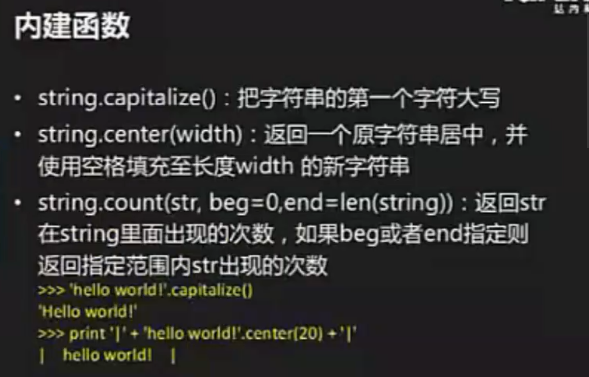
In [11]: hi = 'hello world'

In [12]: hi.capitalize()               #句首的单词首字母大写

Out[12]: 'Hello world'

In [13]: hi.title()                #报纸的标题,每个单子首字母大写

Out[13]: 'Hello World'

In [14]: hi.center(20)             #居中 ,不够的用空格补上

Out[14]: ' hello world '

In [15]: hi.center(20,'+')

Out[15]: '++++hello world+++++'

In [16]: hi.ljust(20)           #左对齐

Out[16]: 'hello world       '

In [17]: hi.ljust(20,'#')

Out[17]: 'hello world#########'

In [18]: hi.rjust(20)          #右对齐

Out[18]: '      hello world'

In [19]: hi.rjust(20,'#')

Out[19]: '#########hello world'

In [20]: hi.count('l')         ####统计出现的次数,‘l’ 出现3次

Out[20]: 3

In [21]: hi.count('ll')     ####统计出现的次数,‘ll’ 出现1次

Out[21]: 1

In [22]: hi = 'hello world!'

In [25]: hi.startswith('h')         #########判断以什么开头,正确返回true,错误返回false

Out[25]: True

In [26]: hi.startswith('hello')

Out[26]: True

In [23]: hi.endswith('!')        #########判断以什么结尾,正确返回true,错误返回false

Out[23]: True
##########比较重要的#############

In [42]: hi = '  hello   world   '

In [46]: hi.strip().split()      #strip() 去除字符串左右两边的空格,split() 什么都不加,默认以空格为分隔符

Out[46]: ['hello', 'world']

In [47]: mylist = ['hello', 'world']

In [48]: '.'.join(mylist)     ###有切割,就有拼接

Out[48]: 'hello.world'

In [49]: '/'.join(mylist)

Out[49]: 'hello/world'

In [50]: ''.join(mylist)

Out[50]: 'helloworld'

In [51]: '\t'.join(mylist)

Out[51]: 'hello\tworld'

In [52]: ' '.join(mylist)

Out[52]: 'hello world'

In [53]: ' '.join(mylist)

Out[53]: 'hello world'
###########查看方式具体用法##############
In [54]: hi.

hi.capitalize  hi.endswith    hi.isalnum     hi.istitle     hi.lstrip      hi.rjust       hi.splitlines  hi.translate

hi.center      hi.expandtabs  hi.isalpha     hi.isupper     hi.partition   hi.rpartition  hi.startswith  hi.upper

hi.count       hi.find        hi.isdigit     hi.join        hi.replace     hi.rsplit      hi.strip       hi.zfill

hi.decode      hi.format      hi.islower     hi.ljust       hi.rfind       hi.rstrip      hi.swapcase

hi.encode      hi.index       hi.isspace     hi.lower       hi.rindex      hi.split       hi.title

In [54]: hi.

hi.capitalize  hi.endswith    hi.isalnum     hi.istitle     hi.lstrip      hi.rjust       hi.splitlines  hi.translate

hi.center      hi.expandtabs  hi.isalpha     hi.isupper     hi.partition   hi.rpartition  hi.startswith  hi.upper

hi.count       hi.find        hi.isdigit     hi.join        hi.replace     hi.rsplit      hi.strip       hi.zfill

hi.decode      hi.format      hi.islower     hi.ljust       hi.rfind       hi.rstrip      hi.swapcase

hi.encode      hi.index       hi.isspace     hi.lower       hi.rindex      hi.split       hi.title

In [54]: help(hi.format)

Help on built-in function format:

format(...)

    S.format(*args, **kwargs) -> string

In [55]: help(hi.replace)

Help on built-in function replace:

replace(...)

    S.replace(old, new[, count]) -> string

    Return a copy of string S with all occurrences of substring

    old replaced by new.  If the optional argument count is

    given, only the first count occurrences are replaced.
######字符串讲完了,现在开始列表(list)###############
1.list赋值与更新
In [56]: alist = [10,20,30,40]
In [57]: alist[1:3]
Out[57]: [20, 30]
In [58]: alist[1:3] = [2,3]
In [59]: alist
Out[59]: [10, 2, 3, 40]
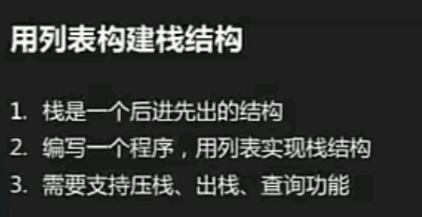
[root@master script]# vim stack.py

#!/usr/bin/python

# coding:utf-8

stack = []

def pushit():

    item = raw_input('item:')

    stack.append(item)

def popit():

    stack.pop()

def viewit():

    print stack

def show_menu():

    CMDs = {'':pushit,'':popit,'':viewit}         ###这个方法很好用

    prompt = """(0) push it

(1) pop it

(2) view it

(3) quit

Please input your choice(0/1/2/3):"""

    while True:

        choice = raw_input(prompt).strip()[0]

        if choice not in '':

            print 'Invalid input,Try again'

            continue

        if choice == '':

            break

        """

        elif choice == '0':

            pushit()

        elif choice == '1':

            popit()

        elif choice == '2':

            viewit()

       """

        CMDs[choice]()          #字典型函数调用

if __name__ == '__main__':

    show_menu()
python 基础之第五天的更多相关文章
- Python基础知识(五)
# -*- coding: utf-8 -*-# @Time : 2018-12-25 19:31# @Author : 三斤春药# @Email : zhou_wanchun@qq.com# @Fi ...
- python基础篇(五)
PYTHON基础篇(五) 算法初识 什么是算法 二分查找算法 ♣一:算法初识 A:什么是算法 根据人们长时间接触以来,发现计算机在计算某些一些简单的数据的时候会表现的比较笨拙,而这些数据的计算会消耗大 ...
- python基础教程项目五之虚拟茶话会
python基础教程项目五之虚拟茶话会 几乎在学习.使用任何一种编程语言的时候,关于socket的练习从来都不会少,尤其是会写一些局域网的通信的东西.所以书上的这个项目刚好可以练习一下socket编程 ...
- Python基础篇(五)_文件和数据格式化
Python基础篇_文件和数据格式化 文件的使用:文件打开.关闭.读写 文件打开:通过open()函数打开文件,并返回一个操作文件的变量. 使用语法:<变量名> = (<文件路径以及 ...
- Py修行路 python基础 (十五)面向对象编程 继承 组合 接口和抽象类
一.前提回忆: 1.类是用来描述某一类的事物,类的对象就是这一类事物中的一个个体.是事物就要有属性,属性分为 1:数据属性:就是变量 2:函数属性:就是函数,在面向对象里通常称为方法 注意:类和对象均 ...
- Python基础(十五)
今日主要内容 模块初识 模块导入 模块路径 自定义模块 内置模块(标准库) time datetime random sys os funtools 一.模块初识 (一)什么是模块 其实我们创建的每一 ...
- Python 基础【第五篇】元组和列表
一 .Python之列表: 其实所谓的列表我个人感觉和shell 中的数组是一样的(只是个人见解哦),列表其实说白了就是元素的组合: 格式: Name = [a,b,c,d] 下标: 每一个列表中的元 ...
- python基础教程(五)
字符串基本操作 所有标准的序列操作(索引.分片.乘法.判断成员资格.求长度.取最小值和最大值)对字符串同样适用,前面已经讲述的这些操作.但是,请注意字符串都是不可变的. 字符串的方法: 字符串从str ...
- python基础自学 第五天(附带视频和相关资源)
数据类型 01.列表 List 是 python 中使用最频繁的数据类型,在其他语言中叫做数组 专门用于存储一串信息 列表用 [ ] 定义,数据之间用 , 分隔 列表的索引从 0 开始 补:索引就是数 ...
- python基础学习(五)while循环语句
while循环基本使用 循环的作用就是让指定的代码重复的执行 while循环最常用的应用场景就是让执行的代码按照指定的次数重复执行 流程图 基本语法 初始条件设置 —— 通常是重复执行的 计数器 wh ...
随机推荐
- AngularJS的ng-repeat显示属性名和属性值
代码下载:https://files.cnblogs.com/files/xiandedanteng/AngularJSAuthorRepeat.rar 代码: <!DOCTYPE HTML P ...
- openCV—Python(1)——初始化环境
本系列博客主要參考自--Adrian Rosebrock:<Practical Python and OpenCV: An Introductory,Example Driven Guide t ...
- SqlServer查询语句中用到的锁
前段时间**公司DBA来我们这培训.讲了一大堆MYSQL的优化. QA环节一程序员问“SQL语句中的 with nolock 除了不锁表外,是否能读其他锁住的数据". 讲课的人嘟嘟了半天没解 ...
- 手把手教你nginx/linux下如何增加网站
先进入到nginx的配置文件目录请输入以下命令 cd /alidata/server/nginx/conf/vhosts 再输入 ll 看看是不是像下面截图的一样 用神器xftp将default. ...
- 惊艳的cygwin——Windows下的Linux命令行环境的配置和使用
http://www.tuicool.com/articles/2MramqI 时间 2014-07-29 09:28:36 点滴之间 聚沙成金 原文 http://www.path8.net/t ...
- 字符串转换成js的日期格式
js字符串转日期格式 ,JavaScript字符串转日期格式 大家都知道JS是根据结果来确定数据类型的. 当然我们也是可以转化的,下面我就介绍两种关于JS字符串类型转换成日期类型的方法, 我个人比较喜 ...
- C语言,简单计算器【上】
由于工作需要最近在研究PHP扩展,无可避免的涉及到了C语言.从出了学校以后C语言在实际工作中还没有用到过,所以必须要先进行一点复习工作.个人认为对于熟悉一样东西说最好的方法是上手实践.于是便想起了当时 ...
- MongoDB——mongo-connector同步到ES
1.搭建完毕MongoDb复制集环境 2.开始安装 mongo-connector pip install mongo-connector:基于pip命令,不管是linux .window 系统默认有 ...
- Delphi的类方法不是静态方法
Delphi中,类方法不是你理解的静态方法 Delphi中的类方法与C++类中的static方法完全没有可比性.Delphi中的类方法是有Self的,而Self就是类本身(注意不是对象),而这个Sel ...
- svn下载
首先介绍的是SVN安装包的下载,分别包括服务器版和客户端版 下载地址:http://subversion.apache.org/packages.html 打开后,点击Windows 分别下载客户端( ...