
Python contenttypes组件
介绍

应用场景
我们在网上po一段散文诗也可以po一张旅途的风景图,文字可以被评论,图片也可以被评论。我们需要在数据库中建表存储这些数据,我们可能会设计出下面这样的表结构。
class Post(models.Model):

    """帖子表"""

    author = models.ForeignKey(User)

    title = models.CharField(max_length=72)

class Picture(models.Model):

    """图片表"""

    author = models.ForeignKey(User)

    image = models.ImageField()

class Comment(models.Model):

    """评论表"""

    author = models.ForeignKey(User)

    content = models.TextField()

    post = models.ForeignKey(Post, null=True, blank=True, on_delete=models.CASCADE)

    picture = models.ForeignKey(Picture, null=True, blank=True, on_delete=models.CASCADE)
这表结构看起来不太简洁,我们画个图来看一下:
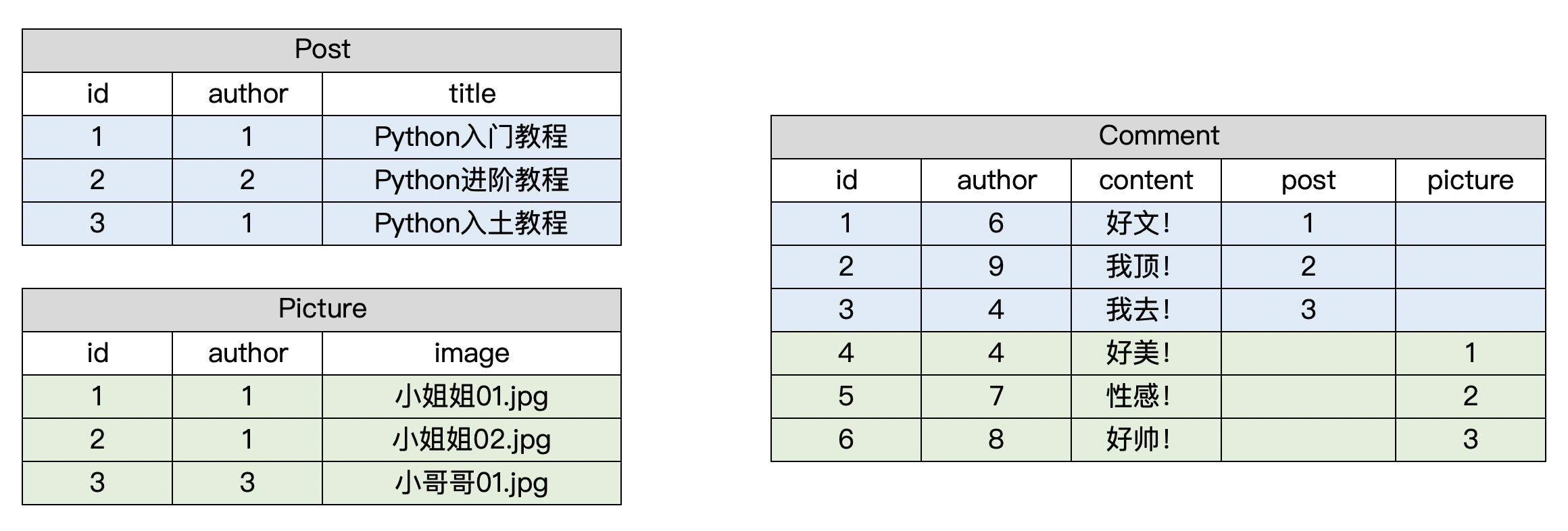
能用是能用,但是评论表有点冗余啊。好多列都空着呢啊!
我们优化一下,我们在评论表里不直接外键关联 文字和图片,而是存储一下关联的表名和字段,这样就好很多了。
看下图:

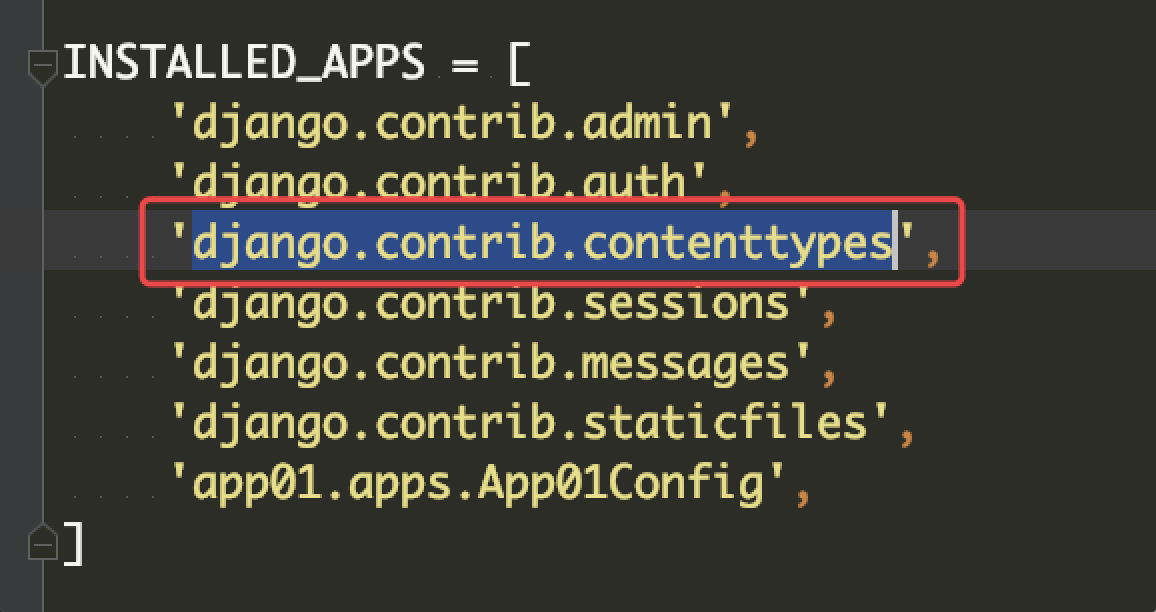
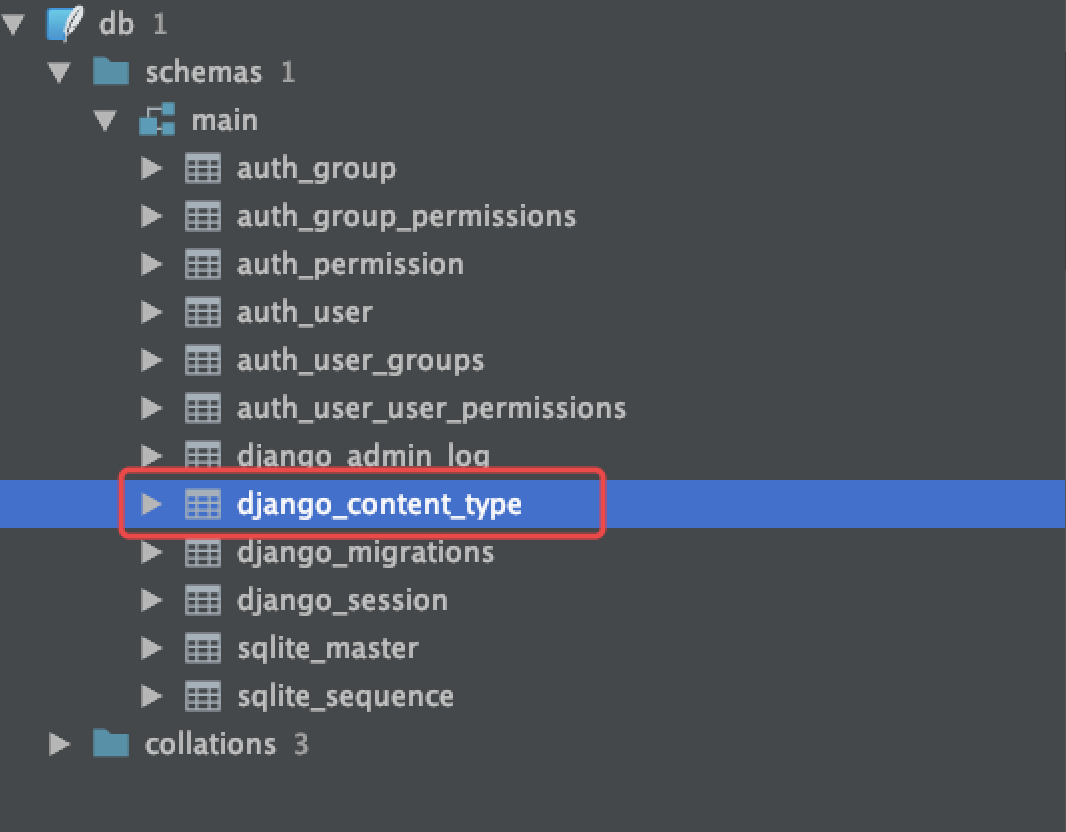
那我们不妨步子再大一点,再往前走一步试试,因为表名在评论里面重复了很多次,我们完全可以把Django项目中的表名都存储在一个表里面。然后评论表里外键关联这个表就可以了。
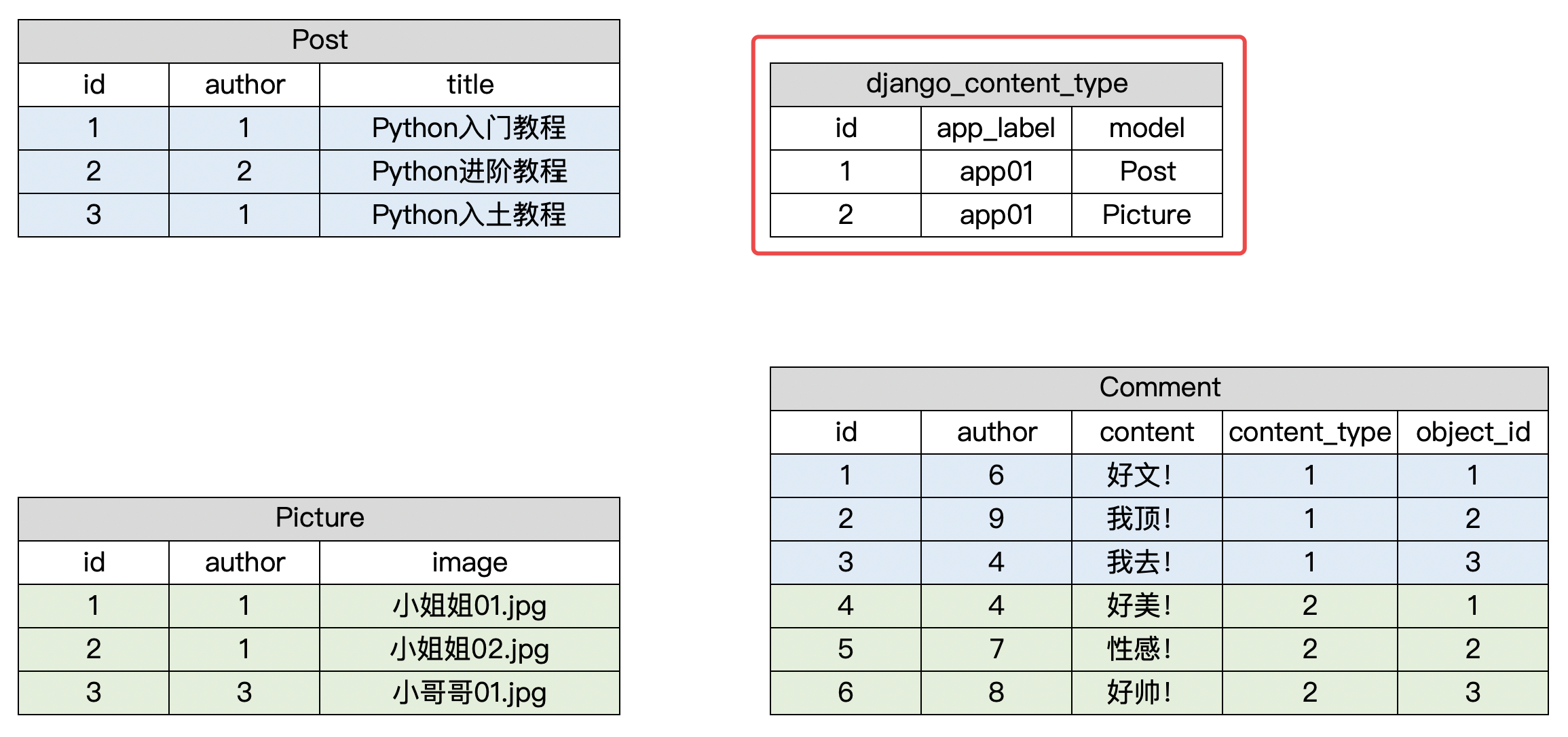
class Comment(models.Model):

    """评论表"""

    author = models.ForeignKey(User)

    content = models.TextField()

    content_type = models.ForeignKey(ContentType)  # 外键关联django_content_type表

    object_id = models.PositiveIntegerField()  # 关联数据的主键

    content_object = GenericForeignKey('content_type', 'object_id')
contenttypes使用
import os

if __name__ == "__main__":

    os.environ.setdefault("DJANGO_SETTINGS_MODULE", "about_contenttype.settings")

    import django

    django.setup()

    from app01.models import Post, Picture, Comment

    from django.contrib.auth.models import User

    # 准备测试数据

    user_1 = User.objects.create_user(username='aaa', password='123')

    user_2 = User.objects.create_user(username='bbb', password='123')

    user_3 = User.objects.create_user(username='ccc', password='123')

    post_1 = Post.objects.create(author=user_1, title='Python入门教程')

    post_2 = Post.objects.create(author=user_2, title='Python进阶教程')

    post_3 = Post.objects.create(author=user_1, title='Python入土教程')

    picture_1 = Picture.objects.create(author=user_1, image='小姐姐01.jpg')

    picture_2 = Picture.objects.create(author=user_1, image='小姐姐02.jpg')

    picture_3 = Picture.objects.create(author=user_3, image='小哥哥01.jpg')

    # 给帖子创建评论数据

    comment_1 = Comment.objects.create(author=user_1, content='好文!', content_object=post_1)

    # 给图片创建评论数据

    comment_2 = Comment.objects.create(author=user_2, content='好美!', content_object=picture_1)
from django.contrib.contenttypes.fields import GenericRelation
class Post(models.Model):

    """帖子表"""

    author = models.ForeignKey(User)

    title = models.CharField(max_length=72)

    comments = GenericRelation('Comment')  # 支持反向查找评论数据(不会在数据库中创建字段)

class Picture(models.Model):

    """图片表"""

    author = models.ForeignKey(User)

    image = models.ImageField()

    comments = GenericRelation('Comment')  # 支持反向查找评论数据(不会在数据库中创建字段)
查询示例:
post_1 = Post.objects.filter(id=1).first()

comment_list = post_1.comments.all()
Python contenttypes组件的更多相关文章
- Django contenttypes 组件
contenttypes组件 介绍 Django包含一个contenttypes应用程序(app),可以跟踪Django项目中安装的所有模型(Model),提供用于处理模型的高级通用接口. Conte ...
- Django contenttypes组件
contenttypes组件 介绍 Django包含一个contenttypes应用程序(app),可以跟踪Django项目中安装的所有模型(Model),提供用于处理模型的高级通用接口. Conte ...
- contenttypes组件 (处理大量外键)
介绍 Django contenttypes是一个非常有用的框架,主要用来创建模型间的通用关系(generic relation). https://www.cnblogs.com/huchong ...
- Django之contenttypes组件
目录 一. 介绍 二. 应用场景 1. 表结构设计的演变 2. GenericForeignKey和GenericRelation 3. 测试 一. 介绍 Django包含一个contenttypes ...
- Python标准组件ConfigParser配置文件解析器,保存配置时支持大写字母的方法
虽然自己已经改用xml作为配置文件首选格式了,但是有时候还是需要解析ini.cfg文件(为了兼容早期版本或者其他作者的软件). 基本上Python自带的ConfigParser足够应对了,但是美中不足 ...
- Python常用组件、命令大总结(持续更新)
Python开发常用组件.命令(干货) 持续更新中-关注公众号"轻松学编程"了解更多. 1.生成6位数字随机验证码 import random import string def ...
- Python分页组件
分页组件的实现: class Pagination(object): """ 自定义分页 """ def __init__(self,cur ...
- Python - Django - 组件
网站中通常会有一个导航条,如下图 这个导航条在很多页面都会存在 可以把导航条做成一个组件,让要显示导航条的网页包含 导航条组件 nav.html: <h1>假装这是一个导航条</h1 ...
- python 日志组件
日志组件: import logging import logging.handlers import os class logs(object): def __init__(self): self. ...
随机推荐
- __contains__, __len__,__reversed__
__contains__():当使用in,not in 对象的时候 调用(not in 是在in完成后再取反,实际上还是in操作) class A(object): def __init__(self ...
- [软件工程基础]2017.11.04 第八次 Scrum 会议
具体事项 项目交接燃尽图 每人工作内容 成员 已完成的工作 计划完成的工作 工作中遇到的困难 游心 #10 搭建可用的开发测试环境:#9 阅读分析 PhyLab 后端代码与文档:#8 掌握 Larav ...
- Gym - 101810A ACM International Collegiate Programming Contest (2018)
bryce1010模板 http://codeforces.com/gym/101810/problem/A 大模拟,写崩了,代码借队友的...... 注意处理段与段的连接问题: #include&l ...
- odoo filter 日期
<!--日期--> <filter name="before_twodays" string="前天" domain="[('dat ...
- Jackson 动态过滤属性,编程式过滤对象中的属性
场景:有时候我们做系统的时候,比如两个请求,返回同一个对象,但是需要的返回字段并不相同. 常见与写前端接口的时候,尤其是手机端,一般需要什么数据就返回什么样的数据.此时对于返回同一个对象我们就要动态过 ...
- PHP中的文件操作
文件系统的概述 任何类型的变量在运行的时候都是将其加载到内存里面.但是内存有一个特点:CPU读取内存的速度很快,但是一旦断电,内存里面的数据就会消失.如果要持久的保存数据,有两种方法:将数据存储到 ...
- C#打开office文件,pdf文件和视频文件
打开office文件 1 需要从网站下载dsoframer.ocx文件 2 把dsoframer.ocx文件复制到c:\windows\system32目录下 开始->运行->regsvr ...
- arcgis mdb 数据中的shp 如何合并一起
如上操作 一直往下就可以啦 选择数据源 就可以了,然后就可以load 其他数据啦 ,坐标系要一直
- JVM垃圾回收机制三
垃圾回收器 分代垃圾回收常见的垃圾回收器 判断一个垃圾回收器好坏的标准 1.吞吐量越高越好 2.工作线程暂停时间越短越好. Serial垃圾回收器 串行回收器时最古老的最基本的垃圾回收器,工作线程会产 ...
- ES-Mac OS环境搭建-ik中文分词器
下载 从github下载ik中文分词器,点击地址,需要注意的是,ik分词器和elasticsearch版本必须一致. 安装 下载到本地并解压到elasticsearch中的plugins目录内即可. ...