
tf.stack和tf.unstack
 import tensorflow as tf

 a = tf.constant([1,2,3])

 b = tf.constant([4,5,6])

 c1 = tf.stack([a,b],axis=0)

 c2 = tf.stack([a,b],axis=1)

 #take c2 for example showing results of unstack

 d1 = tf.unstack(c2,axis=0) # Return: The list of Tensor objects unstacked from value.

 d2 = tf.unstack(c2,axis=1)

 with tf.Session() as sess:

     print('c1(with shape:{}):\n{}'.format(c1.shape, sess.run(c1)))

     print('c2(with shape:{}):\n{}'.format(c2.shape, sess.run(c2)))

     print('d1(with length:{}):\n{}'.format(len(d1), sess.run(d1)))

     print('d2(with length:{}):\n{}'.format(len(d2), sess.run(d2)))
运行结果:
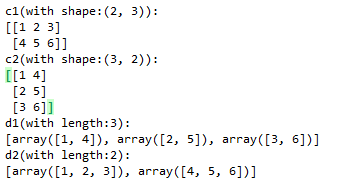
官方API:
https://www.tensorflow.org/api_docs/python/tf/stack
https://www.tensorflow.org/api_docs/python/tf/unstack
tf.stack和tf.unstack的更多相关文章
- tf.concat, tf.stack和tf.unstack的用法
tf.concat, tf.stack和tf.unstack的用法 tf.concat相当于numpy中的np.concatenate函数,用于将两个张量在某一个维度(axis)合并起来,例如: a ...
- tf.stack( )和tf.unstack( )
相同点:他们都增加了矩阵的维度,而split()不改变维度! tf.stack()这是一个矩阵拼接的函数,tf.unstack()则是一个矩阵分解的函数 c是拼接,而d和e则是不同维度的分解
- tf.unstack()、tf.stack()
tf.unstack 原型: unstack( value, num=None, axis=0, name='unstack' ) 官方解释:https://tensorflow.google.cn/ ...
- np.stack() 与 tf.stack() 的简单理解
说明:np ----> numpy tf ----> tensorflownp.stack(arrays, axis=0) np.stack(arrays, axis=0) - ...
- tensorflow 基本函数(1.tf.split, 2.tf.concat,3.tf.squeeze, 4.tf.less_equal, 5.tf.where, 6.tf.gather, 7.tf.cast, 8.tf.expand_dims, 9.tf.argmax, 10.tf.reshape, 11.tf.stack, 12tf.less, 13.tf.boolean_mask
1. tf.split(3, group, input) # 拆分函数 3 表示的是在第三个维度上, group表示拆分的次数, input 表示输入的值 import tensorflow ...
- tf.variable和tf.get_Variable以及tf.name_scope和tf.variable_scope的区别
在训练深度网络时,为了减少需要训练参数的个数(比如具有simase结构的LSTM模型).或是多机多卡并行化训练大数据大模型(比如数据并行化)等情况时,往往需要共享变量.另外一方面是当一个深度学习模型变 ...
- 【TensorFlow基础】tf.add 和 tf.nn.bias_add 的区别
1. tf.add(x, y, name) Args: x: A `Tensor`. Must be one of the following types: `bfloat16`, `half`, ...
- TensorFlow 辨异 —— tf.placeholder 与 tf.Variable
https://blog.csdn.net/lanchunhui/article/details/61712830 https://www.cnblogs.com/silence-tommy/p/70 ...
- TF.VARIABLE、TF.GET_VARIABLE、TF.VARIABLE_SCOPE以及TF.NAME_SCOPE关系
1. tf.Variable与tf.get_variable tensorflow提供了通过变量名称来创建或者获取一个变量的机制.通过这个机制,在不同的函数中可以直接通过变量的名字来使用变量,而不需要 ...
随机推荐
- 存储过程清理N天前数据
CREATE OR REPLACE PROCEDURE APICALL_LOG_INTERFACE_CLEAN ( CLEANDAY IN Number --天数 ) AS v_cleanDay nu ...
- LinkedList 基本示例及源码解析
目录 一.JavaDoc 简介 二.LinkedList 继承接口和实现类介绍 三.LinkedList 基本方法介绍 四.LinkedList 基本方法使用 五.LinkedList 内部结构以及基 ...
- 如何配置Spring Boot Tomcat
1.概述 Spring Boot Web应用程序默认包含预配置的嵌入式Web服务器.但在某些情况下,我们要修改默认配置以满足自定义要求. 在本教程中,我们将介绍通过application.proper ...
- iOS开发系列--让你的应用“动”起来【转载】
概览 原文链接:http://www.cnblogs.com/kenshincui/p/3972100.html 在iOS中随处都可以看到绚丽的动画效果,实现这些动画的过程并不复杂,今天将带大家一窥i ...
- Linux内核源码分析方法_转
Linux内核源码分析方法 转自:http://www.cnblogs.com/fanzhidongyzby/archive/2013/03/20/2970624.html 一.内核源码之我见 Lin ...
- vim与sublime
vim与sublime 对程序员来说,写代码是再熟悉不过的事情了,windows系统自带有记事本软件,能写写小规模的代码,可是代码量大了,它的局限性就暴露得很明显了:没有语法高亮,没有自动提示,不支持 ...
- a标签javascript传参不正确的解决办法!
代码部分: <a href="javascript:void(0);" onClick="findList(${goodsClassify.id})"&g ...
- iOS中用UIWebView的loadHTMLString后图片和文字失调解决方法
iOS中用UIWebView的loadHTMLString后图片和文字失调,图片过大,超过屏幕,文字太小.或者图片太小.文字太大,总之就是不协调. 我们的需求是让图片的大小跟着屏幕的变化而变化.就是动 ...
- python scrapy爬虫框架
http://scrapy-chs.readthedocs.io/zh_CN/0.24/intro/tutorial.html scrapy 提取html的标签内容 from scrapy.selec ...
- iOS 键盘变中文
plist文件添加 Localizations 添加一项字段Chinese (simplified)