
Exploring the MapBox stack: MBTiles, TileJSON, UTFGrids and Wax
转自:http://blog.thematicmapping.org/2012/11/exploring-mapbox-stack-mbtiles-tilejson.html
In my last blog post, we created a population density map of New Zealand using QGIS, SQLite and TileMill. Today, we’re going to publish this map to the web using various MapBox inventions. I'll also show you how to publish an interactive TileMill map on your own web server using some PHP and JavaScript wizardry.
I love MapBox. The team behind this platform has created a series of new specifications, allowing us to create fast, good looking and interactive maps. The downside is the limited support for other map projections than Web Mercator.
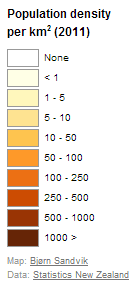
TileMill allows you to add legends and tooltips to your maps. I’ve added a legend to my population density map with a HTML snippet describing the map and the color scale.
| 123456789101112131415161718 |
<div class='my-legend'>
<div class='legend-title'>Population density<br/>per km<sup>2</sup> (2011)</div>
<div class='legend-scale'>
<ul class='legend-labels'>
<li><span style='background:#FFFFFF;'></span>None</li>
<li><span style='background:#FFFFE5;'></span>< 1</li>
<li><span style='background:#FFF7BC;'></span>1 - 5</li>
<li><span style='background:#FEE391;'></span>5 - 10</li>
<li><span style='background:#FEC44F;'></span>10 - 50</li>
<li><span style='background:#FE9929;'></span>50 - 100</li>
<li><span style='background:#EC7014;'></span>100 - 250</li>
<li><span style='background:#CC4C02;'></span>250 - 500</li>
<li><span style='background:#993404;'></span>500 - 1000</li>
<li><span style='background:#662506;'></span>1000 ></li>
</ul>
</div>
<div class='legend-source'>Map: <a href="http://blog.thematicmapping.org">Bjørn Sandvik</a><br/>Data: <a href="http://www.stats.govt.nz/">Statistics New Zealand</a></div>
</div>
|
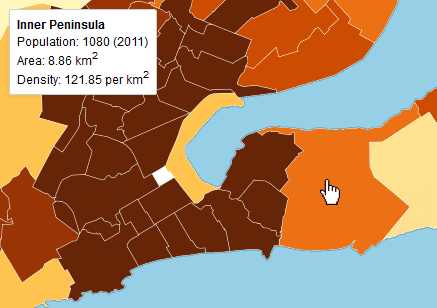
The tooltip shows when the user hovers over or clicks on the map. It allows us to show dynamic content - additional data, images, charts - for each map feature. I want to show the name, total population, area and population density for each feature:
| 123456 |
<div>
<strong>{{{au_name}}}</strong><br>
Population: {{{pop2011}}} (2011)<br>
Area: {{{area}}} km<sup>2</sup><br>
Density: {{{popdens}}} per km<sup>2</sup>
</div>
|
The data fields for the layer are wrapped in curly Mustache tags. These tags will be replaced by data when you interact with the map. You can use the full Mustache template language.
The easy way to publish this map is to upload it to MapBox Hosting, and use the embed code provided. If you want to publish your map on your own web server, this is an alternative route:
To export an interactive map from TileMill, you need to use the MBTiles format. This is an innovative SQLite-basedformat specification capable of storing millions of map tiles in a single file. The format is also supported by various3rd-party applications, and I'm sure we'll see a greater adoption in the future.
Within the MBTiles file, the map legend, the tooltip template and information about map extent, zoom levels etc. is stored in a format named TileJSON. This is also an open specification, providing a consistent way of describing a map, making it easier to load and display a map the way it’s meant to be seen. The TileJSON for my map looks like this:
| 1234567891011121314151617181920 |
{
"tilejson": "2.0.0",
"scheme": "xyz",
"bounds": [ 166, -47.5, 179, -34 ],
"center": [ 173.3, -41.273, 5 ],
"minzoom": 0,
"maxzoom": 12,
"name": "Population density map of New Zealand",
"description": "Created by Bjørn Sandvik\nhttp://blog.thematicmapping.org/",
"legend": "<div class='my-legend'>\n<div class='legend-title'>Population density<br/>per km<sup>2</sup> (2011)</div>\n<div class='legend-scale'>\n <ul class='legend-labels'>\n <li><span style='background:#FFFFFF;'></span>None</li>\n <li><span style='background:#FFFFE5;'></span>< 1</li>\n <li><span style='background:#FFF7BC;'></span>1 - 5</li>\n <li><span style='background:#FEE391;'></span>5 - 10</li>\n <li><span style='background:#FEC44F;'></span>10 - 50</li>\n <li><span style='background:#FE9929;'></span>50 - 100</li>\n <li><span style='background:#EC7014;'></span>100 - 250</li>\n <li><span style='background:#CC4C02;'></span>250 - 500</li>\n <li><span style='background:#993404;'></span>500 - 1000</li>\n <li><span style='background:#662506;'></span>1000 ></li>\n </ul>\n</div>\n<div class='legend-source'>Map: <a href=\"http://blog.thematicmapping.org\">Bjørn Sandvik</a><br/>Data: <a href=\"http://www.stats.govt.nz/\">Statistics New Zealand</a></div>\n</div>",
"attribution": "Statistics New Zealand",
"template": "{{#__location__}}{{/__location__}}{{#__teaser__}}<div>\n<strong>{{{au_name}}}</strong><br>\nPopulation: {{{pop2011}}} (2011)<br>\nArea: {{{area}}} km<sup>2</sup><br>\nDensity: {{{popdens}}} per km<sup>2</sup>\n</div>{{/__teaser__}}{{#__full__}}{{/__full__}}",
"version": "1.0.0",
"tiles": [
"http://earthatlas.info/nz/tiles/nz-popden/{z}/{x}/{y}.png"
],
"grids": [
"http://earthatlas.info/nz/tiles/nz-popden/{z}/{x}/{y}.json"
]
}
|
If you add interactivity to your map (tooltips), your MBTiles file will also include the most impressing part of the MapBox specifications: UTFgrids. This JSON-format allows us to add thousands of interactive points or polygons through interactivity data grids, and it will even work in older browsers with limited support for vector data.
So how do we turn our MBTiles file into an interactive map? Previously, I've used MBUtil to extract the contents from MBTiles into a directory structure. But by doing this, we loose the benefits of the MBTiles format, like storing a map in a single file and dealing with redundant images. What we need is a script on our web server that will extract content from our MBTiles file on demand. I decided to try a PHP script from infostreams (this is probably not the most scaleable solution). The script supports the full MBTiles specification, including TileJSON and UTFGrids. Installation is simple: just put the .php file and the .htaccess file in the same directory as your .mbtiles files. The .htaccess file includes a rule that rewrites requested URLs on the fly, so the map data is available un URLs like:
- TileJSON: http://earthatlas.info/nz/tiles/nz-popden.tilejson
- Map tile: http://earthatlas.info/nz/tiles/nz-popden/9/504/320.png
- UTFGrid: http://earthatlas.info/nz/tiles/nz-popden/9/504/320.json

So when we have our backend sorted, how can we recreate our interactive map with Leaflet or other JavaScript mapping libraries? This is way the MapBox team created Wax, which is a client implementation of the MBTiles interaction specification. You just include the wax script together with your mapping library of choice, and then you can add interactivity with a few lines of code:
| 123456789101112131415161718 |
// Load TileJSON
wax.tilejson('http://earthatlas.info/nz/tiles/nz-popden.tilejson', function(tilejson) {
// Create map and add image tiles
var map = new L.Map('map-div')
.addLayer(new wax.leaf.connector(tilejson))
.setView(new L.LatLng(51, 0), 1);
// Create map legend
wax.leaf.legend(map, tilejson).appendTo(map._container);
// Add map interaction (tooltips)
wax.leaf.interaction()
.map(map)
.tilejson(tilejson)
.on(wax.tooltip().animate(true).parent(map._container).events());
});
|
I've also done some extra JavaScript coding to allow switching between various interactive map layers. I'll save that for a later blog post.
The Leaflet map looks like this (there seems to be an issue with the latest Wax distribution and Google Chrome):
Exploring the MapBox stack: MBTiles, TileJSON, UTFGrids and Wax的更多相关文章
- 与你相遇好幸运,mbview的mbtiles文件分析
mbview是一个查看.mbtiles文件的本地程序. https://github.com/mapbox/mbview .mbtiles文件就是一个Sqlite文件,用Navicat Premium ...
- Tilemill + tilestream + mapbox.js 自制地图
感谢Mapbox,带来了一整套完整的地图方案. 你可以把你的地图放在Mapbox的网站上.也可以使用他们提供的开源软件自己架设地图服务. Mapbox的地图方案包括web,ios和android. 不 ...
- TileJSON
TileJSON TileJSON is an open standard for representing map metadata. License The text of this specif ...
- MBTiles
MBTiles Specification MBTiles is a specification for storing tiled map data in SQLite databases for ...
- UVA 1362 Exploring Pyramids 区间DP
Archaeologists have discovered a new set of hidden caves in one of the Egyptian pyramids. The decryp ...
- 支持 MBTiles 规范的预缓存
SuperMap iServer 支持生成符合MBTiles规范的预缓存(MBTiles是由MapBox制定的一种将瓦片地图数据存储到SQLite数据库中并可快速使用,管理和分享的规范. 该规范由Ma ...
- Exploring Python Code Objects
Exploring Python Code Objects https://late.am/post/2012/03/26/exploring-python-code-objects.html Ins ...
- Exploring the 7 Different Types of Data Stories
Exploring the 7 Different Types of Data Stories What makes a story truly data-driven? For one, the n ...
- LA 3516(ZOJ 2641) Exploring Pyramids(递推 DP)
Exploring Pyramids Archaeologists have discovered a new set of hidden caves in one of the Egyptian p ...
随机推荐
- VS2008下直接安装使用Boost库1.46.1版本号
Boost库是一个可移植.提供源码的C++库,作为标准库的后备,是C++标准化进程的发动机之中的一个. Boost库由C++标准委员会库工作组成员发起,当中有些内容有望成为下一代C++标准库内容.在C ...
- CodeForces 452C Magic Trick (排列组合)
#include <iostream> #include <cstdio> #include<cmath> #include<algorithm> us ...
- ExtJS002Window创建
Ext.onReady(function () { Ext.create('Ext.window.Window', { title: 'window', width: 400, height: 300 ...
- 几个linux 下C/C++集成开发环境推荐
链接地址:http://www.lupaworld.com/article-210675-1.html 摘要: 一.AnjutaAnjuta是一个多语言的IDE,它最大的特色是灵活,同时打开多个文件, ...
- JavaSE_ Java基础 总目录(1~6)
JavaSE学习总结第01天_Java概述01.01 计算机概述01.02 计算机硬件和软件概述01.03 软件开发和计算机语言概述01.04 人机交互01.05 键盘功能键和快捷键01.06 如何打 ...
- BZOJ 1266: [AHOI2006]上学路线route(最短路+最小割)
第一问最短路.第二问,先把最短路的图建出来(边(u,v)满足d[s->u]+d[v->t]+d(u,v)==最短路径长度,就在图中,可以从源点和汇点分别跑一次最短路得到每个点到源点和汇点的 ...
- PHP输出中文乱码的解决方法
最近在windows上发现PHP程序中输出来的中文有乱码的情况. 看了很多帖子资料说可以在页面上添加: http://www.cnblogs.com/leandro/archive/2008/04/2 ...
- 阿里云ECS每天一件事D2:配置防火墙
在linux中配置防火墙是一件比较有风险的事情,尤其是在ECS中,一个不当心的操作,可能就会需要重置服务器. 包括阿里云的官方建议,不要配置防火墙,没有必要什么的吧啦吧啦…… (http://bbs. ...
- Correlation rule tuning
Lots of organizations are deploying SIEM systems either to do their due diligence or because it’s pa ...
- Linux安装make无法使用
1.apt-get update 2.apt-get install g++ 3.apt-get install pentium-builder 4.apt-get install build-ess ...