
Android:ServiceDemo
效果图:
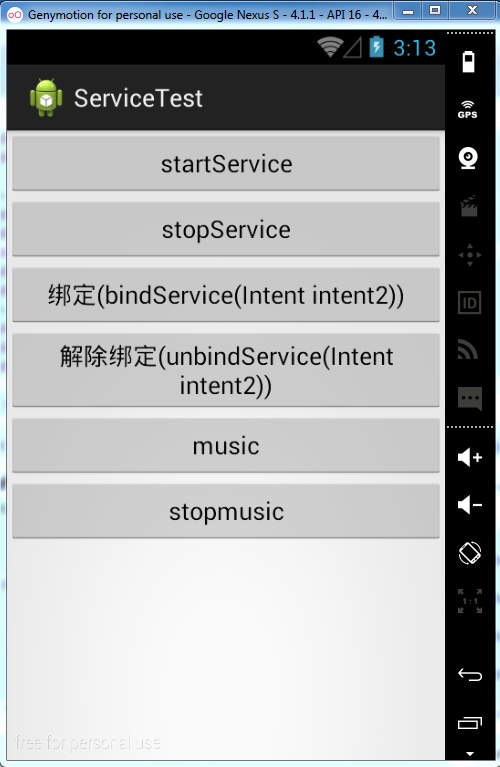
layout的main.xml:
<?xml version="1.0" encoding="utf-8"?>

<LinearLayout xmlns:android="http://schemas.android.com/apk/res/android"

    android:layout_width="match_parent"

    android:layout_height="match_parent"

    android:orientation="vertical" >

    <Button

        android:id="@+id/start"

        android:onClick="onClick"

        android:layout_width="match_parent"

        android:layout_height="wrap_content"

        android:text="startService" />

    <Button

        android:id="@+id/stop"

        android:onClick="onClick"

        android:layout_width="match_parent"

        android:layout_height="wrap_content"

        android:text="stopService" />

    <Button

        android:id="@+id/bind"

        android:onClick="onClick"

        android:layout_width="match_parent"

        android:layout_height="wrap_content"

        android:text="绑定(bindService(Intent intent2))" />

    <Button

        android:id="@+id/unbind"

        android:onClick="onClick"

        android:layout_width="match_parent"

        android:layout_height="wrap_content"

        android:text="解除绑定(unbindService(Intent intent2))" />

	<Button

        android:id="@+id/music"

        android:onClick="onClick"

        android:layout_width="match_parent"

        android:layout_height="wrap_content"

        android:text="music" />

	<Button

        android:id="@+id/stopmusic"

        android:onClick="onClick"

        android:layout_width="match_parent"

        android:layout_height="wrap_content"

        android:text="stopmusic" />

</LinearLayout>
MainActivity:
package com.wyl.servicedemo;

import com.wyl.servicedemo.MyBindService.MyBinder;

import android.app.Activity;

import android.app.Service;

import android.content.ComponentName;

import android.content.Intent;

import android.content.ServiceConnection;

import android.os.Bundle;

import android.os.IBinder;

import android.view.View;

import android.widget.Button;

import android.widget.Toast;

public class MainActivity extends Activity {

	Intent intent ;

	Intent intent2;

	MyBindService service;//定义一个类型为继承了Service类的MyBindService类的成员变量,

	/*

	 * 使用bindService(intent2, conn, Service.BIND_AUTO_CREATE);方式开启一个

	 * Service服务必须实例化一个ServiceConnection用来接收extends Service的MyBindService里

	 * 回传的数据

	 */

	ServiceConnection conn = new ServiceConnection() {

		/**

		 * 当启动源跟Service的连接意外丢失的时候会调用这个方法

		 * 比如当Service崩溃了或者被强行kill了。

		 */

		@Override

		public void onServiceDisconnected(ComponentName arg0) {

			// TODO Auto-generated method stub

			int s = service.SIZE;

//			Toast.makeText(this, "onServiceConnected()方法所在线程为:"+Thread.currentThread().getName(), 100).show();

			System.out.println("SIZE:"+s+",onServiceDisconnected()方法所在线程为:"+Thread.currentThread().getName());

		}

		@Override

		public void onServiceConnected(ComponentName arg0, IBinder binder) {

			//接收会传来的数据,根据这个service我们可以获取一些数据

			service = ((MyBinder)binder).getService();

			int s = service.SIZE;

//			Toast.makeText(this, "onServiceConnected()方法所在线程为:"+Thread.currentThread().getName(), 100).show();

			System.out.println("SIZE:"+s+",onServiceConnected()方法所在线程为:"+Thread.currentThread().getName());

		}

	};

	@Override

	protected void onCreate(Bundle savedInstanceState) {

		super.onCreate(savedInstanceState);

		setContentView(R.layout.main);

	}

	public void onClick(View view) {

		switch (view.getId()) {

		case R.id.start:

			intent = new Intent(MainActivity.this,MyService.class);

			System.out.println("onClick.startService()");

			Toast.makeText(this, "开启线程startService", 500).show();

			startService(intent);

			break;

		case R.id.stop:

			System.out.println("onClick.stopService()");

			Toast.makeText(this, "关闭线程stopService", 500).show();

			stopService(intent);

			break;

		case R.id.bind://绑定

			intent2 = new Intent(MainActivity.this,MyBindService.class);

			//第三个参数是自动开启服务的作用,第二个参数不能够为空,且为ServiceConnection conn类型,

			bindService(intent2, conn, Service.BIND_AUTO_CREATE);

			System.out.println("onClick.bindService()");

			Toast.makeText(this, "开启绑定", 500).show();

			break;

		case R.id.unbind://解除绑定

			stopService(intent2);

			unbindService(conn);//解除绑定,这个参数一个不能够为空,unbindService(ServiceConnection conn);

			System.out.println("onClick.unbindService()");

			Toast.makeText(this, "解除绑定", 500).show();

			break;

		case R.id.music://播放音乐

			service.Play();

			Toast.makeText(this, "播放音乐", 500).show();

			break;

		case R.id.stopmusic://暂停音乐

			service.Play();

			Toast.makeText(this, "暂停音乐", 500).show();

			break;

		}

	}

}
MyService.java (这个service只是用来普通的stopService(),和startService()):
package com.wyl.servicedemo;

import android.app.Service;

import android.content.Intent;

import android.os.IBinder;

public class MyService extends Service{

	@Override

	/*

	 * Parameters

		intent  The Intent that was used to bind to this service,

		as given to Context.bindService. Note that any extras

		that were included with the Intent at that point will

		 not be seen here.

	   Returns

	   Return an IBinder through which clients can call on to the service.

	 */

	public void onCreate() {

		System.out.println("BindService.onCreate()");

		super.onCreate();

	};

	public IBinder onBind(Intent arg0) {

		// TODO Auto-generated method stub

		System.out.println("BindService.onBind");

		return null;

	}

	@Override

	public int onStartCommand(Intent intent, int flags, int startId) {

		// TODO Auto-generated method stub

		System.out.println("onStartCommand()方法。。。。");

		return super.onStartCommand(intent, flags, startId);

	}

	@Override

	public void onDestroy() {

		// TODO Auto-generated method stub

		System.out.println("myServie.ondestroy()....");

		super.onDestroy();

	}

}
MyBindService.java :用bind的方式来绑定service,
package com.wyl.servicedemo;

import android.app.Service;

import android.content.Intent;

import android.content.ServiceConnection;

import android.os.Binder;

import android.os.IBinder;

public class MyBindService extends Service{

	public static int SIZE = 3;

	@Override

	public void onCreate() {

		System.out.println("onCreate()方法。。。");

		super.onCreate();

	}

	/**

	 * bind方式开启service,必须写一个类继承Binder,

	 * 然后再IBinder onBind(Intent arg0)方法中返回所需要返回的值

	 * @author wyl

	 *

	 */

	public class MyBinder extends Binder{

		public MyBindService getService(){

			System.out.println("MyBinder extends Binder的MyBindService getService()方法。。。");

			return MyBindService.this;

		}

	}

	@Override

	public IBinder onBind(Intent arg0) {

		System.out.println("public IBinder onBind(Intent arg0) 方法。。。");

		/*

		 * onBind(Intent arg0),想回传数据,

		 * 必须写上面的public class MyBinder extends Binder

		 */

		return new MyBinder();

	}

	@Override

	public boolean onUnbind(Intent intent) {

		System.out.println("onUnbind(Intent intent)方法。。。");

		return super.onUnbind(intent);

	}

	@Override

	public void unbindService(ServiceConnection conn) {

		System.out.println("unbindService(ServiceConnection conn)方法。。。");

		super.unbindService(conn);

	}

	@Override

	public void onDestroy() {

		System.out.println("onDestroy()方法。。。");

		super.onDestroy();

	}

	public void Play(){

		System.out.println("MyBindService.Play()方法,播放音乐");

	}

	public void Pause(){

		System.out.println("MyBindService.Pause()方法,暂停");

	}

}
有一点要说明:写service或者自己定义了一个新的activity等,这些都需要在清单文件里进行注册。
否则不能够生效,有的时候程序还不报错,页面上还只是空白,所以不好找原因。要牢记一定在在清单文件里注册。
Android:ServiceDemo的更多相关文章
- Android四大组件之—— 使用服务进行后台操作
什么是服务 服务是一个没有可视化界面的组件,它可以在后台长期运行并进行各种操作. 服务的创建 我们只需要继承Service类并实现相应的方法即可创建服务 要想启动服务,还得在AndroidManife ...
- Android入门(十八)服务
原文链接:http://www.orlion.ga/674/ 一.定义一个服务 创建一个项目ServiceDemo,然后在这个项目中新增一个名为 MyService的类,并让它继承自 Service, ...
- 一个帖子学会Android开发四大组件
来自:http://www.cnblogs.com/pepcod/archive/2013/02/11/2937403.html 这个文章主要是讲Android开发的四大组件,本文主要分为 一.Act ...
- Android 保持Service不被Kill掉的方法--双Service守护 && Android实现双进程守护
本文分为两个部分,第一部分为双Service守护,第二部分为双进程守护 第一部分: 一.Service简介:Java.lang.Object ↳Android.content.Context ↳an ...
- Android Service学习之本地服务
Service是在一段不定的时间运行在后台,不和用户交互应用组件.每个Service必须在manifest中 通过来声明.可以通过contect.startservice和contect.bindse ...
- Android开发之Service的写法以及与Activity的通信
Service的总结: 1.按运行地点分类: 类别 区别 优点 缺点 应用 本地服务(Local) 该服务依附在主进程上, 服务依附在主进程上而不是独立的进程,这样在一定程度上节约了资源,另外 ...
- 保持Service不被Kill掉的方法--双Service守护 && Android实现双进程守护
本文分为两个部分,第一部分为双Service守护,第二部分为双进程守护 第一部分: 一.Service简介:Java.lang.Object ↳Android.content.Context ↳an ...
- Android Service生命周期及用法
Service概念及用途:Android中的服务,它与Activity不同,它是不能与用户交互的,不能自己启动的,运行在后台的程序,如果我们退出应用时,Service进程并没有结束,它仍然在后台运行, ...
- Android 之Service
service是运行在后台的服务,你可以启动一个服务Service来播放音乐,或者记录你地理信息位置的改变,或者启动一个服务来运行并一直监听某种动作. 接下来分析一下service 的生命周期: 1: ...
随机推荐
- (Problem 70)Totient permutation
Euler's Totient function, φ(n) [sometimes called the phi function], is used to determine the number ...
- JS性能
获取以下属性 会等待对应元素渲染完成 才继续执行 * offsetTop, offsetLeft, offsetWidth, offsetHeight* scrollTop, scrollLeft ...
- JBoss Jopr
http://rhq.jboss.org/ https://issues.jboss.org/browse/JBPAPP6-947 挺好的网站: http://outofmemory.cn/code- ...
- my.ini配置
在家里写点东西,需要配置mysql windows版本,linux版本我一般都是直接编译后,有模板文件可以编辑,新下载的5.6没有,我用的是zip的. 在网上找了两篇博客,写的很详细: http:// ...
- [转载]Android 知识图谱
from: http://blog.csdn.net/xyz_lmn/article/details/41411355
- Warning: Unable to send packet: Error with PF_PACKET send() [11]: Message too long (errno = 90)
今天在使用tcpreplay重放流量时,发现有的数据包没有发送成功: Warning: Unable to send packet: Error with PF_PACKET send() [215] ...
- 使用mongodb存取lbs数据
1,在mongodb中创建lbs_db数据库,collection名称lbs_info,要使用lbs查询功能,需要对二维数据列建立索引 db.lbs_info.ensureIndex( { locs ...
- 【剑指Offer学习】【面试题36:数组中的逆序对】
题目:在数组中的两个数字假设前面一个数字大于后面的数字.则这两个数字组成一个逆序对.输入一个数组.求出这个数组中的逆序对的总数. 举例分析 比如在数组{7, 5, 6, 4 中, 一共存在5 个逆序对 ...
- 开源html5_kiwijs_helloworld
本次须要的下载文件已经共享出来 网盘地址 由于我使用的是黑苹果系统, window我就无视了. 开发工具使用 网盘里的 dmg :Sublime Text 打开开发工具后在helloworld中找到 ...
- Java设计模式模式观测(Observer Pattern)
Observer Pattern 设计模式通常用于.这是一个事件侦听器模型. 该模型有两个作用,一个是Subject, 有一个Observer.Subject 保存多个Observer参考,一旦一个特 ...