
How to fix the problem that Raspberry Pi cannot use the root user for SSH login All In One
How to fix the problem that Raspberry Pi cannot use the root user for SSH login All In One
如何修复树莓派无法使用 root 用户进行 SSH 登录的问题
应用场景
修改树莓派默认的密码和用户名后,使用 root 用户 SSH 登录,对 pi/home 文件夹进行备份,复制到新用户下 xgqfrms/home
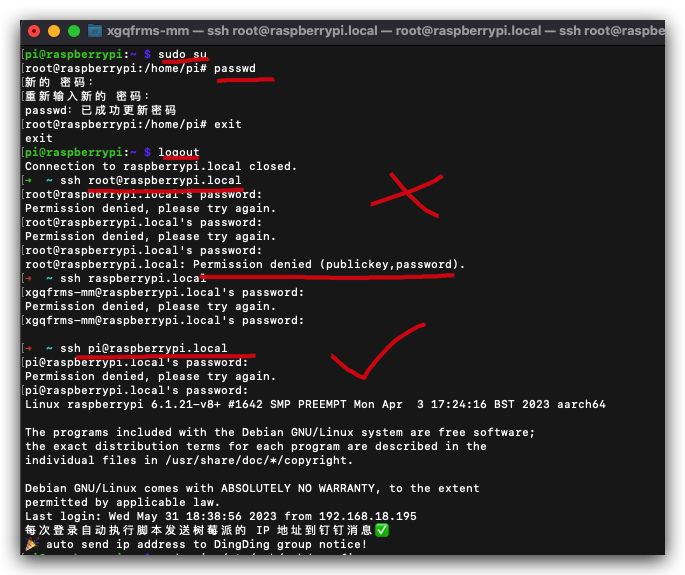
errors
#  pi 用户切换到 root 用户

$ sudo su

# 设置 root 用户的密码

root@raspberrypi:/home/pi# passwd

新的 密码:

重新输入新的 密码:

passwd:已成功更新密码

# 退回到 pi 用户

root@raspberrypi:/home/pi# exit

exit
# pi 用户退出 SSH 登录

$ logout

# pi 用户 SSH 登录正常

$ ssh pi@raspberrypi.local

# 密码没有错误,但是 root 用户一直无法 SSH 登录

$ ssh root@raspberrypi.local

root@raspberrypi.local's password:

Permission denied, please try again.

root@raspberrypi.local's password:

Permission denied, please try again.

root@raspberrypi.local's password:

root@raspberrypi.local: Permission denied (publickey,password).
solution
要给 root 设置登录密码,默认 root 没有密码
要开启 root 的 SSH 登录权限,默认是不允许 root 进行 SSH 访问的
# 修改

$ sudo vim /etc/ssh/sshd_config
# 重启 sshd 服务

$ systemctl restart sshd

==== AUTHENTICATING FOR org.freedesktop.systemd1.manage-units ===

重新启动“ssh.service”需要认证。

Authenticating as: ,,, (pi)

Password:

==== AUTHENTICATION COMPLETE ===

prohibit-password=>yes
# Authentication:

# 临时打开 ️

LoginGraceTime 2m

PermitRootLogin yes

StrictModes yes

#MaxAuthTries 6

#MaxSessions 10
# Authentication:

+ # 临时打开 ️

+ LoginGraceTime 2m

+ PermitRootLogin yes

+ StrictModes yes

- # LoginGraceTime 2m

- # PermitRootLogin prohibit-password

- # StrictModes yes

#MaxAuthTries 6

#MaxSessions 10
demos
SSH &
/etc/ssh/sshd_config
$ cat /etc/ssh/sshd_config
$ cat /etc/ssh/sshd_config
#	$OpenBSD: sshd_config,v 1.103 2018/04/09 20:41:22 tj Exp $

# This is the sshd server system-wide configuration file.  See

# sshd_config(5) for more information.

# This sshd was compiled with PATH=/usr/bin:/bin:/usr/sbin:/sbin

# The strategy used for options in the default sshd_config shipped with

# OpenSSH is to specify options with their default value where

# possible, but leave them commented.  Uncommented options override the

# default value.

Include /etc/ssh/sshd_config.d/*.conf

#Port 22

#AddressFamily any

#ListenAddress 0.0.0.0

#ListenAddress ::

#HostKey /etc/ssh/ssh_host_rsa_key

#HostKey /etc/ssh/ssh_host_ecdsa_key

#HostKey /etc/ssh/ssh_host_ed25519_key

# Ciphers and keying

#RekeyLimit default none

# Logging

#SyslogFacility AUTH

#LogLevel INFO

# Authentication:

# 临时打开 ️

LoginGraceTime 2m

PermitRootLogin yes

StrictModes yes

#LoginGraceTime 2m

#PermitRootLogin prohibit-password

#StrictModes yes

#MaxAuthTries 6

#MaxSessions 10

#PubkeyAuthentication yes

# Expect .ssh/authorized_keys2 to be disregarded by default in future.

#AuthorizedKeysFile	.ssh/authorized_keys .ssh/authorized_keys2

#AuthorizedPrincipalsFile none

#AuthorizedKeysCommand none

#AuthorizedKeysCommandUser nobody

# For this to work you will also need host keys in /etc/ssh/ssh_known_hosts

#HostbasedAuthentication no

# Change to yes if you don't trust ~/.ssh/known_hosts for

# HostbasedAuthentication

#IgnoreUserKnownHosts no

# Don't read the user's ~/.rhosts and ~/.shosts files

#IgnoreRhosts yes

# To disable tunneled clear text passwords, change to no here!

#PasswordAuthentication yes

#PermitEmptyPasswords no

# Change to yes to enable challenge-response passwords (beware issues with

# some PAM modules and threads)

ChallengeResponseAuthentication no

# Kerberos options

#KerberosAuthentication no

#KerberosOrLocalPasswd yes

#KerberosTicketCleanup yes

#KerberosGetAFSToken no

# GSSAPI options

#GSSAPIAuthentication no

#GSSAPICleanupCredentials yes

#GSSAPIStrictAcceptorCheck yes

#GSSAPIKeyExchange no

# Set this to 'yes' to enable PAM authentication, account processing,

# and session processing. If this is enabled, PAM authentication will

# be allowed through the ChallengeResponseAuthentication and

# PasswordAuthentication.  Depending on your PAM configuration,

# PAM authentication via ChallengeResponseAuthentication may bypass

# the setting of "PermitRootLogin without-password".

# If you just want the PAM account and session checks to run without

# PAM authentication, then enable this but set PasswordAuthentication

# and ChallengeResponseAuthentication to 'no'.

UsePAM yes

#AllowAgentForwarding yes

#AllowTcpForwarding yes

#GatewayPorts no

X11Forwarding yes

#X11DisplayOffset 10

#X11UseLocalhost yes

#PermitTTY yes

PrintMotd no

#PrintLastLog yes

#TCPKeepAlive yes

#PermitUserEnvironment no

#Compression delayed

#ClientAliveInterval 0

#ClientAliveCountMax 3

#UseDNS no

#PidFile /var/run/sshd.pid

#MaxStartups 10:30:100

#PermitTunnel no

#ChrootDirectory none

#VersionAddendum none

# no default banner path

#Banner none

# Allow client to pass locale environment variables

AcceptEnv LANG LC_*

# override default of no subsystems

Subsystem	sftp	/usr/lib/openssh/sftp-server

# Example of overriding settings on a per-user basis

#Match User anoncvs

#	X11Forwarding no

#	AllowTcpForwarding no

#	PermitTTY no

#	ForceCommand cvs server
( 反爬虫测试!打击盗版️)如果你看到这个信息, 说明这是一篇剽窃的文章,请访问 https://www.cnblogs.com/xgqfrms/ 查看原创文章!
refs
https://www.cnblogs.com/xgqfrms/p/17446689.html#5181665
xgqfrms 2012-2021
www.cnblogs.com/xgqfrms 发布文章使用:只允许注册用户才可以访问!
原创文章,版权所有️xgqfrms, 禁止转载 ️,侵权必究️!
How to fix the problem that Raspberry Pi cannot use the root user for SSH login All In One的更多相关文章
- Raspberry Pi 摄像头模块入门
目录 一.摄像头模块安装 二.使用命令控制摄像头 三.使用Python程序控制摄像头 四.基于vlc的Raspberry Pi摄像头实时监控 参考资料 Raspberry Pi提供了摄像头模块的接口, ...
- Raspberry Pi 4B 安装 CentOS 8
最近新入手一块Raspberry Pi 4B 8G的板子,想在这块板子上搭建CentOS 8的环境.经过数次采坑终于安装成功. 准备条件: 1.Raspberry Pi 4B 板子 + SD卡 2. ...
- raspberry pi使用笔记
1.raspberry pi系统vim问题 习惯了Linux的vim的使用,但是在raspberry pi中,用apt-get install vim后,vim变得很难用,进入编辑模式,输入字母时会莫 ...
- [quote ]ffmpeg, gstreamer, Raspberry Pi, Windows Desktop streaming
[quote ]ffmpeg, gstreamer, Raspberry Pi, Windows Desktop streaming http://blog.pi3g.com/2013/08/ffmp ...
- Raspberry Pi Kernel Compilation 内核编译官方文档
elinux.org/Raspberry_Pi_Kernel_Compilation#Use_the_provided_compiler Software & Distributions: S ...
- Roomblock: a Platform for Learning ROS Navigation With Roomba, Raspberry Pi and RPLIDAR(转)
What is this? "Roomblock" is a robot platform consists of a Roomba, a Raspberry Pi 2, a ...
- How to emulate a Raspberry Pi on your PC
How to emulate a Raspberry Pi on your PC I am very interested in trying simulators and emulators for ...
- RASPBERRY PI 外设学习资源
参考: http://www.siongboon.com/projects/2013-07-08_raspberry_pi/index.html Raspberry Pi Get st ...
- Raspberry Pi Resources-Using the UART
参考:RPi Serial Connection 本文来自:http://www.raspberry-projects.com/pi/programming-in-c/uart-serial-port ...
- Adding an On/Off switch to your Raspberry Pi
http://www.raspberry-pi-geek.com/Archive/2013/01/Adding-an-On-Off-switch-to-your-Raspberry-Pi#articl ...
随机推荐
- 【读书笔记】组合计数中的行列式方法 专题4 Routings: the Lindstrm–Gessel–Viennot lemma
书用的是Handbook of Enumerative Combinatorics (Miklos Bona) 目录 专题4-Routings: the Lindstrm–Gessel–Viennot ...
- 对一些常用RDD算子的总结
虽然目前逐渐sql化,但是掌握 RDD 常用算子是做好 Spark 应用开发的基础,而数据转换类算子则是基础中的基础,因此学习这些算子还是很有必要的. 这篇博客主要参考Spark官方文档中RDD编程一 ...
- vue3 ts 类式写法的mixins
vue-property-decorator 混入(mixins) // mixins.ts import { Vue } from 'vue-property-decorator' class Mi ...
- 单机最快的队列Disruptor解析和使用
前言 介绍高性能队列Disruptor原理以及使用例子. Disruptor是什么? Disruptor是外汇和加密货币交易所运营商 LMAX group 建立高性能的金融交易所的结果.用于解决生产者 ...
- 6.理解Jwt代码
1.昨天主要是对Jwt的代码里面不熟悉的代码进行了简要的理解,发现其实有些流程并不是普通程序员自己写的,而是自己进行拓展,这些流程是开源程序员写的开发流程:我发现这些代码一般要么是父类的方法实现,要么 ...
- Github 添加贪吃蛇动画
前言 我们都知道,对于Github来说,当你选择你的账户时,可以看到自己的提交记录. 于是就有大神动脑筋了,这些commit记录都是一些豆,如果弄一条蛇来,不就可以搞个贪吃蛇了吗? 有道理有道理,本文 ...
- 运行项目报错Cannot read property 'styles' of undefined
原因是安装依赖版本不对,以下是我的解决办法: 1.先删除项目中package-lock.json 文件 及node_modules文件(可使用rimraf指令删除node_modules,直接删文件很 ...
- CentOS 7 更改内网 IP
打开网络配置文件 vim /etc/sysconfig/network-scripts/ifcfg-em2 修改配置文件如下 TYPE=Ethernet PROXY_METHOD=none BROWS ...
- 【vue3-element-admin 】基于 Vue3 + Vite4 + TypeScript + Element-Plus 从0到1搭建后台管理系统(前后端开源@有来开源组织)
vue3-element-admin 是基于 vue-element-admin 升级的 Vue3 + Element Plus 版本的后台管理前端解决方案,技术栈为 Vue3 + Vite4 + T ...
- canvas-绘制3D金字塔
var canvas1 = document.getElementById("canvas1"); var context = canvas1.getContext("2 ...