
openAI的仿真环境Gym Retro的Python API接口
如题,本文主要介绍仿真环境Gym Retro的Python API接口 。
官网地址:
https://retro.readthedocs.io/en/latest/python.html
==============================================
gym-retro 的Python接口和gym基本保持一致,或者说是兼容的,在使用gym-retro的时候会调用gym的一些操作,因此我们安装gym-retro的同时也会将gym进行安装。
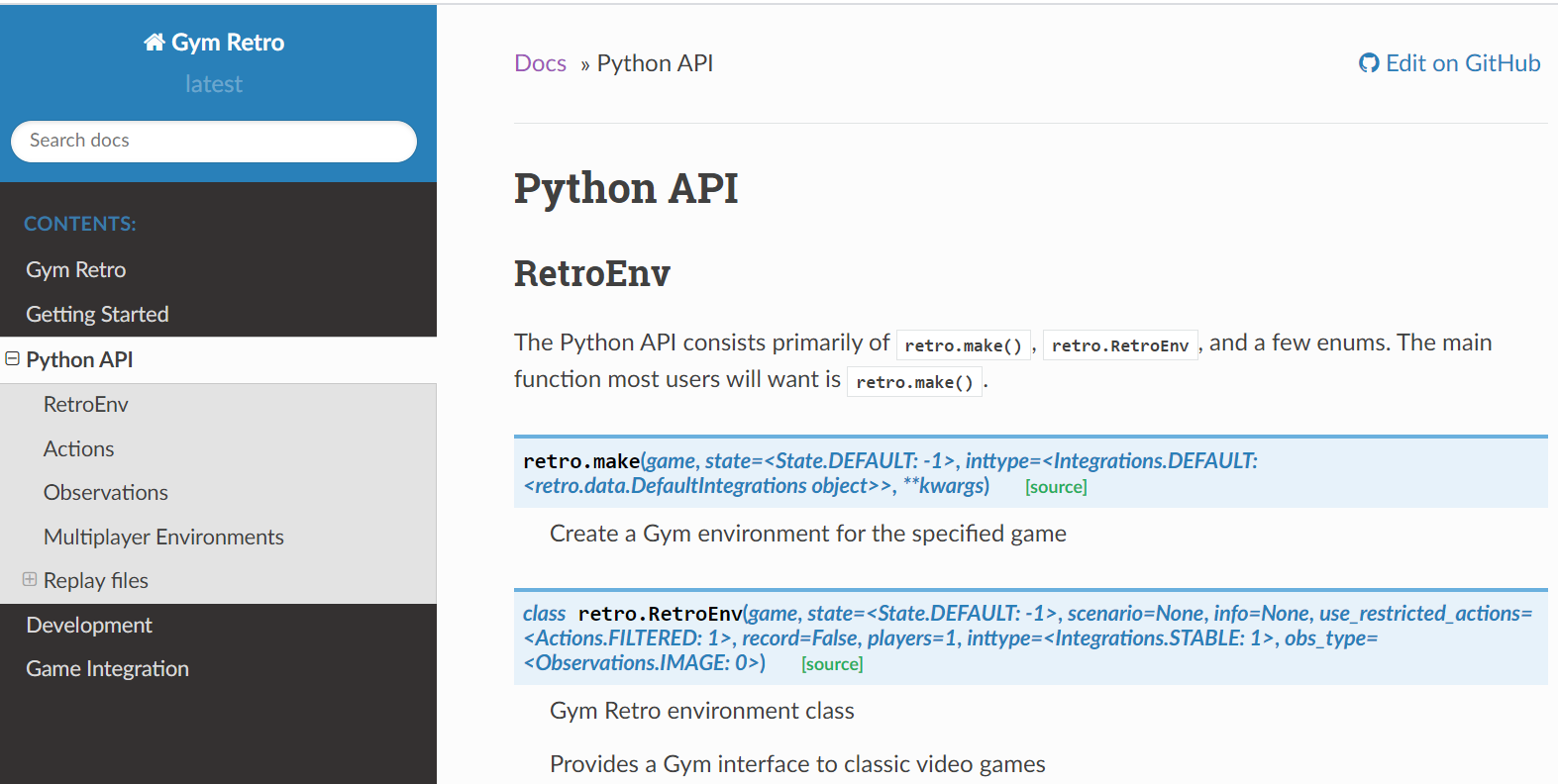
因为gym-retro的Python接口和gym大致相同,所以官网给出的也是二者不同的地方,也就是gym-retro中才有的一些设置,该不同的地方其实就只有一处,就是环境的设置入口,而其他的不同地方都是围绕着这个入口函数的或者说是为这个入口函数进行参数设置的。环境入口函数如上图所示。
gym-retro 的环境入口函数(其实是类的函数)有两个,分别为:retro.make(), retro.RetroEnv
retro.make 函数的输入参数情况:

retro.RetroEnv 函数的输入参数情况:

说明一点,个人在使用时没有发现这两个函数有什么不同,为了和gym更加匹配所以更加推荐使用 retro.make 函数,同时官网中也是推荐使用 retro.make 函数进行环境设置。
下面我们都以 retro.make 为例子进行介绍。
==============================================
retro.make 中的输入参数为 enum 枚举类型,具体为类:
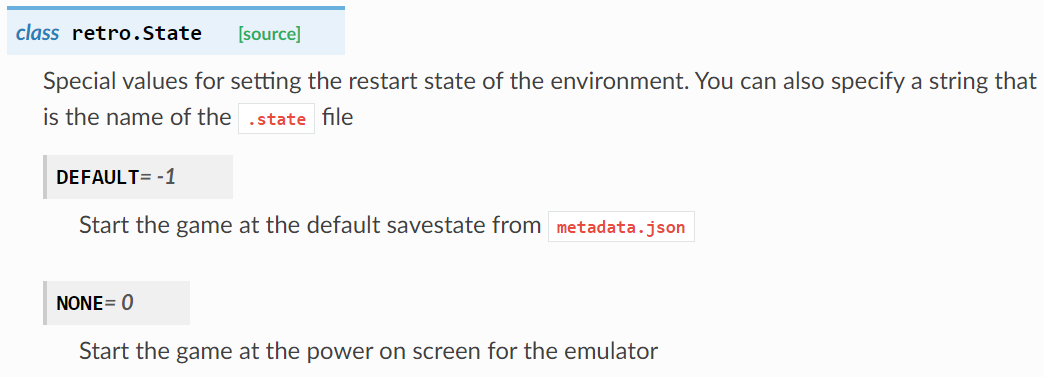
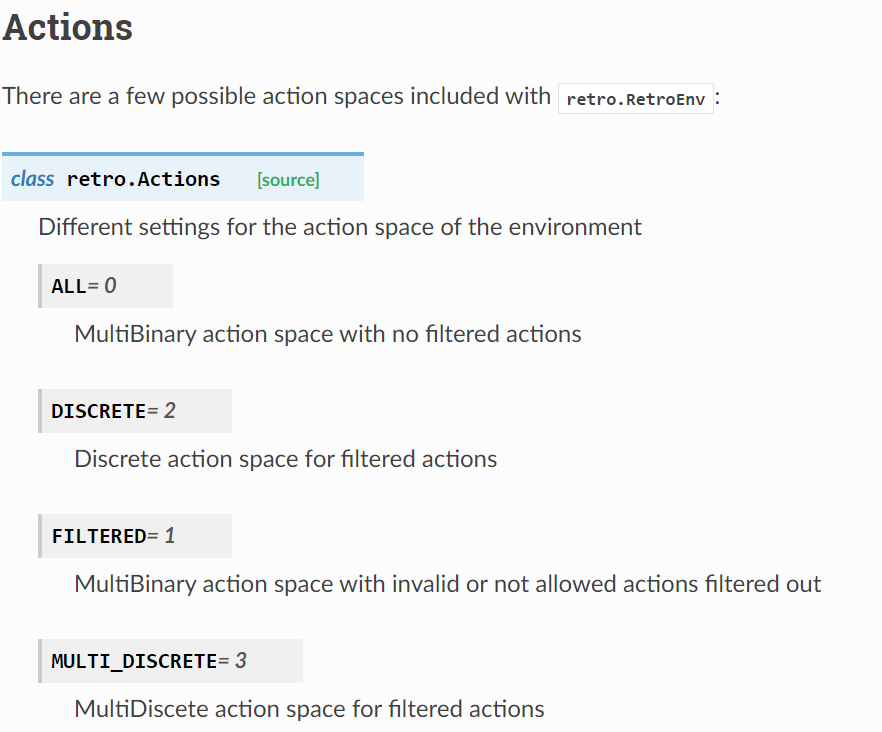
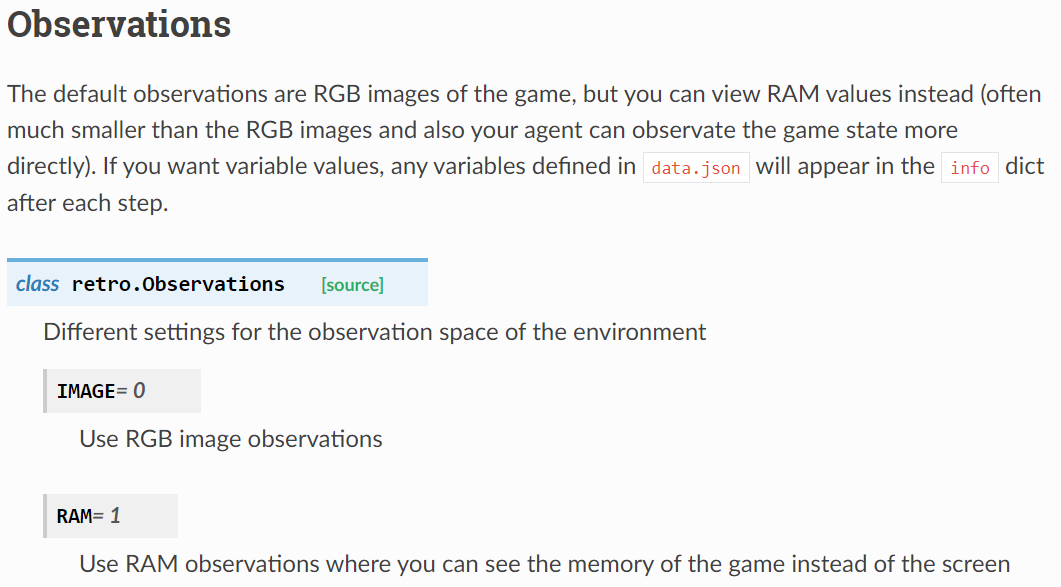
retro.State , retro.Actions , retro.Observations 。
官网介绍:
=============================================
下面使用 游戏 Pong-Atari2600 进行API的介绍,标准默认的代码如下:
注意: 游戏的roms下载地址:
atari 2600 ROM官方链接:
http://www.atarimania.com/rom_collection_archive_atari_2600_roms.html
import retro

def main():

    env = retro.make(game='Pong-Atari2600', players=2)

    obs = env.reset()

    while True:

        # action_space will by MultiBinary(16) now instead of MultiBinary(8)

        # the bottom half of the actions will be for player 1 and the top half for player 2

        obs, rew, done, info = env.step(env.action_space.sample())

        # rew will be a list of [player_1_rew, player_2_rew]

        # done and info will remain the same

        env.render()

        if done:

            obs = env.reset()

    env.close()

if __name__ == "__main__":

    main()
对环境函数 retro.make 设置入参 state :
入参 state的输入值为 retro.State 的枚举类:
分别可以设置为
state=retro.State.DEFAULT
或
state=retro.State.NONE
其中,我们默认的是使用 state=retro.State.DEFAULT ,这样我们就可以使用安装游戏时游戏rom文件夹下的 metadata.json 文件中指定的 游戏开始状态,即 metadata.json 中指定的 .state 文件。而 state=retro.State.NONE 则是使用rom文件默认的原始初始状态进行游戏初始化。
说明一下,ROMs游戏的状态可以保存为某个 .state 文件,从 .state 文件中启动初始化某游戏我们可以得到完全相同的游戏初始化环境(游戏在内存中的所有数值都是完全相同的)。由于ROMs游戏原本设计并不是给计算机仿真使用的,所以很多游戏在开始阶段需要认为手动的进行选择(如关卡选择、难度选择、具体配置选择等),为了可以方便的在计算机里面仿真我们一般需要提前对ROMs游戏进行手动初始化也就是跳过这些需要手动操作的步骤,然后再将此时的游戏状态保存下来,以后使用计算机仿真的时候直接从保存的状态启动。
这时大家或许会有个疑问,那就是采用上面的方式每次都是从同一个状态开始游戏那么是不是会进行多个回合的游戏最后结果都一样呢,确实这个担忧是多余的,因为即使每次都是从同一个游戏状态启动游戏但是在运行游戏的过程中我们使用的随机种子是不同的,这样计算机采取的动作也是不同的,这时不论agent的动作如何选择整个游戏过程都是各不相同的。
正因为我们往往需要手动操作游戏去跳过游戏的开始阶段所以我们一般不使用 state=retro.State.NONE 设置,而是 state=retro.State.DEFAULT ,这样就可以在 metadata.json 中指定自己手动指定的开始状态。
本文使用anaconda环境运行,因此本文中 游戏 Pong-Atari2600 的地址:(本机创建的环境名玩为 game )
anaconda3\envs\game\Lib\site-packages\retro\data\stable\Pong-Atari2600
该路径下内容:
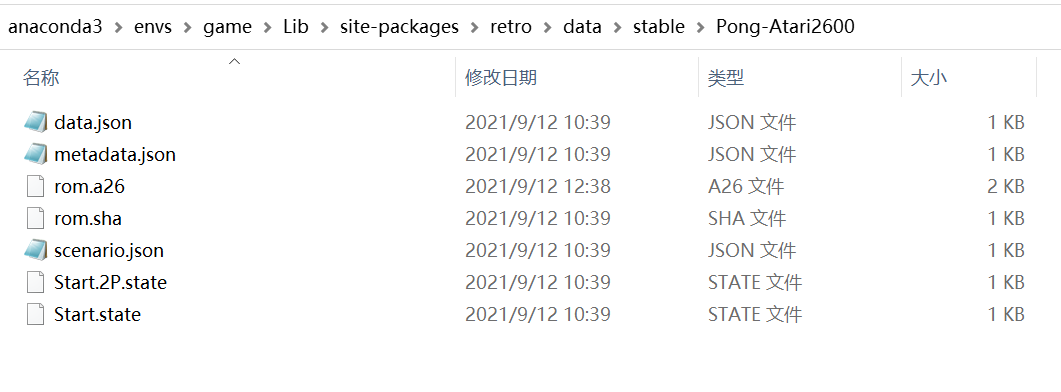
可以看到 metadata.json 中内容:

其中,“Start” 为单人模式下启动游戏的状态文件,“Start.2P” 为双人模式下启动游戏的状态文件名,加上 .state 文件类型后缀则为 Start.state 文件 和 Start.2p.state 文件正好对应上面路径下的两个.state 文件。
例子:
state=retro.State.DEFAULT


import retro

def main():

    env = retro.make(game='Pong-Atari2600', players=2, state=retro.State.DEFAULT)

    obs = env.reset()

    while True:

        # action_space will by MultiBinary(16) now instead of MultiBinary(8)

        # the bottom half of the actions will be for player 1 and the top half for player 2

        obs, rew, done, info = env.step(env.action_space.sample())

        # rew will be a list of [player_1_rew, player_2_rew]

        # done and info will remain the same

        env.render()

        if done:

            obs = env.reset()

    env.close()

if __name__ == "__main__":

    main()
state=retro.State.NONE
import retro

def main():

    env = retro.make(game='Pong-Atari2600', players=2, state=retro.State.NONE)

    obs = env.reset()

    while True:

        # action_space will by MultiBinary(16) now instead of MultiBinary(8)

        # the bottom half of the actions will be for player 1 and the top half for player 2

        obs, rew, done, info = env.step(env.action_space.sample())

        # rew will be a list of [player_1_rew, player_2_rew]

        # done and info will remain the same

        env.render()

        if done:

            obs = env.reset()

    env.close()

if __name__ == "__main__":

    main()
===============================================
对环境函数 retro.make 设置入参 obs_type :
分别可以设置为
obs_type=retro.Observations.IMAGE
或
obs_type=retro.Observations.RAM
其中,obs_type=retro.Observations.IMAGE 为默认设置,表示agent与环境交互返回的状态变量为图像的数值,
而 obs_type=retro.Observations.RAM 则表示返回的是游戏运行时的内存数据(用游戏当前运行时内存中数据表示此时的状态)
例子:
obs_type=retro.Observations.IMAGE
import retro

def main():

    env = retro.make(game='Pong-Atari2600', players=2, state=retro.State.DEFAULT, obs_type=retro.Observations.IMAGE)

    obs = env.reset()

    while True:

        # action_space will by MultiBinary(16) now instead of MultiBinary(8)

        # the bottom half of the actions will be for player 1 and the top half for player 2

        obs, rew, done, info = env.step(env.action_space.sample())

        # rew will be a list of [player_1_rew, player_2_rew]

        # done and info will remain the same

        env.render()

        print(type(obs))

        print(obs)

        if done:

            obs = env.reset()

    env.close()

if __name__ == "__main__":

    main()
obs_type=retro.Observations.RAM
import retro

def main():

    env = retro.make(game='Pong-Atari2600', players=2, state=retro.State.DEFAULT, obs_type=retro.Observations.RAM)

    obs = env.reset()

    while True:

        # action_space will by MultiBinary(16) now instead of MultiBinary(8)

        # the bottom half of the actions will be for player 1 and the top half for player 2

        obs, rew, done, info = env.step(env.action_space.sample())

        # rew will be a list of [player_1_rew, player_2_rew]

        # done and info will remain the same

        env.render()

        print(type(obs))

        print(obs)

        if done:

            obs = env.reset()

    env.close()

if __name__ == "__main__":

    main()
================================================
对环境函数 retro.make 设置入参 use_restricted_actions :
可设置为:
use_restricted_actions=retro.Actions.ALL
或
use_restricted_actions=retro.Actions.DISCRETE
或
use_restricted_actions=retro.Actions.FILTERED
或
use_restricted_actions=retro.Actions.MULTI_DISCRETE
根据 函数 retro.RetroEnv 源代码:
https://retro.readthedocs.io/en/latest/_modules/retro/retro_env.html#RetroEnv
我们可以大致估计默认设置为:
use_restricted_actions=retro.Actions.FILTERED
其中,use_restricted_actions=retro.Actions.ALL 代表动作为 MultiBinary 类型,并且不对动作进行过滤,也就是说动作空间为使用所有动作(有些无效动作也会包括在里面)。
而 use_restricted_actions=retro.Actions.DISCRETE 和 use_restricted_actions=retro.Actions.FILTERED 和 use_restricted_actions=retro.Actions.MULTI_DISCRETE
则是对动作过滤,也就是说不使用所有动作作为动作空间,将一些无效动作直接过滤排除掉,不包括在动作空间中。
其中,use_restricted_actions=retro.Actions.DISCRETE 动作空间的类型为 DISCRETE 类型,
use_restricted_actions=retro.Actions.FILTERED 动作空间的类型为 MultiBinary 类型 。
use_restricted_actions=retro.Actions.MULTI_DISCRETE 动作空间的类型为 MultiDiscete 类型 。
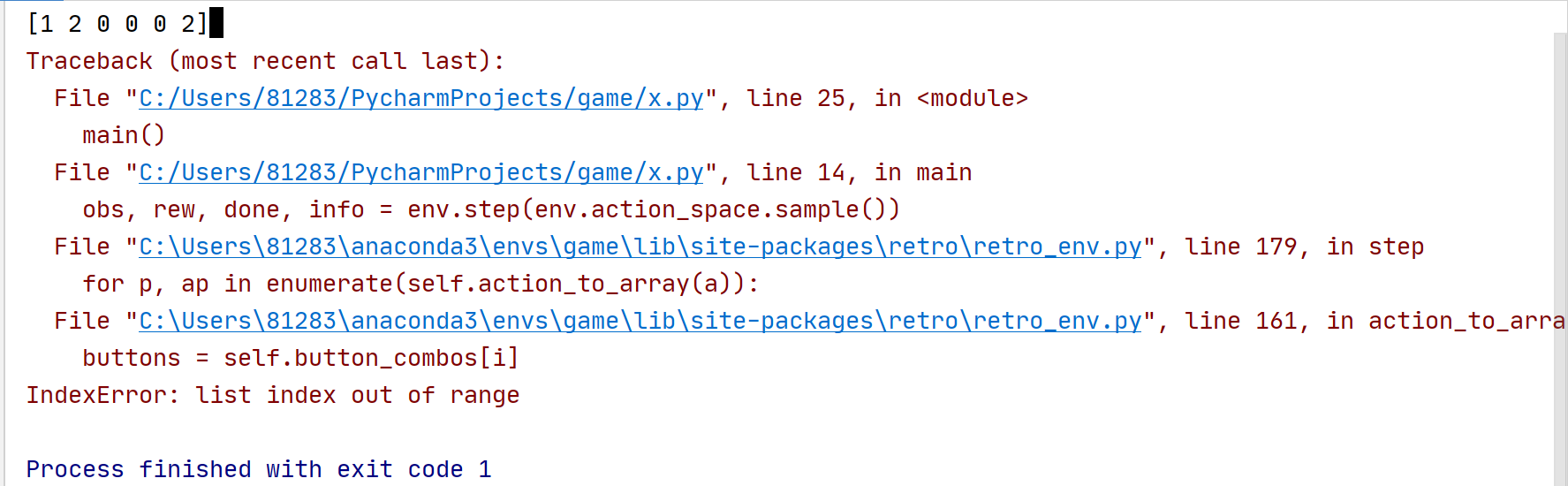
注意: 在游戏 Pong-Atari2600 中 use_restricted_actions=retro.Actions.MULTI_DISCRETE 传递给环境的step函数后会报错。
例子:
use_restricted_actions=retro.Actions.MULTI_DISCRETE
import retro

def main():

    env = retro.make(game='Pong-Atari2600', players=2, state=retro.State.DEFAULT, obs_type=retro.Observations.IMAGE, use_restricted_actions=retro.Actions.MULTI_DISCRETE)

    obs = env.reset()

    while True:

        # action_space will by MultiBinary(16) now instead of MultiBinary(8)

        # the bottom half of the actions will be for player 1 and the top half for player 2

        print(env.action_space.sample())

        obs, rew, done, info = env.step(env.action_space.sample())

        # rew will be a list of [player_1_rew, player_2_rew]

        # done and info will remain the same

        env.render()

        if done:

            obs = env.reset()

    env.close()

if __name__ == "__main__":

    main()
运行报错信息:
[1 2 0 0 0 2]

Traceback (most recent call last):

  File "C:/Users/81283/PycharmProjects/game/x.py", line 25, in <module>

    main()

  File "C:/Users/81283/PycharmProjects/game/x.py", line 14, in main

    obs, rew, done, info = env.step(env.action_space.sample())

  File "C:\Users\81283\anaconda3\envs\game\lib\site-packages\retro\retro_env.py", line 179, in step

    for p, ap in enumerate(self.action_to_array(a)):

  File "C:\Users\81283\anaconda3\envs\game\lib\site-packages\retro\retro_env.py", line 161, in action_to_array

    buttons = self.button_combos[i]

IndexError: list index out of range

Process finished with exit code 1
这说明 游戏 Pong-Atari2600 环境的step函数不支持 MultiDiscete 类型的动作空间。
例子:
use_restricted_actions=retro.Actions.ALL
import retro

def main():

    env = retro.make(game='Pong-Atari2600', players=2, state=retro.State.DEFAULT, obs_type=retro.Observations.IMAGE, use_restricted_actions=retro.Actions.ALL)

    obs = env.reset()

    while True:

        # action_space will by MultiBinary(16) now instead of MultiBinary(8)

        # the bottom half of the actions will be for player 1 and the top half for player 2

        print(env.action_space.sample())

        obs, rew, done, info = env.step(env.action_space.sample())

        # rew will be a list of [player_1_rew, player_2_rew]

        # done and info will remain the same

        env.render()

        if done:

            obs = env.reset()

    env.close()

if __name__ == "__main__":

    main()
不对动作进行进行过滤,有些无效的动作也会被选择,所以导致游戏会出现很多无法预料的结果,这个例子中就会出现游戏始终无法正式开始(游戏开始一般需要执行fire button),或者游戏没有运行几步就 reset 重新初始化了。
例子:
use_restricted_actions=retro.Actions.DISCRETE
import retro

def main():

    env = retro.make(game='Pong-Atari2600', players=2, state=retro.State.DEFAULT, obs_type=retro.Observations.IMAGE, use_restricted_actions=retro.Actions.DISCRETE)

    obs = env.reset()

    while True:

        # action_space will by MultiBinary(16) now instead of MultiBinary(8)

        # the bottom half of the actions will be for player 1 and the top half for player 2

        print(env.action_space.sample())

        obs, rew, done, info = env.step(env.action_space.sample())

        # rew will be a list of [player_1_rew, player_2_rew]

        # done and info will remain the same

        env.render()

        if done:

            obs = env.reset()

    env.close()

if __name__ == "__main__":

    main()
例子:(默认的设置)
use_restricted_actions=retro.Actions.FILTERED
import retro

def main():

    env = retro.make(game='Pong-Atari2600', players=2, state=retro.State.DEFAULT, obs_type=retro.Observations.IMAGE, use_restricted_actions=retro.Actions.FILTERED )

    obs = env.reset()

    while True:

        # action_space will by MultiBinary(16) now instead of MultiBinary(8)

        # the bottom half of the actions will be for player 1 and the top half for player 2

        print(env.action_space.sample())

        obs, rew, done, info = env.step(env.action_space.sample())

        # rew will be a list of [player_1_rew, player_2_rew]

        # done and info will remain the same

        env.render()

        if done:

            obs = env.reset()

    env.close()

if __name__ == "__main__":

    main()
设置 use_restricted_actions=retro.Actions.DISCRETE 和 use_restricted_actions=retro.Actions.FILTERED 的动作空间类型分别为 DISCRETE 类型 和 MultiBinary 类型 。虽然这两个设置的动作空间不同,但是都是动作空间对应的动作都是过滤后的动作,因此在执行过程中这两种设置取得的效果大致相同。
这里说明一下,无效动作个人的理解是对环境初始化或者其他的可以影响环境正常运行的动作,而不是说无效动作会执行后报错的,只能说执行无效动作会使我们得到不想要的环境状态。
===============================================
对动作空间进行定制化,给出例子,对126个数值的 Discrete(126) 动作空间限制为7个数值的 Discrete(7)动作空间,也就是说Discrete类型的126个动作中我们只取其中最重要的7个动作,将这7个动作定制为新的动作空间。
例子: discretizer.py
修改后的代码:
"""

Define discrete action spaces for Gym Retro environments with a limited set of button combos

"""

import gym

import numpy as np

import retro

class Discretizer(gym.ActionWrapper):

    """

    Wrap a gym environment and make it use discrete actions.

    Args:

        combos: ordered list of lists of valid button combinations

    """

    def __init__(self, env, combos):

        super().__init__(env)

        assert isinstance(env.action_space, gym.spaces.MultiBinary)

        buttons = env.unwrapped.buttons

        self._decode_discrete_action = []

        for combo in combos:

            arr = np.array([False] * env.action_space.n)

            for button in combo:

                arr[buttons.index(button)] = True

            self._decode_discrete_action.append(arr)

        self.action_space = gym.spaces.Discrete(len(self._decode_discrete_action))

    def action(self, act):

        return self._decode_discrete_action[act].copy()

class SonicDiscretizer(Discretizer):

    """

    Use Sonic-specific discrete actions

    based on https://github.com/openai/retro-baselines/blob/master/agents/sonic_util.py

    """

    def __init__(self, env):

        super().__init__(env=env,

                         combos=[['LEFT'], ['RIGHT'], ['LEFT', 'DOWN'], ['RIGHT', 'DOWN'], ['DOWN'], ['DOWN', 'B'],

                                 ['B']])

def main():

    env = retro.make(game='SonicTheHedgehog-Genesis', use_restricted_actions=retro.Actions.MULTI_DISCRETE)

    print('retro.Actions.MULTI_DISCRETE action_space', env.action_space)

    env.close()

    env = retro.make(game='SonicTheHedgehog-Genesis', use_restricted_actions=retro.Actions.ALL)

    print('retro.Actions.ALL action_space', env.action_space)

    env.close()

    env = retro.make(game='SonicTheHedgehog-Genesis', use_restricted_actions=retro.Actions.FILTERED)

    print('retro.Actions.FILTERED action_space', env.action_space)

    env.close()

    env = retro.make(game='SonicTheHedgehog-Genesis', use_restricted_actions=retro.Actions.DISCRETE)

    print('retro.Actions.DISCRETE action_space', env.action_space)

    env.close()

    env = retro.make(game='SonicTheHedgehog-Genesis')

    print(env.unwrapped.buttons)

    env = SonicDiscretizer(env)

    print('SonicDiscretizer action_space', env.action_space)

    env.close()

if __name__ == '__main__':

    main()
运行结果:

已知过滤后的DISCRETE 动作空间为 Discrete(126) , 我们希望将 DISCRETE 动作空间限制为 DISCRETE(7) 。
上面例子的实现是将 MultiBinary(12) 对应的Button,即 ['B', 'A', 'MODE', 'START', 'UP', 'DOWN', 'LEFT', 'RIGHT', 'C', 'Y', 'X', 'Z']
选取为 [['LEFT'], ['RIGHT'], ['LEFT', 'DOWN'], ['RIGHT', 'DOWN'], ['DOWN'], ['DOWN', 'B'], ['B']] ,即 MultiBinary(7) 。
Discrete(7) 的动作分别为 0, 1, 2, 3, 4, 5, 6 ,对应的 MultiBinary(7) 的button意义分别为:
[['LEFT'], ['RIGHT'], ['LEFT', 'DOWN'], ['RIGHT', 'DOWN'], ['DOWN'], ['DOWN', 'B'], ['B']]
而上面例子的MultiBinary(7) 其实是在MultiBinary(12)的基础上包装的,其真实的MultiBinary(12) 编码为:
[[0 0 0 0 0 0 1 0 0 0 0 0]
[0 0 0 0 0 0 0 1 0 0 0 0]
[0 0 0 0 0 1 1 0 0 0 0 0]
[0 0 0 0 0 1 0 1 0 0 0 0]
[0 0 0 0 0 1 0 0 0 0 0 0]
[1 0 0 0 0 1 0 0 0 0 0 0]
[1 0 0 0 0 0 0 0 0 0 0 0]]
代码:
"""

Define discrete action spaces for Gym Retro environments with a limited set of button combos

"""

import gym

import numpy as np

import retro

class Discretizer(gym.ActionWrapper):

    """

    Wrap a gym environment and make it use discrete actions.

    Args:

        combos: ordered list of lists of valid button combinations

    """

    def __init__(self, env, combos):

        super().__init__(env)

        assert isinstance(env.action_space, gym.spaces.MultiBinary)

        buttons = env.unwrapped.buttons

        self._decode_discrete_action = []

        for combo in combos:

            arr = np.array([False] * env.action_space.n)

            for button in combo:

                arr[buttons.index(button)] = True

            self._decode_discrete_action.append(arr)

        print("inside encode:")

        print(np.array(self._decode_discrete_action, dtype=np.int32))

        self.action_space = gym.spaces.Discrete(len(self._decode_discrete_action))

    def action(self, act):

        return self._decode_discrete_action[act].copy()

class SonicDiscretizer(Discretizer):

    """

    Use Sonic-specific discrete actions

    based on https://github.com/openai/retro-baselines/blob/master/agents/sonic_util.py

    """

    def __init__(self, env):

        super().__init__(env=env,

                         combos=[['LEFT'], ['RIGHT'], ['LEFT', 'DOWN'], ['RIGHT', 'DOWN'], ['DOWN'], ['DOWN', 'B'],

                                 ['B']])

def main():

    env = retro.make(game='SonicTheHedgehog-Genesis', use_restricted_actions=retro.Actions.MULTI_DISCRETE)

    print('retro.Actions.MULTI_DISCRETE action_space', env.action_space)

    env.close()

    env = retro.make(game='SonicTheHedgehog-Genesis', use_restricted_actions=retro.Actions.ALL)

    print('retro.Actions.ALL action_space', env.action_space)

    env.close()

    env = retro.make(game='SonicTheHedgehog-Genesis', use_restricted_actions=retro.Actions.FILTERED)

    print('retro.Actions.FILTERED action_space', env.action_space)

    env.close()

    env = retro.make(game='SonicTheHedgehog-Genesis', use_restricted_actions=retro.Actions.DISCRETE)

    print('retro.Actions.DISCRETE action_space', env.action_space)

    env.close()

    env = retro.make(game='SonicTheHedgehog-Genesis')

    print(env.unwrapped.buttons)

    env = SonicDiscretizer(env)

    print('SonicDiscretizer action_space', env.action_space)

    env.close()

if __name__ == '__main__':

    main()
说明: MultiBinary 动作空间每次选择的动作可能是几个动作的组合,比如在 MultiBinary(5) 的动作空间中随机选取动作可能为:
[0,1,0,1,0] 或者 [1,0,1,1,0],其中 1 代表选取对应的动作,0则代表不选取对应的动作。
openAI的仿真环境Gym Retro的Python API接口的更多相关文章
- 初识Django —Python API接口编程入门
初识Django —Python API接口编程入门 一.WEB架构的简单介绍 Django是什么? Django是一个开放源代码的Web应用框架,由Python写成.我们的目标是用Python语言, ...
- Python api接口和SQL数据库关联
数据库表创建 服务器环境配置.连接 .操作.数据库 API接口 原则:
- kafka环境搭建和使用(python API)
引言 上一篇文章了解了kafka的重要组件zookeeper,用来保存broker.consumer等相关信息,做到平滑扩展.这篇文章就实际操作部署下kafka,用几个简单的例子加深对kafka的理解 ...
- Python Api接口自动化测试框架 excel篇
工作原理: 测试用例在excel上编辑,使用第三方库xlrd,读取表格sheet和内容,sheetName对应模块名,Jenkins集成服务发现服务moduleName查找对应表单,运用第三方库req ...
- Python Api接口自动化测试框架 代码写用例
公司新来两个妹子一直吐槽这个接口测试用例用excel维护起来十分费脑费事,而且比较low(内心十分赞同但是不能推翻自己),妹子说excel本来就很麻烦的工具,于是偷偷的进行了二次改版. 变更内容如下: ...
- python api接口认证脚本
import requests import sys def acces_api_with_cookie(url_login, USERNAME, PASSWORD, url_access): ...
- 【Python实例】用脚本自动拿一个或多个仿真环境
注1:之前使用的是perl,现在尝试切换到python; 注2:该脚本用于实现自动拿仿真环境,里面应该还有很多不足之处,后续逐渐完善; 注3:假设脚本名字为get_env.py,直接执行脚本,会有两次 ...
- 项目开发过程中什么是开发环境、测试环境、生产环境、UAT环境、仿真环境?
项目开发过程中什么是开发环境.测试环境.生产环境.UAT环境.仿真环境? 最近在公司项目开发过程中总用到测试环境,生产环境和UAT环境等,然而我对环境什么的并不是很理解它的意思,一直处于开发阶段,出于 ...
- 搭建Modelsim SE仿真环境-使用do文件仿真
本章我们介绍仿真环境搭建是基于Modelsim SE的.Modelsim有很多版本,比如说Modelsim-Altera,但是笔者还是建议大家使用Modelsim-SE,Modelsim-Altera ...
- 什么是 开发环境、测试环境、生产环境、UAT环境、仿真环境
开发环境:开发环境是程序猿们专门用于开发的服务器,配置可以比较随意, 为了开发调试方便,一般打开全部错误报告. 测试环境:一般是克隆一份生产环境的配置,一个程序在测试环境工作不正常,那么肯定不能把它发 ...
随机推荐
- raksmart服务器部署SSL报错:ERR_CERT_COMMON_NAME_INVALID
背景:raksmart服务器 下篇 部署项目 SSL报错:ERR_CERT_COMMON_NAME_INVALID 安装certbot sudo apt update sudo apt install ...
- python实现推送消息到微信公众号
使用到库: Requests 实现方式: 微信已开放了对应的接口,直接通过python的requests库,发起请求,实现推送消息到公众号 微信公众号准备: 1.没有注册微信公众号,可以使用微信提供的 ...
- springboot+security自定义登录-1-基础-自定义用户和登录界面
为何学习spring security? 理由如下: 1)虽然可以不用,但难免部分客户又要求 2)某种程度上,security还是不错的,譬如csrf,oauth等等,省了一些功夫. 3)虽然spri ...
- 利用Vue做一个小购物车
<!DOCTYPE html> <html> <head> <meta charset="utf-8"> <title> ...
- Android 中的 perfboot工具
背景 开机首先加载bootloader,由bootloader启动kernel,然后运行init程序,有init启动Zygote,Zygote进程启动SystemServ进程,在SystemServe ...
- KES数据库实践指南:探索KES数据库的事务隔离级别
引言 前两篇文章我们详细讲解了如何安装KES金仓数据库,并提供了快速查询和搭建基于coze平台的智能体的解决方案.今天,我们的焦点将放在并发控制机制和事务隔离级别上. 本文将通过一系列实验操作,深入探 ...
- 【资料分享】全志科技T507-H开发板规格书
1 评估板简介 创龙科技TLT507-EVM是一款基于全志科技T507-H处理器设计的4核ARM Cortex-A53国产工业评估板,主频高达1.416GHz,由核心板和评估底板组成.核心板CPU.R ...
- javascript深入参数传递
我们都知道javascript的基础数据类型有: Undefined . Null . Boolean . Number . String . 如果从一个变量向另一个变量复制基本类型的值,会在变量对象 ...
- .NET科普:.NET简史、.NET Standard以及C#和.NET Framework之间的关系
最近在不少自媒体上看到有关.NET与C#的资讯与评价,感觉大家对.NET与C#还是不太了解,尤其是对2016年6月发布的跨平台.NET Core 1.0,更是知之甚少.在考虑一番之后,还是决定写点东西 ...
- Packer构建openStack镜像
目录 使用Packer自动化构建镜像 使用Packer自动化构建镜像 openstack插件安装:OpenStack | Integrations | Packer | HashiCorp Devel ...