
用Docker搭建DNS服务器
0、准备工作
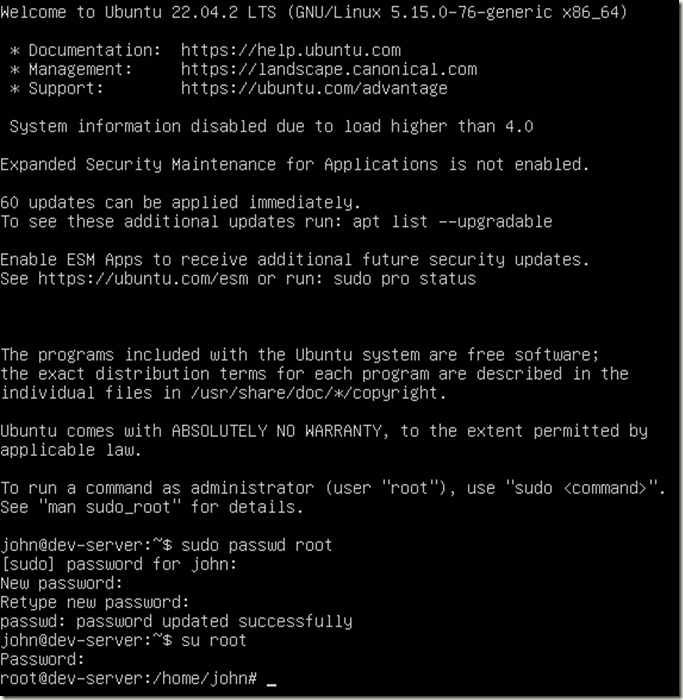
如果是全新安装的服务器,先要给root账户设置密码,命令是
sudo passwd root
然后切换到root账户
su root
上述过程屏幕输出如下
1、Docker-Compose的配置文件
用vi编辑器,创建文件:
vi docker-compose.yml
内容如下:
version: '3.6'

networks:

   main:

     ipam:

       config:

         - subnet: 10.10.1.0/24

services:

   web:

     image: 'sameersbn/bind:9.16.1-20200524'

     container_name: dns

     restart: always

     networks:

       main:

         ipv4_address: 10.10.1.2

     ports:

       - '53:53/udp'

       - '10000:10000/tcp'

     volumes:

       - '/mnt/data/dns-server:/data'

     shm_size: '256m'
保存后退出
2、用docker-compose启动容器
- 可能提示没有安装docker-compose
root@dns-server:/home/public/software/dns# docker-compose up -d

 Command 'docker-compose' not found, but can be installed with:

 snap install docker          # version 20.10.24, or

 apt  install docker-compose  # version 1.29.2-1

 See 'snap info docker' for additional versions.
- 遵照上一步的提示,安装docker-compose
root@dns-server:/home/public/software/dns# apt install docker-compose

 Reading package lists... Done

 Building dependency tree... Done

 Reading state information... Done

 The following additional packages will be installed:

   bridge-utils containerd dns-root-data dnsmasq-base docker.io pigz python3-docker python3-dockerpty python3-docopt python3-dotenv python3-texttable python3-websocket runc ubuntu-fan

 Suggested packages:

   ifupdown aufs-tools cgroupfs-mount | cgroup-lite debootstrap docker-doc rinse zfs-fuse | zfsutils

 The following NEW packages will be installed:

   bridge-utils containerd dns-root-data dnsmasq-base docker-compose docker.io pigz python3-docker python3-dockerpty python3-docopt python3-dotenv python3-texttable python3-websocket runc ubuntu-fan

 0 upgraded, 15 newly installed, 0 to remove and 60 not upgraded.

 Need to get 72.7 MB of archives.

 After this operation, 288 MB of additional disk space will be used.

 Do you want to continue? [Y/n] Y

 Get:1 http://cn.archive.ubuntu.com/ubuntu jammy/universe amd64 pigz amd64 2.6-1 [63.6 kB]

 Get:2 http://cn.archive.ubuntu.com/ubuntu jammy/main amd64 bridge-utils amd64 1.7-1ubuntu3 [34.4 kB]

 Get:3 http://cn.archive.ubuntu.com/ubuntu jammy-updates/main amd64 runc amd64 1.1.4-0ubuntu1~22.04.3 [4,244 kB]

 Get:4 http://cn.archive.ubuntu.com/ubuntu jammy-updates/main amd64 containerd amd64 1.6.12-0ubuntu1~22.04.3 [34.4 MB]

 Get:5 http://cn.archive.ubuntu.com/ubuntu jammy/main amd64 dns-root-data all 2021011101 [5,256 B]

 Get:6 http://cn.archive.ubuntu.com/ubuntu jammy-updates/main amd64 dnsmasq-base amd64 2.86-1.1ubuntu0.3 [354 kB]

 Get:7 http://cn.archive.ubuntu.com/ubuntu jammy/universe amd64 python3-websocket all 1.2.3-1 [34.7 kB]

 Get:8 http://cn.archive.ubuntu.com/ubuntu jammy/universe amd64 python3-docker all 5.0.3-1 [89.3 kB]

 Get:9 http://cn.archive.ubuntu.com/ubuntu jammy/universe amd64 python3-dockerpty all 0.4.1-2 [11.1 kB]

Get:10 http://cn.archive.ubuntu.com/ubuntu jammy/universe amd64 python3-docopt all 0.6.2-4 [26.9 kB]

 Get:11 http://cn.archive.ubuntu.com/ubuntu jammy/universe amd64 python3-dotenv all 0.19.2-1 [20.5 kB]

 Get:12 http://cn.archive.ubuntu.com/ubuntu jammy/universe amd64 python3-texttable all 1.6.4-1 [11.4 kB]

 Get:13 http://cn.archive.ubuntu.com/ubuntu jammy/universe amd64 docker-compose all 1.29.2-1 [95.8 kB]

 Get:14 http://cn.archive.ubuntu.com/ubuntu jammy-updates/universe amd64 docker.io amd64 20.10.21-0ubuntu1~22.04.3 [33.3 MB]

 Get:15 http://cn.archive.ubuntu.com/ubuntu jammy/universe amd64 ubuntu-fan all 0.12.16 [35.2 kB]

 Fetched 72.7 MB in 20s (3,598 kB/s)

 Preconfiguring packages ...

 Selecting previously unselected package pigz.

 (Reading database ... 74075 files and directories currently installed.)

 Preparing to unpack .../00-pigz_2.6-1_amd64.deb ...

 Unpacking pigz (2.6-1) ...

 Selecting previously unselected package bridge-utils.

 Preparing to unpack .../01-bridge-utils_1.7-1ubuntu3_amd64.deb ...

 Unpacking bridge-utils (1.7-1ubuntu3) ...

 Selecting previously unselected package runc.

 Preparing to unpack .../02-runc_1.1.4-0ubuntu1~22.04.3_amd64.deb ...

 Unpacking runc (1.1.4-0ubuntu1~22.04.3) ...

 Selecting previously unselected package containerd.

 Preparing to unpack .../03-containerd_1.6.12-0ubuntu1~22.04.3_amd64.deb ...

 Unpacking containerd (1.6.12-0ubuntu1~22.04.3) ...

 Selecting previously unselected package dns-root-data.

 Preparing to unpack .../04-dns-root-data_2021011101_all.deb ...

 Unpacking dns-root-data (2021011101) ...

 Selecting previously unselected package dnsmasq-base.

 Preparing to unpack .../05-dnsmasq-base_2.86-1.1ubuntu0.3_amd64.deb ...

 Unpacking dnsmasq-base (2.86-1.1ubuntu0.3) ...

 Selecting previously unselected package python3-websocket.

 Preparing to unpack .../06-python3-websocket_1.2.3-1_all.deb ...

 Unpacking python3-websocket (1.2.3-1) ...

 Selecting previously unselected package python3-docker.

 Preparing to unpack .../07-python3-docker_5.0.3-1_all.deb ...

 Unpacking python3-docker (5.0.3-1) ...

 Selecting previously unselected package python3-dockerpty.

 Preparing to unpack .../08-python3-dockerpty_0.4.1-2_all.deb ...

 Unpacking python3-dockerpty (0.4.1-2) ...

 Selecting previously unselected package python3-docopt.

 Preparing to unpack .../09-python3-docopt_0.6.2-4_all.deb ...

 Unpacking python3-docopt (0.6.2-4) ...

 Selecting previously unselected package python3-dotenv.

 Preparing to unpack .../10-python3-dotenv_0.19.2-1_all.deb ...

 Unpacking python3-dotenv (0.19.2-1) ...

 Selecting previously unselected package python3-texttable.

 Preparing to unpack .../11-python3-texttable_1.6.4-1_all.deb ...

 Unpacking python3-texttable (1.6.4-1) ...

 Selecting previously unselected package docker-compose.

 Preparing to unpack .../12-docker-compose_1.29.2-1_all.deb ...

 Unpacking docker-compose (1.29.2-1) ...

 Selecting previously unselected package docker.io.

 Preparing to unpack .../13-docker.io_20.10.21-0ubuntu1~22.04.3_amd64.deb ...

 Unpacking docker.io (20.10.21-0ubuntu1~22.04.3) ...

 Selecting previously unselected package ubuntu-fan.

 Preparing to unpack .../14-ubuntu-fan_0.12.16_all.deb ...

 Unpacking ubuntu-fan (0.12.16) ...

 Setting up python3-dotenv (0.19.2-1) ...

 Setting up python3-texttable (1.6.4-1) ...

 Setting up python3-docopt (0.6.2-4) ...

 Setting up dnsmasq-base (2.86-1.1ubuntu0.3) ...

 Setting up runc (1.1.4-0ubuntu1~22.04.3) ...

 Setting up dns-root-data (2021011101) ...

 Setting up bridge-utils (1.7-1ubuntu3) ...

 Setting up pigz (2.6-1) ...

 Setting up containerd (1.6.12-0ubuntu1~22.04.3) ...

 Created symlink /etc/systemd/system/multi-user.target.wants/containerd.service → /lib/systemd/system/containerd.service.

 Setting up python3-websocket (1.2.3-1) ...

 Setting up python3-dockerpty (0.4.1-2) ...

 Setting up ubuntu-fan (0.12.16) ...

 Created symlink /etc/systemd/system/multi-user.target.wants/ubuntu-fan.service → /lib/systemd/system/ubuntu-fan.service.

 Setting up python3-docker (5.0.3-1) ...

 Setting up docker.io (20.10.21-0ubuntu1~22.04.3) ...

 Adding group `docker' (GID 120) ...

 Done.

 Created symlink /etc/systemd/system/multi-user.target.wants/docker.service → /lib/systemd/system/docker.service.

 Created symlink /etc/systemd/system/sockets.target.wants/docker.socket → /lib/systemd/system/docker.socket.

 Setting up docker-compose (1.29.2-1) ...

 Processing triggers for dbus (1.12.20-2ubuntu4.1) ...

 Processing triggers for man-db (2.10.2-1) ...

 Scanning processes...

 Scanning processor microcode...

 Scanning linux images...

Running kernel seems to be up-to-date.

The processor microcode seems to be up-to-date.

No services need to be restarted.

No containers need to be restarted.

No user sessions are running outdated binaries.

No VM guests are running outdated hypervisor (qemu) binaries on this host.

 root@dns-server:/home/public/software/dns#
- 再次用docker-compose启动容器
会发现linux系统已经能执行docker-compose命令,但是最终是报错。
root@ami-home-gateway:/home/david/software/dns# ls

 docker-compose.yml

 root@ami-home-gateway:/home/david/software/dns# docker-compose up -d

 /snap/docker/2285/lib/python3.6/site-packages/paramiko/transport.py:33: CryptographyDeprecationWarning: Python 3.6 is no longer supported by the Python core team. Therefore, support for it is deprecated in cryptography and will be removed in a future release.

   from cryptography.hazmat.backends import default_backend

 Creating network "dns_main" with the default driver

 Pulling web (sameersbn/bind:9.16.1-20200524)...

 9.16.1-20200524: Pulling from sameersbn/bind

 d51af753c3d3: Pull complete

 fc878cd0a91c: Pull complete

 6154df8ff988: Pull complete

 fee5db0ff82f: Pull complete

 7d5f2b88fbe1: Pull complete

 677da372f47f: Pull complete

 4adaef8a17ca: Pull complete

 00abb6dce6f7: Pull complete

 d7852cfdd714: Pull complete

 Digest: sha256:685d9404bf08c177413a7448bfdb7ae71ee002a3fbf917fd8d46d4aadd687522

 Status: Downloaded newer image for sameersbn/bind:9.16.1-20200524

 Creating dns ...

 Creating dns ... error

ERROR: for dns  Cannot start service web: driver failed programming external connectivity on endpoint dns (7113503da0649c0f745f4a53c16c3c1de24b767f6fbbf816747bf04d987fe803): Error starting userland proxy: listen udp4 0.0.0.0:53: bind: address already in use

ERROR: for web  Cannot start service web: driver failed programming external connectivity on endpoint dns (7113503da0649c0f745f4a53c16c3c1de24b767f6fbbf816747bf04d987fe803): Error starting userland proxy: listen udp4 0.0.0.0:53: bind: address already in use

 ERROR: Encountered errors while bringing up the project.
上边提示的很清楚,因为DNS需要的UDP53端口,被Ubuntu占用了,
3、修改物理服务器
目的是释放对UDP端口53的占用,让容器启动后能使用UDP53端口。
修改/etc/systemd/resolved.conf文件
root@amicore:~# cd /etc/systemd/

root@amicore:/etc/systemd# ls

journald.conf  logind.conf  network  networkd.conf  pstore.conf  resolved.conf  sleep.conf  system  system.conf  timesyncd.conf  user  user.conf

 root@amicore:/etc/systemd# vi resolved.conf
文件修改两个地方
#  This file is part of systemd.

 #

 #  systemd is free software; you can redistribute it and/or modify it under the

 #  terms of the GNU Lesser General Public License as published by the Free

 #  Software Foundation; either version 2.1 of the License, or (at your option)

 #  any later version.

 #

 # Entries in this file show the compile time defaults. Local configuration

 # should be created by either modifying this file, or by creating "drop-ins" in

 # the resolved.conf.d/ subdirectory. The latter is generally recommended.

 # Defaults can be restored by simply deleting this file and all drop-ins.

 #

 # Use 'systemd-analyze cat-config systemd/resolved.conf' to display the full config.

 #

 # See resolved.conf(5) for details.

[Resolve]

 # Some examples of DNS servers which may be used for DNS= and FallbackDNS=:

 # Cloudflare: 1.1.1.1#cloudflare-dns.com 1.0.0.1#cloudflare-dns.com 2606:4700:4700::1111#cloudflare-dns.com 2606:4700:4700::1001#cloudflare-dns.com

 # Google:     8.8.8.8#dns.google 8.8.4.4#dns.google 2001:4860:4860::8888#dns.google 2001:4860:4860::8844#dns.google

 # Quad9:      9.9.9.9#dns.quad9.net 149.112.112.112#dns.quad9.net 2620:fe::fe#dns.quad9.net 2620:fe::9#dns.quad9.net

 # 第一个改动,把这里的IP地址改成服务器在局域网中的地址

DNS=192.168.3.254

 #FallbackDNS=

 #Domains=

 #DNSSEC=no

 #DNSOverTLS=no

#MulticastDNS=no

 #LLMNR=no

 #Cache=no-negative

 #CacheFromLocalhost=no

 # 第二个改动,把#号去掉,yes改成no

DNSStubListener=no

 #DNSStubListenerExtra=

 #ReadEtcHosts=yes

 #ResolveUnicastSingleLabel=no
我没有确认是否生效,保存上述修改后,直接尝试用docker-compose启动容器,继续报错如下:
root@dev-server:/home/public/software/dns# docker-compose up -d

Starting dns ...

Starting dns ... error

ERROR: for dns  Cannot start service web: driver failed programming external connectivity on endpoint dns (9739bf23d700a34dd297df89693e5978670464d74a991881e0522d69c1aa6a26): Error starting userland proxy: listen udp4 0.0.0.0:53: bind: address already in use

ERROR: for web  Cannot start service web: driver failed programming external connectivity on endpoint dns (9739bf23d700a34dd297df89693e5978670464d74a991881e0522d69c1aa6a26): Error starting userland proxy: listen udp4 0.0.0.0:53: bind: address already in use

ERROR: Encountered errors while bringing up the project.

root@dev-server:/home/public/software/dns#
用reboot命令重新启动服务器,再尝试启动容器,成功了:
root@dev-server:/home/public/software/dns# docker-compose up -d
Starting dns ... done
4、再次改动服务器
如果容器无法被启动(安装),那么进入下述步骤
查看下述文件的内容。
root@amicore:/etc/systemd# cd /etc

root@amicore:/etc# vi resolv.conf
### 文件内容如下
# This is /run/systemd/resolve/resolv.conf managed by man:systemd-resolved(8).

 # Do not edit.

 #

 # This file might be symlinked as /etc/resolv.conf. If you're looking at

 # /etc/resolv.conf and seeing this text, you have followed the symlink.

 #

 # This is a dynamic resolv.conf file for connecting local clients directly to

 # all known uplink DNS servers. This file lists all configured search domains.

 #

 # Third party programs should typically not access this file directly, but only

 # through the symlink at /etc/resolv.conf. To manage man:resolv.conf(5) in a

 # different way, replace this symlink by a static file or a different symlink.

 #

 # See man:systemd-resolved.service(8) for details about the supported modes of

 # operation for /etc/resolv.conf.

nameserver 192.168.3.1

 search .
nameserver只有192.168.3.1证明没有生效,得修改
root@amicore:/etc# rm -f resolv.conf

root@amicore:/etc# sudo ln -sf /run/systemd/resolve/resolv.conf /etc/resolv.conf
再次查看,竟然还是没有生效,reboot服务器吧!
生效后文件内容如下
# This is /run/systemd/resolve/resolv.conf managed by man:systemd-resolved(8).

 # Do not edit.

 #

 # This file might be symlinked as /etc/resolv.conf. If you're looking at

 # /etc/resolv.conf and seeing this text, you have followed the symlink.

 #

 # This is a dynamic resolv.conf file for connecting local clients directly to

 # all known uplink DNS servers. This file lists all configured search domains.

 #

 # Third party programs should typically not access this file directly, but only

 # through the symlink at /etc/resolv.conf. To manage man:resolv.conf(5) in a

 # different way, replace this symlink by a static file or a different symlink.

 #

 # See man:systemd-resolved.service(8) for details about the supported modes of

 # operation for /etc/resolv.conf.

nameserver 192.168.3.254

 nameserver 192.168.3.1

 search .
5、再次用docker-compose启动容器
先前的安装是失败了的,重新运行
docker-compose up -d
发现成功了
root@dev-server:/home/public/software/dns# docker-compose up -d

Starting dns ... done
下一篇文章我们将如何配置DNS服务器。
用Docker搭建DNS服务器的更多相关文章
- 通过Docker配置DNS服务器
1. 概述 DockerHub中的 sameersbn/bind 镜像提供了搭建DNS服务器的功能,本文给出使用该镜像搭建DNS服务器的例子. 2. 环境 DNS服务器主机 IP:10.11.150. ...
- 第一次搭建dns服务器
CentOS 7 搭建DNS服务器 主要参考的是小左先森的一篇博客:https://blog.51cto.com/13525470/2054121. 1.搭建过程中遇到的几个问题说一下: a.在重启服 ...
- centos DNS服务搭建 DNS原理 使用bind搭建DNS服务器 配置DNS转发 配置主从 安装dig工具 DHCP dhclient 各种域名解析记录 mydns DNS动态更新 第三十节课
centos DNS服务搭建 DNS原理 使用bind搭建DNS服务器 配置DNS转发 配置主从 安装dig工具 DHCP dhclient 各种域名解析记录 mydns DNS动态更 ...
- [转]DNS服务器原理详解与Centos6.x下搭建DNS服务器
转自:http://blog.it985.com/8958.html DNS 数据库的记录:正解,反解, Zone 的意义 通过DNS解析过程详解这篇文章,我们知道了要想访问www.zmit.cn,最 ...
- Centos7 搭建DNS服务器与原理配置详解
在搭建我们自己DNS服务器之前,先必须了解下DNS服务器的作用和原理. DNS是在互联网上进行域名解析到对应IP地址的服务器,保存互联网上所有的IP与域名的对应信息,然后将我们对网址的访问,解析成IP ...
- Windows Server 2008 R2 搭建DNS服务器(转)
Windows Server 2008 R2 搭建DNS服务器将本机IP设为首选DNS服务器的地址在dos 下分别输入 nslookup www.mydns.com 和 nslookup 192.16 ...
- centos搭建dns服务器
前言:搭建dns服务器,dns服务器我就不多说什么了,大家都懂,就是域名解析,就将ip装换为域名,域名就可以理解为类似这样的www.baidu.com网址,接下来我就直接上图了.这里面最重要的是修改u ...
- Docker搭建Svn服务器
一.下载镜像 # 搜索镜像 docker search svn # 下载镜像 docker pull garethflowers/svn-server 二.启动镜像 # 编辑配置文件 vim dock ...
- 快速搭建 DNS 服务器: skydns + etcd
参考: [ skynetservice github ] [ skydns 测试记录 CSDN ] etcd 安装配置 安装 yum install etcd 配置 sed -i 's@ETCD_LI ...
- Linux系统下搭建DNS服务器——DNS原理总结
2017-01-07 整理 DNS原理 域名到IP地址的解析过程 IP地址到域名的反向域名解析过程 抓包分析DNS报文和具体解析过程 DNS服务器搭建和配置 这个东东也是今年博主参见校招的时候被很多公 ...
随机推荐
- [转帖]将nginx.conf文件的内容拆分成多个
nginx的如果有多个server模块都配置在同一个nginx.conf文件会显得比较臃肿,后续维护起来也会比较困难,所以可以将内容写入到多个配置文件中然后在nginx.conf文件中通过includ ...
- 乌班图安装docker
目录 一.前言 二.安装 2.1 设置仓库 2.3 安装 Docker Engine 2.4 安装特定版本的 Docker Engine: 2.5 测试 三.配置非 root 用户运行 Docker ...
- String 中的Trim
Trim 切除首尾指定字符 var newStr=""; char[] trimChars={'@','#','$',' '}; string strC="@Hello# ...
- c++ container容器(string,vector,map,queue,stack等等)
STL和c++标准库 标准模板库STL部分包含在C++标准库中的软件库. c++标准库:即以std::开头,但是部分编译器厂商也会把STL的内容放在std:: namespace里面 由于一个常见的误 ...
- 【任务调度】Spring 的动态定时任务之 ScheduledTaskRegistrar(解决方案一)
前言 在做SpringBoot项目的过程中,有时客户会提出按照指定时间执行一次业务的需求. 如果客户需要改动业务的执行时间,即动态地调整定时任务的执行时间,那么可以采用SpringBoot自带 ...
- 6.4 Windows驱动开发:内核枚举DpcTimer定时器
在操作系统内核中,DPC(Deferred Procedure Call)是一种延迟执行的过程调用机制,用于在中断服务例程(ISR)的上下文之外执行一些工作.DPC定时器是基于DPC机制的一种定时执行 ...
- Python 基础知识点归纳
Python 是一种跨平台的计算机程序设计语言,是一种面向对象的动态类型语言,笔记内容包括编译安装python,python列表,字典,元组,文件操作等命令的基本使用技巧. 编译安装 Python P ...
- git操作 手写稿
- 从CPU100%高危故障到稳定在10%:一个月的优化之旅,成功上线!
引言 经过三个月的开发,项目通过了所有测试并上线,然而,我们发现项目的首页几乎无法打开,后台一直发生超时错误,导致CPU过度负荷.在这次项目开发过程中,我制定了一份详细的技术优化方案.考虑到客户无法提 ...
- 下载安装JDK 和 IntelliJ IDEA 和 ActiveMq
wget http://yun.diandaxia.com/other/jdk-8u92-linux-x64.rpm rpm -ivh jdk-8u92-linux-x64.rpm wget http ...