
【Azure 环境】Update-MgEntitlementManagementAccessPackageAssignmentPolicy 命令执行时候遇见的 No HTTP Resource was found 问题分析
Microsoft Graph PowerShell SDK: acts as an API wrapper for the Microsoft Graph APIs, exposing the entire API set for use in PowerShell. It contains a set of cmdlets that helps you manage identities at scale from automating tasks to managing users in bulk using Azure Active Directory (Azure AD). It will help administer every Azure AD feature that has an API in Microsoft Graph.
The Microsoft Graph PowerShell SDK is the replacement for the Azure AD PowerShell module and is recommended for interacting with Azure AD.
Microsoft Graph PowerShell SDK:作为微软 Graph APIs 的SDK工具,通过PowerShell指令可以调用全部的Graph API。 它包含一组 cmdlets 指令集,可以非常好的使用自动任务来管理在AAD中的用户。 Microsoft Graph PowerShell SDK是以前Azure AD模块的替代产品,用于和Azure AD交互。
问题描述
由于 Microsoft Graph PowerShell 还处于 Beta版本,所以在使用中会遇见 Unknow Issue,比如在使用 Update-MgEntitlementManagementAccessPackageAssignmentPolicy 命令从 IdentityGovernance 中更新 accessPackageAssignmentPolicies时候,就遇见了如下错误:
Update-MgEntitlementManagementAccessPackageAssignmentPolicy_UpdateExpanded: C:\Users\setupGovernance-v2.ps1:15:33

Line |

15 |  …             Update-MgEntitlementManagementAccessPackageAssignmentPoli …

     |                ~~~~~~~~~~~~~~~~~~~~~~~~~~~~~~~~~~~~~~~~~~~~~~~~~~~~~~~~~

     | No HTTP resource was found that matches the request URI

     | 'https://igaelm-ecapi-cne2.chinacloudsites.cn/api/v1/accessPackageAssignmentPolicies('ee52b1d4-95f6-4532-9682-b94dc24783e3')?slice=PROD'.
所执行的Power Shell 脚本为:
$updatePolicy = Get-MgEntitlementManagementAccessPackageAssignmentPolicy -AccessPackageAssignmentPolicyId $p.id

if ($updatePolicy.requestorSettings.acceptRequests) {

    $requestorSettings = $updatePolicy.requestorSettings

    $requestorSettings.acceptRequests = $false

    Update-MgEntitlementManagementAccessPackageAssignmentPolicy -AccessPackageAssignmentPolicyId $p.id `

        -RequestorSettings $requestorSettings

}
问题分析
在 Update-MgEntitlementManagementAccessPackageAssignmentPolicy 指令中使用 -debug 输出调试信息中,发现出错在执行 PATCH https://microsoftgraph.chinacloudapi.cn/beta/xxx 时出现的404 Not Found错误。
DEBUG: PATCH https://microsoftgraph.chinacloudapi.cn/beta/identityGovernance/entitlementManagement/accessPackageAssignmentPolicies/xxxxxxxx-xxxx-xxxx-xxxx-xxxxxxxxxxxx

HTTP/1.1 404 Not Found

Date: Sat, 18 Sep 2021 07:38:34 GMT

Transfer-Encoding: chunked

Vary: Accept-Encoding

Strict-Transport-Security: max-age=31536000

request-id: xxxxxxxx-xxxx-xxxx-xxxx-xxxxxxxxxxxx

client-request-id: xxxxxxxx-xxxx-xxxx-xxxx-xxxxxxxxxxxx

x-ms-ags-diagnostic: {"ServerInfo":{"DataCenter":"China East","Slice":"E","Ring":"6","ScaleUnit":"001","RoleInstance":"SH1NEPF0000034A"}}

Content-Type: application/json

Content-Encoding: gzip

{"error":{"code":"",

"message":"No HTTP resource was found that matches the request URI 'https://igaelm-ecapi-cne2.chinacloudsites.cn/api/v1/accessPackageAssignmentPolicies('xxxxxxxx-xxxx-xxxx-xxxx-xxxxxxxxxxxx')?slice=PROD'.",

"innerError":{"date":"2021-09-18T07:38:35","request-id":"xxxxxxxx-xxxx-xxxx-xxxx-xxxxxxxxxxxx","client-request-id":"xxxxxxxx-xxxx-xxxx-xxxx-xxxxxxxxxxxx"}}}


DEBUG: Finally:

DEBUG: CmdletAfterAPICall:

DEBUG: CmdletProcessRecordAsyncEnd:

DEBUG: CmdletProcessRecordEnd:

DEBUG: CmdletEndProcessing:
所以问题就定位在 PATCH 请求这里,通过对比REST API, 使用GET, PUT都是成功的。所以这里就是 SDK 中 Microsoft.Graph.Identity.Governance 部分的一个Bug。 使用错误的HTTP Method。但是在版本没有发布前,如何来解决这个问题呢?
1) 使用 REST API 来代替 PowerShell Command 发送 https://microsoftgraph.chinacloudapi.cn/beta/identityGovernance/entitlementManagement/accessPackageAssignmentPolicies/xxxxxxxx-xxxx-xxxx-xxxx-xxxxxxxxxxxx请求
|
If send a put request https://microsoftgraph.chinacloudapi.cn/beta/identityGovernance/entitlementManagement/accessPackageAssignmentPolicies/xxxxxx by the postman tool, It returned 200 Success. If send a patch request https://microsoftgraph.chinacloudapi.cn/beta/identityGovernance/entitlementManagement/accessPackageAssignmentPolicies/xxxxxx and it returned a 404 error code. |
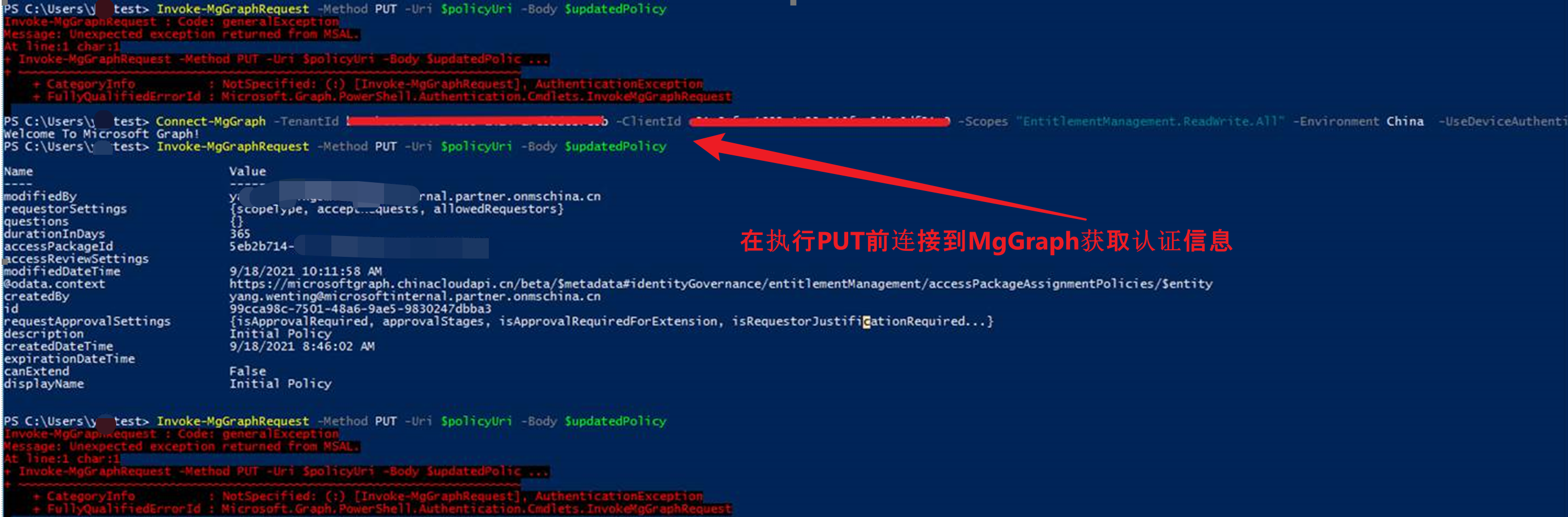
2) 使用 Invoke-MgGraphRequest 并指定 Method 为 PUT 来完成 https://microsoftgraph.chinacloudapi.cn/beta/identityGovernance/entitlementManagement/accessPackageAssignmentPolicies/xxxxxxxx-xxxx-xxxx-xxxx-xxxxxxxxxxxx 请求
详细代码为:
注意:如果在执行命令时候遇见了 “ generalException Message: Unexpected exception returned from MSAL.” 错误,则是认证问题,可以在调用 Invoke-MgGraphRequest 前,Connect-MgGraph 一次。
参考资料
Update-EMAccessPackagePolicy.ps1: https://github.com/JefTek/AzureADSamples/blob/main/PowerShell/IdentityGovernance/Update-EMAccessPackagePolicy.ps1
Update accessPackageAssignmentPolicy:https://docs.microsoft.com/en-us/graph/api/accesspackageassignmentpolicy-update?view=graph-rest-beta&tabs=java
Overview of Microsoft Graph:https://docs.microsoft.com/en-us/graph/overview?view=graph-rest-beta
Microsoft Graph PowerShell SDK: https://docs.microsoft.com/en-us/graph/powershell/installation?view=graph-rest-beta
【Azure 环境】Update-MgEntitlementManagementAccessPackageAssignmentPolicy 命令执行时候遇见的 No HTTP Resource was found 问题分析的更多相关文章
- Linux系统服务器 GNU Bash 环境变量远程命令执行漏洞修复命令
具体方法就是在ssh上执行 yum update bash 完成后重启VPS.
- 【Azure 环境】使用Microsoft Graph PS SDK 登录到中国区Azure, 命令Connect-MgGraph -Environment China xxxxxxxxx 遇见登录错误
问题描述 通过PowerShell 连接到Microsoft Graph 中国区Azure,一直出现AADSTS700016错误, 消息显示 the specific application was ...
- 利用phar实行php反序列化命令执行(测试环境复现)
测试环境的过程大概是:构成出来的phar文件,并修改为任意后缀上传至服务器.通过index.php中存在的文件操作函数参数可控,把参数设置为 phar://上传文件名 即可导致命令执行. index. ...
- PHP 命令行模式实战之cli+mysql 模拟队列批量发送邮件(在Linux环境下PHP 异步执行脚本发送事件通知消息实际案例)
源码地址:https://github.com/Tinywan/PHP_Experience 测试环境配置: 环境:Windows 7系统 .PHP7.0.Apache服务器 PHP框架:ThinkP ...
- thinkphp5.x命令执行漏洞复现及环境搭建
楼主Linux环境是Centos7,LAMP怎么搭不用我废话吧,别看错了 一.thinkphp5.X系列 1.安装composer yum -y install composer 安装php拓展 yu ...
- python在执行命令时添加环境变量或指定执行路径
cwd: 命令的执行路径,相当于os.chdir('/home')提前切换到对应路径 env: 环境变量,某些执行路径需要添加必须的环境变量,例如fastboot依赖与adb路径下的环境变量 impo ...
- Linux:命令执行顺序控制与管道
命令执行顺序控制与管道 顺序执行 简单的顺序命令可以使用符号";"完成,如:sudo apt-get update;sudo apt-get install some-tool;s ...
- (大数据工程师学习路径)第一步 Linux 基础入门----命令执行顺序控制与管道
介绍 顺序执行.选择执行.管道.cut 命令.grep 命令.wc 命令.sort 命令等,高效率使用 Linux 的技巧. 一.命令执行顺序的控制 1.顺序执行多条命令 通常情况下,我们每次只能在终 ...
- Linux环境及基础命令(一)
Linux环境及基础命令 一.认识Linux系统 略 二.配置Linux系统远程登录 2.1虚拟机系统配置 2.11虚拟机配置 统一NAT模式 虚拟机连不上 确定VMnet8网卡的IP地址(每台虚拟机 ...
- DHCP命令执行CVE-2018-1111漏洞复现
DHCP命令执行_CVE-2018-1111漏洞复现 一.漏洞描述 在Red Hat Enterprise Linux多个版本的DHCP客户端软件包所包含的NetworkManager集成脚本中发现了 ...
随机推荐
- 【如何提高IT运维效率】深度解读京东云基于NLP的运维日志异常检测AIOps落地实践
作者:京东科技 张宪波.张静.李东江 基于NLP技术对运维日志聚类,从日志角度快速发现线上业务问题 日志在IT行业中被广泛使用,日志的异常检测对于识别系统的运行状态至关重要.解决这一问题的传统方法需 ...
- js-正则表达式边界符和前瞻、后顾的使用-保证你看明白
创建正则表达式第两种方式 1==>通过new字符的方式,来创建正则表达式 2==>通过创建字面量的方式去创建 1.new字符的方式 let regexp=new RegExp(/123/) ...
- [postgres]配置主从异步流复制
前言 环境信息 IP 角色 操作系统 PostgreSQL版本 192.168.1.112 主库 Debian 12 15.3 192.168.1.113 从库 Debian 12 15.3 配置主从 ...
- Qt "有效且启用的储存库"问题
传送门 : https://www.cnblogs.com/SaveDictator/p/8532664.html 看就完了, 反正我好了 https://mirrors.tuna.tsinghua. ...
- c++基础之函数
距离上次更新又过了一周,又该更新新的读书笔记了.本次更新的主要是c++中函数部分的内容 c++ 中的函数与c语言中的函数大致用法或者语法是一样的,这里就不就这点详细展开了.需要注意的是c/c++中并没 ...
- 通过Demo学WPF—数据绑定(一)✨
前言 想学习WPF,但是看视频教程觉得太耗时间,直接看文档又觉得似懂非懂,因此想通过看Demo代码+文档的方式进行学习. 准备 微软官方其实提供了WPF的一些Demo,地址为:microsoft/WP ...
- 8.3 C++ 定义并使用类
C/C++语言是一种通用的编程语言,具有高效.灵活和可移植等特点.C语言主要用于系统编程,如操作系统.编译器.数据库等:C语言是C语言的扩展,增加了面向对象编程的特性,适用于大型软件系统.图形用户界面 ...
- 给textarea添加行号,textarea使用代码风格的一些思考
背景 项目有个需求是 在textarea中编辑脚本并显示为代码风格样式,显示行号: textarea显示行号 思路: 1.监听textarea内容变化,执行一个change函数,解析内容里面有多少个换 ...
- 基数排序|RadixSort|C++实现
前言 那么这里博主先安利一些干货满满的专栏了! 首先是博主的高质量博客的汇总,这个专栏里面的博客,都是博主最最用心写的一部分,干货满满,希望对大家有帮助. 高质量干货博客汇总https://blog. ...
- Mysql数据库迁移|如何把一台服务器的mysql数据库迁移到另一台服务器上的myql中
前言 那么这里博主先安利一下一些干货满满的专栏啦! Linux专栏https://blog.csdn.net/yu_cblog/category_11786077.html?spm=1001.2014 ...