
Kubernetes-10:Ingress-nginx介绍及演示
Ingress介绍
Ingress是什么?
ingress 是除了 hostport nodeport clusterIP以及云环境专有的负载均衡器外的访问方式,官方提供了Nginx ingress controller。ingress-nginx本身就是nodeport模式
Ingress能做什么?
k8s中,不管是哪种类型的svc,不管是用iptables还是ipvs实现端口转发实现负载均衡,也只是实现了四层的负载均衡,但是,如果有需求要进行七层负载均衡呢?比如你想将你的网站设置为https呢?Ingress就是来帮你解决此问题的。
Ingress工作原理及主要组成部分?
工作原理:
类似于Nginx,可以理解为在Ingress建立一个个映射规则,Ingress Controller通过监听Ingress这个api对象里的规则并转化为Nginx/HAporxy等的配置,然后对外部提供服务。
组成部分:
ingress controller:
核心是一个deployment,实现方式有很多种,比如Nignx、HAproxy、trafik、lstio,需要编写的yaml有:Deployment、Service、ConfigMap、ServiceAccount(Auth),其中Service类型可以是NodePort或者LoadBalance
ingress resources:这个是类型为ingress的k8s api对象,主要面向开发人员。
1、下载Ingress
### 进入官网下载

https://kubernetes.github.io/ingress-nginx/deploy/
里边会有提示:
Using NodePort:
kubectl apply -f https://raw.githubusercontent.com/kubernetes/ingress-nginx/controller-0.32.0/deploy/static/provider/baremetal/deploy.yaml

### 可以看到,本身就是一个yaml文件,可以先下载到本地
然后进行安装:
### 查看yaml文件中用到了那个image,可以预先下载下来,所有node都要下载

[root@Centos8 ~]# grep image /usr/local/install-k8s/ingress/deploy.yaml

          image: quay.io/kubernetes-ingress-controller/nginx-ingress-controller:0.32.0

          imagePullPolicy: IfNotPresent

          image: jettech/kube-webhook-certgen:v1.2.0

          imagePullPolicy: IfNotPresent

          image: jettech/kube-webhook-certgen:v1.2.0

          imagePullPolicy:

### 下载完毕后,直接执行构建命令

[root@Centos8 ingress]# kubectl apply -f deploy.yaml

namespace/ingress-nginx created

serviceaccount/ingress-nginx created

configmap/ingress-nginx-controller created

clusterrole.rbac.authorization.k8s.io/ingress-nginx created

clusterrolebinding.rbac.authorization.k8s.io/ingress-nginx created

role.rbac.authorization.k8s.io/ingress-nginx created

rolebinding.rbac.authorization.k8s.io/ingress-nginx created

service/ingress-nginx-controller-admission created

service/ingress-nginx-controller created

deployment.apps/ingress-nginx-controller created

validatingwebhookconfiguration.admissionregistration.k8s.io/ingress-nginx-admission created

clusterrole.rbac.authorization.k8s.io/ingress-nginx-admission created

clusterrolebinding.rbac.authorization.k8s.io/ingress-nginx-admission created

job.batch/ingress-nginx-admission-create created

job.batch/ingress-nginx-admission-patch created

role.rbac.authorization.k8s.io/ingress-nginx-admission created

rolebinding.rbac.authorization.k8s.io/ingress-nginx-admission created

serviceaccount/ingress-nginx-admission created

ok,安装完毕

可以看到,创建了一个ingress-nginx的namespace

ingress-nginx本身所有的规则全部放在ingress-nginx这个名称空间下

例如:查看pod svc

[root@Centos8 k8sYaml]# kubectl get pod -n ingress-nginx

NAME                                        READY   STATUS      RESTARTS   AGE

ingress-nginx-admission-create-lrsvp        0/1     Completed   0          10m

ingress-nginx-admission-patch-5hk9n         0/1     Completed   0          10m

ingress-nginx-controller-5575c6cd9d-2sblm   1/1     Running     0          32m

[root@Centos8 k8sYaml]# kubectl get svc -n ingress-nginx

NAME                                 TYPE        CLUSTER-IP     EXTERNAL-IP   PORT(S)                      AGE

ingress-nginx-controller             NodePort    10.107.76.91   <none>        80:30361/TCP,443:31087/TCP   114m

ingress-nginx-controller-admission   ClusterIP   10.96.12.12    <none>        443/TCP                      114m

可以看到ingress-nginx的svc的端口映射关系为:

80:30361/TCP,443:31087/TCP

后边的所有测试,需访问http则访问30361端口,访问https则访问31087端口
2、创建Igress HTTP代理访问
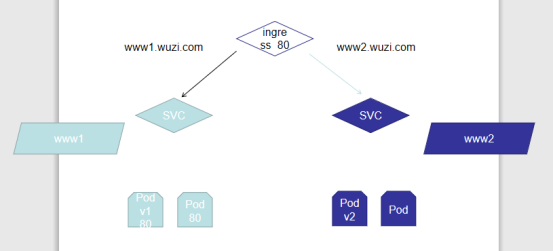
(1)首先创建deployment、Pod
(2)其次创建SVC,通过SVC来绑定与Pod之间的连接
(3)然后创建ingress,实现svc与ingress的绑定
(4)最后外网通过访问ingress映射到SVC再到具体的Pod
最后注意:ingress是通过域名进行实现转发的,所以在测试的时候不要忘记将所有用到的域名及ip加入到hosts文件中
(1)创建Deployment与svc
### www1的创建

vim svc-deployment1.yml

...

apiVersion: apps/v1

kind: Deployment

metadata:

  name: ingress-http1

  namespace: default

spec:

  replicas: 3

  selector:

    matchLabels:

      app: myapp

  template:

    metadata:

      labels:

        app: myapp

    spec:

      containers:

      - name: myapp1

        image: hub.vfancloud.com/test/myapp:v1

        imagePullPolicy: IfNotPresent

        ports:

        - name: http

          containerPort: 80

---

apiVersion: v1

kind: Service

metadata:

  name: ingress-svc1

  namespace: default

spec:

  type: ClusterIP

  selector:

    app: myapp

  ports:

  - name: http

    port: 80

    targetPort: 80

---

apiVersion: extensions/v1beta1

kind: Ingress

metadata:

  name: ingress1

spec:

  rules:

  - host: www1.wuzi.com

    http:

      paths:

      - path: /

        backend:

          serviceName: ingress-svc1

          servicePort: 80

...

kubectl apply -f svc-deployment1.yml

vim svc-deployment2.yml

...

apiVersion: apps/v1

kind: Deployment

metadata:

  name: ingress-http2

  namespace: default

spec:

  replicas: 3

  selector:

    matchLabels:

      app: myapp2

  template:

    metadata:

      labels:

        app: myapp2

    spec:

      containers:

      - name: myapp2

        image: hub.vfancloud.com/test/myapp:v2

        imagePullPolicy: IfNotPresent

        ports:

        - name: http

          containerPort: 80

---

apiVersion: v1

kind: Service

metadata:

  name: ingress-svc2

  namespace: default

spec:

  type: ClusterIP

  selector:

    app: myapp2

  ports:

  - name: http

    port: 80

    targetPort: 80

---

apiVersion: extensions/v1beta1

kind: Ingress

metadata:

  name: ingress2

spec:

  rules:

  - host: www2.wuzi.com

    http:

      paths:

      - path: /

        backend:

          serviceName: ingress-svc2

          servicePort: 80

...

kubectl apply -f svc-deployment2.yml
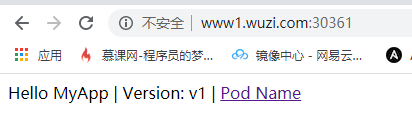
两个都构建完成,测试访问:
http://www1.wuzi.com:30361
http://www2.wuzi.com:30361
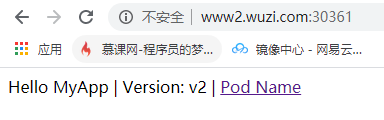
一个v1版本,一个v2版本
4、Ingress HTTPS代理访问
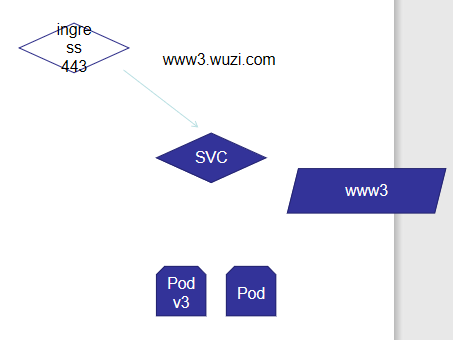
(1)创建https证书
mkdir https

cd https

## 创建私钥key

[root@Centos8 https]# openssl genrsa -des3 -out server.key 2048

Generating RSA private key, 2048 bit long modulus (2 primes)

........+++++

...............................................................+++++

e is 65537 (0x010001)

Enter pass phrase for server.key:

Verifying - Enter pass phrase for server.key:

## 创建csr请求

[root@Centos8 https]# openssl req -new -key server.key -out server.csr

Enter pass phrase for server.key:

You are about to be asked to enter information that will be incorporated

into your certificate request.

What you are about to enter is what is called a Distinguished Name or a DN.

There are quite a few fields but you can leave some blank

For some fields there will be a default value,

If you enter '.', the field will be left blank.

-----

Country Name (2 letter code) [XX]:cn

State or Province Name (full name) []:bj

Locality Name (eg, city) [Default City]:bj

Organization Name (eg, company) [Default Company Ltd]:vfan

Organizational Unit Name (eg, section) []:vfan

Common Name (eg, your name or your server's hostname) []:

Email Address []:

Please enter the following 'extra' attributes

to be sent with your certificate request

A challenge password []:

An optional company name []:

## 去除私钥的连接密码

[root@Centos8 https]# cp server.key{,.org}

[root@Centos8 https]# openssl rsa -in server.key.org -out server.key

## 生成证书文件

openssl x509 -req -days 3650 -in server.csr -signkey server.key -out server.crt

## 生成tls格式

[root@Centos8 https]# kubectl create secret tls tls-secret --key server.key --cert server.crt

secret/tls-secret created
(2)创建deployment、svc、ingress
vim ingress-https.yaml

...

apiVersion: apps/v1

kind: Deployment

metadata:

  name: ingress-deployment

spec:

  replicas: 3

  selector:

    matchLabels:

      name: in-https

  template:

    metadata:

      labels:

        name: in-https

    spec:

      containers:

      - name: in-https

        image: hub.vfancloud.com/test/myapp:v3

        imagePullPolicy: IfNotPresent

        ports:

        - name: http

          containerPort: 80

---

apiVersion: v1

kind: Service

metadata:

  name: ingress-https

spec:

  selector:

    name: in-https

  ports:

  - name: http

    port: 80

    targetPort: 80

    protocol: TCP

---

apiVersion: extensions/v1beta1

kind: Ingress

metadata:

  name: ingress-https

spec:

  tls:

  - hosts:

    - www3.wuzi.com

    secretName: tls-secret

  rules:

  - host: www3.wuzi.com

    http:

      paths:

      - path: /

        backend:

          serviceName: ingress-https

          servicePort: 80

...

[root@Centos8 https]# kubectl apply -f ingress-https.yaml

[root@Centos8 https]# kubectl get ingress

NAME            HOSTS           ADDRESS           PORTS     AGE

ingress-https   www3.wuzi.com   192.168.152.253   80, 443   16m

ingress1        www1.wuzi.com   192.168.152.253   80        45m

ingress2        www2.wuzi.com   192.168.152.253   80        45m
测试访问ingress https
注意,访问的是svc的443相对应的端口
导航栏输入:https://www3.wuzi.com:31087
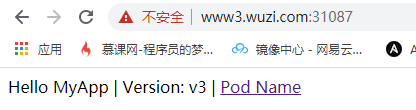
ok,访问到了
5、Nginx进行BasicAuth
### 首先使用htpasswd命令创建BasicAuth用户,切记,保存的文件名一定要是auth

[root@Centos8 auth]# htpasswd -c auth vfan

New password:

Re-type new password:

Adding password for user vfan

### 创建secret

[root@Centos8 auth]# kubectl create secret generic basic-auth --from-file=auth

secret/basic-auth created

### 创建yaml文件

vim auth.yaml

...

apiVersion: apps/v1

kind: Deployment

metadata:

  name: ingress-auth

spec:

  replicas: 3

  selector:

    matchLabels:

      name: auth

  template:

    metadata:

      labels:

        name: auth

    spec:

      containers:

      - name: ingress-auth

        image: hub.vfancloud.com/test/myapp:v4

        imagePullPolicy: IfNotPresent

        ports:

        - name: http

          containerPort: 80

---

apiVersion: v1

kind: Service

metadata:

  name: svc-auth

spec:

  selector:

    name: auth

  ports:

  - name: http

    port: 80

    targetPort: 80

    protocol: TCP

---

apiVersion: networking.k8s.io/v1beta1

kind: Ingress

metadata:

  name: ingress-with-auth

  annotations:

    nginx.ingress.kubernetes.io/auth-type: basic

    nginx.ingress.kubernetes.io/auth-secret: basic-auth

    nginx.ingress.kubernetes.io/auth-realm: 'Authentication Required - vfan'

spec:

  rules:

  - host: www4.wuzi.com

    http:

      paths:

      - path: /

        backend:

          serviceName: auth-svc

          servicePort: 80

...

[root@Centos8 auth]# kubectl apply -f auth.yaml

[root@Centos8 auth]# kubectl  get ingress

NAME            HOSTS           ADDRESS           PORTS     AGE

ingress-with-auth    www4.wuzi.com   192.168.152.253   80        94s

ingress-https   www3.wuzi.com   192.168.152.253   80, 443   33m

ingress1        www1.wuzi.com   192.168.152.253   80        62m

ingress2        www2.wuzi.com   192.168.152.253   80        62m
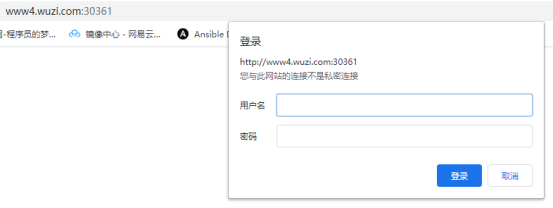
测试访问:
6、Ingress-Nginx重写
|
Name |
Description |
Values |
|
nginx.ingress.kubernetes.io/rewrite-target |
必须将流量重定向到的目标URI |
string |
|
nginx.ingress.kubernetes.io/ssl-redirect |
指示位置部分是否仅可访问SSL(Ingress包含证书时默认为True) |
bool |
|
nginx.ingress.kubernetes.io/force-ssl-redirect |
即使未启用TLS,也强制将重定向到HTTPS |
bool |
|
nginx.ingress.kubernetes.io/app-root |
定义如果在“ /”上下文中,控制器必须重定向的应用程序根 |
string |
|
nginx.ingress.kubernetes.io/use-regex |
指示在Ingress上定义的路径是否使用正则表达式 |
bool |
示例:
将访问www5.wuzi.com 访问 / 目录的流量全部转发至https://www3.wuzi.com:31087
vim rewrite.yaml

...

apiVersion: networking.k8s.io/v1beta1

kind: Ingress

metadata:

  annotations:

    nginx.ingress.kubernetes.io/rewrite-target: https://www3.wuzi.com:31087

  name: rewrite

  namespace: default

spec:

  rules:

  - host: www5.wuzi.com

    http:

      paths:

      - backend:

          serviceName: ingress-svc1

          servicePort: 80

        path: /

...

[root@Centos8 rewrite]# kubectl create -f rewrite.yaml

ingress.networking.k8s.io/rewrite created

[root@Centos8 rewrite]# kubectl get ingress

NAME                HOSTS           ADDRESS           PORTS     AGE

ingress-https       www3.wuzi.com   192.168.152.253   80, 443   148m

ingress-with-auth   www4.wuzi.com   192.168.152.253   80        20m

ingress1            www1.wuzi.com   192.168.152.253   80        177m

ingress2            www2.wuzi.com   192.168.152.253   80        177m

rewrite             www5.wuzi.com   192.168.152.253   80        41s
测试访问:
http://www5.wuzi.com:30361
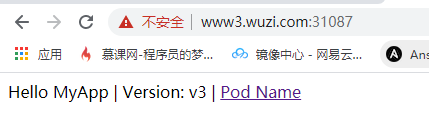
已跳转

Kubernetes-10:Ingress-nginx介绍及演示的更多相关文章
- kubernetes的Ingress资源介绍
Ingress 的资源帮助信息介绍 [root@master ~]# kubectl explain ingress KIND: Ingress VERSION: extensions/v1beta1 ...
- Kubernetes系列之Helm介绍篇
本次系列使用的所需部署包版本都使用的目前最新的或最新稳定版,安装包地址请到公众号内回复[K8s实战]获取 介绍 Helm 是 Deis 开发的一个用于 Kubernetes 应用的包管理工具,主要用来 ...
- Kubernetes 使用 ingress 配置 https 集群(十五)
目录 一.背景 1.1 需求 1.2 Ingress 1.3 环境介绍 二.安装部署 2.1.创建后端 Pod 应用 2.2 创建后端 Pod Service 2.3.创建 ingress 资源 2. ...
- 08 . Kubernetes之 ingress及Ingress Controller
Ingress简介 ingress是什么? 上篇文章介绍service时有说了暴露了service的三种方式ClusterIP.NodePort与LoadBalance,这几种方式都是在service ...
- Kubernetes 使用 Ingress 实现灰度发布功能
使用 Ingress 实现灰度发布 一.Canary 规则说明 Ingress-Nginx 是一个K8S ingress工具,支持配置 Ingress Annotations 来实现不同场景下的灰度发 ...
- kubernetes 安装 ingress controller
文章链接 ingress-nginx ingress 官方网站 ingress 仓库地址 ingress-nginx v1.0 最新版本 v1.0 适用于 Kubernetes 版本 v1.19+ ( ...
- 云原生之旅 - 8)云原生时代的网关 Ingress Nginx
前言 当我们在Kubernetes部署的服务需要暴露给外部用户使用时,有三种选择:LoadBalancer,NodePort, Ingress. LoadBalancer类型得结合各个Cloud Pr ...
- Docker集群编排工具之Kubernetes(K8s)介绍、安装及使用
K8s基础原理 k8s中文社区:https://www.kubernetes.org.cn/ 简介 Kubernetes与较早的集群管理系统Mesos和YARN相比,对容器尤其是 Docker的支持更 ...
- kubernetes下的Nginx加Tomcat三部曲之一:极速体验
在生产环境中,常用到Nginx加Tomcat的部署方式,如下图: 从本章开始,我们来实战kubernetes下部署上述Nginx和Tomcat服务,并开发spring boot的web应用来验证环境, ...
- kubernetes Traefik ingress配置详解
理解Ingress 简单的说,ingress就是从kubernetes集群外访问集群的入口,将用户的URL请求转发到不同的service上.Ingress相当于nginx.apache等负载均衡方向代 ...
随机推荐
- 使用flume将数据sink到HBase
===========>先创建Hbase表和列族<================案例1:源数据一行对应Hbase的一列存储(hbase-1.12没有问题)================ ...
- ELK日志缺失问题排查-多行日志聚合Logstash配置问题
1. 背景 推荐系统的推荐请求追踪日志,通过ELK收集,方便遇到问题时,可以通过唯一标识sid来复现推荐过程 最近在碰到了几个bad case,需要通过sid来查询推荐日志,但发现部分无法在kiban ...
- Django详细笔记
django 学习 特点 快速开发 安全性高 可伸缩性强 URL 组成部分 URL: 同意资源定位符 一个URL由以下几部分组成 scheme://host:port/path/?query-stri ...
- yb课堂 实战之Mybatis打通Mysql数据库 《二》
配置mybatis连接Mysql数据库 server.port=8081 # ========================数据库相关配置===================== spring.d ...
- MongoDB安装、基础操作和聚合实例详解
虽然MongoDB这些年很流行,但笔者之前没研究过,现在有需求研究这类NoSQL的数据库,是为了验证其是否可被替换. MongoDB是很轻量的文档数据库,简单测试也懒得专门准备虚拟机环境了,直接在ma ...
- 【Java】删除项目中多余的SVG图片资源
在DB库的菜单表,每个菜单会存放对应的svg图片名称,用于菜单渲染 在页面中的渲染: 在项目的目录的存放位置: 需求是这个目录还存放了很多不需要的svg图片,需要把他们删除掉 数量有七八十张,人肉手删 ...
- 【Zookeeper】Re01 安装与操作
Zookeeper基于JDK开发出来的 运行环境至少需要JRE 快速安装JDK: yum install -y java-1.8.0-openjdk-devel.x86_64 # ZK镜像仓库 htt ...
- 家中局域网搭建nas后的一些体验 —— NAS的速率究竟如何计算
NAS局域网,使用的路由器的有线端口为1000Mbps,无线WiFi速率860Mbps,不过由于不知道是不是因为电脑WiFi接收器型号老旧还是路由器WiFi协议或天线老旧(电脑和路由器均不支持WiFi ...
- 《Python数据可视化之matplotlib实践》 源码 第二篇 精进 第七章
图 7.1 import matplotlib as mpl import matplotlib.pyplot as plt import numpy as np mpl.rcParams[& ...
- 如何使用工具下载B站非会员视频(下载B站免费web视频)
最近准备从B站上下载几个web页面上的视频,但是B站的视频又没有提供相关的下载工具,于是找到了一款下载B站视频的工具( you-get ), 该工具不能下载会员版的视频,不能下载收费的视频,不过对于免 ...