
为什么defineProps宏函数不需要从vue中import导入?
前言
我们每天写vue代码时都在用defineProps,但是你有没有思考过下面这些问题。为什么defineProps不需要import导入?为什么不能在非setup顶层使用defineProps?defineProps是如何将声明的 props 自动暴露给模板?
举几个例子
我们来看几个例子,分别对应上面的几个问题。
先来看一个正常的例子,common-child.vue文件代码如下:
<template>

  <div>content is {{ content }}</div>

</template>

<script setup lang="ts">

defineProps({

  content: String,

});

</script>
我们看到在这个正常的例子中没有从任何地方import导入defineProps,直接就可以使用了,并且在template中渲染了props中的content。
我们再来看一个在非setup顶层使用defineProps的例子,if-child.vue文件代码如下:
<template>

  <div>content is {{ content }}</div>

</template>

<script setup lang="ts">

import { ref } from "vue";

const count = ref(10);

if (count.value) {

  defineProps({

    content: String,

  });

}

</script>
代码跑起来直接就报错了,提示defineProps is not defined
通过debug搞清楚上面几个问题
在我的上一篇文章 vue文件是如何编译为js文件 中已经带你搞清楚了vue文件中的<script>模块是如何编译成浏览器可直接运行的js代码,其实底层就是依靠vue/compiler-sfc包的compileScript函数。
当然如果你还没看过我的上一篇文章也不影响这篇文章阅读,这里我会简单说一下。当我们import一个vue文件时会触发@vitejs/plugin-vue包的transform钩子函数,在这个函数中会调用一个transformMain函数。transformMain函数中会调用genScriptCode、genTemplateCode、genStyleCode,分别对应的作用是将vue文件中的<script>模块编译为浏览器可直接运行的js代码、将<template>模块编译为render函数、将<style>模块编译为导入css文件的import语句。genScriptCode函数底层调用的就是vue/compiler-sfc包的compileScript函数。
一样的套路,首先我们在vscode的打开一个debug终端。

然后在node_modules中找到vue/compiler-sfc包的compileScript函数打上断点,compileScript函数位置在/node_modules/@vue/compiler-sfc/dist/compiler-sfc.cjs.js。在debug终端上面执行yarn dev后在浏览器中打开对应的页面,比如:http://localhost:5173/ 。此时断点就会走到compileScript函数中,我们在debug中先来看看compileScript函数的第一个入参sfc。sfc.filename的值为当前编译的vue文件路径。由于每编译一个vue文件都要走到这个debug中,现在我们只想debug看看common-child.vue文件,所以为了方便我们在compileScript中加了下面这样一段代码,并且去掉了在compileScript函数中加的断点,这样就只有编译common-child.vue文件时会走进断点。

compileScript函数
我们再来回忆一下common-child.vue文件中的script模块代码如下:
<script setup lang="ts">

defineProps({

  content: String,

});

</script>
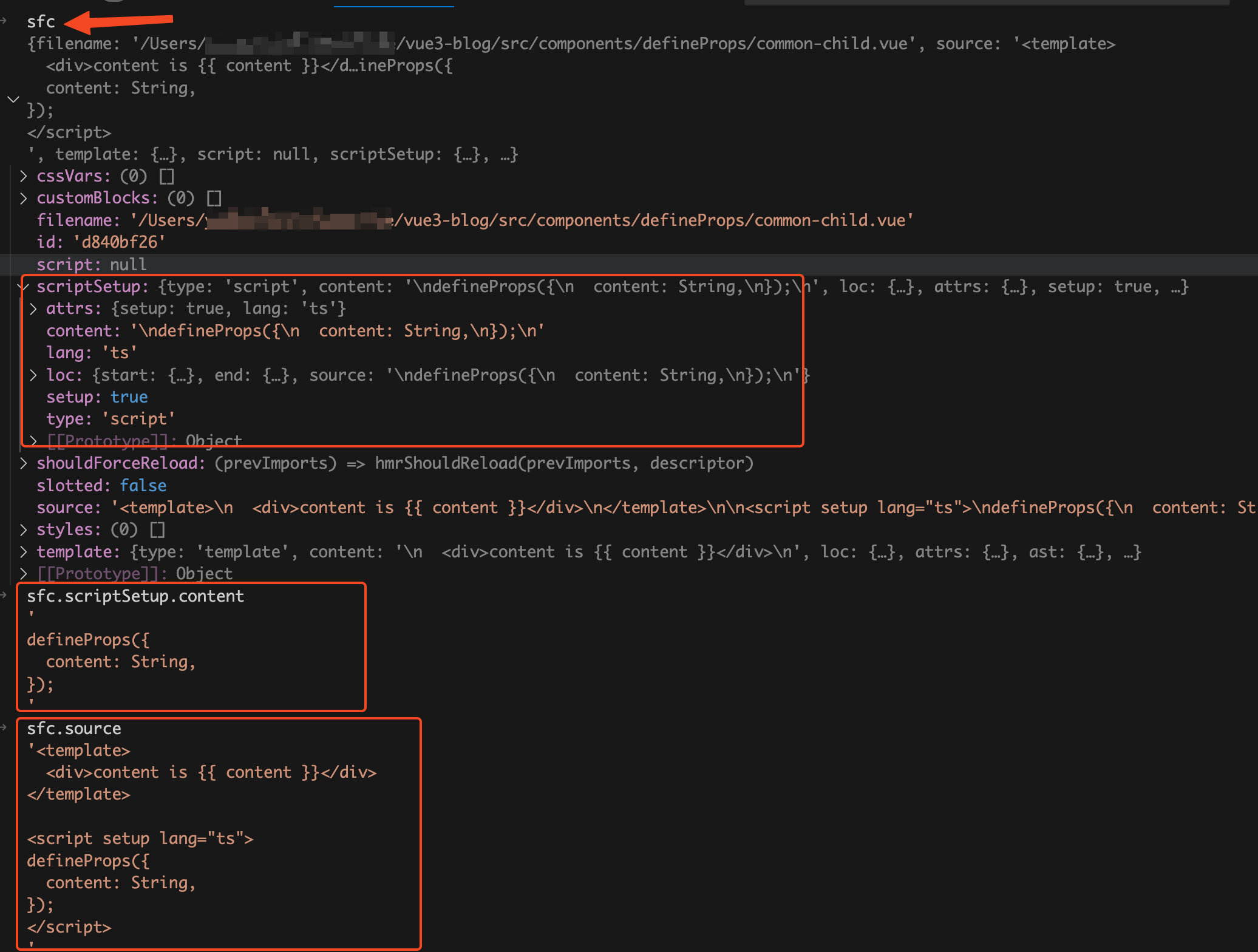
我们接着来看compileScript函数的入参sfc,在上一篇文章 vue文件是如何编译为js文件 中我们已经讲过了sfc是一个descriptor对象,descriptor对象是由vue文件编译来的。descriptor对象拥有template属性、scriptSetup属性、style属性,分别对应vue文件的<template>模块、<script setup>模块、<style>模块。在我们这个场景只关注scriptSetup属性,sfc.scriptSetup.content的值就是<script setup>模块中code代码字符串,sfc.source的值就是vue文件中的源代码code字符串。详情查看下图:
compileScript函数内包含了编译script模块的所有的逻辑,代码很复杂,光是源代码就接近1000行。这篇文章我们不会去通读compileScript函数的所有功能,只会讲处理defineProps相关的代码。下面这个是我简化后的代码:
function compileScript(sfc, options) {

  const ctx = new ScriptCompileContext(sfc, options);

  const startOffset = ctx.startOffset;

  const endOffset = ctx.endOffset;

  const scriptSetupAst = ctx.scriptSetupAst;

  for (const node of scriptSetupAst.body) {

    if (node.type === "ExpressionStatement") {

      const expr = node.expression;

      if (processDefineProps(ctx, expr)) {

        ctx.s.remove(node.start + startOffset, node.end + startOffset);

      }

    }

    if (node.type === "VariableDeclaration" && !node.declare || node.type.endsWith("Statement")) {

      // ....

    }

  }

  ctx.s.remove(0, startOffset);

  ctx.s.remove(endOffset, source.length);

  let runtimeOptions = ``;

  const propsDecl = genRuntimeProps(ctx);

  if (propsDecl) runtimeOptions += `\n  props: ${propsDecl},`;

  const def =

    (defaultExport ? `\n  ...${normalScriptDefaultVar},` : ``) +

    (definedOptions ? `\n  ...${definedOptions},` : "");

  ctx.s.prependLeft(

    startOffset,

    `\n${genDefaultAs} /*#__PURE__*/${ctx.helper(

      `defineComponent`

    )}({${def}${runtimeOptions}\n  ${

      hasAwait ? `async ` : ``

    }setup(${args}) {\n${exposeCall}`

  );

  ctx.s.appendRight(endOffset, `})`);

  return {

    //....

    content: ctx.s.toString(),

  };

}
在compileScript函数中首先调用ScriptCompileContext类生成一个ctx上下文对象,然后遍历vue文件的<script setup>模块生成的AST抽象语法树。如果节点类型为ExpressionStatement表达式语句,那么就执行processDefineProps函数,判断当前表达式语句是否是调用defineProps函数。如果是那么就删除掉defineProps调用代码,并且将调用defineProps函数时传入的参数对应的node节点信息存到ctx上下文中。然后从参数node节点信息中拿到调用defineProps宏函数时传入的props参数的开始位置和结束位置。再使用slice方法并且传入开始位置和结束位置,从<script setup>模块的代码字符串中截取到props定义的字符串。然后将截取到的props定义的字符串拼接到vue组件对象的字符串中,最后再将编译后的setup函数代码字符串拼接到vue组件对象的字符串中。
ScriptCompileContext类
ScriptCompileContext类中我们主要关注这几个属性:startOffset、endOffset、scriptSetupAst、s。先来看看他的constructor,下面是我简化后的代码。
import MagicString from 'magic-string'

class ScriptCompileContext {

  source = this.descriptor.source

  s = new MagicString(this.source)

  startOffset = this.descriptor.scriptSetup?.loc.start.offset

  endOffset = this.descriptor.scriptSetup?.loc.end.offset

  constructor(descriptor, options) {

    this.s = new MagicString(this.source);

    this.scriptSetupAst = descriptor.scriptSetup && parse(descriptor.scriptSetup.content, this.startOffset);

  }

}
在前面我们已经讲过了descriptor.scriptSetup对象就是由vue文件中的<script setup>模块编译而来,startOffset和endOffset分别就是descriptor.scriptSetup?.loc.start.offset和descriptor.scriptSetup?.loc.end.offset,对应的是<script setup>模块在vue文件中的开始位置和结束位置。
descriptor.source的值就是vue文件中的源代码code字符串,这里以descriptor.source为参数new了一个MagicString对象。magic-string是由svelte的作者写的一个库,用于处理字符串的JavaScript库。它可以让你在字符串中进行插入、删除、替换等操作,并且能够生成准确的sourcemap。MagicString对象中拥有toString、remove、prependLeft、appendRight等方法。s.toString用于生成返回的字符串,我们来举几个例子看看这几个方法你就明白了。
s.remove( start, end )用于删除从开始到结束的字符串:
const s = new MagicString('hello word');

s.remove(0, 6);

s.toString(); // 'word'
s.prependLeft( index, content )用于在指定index的前面插入字符串:
const s = new MagicString('hello word');

s.prependLeft(5, 'xx');

s.toString(); // 'helloxx word'
s.appendRight( index, content )用于在指定index的后面插入字符串:
const s = new MagicString('hello word');

s.appendRight(5, 'xx');

s.toString(); // 'helloxx word'
我们接着看constructor中的scriptSetupAst属性是由一个parse函数的返回值赋值,parse(descriptor.scriptSetup.content, this.startOffset),parse函数的代码如下:
import { parse as babelParse } from '@babel/parser'

function parse(input: string, offset: number): Program {

  try {

    return babelParse(input, {

      plugins,

      sourceType: 'module',

    }).program

  } catch (e: any) {

  }

}
我们在前面已经讲过了descriptor.scriptSetup.content的值就是vue文件中的<script setup>模块的代码code字符串,parse函数中调用了babel提供的parser函数,将vue文件中的<script setup>模块的代码code字符串转换成AST抽象语法树。
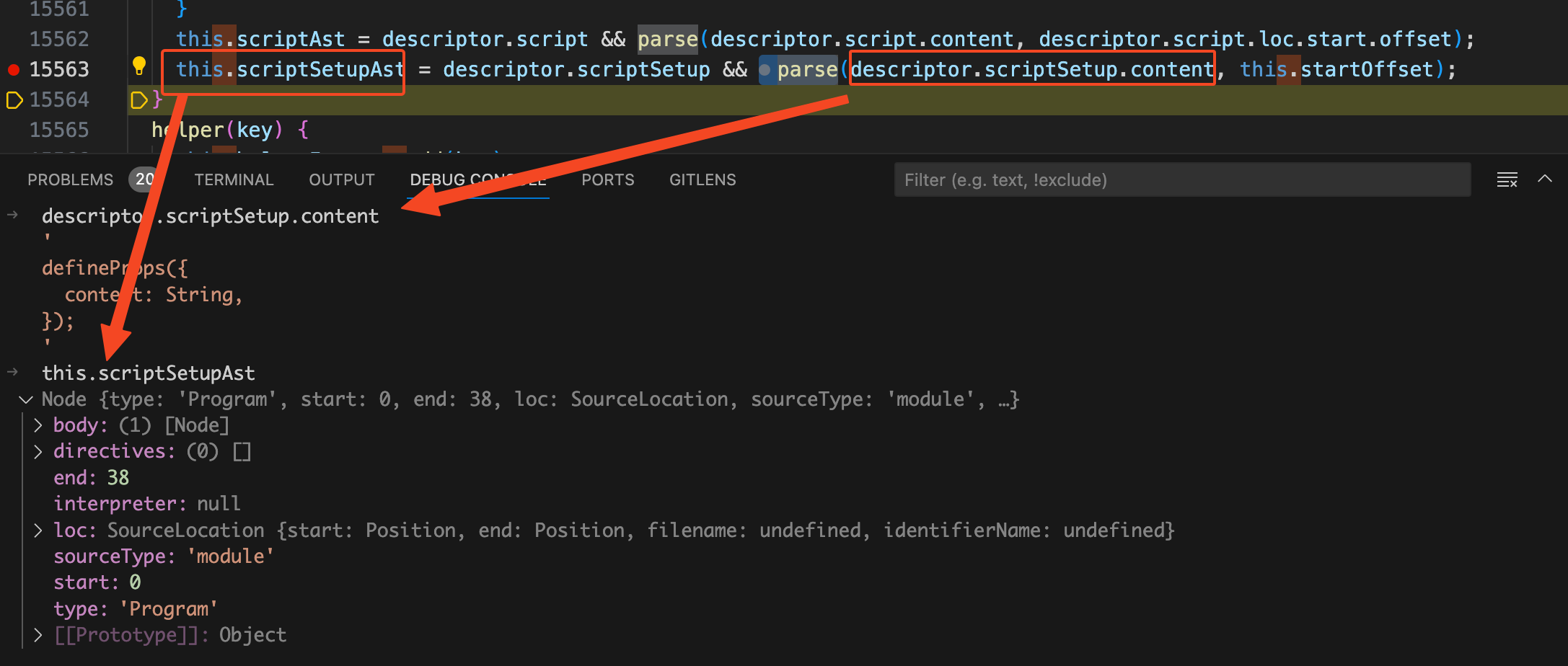
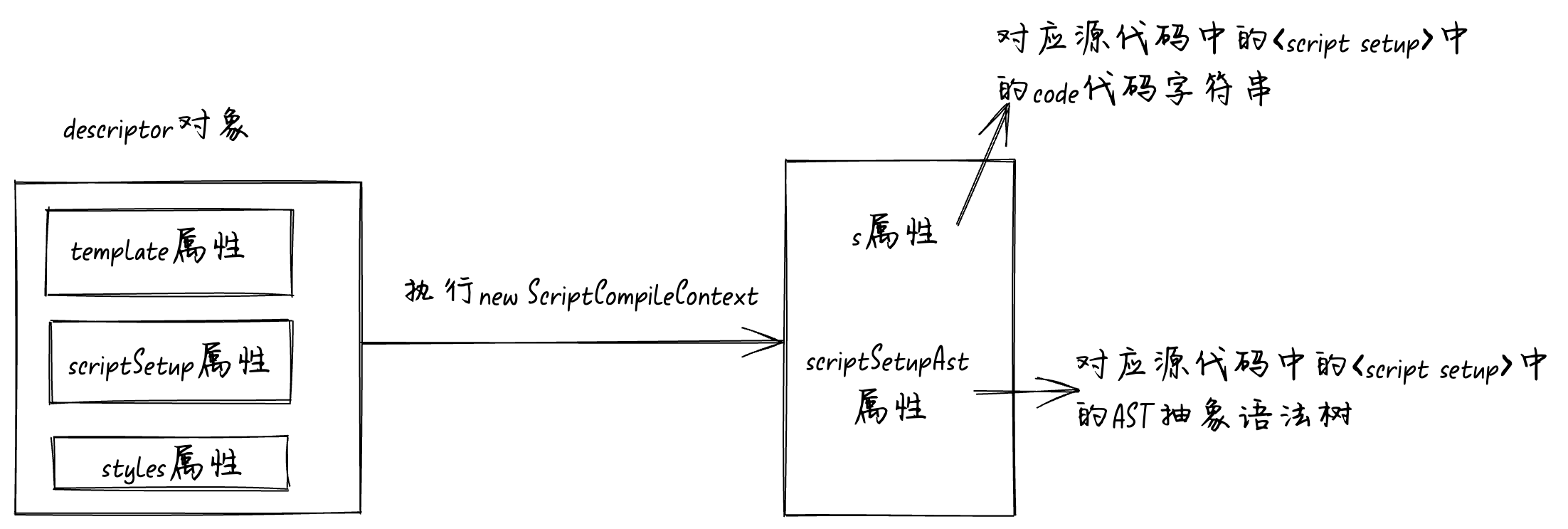
现在我们再来看compileScript函数中的这几行代码你理解起来就没什么难度了,这里的scriptSetupAst变量就是由vue文件中的<script setup>模块的代码转换成的AST抽象语法树。
const ctx = new ScriptCompileContext(sfc, options);

const startOffset = ctx.startOffset;

const endOffset = ctx.endOffset;

const scriptSetupAst = ctx.scriptSetupAst;
流程图如下:
processDefineProps函数
我们接着将断点走到for循环开始处,代码如下:
for (const node of scriptSetupAst.body) {

  if (node.type === "ExpressionStatement") {

    const expr = node.expression;

    if (processDefineProps(ctx, expr)) {

      ctx.s.remove(node.start + startOffset, node.end + startOffset);

    }

  }

}
遍历AST抽象语法树,如果当前节点类型为ExpressionStatement表达式语句,并且processDefineProps函数执行结果为true就调用ctx.s.remove方法。这会儿断点还在for循环开始处,在控制台执行ctx.s.toString()看看当前的code代码字符串。
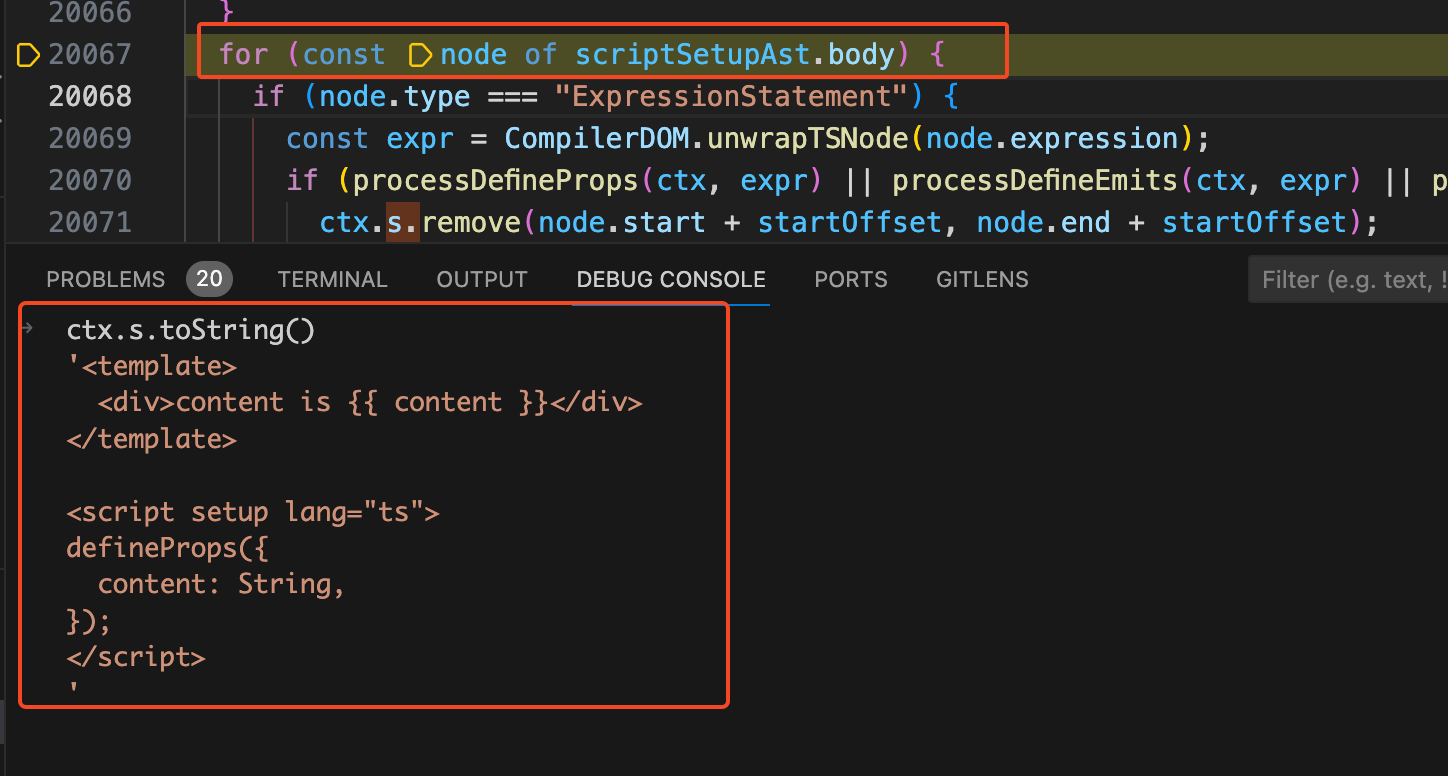
从图上可以看见此时toString的执行结果还是和之前的common-child.vue源代码是一样的,并且很明显我们的defineProps是一个表达式语句,所以会执行processDefineProps函数。我们将断点走到调用processDefineProps的地方,看到简化过的processDefineProps函数代码如下:
const DEFINE_PROPS = "defineProps";

function processDefineProps(ctx, node, declId) {

  if (!isCallOf(node, DEFINE_PROPS)) {

    return processWithDefaults(ctx, node, declId);

  }

  ctx.propsRuntimeDecl = node.arguments[0];

  return true;

}
在processDefineProps函数中首先执行了isCallOf函数,第一个参数传的是当前的AST语法树中的node节点,第二个参数传的是"defineProps"字符串。从isCallOf的名字中我们就可以猜出他的作用是判断当前的node节点的类型是不是在调用defineProps函数,isCallOf的代码如下:
export function isCallOf(node, test) {

  return !!(

    node &&

    test &&

    node.type === "CallExpression" &&

    node.callee.type === "Identifier" &&

    (typeof test === "string"

      ? node.callee.name === test

      : test(node.callee.name))

  );

}
isCallOf函数接收两个参数,第一个参数node是当前的node节点,第二个参数test是要判断的函数名称,在我们这里是写死的"defineProps"字符串。我们在debug console中将node.type、node.callee.type、node.callee.name的值打印出来看看。
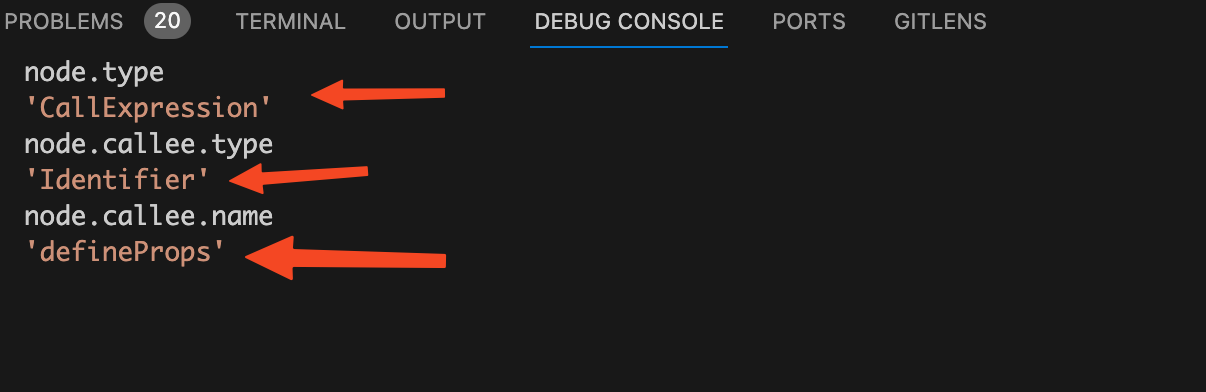
从图上看到node.type、node.callee.type、node.callee.name的值后,可以证明我们的猜测是正确的这里isCallOf的作用是判断当前的node节点的类型是不是在调用defineProps函数。我们这里的node节点确实是在调用defineProps函数,所以isCallOf的执行结果为true,在processDefineProps函数中是对isCallOf函数的执行结果取反。也就是!isCallOf(node, DEFINE_PROPS)的执行结果为false,所以不会走到return processWithDefaults(ctx, node, declId);。
我们接着来看processDefineProps函数:
function processDefineProps(ctx, node, declId) {

  if (!isCallOf(node, DEFINE_PROPS)) {

    return processWithDefaults(ctx, node, declId);

  }

  ctx.propsRuntimeDecl = node.arguments[0];

  return true;

}
如果当前节点确实是在执行defineProps函数,那么就会执行ctx.propsRuntimeDecl = node.arguments[0];。将当前node节点的第一个参数赋值给ctx上下文对象的propsRuntimeDecl属性,这里的第一个参数其实就是调用defineProps函数时给传入的第一个参数。为什么写死成取arguments[0]呢?是因为defineProps函数只接收一个参数,传入的参数可以是一个对象或者数组。比如:
const props = defineProps({

  foo: String

})

const props = defineProps(['foo', 'bar'])
记住这个在ctx上下文上面塞的propsRuntimeDecl属性,后面生成运行时的props就是根据propsRuntimeDecl属性生成的。
至此我们已经了解到了processDefineProps中主要做了两件事:判断当前执行的表达式语句是否是defineProps函数,如果是那么将解析出来的props属性的信息塞的ctx上下文的propsRuntimeDecl属性中。
我们这会儿来看compileScript函数中的processDefineProps代码你就能很容易理解了:
for (const node of scriptSetupAst.body) {

  if (node.type === "ExpressionStatement") {

    const expr = node.expression;

    if (processDefineProps(ctx, expr)) {

      ctx.s.remove(node.start + startOffset, node.end + startOffset);

    }

  }

}
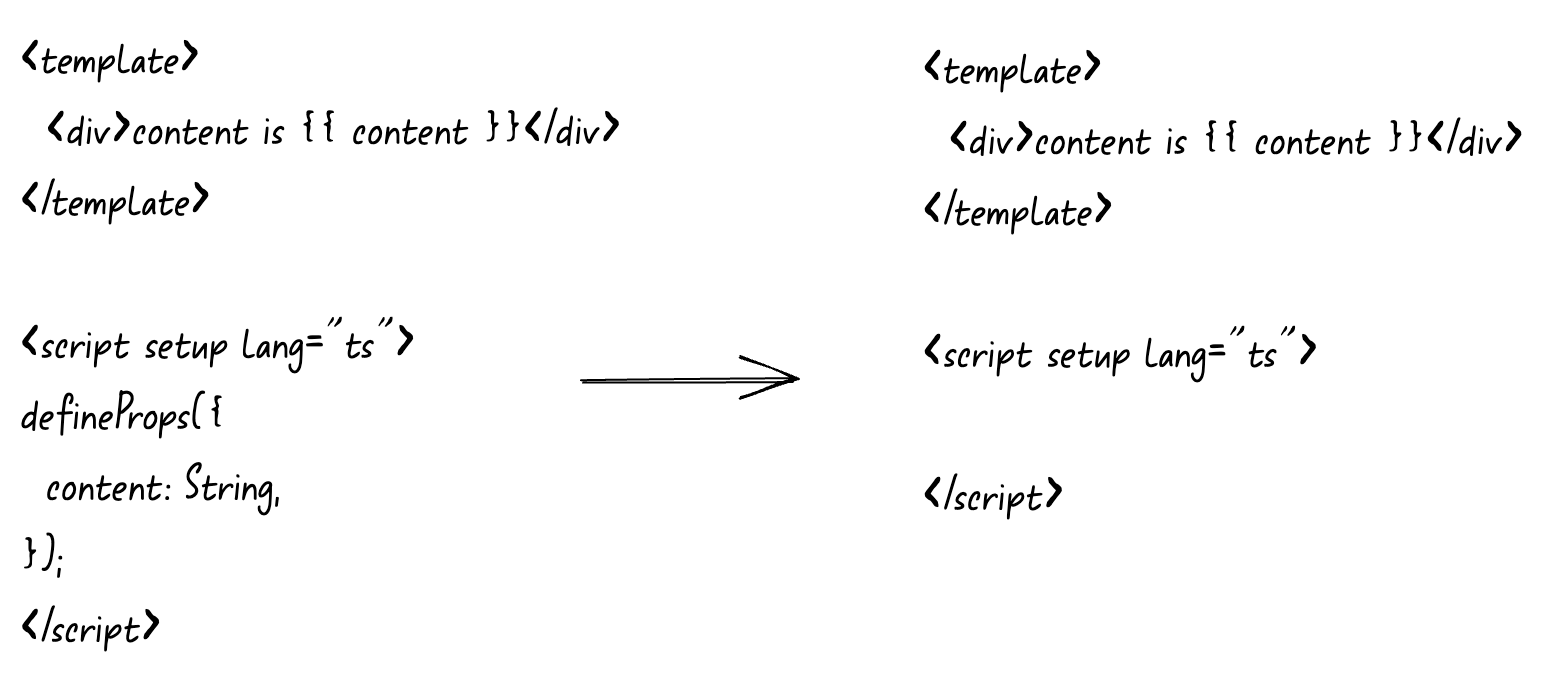
遍历AST语法树,如果当前节点类型是ExpressionStatement表达式语句,再执行processDefineProps判断当前node节点是否是执行的defineProps函数。如果是defineProps函数就调用ctx.s.remove方法将调用defineProps函数的代码从源代码中删除掉。此时我们在debug console中执行ctx.s.toString(),看到我们的code代码字符串中已经没有了defineProps了:
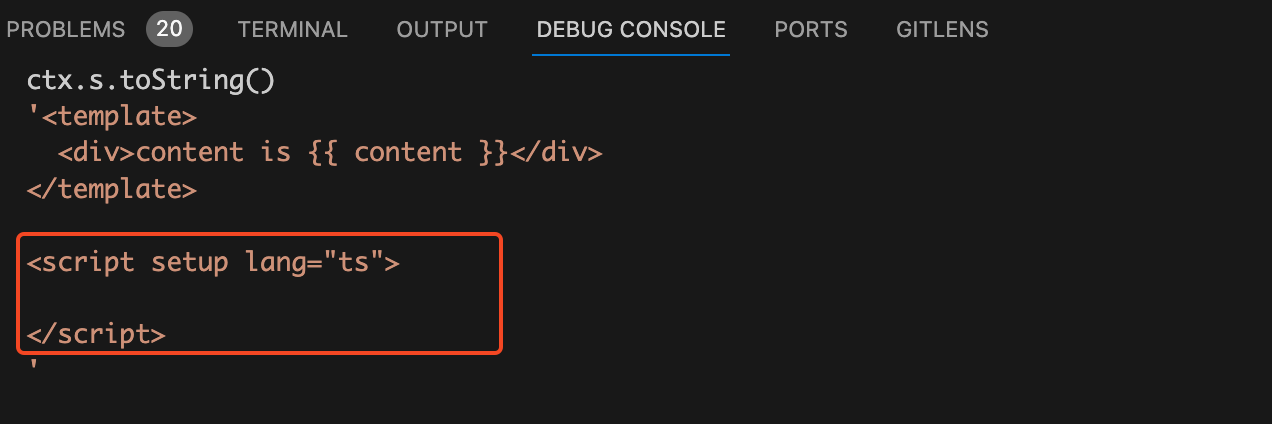
现在我们能够回答第一个问题了:
为什么defineProps不需要import导入?
因为在编译过程中如果当前AST抽象语法树的节点类型是ExpressionStatement表达式语句,并且调用的函数是defineProps,那么就调用remove方法将调用defineProps函数的代码给移除掉。既然defineProps语句已经被移除了,自然也就不需要import导入了defineProps了。
genRuntimeProps函数
接着在compileScript函数中执行了两条remove代码:
ctx.s.remove(0, startOffset);

ctx.s.remove(endOffset, source.length);
这里的startOffset表示script标签中第一个代码开始的位置, 所以ctx.s.remove(0, startOffset);的意思是删除掉包含<script setup>开始标签前面的所有内容,也就是删除掉template模块的内容和<script setup>开始标签。这行代码执行完后我们再看看ctx.s.toString()的值:
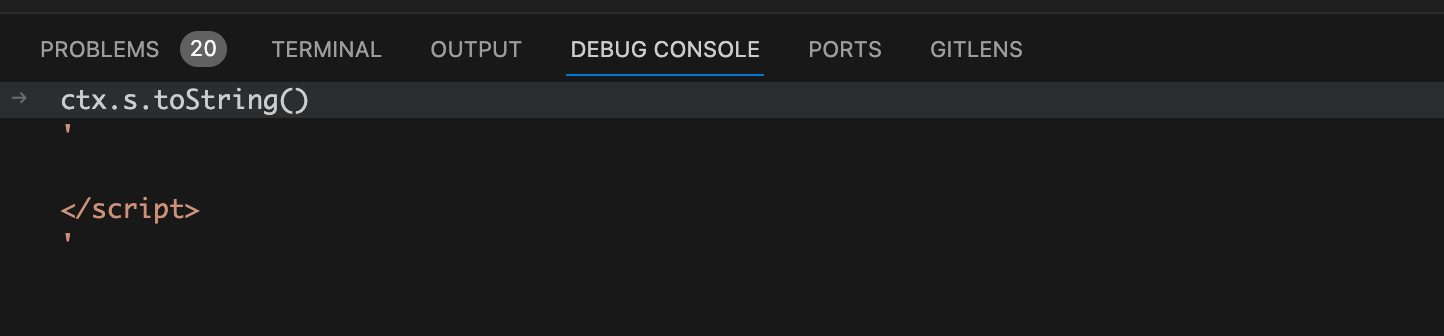
接着执行ctx.s.remove(endOffset, source.length);,这行代码的意思是将</script >包含结束标签后面的内容全部删掉,也就是删除</script >结束标签和<style>模块。这行代码执行完后我们再来看看ctx.s.toString()的值:
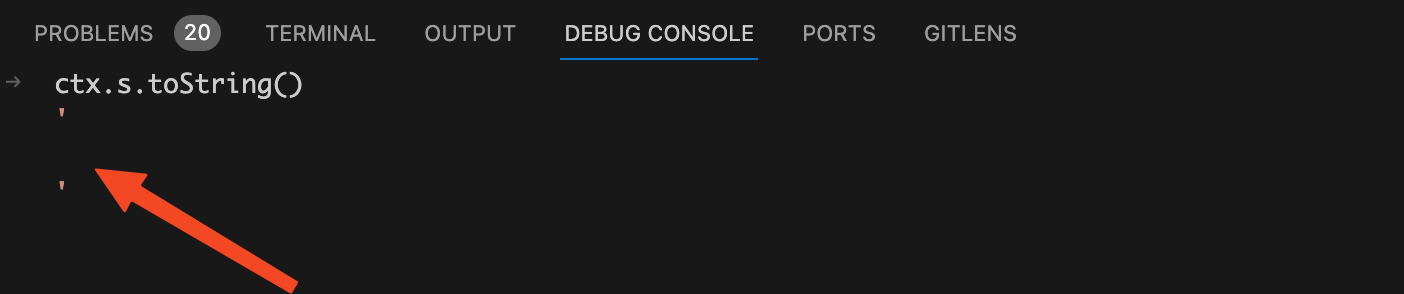
由于我们的common-child.vue的script模块中只有一个defineProps函数,所以当移除掉template模块、style模块、script开始标签和结束标签后就变成了一个空字符串。如果你的script模块中还有其他js业务代码,当代码执行到这里后就不会是空字符串,而是那些js业务代码。
我们接着将compileScript函数中的断点走到调用genRuntimeProps函数处,代码如下:
let runtimeOptions = ``;

const propsDecl = genRuntimeProps(ctx);

if (propsDecl) runtimeOptions += `\n  props: ${propsDecl},`;
从genRuntimeProps名字你应该已经猜到了他的作用,根据ctx上下文生成运行时的props。我们将断点走到genRuntimeProps函数内部,在我们这个场景中genRuntimeProps主要执行的代码如下:
function genRuntimeProps(ctx) {

  let propsDecls;

  if (ctx.propsRuntimeDecl) {

    propsDecls = ctx.getString(ctx.propsRuntimeDecl).trim();

  }

  return propsDecls;

}
还记得这个ctx.propsRuntimeDecl是什么东西吗?我们在执行processDefineProps函数判断当前节点是否为执行defineProps函数的时候,就将调用defineProps函数的参数node节点赋值给ctx.propsRuntimeDecl。换句话说ctx.propsRuntimeDecl中拥有调用defineProps函数传入的props参数中的节点信息。我们将断点走进ctx.getString函数看看是如何取出props的:
getString(node, scriptSetup = true) {

  const block = scriptSetup ? this.descriptor.scriptSetup : this.descriptor.script;

  return block.content.slice(node.start, node.end);

}
我们前面已经讲过了descriptor对象是由vue文件编译而来,其中的scriptSetup属性就是对应的<script setup>模块。我们这里没有传入scriptSetup,所以block的值为this.descriptor.scriptSetup。同样我们前面也讲过scriptSetup.content的值是<script setup>模块code代码字符串。请看下图:
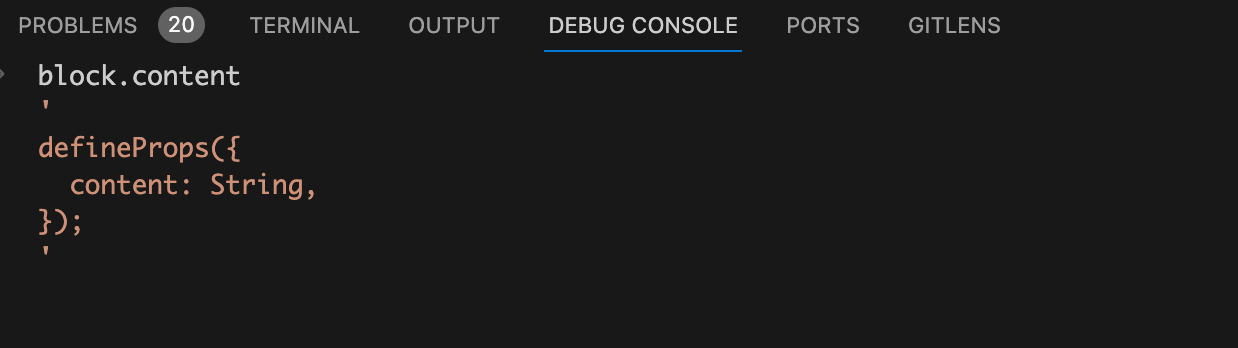
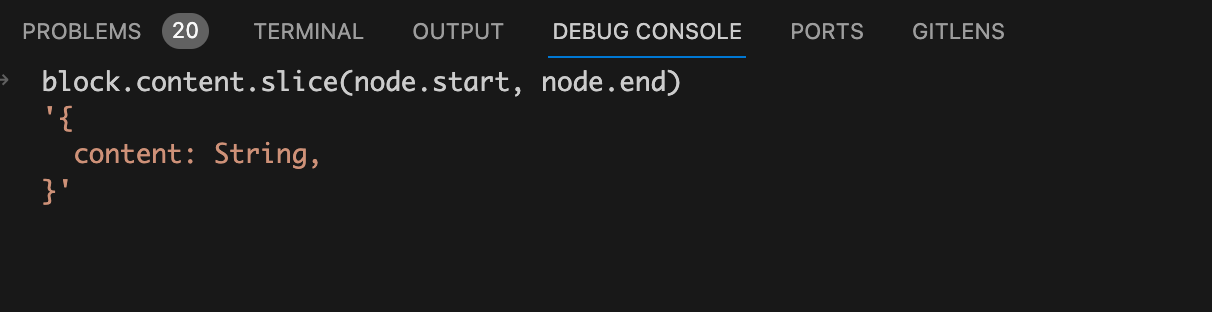
这里传入的node节点就是我们前面存在上下文中ctx.propsRuntimeDecl,也就是在调用defineProps函数时传入的参数节点,node.start就是参数节点开始的位置,node.end就是参数节点的结束位置。所以使用content.slice方法就可以截取出来调用defineProps函数时传入的props定义。请看下图:
现在我们再回过头来看compileScript函数中的调用genRuntimeProps函数的代码你就能很容易理解了:
let runtimeOptions = ``;

const propsDecl = genRuntimeProps(ctx);

if (propsDecl) runtimeOptions += `\n  props: ${propsDecl},`;
这里的propsDecl在我们这个场景中就是使用slice截取出来的props定义,再使用\n props: ${propsDecl},进行字符串拼接就得到了runtimeOptions的值。如图:
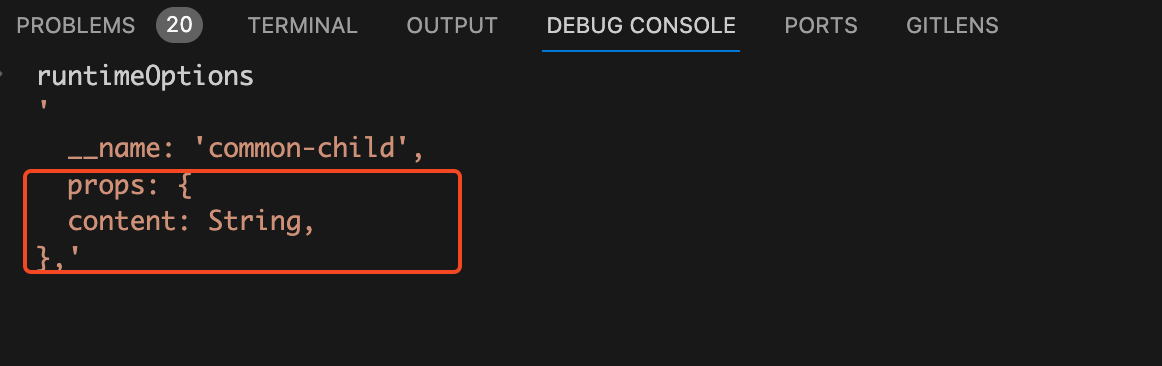
看到runtimeOptions的值是不是就觉得很熟悉了,又有name属性,又有props属性。其实就是vue组件对象的code字符串的一部分。name拼接逻辑是在省略的代码中,我们这篇文章只讲props相关的逻辑,所以name不在这篇文章的讨论范围内。
现在我们能够回答前面提的第三个问题了。
defineProps是如何将声明的 props 自动暴露给模板?
编译时在移除掉defineProps相关代码时会将调用defineProps函数时传入的参数node节点信息存到ctx上下文中。遍历完AST抽象语法树后,然后从上下文中存的参数node节点信息中拿到调用defineProps宏函数时传入props的开始位置和结束位置。再使用slice方法并且传入开始位置和结束位置,从<script setup>模块的代码字符串中截取到props定义的字符串。然后将截取到的props定义的字符串拼接到vue组件对象的字符串中,这样vue组件对象中就有了一个props属性,这个props属性在template模版中可以直接使用。
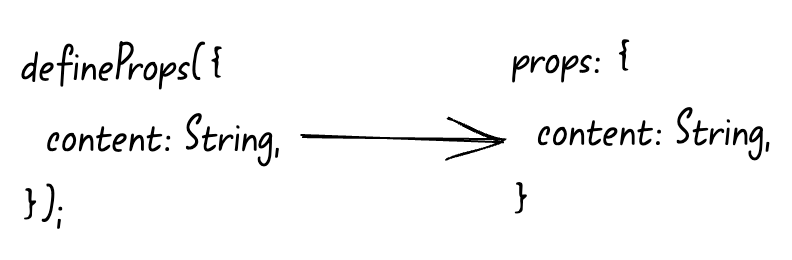
拼接成完整的浏览器运行时js代码
我们再来看compileScript函数中的最后一坨代码;
const def =

  (defaultExport ? `\n  ...${normalScriptDefaultVar},` : ``) +

  (definedOptions ? `\n  ...${definedOptions},` : "");

ctx.s.prependLeft(

  startOffset,

  `\n${genDefaultAs} /*#__PURE__*/${ctx.helper(

    `defineComponent`

  )}({${def}${runtimeOptions}\n  ${

    hasAwait ? `async ` : ``

  }setup(${args}) {\n${exposeCall}`

);

ctx.s.appendRight(endOffset, `})`);

return {

  //....

  content: ctx.s.toString(),

};
这里先调用了ctx.s.prependLeft方法给字符串开始的地方插入了一串字符串,这串拼接的字符串看着脑瓜子痛,我们直接在debug console上面看看要拼接的字符串是什么样的:
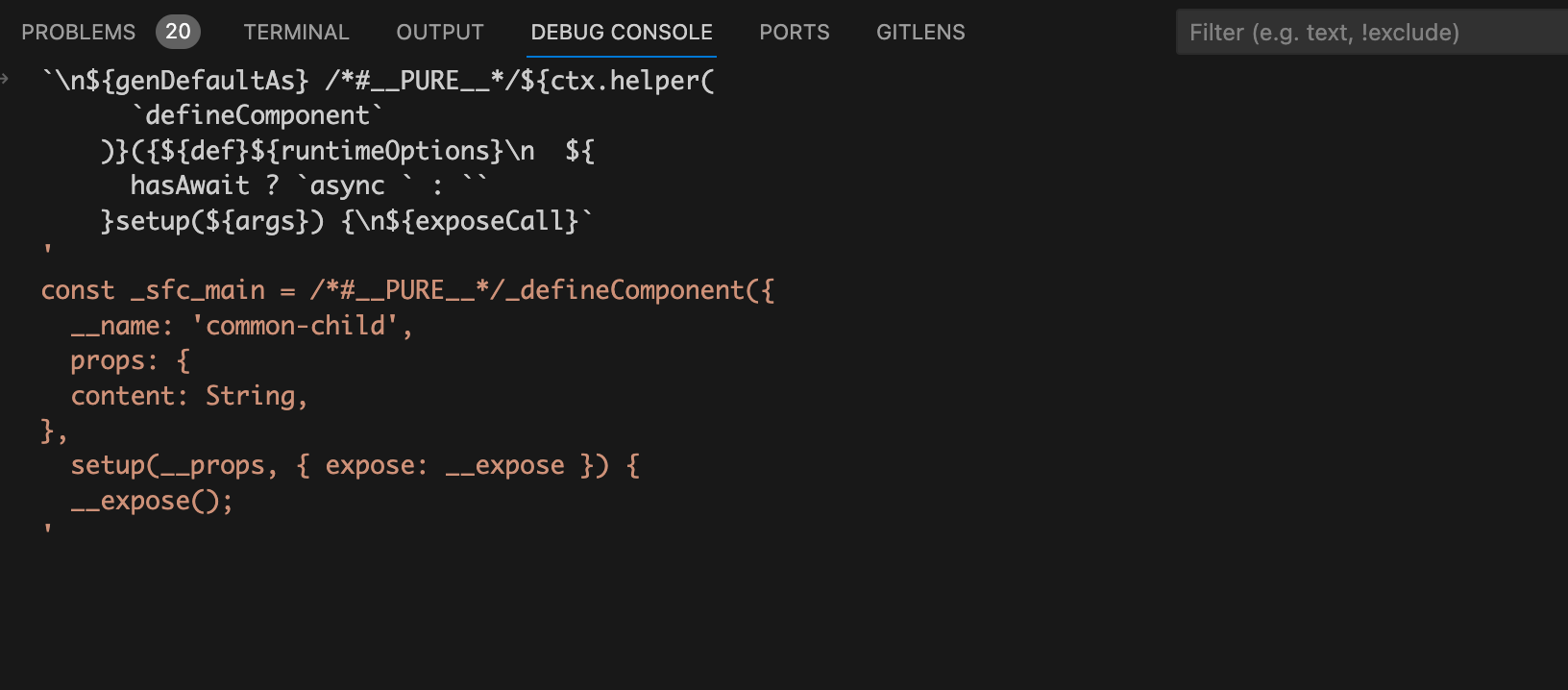
看到这串你应该很熟悉,除了前面我们拼接的name和props之外还有部分setup编译后的代码,其实这就是vue组件对象的code代码字符串的一部分。
当断点执行完prependLeft方法后,我们在debug console中再看看此时的ctx.s.toString()的值是什么样的:
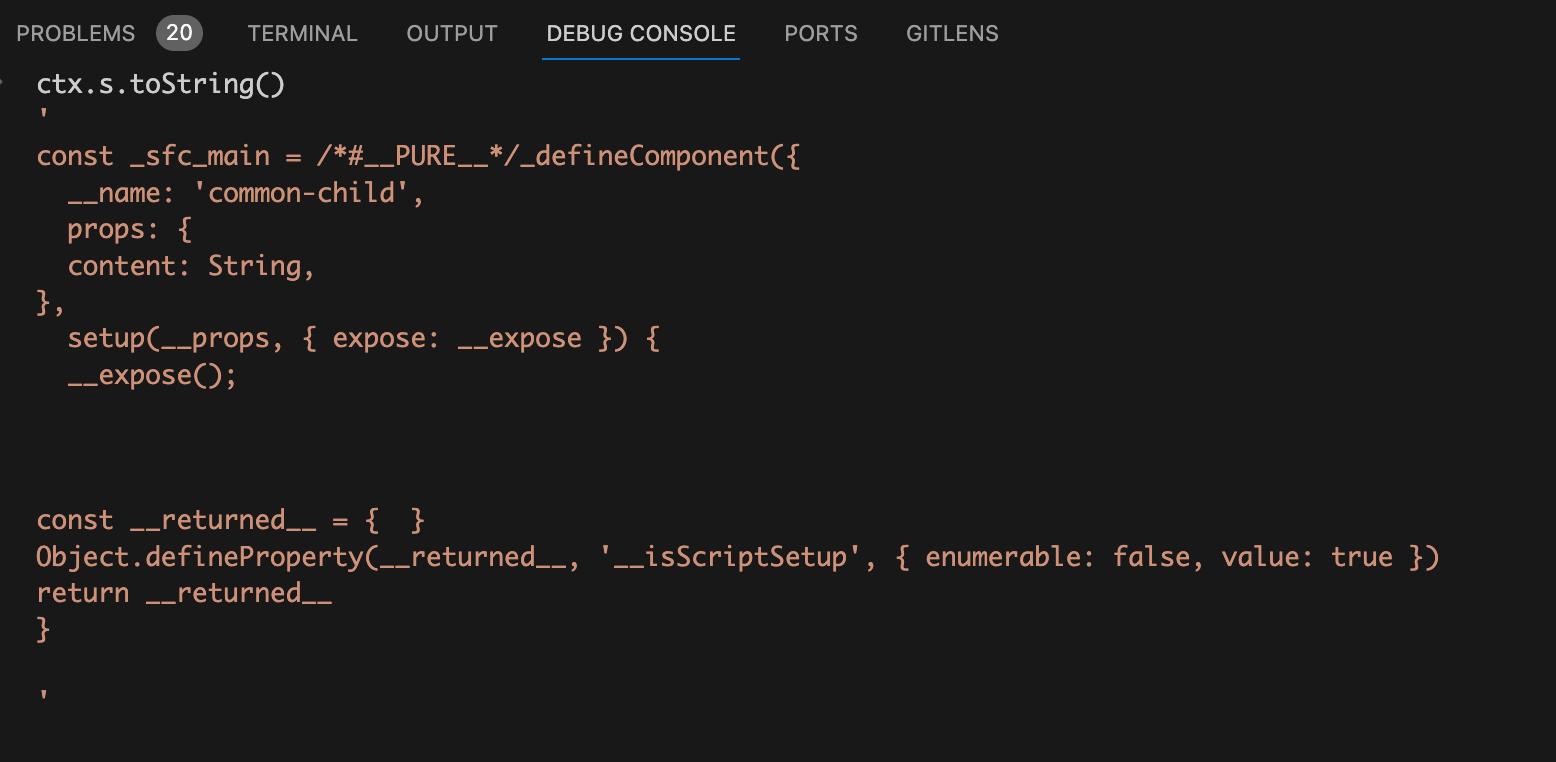
从图上可以看到vue组件对象上的name属性、props属性、setup函数基本已经拼接的差不多了,只差一个})结束符号,所以执行ctx.s.appendRight(endOffset, }));将结束符号插入进去。
我们最后再来看看compileScript函数的返回对象中的content属性,也就是ctx.s.toString(),content属性的值就是vue组件中的<script setup>模块编译成浏览器可执行的js代码字符串。
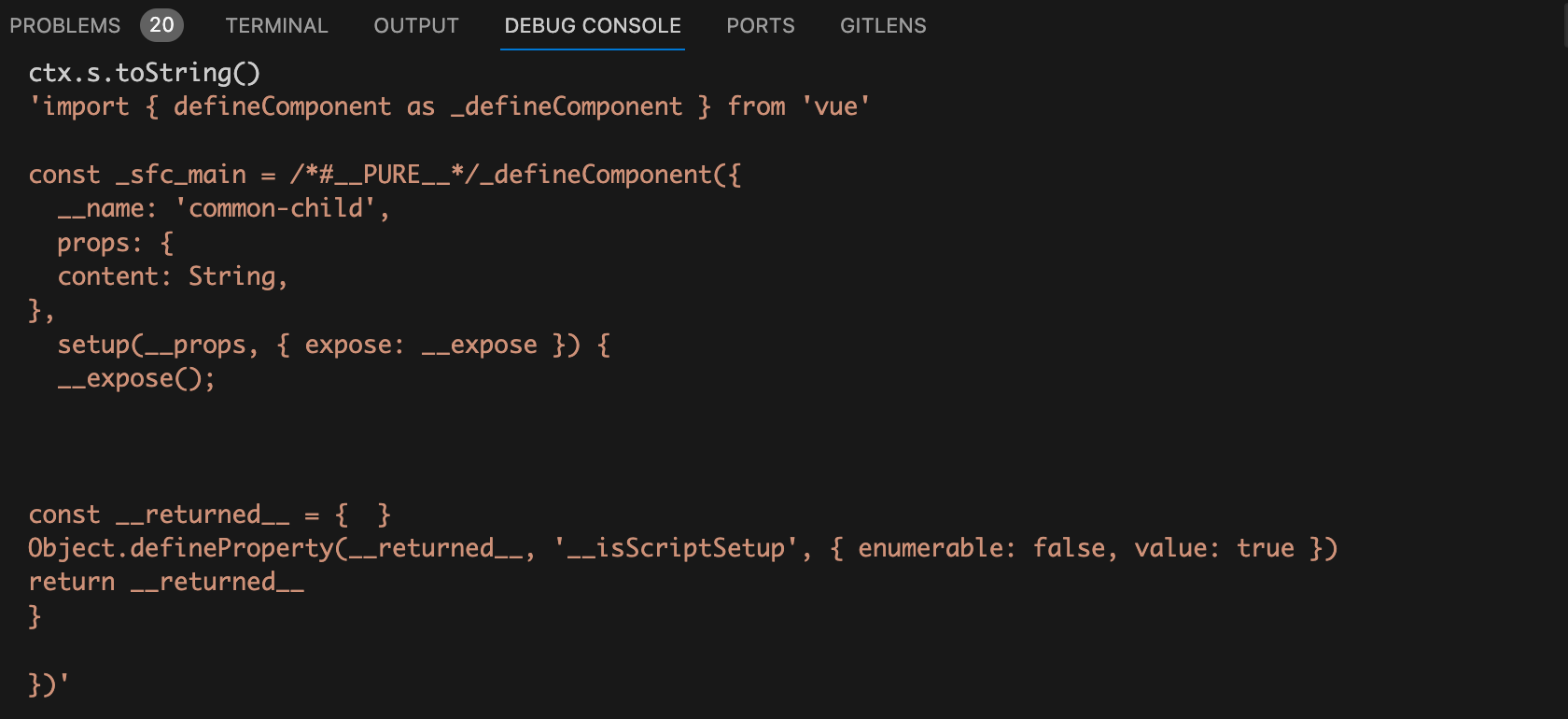
为什么不能在非setup顶层使用defineProps?
同样的套路我们来debug看看if-child.vue文件,先来回忆一下if-child.vue文件的代码。
<template>

  <div>content is {{ content }}</div>

</template>

<script setup lang="ts">

import { ref } from "vue";

const count = ref(10);

if (count.value) {

  defineProps({

    content: String,

  });

}

</script>
将断点走到compileScript函数的遍历AST抽象语法树的地方,我们看到scriptSetupAst.body数组中有三个node节点。
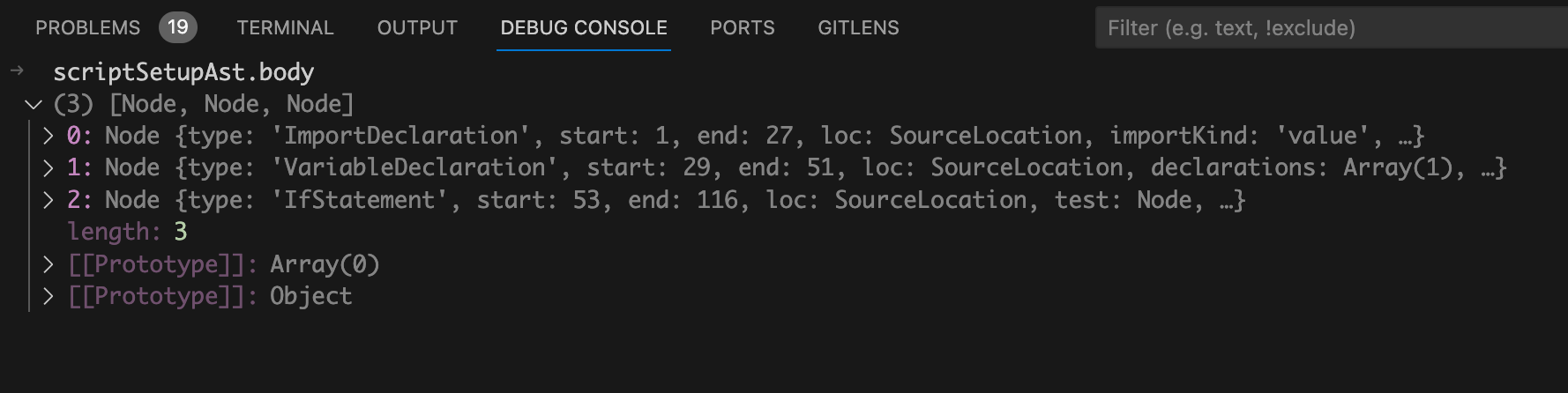
从图中我们可以看到这三个node节点类型分别是:ImportDeclaration、VariableDeclaration、IfStatement。很明显这三个节点对应的是我们源代码中的import语句、const定义变量、if 模块。我们再来回忆一下compileScript函数中的遍历AST抽象语法树的代码:
function compileScript(sfc, options) {

   // 省略..

  for (const node of scriptSetupAst.body) {

    if (node.type === "ExpressionStatement") {

      const expr = node.expression;

      if (processDefineProps(ctx, expr)) {

        ctx.s.remove(node.start + startOffset, node.end + startOffset);

      }

    }

    if (

      (node.type === "VariableDeclaration" && !node.declare) ||

      node.type.endsWith("Statement")

    ) {

      // ....

    }

  }

  // 省略..

}
从代码我们就可以看出来第三个node节点,也就是在if中使用defineProps的代码,这个节点类型为IfStatement,不等于ExpressionStatement,所以代码不会走到processDefineProps函数中,也不会执行remove方法删除掉调用defineProps函数的代码。当代码运行在浏览器时由于我们没有从任何地方import导入defineProps,当然就会报错defineProps is not defined。
总结
现在我们能够回答前面提的三个问题了。
为什么
defineProps不需要import导入?因为在编译过程中如果当前
AST抽象语法树的节点类型是ExpressionStatement表达式语句,并且调用的函数是defineProps,那么就调用remove方法将调用defineProps函数的代码给移除掉。既然defineProps语句已经被移除了,自然也就不需要import导入了defineProps了。为什么不能在非
setup顶层使用defineProps?因为在非
setup顶层使用defineProps的代码生成AST抽象语法树后节点类型就不是ExpressionStatement表达式语句类型,只有ExpressionStatement表达式语句类型才会走到processDefineProps函数中,并且调用remove方法将调用defineProps函数的代码给移除掉。当代码运行在浏览器时由于我们没有从任何地方import导入defineProps,当然就会报错defineProps is not defined。defineProps是如何将声明的props自动暴露给模板?编译时在移除掉
defineProps相关代码时会将调用defineProps函数时传入的参数node节点信息存到ctx上下文中。遍历完AST抽象语法树后,然后从上下文中存的参数node节点信息中拿到调用defineProps宏函数时传入props的开始位置和结束位置。再使用slice方法并且传入开始位置和结束位置,从<script setup>模块的代码字符串中截取到props定义的字符串。然后将截取到的props定义的字符串拼接到vue组件对象的字符串中,这样vue组件对象中就有了一个props属性,这个props属性在template模版中可以直接使用。
关注公众号:前端欧阳,解锁我更多vue干货文章,并且可以免费向我咨询vue相关问题。

为什么defineProps宏函数不需要从vue中import导入?的更多相关文章
- Vue中import和require的对比
Vue中import和require的对比 一.前言 vue框架想必是我们前端朋友们必学的知识点,说它难也没有那么难,说简单也没有那么简单,主要技术就是那么几个,可是里面的细节很多,有些时候我们会 ...
- vue中excel导入导出组件
vue中导入导出excel,并根据后台返回类型进行判断,导入到数据库中 功能:实现js导入导出excel,并且对导入的excel进行展示,当excel标题名称和数据库的名称标题匹配时,则对应列导入的数 ...
- Vue中import引入模块路径时的@符号
1.ES6 模块主要有两个功能:export 和 import export:用户对外输出本模块(一个文件可以理解为一个模块,比如 aaa.js bbb.js)变量的接口 . import:用于在一个 ...
- Vue中import from的来源--省略后缀与加载文件夹
Vue使用import ... from ...来导入组件,库,变量等.而from后的来源可以是js,vue,json.这个是在webpack.base.conf.js中设置的: module.exp ...
- vue 中import和export如何一起使用(一)
前段时间碰到一个问题,vue js中要使用import来加载第三方的js,但是后面使用exports.XXX的话会报exports is not defined.那要怎么解决呢? 首先,我们要了解ES ...
- Vue中import '@...'的意思
转载: https://blog.csdn.net/xiazeqiang2018/article/details/81325996 写项目的时候看到很多导入都是@开头,这是webpack的路径别名,相 ...
- Vue中import用法
1. 引入第三方插件 第三方常用插件参考https://blog.csdn.net/vbirdbest/article/details/86527886 2. 导入 css 文件 import 'iv ...
- vue中import引入模块路径中@符号是什么意思
在编写vue文件中引入模块 import model from "@/common/model"; 这里路径前面的“@”符号表示什么意思? resolve: { // 自动补全的扩 ...
- vue中import xxx from 和 import {xxx} from的区别
1.import xxx from import FunName from ‘../xxx’ 对应js中的引用: export defualt function FunName() { return ...
- 在vue中import()语法不能传入变量
解决办法: 一定要用变量的时候,可以通过字符串模板来提供部分信息给webpack:例如import(`./path/${myFile}`), 这样编译时会编译所有./path下的模块,但运行时确定my ...
随机推荐
- C#中使用AutoMapper
AutoMapper是一种流行的对象到对象映射库,可用于映射属于不同类型的对象.例如,您可能需要将应用程序中的DTO(数据传输对象)映射到模型对象. AutoMapper省去了手动映射此类不兼容类型的 ...
- 小知识:RHEL7上设置Keepalived日志重定向
1.配置 /etc/sysconfig/keepalived 文件 2.添加keepalived日志保存位置的配置 3.修改 /lib/systemd/system/keepalived.servic ...
- DbgridEh表格框的【可连续点击两次编辑设置,和不允许点击两次编辑的设置】
- [JVM]GC日志解读解析
GC日志解读解析 示例代码 package jvm.test1; import java.util.Random; import java.util.concurrent.TimeUnit; impo ...
- 从零开始的微信小程序入门教程(三),有趣且好玩的数据绑定
壹 ❀ 引 我在从零开始的微信小程序入门教程(二),初识WXML与WXSS一文中简单介绍了小程序组件与小程序样式相关概念,在了解这两者之后,其实我们已经可以搭建出简单的静态页面,与书写HTML页面一样 ...
- NC207569 牛牛爱奇数
题目链接 题目 题目描述 在牛牛面前放着 \(n\) 个数,这些数字既有奇数也有偶数,只不过牛牛对奇数情有独钟,他特别想让这些数都变成奇数. 现在牛牛获得了一种能力,他可以执行一种操作:每次选中一个偶 ...
- SQL中为什么不要使用1=1?
最近看几个老项目的SQL条件中使用了1=1,想想自己也曾经这样写过,略有感触,特别拿出来说道说道. 编写SQL语句就像炒菜,每一种调料的使用都会影响菜品的最终味道,每一个SQL条件的加入也会影响查询的 ...
- BUG管理系统(Mantis)迁移实战
Mantis迁移实战 名词解释 Mantis: 开源的BUG管理平台Mantis,也做MantisBT. 同档次产品有EasyBUG,QC,BugFree,Bugzila. Xa ...
- 项目实战:Qt编译Qt库以及使用C#调用Qt库,并实现C#集成Qt的tcp客户端
需求 1.Qt已经开发了应用,封装成Qt库,以供C#调用. 2.Qt的tcp客户端封装,以供C#调用,双向传递数据. 原理 1.使用QtCreator编译msvc版本的Qt库: 2.使 ...
- queryset高级用法:select_related
在提取某个模型的数据的同时,也提前将相关联的数据提取出来.比如提取文章数据,可以使用select_related将author信息提取出来,以后再次使用article.author的时候就不需要再次去 ...