
SpringCloud Hystrix断路器的基本使用
官网资料: https://github.com/Netflix/Hystrix/wiki/How-To-Use
1. 服务雪崩
分布式系统面临的问题
复杂分布式体系结构中的应用程序有数十个依赖关系,每个依赖关系在某些时候将不可避免的因为各种因素通信失败
多个微服务之间调用的时候,如果调用链过长,那么链路上的其中某个微服务因为响应时间过长或者不可用,对整个链路上的所有的微服务都产生影响,引起系统雪崩效应
对于高流量应用来说,如果某个微服务因为不可用或者响应时间长,导致整体服务延迟增加,队列堆积,线程和其他资源紧张 ,导致系统发生级联故障. 我们应该将故障进行隔离,降级,
2. 功能介绍
Hystrix断路器 的目的则是解决上述问题的工具,通过服务降级,服务熔断,服务限流等手段对 故障的服务进行管控
服务降级:
当程序运行异常,超时,线程池/信号量打满 等 将会导致服务降级,可以给用户一个友好的提示 例如服务器忙,请稍候再试,不让客户端等待并立刻返回一个友好提示,而不是抛出异常服务熔断:
类比保险丝达到最大服务访问后,直接拒绝访问,拉闸限电,然后调用服务降级的方法并返回友好提示服务限流:
高并发等操作,严禁一窝蜂的过来拥挤,大家排队,一秒钟N个,有序进行
3. 问题重现
服务提供方,注册eureka
hystrix 相关依赖:
<dependency>

      <groupId>org.springframework.cloud</groupId>

      <artifactId>spring-cloud-starter-netflix-hystrix</artifactId>

</dependency>
yaml:
server:

  port: 8001

eureka:

  client:

    register-with-eureka: true   #是否将自己注册到注册中心,集群必须设置为true配合ribbon

    fetch-registry: true    #是否从服务端抓取已有的注册信息

    service-url:

      defaultZone: http://127.0.0.1.com:7001/eureka

spring:

  application:

    name: cloud-provider-hystrix-payment
主启动类: 启用Hystrix 自动配置
@SpringBootApplication

@EnableHystrix

public class PaymentMain8001 {

    public static void main(String[] args) {

        SpringApplication.run(PaymentMain8001.class,args);

    }

}
服务提供方Controller 简单调用Service层方法
@RestController

@Slf4j

public class PaymentController {

    @Resource

    private PaymentService paymentService;

	/*

	* 调用Service的paymentInfo_OK方法

	*/

    @GetMapping("/payment/hystrix/ok/{id}")

    public String paymentInfo_OK(@PathVariable("id") Integer id) {

        return paymentService.paymentInfo_OK(id);

    }

    /*

    * 被除数为0, 模拟出错场景

    */

    @GetMapping("/payment/hystrix/error/{id}")

    public String paymentInfo_Error(@PathVariable("id") Integer id) {

        return paymentService.paymentInfo_Error(id);

    }

	/*

	* 调用Service的paymentService.paymentInfo_TimeOut 长时间服务接口

	*/

    @GetMapping("/payment/hystrix/timeout/{id}")

    public String paymentInfo_TimeOut(@PathVariable("id") Integer id) {

        return paymentService.paymentInfo_TimeOut(id);

    }

}
这里paymentInfo_TimeOut 接口是一个 长时间的调用, 而paymentInfo_OK 是一个非常正常的接口,但是如果这时我用测试工具 强压 paymentInfo_TimeOut 接口 导致线程数被沾满,也将影响到正常情况下调用非常快速的其他接口, 这也就是我们需要解决的问题
4. 服务熔断和降级
4.1 服务降级
使用Hystrix提供的注解,对抛出异常的方法进行降级,@HystrixCommand 并指定 降级方法
@Service

public class PaymentService {

    /**

     * 正常访问,肯定ok

     *

     * @param id

     * @return

     */

    public String paymentInfo_OK(Integer id) {

        return "调用正常";

    }

    /**

    *  抛出异常 调用fallbackMethod 定义的兜底方法

    */

    @HystrixCommand(fallbackMethod = "paymentInfo_ErrorHandler")

    public String paymentInfo_Error(Integer id) {

        int i = 10/0;

        return "调用成功"+id;

    }

    public String paymentInfo_ErrorHandler(Integer id) {

        return "系统错误"+id;

    }
浏览器访问 该接口:http://127.0.0.1:8001/payment/hystrix/error/10
返回信息: 系统错误10 接口出错,调用fallback方法 并将参数传递过去
4.2 自定义规则
上面的例子中没有指定任何 规则,默认方法报错为降级条件, Hystrix 提供了丰富的降级规则制定,
所有的规则都在com.netflix.hystrix.HystrixCommandProperties 类中定义
/**

 * Properties for instances of {@link HystrixCommand}.

 * <p>

 * Default implementation of methods uses Archaius (https://github.com/Netflix/archaius)

 */

public abstract class HystrixCommandProperties {

    private static final Logger logger = LoggerFactory.getLogger(HystrixCommandProperties.class);

    /* 重要参数的默认值配置 */

    /* package */ static final Integer default_metricsRollingStatisticalWindow = 10000;// default => statisticalWindow: 10000 = 10 seconds (and default of 10 buckets so each bucket is 1 second)

    private static final Integer default_metricsRollingStatisticalWindowBuckets = 10;// default => statisticalWindowBuckets: 10 = 10 buckets in a 10 second window so each bucket is 1 second

    private static final Integer default_circuitBreakerRequestVolumeThreshold = 20;// default => statisticalWindowVolumeThreshold: 20 requests in 10 seconds must occur before statistics matter

    private static final Integer default_circuitBreakerSleepWindowInMilliseconds = 5000;// default => sleepWindow: 5000 = 5 seconds that we will sleep before trying again after tripping the circuit

    private static final Integer default_circuitBreakerErrorThresholdPercentage = 50;// default => errorThresholdPercentage = 50 = if 50%+ of requests in 10 seconds are failures or latent then we will trip the circuit

    private static final Boolean default_circuitBreakerForceOpen = false;// default => forceCircuitOpen = false (we want to allow traffic)

    /* package */ static final Boolean default_circuitBreakerForceClosed = false;// default => ignoreErrors = false

    private static final Integer default_executionTimeoutInMilliseconds = 1000; // default => executionTimeoutInMilliseconds: 1000 = 1 second

    private static final Boolean default_executionTimeoutEnabled = true;

    private static final ExecutionIsolationStrategy default_executionIsolationStrategy = ExecutionIsolationStrategy.THREAD;

    private static final Boolean default_executionIsolationThreadInterruptOnTimeout = true;

    private static final Boolean default_executionIsolationThreadInterruptOnFutureCancel = false;

    private static final Boolean default_metricsRollingPercentileEnabled = true;

    private static final Boolean default_requestCacheEnabled = true;

    private static final Integer default_fallbackIsolationSemaphoreMaxConcurrentRequests = 10;

    private static final Boolean default_fallbackEnabled = true;

    private static final Integer default_executionIsolationSemaphoreMaxConcurrentRequests = 10;

    private static final Boolean default_requestLogEnabled = true;

    private static final Boolean default_circuitBreakerEnabled = true;

    private static final Integer default_metricsRollingPercentileWindow = 60000; // default to 1 minute for RollingPercentile

    private static final Integer default_metricsRollingPercentileWindowBuckets = 6; // default to 6 buckets (10 seconds each in 60 second window)

    private static final Integer default_metricsRollingPercentileBucketSize = 100; // default to 100 values max per bucket

    private static final Integer default_metricsHealthSnapshotIntervalInMilliseconds = 500; // default to 500ms as max frequency between allowing snapshots of health (error percentage etc)

    /**

    * 保存每个配置的 参数定义

    */

    @SuppressWarnings("unused") private final HystrixCommandKey key;

    private final HystrixProperty<Integer> circuitBreakerRequestVolumeThreshold; // number of requests that must be made within a statisticalWindow before open/close decisions are made using stats

    private final HystrixProperty<Integer> circuitBreakerSleepWindowInMilliseconds; // milliseconds after tripping circuit before allowing retry

    private final HystrixProperty<Boolean> circuitBreakerEnabled; // Whether circuit breaker should be enabled.

    private final HystrixProperty<Integer> circuitBreakerErrorThresholdPercentage; // % of 'marks' that must be failed to trip the circuit

    private final HystrixProperty<Boolean> circuitBreakerForceOpen; // a property to allow forcing the circuit open (stopping all requests)

    private final HystrixProperty<Boolean> circuitBreakerForceClosed; // a property to allow ignoring errors and therefore never trip 'open' (ie. allow all traffic through)

    private final HystrixProperty<ExecutionIsolationStrategy> executionIsolationStrategy; // Whether a command should be executed in a separate thread or not.

    private final HystrixProperty<Integer> executionTimeoutInMilliseconds; // Timeout value in milliseconds for a command

    private final HystrixProperty<Boolean> executionTimeoutEnabled; //Whether timeout should be triggered

    private final HystrixProperty<String> executionIsolationThreadPoolKeyOverride; // What thread-pool this command should run in (if running on a separate thread).

    private final HystrixProperty<Integer> executionIsolationSemaphoreMaxConcurrentRequests; // Number of permits for execution semaphore

    private final HystrixProperty<Integer> fallbackIsolationSemaphoreMaxConcurrentRequests; // Number of permits for fallback semaphore

    private final HystrixProperty<Boolean> fallbackEnabled; // Whether fallback should be attempted.

    private final HystrixProperty<Boolean> executionIsolationThreadInterruptOnTimeout; // Whether an underlying Future/Thread (when runInSeparateThread == true) should be interrupted after a timeout

    private final HystrixProperty<Boolean> executionIsolationThreadInterruptOnFutureCancel; // Whether canceling an underlying Future/Thread (when runInSeparateThread == true) should interrupt the execution thread

    private final HystrixProperty<Integer> metricsRollingStatisticalWindowInMilliseconds; // milliseconds back that will be tracked

    private final HystrixProperty<Integer> metricsRollingStatisticalWindowBuckets; // number of buckets in the statisticalWindow

    private final HystrixProperty<Boolean> metricsRollingPercentileEnabled; // Whether monitoring should be enabled (SLA and Tracers).

    private final HystrixProperty<Integer> metricsRollingPercentileWindowInMilliseconds; // number of milliseconds that will be tracked in RollingPercentile

    private final HystrixProperty<Integer> metricsRollingPercentileWindowBuckets; // number of buckets percentileWindow will be divided into

    private final HystrixProperty<Integer> metricsRollingPercentileBucketSize; // how many values will be stored in each percentileWindowBucket

    private final HystrixProperty<Integer> metricsHealthSnapshotIntervalInMilliseconds; // time between health snapshots

    private final HystrixProperty<Boolean> requestLogEnabled; // whether command request logging is enabled.

    private final HystrixProperty<Boolean> requestCacheEnabled; // Whether request caching is enabled.

    //将默认值初始化

    protected HystrixCommandProperties(HystrixCommandKey key, HystrixCommandProperties.Setter builder, String propertyPrefix) {

        this.key = key;

        this.circuitBreakerEnabled = getProperty(propertyPrefix, key, "circuitBreaker.enabled", builder.getCircuitBreakerEnabled(), default_circuitBreakerEnabled);

        this.circuitBreakerRequestVolumeThreshold = getProperty(propertyPrefix, key, "circuitBreaker.requestVolumeThreshold", builder.getCircuitBreakerRequestVolumeThreshold(), default_circuitBreakerRequestVolumeThreshold);

        this.circuitBreakerSleepWindowInMilliseconds = getProperty(propertyPrefix, key, "circuitBreaker.sleepWindowInMilliseconds", builder.getCircuitBreakerSleepWindowInMilliseconds(), default_circuitBreakerSleepWindowInMilliseconds);

        this.circuitBreakerErrorThresholdPercentage = getProperty(propertyPrefix, key, "circuitBreaker.errorThresholdPercentage", builder.getCircuitBreakerErrorThresholdPercentage(), default_circuitBreakerErrorThresholdPercentage);

        this.circuitBreakerForceOpen = getProperty(propertyPrefix, key, "circuitBreaker.forceOpen", builder.getCircuitBreakerForceOpen(), default_circuitBreakerForceOpen);

        this.circuitBreakerForceClosed = getProperty(propertyPrefix, key, "circuitBreaker.forceClosed", builder.getCircuitBreakerForceClosed(), default_circuitBreakerForceClosed);

        this.executionIsolationStrategy = getProperty(propertyPrefix, key, "execution.isolation.strategy", builder.getExecutionIsolationStrategy(), default_executionIsolationStrategy);

        //this property name is now misleading.  //TODO figure out a good way to deprecate this property name

        this.executionTimeoutInMilliseconds = getProperty(propertyPrefix, key, "execution.isolation.thread.timeoutInMilliseconds", builder.getExecutionIsolationThreadTimeoutInMilliseconds(), default_executionTimeoutInMilliseconds);

        this.executionTimeoutEnabled = getProperty(propertyPrefix, key, "execution.timeout.enabled", builder.getExecutionTimeoutEnabled(), default_executionTimeoutEnabled);

        this.executionIsolationThreadInterruptOnTimeout = getProperty(propertyPrefix, key, "execution.isolation.thread.interruptOnTimeout", builder.getExecutionIsolationThreadInterruptOnTimeout(), default_executionIsolationThreadInterruptOnTimeout);

        this.executionIsolationThreadInterruptOnFutureCancel = getProperty(propertyPrefix, key, "execution.isolation.thread.interruptOnFutureCancel", builder.getExecutionIsolationThreadInterruptOnFutureCancel(), default_executionIsolationThreadInterruptOnFutureCancel);

        this.executionIsolationSemaphoreMaxConcurrentRequests = getProperty(propertyPrefix, key, "execution.isolation.semaphore.maxConcurrentRequests", builder.getExecutionIsolationSemaphoreMaxConcurrentRequests(), default_executionIsolationSemaphoreMaxConcurrentRequests);

        this.fallbackIsolationSemaphoreMaxConcurrentRequests = getProperty(propertyPrefix, key, "fallback.isolation.semaphore.maxConcurrentRequests", builder.getFallbackIsolationSemaphoreMaxConcurrentRequests(), default_fallbackIsolationSemaphoreMaxConcurrentRequests);

        this.fallbackEnabled = getProperty(propertyPrefix, key, "fallback.enabled", builder.getFallbackEnabled(), default_fallbackEnabled);

        this.metricsRollingStatisticalWindowInMilliseconds = getProperty(propertyPrefix, key, "metrics.rollingStats.timeInMilliseconds", builder.getMetricsRollingStatisticalWindowInMilliseconds(), default_metricsRollingStatisticalWindow);

        this.metricsRollingStatisticalWindowBuckets = getProperty(propertyPrefix, key, "metrics.rollingStats.numBuckets", builder.getMetricsRollingStatisticalWindowBuckets(), default_metricsRollingStatisticalWindowBuckets);

        this.metricsRollingPercentileEnabled = getProperty(propertyPrefix, key, "metrics.rollingPercentile.enabled", builder.getMetricsRollingPercentileEnabled(), default_metricsRollingPercentileEnabled);

        this.metricsRollingPercentileWindowInMilliseconds = getProperty(propertyPrefix, key, "metrics.rollingPercentile.timeInMilliseconds", builder.getMetricsRollingPercentileWindowInMilliseconds(), default_metricsRollingPercentileWindow);

        this.metricsRollingPercentileWindowBuckets = getProperty(propertyPrefix, key, "metrics.rollingPercentile.numBuckets", builder.getMetricsRollingPercentileWindowBuckets(), default_metricsRollingPercentileWindowBuckets);

        this.metricsRollingPercentileBucketSize = getProperty(propertyPrefix, key, "metrics.rollingPercentile.bucketSize", builder.getMetricsRollingPercentileBucketSize(), default_metricsRollingPercentileBucketSize);

        this.metricsHealthSnapshotIntervalInMilliseconds = getProperty(propertyPrefix, key, "metrics.healthSnapshot.intervalInMilliseconds", builder.getMetricsHealthSnapshotIntervalInMilliseconds(), default_metricsHealthSnapshotIntervalInMilliseconds);

        this.requestCacheEnabled = getProperty(propertyPrefix, key, "requestCache.enabled", builder.getRequestCacheEnabled(), default_requestCacheEnabled);

        this.requestLogEnabled = getProperty(propertyPrefix, key, "requestLog.enabled", builder.getRequestLogEnabled(), default_requestLogEnabled);

}
下面的例子中使用了超时时间的配置
@Service

public class PaymentService {

    public String paymentInfo_OK(Integer id) {

        return "调用正常";

    }

    /**

    * Hystrix 的注解, 用于定义该接口的各种规则

    * paymentInfo_TimeOutHandler 定义fallback

    * execution.isolation.thread.timeoutInMilliseconds 为本接口最大访问时间为 2000 毫秒

    */

    @HystrixCommand(fallbackMethod = "paymentInfo_TimeOutHandler",commandProperties = {

            @HystrixProperty(name = "execution.isolation.thread.timeoutInMilliseconds",value = "2000")

    })

    public String paymentInfo_TimeOut(Integer id) {

        try {

            TimeUnit.MILLISECONDS.sleep(3000);

        } catch (InterruptedException e) {

            e.printStackTrace();

        }

        return "长流程调用成功"+id;

    }

    /*

    * 超时降级方法

    */

    public String paymentInfo_TimeOutHandler(Integer id) {

        return "系统繁忙系统报错,请稍后再试"+id;

    }

}
该案例中,该接口的访问时间为 3秒钟,定义的规则为 超时2秒则调用fallback ,
调用接口 http://127.0.0.1:8001/payment/hystrix/timeout/10
返回 系统繁忙系统报错,请稍后再试10 很显然 ,进入了超时方法,并将参数也传了过去
4.3 服务熔断
前面的降级操作,每个请求仍然是接受并处理的,只是在超时或者报错时进行降级
那如果在一定时间内,确定这个服务都不可用,就可以使某个接口熔断,所以请求皆不可用 ,更加减轻服务器压力, 在一定时间后再恢复过来
仍然是在@HystrixCommand 中定义熔断的规则,基本的使用请看下面的代码注释
//***************** 服务熔断***********************

    //该案例的意思是 5000毫秒内 十次请求 有百分之60失败 则熔断10 秒钟,10秒后尝试恢复

    @HystrixCommand(fallbackMethod = "paymentCircuitBreaker_fallback",commandProperties ={

            @HystrixProperty(name = "circuitBreaker.enabled",value = "true"), //是否开启断路器

        	@HystrixProperty(name = "metrics.rollingStats.timeInMilliseconds",value = "5000"), //统计窗口时间

            @HystrixProperty(name = "circuitBreaker.requestVolumeThreshold",value = "10"), //统计窗口时间内最少请求次数

            @HystrixProperty(name = "circuitBreaker.sleepWindowInMilliseconds",value = "10000"), //短路多久以后开始尝试是否恢复,默认5s

            @HystrixProperty(name = "circuitBreaker.errorThresholdPercentage",value = "60"),//失败率达到多少后跳闸

    })

    public String paymentCircuitBreaker(@PathVariable("id") Integer id) {

        if (id < 0) {

            throw new RuntimeException("******id 不能为负数");

        }

        String serialNumber = IdUtil.simpleUUID();

        return Thread.currentThread().getName()+"\t"+ "调用成功,流水号:" + serialNumber;

    }

    public String paymentCircuitBreaker_fallback(@PathVariable("id") Integer id) {

        return "id 不能负数,请稍后再试,id:" + id;

    }
此案例的代码的意思就是 : 开启服务熔断功能,并指定 在5秒时间内至少有10次请求,并当错误率达到60% 以上时,将熔断此接口,拒绝一切请求,并在10 秒后开始尝试恢复正常,如果没有错误 就完全恢复
测试: 方法中定义如果接收负数则视为出错,正数则为正常,
调用接口 分别传入 -10 和 10 一次调用失败,抛出错误 调用 fallback方法,一次调用成功,返回服务端端口
熔断: 快速调用错误方式,使其达到熔断条件 5秒内 访问次数达到10次,错误率超过 60% ,此时 该接口熔断,及时传入正数的正确方式,也是进入 fallback方法, 拒绝了一切请求,当 10秒后 ,会尝试接收请求,如果 是正确的 则正式恢复,如果仍然检测出错误请求,则继续熔断
5. 统一调用方法
在上面的案例中,每个方法指定了其fallback方法, 定义了 其 出错时的 兜底方法,但是如果 配置过多,每个都配置一个方法,那么项目中将存在大量的冗余代码,对于相似的错误 可以使用 默认的处理方法 统一处理
@DefaultProperties(defaultFallback 定义在类上 ,定义此类中方法默认的fallback 方法
示例:
@Service

@DefaultProperties(defaultFallback = "payment_Global_FallbackMethod")

public class PaymentService {

    public String paymentInfo_OK(Integer id) {

        return "调用正常";

    }

    @HystrixCommand

    public String paymentInfo_Error(Integer id) {

        int i = 10/0;

        return "调用成功"+id;

    }

    @HystrixCommand(fallbackMethod = "paymentInfo_TimeOutHandler",commandProperties = {

            @HystrixProperty(name = "execution.isolation.thread.timeoutInMilliseconds",value = "2000")

    })

    public String paymentInfo_TimeOut(Integer id) {

        try {

            TimeUnit.MILLISECONDS.sleep(3000);

        } catch (InterruptedException e) {

            e.printStackTrace();

        }

        return "长流程调用成功"+id;

    }

    /*

    * 超时降级方法

    */

    public String paymentInfo_TimeOutHandler(Integer id) {

        return "系统繁忙系统报错,请稍后再试"+id;

    }

    /*

    * 全局fallback

    */

    public String payment_Global_FallbackMethod() {

        return "系统繁忙系统报错,请稍后再试";

    }

}
上面三个方法中, 具体使用哪个规则,哪个兜底方法
第一个 没有加任何注解,没有将此接口交给 Hystrix 管控,所以即使此方法出错 也不会被降级,将会非常普通的直接抛出异常
第二个方法,使用基本的注解 但是没有使用规则也没有指定对应的 fallback方法,所以当方法内报错时,将会进入类上指定的默认fallback方法
第三个方法 指定规则为超时 并指定 单独的fallback 所以当内部报错 或者 方法调用超时时,将会进入该方法指定的fallback方法
6. Feign 对 Hystrix的支持
在上面的案例中,我们的异常处理 都是在 server 端 是 sever端自己对自己的降级保护,但是 在实际环境中,如果服务端宕机或死掉,那么我们配置的这些 将起不到作用,调用方仍然将可能会出现异常,超时等,所以一般在服务调用方中也会进行保护
使用方法和上面一样,可以在controller 或者 service 上添加配置
若调用方使用 OpenFeign 调用 服务,也可以使用 Feign中自带的支持Hystrix方式
示例:
OpenFeign 调用接口,指定 fallback 类,此类实现该接口,当对应的方法错误,或超时时,会调用fallback类中对应的降级方法
@Component

//Feign对 Hystrix的支持 , fallback 指定 如果出错调用的类

@FeignClient(value = "CLOUD-PROVIDER-HYSTRIX-PAYMENT",fallback = PaymentFallbackService.class)

public interface PaymentHystrixService {

    @GetMapping("/payment/hystrix/ok/{id}")

    String paymentInfo_OK(@PathVariable("id") Integer id);

    @GetMapping("/payment/hystrix/timeout/{id}")

    String paymentInfo_TimeOut(@PathVariable("id") Integer id);

}
fallback 类 实现 Feign接口
@Component

public class PaymentFallbackService implements  PaymentHystrixService{

    @Override

    public String paymentInfo_OK(Integer id) {

        return "-------PaymentFallbackService fall back-paymentInfo_OK,o(╥﹏╥)o";

    }

    @Override

    public String paymentInfo_TimeOut(Integer id) {

        return "-------PaymentFallbackService fall back-paymentInfo_TimeOut,o(╥﹏╥)o";

    }

}
application 配置中开启 feign对Hystrix 的支持
# feign 对 hystrix 的支持

feign:

  hystrix:

    enabled: true
7. Hystrix 服务监控可视化页面
Hystrix 还提供了准实时的调用监控页面,会持续记录所有通过Hystrix 发起的请求的执行信息,并通过统计报表和图形的形式展示给用户
需要搭建一个服务监控平台
依赖:
 <dependencies>

        <dependency>

            <groupId>org.springframework.cloud</groupId>

            <artifactId>spring-cloud-starter-netflix-hystrix-dashboard</artifactId>

        </dependency>

        <dependency>

            <groupId>org.springframework.boot</groupId>

            <artifactId>spring-boot-starter-actuator</artifactId>

        </dependency>

    </dependencies>
yaml 指定监控地址的端口
server:

  port: 9001
主启动类,开启
@SpringBootApplication

@EnableHystrixDashboard

public class HystrixDashboardMain9001 {

    public static void main(String[] args) {

        SpringApplication.run(HystrixDashboardMain9001.class, args);

    }

}
启动项目 浏览器访问:http://127.0.0.1:9001/hystrix
主页面:
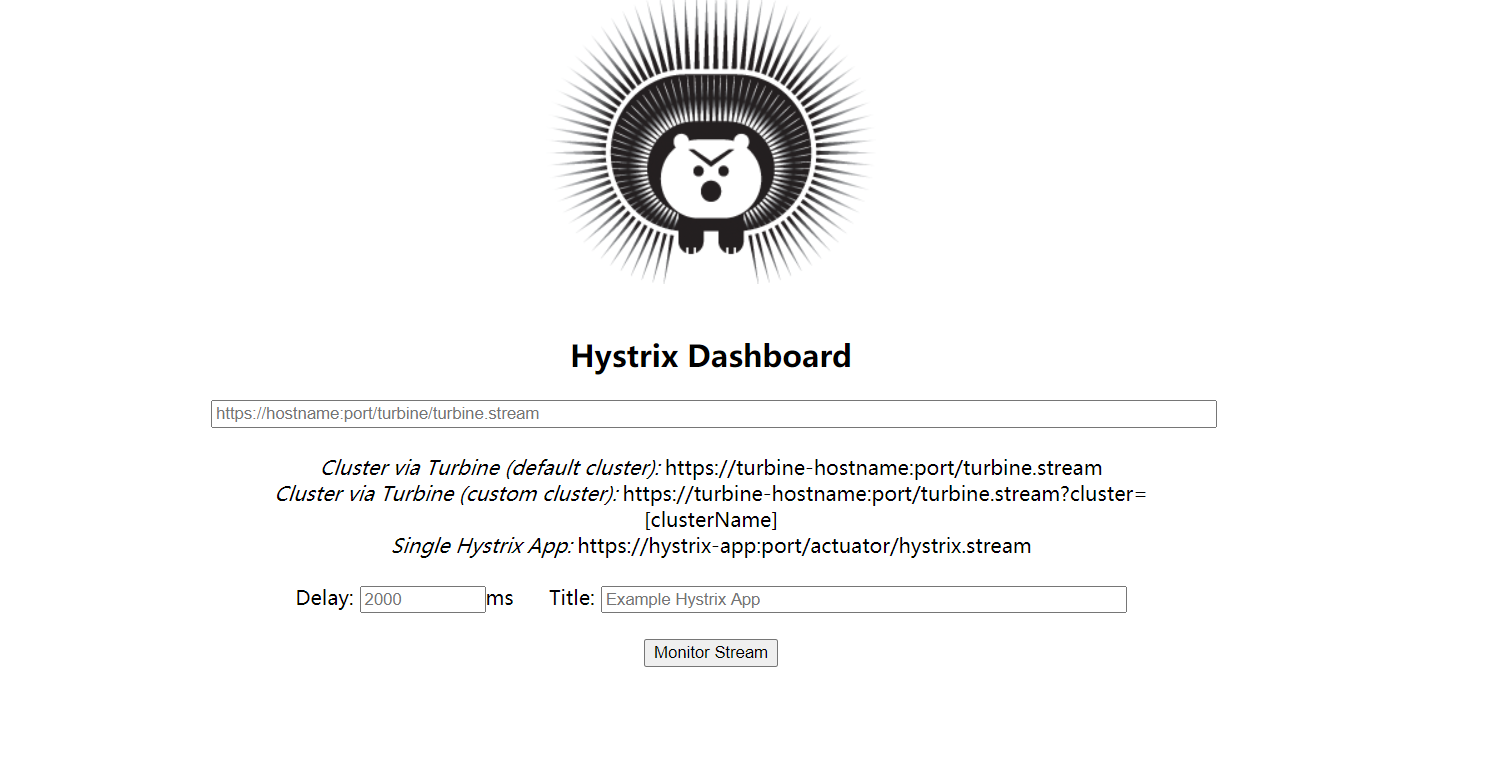
这里我们演示监控 服务提供方服务,
在被监控的项目中 添加一个bean ,解决 新版 Hystrix 的一个坑, 如果出现 Unable to connect to Command Metric Stream 或者 404 等错误 可以加上试试
@SpringBootApplication

@EnableEurekaClient

@EnableHystrix

public class PaymentMain8001 {

    public static void main(String[] args) {

        SpringApplication.run(PaymentMain8001.class,args);

    }

    /**

     * 此配置是为了服务监控而配置,与服务器容错本身无关,springcloud升级后的坑

     * ServletRegistrationBean因为springboot的默认路径不是/hystrix.stream

     * 只要在自己的项目里配置上下文的servlet就可以了

     */

    @Bean

    public ServletRegistrationBean getservlet(){

        HystrixMetricsStreamServlet streamServlet = new HystrixMetricsStreamServlet();

        ServletRegistrationBean<HystrixMetricsStreamServlet> registrationBean = new ServletRegistrationBean<>(streamServlet);

        registrationBean.setLoadOnStartup(1);

        registrationBean.addUrlMappings("/hystrix.stream");

        registrationBean.setName("HystrixMetricsStreamServlet");

        return registrationBean;

    }

}
其他不用修改 启动项目
输入被监控服务的数据url : http://127.0.0.1:8001/hystrix.stream

就会进入如下界面(监控前 服务端最好有被调用过,不然会一直显示Loading):
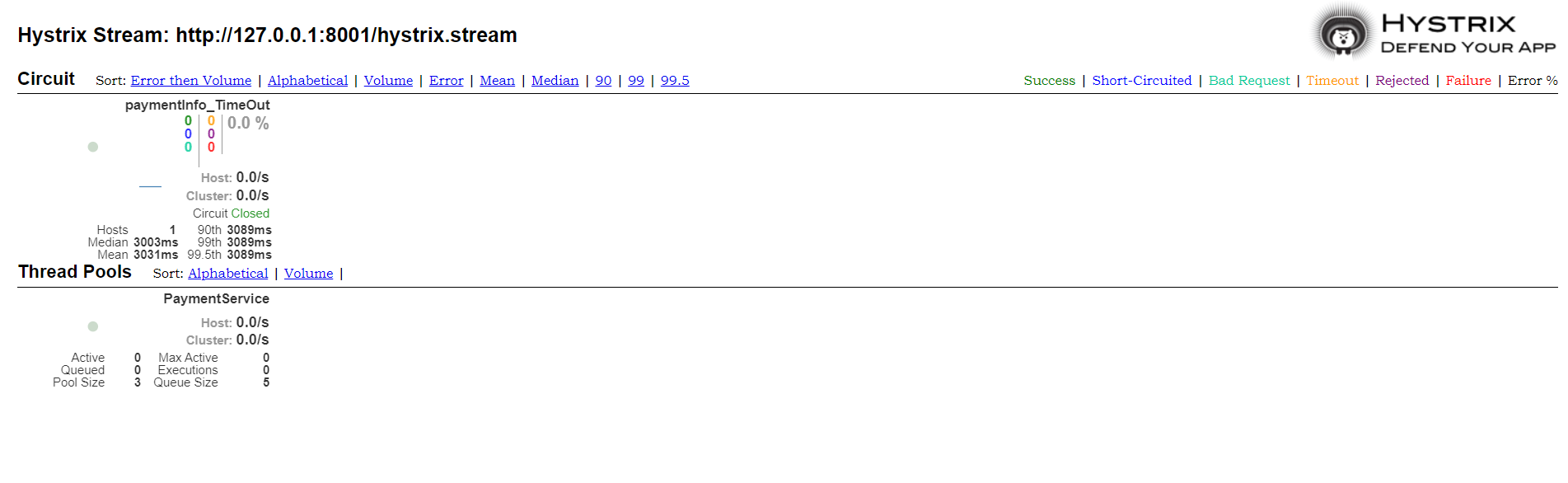
此页面具体使用规则这里不做记录
SpringCloud Hystrix断路器的基本使用的更多相关文章
- SpringCloud 进阶之Hystrix(断路器)
1. Hystrix 断路器 Hystrix是一个用于处理分布式系统的延迟和容错的开源库,在分布式系统里,许多依赖不可避免的会调用失败, 比如超时,异常等,Hystrix能够保证在一个依赖出问题的情况 ...
- SpringCloud的入门学习之概念理解、Hystrix断路器
1.分布式系统面临的问题,复杂分布式体系结构中的应用程序有数十个依赖关系,每个依赖关系在某些时候将不可避免地失败. 2.什么是服务雪崩? 答:多个微服务之间调用的时候,假设微服务A调用微服务B和微服务 ...
- 小D课堂 - 新版本微服务springcloud+Docker教程_5-04 feign结合hystrix断路器开发实战下
笔记 4.Feign结合Hystrix断路器开发实战<下> 简介:讲解SpringCloud整合断路器的使用,用户服务异常情况 1.feign结合Hystrix ...
- 小D课堂 - 新版本微服务springcloud+Docker教程_5-03 feign结合hystrix断路器开发实战上
笔记 3.Feign结合Hystrix断路器开发实战<上> 简介:讲解SpringCloud整合断路器的使用,用户服务异常情况 1.加入依赖 注意:网上新旧版本问 ...
- SpringCloud学习笔记(七):Hystrix断路器
概述 什么时候需要断路器?熔断? 举个简单的例子:小明喜欢小美,可是小美没有电话,小美给了小明家里的座机,小明打给座机,这个时候小美的妈妈接到了,小明怕妈妈知道自己喜欢小美,就跟小美妈妈说让小美哥接电 ...
- Springcloud 整合Hystrix 断路器,支持Feign客户端调用
1,在这篇博文中,已经大致说过了Springcloud服务保护框架 Hystrix在服务隔离,服务降级,以及服务熔断中的使用 https://www.cnblogs.com/pickKnow/p/11 ...
- SpringCloud(三)Hystrix断路器
Hystrix断路器 概述 分布式系统面临的问题 复杂分布式体系结构中的应用程序有数十个依赖关系,每个依赖关系在某些时候将不可避免地失败 服务雪崩 多个微服务之间调用的时候,假设微服务A调用微服务B和 ...
- SpringCloud(五)之Spring Cloud 中 Feign结合Hystrix断路器开发实战
1.先讲hystrx(断路器) 在springcloub 中的使用 1.1 加入依赖 注意:网上新旧版本问题,所以要以官网为主,不然部分注解会丢失最新版本 2.0 <dependency> ...
- Hystrix断路器配置属性解析
HystrixCommand 配置方式 我们的配置都是基于 HystrixCommand 的,我们通过在方法上添加 @HystrixCommand 注解并配置注解的参数来实现配置,但有的时候一个类里面 ...
- 微服务架构 | 5.1 使用 Netflix Hystrix 断路器
目录 前言 1. Hystrix 基础知识 1.1 Hystrix 断路器强调调用 1.2 两大类别的 Hystrix 实现 1.3 舱壁策略 1.4 Hystrix 在远程资源调用失败时的决策过程 ...
随机推荐
- Leetcode 92题反转链表 II(Reverse Linked List II) Java语言求解
前言 反转链表可以先看我这篇文章: Leetcode 206题 反转链表(Reverse Linked List)Java语言求解 题目链接 https://leetcode-cn.com/probl ...
- 主动学习(Active Learning)简介综述汇总以及主流技术方案
0.引言 在机器学习(Machine learning)领域,监督学习(Supervised learning).非监督学习(Unsupervised learning)以及半监督学习(Semi-su ...
- [XXL-JOB] 项目集成-Framework
1.导入pom坐标 <dependency> <groupId>com.hbasesoft.framework</groupId> <artifactId&g ...
- webpack与其常见loader加载器使用方式
webpack是什么 webpack是前端项目工程化的具体解决方案. 主要功能:提供了友好的前端模块化开发支持,支持代码压缩混淆(去除空格和注释,让文件体积更小),处理浏览器端JS的兼容性(将箭头函数 ...
- 6、后端学习规划:Java学习 - 学习规划系列文章
Java语言在现在的编程语言排行榜上也是前5的存在.经过这么些年的发展,Java的发展没有C#这么大,但是在编程领域,因为有MVC架构,以及Spring框架的支持,以及微服务架构等等,Java这些年也 ...
- VB6各类源码开源 - 开源研究系列文章
今天把以前下载整理的关于VB6的一些代码进行了开源,覆盖了多个分类内容,需要的朋友请下载: VB6源码.part1 https://download.csdn.net/download/lzhdim/ ...
- 配置PHP的运行环境
一.wamp Wamp是Windows Apache Mysql PHP的缩写,即在windows下将Apache+PHP+Mysql集成的开发环境,操作简单一键安装,摆脱手动修改配置文件的繁琐. 图 ...
- dbgrideh 下拉显示多列
- 探索C语言结构体:编程中的利器与艺术
欢迎大家来到贝蒂大讲堂 养成好习惯,先赞后看哦~ 所属专栏:C语言学习 贝蒂的主页:Betty's blog 1. 常量与变量 1. 什么是结构体 在C语言中本身就自带了一些数据类型,如:char,i ...
- HBase-HBase的特征、优缺点、应用场景
一.Hbase的概念 HBase是Hadoop的生态系统,是建立在Hadoop文件系统(HDFS)之上的分布式.面向列的数据库,通过利用Hadoop的文件系统提供容错能力.如果你需要进行实时读写或者随 ...