
自定义MyBatis拦截器更改表名
by emanjusaka from https://www.emanjusaka.top/archives/10 彼岸花开可奈何
本文欢迎分享与聚合,全文转载请留下原文地址。
自定义MyBatis拦截器可以在方法执行前后插入自己的逻辑,这非常有利于扩展和定制 MyBatis 的功能。本篇文章实现自定义一个拦截器去改变要插入或者查询的数据源。
@Intercepts
@Intercepts是Mybatis的一个注解,它的主要作用是标识一个类为拦截器。该注解通过一个@Signature注解(即拦截点),来指定拦截那个对象里面的某个方法。
具体来说,@Signature注解的属性type用于指定拦截器类型,可能的值包括:
- Executor(sql的内部执行器)
- ParameterHandler(拦截参数的处理)
- StatementHandler(拦截sql的构建)
- ResultSetHandler(拦截结果的处理)。
method属性表示在指定的拦截器类型中要拦截的方法
args属性表示拦截的方法对应的参数
实现步骤
实现
org.apache.ibatis.plugin.Interceptor接口,重写一下的方法: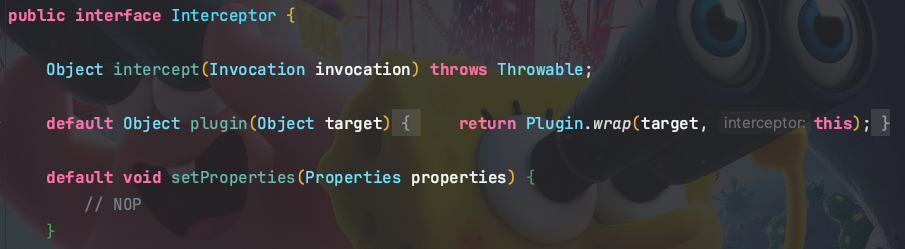
添加拦截器注解,
@Intercepts({@Signature(type = StatementHandler.class, method = "prepare", args = {Connection.class, Integer.class})})配置文件中添加拦截器
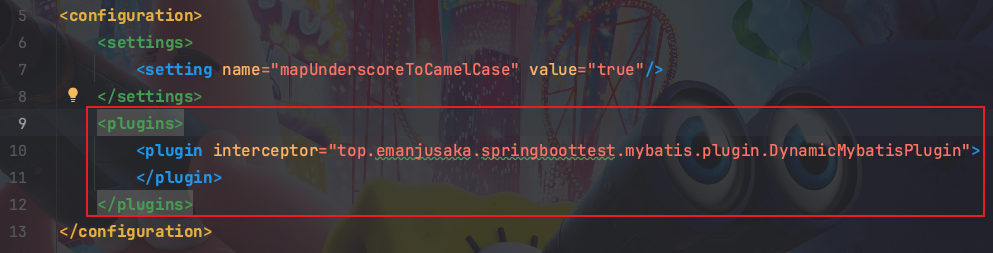
注意需要在 Spring Boot 的 application.yml 文件中配置 mybatis 配置文件的路径。
mybatis拦截器目前不支持在application.yml配置文件中通过属性配置,目前只支持通过xml配置或者代码配置。
代码实现
Mybatis拦截器:
package top.emanjusaka.springboottest.mybatis.plugin;

import org.apache.ibatis.executor.statement.StatementHandler;

import org.apache.ibatis.mapping.BoundSql;

import org.apache.ibatis.mapping.MappedStatement;

import org.apache.ibatis.plugin.Interceptor;

import org.apache.ibatis.plugin.Intercepts;

import org.apache.ibatis.plugin.Invocation;

import org.apache.ibatis.plugin.Signature;

import org.apache.ibatis.reflection.DefaultReflectorFactory;

import org.apache.ibatis.reflection.MetaObject;

import org.apache.ibatis.reflection.SystemMetaObject;

import top.emanjusaka.springboottest.mybatis.annotation.DBTableStrategy;

import java.lang.reflect.Field;

import java.sql.Connection;

import java.util.regex.Matcher;

import java.util.regex.Pattern;

/**

 * @Author emanjusaka

 * @Date 2023/10/18 17:25

 * @Version 1.0

 */

@Intercepts({@Signature(type = StatementHandler.class, method = "prepare", args = {Connection.class, Integer.class})})

public class DynamicMybatisPlugin implements Interceptor {

    private Pattern pattern = Pattern.compile("(from|into|update)[\\s]{1,}(\\w{1,})", Pattern.CASE_INSENSITIVE);

    @Override

    public Object intercept(Invocation invocation) throws Throwable {

        StatementHandler statementHandler = (StatementHandler) invocation.getTarget();

        MetaObject metaObject = MetaObject.forObject(statementHandler, SystemMetaObject.DEFAULT_OBJECT_FACTORY, SystemMetaObject.DEFAULT_OBJECT_WRAPPER_FACTORY, new DefaultReflectorFactory());

        MappedStatement mappedStatement = (MappedStatement) metaObject.getValue("delegate.mappedStatement");

        // 获取自定义注解判断是否进行分表操作

        String id = mappedStatement.getId();

        String className = id.substring(0, id.lastIndexOf("."));

        Class<?> clazz = Class.forName(className);

        DBTableStrategy dbTableStrategy = clazz.getAnnotation(DBTableStrategy.class);

        if (null == dbTableStrategy || !dbTableStrategy.changeTable() || null == dbTableStrategy.tbIdx()) {

            return invocation.proceed();

        }

        // 获取SQL

        BoundSql boundSql = statementHandler.getBoundSql();

        String sql = boundSql.getSql();

        // 替换SQL表名

        Matcher matcher = pattern.matcher(sql);

        String tableName = null;

        if (matcher.find()) {

            tableName = matcher.group().trim();

        }

        assert null != tableName;

        String replaceSql = matcher.replaceAll(tableName + "_" + dbTableStrategy.tbIdx());

        // 通过反射修改SQL语句

        Field field = boundSql.getClass().getDeclaredField("sql");

        field.setAccessible(true);

        field.set(boundSql, replaceSql);

        field.setAccessible(false);

        return invocation.proceed();

    }

}
mapper的xml:
<?xml version="1.0" encoding="UTF-8"?>

<!DOCTYPE mapper PUBLIC "-//mybatis.org//DTD Mapper 3.0//EN"

        "http://mybatis.org/dtd/mybatis-3-mapper.dtd">

<mapper namespace="top.emanjusaka.springboottest.score.repository.IScoreRepository">

    <select id="selectAll" resultType="top.emanjusaka.springboottest.score.model.vo.ScoreVO">

        select * from score

    </select>

</mapper>
切换表名的注解:
package top.emanjusaka.springboottest.score.repository;

import org.apache.ibatis.annotations.Mapper;

import top.emanjusaka.springboottest.mybatis.annotation.DBTableStrategy;

import top.emanjusaka.springboottest.score.model.vo.ScoreVO;

import java.util.List;

/**

 * @Author emanjusaka

 * @Date 2023/10/18 17:45

 * @Version 1.0

 */

@Mapper

@DBTableStrategy(changeTable = true,tbIdx = "2")

public interface IScoreRepository {

    List<ScoreVO> selectAll();

}
测试代码:
package top.emanjusaka.springboottest;

import org.junit.jupiter.api.Test;

import org.springframework.boot.test.context.SpringBootTest;

import top.emanjusaka.springboottest.score.model.vo.ScoreVO;

import top.emanjusaka.springboottest.score.service.IScore;

import javax.annotation.Resource;

import java.util.List;

@SpringBootTest

class SpringBootTestApplicationTests {

    @Resource

    private IScore score;

    @Test

    void contextLoads() {

        List<ScoreVO> list = score.selectAll();

        list.forEach(System.out::println);

    }

}
运行结果
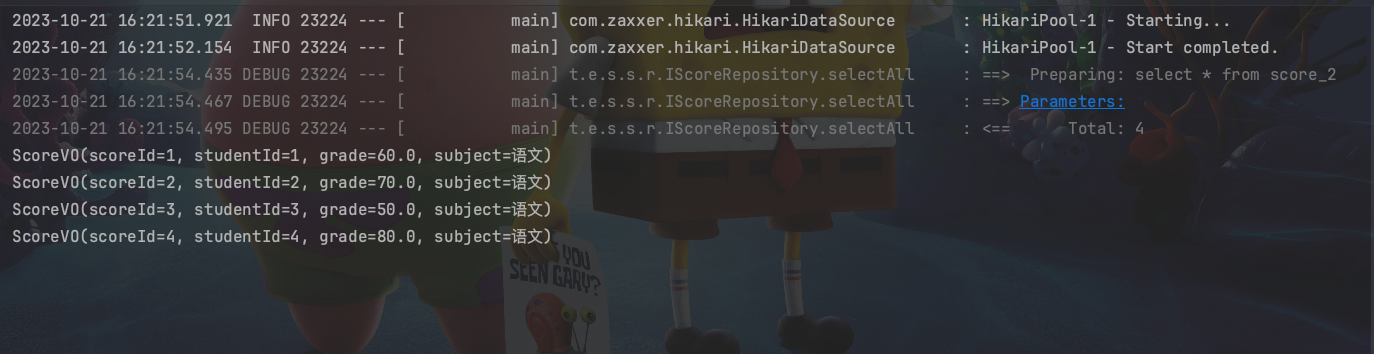
通过上图可以看出,现在表名已经修改成了score_2了。通过这种机制,我们可以应用到自动分表中。本文的表名的索引是通过注解参数传递的,实际应用中需要通过哈希散列计算。
本文原创,才疏学浅,如有纰漏,欢迎指正。如果本文对您有所帮助,欢迎点赞,并期待您的反馈交流,共同成长。
原文地址: https://www.emanjusaka.top/archives/10
微信公众号:emanjusaka的编程栈
自定义MyBatis拦截器更改表名的更多相关文章
- 基于mybatis拦截器分表实现
1.拦截器简介 MyBatis提供了一种插件(plugin)的功能,但其实这是拦截器功能.基于这个拦截器我们可以选择在这些被拦截的方法执行前后加上某些逻辑或者在执行这些被拦截的方法时执行自己的逻辑. ...
- 玩转SpringBoot之整合Mybatis拦截器对数据库水平分表
利用Mybatis拦截器对数据库水平分表 需求描述 当数据量比较多时,放在一个表中的时候会影响查询效率:或者数据的时效性只是当月有效的时候:这时我们就会涉及到数据库的分表操作了.当然,你也可以使用比较 ...
- Mybatis自定义SQL拦截器
本博客介绍的是继承Mybatis提供的Interface接口,自定义拦截器,然后将项目中的sql拦截一下,打印到控制台. 先自定义一个拦截器 package com.muses.taoshop.com ...
- Mybatis拦截器实现分页
本文介绍使用Mybatis拦截器,实现分页:并且在dao层,直接返回自定义的分页对象. 最终dao层结果: public interface ModelMapper { Page<Model&g ...
- "犯罪心理"解读Mybatis拦截器
原文链接:"犯罪心理"解读Mybatis拦截器 Mybatis拦截器执行过程解析 文章写过之后,我觉得 "Mybatis 拦截器案件"背后一定还隐藏着某种设计动 ...
- 使用MyBatis拦截器后,摸鱼时间又长了。🐟
场景 在后端服务开发时,现在很流行的框架组合就是SSM(SpringBoot + Spring + MyBatis),在我们进行一些业务系统开发时,会有很多的业务数据表,而表中的信息从新插入开始,整个 ...
- Mybatis拦截器介绍
拦截器的一个作用就是我们可以拦截某些方法的调用,我们可以选择在这些被拦截的方法执行前后加上某些逻辑,也可以在执行这些被拦截的方法时执行自己的逻辑而不再执行被拦截的方法.Mybatis拦截器设计的一个初 ...
- Mybatis拦截器介绍及分页插件
1.1 目录 1.1 目录 1.2 前言 1.3 Interceptor接口 1.4 注册拦截器 1.5 Mybatis可拦截的方法 1.6 利用拦截器进行分页 1.2 前言 拦截器的一 ...
- 详解Mybatis拦截器(从使用到源码)
详解Mybatis拦截器(从使用到源码) MyBatis提供了一种插件(plugin)的功能,虽然叫做插件,但其实这是拦截器功能. 本文从配置到源码进行分析. 一.拦截器介绍 MyBatis 允许你在 ...
- Mybatis拦截器 mysql load data local 内存流处理
Mybatis 拦截器不做解释了,用过的基本都知道,这里用load data local主要是应对大批量数据的处理,提高性能,也支持事务回滚,且不影响其他的DML操作,当然这个操作不要涉及到当前所lo ...
随机推荐
- 安装VMware Workstation 16 Pro
下载 官网:https://www.vmware.com/cn/products/workstation-pro/workstation-pro-evaluation.html 注:我是在新毒霸软件管 ...
- 即构 SDK 6月迭代:新增拉流画面镜像等功能,为开发者提供更大便利
即构SDK6月新版本已上线,本月SDK迭代主要新增了拉流画面镜像功能,媒体播放器新增支持缓存相关的设置,新增支持设置对焦模式和曝光模式等功能,多个功能模块的灵活设置,让开发者能更便利的自定义选择,为用 ...
- Hexo博客yilia主题首页添加helper-live2d模型插件
插件效果 插件的github地址 插件作者提供了较为详细的安装步骤,我结合自己操作和图示,提供大家. 效果展示:红框内为2d模型,可以随鼠标移动而变化 安装模块: hexo博客根目录选择cmd命令窗口 ...
- 开源BaaS平台Supabase介绍
Supabase 介绍 Supabase 是一个开源的 Firebase 替代品,以BaaS的形式向各种应用程序提供了一系列的后端功能,可以帮助开发者更快地构建产品. 对于想快速实现一个产品而言,如果 ...
- 洛谷 T356695 文字处理软件(重置版)
很简单了啊! 说普及- 我都不信 作者(也就是我)链接:https://www.luogu.com.cn/problem/T356695 好好想想!!!! 题目! 文字处理软件(重置版) 题目背景 A ...
- React: husky > pre-push hook failed (add --no-verify to bypass)
解决方案 提交commit和推送代码时都加上--no-verify参数,然他跳过检查 提交 推送
- jQuery事件自动触发
<!DOCTYPE html> <html lang="en"> <head> <meta charset="UTF-8&quo ...
- 在 ubuntu 中安装或升级最新版本的 Elasticsearch
1. 安装 java 8 首先最新版本的elasticsearch需要java8的支持,那先来安装一下. $ sudo add-apt-repository -y ppa:webupd8team/ja ...
- WPF 入门笔记 - 07 - MVVM示例
滴咚,大家好久不见.好就没写东西了,鸽着鸽着就无了... 回到正题,上篇文章说完命令提了一嘴MVVM模式直接就上MVVMLight这些程序的框架了,虽然也没说多少,但还是有点不好过渡,这篇对MVVM做 ...
- Redis 持久化及集群架构
1 Redis 持久化 1.1 持久化的概念和原因 Redis 持久化是指将 Redis 服务器中的数据保存到磁盘上,以便在服务器重启后可以重新加载数据.持久化是为了解决 Redis 内存数据库的数据 ...