
OpenCV笔记(7) 轮廓
1. 查找轮廓 FindContours
public static void FindContours(InputOutputArray image, //输入8-bit单通道的图片
                    out Mat[] contours, //一组数组,contours[i]是一条轮廓,而contours[i][j]是点
                    OutputArray hierarchy, //输出一个数组,表示轮廓的树结构,每个值都是四元数组
                    RetrievalModes mode, //轮廓提取方式
                    ContourApproximationModes method, //轮廓如何被表达
                    Point? offset = null);

public static void FindContours(InputOutputArray image,
                    out Point[][] contours,
                    out HierarchyIndex[] hierarchy,
                    RetrievalModes mode,
                    ContourApproximationModes method,
                    Point? offset = null);
2. 绘制轮廓 DrawContours
public static void DrawContours(InputOutputArray image,
                    IEnumerable<Mat> contours,
                    int contourIdx, //需要绘制的轮廓索引,若为负,绘制所有轮廓
                    Scalar color, //颜色
                    int thickness = 1, //线粗
                    LineTypes lineType = LineTypes.Link8, //四联通、八联通、AA线
                    Mat hierarchy = null,
                    int maxLevel = int.MaxValue,
                    Point? offset = null);

public static void DrawContours(InputOutputArray image,
                    IEnumerable<IEnumerable<Point>> contours,
                    int contourIdx,
                    Scalar color,
                    int thickness = 1,
                    LineTypes lineType = LineTypes.Link8,
                    IEnumerable<HierarchyIndex> hierarchy = null,
                    int maxLevel = int.MaxValue, Point? offset = null);
示例:滑动条和找轮廓
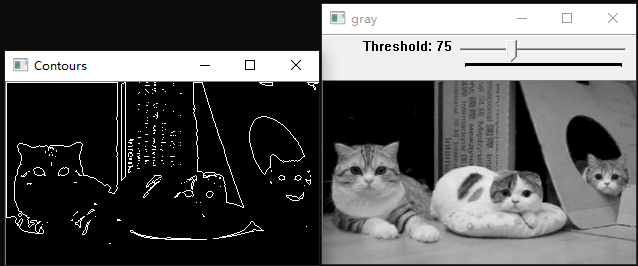
代码:
using System;

using OpenCvSharp;

namespace ConsoleApp2

{

    class Program

    {

        static void Main(string[] args)

        {

            Mat g_gray = new Mat();

            Mat g_binary = new Mat();

            int g_thresh = 100;

            void on_trackbar(int pos, object userdata)

            {

                Cv2.Threshold((Mat)userdata, g_binary, pos, 255, ThresholdTypes.BinaryInv);

                Point[][] contours; HierarchyIndex[] hierarchy;

                Cv2.FindContours(g_binary, out contours, out hierarchy, RetrievalModes.List, ContourApproximationModes.ApproxSimple);

                Mat mask = new Mat(g_binary.Rows, g_binary.Cols, MatType.CV_8UC1, new Scalar(0));

                Cv2.DrawContours(mask, contours, -1, new Scalar(255));

                Cv2.ImShow("Contours", mask);

            }

            g_gray = Cv2.ImRead("C:\\Users\\ATWER\\Desktop\\b.png",ImreadModes.Grayscale);

            Cv2.ImShow("gray", g_gray);

            CvTrackbar cvTrackbar = new CvTrackbar("Threshold", "gray", g_thresh, 255, on_trackbar,g_gray);

            Cv2.ImShow("gray", g_gray);

            Cv2.WaitKey(0);

        }

    }

}
3. 查找连通区域 ConnectedComponentsWithStats
示例:连通区域
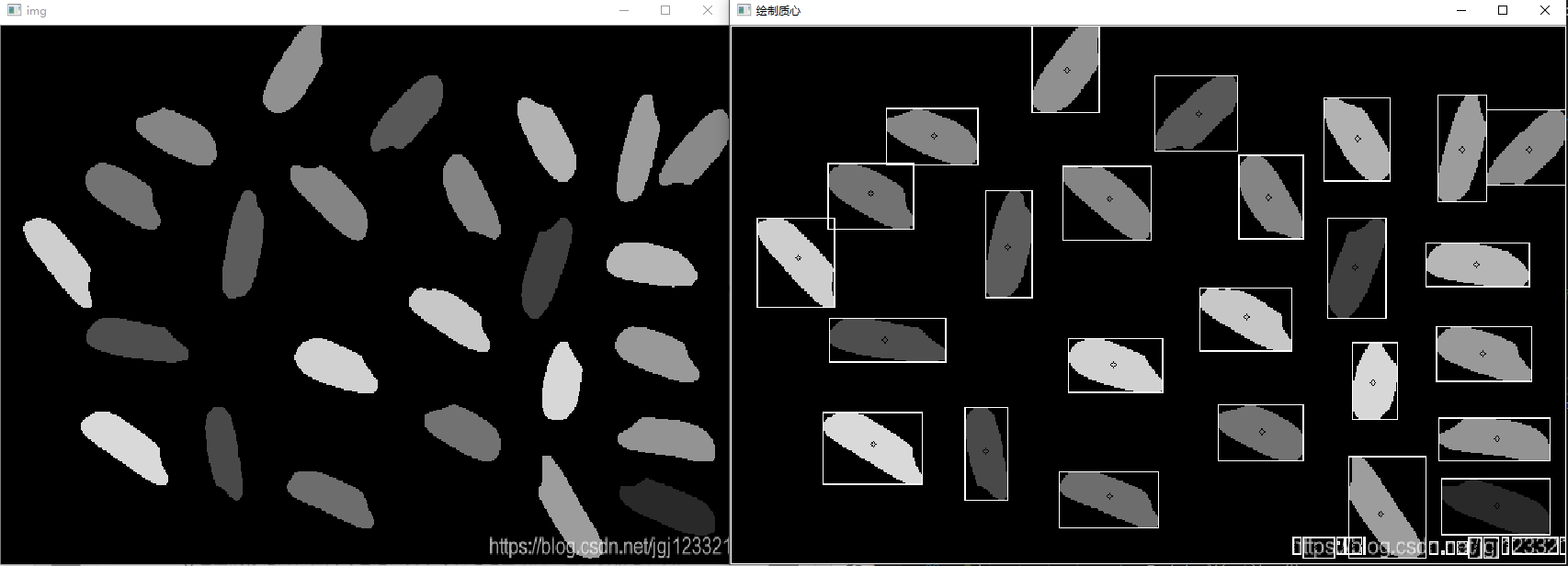
using System;

using OpenCvSharp;

namespace ConsoleApp2

{

    class Program

    {

        static void Main(string[] args)

        {

            Mat img = Cv2.ImRead("C:\\Users\\ATWER\\Desktop\\c.png");

            Mat labelMat = new Mat(); Mat stats = new Mat();

            Mat centroids = new Mat();

            Cv2.CvtColor(img, img, ColorConversionCodes.BGR2GRAY);
        Cv2.NamedWindow("img",WindowMode.Normal);

       Cv2.ImShow("img", img);

            int num = Cv2.ConnectedComponentsWithStats(img, labelMat, stats, centroids, PixelConnectivity.Connectivity4);

            Console.WriteLine(num.ToString());

            for (int i = 0; i < num; i++)

            {

                double a = centroids.At<double>(i, 0);

                double b = centroids.At<double>(i, 1);

                Point point = new OpenCvSharp.Point(a, b);

                Cv2.Circle(img, point, 2, new Scalar(0, 0, 255));

                int x = stats.At<int>(i, 0);

                int y = stats.At<int>(i, 1);

                int width = stats.At<int>(i, 2);

                int height = stats.At<int>(i, 3);

                Rect rect = new Rect(x, y, width, height);

                Cv2.Rectangle(img, rect, new Scalar(255));

            }

            Cv2.NamedWindow("绘制质心", WindowMode.Normal);

            Cv2.ImShow("绘制质心", img);

            Cv2.WaitKey(0);

        }

    }

}
4. 多边形逼近轮廓 ApproxPolyDP()
public static void ApproxPolyDP(InputArray curve,
                    OutputArray approxCurve,
                    double epsilon,
                    bool closed);
示例:多边形逼近一个圆的外轮廓
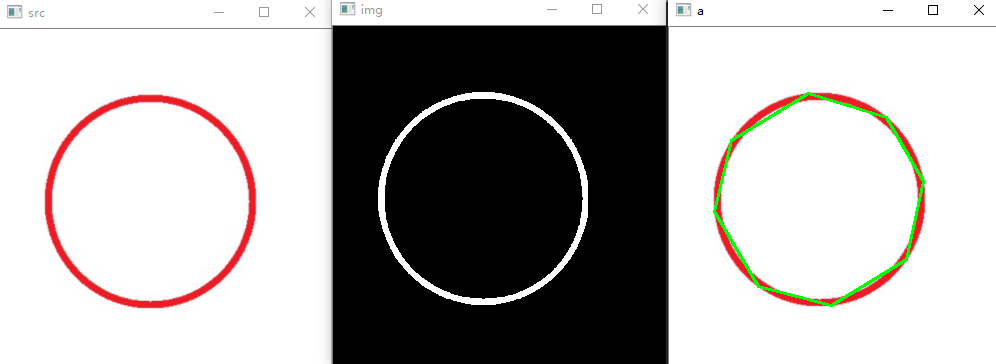
代码:
using System;

using System.Numerics;

using OpenCvSharp;

namespace ConsoleApp10

{

    class Program

    {

        static void Main(string[] args)

        {

            Mat img = new Mat();

            Mat src = Cv2.ImRead("D:\\Backup\\桌面\\c.png");
        //预处理

            Cv2.CvtColor(src, img, ColorConversionCodes.BGR2GRAY);

            Cv2.BitwiseNot(img, img);

            Cv2.Threshold(img, img, 128, 255, ThresholdTypes.Binary);

            Cv2.ImShow("img", img);
        //查找轮廓

            Mat[] contours;

            Mat hierarchy = new Mat();

            Cv2.FindContours(img,out contours, hierarchy, RetrievalModes.External, ContourApproximationModes.ApproxSimple);

            Mat[] contours_poly = (Mat[])contours.Clone();

            //Cv2.DrawContours(img, contours, -1, new Scalar(255),5);

            for (int i = 0; i < contours.Length; i++)

            {

                Cv2.ApproxPolyDP(contours[i], contours_poly[i], 10, true);//多边形逼近

            }
        //绘制轮廓

            Cv2.DrawContours(src, contours_poly, -1, new Scalar(0,255, 0),2);

            Cv2.ImShow("a", src);

            Cv2.WaitKey(0);

        }

    }

}
5. 获得矩形包围框 BoundingRect
public static Rect BoundingRect(InputArray curve);

public static RotatedRect MinAreaRect(InputArray points);
示例:矩形包围框
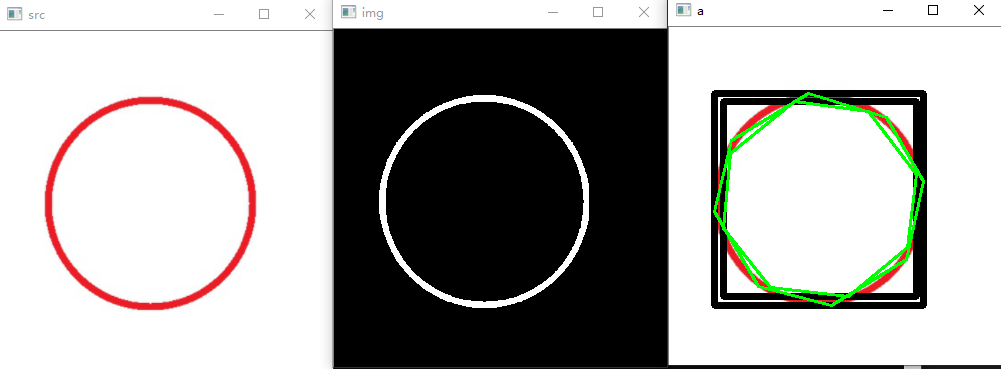
代码:
using System;

using System.Numerics;

using OpenCvSharp;

namespace ConsoleApp10

{

    class Program

    {

        static void Main(string[] args)

        {

            Mat img = new Mat();

            Mat src = Cv2.ImRead("D:\\Backup\\桌面\\c.png");

            Cv2.ImShow("src", src);

            Cv2.CvtColor(src, img, ColorConversionCodes.BGR2GRAY);

            Cv2.BitwiseNot(img, img);

            Cv2.Threshold(img, img, 128, 255, ThresholdTypes.Binary);

            Cv2.ImShow("img", img);

            //查找轮廓
        Mat[] contours;

            Mat hierarchy = new Mat();

            Cv2.FindContours(img,out contours, hierarchy, RetrievalModes.List, ContourApproximationModes.ApproxSimple);

            Mat[] contours_poly = (Mat[])contours.Clone();

            for (int i = 0; i < contours.Length; i++)

            {

                Cv2.ApproxPolyDP(contours[i], contours_poly[i], 10, true);

                //获得轮廓长度

                double len = Cv2.ArcLength(contours_poly[i], true);

                Console.WriteLine(len.ToString());

                //获得矩形包围框

                Rect rect = Cv2.BoundingRect(contours_poly[i]);

                Cv2.Rectangle(src, rect, new Scalar(0),5);

                //获得最小矩形框

                RotatedRect rect_rotate = Cv2.MinAreaRect(contours_poly[i]);

                Console.WriteLine(rect_rotate.Angle.ToString());

            }
        //绘制轮廓

            Cv2.DrawContours(src, contours_poly, -1, new Scalar(0,255, 0),2);

            Cv2.ImShow("a", src);

            Cv2.WaitKey(0);

        }

    }

}
6. 获得轮廓凸包 ConvexHull
public static void ConvexHull(InputArray points,
                  OutputArray hull,
                  bool clockwise = false,
                  bool returnPoints = true);
示例:轮廓凸包
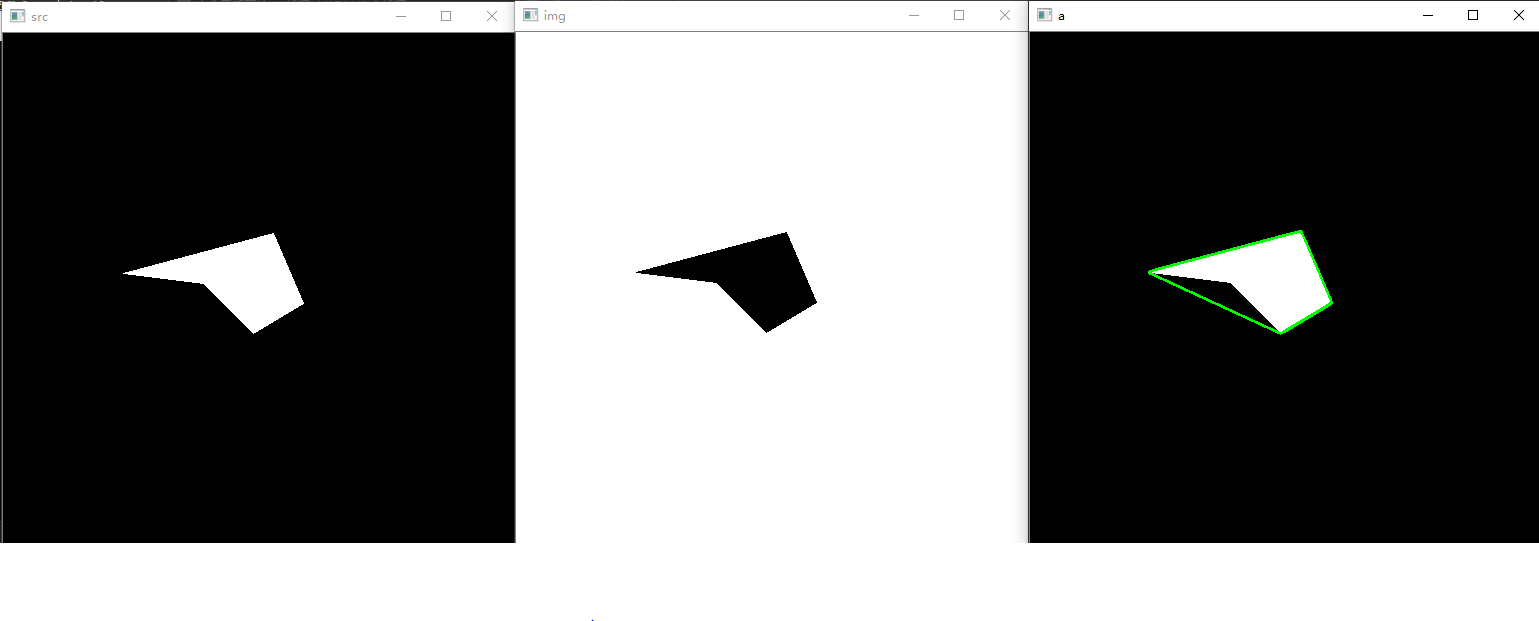 代码:
代码:
using System;

using System.Numerics;

using OpenCvSharp;

namespace ConsoleApp10

{

    class Program

    {

        static void Main(string[] args)

        {

            Mat img = new Mat();

            Mat src = Cv2.ImRead("D:\\Backup\\桌面\\d.png");

            Cv2.ImShow("src", src);

            Cv2.CvtColor(src, img, ColorConversionCodes.BGR2GRAY);

            Cv2.BitwiseNot(img, img);

            Cv2.Threshold(img, img, 128, 255, ThresholdTypes.Binary);

            Cv2.ImShow("img", img);
        //查找轮廓

            Mat[] contours;

            Mat hierarchy = new Mat();

            Cv2.FindContours(img,out contours, hierarchy, RetrievalModes.List, ContourApproximationModes.ApproxSimple);
        //凸包  居然想不到第二个方法把hulls画出来

            Mat hulls = new Mat();

            Cv2.ConvexHull(contours[0],hulls,false);

            Mat[] r = new Mat[] { hulls };

        //绘制轮廓

            Cv2.DrawContours(src, r, -1, new Scalar(0, 255, 0), 2);

            Cv2.ImShow("a", src);

            Cv2.WaitKey(0);

        }

    }

}
7. Tips
学到一个新知识点,在二值化和查找轮廓之间,运用开运算,可以去除小的区域干扰。相比于在for循环遍历中再判断大小,要更节约时间。——2021.10.18
源自:蝴蝶书第十四章轮廓
OpenCV笔记(7) 轮廓的更多相关文章
- OpenCV笔记大集锦(转载)
整理了我所了解的有关OpenCV的学习笔记.原理分析.使用例程等相关的博文.排序不分先后,随机整理的.如果有好的资源,也欢迎介绍和分享. 1:OpenCV学习笔记 作者:CSDN数量:55篇博文网址: ...
- opencv笔记6:角点检测
time:2015年10月09日 星期五 23时11分58秒 # opencv笔记6:角点检测 update:从角点检测,学习图像的特征,这是后续图像跟踪.图像匹配的基础. 角点检测是什么鬼?前面一篇 ...
- opencv笔记5:频域和空域的一点理解
time:2015年10月06日 星期二 12时14分51秒 # opencv笔记5:频域和空域的一点理解 空间域和频率域 傅立叶变换是f(t)乘以正弦项的展开,正弦项的频率由u(其实是miu)的值决 ...
- opencv笔记4:模板运算和常见滤波操作
time:2015年10月04日 星期日 00时00分27秒 # opencv笔记4:模板运算和常见滤波操作 这一篇主要是学习模板运算,了解各种模板运算的运算过程和分类,理论方面主要参考<图像工 ...
- opencv笔记3:trackbar简单使用
time:2015年 10月 03日 星期六 13:54:17 CST # opencv笔记3:trackbar简单使用 当需要测试某变量的一系列取值取值会产生什么结果时,适合用trackbar.看起 ...
- opencv笔记2:图像ROI
time:2015年 10月 03日 星期六 12:03:45 CST # opencv笔记2:图像ROI ROI ROI意思是Region Of Interests,感兴趣区域,是一个图中的一个子区 ...
- opencv笔记1:opencv的基本模块,以及环境搭建
opencv笔记1:opencv的基本模块,以及环境搭建 安装系统 使用fedora22-workstation-x86_64 安装opencv sudo dnf install opencv-dev ...
- [OpenCV-Python] 21 OpenCV 中的轮廓
文章目录 OpenCV-Python:IV OpenCV中的图像处理 21 OpenCV 中的轮廓 21.1 初识轮廓 21.1.1 什么是轮廓 21.1.2 怎样绘制轮廓 21.1.3 轮廓的近似方 ...
- 查找并绘制轮廓[OpenCV 笔记XX]
好久没有更新了,原谅自己放了个假最近又在赶进度,所以...更新的内容是很靠后的第八章,因为最近工作要用就先跳了,后面会更新笔记编号...加油加油! 在二值图像中寻找轮廓 void cv::findCo ...
- OpenCV学习笔记(12)——OpenCV中的轮廓
什么是轮廓 找轮廓.绘制轮廓等 1.什么是轮廓 轮廓可看做将连续的点(连着边界)连在一起的曲线,具有相同的颜色和灰度.轮廓在形态分析和物体的检测和识别中很有用. 为了更加准确,要使用二值化图像.在寻找 ...
随机推荐
- redis 简单整理——CEO[十五]
前文 简单介绍一下CEO. 正文 Redis3.2版本提供了GEO(地理信息定位)功能,支持存储地理位置信 息用来实现诸如附近位置.摇一摇这类依赖于地理位置信息的功能,对于需 要实现这些功能的开发者来 ...
- c# Barrier 线程回调
前言 假如现在有一个这样的需求,我一堆小黄人生产小黄丹,而大黄人要一直吃小黄丹. 如果是这样的话,想到就是一堆小黄人作为一个多线程,然后一直制造,然后另外一个大黄人一直检索是否有小黄丹,有就吃掉. 但 ...
- c# ManualResetEventSlim
前言 后续会把异步编程的ManualResetEventSlim 深入写完,先简单介绍一下吧. ManualResetEventSlim 有set 方法和 reset .wait.dispose方法. ...
- CSS:注册页面的编写练习
最终效果图: html文件: <!-- * @Qusetion: * @Author: 一届书生 * @Date: 2020-04-07 08:17:36 * @LastEditTime: 20 ...
- 对于小程序canvas在某些情况下touchmove 不能触发导致的签名不连续替代方案(企微)
1.问题 微信开放社区链接 尝试过新版canvas,在企业微信中签名依然是依然断触,有问题的手机是iphoe15,系统版本以及企微版本微信版本均与签名正常的手机一致,但是那个手机就是无法正常签字,在微 ...
- OpenSergo 正式开源,多家厂商共建微服务治理规范和实现
简介 OpenSergo,Open 是开放的意思,Sergo 则是取了服务治理两个英文单词 Service Governance 的前部分字母 Ser 和 Go,合起来即是一个开放的服务治理项目. ...
- [GPT] 使用 nodejs的 puppeteer 库使用完关闭后,linux上面有很多 chrome 进程
在使用 Node.js 的 Puppeteer 库时,如果你在使用完后关闭了浏览器,但在 Linux 上仍然存在很多 Chrome 进程,可能是因为没有正确地关闭所有相关的进程. 可以尝试以下方法 ...
- dotnet 6 命令行 cmd 设置输出英文解决中文乱码
我遇到在部署 CI 服务器,执行 cmd 命令构建,输出的中文是乱码.我期望让 dotnet 命令行输出使用英文解决乱码问题.通过设置 dotnet 命令行的语言文化,即可解决此问题 给 dotnet ...
- JavaScript函数属性,方法,ES6拓展内容总结(箭头函数使用,rest参数)
引言 函数在js中也是一个对象,所以它也是有着自己的属性和方法的,了解它们能更好的使用函数. // 各种样子的函数 function foo() {} function foo(a) {} funct ...
- 开发日志:Kylin麒麟操作系统部署ASP.NET CORE
需求场景: 我需要部署的项目是在Windows上开发的,目标框架为.net core 6.0 因此我们需要先在kylin上部署项目运行所需要的环境. 借助百度词条,先看看Kylin是什么: 服务器资源 ...