
基于Spring MVC + Spring + MyBatis的【物流系统 - 公司信息管理】
资源下载:https://download.csdn.net/download/weixin_44893902/45601768
练习点设计:模糊查询、删除、新增
一、语言和环境
- 实现语言:JAVA语言。
- 环境要求:MyEclipse/Eclipse + Tomcat + MySql。
- 使用技术:
Jsp+Servlet+JavaBean或SpringMVC+Spring+Mybatis。
二、实现功能
使用 SSM(Spring+SpringMVC+MyBatis)框架开发物流系统 - 公司信息管理模块,具体实现如下功能:
1,首页显示所有公司信息,如图 1 所示。
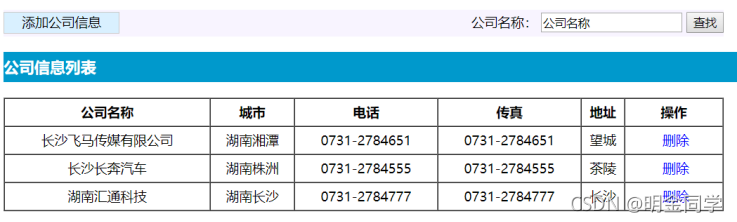
2,实现按公司名称模糊查询功能:在输入框中输入要查询的公司名称,点击“查找”按钮,显示相关的公司信息。
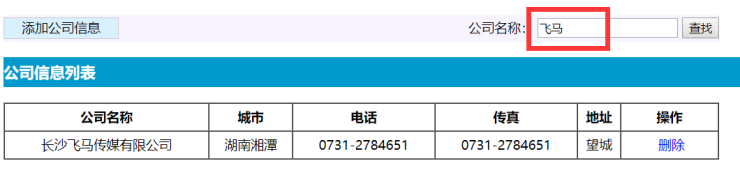
3,实现删除功能,删除之前弹出“删除确认”提示,删除成功后显示最新数据。效果图如图3所示。
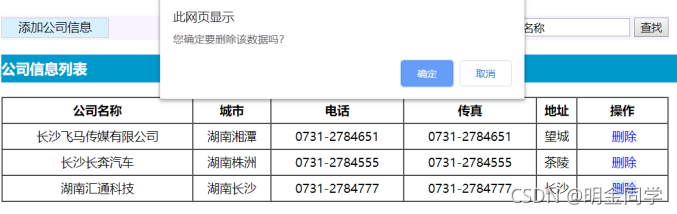
4,实现增加公司信息的功能:点击首页上的“添加公司信息”,跳转到添加公司信息页面,页面效果如图4所示,完成增加功能,公司编号和公司名称必须输入。
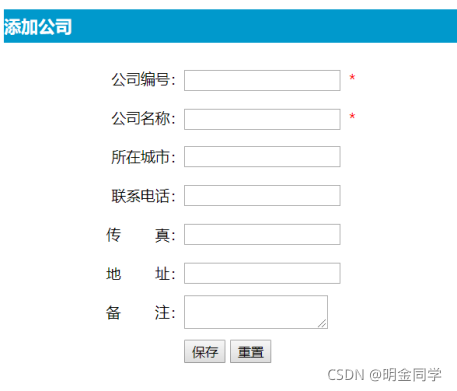
三、数据库设计
1.创建数据库(logisticsDB)。
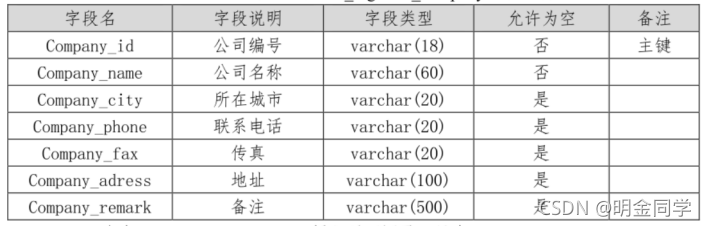
2.创建公司信息(tb_company)表,结构见表 1。
表1 公司信息表结构
四、推荐实现步骤
建立数据库和数据表,并且添加测试数据(至少添加5条测试数据)。
打开 Eclipse 或 Idea,创建 Web 工程,并创建相应包。
为工程添加 Spring、SpringMVC 和 MyBatis 支持。
在工程中创建实体类和与实体对应的 MyBatis 映射文件,正确配置MySQL 的 SQL 映射文件。
创建 Mapper映射器、业务类。在 映射器或映射文件中 编写 SQL 语句实现查询和增加操作。
创建 Controller 类,正确配置 SpringMVC 的配置文件。
正确配置 Spring 的配置文件,并有效管理 SQLSessionFactory。
五、实现代码
1、mysql代码
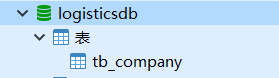
1.创建数据库(logisticsDB)。
2.创建公司信息(tb_company)表。
/*

 Date: 25/07/2021 22:02:55

*/

SET NAMES utf8mb4;

SET FOREIGN_KEY_CHECKS = 0;

-- ----------------------------

-- Table structure for tb_company

-- ----------------------------

DROP TABLE IF EXISTS `tb_company`;

CREATE TABLE `tb_company`  (

  `Company_id` int(11) NOT NULL AUTO_INCREMENT,

  `Company_name` varchar(255) CHARACTER SET utf8 COLLATE utf8_general_ci NULL DEFAULT NULL,

  `Company_city` varchar(255) CHARACTER SET utf8 COLLATE utf8_general_ci NULL DEFAULT NULL,

  `Company_phone` varchar(255) CHARACTER SET utf8 COLLATE utf8_general_ci NULL DEFAULT NULL,

  `Company_fax` varchar(255) CHARACTER SET utf8 COLLATE utf8_general_ci NULL DEFAULT NULL,

  `Company_adress` varchar(255) CHARACTER SET utf8 COLLATE utf8_general_ci NULL DEFAULT NULL,

  `Company_remark` varchar(255) CHARACTER SET utf8 COLLATE utf8_general_ci NULL DEFAULT NULL,

  PRIMARY KEY (`Company_id`) USING BTREE

) ENGINE = InnoDB AUTO_INCREMENT = 1006 CHARACTER SET = utf8 COLLATE = utf8_general_ci ROW_FORMAT = Dynamic;

-- ----------------------------

-- Records of tb_company

-- ----------------------------

INSERT INTO `tb_company` VALUES (1001, '长沙飞马传媒有限公司', '湖南湘潭', '0731-2784651', '0731-2784651', '望城', NULL);

INSERT INTO `tb_company` VALUES (1002, '长沙长奔汽车', '湖南株洲', '0731-2784555', '0731-2784555', '茶陵', NULL);

INSERT INTO `tb_company` VALUES (1003, '湖南汇通科技', '湖南长沙', '0731-2784777', '0731-2784777', '长沙', NULL);

INSERT INTO `tb_company` VALUES (1004, '长沙科技', '湖南长沙', '0731-2784651', '0731-2784651', '湘潭', NULL);

SET FOREIGN_KEY_CHECKS = 1;
2、项目Java代码
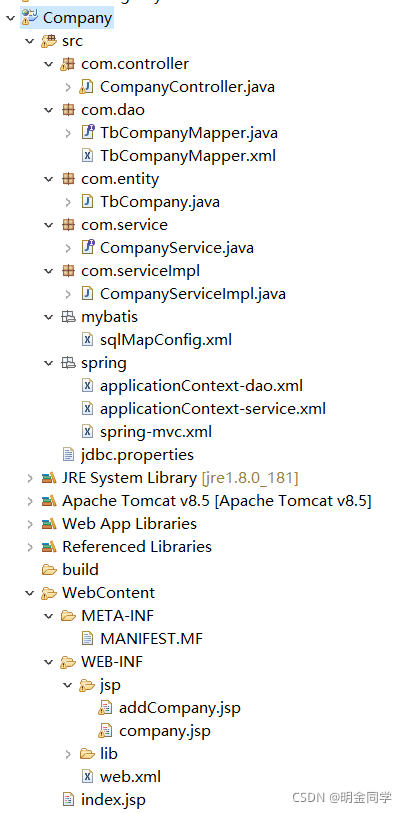
目录结构
Company
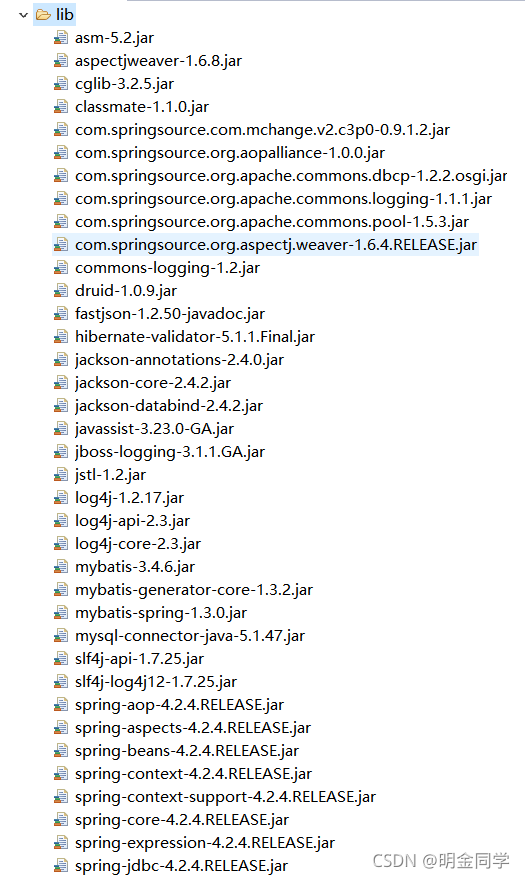
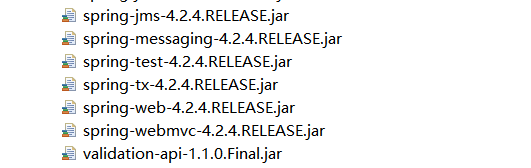
JAR包:
src
com.controller
CompanyController.java
package com.controller;

import java.util.List;

import javax.annotation.Resource;

import org.springframework.stereotype.Controller;

import org.springframework.ui.Model;

import org.springframework.web.bind.annotation.RequestMapping;

import com.entity.TbCompany;

import com.service.CompanyService;

@Controller

public class CompanyController {

	@Resource

	CompanyService companyService;

	// 查询与模糊查询

	@RequestMapping("/CompanysList")

	public String CompanysList(Model model, String Company_name) {

		List<TbCompany> companyList = companyService.selectAll(Company_name);

		model.addAttribute("companyList", companyList);

		return "/company";

	}

	// 跳转到添加页面

	@RequestMapping("/insertInto")

	public String insertInto() {

		return "/addCompany";

	}

	// 添加

	@RequestMapping("/insertCompany")

	public String insertCompany(TbCompany tbCompany) {

		int insertCompany = companyService.insertCompany(tbCompany);

		return "redirect:/CompanysList.do";

	}

	// 删除

	@RequestMapping("/delCompany")

	public String delCompany(int companyId) {

		int delCompany = companyService.delCompany(companyId);

		return "redirect:/CompanysList.do";

	}

}
com.dao
TbCompanyMapper.java
package com.dao;

import com.entity.TbCompany;

import java.util.List;

import org.apache.ibatis.annotations.Param;

public interface TbCompanyMapper {

    int deleteByPrimaryKey(Integer companyId);

    int insert(TbCompany record);

    List<TbCompany> selectAll(@Param("Company_name")String Company_name);

}
TbCompanyMapper.xml
<?xml version="1.0" encoding="UTF-8" ?>

<!DOCTYPE mapper PUBLIC "-//mybatis.org//DTD Mapper 3.0//EN" "http://mybatis.org/dtd/mybatis-3-mapper.dtd" >

<mapper namespace="com.dao.TbCompanyMapper" >

  <resultMap id="BaseResultMap" type="com.entity.TbCompany" >

    <id column="Company_id" property="companyId" jdbcType="INTEGER" />

    <result column="Company_name" property="companyName" jdbcType="VARCHAR" />

    <result column="Company_city" property="companyCity" jdbcType="VARCHAR" />

    <result column="Company_phone" property="companyPhone" jdbcType="VARCHAR" />

    <result column="Company_fax" property="companyFax" jdbcType="VARCHAR" />

    <result column="Company_adress" property="companyAdress" jdbcType="VARCHAR" />

    <result column="Company_remark" property="companyRemark" jdbcType="VARCHAR" />

  </resultMap>

  <delete id="deleteByPrimaryKey" parameterType="java.lang.Integer" >

    delete from tb_company

    where Company_id = #{companyId,jdbcType=INTEGER}

  </delete>

  <insert id="insert" parameterType="com.entity.TbCompany" >

    insert into tb_company (Company_id, Company_name, Company_city,

      Company_phone, Company_fax, Company_adress,

      Company_remark)

    values (#{companyId,jdbcType=INTEGER}, #{companyName,jdbcType=VARCHAR}, #{companyCity,jdbcType=VARCHAR},

      #{companyPhone,jdbcType=VARCHAR}, #{companyFax,jdbcType=VARCHAR}, #{companyAdress,jdbcType=VARCHAR},

      #{companyRemark,jdbcType=VARCHAR})

  </insert>

  <select id="selectAll" resultMap="BaseResultMap" >

    select Company_id, Company_name, Company_city, Company_phone, Company_fax, Company_adress,

    Company_remark

    from tb_company

    <where>

		<if test="Company_name!= null">Company_name like "%"#{Company_name}"%"   </if>

	</where>

  </select>

</mapper>
com.entity
TbCompany.java
package com.entity;

public class TbCompany {

    private Integer companyId;

    private String companyName;

    private String companyCity;

    private String companyPhone;

    private String companyFax;

    private String companyAdress;

    private String companyRemark;

    public Integer getCompanyId() {

        return companyId;

    }

    public void setCompanyId(Integer companyId) {

        this.companyId = companyId;

    }

    public String getCompanyName() {

        return companyName;

    }

    public void setCompanyName(String companyName) {

        this.companyName = companyName == null ? null : companyName.trim();

    }

    public String getCompanyCity() {

        return companyCity;

    }

    public void setCompanyCity(String companyCity) {

        this.companyCity = companyCity == null ? null : companyCity.trim();

    }

    public String getCompanyPhone() {

        return companyPhone;

    }

    public void setCompanyPhone(String companyPhone) {

        this.companyPhone = companyPhone == null ? null : companyPhone.trim();

    }

    public String getCompanyFax() {

        return companyFax;

    }

    public void setCompanyFax(String companyFax) {

        this.companyFax = companyFax == null ? null : companyFax.trim();

    }

    public String getCompanyAdress() {

        return companyAdress;

    }

    public void setCompanyAdress(String companyAdress) {

        this.companyAdress = companyAdress == null ? null : companyAdress.trim();

    }

    public String getCompanyRemark() {

        return companyRemark;

    }

    public void setCompanyRemark(String companyRemark) {

        this.companyRemark = companyRemark == null ? null : companyRemark.trim();

    }

}
com.service
CompanyService.java
package com.service;

import java.util.List;

import com.entity.TbCompany;

public interface CompanyService {

	//查询

	List<TbCompany> selectAll(String Company_name);

	//添加

	int insertCompany(TbCompany tbCompany);

	//删除

	int  delCompany(int companyId);

}
com.serviceImpl
CompanyServiceImpl.java
package com.serviceImpl;

import java.util.List;

import javax.annotation.Resource;

import org.springframework.stereotype.Service;

import com.dao.TbCompanyMapper;

import com.entity.TbCompany;

import com.service.CompanyService;

@Service

public class CompanyServiceImpl implements CompanyService {

	@Resource

	TbCompanyMapper mapper;

	@Override

	public List<TbCompany> selectAll(String Company_name) {

		List<TbCompany> selectAll=mapper.selectAll(Company_name);

		return selectAll;

	}

	@Override

	public int insertCompany(TbCompany tbCompany) {

		int insertCompany=mapper.insert(tbCompany);

		return insertCompany;

	}

	@Override

	public int delCompany(int companyId) {

		int delCompany=mapper.deleteByPrimaryKey(companyId);

		return delCompany;

	}

}
mybatis
sqlMapConfig.xml.java
<?xml version="1.0" encoding="UTF-8"?>

<!DOCTYPE configuration PUBLIC "-//mybatis.org//DTD Config 3.0//EN"

	"http://mybatis.org/dtd/mybatis-3-config.dtd">

<configuration>

	<!-- 别名 -->

	<typeAliases>

		<package name="com.entity" />

	</typeAliases>

</configuration>
spring
applicationContext-dao.xml
<?xml version="1.0" encoding="UTF-8"?>

<beans xmlns:xsi="http://www.w3.org/2001/XMLSchema-instance"

	xmlns="http://www.springframework.org/schema/beans"

	xmlns:p="http://www.springframework.org/schema/p"

	xmlns:context="http://www.springframework.org/schema/context"

	xmlns:aop="http://www.springframework.org/schema/aop"

	xmlns:tx="http://www.springframework.org/schema/tx"

	xsi:schemaLocation="http://www.springframework.org/schema/beans

	http://www.springframework.org/schema/beans/spring-beans-4.2.xsd

	http://www.springframework.org/schema/context

	http://www.springframework.org/schema/context/spring-context-4.2.xsd

	http://www.springframework.org/schema/aop

	http://www.springframework.org/schema/aop/spring-aop-4.2.xsd

	http://www.springframework.org/schema/tx

	http://www.springframework.org/schema/tx/spring-tx.xsd

	http://www.springframework.org/schema/mvc

		http://www.springframework.org/schema/mvc/spring-mvc-4.2.xsd ">

	<!-- 指定spring容器读取db.properties文件 -->

	<context:property-placeholder location="classpath:jdbc.properties"></context:property-placeholder>

	<!-- 将连接池注册到bean容器中 -->

	<bean id="dataSource" class="com.alibaba.druid.pool.DruidDataSource">

		<property name="driverClassName" value="${jdbc.driver}"></property>

		<property name="Url" value="${jdbc.url}"></property>

		<property name="username" value="${jdbc.username}"></property>

		<property name="password" value="${jdbc.password}"></property>

	</bean>

	<!-- 配置SqlSessionFactory -->

	<bean class="org.mybatis.spring.SqlSessionFactoryBean">

		<!-- 设置MyBatis核心配置文件 -->

		<property name="configLocation" value="classpath:mybatis/sqlMapConfig.xml" />

		<!-- 设置数据源 -->

		<property name="dataSource" ref="dataSource" />

	</bean>

	<!-- 配置Mapper扫描 -->

	<bean class="org.mybatis.spring.mapper.MapperScannerConfigurer">

		<!-- 设置Mapper扫描包 -->

		<property name="basePackage"  value="com.dao" />

	</bean>

	<!-- 配置事务管理器 -->

		<bean id="transactionManager" class="org.springframework.jdbc.datasource.DataSourceTransactionManager">

			<property name="dataSource" ref="dataSource"></property>

		</bean>

		<!-- 开启注解方式管理AOP事务 -->

		<tx:annotation-driven transaction-manager="transactionManager" />

</beans>
applicationContext-service.xml
<?xml version="1.0" encoding="UTF-8"?>

<beans  xmlns:xsi="http://www.w3.org/2001/XMLSchema-instance"

		xmlns="http://www.springframework.org/schema/beans"

		xmlns:context="http://www.springframework.org/schema/context"

		xmlns:aop="http://www.springframework.org/schema/aop"

		xmlns:tx="http://www.springframework.org/schema/tx"

		xmlns:mvc="http://www.springframework.org/schema/mvc"

		xsi:schemaLocation="http://www.springframework.org/schema/beans

		http://www.springframework.org/schema/beans/spring-beans-4.2.xsd

		http://www.springframework.org/schema/context

		http://www.springframework.org/schema/context/spring-context-4.2.xsd

		http://www.springframework.org/schema/aop

		http://www.springframework.org/schema/aop/spring-aop-4.2.xsd

		http://www.springframework.org/schema/tx

		http://www.springframework.org/schema/tx/spring-tx-4.2.xsd

		http://www.springframework.org/schema/mvc

		http://www.springframework.org/schema/mvc/spring-mvc-4.2.xsd ">

		<!-- 配置Service扫描 -->

		<context:component-scan base-package="com" />

</beans>
spring-mvc.xml
<?xml version="1.0" encoding="UTF-8"?>

<beans  xmlns:xsi="http://www.w3.org/2001/XMLSchema-instance"

		xmlns="http://www.springframework.org/schema/beans"

		xmlns:context="http://www.springframework.org/schema/context"

		xmlns:aop="http://www.springframework.org/schema/aop"

		xmlns:tx="http://www.springframework.org/schema/tx"

		xmlns:mvc="http://www.springframework.org/schema/mvc"

		xsi:schemaLocation="http://www.springframework.org/schema/beans

		http://www.springframework.org/schema/beans/spring-beans-4.2.xsd

		http://www.springframework.org/schema/context

		http://www.springframework.org/schema/context/spring-context-4.2.xsd

		http://www.springframework.org/schema/aop

		http://www.springframework.org/schema/aop/spring-aop-4.2.xsd

		http://www.springframework.org/schema/tx

		http://www.springframework.org/schema/tx/spring-tx-4.2.xsd

		http://www.springframework.org/schema/mvc

		http://www.springframework.org/schema/mvc/spring-mvc-4.2.xsd ">

		<!-- 配置Controller扫描 -->

		<context:component-scan base-package="com.controller" />

		<!-- 配置注解驱动 -->

		<mvc:annotation-driven />

		<!-- 配置视图解析器 -->

		<bean class="org.springframework.web.servlet.view.InternalResourceViewResolver">

			<!-- 前缀 -->

			<property name="prefix" value="/WEB-INF/jsp/" />

			<!-- 后缀 -->

			<property name="suffix" value=".jsp" />

		</bean>

</beans>
jdbc.properties
jdbc.url=jdbc:mysql://localhost:3306/logisticsdb?useUnicode=true&characterEncoding=UTF-8&useSSL=false

jdbc.username=root

jdbc.password=123456

jdbc.driver=com.mysql.jdbc.Driver
WebContent
web.xml
<?xml version="1.0" encoding="UTF-8"?>

<web-app xmlns:xsi="http://www.w3.org/2001/XMLSchema-instance" xmlns="http://xmlns.jcp.org/xml/ns/javaee" xsi:schemaLocation="http://xmlns.jcp.org/xml/ns/javaee http://xmlns.jcp.org/xml/ns/javaee/web-app_3_1.xsd" id="WebApp_ID" version="3.1">

  <display-name>Company</display-name>

  <welcome-file-list>

    <welcome-file>index.html</welcome-file>

    <welcome-file>index.htm</welcome-file>

    <welcome-file>index.jsp</welcome-file>

    <welcome-file>default.html</welcome-file>

    <welcome-file>default.htm</welcome-file>

    <welcome-file>default.jsp</welcome-file>

  </welcome-file-list>

  <!--spring容器  -->

  <context-param>

  	<param-name>contextConfigLocation</param-name>

  	<param-value>classpath:spring/applicationContext-*.xml</param-value>

  </context-param>

  <!-- 监听器,加载spring配置 -->

  <listener>

  	<listener-class>org.springframework.web.context.ContextLoaderListener</listener-class>

  </listener>

  <!-- 前端控制器 -->

	<servlet>

		<servlet-name>springmvc</servlet-name>

		<servlet-class>org.springframework.web.servlet.DispatcherServlet</servlet-class>

		<init-param>

			<param-name>contextConfigLocation</param-name>

			<param-value>classpath:spring/spring-mvc.xml</param-value>

		</init-param>

		<load-on-startup>1</load-on-startup>

	</servlet>

	<servlet-mapping>

		<servlet-name>springmvc</servlet-name>

		<url-pattern>*.do</url-pattern>

	</servlet-mapping>

	<!-- 设置post请求的字符编码过滤器 -->

  <filter>

        <filter-name>CharacterEncodingFilter</filter-name>

        <filter-class>org.springframework.web.filter.CharacterEncodingFilter</filter-class>

        <init-param>

            <param-name>encoding</param-name>

            <param-value>UTF-8</param-value>

        </init-param>

    </filter>

    <filter-mapping>

        <filter-name>CharacterEncodingFilter</filter-name>

        <url-pattern>/*</url-pattern>

    </filter-mapping>

</web-app>
JSP
index.jsp
<%@ page language="java" contentType="text/html; charset=utf-8"

    pageEncoding="utf-8"%>

<!DOCTYPE html>

    <%

	String path = request.getContextPath();

	String basePath = request.getScheme()+"://"+request.getServerName()+":"

		+request.getServerPort()+path;

%>

<html>

<head>

<meta charset="utf-8">

<title>登录</title>

</head>

<body>

<script type="text/javascript">

	window.location.href="<%=basePath%>/CompanysList.do";

</script>

</body>

</html>
addCompany.jsp
<%@ page language="java" contentType="text/html; charset=utf-8"
pageEncoding="utf-8"%>
<!DOCTYPE html>
<html>
<head>
<meta charset="utf-8">
<title>添加公司信息</title>
<style type="text/css">
.centen1 {
width: 100%;
height: 40px;
color: white;
line-height: 40px;
background-color: #0098CB;
}
table {
margin: auto;
}
span {
color: red;
}
</style>
</head>
<body>
<div class="centen1">
<h3>添加公司</h3>
</div>
<div class="centen2">
<form action="insertCompany.do">
<table border="0" cellspacing="10" cellpadding="6">
<tr>
<td>公司编号: <input type="text"
name="companyId" required> <span>*</span>
</td>
</tr>
<tr>
<td>公司名称: <input type="text"
name="companyName" required> <span>*</span>
</td>
</tr>
<tr>
<td>所在城市: <input type="text"
name="companyCity">
</td>
</tr>
<tr>
<td>联系电话: <input type="text"
name="companyPhone">
</td>
</tr>
<tr>
<td>传
真: <input
type="text" name="companyFax">
</td>
</tr>
<tr>
<td>地
址: <input
type="text" name="companyAdress">
</td>
</tr>
<tr>
<td>备
注: <input
type="text" name="companyRemark">
</td>
</tr>
<tr>
<td>
<input
type="submit" value="保存" /> <input type="reset" value="重置" />
</td>
</tr>
</table>
</form>
</div>
</body>
</html>
company.jsp
<%@ page language="java" contentType="text/html; charset=utf-8"

	pageEncoding="utf-8"%>

<!DOCTYPE html>

<html>

<head>

<%@taglib uri="http://java.sun.com/jsp/jstl/core" prefix="c"%>

<meta charset="utf-8">

<title>物流系统 - 公司信息管理</title>

<style type="text/css">

	.head {

		height: 40px;

		width: 100%;

		background-color: #F8F4FF;

	}

	.head1 {

		width: 250px;

		height: 100%;

		float: left;

	}

	.head2 {

		width: 450px;

		height: 100%;

		line-height: 36px;

		float: right;

	}

	.centen {

		color: white;

		font-size: 20px;

		width: 100%;

		height: 36px;

		background-color: #0098CB;

		margin-top: 20px;

		line-height: 36px;

	}

	.foot {

		margin-top: 20px;

	}

	table {

		text-align: center;

	}

</style>

</head>

<body>

	<div class="head">

		<div class="head1">

			<a href="insertInto.do">

				<button type="button"

					style="height: 36px; font-size: 20px; background-color: #D9F0FF; border: none;">添加公司信息</button>

			</a>

		</div>

		<div class="head2" style="font-size: 20px; text-align: center;">

			<form action="CompanysList.do" method="post">

				公司名称: <input type="text" placeholder="公司名称" name="Company_name"

					style="height: 26px; font-size: 15px; margin-bottom: 2px;" /> <input

					type="submit" value="查找" style="height: 30px; font-size: 15px;" />

			</form>

		</div>

	</div>

	<div class="centen">

		<h4>公司信息列表</h4>

	</div>

	<div class="foot">

		<table width="100%" border="1px" cellpadding="5" cellspacing="0">

			<tr>

				<th width="150px">公司名称</th>

				<th width="150px">城市</th>

				<th width="150px">电话</th>

				<th width="150px">传真</th>

				<th width="150px">地址</th>

				<th width="150px">操作</th>

			</tr>

			<c:forEach var="company" items="${companyList }" varStatus="item">

				<tr>

					<td width="150px">${company.companyName}</td>

					<td width="150px">${company.companyCity}</td>

					<td width="150px">${company.companyPhone}</td>

					<td width="150px">${company.companyFax}</td>

					<td width="150px">${company.companyAdress}</td>

					<td width="150px"><a

						href="javascript:if(confirm('确实要删除吗?'))location='delCompany.do?companyId=${company.companyId}'">删除</a>

					</td>

				</tr>

			</c:forEach>

		</table>

	</div>

</body>

</html>
基于Spring MVC + Spring + MyBatis的【物流系统 - 公司信息管理】的更多相关文章
- 基于Spring MVC + Spring + MyBatis的【医院就诊挂号系统】
资源下载:https://download.csdn.net/download/weixin_44893902/21727306 一.语言和环境 1.实现语言: JAVA语言. 2.环境要求: MyE ...
- Spring、Spring MVC、MyBatis
Spring.Spring MVC.MyBatis整合文件配置详解 使用SSM框架做了几个小项目了,感觉还不错是时候总结一下了.先总结一下SSM整合的文件配置.其实具体的用法最好还是看官方文档. Sp ...
- SSM 即所谓的 Spring MVC + Spring + MyBatis 整合开发。
SSM 即所谓的 Spring MVC + Spring + MyBatis 整合开发.是目前企业开发比较流行的架构.代替了之前的SSH(Struts + Spring + Hibernate) 计划 ...
- 转载 Spring、Spring MVC、MyBatis整合文件配置详解
Spring.Spring MVC.MyBatis整合文件配置详解 使用SSM框架做了几个小项目了,感觉还不错是时候总结一下了.先总结一下SSM整合的文件配置.其实具体的用法最好还是看官方文档. ...
- [读后感]spring Mvc 教程框架实例以及系统演示下载
[读后感]spring Mvc 教程框架实例以及系统演示下载 太阳火神的漂亮人生 (http://blog.csdn.net/opengl_es) 本文遵循"署名-非商业用途-保持一致&qu ...
- spring MVC、mybatis配置读写分离
spring MVC.mybatis配置读写分离 1.环境: 3台数据库机器,一个master,二台slave,分别为slave1,slave2 2.要实现的目标: ①使数据写入到master ②读数 ...
- spring mvc与mybatis收集到博客
mybaits-spring 官方教程 http://mybatis.github.io/spring/zh/ SpringMVC 基础教程 框架分析 http://blog.csdn.net/swi ...
- 搭建Spring、Spring MVC、Mybatis和Freemarker
搭建Spring.Spring MVC.Mybatis和Freemarker 1.pom文件 <project xmlns="http://maven.apache.org/POM/4 ...
- Spring Mvc和Mybatis的多数据库访问配置过程
Spring Mvc 加Mybatis的多数据库访问源配置访问过程如下: 在applicationContext.xml进行配置 <?xml version="1.0" en ...
随机推荐
- 零基础学习java------35---------删除一个商品案例,删除多个商品,编辑(修改商品信息),校验用户名是否已经注册(ajax)
一. 删除一个商品案例 将要操作的表格 思路图 前端代码 <%@ page language="java" contentType="text/html; cha ...
- Docker学习(六)——Dockerfile文件详解
Docker学习(六)--Dockerfile文件详解 一.环境介绍 1.Dockerfile中所用的所有文件一定要和Dockerfile文件在同一级父目录下,可以为Dockerfile父目录的子目录 ...
- 集合类——Map集合、Properties属性文件操作
1.Map集合 Collection集合的特点是每次进行单个对象的保存,若要对一对对象来进行保存就只能用Map集合来保存.即Map集合中一次可以保存两个对象,且这两个对象的关系是key = value ...
- RecyclerView实现侧滑删除、置顶、滑动
1.首先在build.gradle里添加 compile 'com.github.mcxtzhang:SwipeDelMenuLayout:V1.2.1' 2.设置recyclerView的item布 ...
- spring cloud config center Git SSH configuration
Git SSH configuration using properties By default, the JGit library used by Spring Cloud Config Serv ...
- spring的注解AOP配置
package com.hope.service.impl;import com.hope.service.IAccountService;import org.aspectj.lang.annota ...
- windows 显示引用账户已被锁定,且可能无法登录
今天遇到一个比较尴尬的事情,清理笔记本键盘时,在锁屏界面多次碰到enter键,在登录界面被锁定无法登录. 一开始慌了,因为没遇到过这样的问题.百度一看方法不少,便开始尝试, 有的说是重启进入安全模式, ...
- C++STL标准库学习笔记(五)set
前言: 在这个笔记中,我把大多数代码都加了注释,我的一些想法和注解用蓝色字体标记了出来,重点和需要关注的地方用红色字体标记了出来,这一篇后面主要都是我的记录了,为了防止大片蓝色字体出现,后面就不改蓝色 ...
- Redis cluster 集群报错合集
目录 一.连接集群操作报错(error)MOVED 二.集群关闭后重启报错 三.Redis (error) NOAUTH Authentication required 四.Redis集群使用中突然挂 ...
- Android Service VS AsyncTask VS Thread
这三种方式的设计目的是不同的. Service: 适用于在后台长期持续运行的动作,如:播放音乐,查看网络数据.注意,在开发文档中,service本身是在UI线程中,所以所需的操作应该创建一个新的线程来 ...