
四、mybatis动态sql
# 前言
前面mysql都是通过静态sql进行查询的,但是如果业务复杂的时候,我们会遇到引号问题,或者多一个空格,这就使得sql代码编写错误了,所以为了解决这个问题,我们有了动态sql。
Mybatis框架的动态SQL技术是一种根据特定条件动态拼装SQL语句的功能,它存在的意义是为了解决拼接SQL语句字符串时的痛点问题。具体是通过标签来实现的。
# 动态sql
1. 先看一下模块目录结构
在类路径的resources下的mapper包下创建sql.xml文件(共性抽取)
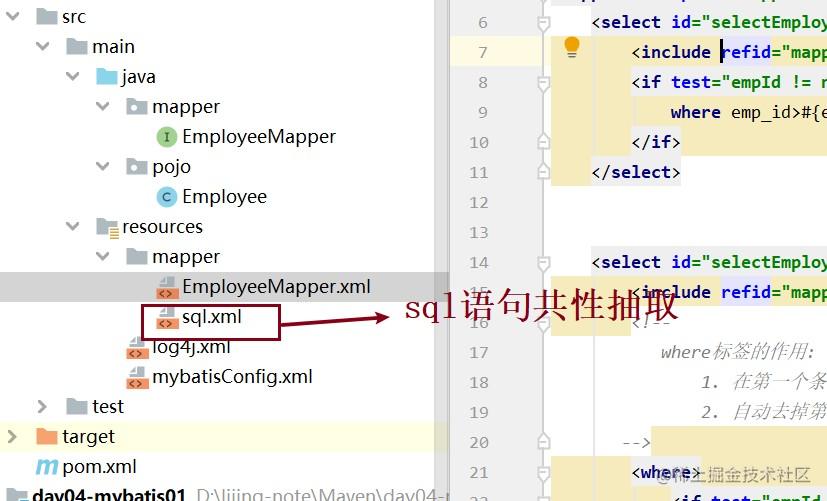
2. 物理建模和逻辑建模
这里省略物理建模步骤,要求数据库的表与pojo类要对应。
```java
package pojo;
import lombok.AllArgsConstructor;
import lombok.Data;
import lombok.NoArgsConstructor;
@Data
@AllArgsConstructor
@NoArgsConstructor
public class Employee {
private Integer empId;
private String empName;
private Double empSalary;
}
```
3. 引入依赖
把之前的log4j复制到类路径resouces下,另外我们引入依赖后的pom.xml如下:
```xml
<?xml version="1.0" encoding="UTF-8"?>
<project xmlns="http://maven.apache.org/POM/4.0.0"
xmlns:xsi="http://www.w3.org/2001/XMLSchema-instance"
xsi:schemaLocation="http://maven.apache.org/POM/4.0.0 http://maven.apache.org/xsd/maven-4.0.0.xsd">
<modelVersion>4.0.0</modelVersion>
<groupId>org.example</groupId>
<artifactId>day03-mybatis02-dynamic</artifactId>
<version>1.0-SNAPSHOT</version>
<packaging>jar</packaging>
<dependencies>
<dependency>
<groupId>org.projectlombok</groupId>
<artifactId>lombok</artifactId>
<version>1.18.8</version>
<scope>provided</scope>
</dependency>
<!-- Mybatis核心 -->
<dependency>
<groupId>org.mybatis</groupId>
<artifactId>mybatis</artifactId>
<version>3.5.7</version>
</dependency>
<!-- junit测试 -->
<dependency>
<groupId>junit</groupId>
<artifactId>junit</artifactId>
<version>4.12</version>
<scope>test</scope>
</dependency>
<!-- MySQL驱动 -->
<dependency>
<groupId>mysql</groupId>
<artifactId>mysql-connector-java</artifactId>
<version>5.1.3</version>
<scope>runtime</scope>
</dependency>
<!-- log4j日志 -->
<dependency>
<groupId>log4j</groupId>
<artifactId>log4j</artifactId>
<version>1.2.17</version>
</dependency>
</dependencies>
</project>
```
4. 全局配置文件
```xml
<?xml version="1.0" encoding="UTF-8" ?>
<!DOCTYPE configuration
PUBLIC "-//mybatis.org//DTD Config 3.0//EN"
"http://mybatis.org/dtd/mybatis-3-config.dtd">
<configuration>
<!--驼峰映射-->
<settings>
<setting name="mapUnderscoreToCamelCase" value="true"/>
</settings>
<!--类型别名映射-->
<typeAliases>
<package name="pojo"/>
</typeAliases>
<!--环境配置-->
<environments default="dev">
<environment id="dev">
<transactionManager type="JDBC"></transactionManager>
<dataSource type="POOLED">
<property name="username" value="root"/>
<property name="password" value="888888"/>
<property name="url" value="jdbc:mysql://localhost:3306/mybatis-example"/>
<property name="driver" value="com.mysql.jdbc.Driver"/>
</dataSource>
</environment>
</environments>
<!--路径映射-->
<mappers>
<mapper resource="mapper/sql.xml"/>
<package name="mapper"/>
</mappers>
</configuration>
```
**注意:** 这里有驼峰映射,别名映射,路径映射和路径映射。和以前的不同的是,我们这里做了sql语句的**共性抽取**,所以得加一个sql的路径映射 ` <mapper resource="mapper/sql.xml"/>`。
5. sql共性抽取文件
在类路径resources下的包mapper下创建一个sql.xml(因为我们sql是要写在映射文件中,自己本身也是映射文件,所以需要写在mapper下)。到要用的时候,在映射路径文件中需要用到这个sql语句的地方加入`
<include refid="mapper.sql.mySelectSql"></include>`。
```xml
<?xml version="1.0" encoding="UTF-8" ?>
<!DOCTYPE mapper
PUBLIC "-//mybatis.org//DTD Mapper 3.0//EN"
"http://mybatis.org/dtd/mybatis-3-mapper.dtd">
<mapper namespace="mapper.sql">
<sql id="mySelectSql">
select emp_id,emp_name,emp_salary from t_emp
</sql>
</mapper>
```
> 共性抽取文件也可以不配置,这时候直接在映射文件中把要执行的语句重新编写就行了。
6. mapper接口
一共有七个方法,
```java
package mapper;
import org.apache.ibatis.annotations.Param;
import pojo.Employee;
import java.util.List;
public interface EmployeeMapper {
//根据员工的empId查询大于该empId的所有员工,如果empId为null,则查询全体员工
List<Employee> selectEmployeeListByEmpId(Integer empId);
/**
* 查询大于传入的empId并且工资大于传入的empSalary的员工集合,如果传入的empId为null,则不考虑empId条件
* 传入的empSalary为null则不考虑empSalary的条件
*/
List<Employee> selectEmployeeListByEmpIdAndEmpSalary(@Param("empId") Integer empId, @Param("empSalary") Double empSalary);
/**
* 根据empId更新员工信息,如果某个值为null,则不更新这个字段
*/
void updateEmployee(Employee employee);
/**
* 根据emp_id查询员工信息,如果0<emp_id<6,那么就查询所有大于该emp_id的员工,如果emp_id是大于6,那么就查询所有小于该emp_id的员工
* 如果是其它情况,则查询所有员工信息
*/
List<Employee> selectEmployeeList(Integer empId);
/**
* 添加员工信息
*/
void insertEmployee(Employee employee);
/**
* 批量添加员工集合
*/
void insertEmployeeList(@Param("employeeList") List<Employee> employeeList);
/**
* 根据员工的id集合查询员工集
*/
List<Employee> selectEmployeeListByEmpIdList(List<Integer> idList);
}
```
## if
目标:根据员工的empId查询大于该empId的所有员工,如果empId为null,则查询全体员工。
> Dao接口的方法为:
> ` List<Employee> selectEmployeeListByEmpId(Integer empId);`
**静态sql**:
```xml
<select id="selectEmployeeListByEmpId" resultType="Employee">
<include refid="mapper.sql.mySelectSql"></include> where emp_id>#{empId}
</select>
```
**动态sql**:
```xml
<select id="selectEmployeeListByEmpId" resultType="Employee">
<include refid="mapper.sql.mySelectSql"></include>
<if test="empId != null">
where emp_id>#{empId}
</if>
</select>
```
` <include refid="mapper.sql.mySelectSql"></include>`表示引用抽取出的sql片段,也可以直接写sql语句。如果是静态sql,当id为null时,查询出来的是空,动态sql则可以查出全部。**if标签里面有test属性名,作为判断语句。**
## where
目标:
- 查询大于传入的empId并且工资大于传入的empSalary的员工集合
- 如果传入的empId为null,则不考虑empId条件
* 传入的empSalary为null则不考虑empSalary的条件
> Dao接口方法:
>
> ` List<Employee> selectEmployeeListByEmpIdAndEmpSalary(@Param("empId") Integer empId, @Param("empSalary") Double empSalary);`
**用if标签的动态sql**:
```xml
<select id="selectEmployeeListByEmpIdAndEmpSalary" resultType="Employee">
<include refid="mapper.sql.mySelectSql"></include> where
<if test="empId != null">
emp_id>#{empId}
</if>
<if test="empSalary != null">
and emp_salary>#{empSalary}
</if>
```
这里可以看到,如果empSalary为空,那么sql语句为select * from t_emp where emp_id >#{empId},但是如果empId为空,那么sql语句为select * from t_emp where and emp_salary>#{empSalary},很明显这个是错的,if标签在这里就不适用了。所以我们用where标签,或者trim标签。
**where和if的动态sql**:
```xml
<select id="selectEmployeeListByEmpIdAndEmpSalary" resultType="Employee">
<include refid="mapper.sql.mySelectSql"></include>
<where>
<if test="empId != null">
emp_id>#{empId}
</if>
<if test="empSalary != null">
and emp_salary>#{empSalary}
</if>
</where>
</select>
```
> **where标签的作用:**
> 1. 在第一个条件之前自动添加WHERE关键字
> 2. 自动去掉第一个条件前的连接符(AND、OR等等)
## trim
trim是修建的意思,其实就是去头去尾,这里还是根据上面那个方法
**trim的动态sql**
```xml
<select id="selectEmployeeListByEmpIdAndEmpSalary" resultType="Employee">
<include refid="mapper.sql.mySelectSql"></include>
<trim prefix="WHERE" prefixOverrides="AND|OR">
<if test="empId != null">
emp_id>#{empId}
</if>
<if test="empSalary != null">
AND emp_salary>#{empSalary}
</if>
</trim>
</select>
```
> **trim标签:**
> - prefix:指定要动态添加的前缀
> - suffix属性:指定要动态添加的后缀
> - prefixOverrides:指定要动态去掉的前缀,使用“|”分隔有可能的多个值
> - suffixOverrides属性:指定要动态去掉的后缀,使用“|”分隔有可能的多个值
## set
目标:根据empId更新员工信息,如果某个值为null,则不更新这个字段
> Dao接口方法:
>` void updateEmployee(Employee employee);`
我们先用上面的trim标签来解决一下这个问题,
**trim的动态sql**:
```xml
<update id="updateEmployee" >
<trim prefix="set" prefixOverrides=",">
<if test="empName!=null">
emp_name=#{empName}
</if>
<if test="empSalary!=null">
, emp_salary=#{empSalary}
</if>
</trim>
where emp_id=#{empId}
</update>
```
**set的动态sql**
```xml
<update id="updateEmployee" >
update t_emp
<set >
<if test="empName!=null">
emp_name=#{empName}
</if>
<if test="empSalary!=null">
, emp_salary=#{empSalary}
</if>
</set>
```
可以看出
> **set标签的作用:**
> 1. 自动在要修改的第一个字段之前添加SET关键字
> 2. 去掉要修改的第一个字段前的连接符(,)
## choose、when、otherwise
目标:
- 根据emp_id查询员工信息,如果0<emp_id<6,那么就查询所有大于该emp_id的员工
- 如果emp_id是大于6,那么就查询所有小于该emp_id的员工
- 如果是其它情况,则查询所有员工信息
> Dao接口方法:
> ` List<Employee> selectEmployeeList(Integer empId);`
**动态sql**
```xml
<select id="selectEmployeeList" resultType="employee">
<include refid="mapper.sql.mySelectSql"></include> where
<choose>
<!--<是<号的转义字符-->
<when test="empId>0 and empId<6">
emp_id>#{empId}
</when>
<when test="empId>6">
emp_id<#{empId}
</when>
<otherwise>
1==1
</otherwise>
</choose>
</select>
```
choose、when、otherwise
相当于if ... else if... else if ... else
- 如果某一个when的条件成立,则不会继续判断后续的when
- 如果所有的when都不成立,则会拼接otherwise标签中的内容
## foreach
目标1:批量添加员工信息
> Dao接口方法:
>
> void insertEmployeeList(@Param("employeeList") List<Employee> employeeList);
**动态sql**
```xml
<insert id="insertEmployeeList">
insert into t_emp(emp_name,emp_salary)values
<!--collection标签可以写list,collection,
或者自己自己定义参数名@Param("employeeList") List<Employee> employeeList-->
<foreach collection="employeeList" separator="," item="emp">
(#{emp.empName},#{emp.empSalary})
</foreach>
</insert>
```
目标2:根据多个id查询多个员工信息
> Dao接口
>
> List<Employee> selectEmployeeListByEmpIdList(List<Integer> idList);
**动态sql**
```xml
<select id="selectEmployeeListByEmpIdList" resultType="employee">
<include refid="mapper.sql.mySelectSql"></include>
<foreach collection="collection" item="id" separator="," open="where emp_id in (" close=")">
#{id}
</foreach>
</select>
```
**批量查询:foreach标签**
1. collection属性: 表示要遍历的对象,如果要遍历的参数使用**@Param**注解取名了就使用该名字,如果没有取名**List,或者collection。**
2. item属性: 表示遍历出来的元素,我们到时候要拼接SQL语句就得使用这个元素: 如果遍历出来的元素是POJO对象, 那么我们就通过 **#{遍历出来的元素.POJO的属性}** 获取数据;如果遍历出来的元素是简单类型的数据,那么我们就使用 **#{遍历出来的元素}** 获取这个简单类型数据
3. separator属性: 遍历出来的元素之间的分隔符
4. open属性: 在遍历出来的第一个元素之前添加前缀
5. close属性: 在遍历出来的最后一个元素之后添加后缀
四、mybatis动态sql的更多相关文章
- 【转载】 mybatis入门系列四之动态SQL
mybatis 详解(五)------动态SQL 目录 1.动态SQL:if 语句 2.动态SQL:if+where 语句 3.动态SQL:if+set 语句 4.动态SQL:choose(when, ...
- Mybatis动态SQL简单了解 Mybatis简介(四)
动态SQL概况 MyBatis 的强大特性之一便是它的动态 SQL 在Java开发中经常遇到条件判断,比如: if(x>0){ //执行一些逻辑........ } Mybatis应用中,S ...
- MyBatis 动态SQL(十二)
动态条件查询 以下是我们数据库表 tb_user 的记录: 假设现在有一个需求,就是根据输入的用户年龄和性别,查询用户的记录信息.你可能会说,这太简单了,脑袋里立马蹦出如下的 SQL 语句: SELE ...
- mybatis实战教程(mybatis in action)之八:mybatis 动态sql语句
mybatis 的动态sql语句是基于OGNL表达式的.可以方便的在 sql 语句中实现某些逻辑. 总体说来mybatis 动态SQL 语句主要有以下几类:1. if 语句 (简单的条件判断)2. c ...
- 9.mybatis动态SQL标签的用法
mybatis动态SQL标签的用法 动态 SQL MyBatis 的强大特性之一便是它的动态 SQL.如果你有使用 JDBC 或其他类似框架的经验,你就能体会到根据不同条件拼接 SQL 语句有多么 ...
- 自己动手实现mybatis动态sql
发现要坚持写博客真的是一件很困难的事情,各种原因都会导致顾不上博客.本来打算写自己动手实现orm,看看时间,还是先实现一个动态sql,下次有时间再补上orm完整的实现吧. 用过mybatis的人,估计 ...
- Mybatis动态SQL单一基础类型参数用if标签
Mybatis动态SQL单一基础类型参数用if标签时,test中应该用 _parameter,如: 1 2 3 4 5 6 <select id="selectByName" ...
- 超全MyBatis动态SQL详解!( 看完SQL爽多了)
MyBatis 令人喜欢的一大特性就是动态 SQL. 在使用 JDBC 的过程中, 根据条件进行 SQL 的拼接是很麻烦且很容易出错的. MyBatis 动态 SQL 的出现, 解决了这个麻烦. My ...
- mybatis原理分析学习记录,mybatis动态sql学习记录
以下个人学习笔记,仅供参考,欢迎指正. MyBatis 是支持定制化 SQL.存储过程以及高级映射的持久层框架,其主要就完成2件事情: 封装JDBC操作 利用反射打通Java类与SQL语句之间的相互转 ...
- mybatis 动态sql和参数
mybatis 动态sql 名词解析 OGNL表达式 OGNL,全称为Object-Graph Navigation Language,它是一个功能强大的表达式语言,用来获取和设置Java对象的属性, ...
随机推荐
- WPF---数据绑定(二)
一.绑定到非UI元素 上篇中,我们绑定的数据源均是派生自UIElement的WPF元素.本篇描述的绑定数据源是一个我们自定义的普通的类型. 注:尽管绑定的数据源可以是任意类型的对象,但Path必须总是 ...
- vue2.0中模拟数据的配置
在开发过程中,有时候接口跟不上我们的进度,我们要测试,就需要自测. 现在vue已经升级到2.0版本了,早期在vue构建工程文件在build里面有dev-server.js,但是后来构建去除了该文件集成 ...
- hdu1002 大数相加问题
这个题对于 几个月前的我简直是噩梦 好在磕磕绊绊终于写出来了 由于自己的问题 还被巨巨嘲讽了 1 1.#include<stdio.h> 2 2.#include<string. ...
- 【SpringMVC】域对象共享数据
使用ModelAndView向request域对象共享数据 index.html <a th:href="@{/testModelAndView}">使用ModelAn ...
- ES6 class——getter setter音乐播放器
<!DOCTYPE html> <html> <head> <meta charset="utf-8"> <title> ...
- netty系列之:搭建HTTP上传文件服务器
目录 简介 GET方法上传数据 POST方法上传数据 POST方法上传文件 总结 简介 上一篇的文章中,我们讲到了如何从HTTP服务器中下载文件,和搭建下载文件服务器应该注意的问题,使用的GET方法. ...
- 你的 SQL 还在回表查询吗?快给它安排覆盖索引
什么是回表查询 小伙伴们可以先看这篇文章了解下什么是聚集索引和辅助索引:Are You OK?主键.聚集索引.辅助索引,简单回顾下,聚集索引的叶子节点包含完整的行数据,而非聚集索引的叶子节点存储的是每 ...
- zabbix告警推送至个人微信
文章原文 自从接触zabbix后,就一直想着怎么才能把告警推送到个人微信上.有这样的想法主要是个人微信的使用频率远远要比钉钉,企业微信,邮箱,飞书等使用频率要高.比如我,就遇到过在周末的时候,因为没有 ...
- 图像处理之Canny边缘检测(一)
一:历史 Canny边缘检测算法是1986年有John F. Canny开发出来一种基于图像梯度计算的边缘 检测算法,同时Canny本人对计算图像边缘提取学科的发展也是做出了很多的贡献.尽 管至今已经 ...
- 查询同一张表符合条件的某些数据的id拼接成一个字段返回
同一张表存在类似多级菜单的上下级关系的数据,查询出符合条件的某些数据的id拼接成一个字段返回: SELECT CONCAT(a.pid, ',', b.subid) AS studentIDS FRO ...