
php nginx 路径批量配置
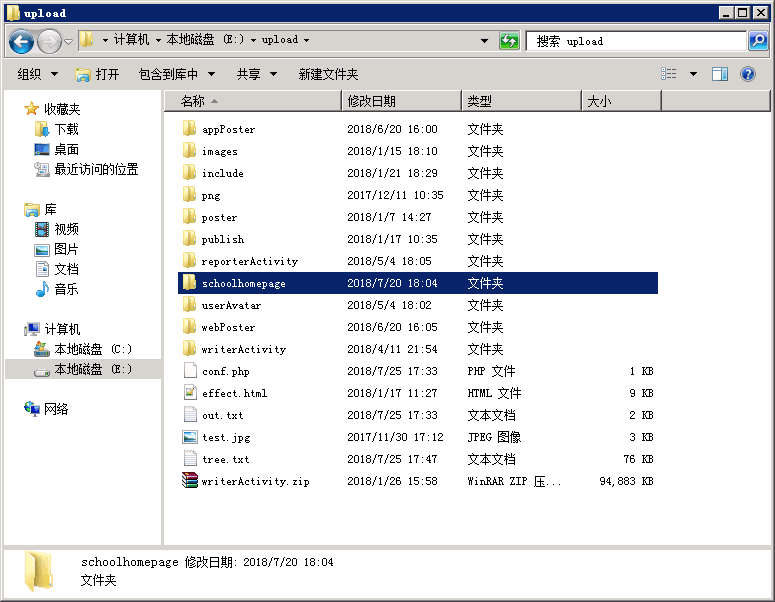
* 假设 E:\upload 作为图片上传的位置 nginx 做web服务
* 创建文件conf.php 放到这个目录下
<?php

function handleDir($it, &$a) {

	foreach ($it as $fileinfo) {

		if ($fileinfo->isDir()) {

			$filename = $it->getFilename();

			if ($filename !== "." && $filename !== "..") {

				array_push($a, $filename);

			}

		}

	}

}

$it = new \DirectoryIterator(".");

$baseDir = preg_replace('/\\\\/', '/', __DIR__);

$filenames = [];

handleDir($it, $filenames);

$out = new SplFileObject($baseDir."/out.txt", "w+");

array_walk($filenames, function($value, $key, $dir) use ($out) {

	$path = $dir .'/'.$value;

	$out->fwrite("location /".$value." {".PHP_EOL);

	$out->fwrite("    alias ".$path.";".PHP_EOL);

	$out->fwrite("    allow all;".PHP_EOL);

	$out->fwrite("    autoindex on;".PHP_EOL);

	$out->fwrite("    charset utf-8,gbk;".PHP_EOL);

	$out->fwrite("}".PHP_EOL);

}, $baseDir);

/*

		location /schoolhomepage {

			alias E:/upload/schoolhomepage;

			allow all;

			autoindex on;

			charset utf-8,gbk;

		}

*/
* 把out.txt粘贴到 nginx 的conf路径下的nginx.conf文件中的对应位置
#user  nobody;

worker_processes  1;

#error_log  logs/error.log;

#error_log  logs/error.log  notice;

#error_log  logs/error.log  info;

#pid        logs/nginx.pid;

events {

    worker_connections  1024;

}

http {

    include       mime.types;

    default_type  application/octet-stream;

    #log_format  main  '$remote_addr - $remote_user [$time_local] "$request" '

    #                  '$status $body_bytes_sent "$http_referer" '

    #                  '"$http_user_agent" "$http_x_forwarded_for"';

    #access_log  logs/access.log  main;

    sendfile        on;

    #tcp_nopush     on;

    #keepalive_timeout  0;

    keepalive_timeout  65;

    #gzip  on;

    server {

        listen       8089;

        server_name  localhost;

        #charset koi8-r;

        charset utf-8;

        #access_log  logs/host.access.log  main;

        location / {

            root   html;

            index  index.html index.htm;

            charset utf-8;

        }

        #error_page  404              /404.html;

        # redirect server error pages to the static page /50x.html

        #

        error_page   500 502 503 504  /50x.html;

        location = /50x.html {

            root   html;

        }

location /appPoster {

    alias E:/upload/appPoster;

    allow all;

    autoindex on;

    charset utf-8,gbk;

}

location /images {

    alias E:/upload/images;

    allow all;

    autoindex on;

    charset utf-8,gbk;

}

location /include {

    alias E:/upload/include;

    allow all;

    autoindex on;

    charset utf-8,gbk;

}

location /png {

    alias E:/upload/png;

    allow all;

    autoindex on;

    charset utf-8,gbk;

}

location /poster {

    alias E:/upload/poster;

    allow all;

    autoindex on;

    charset utf-8,gbk;

}

location /publish {

    alias E:/upload/publish;

    allow all;

    autoindex on;

    charset utf-8,gbk;

}

location /reporterActivity {

    alias E:/upload/reporterActivity;

    allow all;

    autoindex on;

    charset utf-8,gbk;

}

location /schoolhomepage {

    alias E:/upload/schoolhomepage;

    allow all;

    autoindex on;

    charset utf-8,gbk;

}

location /userAvatar {

    alias E:/upload/userAvatar;

    allow all;

    autoindex on;

    charset utf-8,gbk;

}

location /webPoster {

    alias E:/upload/webPoster;

    allow all;

    autoindex on;

    charset utf-8,gbk;

}

location /writerActivity {

    alias E:/upload/writerActivity;

    allow all;

    autoindex on;

    charset utf-8,gbk;

}

        # proxy the PHP scripts to Apache listening on 127.0.0.1:80

        #

        #location ~ \.php$ {

        #    proxy_pass   http://127.0.0.1;

        #}

        # pass the PHP scripts to FastCGI server listening on 127.0.0.1:9000

        #

        #location ~ \.php$ {

        #    root           html;

        #    fastcgi_pass   127.0.0.1:9000;

        #    fastcgi_index  index.php;

        #    fastcgi_param  SCRIPT_FILENAME  /scripts$fastcgi_script_name;

        #    include        fastcgi_params;

        #}

        # deny access to .htaccess files, if Apache's document root

        # concurs with nginx's one

        #

        #location ~ /\.ht {

        #    deny  all;

        #}

    }

    # another virtual host using mix of IP-, name-, and port-based configuration

    #

    #server {

    #    listen       8000;

    #    listen       somename:8080;

    #    server_name  somename  alias  another.alias;

    #    location / {

    #        root   html;

    #        index  index.html index.htm;

    #    }

    #}

    # HTTPS server

    #

    #server {

    #    listen       443 ssl;

    #    server_name  localhost;

    #    ssl_certificate      cert.pem;

    #    ssl_certificate_key  cert.key;

    #    ssl_session_cache    shared:SSL:1m;

    #    ssl_session_timeout  5m;

    #    ssl_ciphers  HIGH:!aNULL:!MD5;

    #    ssl_prefer_server_ciphers  on;

    #    location / {

    #        root   html;

    #        index  index.html index.htm;

    #    }

    #}

}
nginx.conf
* 重启nginx服务
php nginx 路径批量配置的更多相关文章
- Nginx 安装及配置、负载均衡https网站及转发后页面js、css等路径找不到问题、更换证书导致问题解决
官网下载nginx:http://nginx.org/en/download.html 安装nginx编译环境:yum install -y gcc-c++ 安装pcre库解析正则:yum insta ...
- Nginx服务安装配置
1.Nginx介绍 Nginx是一个高性能的HTTP和反向代理服务器,由俄罗斯人开发的,第一个版本发布于2004年10月4日.Nginx由于出色的性能,在世界范围内受到了越来越多人的关注,其特点是占有 ...
- Nginx的安装配置
1.安装PCRE库 $ cd /usr/local/ $ https://sourceforge.net/projects/pcre/files/pcre/8.36/ $ tar -zxvf pcre ...
- nginx入门篇----nginx服务器基础配置
1.nginx.conf文件结构... #全局块 events{ ... } http #http块{ ...
- nginx反向代理配置及优化
nginx反向代理配置及优化前言: 由于服务器apache抗不住目前的并发.加上前端squid配置后,问题依然无法解决.而页面程序大部分是动态.无法使用fastcgi来处理.因此想使用nginx做为反 ...
- LVS + Keepalived + Nginx安装及配置
1.概述 上篇文章<架构设计:负载均衡层设计方案(6)——Nginx + Keepalived构建高可用的负载层>(http://blog.csdn.net/yinwenjie/artic ...
- windows下nginx+php简单配置
Nginx+php运行环境搭建 虽然目前nginx使用很广泛,在大陆主流的互联网站点或多或少会用到这个俄国人开发的小应用(占用资源小).但是我这个土鳖还是第一次自己独立配置,网上资料不少,但是还是遇到 ...
- nginx 的基础配置[转]
nginx 的基础配置 分类: 工具软件2013-11-13 23:26 11人阅读 评论(0) 收藏 举报 目录(?)[-] 管理配置文件 全局配置 虚拟机server配置 location配置 ...
- 利用nginx泛域名解析配置二级域名和多域名
利用nginx泛域名解析配置二级域名和多域名 网站的目录结构为 html ├── bbs └── www html为nginx的安装目录下默认的存放源代码的路径. bbs为论坛程序源代码路径 www为 ...
随机推荐
- 009 FPGA实现网口通信的几种方式【转载】
从硬件上来说,一般PHY芯片为模数混合电路,负责接收电.光这类模拟信号,经过解调和A/D转换后通过MII接口将信号交给MAC芯片进行处理.一般MAC芯片为纯数字电路. 物理层定义了数据传送与接收所需要 ...
- AlexNet论文总结
论文链接:https://papers.nips.cc/paper/2012/file/c399862d3b9d6b76c8436e924a68c45b-Paper.pdf Q1:解决了什么? 目前主 ...
- Android 9.0 默认输入法的设置流程分析
Android 输入法设置文章 Android 9.0 默认输入法的设置流程分析 Android 9.0 添加预置第三方输入法/设置默认输入法(软键盘) 前言 在上一篇文章 Android 9.0 ...
- 快速解决flutter中package包版本冲突问题
当你的项目需要安装的依赖包越多,遇到包冲突可能性就越大,尤其是当依赖的包有重大更新时.比如下图: 上面可以看到是xml跟intl_translation两个包有冲突,因为他们依赖两个不同的petitp ...
- 基于typescript编写vue的ts文件语法模板
1 <template> 2 <div> 3 <input v-model="msg"> 4 <p>prop: {{ propMes ...
- C#中的几种锁:用户模式锁、内核模式锁、动态计数、监视锁
参考网址: https://blog.csdn.net/weixin_43989331/article/details/105356008 C#中的几种锁:用户模式锁.内核模式锁.动态计数.监视锁介绍 ...
- 15.SpringMVC之异步请求
SpringMVC中异步请求相关组件 SpringMVC在此基础上对异步请求进行了封装.提供了AsyncWebRequest类型的request,并提供了处理异步请求的管理器WebAsyncManag ...
- linux(5)----------防火墙的配置
1.安装: yum install firewalld 2.启动: service firewalld start 3.检查状态: service firewalld sta ...
- input text 只能输入数字 js 正则表达式
$("#txt1").keyup(function () { $(this).val($(this).val().replace(/[^0-9.]/g, '')); }).bind ...
- RabbitMq安装(单点与集群)rabbitMq以及状态查询
集群进入某个节点查看指令:rabbitmqctl cluster_status单机版:docker run -d --name rabbit \-e RABBITMQ_DEFAULT_USER=adm ...