
java输入/输出流的基本知识
通过流可以读写文件,流是一组有序列的数据序列,以先进先出方式发送信息的通道。
输入/输出流抽象类有两种:InputStream/OutputStream字节输入流和Reader/Writer字符输入流。
一、字节流
1.InputStream类
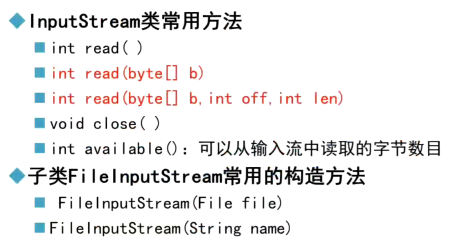
int read():从输入流中读取下一个字节,并返回该字节对应的整型数字 0-255。
int read(byte[ ] b):从输入流中读取多个字节,并将字节存放到数组b[ ]中,返回读到的字节个数,即数组长度。
int read(byte[ ] b ,int off ,int len):从输入流中读取多个字节,并将字节存放到数组b[ ]中,从数组的off位置处开始存放,len是读到的字节个数。
2.OutputStream类

字节流输入步骤:
1.引用相关类;
2.创建FileInputStream类对象;
3.读取文本文件;
4.关闭流。
字节流输出步骤:
1.引用相关类;
2.创建FileOutputStream类对象;
3.写入文本文件;
4.关闭流。
案例:
package com.yh.filestring;

import java.io.*;

public class FileTest2 {

    public static void main(String[] args) {

        // 创建目录

        File dir = new File("d:/eclipseWJ/HelloWorld/FileTest2");

        dir.mkdirs();

        // 创建文件

        File file = new File("d:/eclipseWJ/HelloWorld/FileTest2/test2.txt");

        FileOutputStream fos = null;

        FileInputStream fis = null;

        try {
            if(!file.exists())

                file.createNewFile();

            fos = new FileOutputStream(file,true); // 在文件原有的内容上追加
            fos = new FileOutputStream(file); // 直接覆盖文件原有的内容

            String str = "学习Java!";

            byte[] words = str.getBytes();

            fos.write(words, 0, words.length);

            // 创建输入流对象

            fis = new FileInputStream(file);

            int data;

            while ((data = fis.read()) != -1) {

                System.out.print((char) data);

            }

        } catch (FileNotFoundException e) {

            // TODO Auto-generated catch block

            e.printStackTrace();

        } catch (IOException e) {

            // TODO Auto-generated catch block

            e.printStackTrace();

        } finally {

            // 关闭输入流

            try {

                fos.close();

                fis.close();

            } catch (IOException e) {

                // TODO Auto-generated catch block

                e.printStackTrace();

            }

        }

    }

}
案例:将file1中的内容复制到file2
package com.yh.filestring;

import java.io.*;

public class FileCopy {

    public static void main(String[] args) {

        File dir = new File("D:/eclipseWJ/HelloWorld/filecopy");

        File file1 = new File("D:/eclipseWJ/HelloWorld/filecopy/file1.txt");

        File file2 = new File("d:/eclipseWJ/HelloWorld/filecopy/file2.txt");

        dir.mkdirs();

        FileInputStream fis = null;

        FileOutputStream fos = null;

        try {
            if(!file1.exists())

                file1.createNewFile();
            if(!file2.exists())

                file2.createNewFile();

            fos = new FileOutputStream(file1);

            String str = "HelloWorld";

            byte[] words = str.getBytes();

            fos.write(words, 0, str.length());

            fos.close();

            fis = new FileInputStream(file1);

            fos = new FileOutputStream(file2, true);

            int len;

            byte[] word = new byte[1024];

            while ((len = fis.read(word)) != -1) { // 读取到的字节存到数组word[]中,追加存储

                fos.write(word,0,len);

            }

            fis.close();

            fis = new FileInputStream(file2);

            int data;

            while ((data = fis.read()) != -1) {

                System.out.print((char)data);

            }

        } catch (IOException e) {

            // TODO Auto-generated catch block

            e.printStackTrace();

        } finally {

            try {

                fis.close();

                fos.close();

            } catch (IOException e) {

                // TODO Auto-generated catch block

                e.printStackTrace();

            }

        }

    }

}
二、字符流
1.Reader类

Reader类常用方法:
int read():从输入流中读取下一个字符,并返回该字符对应的整型数字 0-65535。
int read(char[ ] c):从输入流中读取多个字符,并将字符存放到数组b[ ]中,返回读到的字符个数,即数组长度。
int read(char[ ] c ,int off ,int len):从输入流中读取多个字符,并将字符存放到数组b[ ]中,从数组的off位置处开始存放,len是读到的字符个数。
子类InputStreamReader常用构造方法:
InputStreamReader(InputStream in):参数是一个字节流对象,将一个字节流包装成字符流,读取内容按本地平台默认编码。
InputStreamReader(InputStream in ,String charserName):参数是一个字节流对象和字符集编码,先将字节流包装成字符流,然后再按照这个字符集编码来读取到内容。
步骤:
1.创建FileInputStream类对象(字节流);
2.创建InputStreamReader类对象,并将FileInputStream类对象和字符集编码名字作为构造函数的参数(字符流);
3.创建BufferedReader类对象,并将InputStreamReader类对象作为构造函数的参数(字符流);
4.读取文本。
代码示例(较为综合):
package com.yh.filestring;

import java.io.*;

public class InputStreamReaderDemo {

    public static void main(String[] args) {

        // TODO Auto-generated method stub

        File file = new File("D:\\eclipseWJ\\HelloWorld\\Chapter\\File3.txt");

        InputStream is = null;

        Reader isr = null;

        BufferedReader br = null;

        try {

            is = new FileInputStream(file);

            isr = new InputStreamReader(is,"UTF-8");

            br = new BufferedReader(isr);

            StringBuffer bf = new StringBuffer();

            String line = null;

            if((line = br.readLine())!=null) {

                bf.append(line);

            }

            System.out.println(bf);

        } catch (FileNotFoundException e) {

            // TODO Auto-generated catch block

            e.printStackTrace();

        } catch (IOException e) {

            // TODO Auto-generated catch block

            e.printStackTrace();

        } finally {

            try {

                br.close();

                isr.close();

            } catch (IOException e) {

                // TODO Auto-generated catch block

                e.printStackTrace();

            }

        }

    }

}
文本文件读取类FileReader是InputStreamReader的子类:
构造方法:
FileReader(File file)
FileReader(String pathName)
FileReader只能按照本地平台的字符编码来读,不能通过用户特定的字符集编码来读。
本地平台字符集编码获得:String encoding = System.getProperty("file.encoding");
使用FileReader类读取文本步骤:
1.引用相关类;
2.创建FileReader类对象;
3.读取文本文件;
4.关闭流。
代码示例:
package com.yh.filestring;

import java.io.*;

public class FileReaderDemo {

    public static void main(String[] args) {

        FileReader filereader;

        try {

            filereader = new FileReader("d:/eclipseWJ/HelloWorld/FileTest2/test2.txt");

            StringBuffer sbf = new StringBuffer();

            char[] words = new char[1024];

            while(filereader.read(words)!=-1) { // while只执行一次

                sbf.append(words);

            }

            System.out.println(sbf);

        } catch (FileNotFoundException e) {

            // TODO Auto-generated catch block

            e.printStackTrace();

        } catch (IOException e) {

            // TODO Auto-generated catch block

            e.printStackTrace();

        }

    }

}
BufferReader类:带有缓冲区的字符输入流
代码示例:
package com.yh.filestring;

import java.io.*;

public class FileTestBuffer {

    public static void main(String[] args) {

        BufferedReader reader = null;

        try {

            // 创建目录

            File dir = new File("Chapter");

            dir.mkdirs();

            // 创建文件

            File f = new File("D:\\eclipseWJ\\HelloWorld\\Chapter\\File1.txt");

            f.createNewFile();

            // 写入文本

            FileWriter writer = new FileWriter(f); // 覆盖重写
            FileWriter writer = new FileWriter(f, true); // 追加

            BufferedWriter bufferedwriter = new BufferedWriter(writer);

            bufferedwriter.write("你好");
            bufferedwriter.flush(); //将缓冲区的内容全部写入文本

            bufferedwriter.close();

            // 输出目录中的文件

            if (dir.isDirectory()) {

                String[] fileContents = dir.list();

                for (String i : fileContents)

                    System.out.println(i);

            }

            // 读出文件内容

            FileReader fileReader = new FileReader(f);

            reader = new BufferedReader(fileReader);

            String line = null;

            while ((line = reader.readLine()) != null)

                System.out.println(line);

        } catch (FileNotFoundException ex) {

            ex.printStackTrace();

        } catch (IOException ex) {

            ex.printStackTrace();

        }finally {

            try {

                reader.close();

            } catch (IOException e) {

                // TODO Auto-generated catch block

                e.printStackTrace();

            }

        }

    }

}
2.Writer类
参考上述Reader类。
三、读写二进制文件
读取特定图片并完成该图片的复制
代码示例:
package com.yh.filestring;

import java.io.*;

public class FIleImg {

    public static void main(String[] args) {

        // TODO Auto-generated method stub

        FileInputStream fis = null;

        DataInputStream dis = null;

        FileOutputStream fos = null;

        DataOutputStream dos = null;

        try {

            fis = new FileInputStream("D:\\eclipseWJ\\HelloWorld\\fish.jpg");

            dis = new DataInputStream(fis);

            fos = new FileOutputStream("D:\\eclipseWJ\\HelloWorld\\newfish.jpg");

            dos = new DataOutputStream(fos);

            int data;

            while ((data = dis.read()) != -1) {

                dos.write(data);

            }

            //dos.flush();

        } catch (FileNotFoundException e) {

            // TODO Auto-generated catch block

            e.printStackTrace();

        } catch (IOException e) {

            // TODO Auto-generated catch block

            e.printStackTrace();

        } finally {

            try {

                dos.close();

                fos.close();

                dis.close();

                fis.close();

            } catch (IOException e) {

                // TODO Auto-generated catch block

                e.printStackTrace();

            }

        }

    }

}
四、序列化和反序列化
五、总结
1.类的继承关系总结:
InputStream类(字节流)—— FileInputStream类 —— DataInputStream类(读取二进制文件)
OutputStream类(字节流)—— FileOutputStream类 —— DataOutputStream类(写入二进制文件)
Reader类(字符流)—— InputStreamReader类(构造函数参数:一个字节流InputStream类对象和字符集编码名字)和BufferedReader类(构造函数参数:一个Reader对象,提供通用的缓冲方式文本读取,readLine读取一个文本行)—— FileReader类(构造函数参数:File类对象或完整路径,无法指定字符集编码)
Writer类(字符流)—— OutputStreamWriter类(构造函数参数:一个字节流OutputStream类对象和字符集编码名字)和BufferedWriter类(构造函数参数:一个Writer对象,提供通用的缓冲方式文本写入)—— FileWriter类(构造函数参数:File类对象或完整路径,无法指定字符集编码)
2.字节和字符的关系:
Java采用unicode来表示字符,java中的一个char是2个字节,一个中文或英文字符的unicode编码都占2个字节,但如果采用其他编码方式,一个字符占用的字节数则各不相同。
在 GB-2312 编码或 GBK 编码中,一个英文字母字符存储需要1个字节,一个汉子字符存储需要2个字节。
在UTF-8编码中,一个英文字母字符存储需要1个字节,一个汉字字符储存需要3到4个字节。
在UTF-16编码中,一个英文字母字符存储需要2个字节,一个汉字字符储存需要3到4个字节(Unicode扩展区的一些汉字存储需要4个字节)。
在UTF-32编码中,世界上任何字符的存储都需要4个字节。
3.flush()方法
在进行文件写入相关操作时,需要调用。
java输入/输出流的基本知识的更多相关文章
- 深入理解Java输入输出流
Java.io包的File类,File类用于目录和文件的创建.删除.遍历等操作,但不能用于文件的读写. Java 对文件的写入和读取涉及到流的概念,写入为输出流,读取为输入流.如何理解流的概念呢?可以 ...
- Java输入/输出流体系
在用java的io流读写文件时,总是被它的各种流能得很混乱,有40多个类,理清啦,过一段时间又混乱啦,决定整理一下!以防再忘 Java输入/输出流体系 1.字节流和字符流 字节流:按字节读取.字符流: ...
- java基础---->java输入输出流
今天我们总结一下java中关于输入流和输出流的知识,博客的代码选自Thinking in java一书.我突然很想忘了你,就像从未遇见你. java中的输入流 huhx.txt文件的内容如下: I l ...
- Java 输入输出流 转载
转载自:http://blog.csdn.net/hguisu/article/details/7418161 1.什么是IO Java中I/O操作主要是指使用Java进行输入,输出操作. Java所 ...
- Java输入输出流(一)——常用的输入输出流
1.流的概念:在Java中,流是从源到目的地的字节的有序序列.Java中有两种基本的流--输入流(InputStream)和输出流(OutputStream). 根据流相对于程序的另一个端点的不同,分 ...
- java 输入输出流1 FileInputStrem&&FileOutStream
通过文件输入流读取问价 package unit6; import java.io.FileInputStream; import java.io.FileNotFoundException; imp ...
- java输入输出流总结 转载
一.基本概念 1.1 什么是IO? IO(Input/Output)是计算机输入/输出的接口.Java中I/O操作主要是指使用Java进行输入,输出操作. Java所有的I/O机制都是 ...
- java输入输出流(内容练习)
1,编写一个程序,读取文件test.txt的内容并在控制台输出.如果源文件不存在,则显示相应的错误信息. package src; import java.io.File; import java.i ...
- Java输入输出流(转载)
转自http://blog.csdn.net/hguisu/article/details/7418161 目录(?)[+] 1.什么是IO Java中I/O操作主要是指使用Java进行输入,输出操作 ...
随机推荐
- 说下我费了几个钟头才搞定的myeclipse和tomcat问题
配置myeclipse与tomcat的时候,我根本没有想到myeclipse已经集成了tomcat,根据我上篇文章可以找到所集成的tomcat的位置.于是,自己下了一个tomcat,也许是自作聪明吧, ...
- Financial Tsunami
COP 3502: PROGRAMMING ASSIGNMENT 4 DUE DATE: MARCH 16, 4:00 PM Name your class as PA4 and turn in .j ...
- [cf1458D]Flip and Reverse
将$s$中的01分别变为$1,-1$,即得到一个序列$a_{i}$(设其长度为$n$,下标范围为$[1,n]$) 对$a_{i}$建立一张有向图,其点集合为$Z$,并对$\forall 0\le k& ...
- [nowcoder5669H]Harder Gcd Problem
题目相当于问1-n中最多能选出多少对不互素无交集的二元组,并要求方案 构造:将所有数放入其最小质因子对应的集合,若素数p所对应的集合元素个数为奇数且$p\ne 2$且$2p\le n$,那么就将$2p ...
- vue 数据单项绑定
提供get方法,修改数据不改原来数据,进行单向绑定,还可以做数据缓存,减少服务器压力. 提供单独的set方法.
- .net core 和 WPF 开发升讯威在线客服系统:使用本地IP数据库实现访客来源快速定位,支持国外
本系列文章详细介绍使用 .net core 和 WPF 开发 升讯威在线客服与营销系统 的过程.本产品已经成熟稳定并投入商用. 免费使用 & 私有化部署:https://kf.shengxun ...
- Java培训机构如何选择才能避免被骗?
近年来,随着IT行业的快速崛起,各类互联网人才供不应求,而Java工程师作为目前最为火爆的岗位之一,更是以高薪+高新技术的标签受到了人们的广泛关注.许多年轻人也看到了这个行业的发展前景,决定报名培训机 ...
- 洛谷 P4564 [CTSC2018]假面(期望+dp)
题目传送门 题意: 有 \(n\) 个怪物,第 \(i\) 个怪物初始血量为 \(m_i\).有 \(Q\) 次操作: 0 x u v,有 \(p=\frac{u}{v}\) 的概率令 \(m_x\) ...
- PHP非对称加密-RSA
对称加密算法是在加密和解密时使用同一个密钥.与对称加密算法不同,非对称加密算法需要两个密钥--公开密钥(public key)和私有密钥(private key)进行加密和解密.公钥和密钥是一对,如果 ...
- ubuntu终端颜色快速配置
ubuntu终端颜色快速配置 根据以下step步骤设置即可 step1:备份:cp ~/.bashrc ~/.bashrc.backup step2:打开文件:vim ~/.bashrc step3: ...