
008.Ansible文件管理模块
一 stat模块
检查文件状态使用,模块获取文件的状态等信息,类似与linux中的STAT命令可以用来获取文件的属主、可读/写、文件状态等信息
[root@node1 ansible]# stat lookup_files_ex.yml
  File: ‘lookup_files_ex.yml’

  Size: 125           Blocks: 8          IO Block: 4096   regular file

Device: fd00h/64768d    Inode: 69018922    Links: 1

Access: (0644/-rw-r--r--)  Uid: (    0/    root)   Gid: (    0/    root)

Access: 2020-04-30 18:01:52.947596173 +0800

Modify: 2020-04-30 18:01:51.624591268 +0800

Change: 2020-04-30 18:01:51.626591276 +0800

 Birth: -
[root@node1 ansible]# vim files_stat_ex.yml
- hosts: demo2.example.com

  gather_facts: no

  tasks:

    - name: stat /rtc/fstab

      stat:

        path: /etc/fstab

      register: fstab_stat

    - name: print fstab_stat

      debug:

        msg: "{{ fstab_stat }}"
[root@node1 ansible]# ansible-playbook files_stat_ex.yml
TASK [print fstab_stat] ***********************************************************************************************************************

ok: [demo2.example.com] => {

    "msg": {

        "changed": false,

        "failed": false,

        "stat": {

            "atime": 1588162552.5214317,

            "attr_flags": "",

            "attributes": [],

            "block_size": 4096,

            "blocks": 8,

            "charset": "us-ascii",

            "checksum": "8e1580bbd25809a2232e28adba26735dad99cc06",

            "ctime": 1565620911.8073654,

            "dev": 64768,

            "device_type": 0,

            "executable": false,

            "exists": true,

            "gid": 0,

            "gr_name": "root",

            "inode": 33554498,

            "isblk": false,

            "ischr": false,

            "isdir": false,

            "isfifo": false,

            "isgid": false,

            "islnk": false,

            "isreg": true,

            "issock": false,

            "isuid": false,

            "mimetype": "text/plain",

            "mode": "0644",

            "mtime": 1565620660.3251472,

            "nlink": 1,

            "path": "/etc/fstab",

            "pw_name": "root",

            "readable": true,

            "rgrp": true,

            "roth": true,

            "rusr": true,

            "size": 465,

            "uid": 0,

            "version": "598828928",

            "wgrp": false,

            "woth": false,

            "writeable": true,

            "wusr": true,

            "xgrp": false,

            "xoth": false,

            "xusr": false

        }

    }

}
二 blockinfile模块
blockinfile 是 Ansible 的一个非常实用的模块,和单行替换模块 lineinfile 类似,但是可以帮助我们在文件中插入一段文本。
[root@node1 ansible]# vim files/test.html
<html>

    <head>

    </head>

    <body>

    </body>

</html>
[root@node1 ansible]# vim blockfile_ex.yml
- name: blockinfile module test

  hosts: demo3.example.com

  tasks:

    - name: install httpd

      yum:

        name: httpd

        state: installed

    - name: copy test.html to dest

      copy:

        src: files/test.html

        dest: /var/www/html/test.html

    - name: add block

      blockinfile:

        marker: "<!--{mark} ANSIBLE MANAGED BLOCK -->"

        insertafter: "<body>"

        path: /var/www/html/test.html

        block:

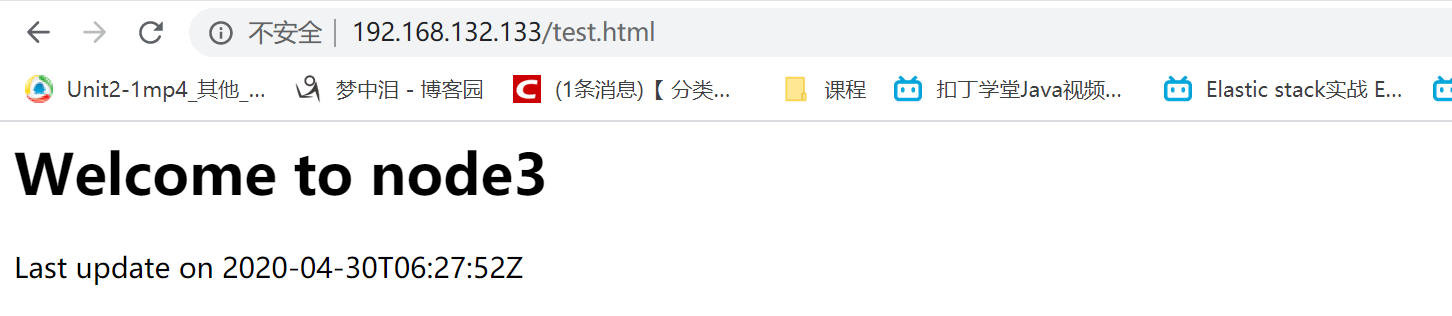
          <h1>Welcome to {{ ansible_hostname}}</h1>

          <p>Last update on {{ ansible_date_time.iso8601}} </p>

    - name: start service

      service:

        name: httpd

        state: started
执行
[root@node1 ansible]# ansible-playbook blockfile_ex.yml
访问
三 lineinfile模块
在大多数时候,我们在linux上的操作,就是针对文件的操作,通过配置管理工具对配置文件作统一的配置修改是一个非常酷的功能。
下面是官方针对该模块的说明:
lineinfile - Ensure a particular line is in a file, or replace an existing line using a back-referenced regular expression
简单讲,这个模块就是针对一个文件中行内容的操作。
下面我们详细说一说其具体可以做的事情。
3.1 修改匹配行
修改selinux示例
[root@node1 ansible]# ansible demo3.example.com -m shell -a "cat /etc/selinux/config |grep ^SELINUX="

[root@node1 ansible]# vim edit_selinux.yml
- hosts: demo3.example.com

  gather_facts: no

  tasks:

    - name: disable selinux

      lineinfile:

        path: /etc/selinux/config

        regex: ^SELINUX=

        line: SELINUX=disabled
[root@node1 ansible]# ansible-playbook edit_selinux.yml
[root@node1 ansible]# ansible demo3.example.com -m shell -a "cat /etc/selinux/config |grep ^SELINUX="
demo3.example.com | CHANGED | rc=0 >>

SELINUX=disabled
在node3节点写入一个文件
[root@node3 ~]# vim /tmp/test.conf
Listen 127.0.0.1:80

Listen 80

Port
3.2 插入匹配行
[root@node1 ansible]# vim lineinfile.yml
- hosts: demo3.example.com

  gather_facts: no

  tasks:

    - name: inser after

      lineinfile:

        path: /tmp/test.conf

        insertafter: "^Listen 80"   #在之后插入

        line: "aaaaa"

    - name: inser befor

      lineinfile:

        path: /tmp/test.conf

        insertbefore: "^Listen 80"    #之前插入

        line: "befor bbbb"
执行
[root@node1 ansible]# ansible-playbook lineinfile.yml
[root@node1 ansible]# ansible demo3.example.com -m shell -a "cat /tmp/test.conf"
demo3.example.com | CHANGED | rc=0 >>

Listen 127.0.0.1:80

befor bbbb

Listen 80

aaaaa

Port
3.3 删除匹配行
[root@node1 ansible]# vim lineinfile.yml
- hosts: demo3.example.com

  gather_facts: no

  vars:

    testfile: "/tmp/test.conf"

  tasks:

    - name: inser after

      lineinfile:

        path: "{{testfile}}"

        insertafter: "^Listen 80"

        line: "aaaaa"

    - name: inser befor

      lineinfile:

        path: "{{ testfile }}"

        insertbefore: "^Listen 80"

        line: "befor bbbb"

    - name: delete line

      lineinfile:

        path: "{{ testfile }}"

        regex: "^Port"

        state: absent
[root@node1 ansible]# ansible-playbook lineinfile.yml
[root@node1 ansible]# ansible demo3.example.com -m shell -a "cat /tmp/test.conf"
demo3.example.com | CHANGED | rc=0 >>

Listen 127.0.0.1:80

befor bbbb

Listen 80

aaaaa
3.4 文件存在则添加一行内容
往/etc/hosts里添加一行10.1.61.131 test.dz11.com(多次执行,不会重复添加),示例如下:
- name: add a line

  lineinfile:

    path: /etc/hosts

    line: '10.1.61.131 test.dz11.com'
如果有匹配的行则修改该行,如果不匹配则添加
[root@node1 ansible]# vim lineinfile.yml
- hosts: demo3.example.com

  gather_facts: no

  vars:

    testfile: "/tmp/test.conf"

  tasks:

    - name: inser after

      lineinfile:

        path: "{{testfile}}"

        insertafter: "^Listen 80"

        line: "aaaaa"

    - name: inser befor

      lineinfile:

        path: "{{ testfile }}"

        insertbefore: "^Listen 80"

        line: "befor bbbb"

    - name: delete line

      lineinfile:

        path: "{{ testfile }}"

        regex: "^Port"

        state: absent

    - name: regex

      lineinfile:

        path: "{{testfile}}"

        regex: "^Listen 8080 "

        line: "Listen 809090 "
[root@node1 ansible]# ansible-playbook lineinfile.yml
[root@node1 ansible]# ansible demo3.example.com -m shell -a "cat /tmp/test.conf"
demo3.example.com | CHANGED | rc=0 >>

Listen 127.0.0.1:80

befor bbbb

Listen 80

aaaaa

Listen 809090
3.5 参数backrefs,backup说明
- backup: 是否备份原文件,默认为no
- backrefs:
- 当backrefs为no时,如果regex没有匹配到行,则添加一行,如果Regx匹配到行,则修改该行
- 当backrefs为yes时,如果regex没有匹配到行,则保持原文件不变,如果regex匹配到行,则修改该行
- backrefs默认为no,所以上面那个示例中,我们没有配置backrefs,而默认没有匹配,则修改。
3.6 使用validate验证文件是否正确修改
在一些场景下,我们修改完文件后,需要对文件做一下测试,用以检查文件修改之后,是否能正常运行。如http.conf、nginx.conf等,一旦改错,而不加以测试,可能会直接导致http服务挂掉。
可以使用validate关键字,在修改完成以后,对文件执行检测:
- name: test validate

  lineinfile:

      dest: /etc/sudoers

      state: present

      regexp: '^%ADMIN ALL='

      line: '%ADMIN ALL=(ALL)'

      validate: 'visudo -cf %s'    #这里就是执行检测,比如nginx就可以写入nginx -t检测配置文件

  tags:

    - testsudo
博主声明:本文的内容来源主要来自誉天教育晏威老师,由本人实验完成操作验证,需要的博友请联系誉天教育(http://www.yutianedu.com/),获得官方同意或者晏老师(https://www.cnblogs.com/breezey/)本人同意即可转载,谢谢!
008.Ansible文件管理模块的更多相关文章
- ansible文件模块使用
1. 文件组装模块-assemble assemble主要是将多份配置文件组装为一份配置文件. 参数 必填 默认 选项 说明 Backup 否 No Yes/no 是否创建备份文件,使用时间戳 Del ...
- Ansible15:文件管理模块及Jinja2过滤器
目录 常用文件管理模块 1. file 2. synchronize 3. copy 4. fetch 5. lineinfile 6. stat 7. blockinfile Jinja2模板管理 ...
- Ansible 常用模块详解
经过前面的介绍,我们已经熟悉了 Ansible 的一些常识性的东西和如何编译安装Ansible,从本章开始我们将全面介绍 Ansible 的各种生产常用模块,这些也是我们使用 Ansible 的过程中 ...
- ansible的模块使用
转载于 https://www.cnblogs.com/franknihao/p/8631302.html [Ansible 模块] 就如python库一样,ansible的模块也分成了基本模块和 ...
- ansible服务模块和组模块使用
本篇文章主要是介绍ansible服务模块和组模块的使用. 主要模块为ansible service module和ansible group moudle,下面的内容均是通过实践得到,可以直接运行相关 ...
- ansible常用模块用法
ansible常用模块用法 2015-07-21 10:25 24458人阅读 评论(1) 收藏 举报 分类: Linux(44) ansible 版权声明:本文为博主原创文章,未经博主允许不得 ...
- Linux之ansible 常用模块
目的 代码发布系统 代码发布:把本地的代码通过某些方式弄到线上,可以供别人访问 部署 前戏 ansible 批量在远程主机上执行命令 puppet ruby ansible saltstack pyt ...
- Ansible常用模块介绍及使用(week5_day1_part2)--技术流ken
Ansible模块 在上一篇博客<Ansible基础认识及安装使用详解(一)--技术流ken>中以及简单的介绍了一下ansible的模块.ansible是基于模块工作的,所以我们必须掌握几 ...
- Ansible常用模块命令
Ansible常用模块命令 一.安装ansible yum install epel-release yum install ansible 二.配置文件配置 vi /etc/ansible/ansi ...
随机推荐
- 【Django学习笔记】-环境搭建
对于初学django新手,根据以下步骤可以快速进行Django环境搭建 虚拟环境创建 使用virtualenv创建并启用虚拟机环境 ,关于virtualenv可参考https://www.yuque. ...
- 二、python学习-函数
类型判断 1.type()直接获取类型 2.isinstance 用法一:isinstance(值,类型) 返回真或假 用法二:isinstance(值,(类型1,类型2 ...)) 有一个类型满足 ...
- django-自定义用户登录(个人笔记)
django自定义用户登录(个人笔记) 函数说明 1. render()函数:对用户请求做出响应 2. path()函数:定义路由 3. create()函数:增加数据表记录 配置settings.p ...
- Leedcode算法专题训练(数学)
204. 计数质数 难度简单523 统计所有小于非负整数 n 的质数的数量. class Solution { public int countPrimes(int n) { boolean[] is ...
- 第一个 vue-cli项目
第一个 vue-cli项目 什么是vue-cli vue-cli官方提供的一个脚手架,用于快速生成一个vue的项目模板: 预先定义好的目录结构及基础代码,就好比咱们在创建Maven项目时可以选择创建一 ...
- Spring 学习笔记(二):SpringIoC
1 IoC与DI IoC是Inversion of Control的简称,也就是控制反转.通常来说,创建对象需要调用者手动创建,也就是new XXX()的方式.当Spring框架出现后,对象的实例不再 ...
- Java 8 Optional
这是一个可以为null的容器对象.如果值存在则isPresent()方法会返回true,调用get()方法会返回该对象. package com.polaris; import java.util.A ...
- centos7安装kubernetes k8s 1.18
可以参考其他网友的阿里云搭建k8s高可用集群(1.17.3) https://www.cnblogs.com/gmmy/p/12372805.html 准备四台centos7虚拟机,用来安装k8s集群 ...
- php和mysql数据库防SQL注入的有效解决办法
<?php$mysqli = new mysqli("localhost", "my_user", "my_password", &q ...
- Portswigger web security academy:OAth authentication vulnerable
Portswigger web security academy:OAth authentication vulnerable 目录 Portswigger web security academy: ...