
为啥 Response.Write 后,View就不渲染了?
一:背景
1. 讲故事
前几天群里有一位朋友聊到,为什么我在 Action 中执行一句 Response.Write 之后,后续的 View 就不呈现了,如果脑子中没有画面,那就上测试代码:
    public class HomeController : Controller

    {

        public IActionResult Index()

        {

            Response.WriteAsync("hello world!");

            return View();

        }

    }

结果还是挺有意思的,大家都知道,默认情况下会渲染 /Home/Index 对应的 view 页面,但这里被 Response.WriteAsync 插了一杠子,气的 view 都渲染不出来了,那接下来就来找一找 view 为啥这么生气?
二:寻找真相
1. 从 Logger 入手
相信很多人都在用 aspnetcore 中的 logger 记录日志,为什么要首选这个 logger 呢?因为它在 web框架 中是一等公民的存在,毕竟底层源码各处都嵌入着这玩意哈,随便找点代码:
internal abstract class ActionMethodExecutor

{

    private Task ResultNext<TFilter, TFilterAsync>(ref ResourceInvoker.State next, ref ResourceInvoker.Scope scope, [Nullable(2)] ref object state, ref bool isCompleted) where TFilter : class, IResultFilter where TFilterAsync : class, IAsyncResultFilter

    {

    	ResourceInvoker.ResultExecutingContextSealed resultExecutingContext3 = this._resultExecutingContext;

		this._diagnosticListener.BeforeOnResultExecuting(resultExecutingContext3, tfilter);

		this._logger.BeforeExecutingMethodOnFilter(filterType, "OnResultExecuting", tfilter);

		tfilter.OnResultExecuting(resultExecutingContext3);

		this._diagnosticListener.AfterOnResultExecuting(resultExecutingContext3, tfilter);

		this._logger.AfterExecutingMethodOnFilter(filterType, "OnResultExecuting", tfilter);

		if (this._resultExecutingContext.Cancel)

		{

			this._logger.ResultFilterShortCircuited(tfilter);

			this._resultExecutedContext = new ResourceInvoker.ResultExecutedContextSealed(resultExecutingContext3, this._filters, resultExecutingContext3.Result, this._instance)

			{

				Canceled = true

			};

			goto IL_39E;

		}

    }

}
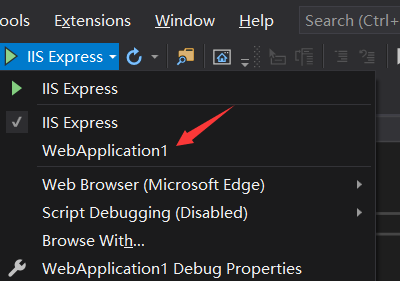
而且大家想想,这种写法特别奇葩,我想底层框架中的 logger 定会有所反馈,接下来在启动程序的时候采用 WebApplication1 的模式启动,如下图:
启动后,在控制台上可以看到一堆报错信息:
info: Microsoft.Hosting.Lifetime[0]

      Now listening on: http://localhost:5000

info: Microsoft.Hosting.Lifetime[0]

      Application started. Press Ctrl+C to shut down.

info: Microsoft.Hosting.Lifetime[0]

      Hosting environment: Development

info: Microsoft.Hosting.Lifetime[0]

      Content root path: E:\net5\WebApplication1\WebApplication1

fail: Microsoft.AspNetCore.Diagnostics.DeveloperExceptionPageMiddleware[1]

      An unhandled exception has occurred while executing the request.

System.InvalidOperationException: Headers are read-only, response has already started.

   at Microsoft.AspNetCore.Server.Kestrel.Core.Internal.Http.HttpHeaders.ThrowHeadersReadOnlyException()

   at Microsoft.AspNetCore.Server.Kestrel.Core.Internal.Http.HttpHeaders.Microsoft.AspNetCore.Http.IHeaderDictionary.set_Item(String key, StringValues value)

   at Microsoft.AspNetCore.Http.DefaultHttpResponse.set_ContentType(String value)

   at Microsoft.AspNetCore.Mvc.ViewFeatures.ViewExecutor.ExecuteAsync(ViewContext viewContext, String contentType, Nullable`1 statusCode)

   at Microsoft.AspNetCore.Mvc.ViewFeatures.ViewExecutor.ExecuteAsync(ActionContext actionContext, IView view, ViewDataDictionary viewData, ITempDataDictionary tempData, String contentType, Nullable`1 statusCode)

   at Microsoft.AspNetCore.Mvc.ViewFeatures.ViewResultExecutor.ExecuteAsync(ActionContext context, ViewResult result)

   at Microsoft.AspNetCore.Mvc.ViewResult.ExecuteResultAsync(ActionContext context)

   at Microsoft.AspNetCore.Mvc.Infrastructure.ResourceInvoker.<InvokeResultAsync>g__Logged|21_0(ResourceInvoker invoker, IActionResult result)

   at Microsoft.AspNetCore.Mvc.Infrastructure.ResourceInvoker.<InvokeNextResultFilterAsync>g__Awaited|29_0[TFilter,TFilterAsync](ResourceInvoker invoker, Task lastTask, State next, Scope scope, Object state, Boolean isCompleted)

   at Microsoft.AspNetCore.Mvc.Infrastructure.ResourceInvoker.Rethrow(ResultExecutedContextSealed context)

   at Microsoft.AspNetCore.Mvc.Infrastructure.ResourceInvoker.ResultNext[TFilter,TFilterAsync](State& next, Scope& scope, Object& state, Boolean& isCompleted)

   at Microsoft.AspNetCore.Mvc.Infrastructure.ResourceInvoker.InvokeResultFilters()
异常信息非常明显:Headers are read-only, response has already started,大概就是说,header是只读的,response已是启动状态了,从调用堆栈的 ViewExecutor.ExecuteAsync 处可看出,代码准备渲染 view,在 set_ContentType 处遭遇异常,结束了后续渲染流程。
接下来一起看下,为什么会触发这个异常???
三: 调试源码寻找异常的原因
1. dnspy 调试
除了从异常堆栈中找到最早的异常代码处,这里还说一个小技巧,使用 ndspy 的 异常断点功能,在异常设置面板 定位 InvalidOperationException 异常即可。
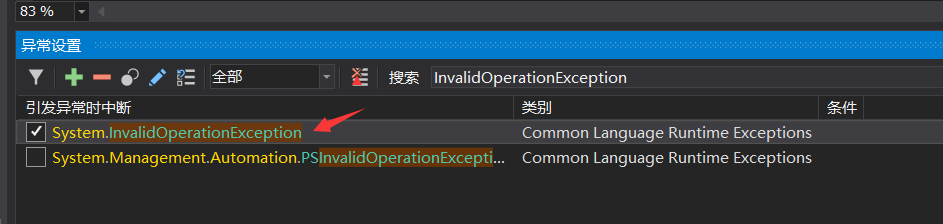
接下来就可以让程序跑起来,当异常抛出时会自动断下来。

仔细看一下图中的文字标注,还是很好理解的,接下来继续追一下: response.ContentType = contentType2; 内部都做了什么。
		public override string ContentType

		{

			get

			{

				return this.Headers[HeaderNames.ContentType];

			}

			set

			{

				if (string.IsNullOrEmpty(value))

				{

					this.HttpResponseFeature.Headers.Remove(HeaderNames.ContentType);

					return;

				}

				this.HttpResponseFeature.Headers[HeaderNames.ContentType] = value;

			}

		}
可以看到 内部是给 this.HttpResponseFeature.Headers 赋值的,继续往下追:
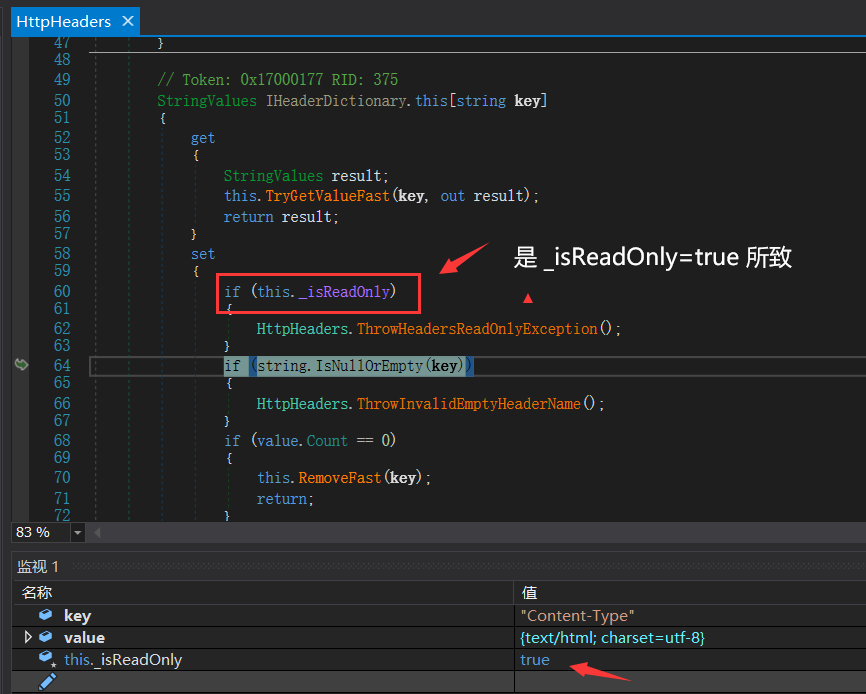
从图中可以看到,最后的 HttpHeader._isReadOnly =true 导致异常的发生,罪魁祸首哈,接下来研究下这句 HttpHeader._isReadOnly=true 是何时被赋值的。
2. _isReadOnly=true 何时发生
这个问题就简单多了,必定是 Response.WriteAsync("hello world!"); 造成了 _isReadOnly=true ,在 HttpHeader 下有一个 SetReadOnly 方法用于对 _isReadOnly 字段的封装,代码如下:
internal abstract class HttpHeaders

{

    public void SetReadOnly()

    {

        this._isReadOnly = true;

    }

}
接下来在该方法处下一个断点,继续调试,如下图:
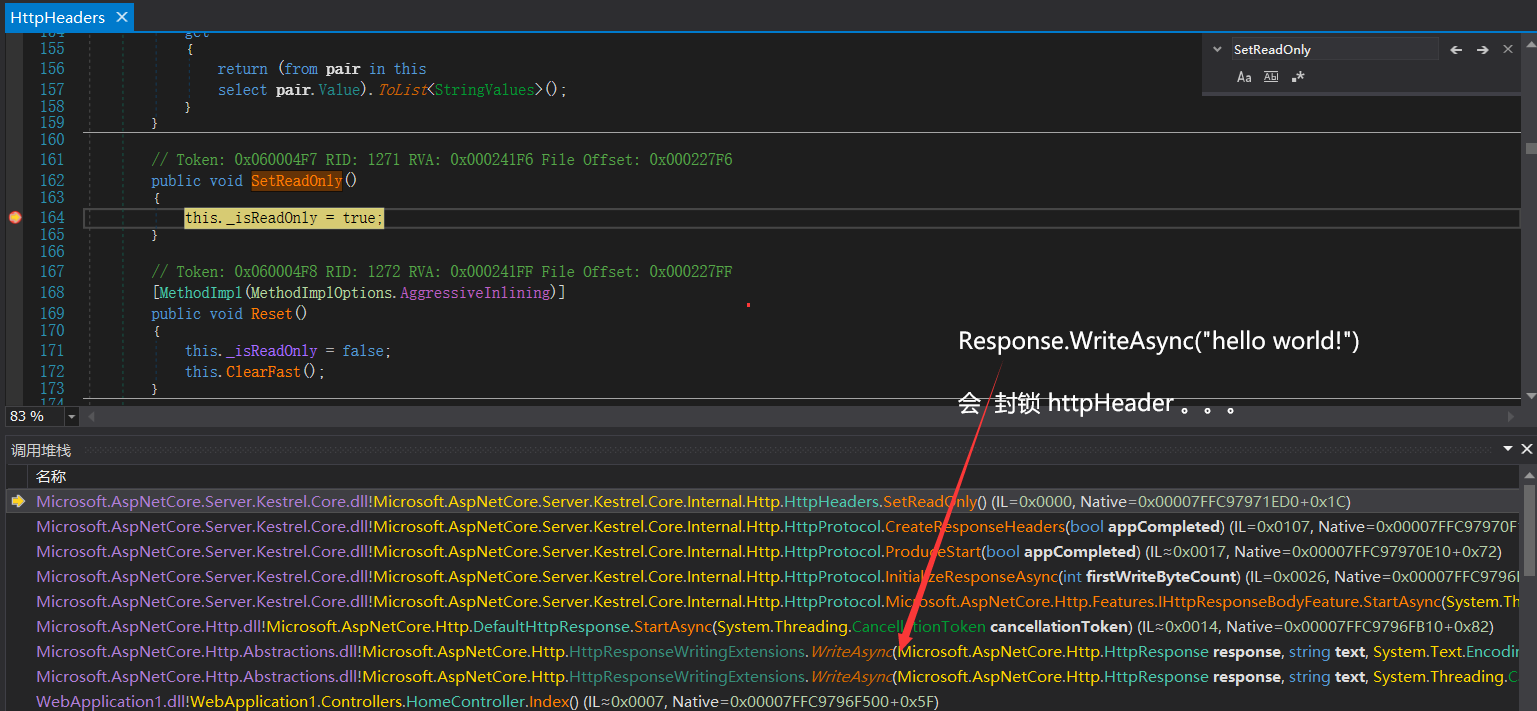
从图中可看到,原来 Response.WriteAsync("hello world!") 是可以封锁 HttpHeaders的,后续任何再对 HttpHeader 的操作都是无效的。。。
其实大家也可以想一想,不同的response,肯定会有不同的 header,要想叠加的话这辈子都不可能的,只能让后面的报错,如下:
1. response:

HTTP/1.1 200 OK

Date: Mon, 19 Oct 2020 14:37:54 GMT

Server: Kestrel

Transfer-Encoding: chunked

c

hello world!

2. view:

HTTP/1.1 200 OK

Date: Mon, 19 Oct 2020 14:39:01 GMT

Content-Type: text/html; charset=utf-8

Server: Kestrel

Content-Length: 2239
四: 总结
这篇就是对群聊天过程中抛出问题的个人探究,一家之言,不过挺有意思,大家也可以多用用调试工具寻找问题,证明问题,纸上得来终觉浅,绝知此事要躬行,好了,希望本篇对您有帮助!
更多高质量干货:参见我的 GitHub: dotnetfly
为啥 Response.Write 后,View就不渲染了?的更多相关文章
- vue修改对象的属性值后页面不重新渲染
原文地址:vue修改对象的属性值后页面不重新渲染 最近项目在使用vue,遇到几次修改了对象的属性后,页面并不重新渲染,场景如下: HTML页面如下: [html] view plain copy &l ...
- 解决springmvc中文件下载功能中使用javax.servlet.ServletOutputStream out = response.getOutputStream();后运行出异常但结果正确的问题
问题描述: 在springmvc中实现文件下载功能一般都会使用javax.servlet.ServletOutputStream out = response.getOutputStream();封装 ...
- SAP MM 明明有需求,为啥MRP RUN后没有PR单据产生?
SAP MM 明明有需求,为啥MRP RUN后没有PR单据产生? 用户报了一个问题说,对于物料号42011222的采购单 4500000156建好了,为啥PR没有自动生成 . 我们检查了物料的MRP ...
- 关于QT Graphics View开启OpenGL渲染后复选框、微调框等无法正常显示的问题
之前学习QT Graphics View框架,除了基本的图元外,还可以通过QGraphicsProxyWidget类添加QT的基本Widget(如按钮.复选框.单选框等),常使用的场景类接口如下: Q ...
- Android 自定义可拖拽View,界面渲染刷新后不会自动回到起始位置
以自定义ImageView为例: /** * 可拖拽ImageView * Created by admin on 2017/2/21. */ public class FloatingImageVi ...
- 手势识别官方教程(4)在挑划或拖动手势后view的滚动用ScrollView和 HorizontalScrollView,自定义用Scroller或OverScroller
简单滚动用ScrollView和 HorizontalScrollView就够.自定义view时可能要自定义滚动效果,可以使用 Scroller或 OverScroller Animating a S ...
- iOS 动画结束后 view的位置 待完善
默认的动画属性,动画结束后,view会回到原始位置.但是如果设定了 CAAnimation的 removedOnCompletion 属性,那么view会保持这个位置!但是真实的接收 点击的frame ...
- 解决TableView / ScrollView上的Menu问题(1滑出View区域还可点击2导致点击menu后View不能滑动)
解决TableView / ScrollView上的Menu问题 1划出区域还可点击 重写CCMenu的触摸事件函数 TouchBegin/TouchMove/TouchCancle/TouchEnd ...
- Android-一只手指滑动View,另一只手指按Home键,重新进入后View状态无法更新的问题
上午测试报了一个bug:说是一只手指拖动虚拟摇杆上的View滑块不松,另一只手指点击Home键将App压后台,重新进入的时候,View滑块卡死了. 刚开始看到这个问题感觉很奇怪,因为正常情况下,手指离 ...
随机推荐
- CTF-WeChall-第四天上午
2020.09.12 08:24 哈哈,go on!
- centos7安装PHP7的redis扩展
前言: 在本篇博客中,我将给大家介绍如何在Centos7上安装PHP-Redis扩展,关于如何在Centos上安装redis的,可以参考另外一篇博客:Centos7安装redis 想要在php中操作r ...
- [SpringBoot项目]笔记
request&response 重定向(跳转) 301 永久跳转/302 临时跳转 工业用途 通过url判断来自手机页面,就跳转到手机对应的页面. 活动页面临时改url? 异常处理 定义一个 ...
- Windows Server系统部署MySQL数据库
由于工作需要在阿里云服务器中使用MySQL,所以安装一下MySQL数据库,中间也踩了一些坑,现在将整个过程给大家记录下来,便于后续查找. 阿里云服务器是WinServer2012系统,之前在Windo ...
- cnblog维护
title: 博客归纳 blog: CSDN data: Java学习路线及视频 2019 12/31 时间管理 2020 1/22 Git是什么? 1/23 Git安装--Windows 3/24 ...
- 信号、多app应用、flask-script
信号 Flask 框架中的信号基于blinker,其只要就是让开发者可以在flak请求过程中制定一些用户行为 安装:pip3 install blinker 内置信号 request_started ...
- Python+Appium运行简单的demo,你需要理解Appium运行原理!
坚持原创输出,点击蓝字关注我吧 作者:清菡 博客:oschina.云+社区.知乎等各大平台都有. 目录 一.Appium 的理念 四个原则 1.Web-Selenium 的运行原理 2.Appium ...
- 从零搭建Spring Boot脚手架(7):Elasticsearch应该独立服务
1. Spring Data Elasticsearch Spring Data Elasticsearch是Spring Data项目的子项目,提供了Elasticsearch与Spring的集成. ...
- Bulldog1靶机渗透
Bulldog1靶机渗透 扫描一下内网存活主机,发现192.168.114.144这个存活主机. 进行端口扫描:23,80,8080端口均开放. 进行网页访问,暂时没有什么发现,扫一下网站的目录. 发 ...
- python os模块方法详解
os.access() 方法使用当前的uid/gid尝试访问路径.大部分操作使用有效的 uid/gid, 因此运行环境可以在 suid/sgid 环境尝试. 实例: os.chdir() 方法用于改变 ...