
spring boot:用zxing生成二维码,支持logo(spring boot 2.3.2)
一,zxing是什么?
1,zxing的用途
如果我们做二维码的生成和扫描,通常会用到zxing这个库,
ZXing是一个开源的,用Java实现的多种格式的1D/2D条码图像处理库。
zxing还可以实现使用手机的内置的摄像头完成条形码的扫描及解码
2,zxing官方项目地址:
https://github.com/zxing/zxing
说明:刘宏缔的架构森林是一个专注架构的博客,地址:https://www.cnblogs.com/architectforest
对应的源码可以访问这里获取: https://github.com/liuhongdi/
说明:作者:刘宏缔 邮箱: 371125307@qq.com
二,演示项目的相关信息
1,项目地址
https://github.com/liuhongdi/qrcode
2, 项目功能说明:
生成二维码直接展示
生成二维码保存成图片
解析二维码图片中的文字信息
3,项目结构,如图:

三,配置文件说明
1,pom.xml
        <!--qrcode begin-->

        <dependency>

            <groupId>com.google.zxing</groupId>

            <artifactId>core</artifactId>

            <version>3.4.0</version>

        </dependency>

        <dependency>

            <groupId>com.google.zxing</groupId>

            <artifactId>javase</artifactId>

            <version>3.4.0</version>

        </dependency>

        <!--qrcode   end-->
导入zxing库供生成qrcode使用
四,java代码说明
1,QrCodeUtil.java
/**

 * 二维码工具类

 * by liuhongdi

 */

public class QrCodeUtil {

    //编码格式,采用utf-8

    private static final String UNICODE = "utf-8";

    //图片格式

    private static final String FORMAT = "JPG";

    //二维码宽度像素pixels数量

    private static final int QRCODE_WIDTH = 300;

    //二维码高度像素pixels数量

    private static final int QRCODE_HEIGHT = 300;

    //LOGO宽度像素pixels数量

    private static final int LOGO_WIDTH = 100;

    //LOGO高度像素pixels数量

    private static final int LOGO_HEIGHT = 100;

    //生成二维码图片

    //content 二维码内容

    //logoPath logo图片地址

    private static BufferedImage createImage(String content, String logoPath) throws Exception {

        Hashtable<EncodeHintType, Object> hints = new Hashtable<EncodeHintType, Object>();

        hints.put(EncodeHintType.ERROR_CORRECTION, ErrorCorrectionLevel.H);

        hints.put(EncodeHintType.CHARACTER_SET, UNICODE);

        hints.put(EncodeHintType.MARGIN, 1);

        BitMatrix bitMatrix = new MultiFormatWriter().encode(content, BarcodeFormat.QR_CODE, QRCODE_WIDTH, QRCODE_HEIGHT,

                hints);

        int width = bitMatrix.getWidth();

        int height = bitMatrix.getHeight();

        BufferedImage image = new BufferedImage(width, height, BufferedImage.TYPE_INT_RGB);

        for (int x = 0; x < width; x++) {

            for (int y = 0; y < height; y++) {

                image.setRGB(x, y, bitMatrix.get(x, y) ? 0xFF000000 : 0xFFFFFFFF);

            }

        }

        if (logoPath == null || "".equals(logoPath)) {

            return image;

        }

        // 插入图片

        QrCodeUtil.insertImage(image, logoPath);

        return image;

    }

    //在图片上插入LOGO

    //source 二维码图片内容

    //logoPath LOGO图片地址

    private static void insertImage(BufferedImage source, String logoPath) throws Exception {

        File file = new File(logoPath);

        if (!file.exists()) {

            throw new Exception("logo file not found.");

        }

        Image src = ImageIO.read(new File(logoPath));

        int width = src.getWidth(null);

        int height = src.getHeight(null);

            if (width > LOGO_WIDTH) {

                width = LOGO_WIDTH;

            }

            if (height > LOGO_HEIGHT) {

                height = LOGO_HEIGHT;

            }

            Image image = src.getScaledInstance(width, height, Image.SCALE_SMOOTH);

            BufferedImage tag = new BufferedImage(width, height, BufferedImage.TYPE_INT_RGB);

            Graphics g = tag.getGraphics();

            g.drawImage(image, 0, 0, null); // 绘制缩小后的图

            g.dispose();

            src = image;

        // 插入LOGO

        Graphics2D graph = source.createGraphics();

        int x = (QRCODE_WIDTH - width) / 2;

        int y = (QRCODE_HEIGHT - height) / 2;

        graph.drawImage(src, x, y, width, height, null);

        Shape shape = new RoundRectangle2D.Float(x, y, width, width, 6, 6);

        graph.setStroke(new BasicStroke(3f));

        graph.draw(shape);

        graph.dispose();

    }

    //生成带logo的二维码图片,保存到指定的路径

    // content 二维码内容

    // logoPath logo图片地址

    // destPath 生成图片的存储路径

    public static String save(String content, String logoPath, String destPath) throws Exception {

        BufferedImage image = QrCodeUtil.createImage(content, logoPath);

        File file = new File(destPath);

        String path = file.getAbsolutePath();

        File filePath = new File(path);

        if (!filePath.exists() && !filePath.isDirectory()) {

            filePath.mkdirs();

        }

        String fileName = file.getName();

        fileName = fileName.substring(0, fileName.indexOf(".")>0?fileName.indexOf("."):fileName.length())

                + "." + FORMAT.toLowerCase();

        System.out.println("destPath:"+destPath);

        ImageIO.write(image, FORMAT, new File(destPath));

        return fileName;

    }

    //生成二维码图片,直接输出到OutputStream

    public static void encode(String content, String logoPath, OutputStream output)

            throws Exception {

        BufferedImage image = QrCodeUtil.createImage(content, logoPath);

        ImageIO.write(image, FORMAT, output);

    }

    //解析二维码图片,得到包含的内容

    public static String decode(String path) throws Exception {

        File file = new File(path);

        BufferedImage image = ImageIO.read(file);

        if (image == null) {

            return null;

        }

        BufferedImageLuminanceSource source = new BufferedImageLuminanceSource(image);

        BinaryBitmap bitmap = new BinaryBitmap(new HybridBinarizer(source));

        Result result;

        Hashtable<DecodeHintType, Object> hints = new Hashtable<DecodeHintType, Object>();

        hints.put(DecodeHintType.CHARACTER_SET, UNICODE);

        result = new MultiFormatReader().decode(bitmap, hints);

        return result.getText();

    }

}
工具类,包含了生成二维码、保存二维码,展示二维码,解析二维码
2,HomeController.java
@RequestMapping("/home")

@Controller

public class HomeController {

    //生成带logo的二维码到response

    @RequestMapping("/qrcode")

    public void qrcode(HttpServletRequest request, HttpServletResponse response) {

        String requestUrl = "http://www.baidu.com";

        try {

            OutputStream os = response.getOutputStream();

            QrCodeUtil.encode(requestUrl, "/data/springboot2/logo.jpg", os);

        } catch (Exception e) {

            e.printStackTrace();

        }

    }

    //生成不带logo的二维码到response

    @RequestMapping("/qrnologo")

    public void qrnologo(HttpServletRequest request, HttpServletResponse response) {

        String requestUrl = "http://www.baidu.com";

        try {

            OutputStream os = response.getOutputStream();

            QrCodeUtil.encode(requestUrl, null, os);

        } catch (Exception e) {

            e.printStackTrace();

        }

    }

    //把二维码保存成文件

    @RequestMapping("/qrsave")

    @ResponseBody

    public String qrsave() {

        String requestUrl = "http://www.baidu.com";

        try {

            QrCodeUtil.save(requestUrl, "/data/springboot2/logo.jpg", "/data/springboot2/qrcode2.jpg");

        } catch (Exception e) {

            e.printStackTrace();

        }

        return "文件已保存";

    }

    //解析二维码中的文字

    @RequestMapping("/qrtext")

    @ResponseBody

    public String qrtext() {

        String url = "";

        try {

             url = QrCodeUtil.decode("/data/springboot2/qrcode2.jpg");

        } catch (Exception e) {

            e.printStackTrace();

        }

        return "解析到的url:"+url;

    }

}
入口处包含了四个方法,接下来我们做测试
五,测试效果
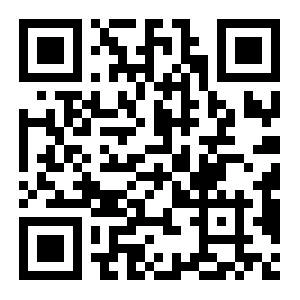
1,生成不带logo的二维码,访问:
http://127.0.0.1:8080/home/qrnologo
效果:
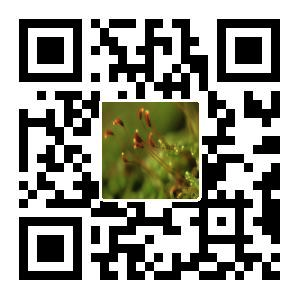
2,生成带logo的二维码:访问
http://127.0.0.1:8080/home/qrcode
效果:
3,生成二维码保存成文件:访问:
http://127.0.0.1:8080/home/qrsave
代码中文件被保存成了:/data/springboot2/qrcode2.jpg
4,解析二维码中包含的文字信息:访问:
http://127.0.0.1:8080/home/qrtext
返回:
解析到的url:http://www.baidu.com
成功解析到了图片中包含的url地址
六,查看spring boot版本
  .   ____          _            __ _ _

 /\\ / ___'_ __ _ _(_)_ __  __ _ \ \ \ \

( ( )\___ | '_ | '_| | '_ \/ _` | \ \ \ \

 \\/  ___)| |_)| | | | | || (_| |  ) ) ) )

  '  |____| .__|_| |_|_| |_\__, | / / / /

 =========|_|==============|___/=/_/_/_/

 :: Spring Boot ::        (v2.3.2.RELEASE)
spring boot:用zxing生成二维码,支持logo(spring boot 2.3.2)的更多相关文章
- 使用jquery.qrcode生成二维码支持logo,和中文
/* utf.js - UTF-8 <=> UTF-16 convertion * * Copyright (C) 1999 Masanao Izumo <iz@onicos.co. ...
- (转)ZXing生成二维码和带logo的二维码,模仿微信生成二维码效果
场景:移动支付需要对二维码的生成与部署有所了解,掌握目前主流的二维码生成技术. 1 ZXing 生成二维码 首先说下,QRCode是日本人开发的,ZXing是google开发,barcode4j也是老 ...
- zxing生成二维码设置边框颜色
真是研究了很久很久,满满的泪啊 zxing生成二维码,默认是可以增加空白边框的,但是并没有可以设置边框颜色的属性. 其中增加空白边框的属性的一句话是: Map hints = new HashMap( ...
- java学习-zxing生成二维码矩阵的简单例子
这个例子需要使用google的开源项目zxing的核心jar包 core-3.2.0.jar 可以百度搜索下载jar文件,也可使用maven添加依赖 <dependency> <gr ...
- 通过zxing生成二维码
二维码现在随处可见,在日常的开发中,也会经常涉及到二维码的生成,特别是开发一些活动或者推广方面的功能时,二维码甚至成为必备功能点.本文介绍通过 google 的 zxing 包生成带 logo 的二维 ...
- 使用google zxing生成二维码图片
生成二维码工具类: 1 import java.awt.geom.AffineTransform; 2 import java.awt.image.AffineTransformOp; 3 impor ...
- 使用jquery-qrcode在页面上生成二维码,支持中文
<!DOCTYPE html PUBLIC "-//W3C//DTD XHTML 1.0 Transitional//EN" "http://www.w3.org/ ...
- C#Qrcode生成二维码支持中文,带图片,带文字
C#Qrcode生成二维码支持中文带图片的操作请看二楼的帖子,当然开始需要下载一下C#Qrcode的源码 下载地址 : http://www.codeproject.com/Articles/2057 ...
- C# 生成二维码(带Logo)
C# 生成二维码(带Logo) 第一种方式 我们需要引用 ThoughtWorks.QRCode.dll 生成带logo二维码(framework4.0以上) 下载地址:https://pan.ba ...
随机推荐
- Oracle数据库之表与表数据操作
一.SQL语言 SQL语言分为四种,分别是:数据定义语言(DDL).数据操纵语言(DCL).事务控制语言(TCL).数据控制语言(DML). 1.1 数据定义语言(DDL) 建立.修改.删除数据库对象 ...
- 工具类-Fastjson入门使用
简介 什么是Fastjson? fastjson是阿里巴巴的开源JSON解析库,它可以解析JSON格式的字符串,支持将Java Bean序列化为JSON字符串,也可以从JSON字符串反序列化到Java ...
- 微信小程序 | 模仿百思不得其姐
微信小程序 仿百思不得姐 设备 微信开发者工具 v1.02.1901230 扩展 修复了视频点击播放不流畅的问题 修复了视频的暂停够无法播放问题 优化了部分页面 接口 首页 http://api.bu ...
- firewalld 防火墙
firewalld防火墙 firewalld简述 firewalld:防火墙,其实就是一个隔离工具:工作于主机或者网络的边缘对于进出本主机或者网络的报文根据事先定义好的网络规则做匹配检测,对于能够 ...
- 如何在 PyPI安装python的软件包?
安装软件包 本节介绍如何安装Python的基本知识.包裹. 需要注意的是,这个上下文中的“包”一词被用作分布(即要安装的一组软件),而不是指包装在Python源代码中导入(即模块的容器).Python ...
- CSS、bootstrap4等相关疑难杂症
说明 本篇博客仅用于个人随笔,所以内容比较随意. 在bootstrap4中,引入样式后,按钮.输入框等组件的选取状态会出现黑色加重边框,该如何解决? 解决示例: input:focus{outline ...
- Dubbo系列之服务暴露过程
点赞再看,养成习惯,微信搜一搜[三太子敖丙]关注这个喜欢写情怀的程序员. 本文 GitHub https://github.com/JavaFamily 已收录,有一线大厂面试完整考点.资料以及我的系 ...
- Spring学习(九)Spring 和数据库编程【了解】
一.传统 JDBC 回顾 用一个大佬的demo来简单看一下 /** * 使用jdbc,根据id查询单个Student的信息 */ public class JdbcManage { public St ...
- 基础篇:深入解析JAVA反射机制
目录 反射的概念 获取Class的三种方法 JAVA反射API 反射机制应用的场景 反射和JDK动态代理 欢迎指正文中错误 关注公众号,一起交流 参考文章 反射的概念 java的放射机制:在程序运行时 ...
- Go gin框架 使用swagger生成API文档
swaggos 是一个golang版本的swagger文档生成器,提供了native code包装器,并且支持主流的web框架包裹器 github 地址:https://github.com/swag ...