
Sentry 高级使用教程
Sentry 高级使用教程
Sentry versions
https://github.com/getsentry/sentry-docs
https://github.com/getsentry/sentry-docs/edit/master/src/docs/product/releases/index.mdx
Sentry releases
版本控制
https://docs.sentry.io/product/releases/
https://docs.sentry.io/platform-redirect/?next=/configuration/releases/
https://docs.sentry.io/platforms/javascript/#configure
Sentry sourcemaps
https://docs.sentry.io/platforms/javascript/sourcemaps/
https://docs.sentry.io/platforms/javascript/sourcemaps/#capturing-source-maps
process.env.SENTRY_AUTH_TOKEN
https://docs.sentry.io/product/integrations/integration-platform/#internal-integrations
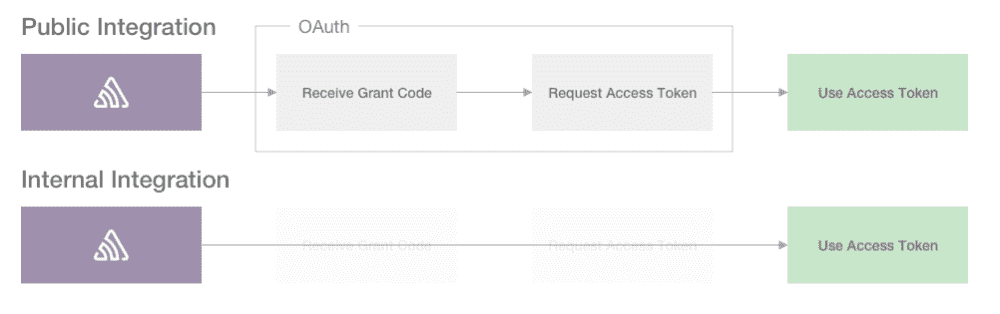
sentry-cli
https://docs.sentry.io/product/cli/configuration/
webpack
https://docs.sentry.io/platforms/javascript/sourcemaps/tools/webpack/
$ yarn add -D @sentry/webpack-plugin

$ yarn add --dev @sentry/webpack-plugin
// webpack.config.js

const SentryWebpackPlugin = require("@sentry/webpack-plugin");

module.exports = {

  // other configuration

  configureWebpack: {

    plugins: [

      new SentryWebpackPlugin({

        // sentry-cli configuration

        authToken: process.env.SENTRY_AUTH_TOKEN,

        org: "fullstack-web",

        project: "react-app",

        // webpack specific configuration

        include: ".",

        ignore: ["node_modules", "webpack.config.js"],

      }),

    ],

  },

};
Sentry Health
https://docs.sentry.io/product/releases/health/
Issue Ownership Rules
问题,追责
https://docs.sentry.io/product/error-monitoring/issue-owners/
demo
import * as Sentry from '@sentry/browser';

import { Vue as VueIntegration } from '@sentry/integrations';

import ErrorHandler from './ErrorHandler.js';

import * as PACKAGE from '../package.json';

// const PACKAGE = require('../package.json');

// package 是保留关键字,不能使用

// import * as package from '../package.json';

// const package = require('../package.json');

console.log(' package.name =', PACKAGE.name);

console.log(' package.version =', PACKAGE.version);

// console.log(' package.name =', package.name);

// console.log(' package.version =', package.version);

// const isDev = process.env.BABEL_ENV === 'development';

// const isProd = process.env.NODE_ENV === 'production';

// const env = process.env.NODE_ENV === 'production' ? true : false;

const env = process.env.NODE_ENV === 'production' ? 'prod' : 'dev';

Sentry.init({

    // To set your release version

    release: `$${PACKAGE.name}_${env}@${PACKAGE.version}`,

    // release: `$${package.name}_${env}@${package.version}`,

    // release: "my-project-name@" + process.env.npm_package_version,

    dsn: 'https://666ed2b5eb51410dbe24f05e67fc999@sentry.xgqfrms//110',

    integrations: [new VueIntegration({Vue, attachProps: true, logErrors: true})],

});

const errorHandler = new ErrorHandler('vue_error');

Vue.config.errorHandler = (err, vm, info) => errorHandler.onError(err, vm, info);

if(env === 'dev') {

    // 测试

    setTimeout(() => {

        console.log('window.Vue; =', window.Vue);

        throw new Error(' Sentry Vue Error 测试!');

    }, 3000);

}
Parsing error: package is a reserved word in strict mode
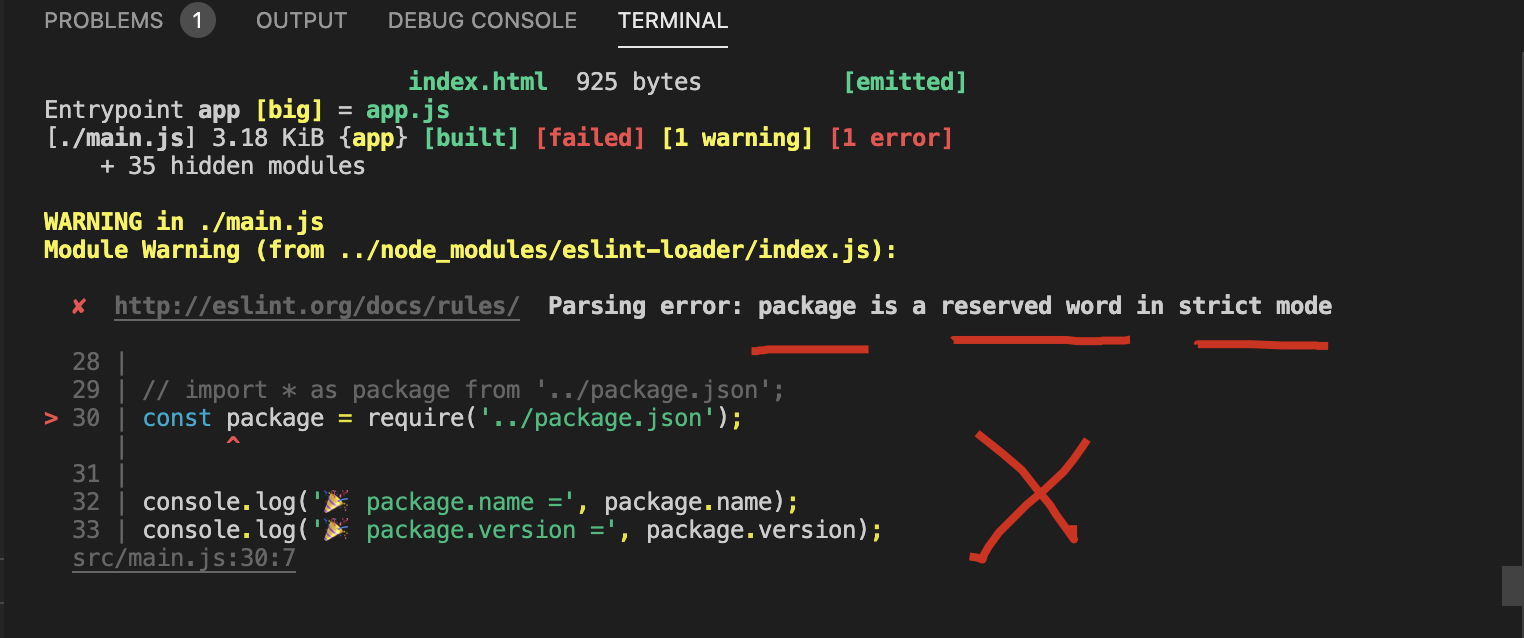
ECMAScript 6 中的保留关键字
https://developer.mozilla.org/zh-CN/docs/Web/JavaScript/Reference/Reserved_words
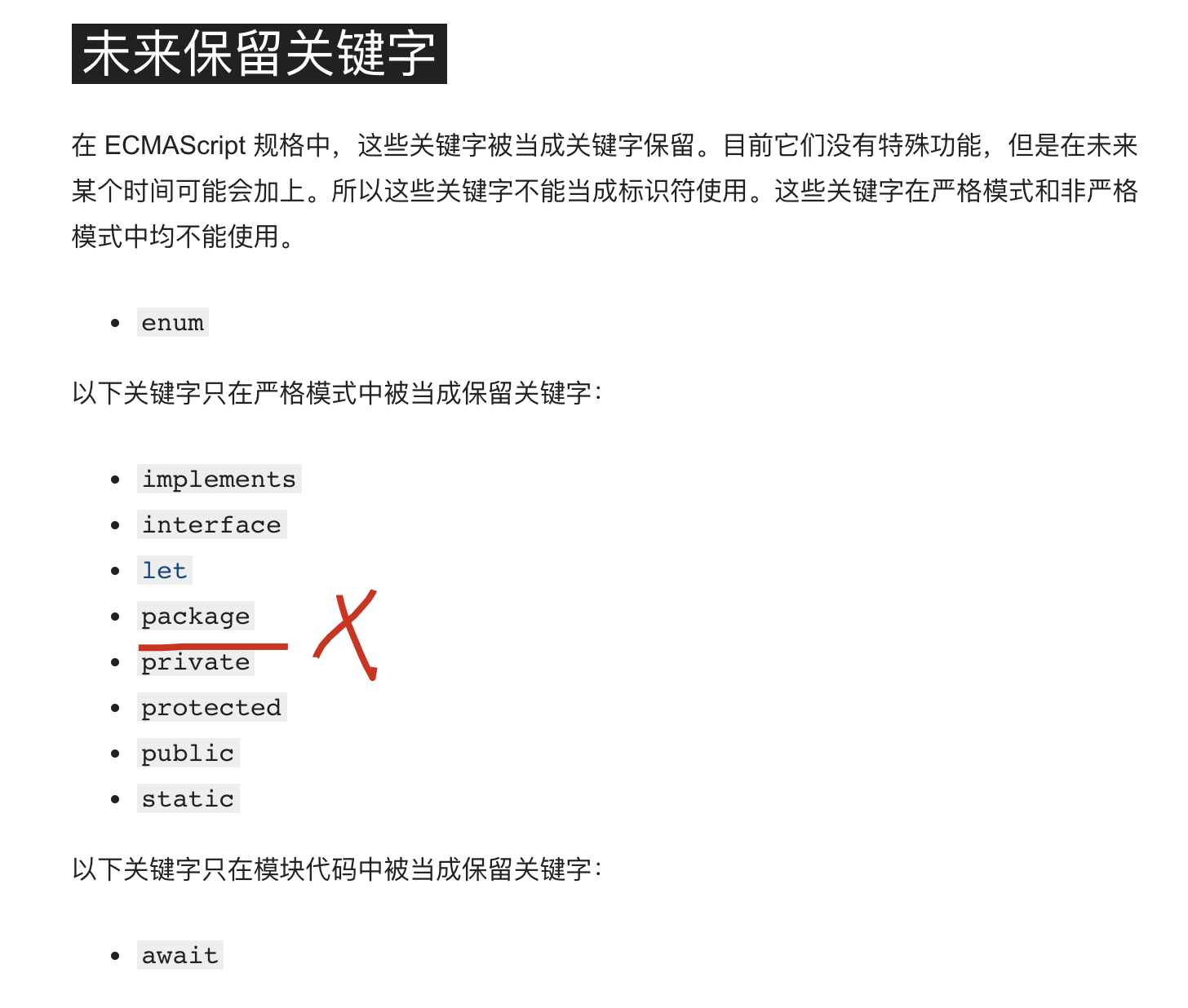
未来保留关键字
以下关键字只在严格模式中被当成保留关键字:
implements
interface
let
package
private
protected
public
static
refs
sourcemap 关联、issue 关联、release 控制
https://segmentfault.com/a/1190000014683598
xgqfrms 2012-2020
www.cnblogs.com 发布文章使用:只允许注册用户才可以访问!
Sentry 高级使用教程的更多相关文章
- XSS高级实战教程
1.[yueyan科普系列]XSS跨站脚本攻击--yueyan 2.存储型XSS的成因及挖掘方法--pkav 3.跨站脚本攻击实例解析--泉哥 4.XSS高级实战教程--心伤的瘦子 5.XSS利用与挖 ...
- 推荐一本好的c#高级程序设计教程
哪位大神推荐一本好的c#高级程序设计教程 小弟在此感激不尽,谢谢
- 《吐血整理》高级系列教程-吃透Fiddler抓包教程(34)-Fiddler如何抓取微信小程序的包-上篇
1.简介 有些小伙伴或者是童鞋们说小程序抓不到包,该怎么办了???其实苹果手机如果按照宏哥前边的抓取APP包的设置方式设置好了,应该可以轻松就抓到包了.那么安卓手机小程序就比较困难,不是那么友好了.所 ...
- 渗透测试工具Nmap从初级到高级使用教程
本文由阿德马翻译自国外网站,请尊重劳动成果,转载请注明出处,谢谢 Nmap是一款网络扫描和主机检测的非常有用的工具.Nmap是不局限于仅仅收集信息和枚举,同时可以用来作为一个漏洞探测器或安全扫描器.它 ...
- ASP.NET Aries 高级开发教程:Excel导入之单表配置(上)
前言: 随着ASP.NET Aries的普及,刚好也有点闲空,赶紧把Excel导入功能的教程补上. Excel导入功能,分为四篇:单表配置(上).多表高级配置(中).配置规则(下).代码编写(番外篇) ...
- PyTorch 高级实战教程:基于 BI-LSTM CRF 实现命名实体识别和中文分词
前言:译者实测 PyTorch 代码非常简洁易懂,只需要将中文分词的数据集预处理成作者提到的格式,即可很快的就迁移了这个代码到中文分词中,相关的代码后续将会分享. 具体的数据格式,这种方式并不适合处理 ...
- ASP.NET Aries 高级开发教程:Excel导入之代码编写(番外篇)
前言: 以许框架提供的导入配置功能,已经能解决95%以上的导入情况,但有些情况总归还是得代码来解决. 本篇介绍与导入相关的代码. 1.前端追加导入时Post的参数: var grid = new AR ...
- ASP.NET Aries 高级开发教程:Excel导入之多表高级导入配置(中)
前言: 在面对Excel的各种复杂导入情况中,多表导入是很常见的情景. 今天就来写一下多表导入是如何配置的. 1.自定义导入模板 怎么自定义: 其实就是自己新建一个Excel了,把列头都写好. 不过有 ...
- Spring Boot 2.x零基础入门到高级实战教程
一.零基础快速入门SpringBoot2.0 1.SpringBoot2.x课程全套介绍和高手系列知识点 简介:介绍SpringBoot2.x课程大纲章节 java基础,jdk环境,maven基础 2 ...
随机推荐
- 代码 or 指令,浅析ARM架构下的函数的调用过程
摘要:linux程序运行的状态以及如何推导调用栈. 1.背景知识 1.ARM64寄存器介绍: 2.STP指令详解(ARMV8手册): 我们先看一下指令格式(64bit),以及指令对于寄存机执行结果的影 ...
- 时序数据库 Apache-IoTDB 源码解析之元数据索引块(六)
上一章聊到 TsFile 索引块的详细介绍,以及一个查询所经过的步骤.详情请见: 时序数据库 Apache-IoTDB 源码解析之文件索引块(五) 打一波广告,欢迎大家访问 IoTDB 仓库,求一波 ...
- Qt 自动化测试Test cutedriver
示例 https://github.com/nomovok-opensource/cutedriver-examples CuteDriver examples This repository con ...
- 《Effective C#》之减少装箱和拆箱
<Effective C#>之减少装箱和拆箱_天极网 http://dev.yesky.com/msdn/359/3486359.shtml <Effective C#>之减少 ...
- Win10家庭版Hyper-V出坑(完美卸载,冲突解决以及Device Guard问题)
本文链接:https://blog.csdn.net/hotcoffie/article/details/85043894 版权声明:本文为博主原创文章,遵循CC 4.0 BY-SA版权协议,转载请附 ...
- MTO1804无刷电机引发的悲惨经历之二:电调固件刷新与优化
前言 原创文章,转载引用请务必注明链接,水平有限,如有疏漏,欢迎指正. 书接上回,我们总算是基本确认了黑衣神秘电调的身份,本文就尝试对电调固件进行一番设置,来个免费优化. 1.刷新固件 关于电调的固件 ...
- Redis,JedisPool工具类
Redis,JedisPool工具类 1.JedisPool 详细配置解释代码 2.Jedis工具类 导入相关依赖: commons-pool2-2.3.jar jedis-2.7.0.jar 1.J ...
- Tomcat Servlet工作原理
前言 Tomcat的启动过程 Web应用初始化 创建Servlet实例 初始化Servlet 执行service方法 前言 Servlet实际上就是一个java类,只不过可以和浏览器进行一些数据的交换 ...
- FortiGate防火墙办公网常用配置
1.建立主备机 2.配置端口 3.配置SD-WAN 4.新建上网路由 5.新建上网策略 6.建立与其他点的IPSec VPN或点对点专线
- cassandra权威指南读书笔记--cassandra概述
cassandra是一个开源的.分布式.去中心化.弹性可扩展.高可用.容错.可调一致性.面向行数据库,分布式设计基于Amazon Dynamo,数据模型基于Google BigTable.cassan ...