
[Failed]Tomcat cluster方案共享session配置出错,sigh....
后继发展:https://www.cnblogs.com/xiandedanteng/p/12134300.html
参考网文一:多个Tomcat之间实现Session共享
参考网文二:Tomcat官方文档
照这俩配了,结果令人沮丧,都没出来:
下面这种方案是在tomcat/conf/server.xml加<Cluster className="org.apache.catalina.ha.tcp.SimpleTcpCluster"/>去做的,结果两边session id不一致。
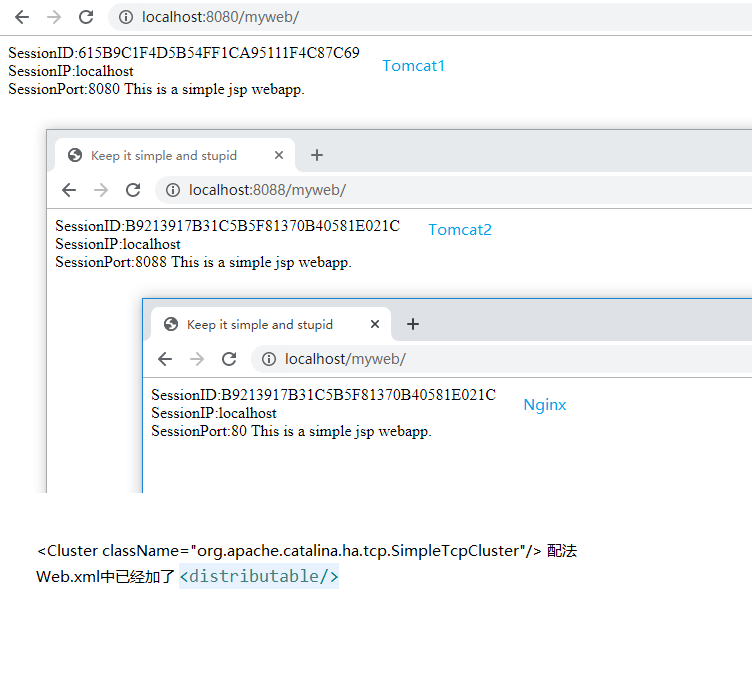
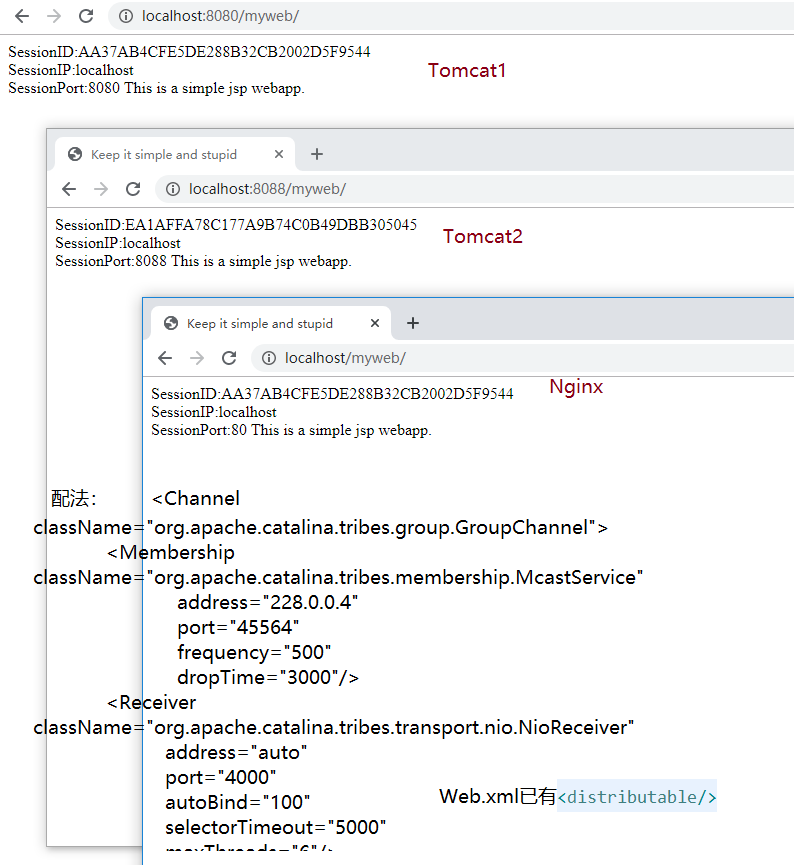
下面这种方案本是按网文一的做的,但tomcat都运行不起来,只好按网文2也就是Tomcat官方文档加入
    <Engine name="Catalina" defaultHost="localhost">

<Cluster className="org.apache.catalina.ha.tcp.SimpleTcpCluster"

                 channelSendOptions="8">

          <Manager className="org.apache.catalina.ha.session.DeltaManager"

                   expireSessionsOnShutdown="false"

                   notifyListenersOnReplication="true"/>

          <Channel className="org.apache.catalina.tribes.group.GroupChannel">

            <Membership className="org.apache.catalina.tribes.membership.McastService"

                        address="228.0.0.4"

                        port="45564"

                        frequency="500"

                        dropTime="3000"/>

            <Receiver className="org.apache.catalina.tribes.transport.nio.NioReceiver"

                      address="auto"

                      port="4000"

                      autoBind="100"

                      selectorTimeout="5000"

                      maxThreads="6"/>

            <Sender className="org.apache.catalina.tribes.transport.ReplicationTransmitter">

              <Transport className="org.apache.catalina.tribes.transport.nio.PooledParallelSender"/>

            </Sender>

            <Interceptor className="org.apache.catalina.tribes.group.interceptors.TcpFailureDetector"/>

            <Interceptor className="org.apache.catalina.tribes.group.interceptors.MessageDispatchInterceptor"/>

          </Channel>

          <Valve className="org.apache.catalina.ha.tcp.ReplicationValve"

                 filter=""/>

          <Valve className="org.apache.catalina.ha.session.JvmRouteBinderValve"/>

          <Deployer className="org.apache.catalina.ha.deploy.FarmWarDeployer"

                    tempDir="/tmp/war-temp/"

                    deployDir="/tmp/war-deploy/"

                    watchDir="/tmp/war-listen/"

                    watchEnabled="false"/>

          <ClusterListener className="org.apache.catalina.ha.session.ClusterSessionListener"/>

        </Cluster>
结果还是session id不一致。
cmd窗口里出现下面错误:
27-Dec-2019 16:19:51.909 荳・驥・[Catalina-utility-2] org.apache.catalina.tribes.group.interceptors.TcpFailureDetector.memberAlive 譌豕戊ソ幄。悟、ア雍・逶第オ具シ悟∞螳壽・蜻伜ョ墓惻縲・org.apache.catalina.tribes.membership.MemberImpl[tcp://{10, 80, 87, 128}:4002,{10, 80, 87, 128},4002, alive=1675289, securePort=-1, UDP Port=-1, id={50 -112 68 12 11 -40 69 69 -72 -117 -78 30 69 90 -99 97 }, payload={}, command={}, domain={}]]
java.net.SocketException: Permission denied: connect
at java.net.DualStackPlainSocketImpl.waitForConnect(Native Method)
at java.net.DualStackPlainSocketImpl.socketConnect(DualStackPlainSocketImpl.java:85)
at java.net.AbstractPlainSocketImpl.doConnect(AbstractPlainSocketImpl.java:350)
at java.net.AbstractPlainSocketImpl.connectToAddress(AbstractPlainSocketImpl.java:206)
at java.net.AbstractPlainSocketImpl.connect(AbstractPlainSocketImpl.java:188)
at java.net.PlainSocketImpl.connect(PlainSocketImpl.java:172)
at java.net.SocksSocketImpl.connect(SocksSocketImpl.java:392)
at java.net.Socket.connect(Socket.java:589)
at org.apache.catalina.tribes.group.interceptors.TcpFailureDetector.memberAlive(TcpFailureDetector.java:340)
at org.apache.catalina.tribes.group.interceptors.TcpFailureDetector.memberAlive(TcpFailureDetector.java:326)
at org.apache.catalina.tribes.group.interceptors.TcpFailureDetector.performBasicCheck(TcpFailureDetector.java:269)
at org.apache.catalina.tribes.group.interceptors.TcpFailureDetector.checkMembers(TcpFailureDetector.java:230)
at org.apache.catalina.tribes.group.interceptors.TcpFailureDetector.heartbeat(TcpFailureDetector.java:222)
at org.apache.catalina.tribes.group.ChannelInterceptorBase.heartbeat(ChannelInterceptorBase.java:108)
at org.apache.catalina.tribes.group.GroupChannel.heartbeat(GroupChannel.java:201)
at org.apache.catalina.tribes.group.GroupChannel$HeartbeatRunnable.run(GroupChannel.java:831)
at java.util.concurrent.Executors$RunnableAdapter.call(Executors.java:511)
at java.util.concurrent.FutureTask.runAndReset(FutureTask.java:308)
at java.util.concurrent.ScheduledThreadPoolExecutor$ScheduledFutureTask.access$301(ScheduledThreadPoolExecutor.java:180)
at java.util.concurrent.ScheduledThreadPoolExecutor$ScheduledFutureTask.run(ScheduledThreadPoolExecutor.java:294)
at java.util.concurrent.ThreadPoolExecutor.runWorker(ThreadPoolExecutor.java:1142)
at java.util.concurrent.ThreadPoolExecutor$Worker.run(ThreadPoolExecutor.java:617)
at org.apache.tomcat.util.threads.TaskThread$WrappingRunnable.run(TaskThread.java:61)
at java.lang.Thread.run(Thread.java:745)
我猜是多播出现了问题,也许是单位网络限制所致,明后天准备在本机上再试一下。
搞得身心疲惫...最后附上三个配置,有高手路过请指点。
Tomcat1/conf/serverl.xml:
<?xml version="1.0" encoding="UTF-8"?>
<!--
Licensed to the Apache Software Foundation (ASF) under one or more
contributor license agreements. See the NOTICE file distributed with
this work for additional information regarding copyright ownership.
The ASF licenses this file to You under the Apache License, Version 2.0
(the "License"); you may not use this file except in compliance with
the License. You may obtain a copy of the License at http://www.apache.org/licenses/LICENSE-2.0 Unless required by applicable law or agreed to in writing, software
distributed under the License is distributed on an "AS IS" BASIS,
WITHOUT WARRANTIES OR CONDITIONS OF ANY KIND, either express or implied.
See the License for the specific language governing permissions and
limitations under the License.
-->
<!-- Note: A "Server" is not itself a "Container", so you may not
define subcomponents such as "Valves" at this level.
Documentation at /docs/config/server.html
-->
<Server port="8005" shutdown="SHUTDOWN">
<Listener className="org.apache.catalina.startup.VersionLoggerListener" />
<!-- Security listener. Documentation at /docs/config/listeners.html
<Listener className="org.apache.catalina.security.SecurityListener" />
-->
<!--APR library loader. Documentation at /docs/apr.html -->
<Listener className="org.apache.catalina.core.AprLifecycleListener" SSLEngine="on" />
<!-- Prevent memory leaks due to use of particular java/javax APIs-->
<Listener className="org.apache.catalina.core.JreMemoryLeakPreventionListener" />
<Listener className="org.apache.catalina.mbeans.GlobalResourcesLifecycleListener" />
<Listener className="org.apache.catalina.core.ThreadLocalLeakPreventionListener" /> <!-- Global JNDI resources
Documentation at /docs/jndi-resources-howto.html
-->
<GlobalNamingResources>
<!-- Editable user database that can also be used by
UserDatabaseRealm to authenticate users
-->
<Resource name="UserDatabase" auth="Container"
type="org.apache.catalina.UserDatabase"
description="User database that can be updated and saved"
factory="org.apache.catalina.users.MemoryUserDatabaseFactory"
pathname="conf/tomcat-users.xml" />
</GlobalNamingResources> <!-- A "Service" is a collection of one or more "Connectors" that share
a single "Container" Note: A "Service" is not itself a "Container",
so you may not define subcomponents such as "Valves" at this level.
Documentation at /docs/config/service.html
-->
<Service name="Catalina"> <!--The connectors can use a shared executor, you can define one or more named thread pools-->
<!--
<Executor name="tomcatThreadPool" namePrefix="catalina-exec-"
maxThreads="150" minSpareThreads="4"/>
--> <!-- A "Connector" represents an endpoint by which requests are received
and responses are returned. Documentation at :
Java HTTP Connector: /docs/config/http.html
Java AJP Connector: /docs/config/ajp.html
APR (HTTP/AJP) Connector: /docs/apr.html
Define a non-SSL/TLS HTTP/1.1 Connector on port 8080
-->
<Connector port="8080" protocol="HTTP/1.1"
connectionTimeout="20000"
redirectPort="8443" />
<!-- A "Connector" using the shared thread pool-->
<!--
<Connector executor="tomcatThreadPool"
port="8080" protocol="HTTP/1.1"
connectionTimeout="20000"
redirectPort="8443" />
-->
<!-- Define an SSL/TLS HTTP/1.1 Connector on port 8443
This connector uses the NIO implementation. The default
SSLImplementation will depend on the presence of the APR/native
library and the useOpenSSL attribute of the
AprLifecycleListener.
Either JSSE or OpenSSL style configuration may be used regardless of
the SSLImplementation selected. JSSE style configuration is used below.
-->
<!--
<Connector port="8443" protocol="org.apache.coyote.http11.Http11NioProtocol"
maxThreads="150" SSLEnabled="true">
<SSLHostConfig>
<Certificate certificateKeystoreFile="conf/localhost-rsa.jks"
type="RSA" />
</SSLHostConfig>
</Connector>
-->
<!-- Define an SSL/TLS HTTP/1.1 Connector on port 8443 with HTTP/2
This connector uses the APR/native implementation which always uses
OpenSSL for TLS.
Either JSSE or OpenSSL style configuration may be used. OpenSSL style
configuration is used below.
-->
<!--
<Connector port="8443" protocol="org.apache.coyote.http11.Http11AprProtocol"
maxThreads="150" SSLEnabled="true" >
<UpgradeProtocol className="org.apache.coyote.http2.Http2Protocol" />
<SSLHostConfig>
<Certificate certificateKeyFile="conf/localhost-rsa-key.pem"
certificateFile="conf/localhost-rsa-cert.pem"
certificateChainFile="conf/localhost-rsa-chain.pem"
type="RSA" />
</SSLHostConfig>
</Connector>
--> <!-- Define an AJP 1.3 Connector on port 8009 -->
<Connector port="8009" protocol="AJP/1.3" redirectPort="8443" /> <!-- An Engine represents the entry point (within Catalina) that processes
every request. The Engine implementation for Tomcat stand alone
analyzes the HTTP headers included with the request, and passes them
on to the appropriate Host (virtual host).
Documentation at /docs/config/engine.html --> <!-- You should set jvmRoute to support load-balancing via AJP ie :
<Engine name="Catalina" defaultHost="localhost" jvmRoute="jvm1">
-->
<Engine name="Catalina" defaultHost="localhost">
<Cluster className="org.apache.catalina.ha.tcp.SimpleTcpCluster"
channelSendOptions="8"> <Manager className="org.apache.catalina.ha.session.DeltaManager"
expireSessionsOnShutdown="false"
notifyListenersOnReplication="true"/> <Channel className="org.apache.catalina.tribes.group.GroupChannel">
<Membership className="org.apache.catalina.tribes.membership.McastService"
address="228.0.0.4"
port="45564"
frequency="500"
dropTime="3000"/>
<Receiver className="org.apache.catalina.tribes.transport.nio.NioReceiver"
address="auto"
port="4080"
autoBind="100"
selectorTimeout="5000"
maxThreads="6"/> <Sender className="org.apache.catalina.tribes.transport.ReplicationTransmitter">
<Transport className="org.apache.catalina.tribes.transport.nio.PooledParallelSender"/>
</Sender>
<Interceptor className="org.apache.catalina.tribes.group.interceptors.TcpFailureDetector"/>
<Interceptor className="org.apache.catalina.tribes.group.interceptors.MessageDispatchInterceptor"/>
</Channel> <Valve className="org.apache.catalina.ha.tcp.ReplicationValve"
filter=""/>
<Valve className="org.apache.catalina.ha.session.JvmRouteBinderValve"/> <Deployer className="org.apache.catalina.ha.deploy.FarmWarDeployer"
tempDir="/tmp/war-temp/"
deployDir="/tmp/war-deploy/"
watchDir="/tmp/war-listen/"
watchEnabled="false"/> <ClusterListener className="org.apache.catalina.ha.session.ClusterSessionListener"/>
</Cluster> <!-- Use the LockOutRealm to prevent attempts to guess user passwords
via a brute-force attack -->
<Realm className="org.apache.catalina.realm.LockOutRealm">
<!-- This Realm uses the UserDatabase configured in the global JNDI
resources under the key "UserDatabase". Any edits
that are performed against this UserDatabase are immediately
available for use by the Realm. -->
<Realm className="org.apache.catalina.realm.UserDatabaseRealm"
resourceName="UserDatabase"/>
</Realm> <Host name="localhost" appBase="webapps"
unpackWARs="true" autoDeploy="true">
<!-- <Context docBase="webapps/myweb" path="" reloadable="true" source="org.eclipse.jst.jee.server:myweb"/> -->
<!-- SingleSignOn valve, share authentication between web applications
Documentation at: /docs/config/valve.html -->
<!--
<Valve className="org.apache.catalina.authenticator.SingleSignOn" />
--> <!-- Access log processes all example.
Documentation at: /docs/config/valve.html
Note: The pattern used is equivalent to using pattern="common" -->
<Valve className="org.apache.catalina.valves.AccessLogValve" directory="logs"
prefix="localhost_access_log" suffix=".txt"
pattern="%h %l %u %t "%r" %s %b" /> </Host>
</Engine>
</Service>
</Server>
tomcat2/conf/serverl.xml
<?xml version="1.0" encoding="UTF-8"?>
<!--
Licensed to the Apache Software Foundation (ASF) under one or more
contributor license agreements. See the NOTICE file distributed with
this work for additional information regarding copyright ownership.
The ASF licenses this file to You under the Apache License, Version 2.0
(the "License"); you may not use this file except in compliance with
the License. You may obtain a copy of the License at http://www.apache.org/licenses/LICENSE-2.0 Unless required by applicable law or agreed to in writing, software
distributed under the License is distributed on an "AS IS" BASIS,
WITHOUT WARRANTIES OR CONDITIONS OF ANY KIND, either express or implied.
See the License for the specific language governing permissions and
limitations under the License.
-->
<!-- Note: A "Server" is not itself a "Container", so you may not
define subcomponents such as "Valves" at this level.
Documentation at /docs/config/server.html
-->
<Server port="8006" shutdown="SHUTDOWN">
<Listener className="org.apache.catalina.startup.VersionLoggerListener" />
<!-- Security listener. Documentation at /docs/config/listeners.html
<Listener className="org.apache.catalina.security.SecurityListener" />
-->
<!--APR library loader. Documentation at /docs/apr.html -->
<Listener className="org.apache.catalina.core.AprLifecycleListener" SSLEngine="on" />
<!-- Prevent memory leaks due to use of particular java/javax APIs-->
<Listener className="org.apache.catalina.core.JreMemoryLeakPreventionListener" />
<Listener className="org.apache.catalina.mbeans.GlobalResourcesLifecycleListener" />
<Listener className="org.apache.catalina.core.ThreadLocalLeakPreventionListener" /> <!-- Global JNDI resources
Documentation at /docs/jndi-resources-howto.html
-->
<GlobalNamingResources>
<!-- Editable user database that can also be used by
UserDatabaseRealm to authenticate users
-->
<Resource name="UserDatabase" auth="Container"
type="org.apache.catalina.UserDatabase"
description="User database that can be updated and saved"
factory="org.apache.catalina.users.MemoryUserDatabaseFactory"
pathname="conf/tomcat-users.xml" />
</GlobalNamingResources> <!-- A "Service" is a collection of one or more "Connectors" that share
a single "Container" Note: A "Service" is not itself a "Container",
so you may not define subcomponents such as "Valves" at this level.
Documentation at /docs/config/service.html
-->
<Service name="Catalina"> <!--The connectors can use a shared executor, you can define one or more named thread pools-->
<!--
<Executor name="tomcatThreadPool" namePrefix="catalina-exec-"
maxThreads="150" minSpareThreads="4"/>
--> <!-- A "Connector" represents an endpoint by which requests are received
and responses are returned. Documentation at :
Java HTTP Connector: /docs/config/http.html
Java AJP Connector: /docs/config/ajp.html
APR (HTTP/AJP) Connector: /docs/apr.html
Define a non-SSL/TLS HTTP/1.1 Connector on port 8080
-->
<Connector port="8088" protocol="HTTP/1.1"
connectionTimeout="20000"
redirectPort="8443" />
<!-- A "Connector" using the shared thread pool-->
<!--
<Connector executor="tomcatThreadPool"
port="8080" protocol="HTTP/1.1"
connectionTimeout="20000"
redirectPort="8443" />
-->
<!-- Define an SSL/TLS HTTP/1.1 Connector on port 8443
This connector uses the NIO implementation. The default
SSLImplementation will depend on the presence of the APR/native
library and the useOpenSSL attribute of the
AprLifecycleListener.
Either JSSE or OpenSSL style configuration may be used regardless of
the SSLImplementation selected. JSSE style configuration is used below.
-->
<!--
<Connector port="8443" protocol="org.apache.coyote.http11.Http11NioProtocol"
maxThreads="150" SSLEnabled="true">
<SSLHostConfig>
<Certificate certificateKeystoreFile="conf/localhost-rsa.jks"
type="RSA" />
</SSLHostConfig>
</Connector>
-->
<!-- Define an SSL/TLS HTTP/1.1 Connector on port 8443 with HTTP/2
This connector uses the APR/native implementation which always uses
OpenSSL for TLS.
Either JSSE or OpenSSL style configuration may be used. OpenSSL style
configuration is used below.
-->
<!--
<Connector port="8443" protocol="org.apache.coyote.http11.Http11AprProtocol"
maxThreads="150" SSLEnabled="true" >
<UpgradeProtocol className="org.apache.coyote.http2.Http2Protocol" />
<SSLHostConfig>
<Certificate certificateKeyFile="conf/localhost-rsa-key.pem"
certificateFile="conf/localhost-rsa-cert.pem"
certificateChainFile="conf/localhost-rsa-chain.pem"
type="RSA" />
</SSLHostConfig>
</Connector>
--> <!-- Define an AJP 1.3 Connector on port 8009 -->
<Connector port="8010" protocol="AJP/1.3" redirectPort="8443" /> <!-- An Engine represents the entry point (within Catalina) that processes
every request. The Engine implementation for Tomcat stand alone
analyzes the HTTP headers included with the request, and passes them
on to the appropriate Host (virtual host).
Documentation at /docs/config/engine.html --> <!-- You should set jvmRoute to support load-balancing via AJP ie :
<Engine name="Catalina" defaultHost="localhost" jvmRoute="jvm1">
-->
<Engine name="Catalina" defaultHost="localhost">
<Cluster className="org.apache.catalina.ha.tcp.SimpleTcpCluster"
channelSendOptions="8"> <Manager className="org.apache.catalina.ha.session.DeltaManager"
expireSessionsOnShutdown="false"
notifyListenersOnReplication="true"/> <Channel className="org.apache.catalina.tribes.group.GroupChannel">
<Membership className="org.apache.catalina.tribes.membership.McastService"
address="228.0.0.4"
port="45564"
frequency="500"
dropTime="3000"/>
<Receiver className="org.apache.catalina.tribes.transport.nio.NioReceiver"
address="auto"
port="4088"
autoBind="100"
selectorTimeout="5000"
maxThreads="6"/> <Sender className="org.apache.catalina.tribes.transport.ReplicationTransmitter">
<Transport className="org.apache.catalina.tribes.transport.nio.PooledParallelSender"/>
</Sender>
<Interceptor className="org.apache.catalina.tribes.group.interceptors.TcpFailureDetector"/>
<Interceptor className="org.apache.catalina.tribes.group.interceptors.MessageDispatchInterceptor"/>
</Channel> <Valve className="org.apache.catalina.ha.tcp.ReplicationValve"
filter=""/>
<Valve className="org.apache.catalina.ha.session.JvmRouteBinderValve"/> <Deployer className="org.apache.catalina.ha.deploy.FarmWarDeployer"
tempDir="/tmp/war-temp/"
deployDir="/tmp/war-deploy/"
watchDir="/tmp/war-listen/"
watchEnabled="false"/> <ClusterListener className="org.apache.catalina.ha.session.ClusterSessionListener"/>
</Cluster>
<!--For clustering, please take a look at documentation at:
/docs/cluster-howto.html (simple how to)
/docs/config/cluster.html (reference documentation) --> <!-- <Cluster className="org.apache.catalina.ha.tcp.SimpleTcpCluster"/> --> <!-- Use the LockOutRealm to prevent attempts to guess user passwords
via a brute-force attack -->
<Realm className="org.apache.catalina.realm.LockOutRealm">
<!-- This Realm uses the UserDatabase configured in the global JNDI
resources under the key "UserDatabase". Any edits
that are performed against this UserDatabase are immediately
available for use by the Realm. -->
<Realm className="org.apache.catalina.realm.UserDatabaseRealm"
resourceName="UserDatabase"/>
</Realm> <Host name="localhost" appBase="webapps"
unpackWARs="true" autoDeploy="true">
<!-- <Context docBase="webapps/myweb" path="" reloadable="true" source="org.eclipse.jst.jee.server:myweb"/> --> <!-- SingleSignOn valve, share authentication between web applications
Documentation at: /docs/config/valve.html -->
<!--
<Valve className="org.apache.catalina.authenticator.SingleSignOn" />
--> <!-- Access log processes all example.
Documentation at: /docs/config/valve.html
Note: The pattern used is equivalent to using pattern="common" -->
<Valve className="org.apache.catalina.valves.AccessLogValve" directory="logs"
prefix="localhost_access_log" suffix=".txt"
pattern="%h %l %u %t "%r" %s %b" /> </Host>
</Engine>
</Service>
</Server>
Nginx/conf/nginx.conf:
#user  nobody;

worker_processes  1;

#error_log  logs/error.log;

#error_log  logs/error.log  notice;

#error_log  logs/error.log  info;

#pid        logs/nginx.pid;

events {

    worker_connections  1024;

}

http {

    include       mime.types;

    default_type  application/octet-stream;

    access_log  logs/access.log;

    sendfile        on;

    keepalive_timeout  65;

    upstream tomcat{

        server localhost:8080;

        server localhost:8088;

    }

    server {

        listen       80;

        server_name  localhost;

        client_max_body_size 1024m;

        location / {

            proxy_pass http://tomcat;

            proxy_set_header Host $host:$server_port;

        }

        error_page   500 502 503 504  /50x.html;

        location = /50x.html {

            root   html;

        }

    }

    server {

        listen       8001;

        access_log   logs/8001.log;

        location / {

            root   html/8001;

            index  index.html;

        }

    }

    server {

        listen       8002;

        access_log   logs/8002.log;

        location / {

            root   html/8002;

            index  index.html;

        }

    }

    server {

        listen       8003;

        access_log   logs/8003.log;

        location / {

            root   html/8003;

            index  index.html;

        }

    }

    autoindex on;# show folder

    autoindex_exact_size on;# show file size

    autoindex_localtime on;# show file modification time

    server {

        listen       9999 default_server;

        listen       [::]:9999 default_server;

        server_name  _;

        root         D:\Users\os-yang.he\software;

        location / {

        }

        error_page 404 /404.html;

            location = /40x.html {

        }

        error_page 500 502 503 504 /50x.html;

            location = /50x.html {

        }

    }

}
--End-- 2019-12-27 16:21
[Failed]Tomcat cluster方案共享session配置出错,sigh....的更多相关文章
- Tomcat cluster方案共享session配置成功,yeah....
后继版本:https://www.cnblogs.com/xiandedanteng/p/12143112.html 参考网文: 1.Tomcat官方文档 2.https://blog.51cto.c ...
- Tomcat三实例cluster多播方案共享session再配置
昨天已经将两实例cluster多播方案共享Session配置成功,其中的关键就在于server.xml中,engine->channel->receiver节点中address得写成自己的 ...
- tomcat-8.0.18 cluster 使用Redis共享Session 配置
事实证明 这位作者提在https://jingyan.baidu.com/article/ac6a9a5e10415f2b653eace8.html 最底下的http://pan.baidu.com/ ...
- spring-session使用配置(分布式共享session配置)
1. 添加依赖 <dependency> <groupId>org.springframework.session</groupId> <artifactId ...
- Tomcat集群的session共享
配置Tomcat的session共享可以有三种解决方案: 第一种是以负载均衡服务器本身提供的session共享策略,每种服务器的配置是不一样的并且nginx本身是没有的. 第二种是利用web容器本身的 ...
- linux下实现redis共享session的tomcat集群
为了实现主域名与子域名的下不同的产品间一次登录,到处访问的效果,因此采用rediss实现tomcat的集群效果.基于redis能够异步讲缓存内容固化到磁盘上,从而当服务器意外重启后,仍然能够让sess ...
- Tomcat通过Redis实现session共享的完整部署记录
对于生产环境有了一定规模的tomcat集群业务来说,要实现session会话共享,比较稳妥的方式就是使用数据库持久化session.为什么要持久化session(共享session)呢?因为在客户端每 ...
- Tomcat 集群 + Redis Session 共享出现 Session 瞬间失效问题
写在前面的话 写这篇博客出于公司最近要迁移到新的云上面且对之前的资源,架构做一个升级. 本来是一个不大的项目,旧环境旧一个 TOMCAT 跑起来,不过出于高可用考虑,新环境决定使用 TOMCAT 集群 ...
- 细说tomcat之集群session共享方案
1. Tomcat Cluster官网:http://tomcat.apache.org/tomcat-7.0-doc/cluster-howto.htmlTomcat原生支持的集群方案,通过组播消息 ...
随机推荐
- C#LeetCode刷题之#39-组合总和(Combination Sum)
目录 问题 示例 分析 问题 该文章已迁移至个人博客[比特飞],单击链接 https://www.byteflying.com/archives/3663 访问. 给定一个无重复元素的数组 candi ...
- SpringMVC大威天龙
一 SpringMVC简介 SpringMVC是Spring提供的一个强大而灵活的Web框架 借助于注解 SpringMVC提供了几乎是POJO的开发模式 使得控制器的开发和测试更加简单 二 Spri ...
- Golang Gtk+3教程:GtkBuilder使用XML构建UI
在这节我将介绍GtkBuilder,其使我们可以从一个描述界面的xml文件构建UI.而这个文件我们可以使用Glade生成,这会极大的方便我们编辑用户界面.这节我们会使用到这么一个XML文件,名字为Bu ...
- K8S(11)配置中心实战-单环境交付apollo三组件
k8s配置中心实战-交付apollo三组件 目录 k8s配置中心实战-交付apollo三组件 1 apollo简单说明 1.1 apollo最简架构图: 1.2 apollo组件部署关系 2 为app ...
- 性能测试必备知识(10)- Linux 是怎么管理内存的?
做性能测试的必备知识系列,可以看下面链接的文章哦 https://www.cnblogs.com/poloyy/category/1806772.html 内存映射 日常生活常说的内存是什么 比方说, ...
- [netty4][netty-handler]netty之idle handler处理
初始化时记录idle时间,并启动一个延时任务,延时时间为idle时间,延时任务是io.netty.handler.timeout.IdleStateHandler.AllIdleTimeoutTask ...
- Python爬取表结构数据---pandas快速获取
例如: 此形式的表数据,可用pandas获取 首先获取table import requests from lxml import etree import pandas as pd url = 'h ...
- 秒杀 2Sum 3Sum 4Sum 算法题
2 Sum 这题是 Leetcode 的第一题,相信大部分小伙伴都听过的吧. 作为一道标着 Easy 难度的题,它真的这么简单吗? 我在之前的刷题视频里说过,大家刷题一定要吃透一类题,为什么有的人题目 ...
- 全网最通透的Java8版本特性讲解
「MoreThanJava」 宣扬的是 「学习,不止 CODE」,本系列 Java 基础教程是自己在结合各方面的知识之后,对 Java 基础的一个总回顾,旨在 「帮助新朋友快速高质量的学习」. 当然 ...
- C++ Templates (1.4 默认模板实参 Default Template Arguments)
返回完整目录 目录 1.4 默认模板实参 Default Template Arguments 1.4 默认模板实参 Default Template Arguments 可以为模板参数定义默认值,这 ...