
【Azure Redis 缓存】Windows和Linux系统本地安装Redis, 加载dump.rdb中数据以及通过AOF日志文件追加数据
任务描述
本次集中介绍使用Windows和Linux()搭建本地Redis服务器的步骤,从备份的RDB文件中加载数据,以及如何生成AOF文件和通过AOF文件想已经运行的Redis追加数据。
操作步骤
Windows版本
| 启动Redis-server |
1:下载Redis for Windows的压缩包或者安装文件,此处通过下载zip文件作为示例:https://github.com/microsoftarchive/redis/releases 2:解压压zip包到本地Redis目录,通过CMD命令,启动Redis-server.exe文件。 3:新开CMD窗口。进入Reids目录,通过redis-cli连接到Redis server。
|
| 加载dump.rdb文件 |
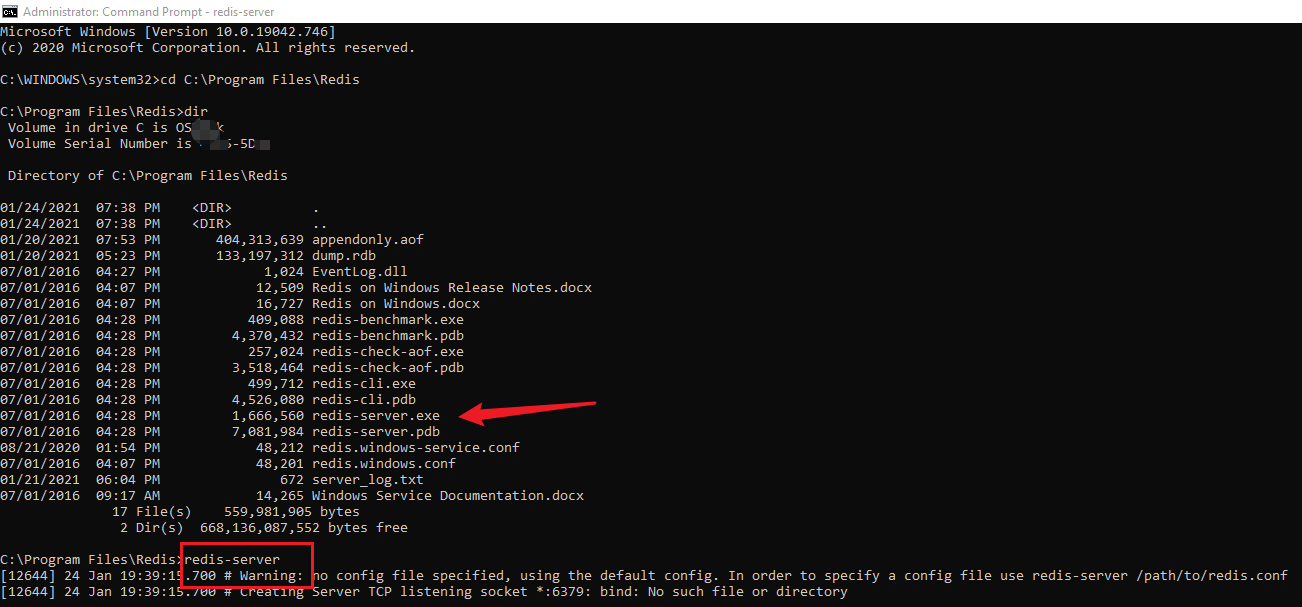
把准备好的RDB文件改名为dump.rdb复制到本地与Redis-server.exe同级目录下,重新启动redis-server.exe Redis-Server会默认从当前启动文件夹中加载dump的文件作为初始化数据。 C:\Program Files\Redis>redis-server |
| 追加AOF数据 |
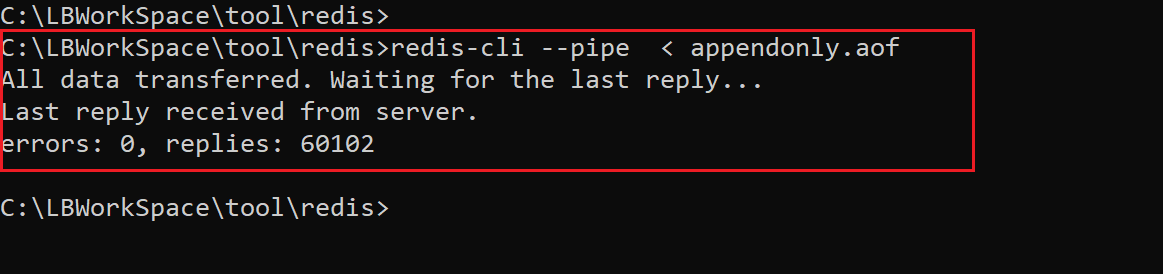
1:准备好aof文件,如无,可以通过redis命令BGREWRITEAOF生成最新的appendonly.aof文件 2:使用redis-cli --pipe命令,追加aof中的数据到Redis中。注: 此处的pipe后符号必须为 < redis-cli --pipe < appendonly.aof
|
Linux版本
| 启动Redis-server |
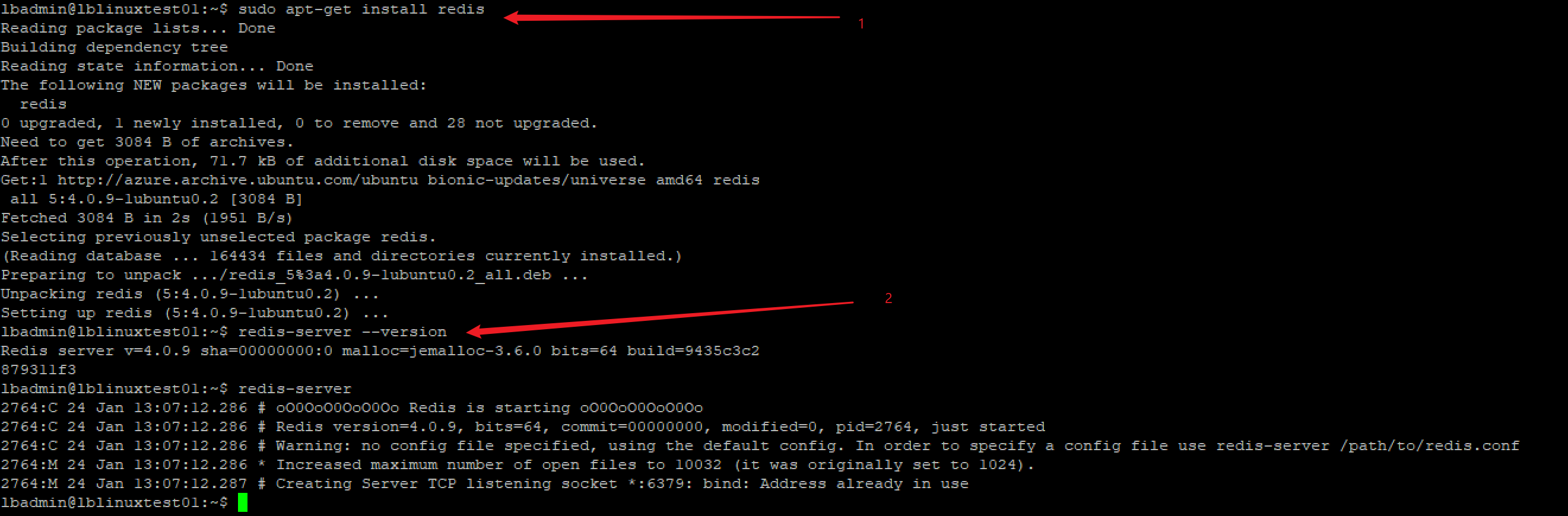
使用任何方式登录进Linux虚拟机,如本地使用PuTTY,登录到Linux后,完完全全参考Redis的官网启动Reids服务:https://redis.io/download#installation 有三种方式安装Reids,从源代码,从Ubuntu PPA和从Snapcraft
|
| 复制RDB文件进入Linux |
查看当前Linux中运行的Redis目录,使用redis-cli连接成功后,使用config get dir命令查看。 127.0.0.1:6379> config get dir 通常来讲,第二行数据的路径为当前Redis服务的启动路径,把RDB文件改名为dump.rdb后复制到该目录下 使用PSCP命令复制到/tmp目录,然后再Linux中使用root权限复制到/var/lib/redis目录 #在Windows中运行pscp命令。如遇见无法访问某个文件夹,则修改文件目录 |
| 加载dump.rdb文件 |
当dump.rdb文件存在于redis目录后。重启Reids服务即可 |
| 追加AOF数据 |
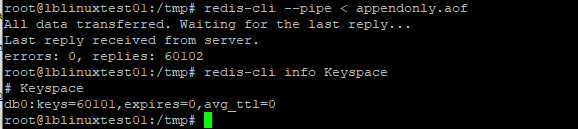
在Windows中,使用PSCP命令把准备好的AOF文件发送到Linux tmp目录中 在tmp目录下使用 redis-cli --pipe < appendonly.aof 追加aof日志到运行的Redis中。然后通过info Keyspace查看当前的信息
|

操作中遇见的错误:
1:no config file specified, using the default config. In order to specify a config file use redis-server /path/to/redis.conf
在redis的目录文件中,已经包含了redis.windows.config文件,可以在启动redis-server时指定config文件。如:redis-server redis.windows.conf
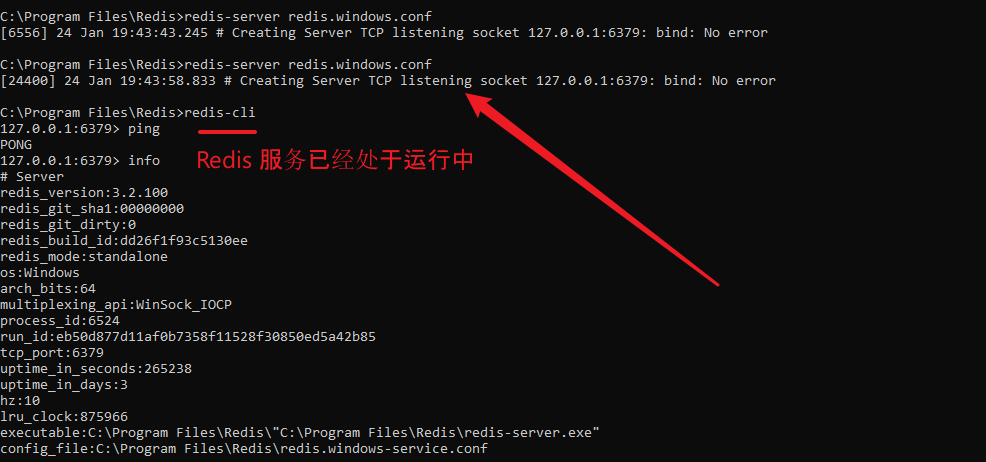
2:Creating Server TCP listening socket 127.0.0.1:6379: bind: No error
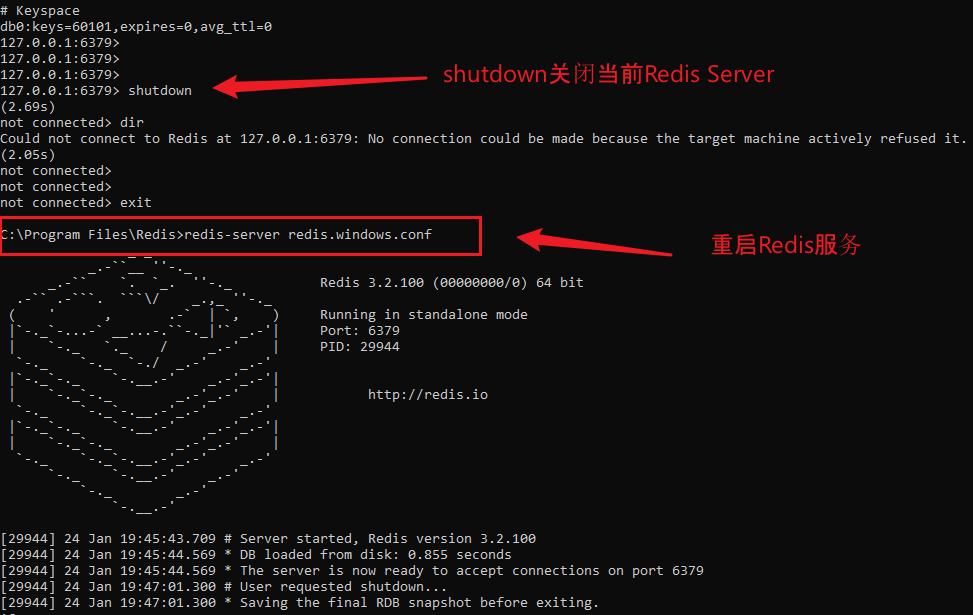
表明6379已经被占用,可以通过redis-cli连接上去。然后执行shutdown命令关闭已经运行的Redis-server, 重启即可。
SHUTDOWN & RESTART
参考资料:
Windows Redis: https://github.com/microsoftarchive/redis/releases
Reids官网:https://redis.io/download#installation
Linux Copy File Command:https://www.cyberciti.biz/faq/copy-command/
Redis Backup:https://www.w3resource.com/redis/redis-backup.php
Copy File:https://comtechies.com/copy-files-between-windows-and-linux.html
Putty Copy File:https://www.ssh.com/ssh/putty/putty-manuals/0.68/Chapter5.html
【Azure Redis 缓存】Windows和Linux系统本地安装Redis, 加载dump.rdb中数据以及通过AOF日志文件追加数据的更多相关文章
- Redis进阶实践之六Redis Desktop Manager连接Windows和Linux系统上的Redis服务
一.引言 今天本来没有打算写这篇文章,当初我感觉使用这个工具应该很简单,下载的过程也不复杂,也没有打算记录下来.但是在使用的过程中还是出现了一些问题,为了给第一次使用Redis Desktop Man ...
- Redis进阶实践之六Redis Desktop Manager连接Windows和Linux系统上的Redis服务(转载6)
Redis进阶实践之六Redis Desktop Manager连接Windows和Linux系统上的Redis服务 一.引言 今天本来没有打算写这篇文章,但是,今天测试Redis的时候发现了两个问题 ...
- Linux系统下安装Redis和Redis集群配置
Linux系统下安装Redis和Redis集群配置 一. 下载.安装.配置环境: 1.1.>官网下载地址: https://redis.io/download (本人下载的是3.2.8版本:re ...
- 在VMware的Linux系统上安装Redis
在VMware的Linux系统上安装Redis 具体过程如下: 下载,解压和编译: 在执行make的时候报错,具体报错信息如下: zmalloc.o: In function `zmalloc_use ...
- CentOS Linux系统下安装Redis过程和配置参数说明
转载于:http://www.itxuexiwang.com/a/shujukujishu/redis/2016/0216/102.html?1455869303 安装过程: 代码如下: wget h ...
- redis在windows和Linux系统下的下载、安装、配置
1.下载redis安装包 在redis的官网只有Linux系统下的安装包,微软的GitHub上有提供windows版本的redis安装包 redis中文网:http://www.redis.cn/ 微 ...
- linux系统下安装redis以及java调用redis
关系型数据库:MySQL Oracle 非关系型数据库:Redis 去掉主外键等关系数据库的关系性特性 1)安装redis编译的c环境,yum install gcc-c++ 2)将redis-2. ...
- linux系统下安装redis及配置
下载Redis redis-3.2.11.tar.gz 解压编译 tar xzf redis-3.2.11.tar.gz cd redis-3.2.11 make 编译完成之后,可以看到解压文件red ...
- Linux系统下安装redis
Linux 下安装 下载地址:http://redis.io/download,下载最新文档版本. 本教程使用的最新文档版本为 2.8.17,下载并安装: $ wget http://download ...
随机推荐
- 网络知识扫盲——DNS
参考文章链接 : https://baijiahao.baidu.com/s?id=1668393227924896391&wfr=spider&for=pc 一.DNS 是什么? ...
- html2canvas实现浏览器截图的原理(包含源码分析的通用方法)
DevUI是一支兼具设计视角和工程视角的团队,服务于华为云DevCloud平台和华为内部数个中后台系统,服务于设计师和前端工程师. 官方网站:devui.design Ng组件库:ng-devui(欢 ...
- 01 . GitLab简介及环境部署
GitLab简介 最初,该产品名为GitLab,是完全免费的开源软件,按照MIT许可证分发. 2013年7月,产品被拆分为:GitLabCE(社区版)和GitLabEE(企业版),当时,GitLabC ...
- JDBC学习(错误反思)
注意拼写错误!!! 注意拼写错误!!! 注意拼写错误!!! 文档注释快捷键 alt+shift+J
- eclipse 4.4安装aptana插件
eclipse 4.4安装aptana插件: 1.地址: http://download.aptana.com/studio3/plugin/update/index.html.在线安装即可成功! 2 ...
- HTML学习案例--仿淘宝商品信息
步骤:1.布局分析 2.敲代码 考察知识点: 1.类选择器(素材第四天) 2.CSS关于display,padding,margin的应用 3.如何用div布局 总结: 如果想让一行有两组以上的字块, ...
- TurtleBot3 Waffle (tx2版华夫)(1)笔记本上安装虚拟机、 Ubuntu 系统
1.1虚拟机的安装 1.1.1.windows7系统建议安装14.1版本 VMware workstation 百度云链接: 链接:https://pan.baidu.com/s/1q6Lh9fMuX ...
- spark的运行指标监控
sparkUi的4040界面已经有了运行监控指标,为什么我们还要自定义存入redis? 1.结合自己的业务,可以将监控页面集成到自己的数据平台内,方便问题查找,邮件告警 2.可以在sparkUi的基础 ...
- Spring框架之spring-webmvc源码完全解析
Spring框架之spring-webmvc源码完全解析 Spring框架提供了构建Web应用程序的全功能MVC模块.Spring MVC分离了控制器.模型对象.分派器以及处理程序对象的角色,支持多种 ...
- OpenWRT19.07_命令行_重拨wan_重启路由
OpenWRT19.07_命令行_重拨wan_重启路由 转载注明来源: 本文链接 来自osnosn的博客,写于 2020-10-19. 写OpenWRT的脚本时,需要用到一些重启命令 以下的命令中的参 ...