
Android 之 使用 Intent 在活动间传递数据
•前言
继上次学习了《通过 Intent 完成点击按钮实现页面跳转》后,我们知道了如何通过 Intent 实现页面跳转;
Intent 除了可以实现页面跳转外,还可以在跳转的时候传递数据;
接下来我们就来看看如何传递;
•准备工作
接着使用上次的活动 MainActivity 和 AnotherActivity;
对布局文件 activity_another.xml 做一些小小的改动;
activity_another.xml
<?xml version="1.0" encoding="utf-8"?>

<RelativeLayout xmlns:android="http://schemas.android.com/apk/res/android"

    android:layout_width="match_parent"

    android:layout_height="match_parent"

    android:padding="10dp">

    <TextView

        android:layout_width="wrap_content"

        android:layout_height="wrap_content"

        android:layout_centerInParent="true"

        android:text="This is Another Activity!"

        android:textSize="20sp"

        android:textColor="@color/black"/>

    <TextView

        android:id="@+id/string"

        android:layout_width="wrap_content"

        android:layout_height="wrap_content"/>

</RelativeLayout>
额外添加了一个 TextView 用于接收传递的数据;
•向下一个活动传递数据
使用 Intent 不仅可以启动一个活动,还可以在启动活动的时候传递数据;
接下来我们就看看如何传递;
Intent 中提供了一系列 putExtra() 方法的重载;
该方法可以把我们想要传递的数据暂存在 Intent 中;
通过 Intent 启动了另一个活动后,只需要把这些数据从 Intent 中取出来就可以了;
修改 MainActivity.java 中的代码;
MainActivity.java
public class MainActivity extends AppCompatActivity {

    ......

    @Override

    protected void onCreate(Bundle savedInstanceState) {

        ......

        mBtn.setOnClickListener(new View.OnClickListener(){

            @Override

            public void onClick(View v) {

                Intent intent = new Intent(MainActivity.this,AnotherActivity.class);

                String data = "我是传递的数据:data";

                intent.putExtra("key",data);

                startActivity(intent);

            }

        });

    }

}
通过 Intent 启动 AnotherActivity,并通过 putExtra() 方法传递了一个字符串 data;
putExtra() 接受两个参数:
第一个参数是键 key
- 用于后面从 Intent 中取值
第二个参数是值 data
- 真正要传递的数据
然后,我们在 AnotherActivity 中将该数据取出,并设置到 TextView 上;
AnotherActivity.java
public class AnotherActivity extends AppCompatActivity {

    private TextView mTvString;

    @Override

    protected void onCreate(Bundle savedInstanceState) {

        super.onCreate(savedInstanceState);

        setContentView(R.layout.activity_another);

        mTvString = findViewById(R.id.string);

        Intent intent = getIntent();

        String data = intent.getStringExtra("key");

        mTvString.setText(data);

    }

}
首先,通过 getIntent() 方法获取到用于启动 AnotherActivity 的 Intent;
然后调用 getStringExtra() 方法,传入相应的键值,就可以得到传递的数据了;
通过 setText() 方法将其显示在 UI 界面上;
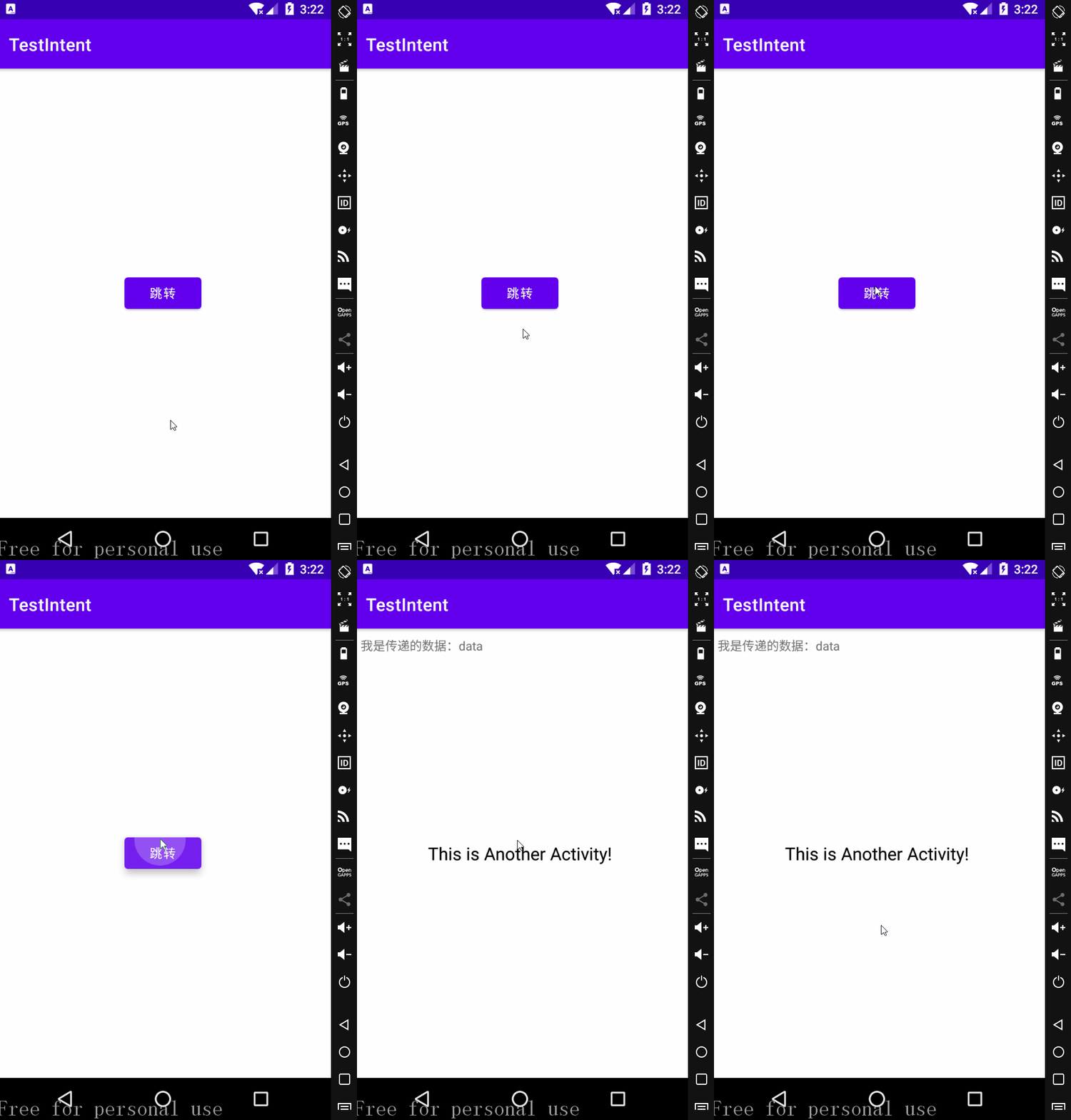
运行效果

Android 之 使用 Intent 在活动间传递数据的更多相关文章
- Android基础知识04—Activity活动之间传递数据
------活动之间传递数据------ 向下一个活动传递数据: Intent中提供了一系列的putExtra()方法,可以把数据暂存到Intent中,启动另一个活动的时候就可以取出来. 代码: (存 ...
- android中使用Intent在activity之间传递数据
android中intent传递数据的简单使用: 1.使用intent传递数据: 首先将需要传递的数据放入到intent中 Intent intent = new Intent(MainActivit ...
- 使用Bundle在Activity间传递数据
使用Bundle在Activity间传递数据 源Activity public class SourceActivty extends Activity { private Intent intent ...
- 小菜学习Winform(五)窗体间传递数据
前言 做项目的时候,winfrom因为没有B/S的缓存机制,窗体间传递数据没有B/S页面传递数据那么方便,今天我们就说下winfrom中窗体传值的几种方式. 共有字段传递 共有字段传递实现起来很方便, ...
- C#中使用SendMessage在进程间传递数据的实例
原文:C#中使用SendMessage在进程间传递数据的实例 1 新建解决方案SendMessageExample 在解决方案下面新建三个项目:CopyDataStruct,Receiver和Send ...
- StoryBoard学习(5):使用segue页面间传递数据
StoryBoard学习(5):使用segue页面间传递数据 函数: - (void)prepareForSegue:(UIStoryboardSegue *)segue sender:(id)sen ...
- WinForm 窗体间传递数据
前言 做项目的时候,winfrom因为没有B/S的缓存机制,窗体间传递数据没有B/S页面传递数据那么方便,今天我们就说下winfrom中窗体传值的几种方式. 共有字段传递 共有字段传递实现起来很方便, ...
- 在微信小程序页面间传递数据总结
在微信小程序页面间传递数据 原文链接:https://www.jianshu.com/p/dae1bac5fc75 在开发微信小程序过程之中,遇到这么一些需要在微信小程序页面之间进行数据的传递的情况, ...
- Andoid Intent学习之在各个活动之间传递数据
Intent是一种运行时绑定(run-time binding)机制,它能在程序运行过程中连接两个不同的组件.通过Intent,你的程序可以向Android表达某种请求或者意愿,Android会根据意 ...
随机推荐
- HTML5 dataset All In One
HTML5 dataset All In One dataset https://developer.mozilla.org/en-US/docs/Web/API/HTMLOrForeignEleme ...
- macOS 需要更新软件才能连接到 iOS 设备
macOS 需要更新软件才能连接到 iOS 设备 更新 Mac 上的软件 如果您在 iPhone.iPad 或 iPod touch 上看到"需要更新软件才能连接到 iOS 设备" ...
- React Hooks & React v16.8.6
React Hooks Hooks are a new addition in React 16.8 const [state, setState] = useState(initialState); ...
- how to open a terminal in finder folder of macOS
how to open a terminal in finder folder of macOS shit service demo refs https://lifehacker.com/launc ...
- Build your own React
Build your own React https://pomb.us/build-your-own-react/ https://github.com/pomber/didact demo htt ...
- input number css hidden arrow
input number css hidden arrow show arrow OK input[type="number"]::-webkit-inner-spin-butto ...
- ubuntu无法连接有线网
问题描述: ubuntu下仅能连接无线网,不能连接有线网,在有线网的下面是没有选项可供连接. 解决方法: 编辑 /etc/network/interfaces 这个文件 将里面仅仅写两句话 auto ...
- [转]ROS Q&A | How to read LaserScan data
http://www.theconstructsim.com/read-laserscan-data/ Step 1. Open a project on ROS Development Studio ...
- 无所不能的Embedding7 - 探索通用文本表达[FastSent/InferSent/GenSen/USE]
在4/5章我们讨论过用skip-thought,quick-thought任务来进行通用文本向量提取,当时就有一个疑问为什么用Bookcorpus这种连续文本,通过预测前一个和后一个句子的方式得到的文 ...
- HashMap扩容后是否需要rehash?
需要,因为要重新计算旧数组元素在新数组地址.HashMap在JDK1.8中的rehash算法(也就是扩容后重新为里面的键值对寻址的算法)进行优化.hash寻址算法是 index =(n - 1) &a ...