
[Xamarin] 透過StartActivityForResult傳值回來(转贴)
上一篇文章(開啟另外一個Activity 並且帶資料),提到了開啟一個新的Activity ,我們將值透過intent 帶到下個Activity
但是,如果我們開啟的Actrivity其實是有一個任務的,他必須要回傳值回來,讓父親可以知道一些訊息可以帶回來,我們該如何做
這次案例首先主畫面為.
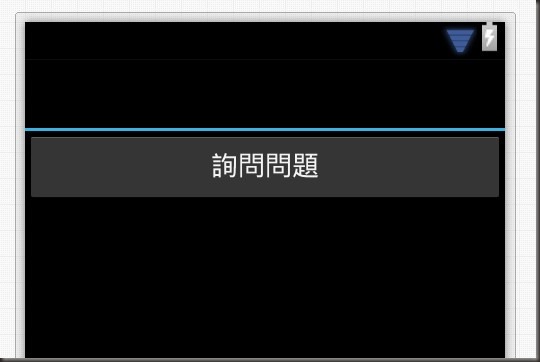
點下按鈕後,就會開啟 LayoutAskQuestion.axml
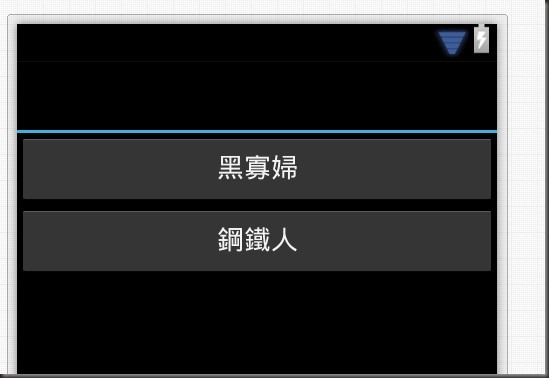
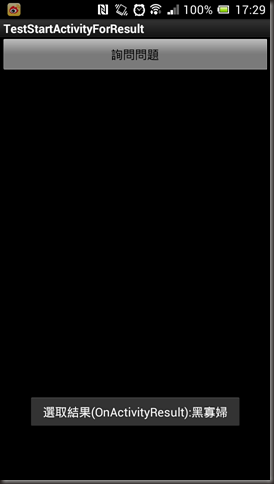
然後就會回到主要的畫面,並且Toast剛剛選擇的結果.
內容我就寫在code 註解裡..
主畫面 Main.axml :
<?xml version="1.0" encoding="utf-8"?>
<LinearLayout xmlns:android="http://schemas.android.com/apk/res/android"
android:orientation="vertical"
android:layout_width="fill_parent"
android:layout_height="fill_parent">
<Button
android:id="@+id/btnAskQuestion"
android:layout_width="fill_parent"
android:layout_height="wrap_content"
android:text="詢問問題" />
</LinearLayout>
Activity1.cs:
using Android.App;
using Android.Content;
using Android.Widget;
using Android.OS;
namespace TestStartActivityForResult
{
[Activity(Label = "TestStartActivityForResult", MainLauncher = true, Icon = "@drawable/icon")]
public class Activity1 : Activity
{
protected override void OnCreate(Bundle bundle)
{
base.OnCreate(bundle);
SetContentView(Resource.Layout.Main);
var btnAskQuestion = FindViewById<Button>(Resource.Id.btnAskQuestion);
//詢問的按鈕按下後
btnAskQuestion.Click += delegate
{
//因為期許他將回傳值,所以使用StartActivityForResult 叫起
//第二參數為 requestcode 這邊主要是設定讓 OnActivityResult 可以判斷當初發出的動機
StartActivityForResult(typeof(ActivityAskQuestion), 1);
};
}
/// <summary>
/// 當有 AcrivityForReult Activity 被呼叫且結束後
/// </summary>
/// <param name="requestCode"></param>
/// <param name="resultCode"></param>
/// <param name="data"></param>
protected override void OnActivityResult(int requestCode, Result resultCode, Intent data)
{
base.OnActivityResult(requestCode, resultCode, data);
//如果當初的發的requestCode =1
if (requestCode == 1 && resultCode == Result.Ok)
{
Toast.MakeText(this, "選取結果(OnActivityResult):" + data.GetStringExtra("hero"), ToastLength.Short).Show();
}
}
}
}
被呼叫端 LayoutAskQuestion.axml :
<?xml version="1.0" encoding="utf-8"?>
<LinearLayout xmlns:android="http://schemas.android.com/apk/res/android"
android:orientation="vertical"
android:layout_width="fill_parent"
android:layout_height="fill_parent">
<Button
android:id="@+id/btnBlackWidow"
android:layout_width="fill_parent"
android:layout_height="wrap_content"
android:text="黑寡婦" />
<Button
android:id="@+id/btnIronMan"
android:layout_width="fill_parent"
android:layout_height="wrap_content"
android:text="鋼鐵人" />
</LinearLayout>
ActivityAskQuestion.cs:
using Android.App;
using Android.Content;
using Android.OS;
using Android.Widget;
namespace TestStartActivityForResult
{
[Activity(Label = "Son Activity")]
public class ActivityAskQuestion : Activity
{
protected override void OnCreate(Bundle bundle)
{
base.OnCreate(bundle);
SetContentView(Resource.Layout.LayoutAskQuestion);
var btnBlackWidow = FindViewById<Button>(Resource.Id.btnBlackWidow);
btnBlackWidow.Click += delegate
{
//開啟一個新的intent
var intent = new Intent(this, typeof(Activity1));
//放入一個key 為hero 值為 黑寡婦
intent.PutExtra("hero", "黑寡婦");
//狀態設為OK
SetResult(Result.Ok, intent);
//呼叫後將關閉此視窗
Finish();
};
var btnIronMan = FindViewById<Button>(Resource.Id.btnIronMan);
btnIronMan.Click += delegate
{
var intent = new Intent(this, typeof(Activity1));
intent.PutExtra("hero", "鋼鐵人");
SetResult(Result.Ok, intent);
Finish();
};
}
}
}
呼叫結果..
[Xamarin] 透過StartActivityForResult傳值回來(转贴)的更多相关文章
- [Xamarin] 透過 intent-filter 來接管 http ,製作偽瀏覽器 (转帖)
使用Android 的朋友一定對這畫面不陌生在開啟網址的時候,或是Youtube連結的時候,因為Android 發現,你手機安裝的App有哪些可以支援這些東西的瀏覽 所以,就可以使用甚麼東西來進行開啟 ...
- [Xamarin] 透過Native Code呼叫 JavaScript function (转帖)
今天我們來聊聊關於如何使用WebView 中的Javascript 來呼叫 Native Code 的部分 首先,你得先來看看這篇[Xamarin] 使用Webview 來做APP因為這篇文章至少講解 ...
- [Xamarin] 透過WebClient跟網路取得資料 (转帖)
之前寫過一篇文章,關於在Android上面取得資料 透過GET方式傳資料給Server(含解決中文編碼問題) 我們來回顧一下 Android 端的Code: 有沒有超多,如果是在Xaramin下面,真 ...
- [Xamarin] 透過 IsolatedStorageFile儲存資料(转帖)
開發手機App通常都會遇到想要儲存資料的,舉個例來說,像是 (圖片來源:http://docs.xamarin.com/guides/android/application_fundamentals/ ...
- 使用 ssmtp 於 shell 透過 Gmail 寄信
有很多程式於 bash shell 執行, 執行完要自動寄信出去, 但是最近都被 Google 退信, 最好的方法是透過 Gmail 直接寄信. 本來是要另外寫隻 script 來做這種事, 剛剛發現 ...
- (STM32F4) 精準的Delay不透過Timer
從一個厲害的國外工程師看來的delay寫法,使用while loop會使用幾個指令去計算,可能會需要多少時間. while(variable--); 這行代碼執行一次預估會消耗MCU 4 clock ...
- [C#] 與Android共舞–透過GET方式傳資料給Server(含解決中文編碼問題) (转帖)
上一篇文章分享了透過POST 方式傳資料回Server,這一篇來談談有關於透過GET的方式傳遞 首先,如我預期的一樣,透過網址傳遞,會產生編碼問題,這邊我就順代解掉,希望有碰到的人 可以不用為此煩惱. ...
- [SQL]透過redgate SQL Monitor 來找出 ASYNC_NETWORK_IO 問題
原文:[SQL]透過redgate SQL Monitor 來找出 ASYNC_NETWORK_IO 問題 最近因為在查一個SQL的效能問題,透過 sys.dm_os_wait_stats 來取得To ...
- 透過手機 App 在 OpenELEC(XBMC)中輸入中文
這裡介紹如何使用手機 App 在沒有中文輸入法的 OpenELEC(XBMC)中輸入中文字. OpenELEC(XBMC)雖然有內建中文語系,但是卻沒有中文的輸入法,沒辦法直接輸入中文字,這對於一般家 ...
随机推荐
- Plupload 多实例上传 测试可用
<style type="text/css"> .btn{-webkit-border-radius:3px;-moz-border-radius:3px;-ms-bo ...
- Github 的注册教程和初步使用体验
我叫许晴,是网工143的学生,学号是1413042064,兴趣包括手绘,看书和手游.学习过c++和汇编语言课程,但在编程方面没什么独立实践经验. 我的Githup用户名是 XQ123 .下面是我在gi ...
- MySQL问题排查工具介绍
本总结来自美团内部分享,屏蔽了内部数据与工具 知识准备 索引 索引是存储引擎用于快速找到记录的一种数据结构 B-Tree,适用于全键值,键值范围或键最左前缀:(A,B,C): A, AB, ABC,B ...
- chrome一个奇怪的问题
我去........... 这牢骚发完了才发现, 多谢了个e 呃................. ================================= 晚上用bootstrap搭建一 ...
- Jenkins HA高可用参考
商用版Jenkins(CloudBee)提供HA插件,开源版本可以借助etcd服务发现+心跳脚本+sync的方式实现高可用.
- 使用像素单位设置 EXCEL 列宽或行高
在导出 Excel 的时候, 经常要需要给列设置宽度或给行设置高度, 在使用 NPOI 或 EppPlus 等组件进行操作的时候, 列宽和行高的单位都不是像素, 好像是英寸,具体是啥也说不清. 平常在 ...
- myeclipse过期以后提示过期以后怎么办?!
昨天电脑上装的myeclipse到期了,不能进到工作空间里边,只有激活和退出选项,在网上百度了一下,有很多破解工具, 1.刚开始直接使用工具破解,没有成功,总是提示要么激活,要么退出 2.继续想办法, ...
- AI-Info-Micron:人如其食:人工智能和人类微生物组
ylbtech-AI-Info-Micron:人如其食:人工智能和人类微生物组 1.返回顶部 1. 人如其食:人工智能和人类微生物组 “相信你身体发出的信号”,的确是一个很好的建议.研究人员在不遗余力 ...
- Mounting VMDK files in Linux
1.用 loop 方式挂载 vmdk 文件 losetup /dev/loop0 docker_pull-flat.vmdk 2.查看分区 [root@localhost]# parted /dev/ ...
- java学习笔记—JDBC1(16)
1.数据持久化 l 持久化(persistence):把数据保存到可掉电式存储设备中以供之后使用,也称为“固化”.在大多数情况下,服务器或客户端应用中数据的持久化是通过关系型数据库来实现 l 存储 ...