
纯css3实现的创意图片放大镜
今天要给大家分享的的一款用纯css3实现的图片放大镜特效。页面打开五个小图显示于页面。当鼠标经过图片时,当前图片以灰色背景图的形式展示。效果非常不错。
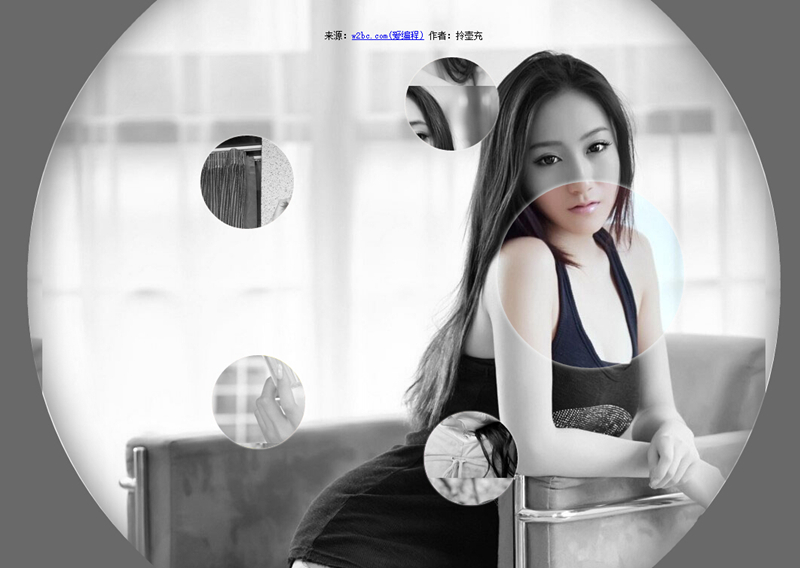
实现的代码:
html代码:
 <ul class="gallery">

        <li class="gallery__item"></li>

        <li class="gallery__item"></li>

        <li class="gallery__item"></li>

        <li class="gallery__item"></li>

        <li class="gallery__item"></li>

        <li class="gallery__item"></li>

</ul>
css代码:
.gallery

        {

            list-style: none;

        }

        .gallery:before, .gallery__item:last-child

        {

            position: fixed;

            top: 50%;

            left: 50%;

            margin: -31.25em;

            width: 62.5em;

            height: 62.5em;

        }

        .gallery:before

        {

            z-index: -1;

            border-radius: 50%;

            content: '';

            box-shadow: inset 0 0 5em dimgrey, 0 0 0 50vw dimgrey;

        }

        .gallery__item

        {

            background-blend-mode: luminosity;

            transition: -webkit-transform 0.5s cubic-bezier(0.175, 0.885, 0.32, 1.275), background-image 0.5s;

        }

        .gallery__item:not(:last-child)

        {

            position: absolute;

            top: 50%;

            left: 50%;

            width: 32vmin;

            height: 32vmin;

            border-radius: 50%;

            box-shadow: 0 0 .5em white;

        }

        .gallery__item:nth-child(1)

        {

            margin: 13.87457vmin -4.53223vmin;

            -webkit-transform: scale(0.5);

            background: url("imgs/1.jpg") 50% 50% fixed whitesmoke;

        }

        .gallery__item:nth-child(1):hover

        {

            -webkit-transform: scale(1);

            background-blend-mode: normal;

            cursor: pointer;

        }

        .gallery__item:nth-child(1):hover ~ :last-child

        {

            background: url("imgs/1.jpg") 50% 50% fixed dimgray;

        }

        .gallery__item:nth-child(1):hover ~ :last-child:after

        {

            opacity: .001;

        }

        .gallery__item:nth-child(2)

        {

            margin: 4.13825vmin -40.86867vmin;

            -webkit-transform: scale(0.5);

            background: url("imgs/2.jpg") 50% 50% fixed whitesmoke;

        }

        .gallery__item:nth-child(2):hover

        {

            -webkit-transform: scale(1);

            background-blend-mode: normal;

            cursor: pointer;

        }

        .gallery__item:nth-child(2):hover ~ :last-child

        {

            background: url("imgs/2.jpg") 50% 50% fixed dimgray;

        }

        .gallery__item:nth-child(2):hover ~ :last-child:after

        {

            opacity: .001;

        }

        .gallery__item:nth-child(3)

        {

            margin: -33.42845vmin -42.83746vmin;

            -webkit-transform: scale(0.5);

            background: url("imgs/3.jpg") 50% 50% fixed whitesmoke;

        }

        .gallery__item:nth-child(3):hover

        {

            -webkit-transform: scale(1);

            background-blend-mode: normal;

            cursor: pointer;

        }

        .gallery__item:nth-child(3):hover ~ :last-child

        {

            background: url("imgs/3.jpg") 50% 50% fixed dimgray;

        }

        .gallery__item:nth-child(3):hover ~ :last-child:after

        {

            opacity: .001;

        }

        .gallery__item:nth-child(4)

        {

            margin: -46.90963vmin -7.71779vmin;

            -webkit-transform: scale(0.5);

            background: url("imgs/4.jpg") 50% 50% fixed whitesmoke;

        }

        .gallery__item:nth-child(4):hover

        {

            -webkit-transform: scale(1);

            background-blend-mode: normal;

            cursor: pointer;

        }

        .gallery__item:nth-child(4):hover ~ :last-child

        {

            background: url("imgs/4.jpg") 50% 50% fixed dimgray;

        }

        .gallery__item:nth-child(4):hover ~ :last-child:after

        {

            opacity: .001;

        }

        .gallery__item:nth-child(5)

        {

            margin: -17.67475vmin 15.95615vmin;

            -webkit-transform: scale(0.5);

            background: url("imgs/5.jpg") 50% 50% fixed whitesmoke;

        }

        .gallery__item:nth-child(5):hover

        {

            -webkit-transform: scale(1);

            background-blend-mode: normal;

            cursor: pointer;

        }

        .gallery__item:nth-child(5):hover ~ :last-child

        {

            background: url("imgs/5.jpg") 50% 50% fixed dimgray;

        }

        .gallery__item:nth-child(5):hover ~ :last-child:after

        {

            opacity: .001;

        }

        .gallery__item:last-child

        {

            z-index: -2;

        }

        .gallery__item:last-child:after

        {

            position: absolute;

            top:;

            right:;

            bottom:;

            left:;

            opacity: .999;

            background: dimgrey;

            transition: opacity 2s;

            content: '';

        }
注:本文爱编程原创文章,转载请注明原文地址:http://www.w2bc.com/Article/5002
纯css3实现的创意图片放大镜的更多相关文章
- 8个超震撼的HTML5和纯CSS3动画源码
HTML5和CSS3之所以强大,不仅因为现在大量的浏览器的支持,更是因为它们已经越来越能满足现代开发的需要.Flash在几年之后肯定会消亡,那么HTML5和CSS3将会替代Flash.今天我们要给大家 ...
- 11个超震撼的HTML5和纯CSS3动画源码
1.jQuery多功能手风琴个人信息菜单面板 这是一款基于jQuery的手风琴个人信息菜单面板,每一个菜单项展开后可以自定义布局,因此可以为每一个菜单项实现多功能.类似这样的多功能菜单还有jQuery ...
- 纯CSS3实现的一些酷炫效果
之前在网上看到一些用纯CSS3实现的酷炫效果,以为实现起来比较困难,于是想看看具体是怎么实现的. 一.笑脸猫动画 实现效果如下: 这个实现起来确实比较麻烦,很多地方需要花时间,有耐心地调整. 1.先看 ...
- 纯css3圆形从中心向四周扩散动画效果
查看效果:http://hovertree.com/texiao/css3/37/ 先来个简单的示例,例如: @keyframes hovertreemove{from {top:30px;}to { ...
- 纯css3 3D图片立方体旋转动画特效
纯css3 3D立方体模块,鼠标触碰,模块炸开,大立方体中套小立方体 效果展示 手机扫描二维码体验效果: 效果图如下: 源码下载:http://hovertree.com/h/bjaf/0qmul8g ...
- 纯CSS3实现多层云彩变换飞行动画
查看效果:http://hovertree.com/texiao/css3/4/效果2 效果图: 代码如下: <!doctype html> <html lang="zh& ...
- 纯css3艺术文字样式效果代码
效果:http://hovertree.com/texiao/css3/1/ 本效果主要使用text-shadow实现.参考:http://hovertree.com/h/bjaf/css3_text ...
- 纯css3手机页面图标样式代码
全部图标:http://hovertree.com/texiao/css/19/ 先看效果: 或者点这里:http://hovertree.com/texiao/css/19/hoverkico.ht ...
- 纯CSS3实现动态火车行驶特效
上次开完飞机,这次开火车 查看效果:http://hovertree.com/texiao/css3/7/ 效果图: 代码如下: <!DOCTYPE html> <html> ...
随机推荐
- c语言入门经典(第5版)
文章转载:http://mrcaoyc.blog.163.com/blog/static/23939201520159135915734 文件大小:126MB 文件格式:PDF [点击下载] C ...
- 网线/双绞线上各标识CAT, AWG, PR, UTP/STP/FTP/SFTP的含义
CAT5, CAT5e, CAT6 表示网线类别, 常见的有 CAT5, CAT5e, CAT6分别表示五类, 超五类, 六类网线 24AWG, 26AWG American Wire Gauge是美 ...
- 转:CMake安装和使用
CMake是一个跨平台的安装(编译)工具,可以用简单的语句来描述所有平台的安装(编译过程).他能够输出各种各样的makefile或者project文件,能测试编译器所支持的C++特性,类似UNIX ...
- HDUOJ----1114(多重背包)悼念512汶川大地震遇难同胞——珍惜现在,感恩生活
悼念512汶川大地震遇难同胞——珍惜现在,感恩生活 Time Limit: 1000/1000 MS (Java/Others) Memory Limit: 32768/32768 K (Jav ...
- 推荐6款极具个性化的在线生成logo的网站
http://www.douban.com/group/topic/10434724/
- Unix环境高级编程(二十)伪终端
1.综述 伪终端对于一个应用程序而言,看上去像一个终端,但事实上伪终端并不是一个真正的终端.从内核角度看,伪终端看起来像一个双向管道,而事实上Solaris的伪终端就是用STREAMS构建的.伪终端总 ...
- 固定尺寸内存块的缓冲队列类及C++实现源代码
-------------------------------------------------------------------------------- 标题: 固定尺寸内存块的缓冲队列类及实 ...
- Python ceil() 函数
描述 ceil(x) 函数返回一个大于或等于 x 的的最小整数(向上取整). 语法 以下是 ceil() 方法的语法: import math math.ceil( x ) 注意:ceil()是不能直 ...
- python标准库介绍——17 tempfile 模块详解
==tempfile 模块== [Example 2-6 #eg-2-6] 中展示的 ``tempfile`` 模块允许你快速地创建名称唯一的临时文件供使用. ====Example 2-6. 使用 ...
- Racket 版本的 24 点实现
Racket 版本的 24 点实现 #lang racket ; Author: woodfox ; Date: Oct 11, 2014 ; ==================== 1. Non- ...