
day2 Ubuntu配置源
1.寻找国内镜像源
https://mirrors.tuna.tsinghua.edu.cn/help/ubuntu/
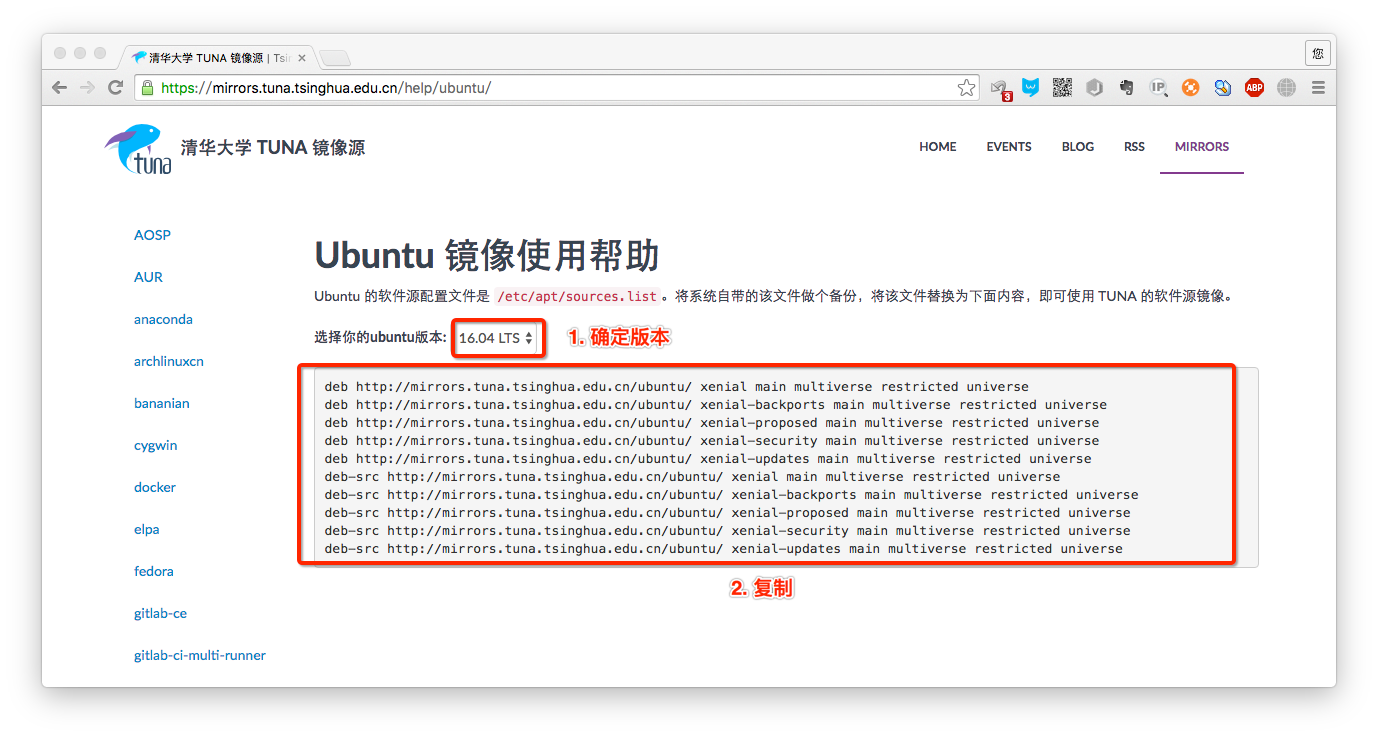
2.配置source list源
sources.list系统自带的,源是来Ubuntu的官网!安装包比较慢,所以最好切换成国内的
python@ubuntu:~$ cd /etc/apt

python@ubuntu:/etc/apt$ sudo cp sources.list sources.list.bak

python@ubuntu:/etc/apt$ vim sources.list
# 默认注释了源码镜像以提高 apt update 速度,如有需要可自行取消注释

deb https://mirrors.tuna.tsinghua.edu.cn/ubuntu/ xenial main restricted universe multiverse

# deb-src https://mirrors.tuna.tsinghua.edu.cn/ubuntu/ xenial main restricted universe multiverse

deb https://mirrors.tuna.tsinghua.edu.cn/ubuntu/ xenial-updates main restricted universe multiverse

# deb-src https://mirrors.tuna.tsinghua.edu.cn/ubuntu/ xenial-updates main restricted universe multiverse

deb https://mirrors.tuna.tsinghua.edu.cn/ubuntu/ xenial-backports main restricted universe multiverse

# deb-src https://mirrors.tuna.tsinghua.edu.cn/ubuntu/ xenial-backports main restricted universe multiverse

deb https://mirrors.tuna.tsinghua.edu.cn/ubuntu/ xenial-security main restricted universe multiverse

# deb-src https://mirrors.tuna.tsinghua.edu.cn/ubuntu/ xenial-security main restricted universe multiverse

# 预发布软件源,不建议启用

# deb https://mirrors.tuna.tsinghua.edu.cn/ubuntu/ xenial-proposed main restricted universe multiverse

# deb-src https://mirrors.tuna.tsinghua.edu.cn/ubuntu/ xenial-proposed main restricted universe multiverse
另:阿里云软件源
#我的配置文件源

# deb cdrom:[Ubuntu 16.04 LTS _Xenial Xerus_ - Release amd64 (20160420.1)]/ xenial main restricted

deb-src http://mirrors.aliyun.com/ubuntu/ xenial main restricted #Added by software-properties

# See http://help.ubuntu.com/community/UpgradeNotes for how to upgrade to

# newer versions of the distribution.

deb http://mirrors.aliyun.com/ubuntu/ xenial main restricted

deb-src http://mirrors.aliyun.com/ubuntu/ xenial multiverse universe #Added by software-properties

# deb-src http://us.archive.ubuntu.com/ubuntu/ xenial main restricted

## Major bug fix updates produced after the final release of the

## distribution.

deb http://mirrors.aliyun.com/ubuntu/ xenial-updates main restricted

deb-src http://mirrors.aliyun.com/ubuntu/ xenial-updates multiverse restricted universe main #Added by software-properties

# deb-src http://us.archive.ubuntu.com/ubuntu/ xenial-updates main restricted

## N.B. software from this repository is ENTIRELY UNSUPPORTED by the Ubuntu

## team, and may not be under a free licence. Please satisfy yourself as to

## your rights to use the software. Also, please note that software in

## universe WILL NOT receive any review or updates from the Ubuntu security

## team.

deb http://mirrors.aliyun.com/ubuntu/ xenial universe

# deb-src http://us.archive.ubuntu.com/ubuntu/ xenial universe

deb http://mirrors.aliyun.com/ubuntu/ xenial-updates universe

# deb-src http://us.archive.ubuntu.com/ubuntu/ xenial-updates universe

## N.B. software from this repository is ENTIRELY UNSUPPORTED by the Ubuntu

## team, and may not be under a free licence. Please satisfy yourself as to

## your rights to use the software. Also, please note that software in

## multiverse WILL NOT receive any review or updates from the Ubuntu

## security team.

deb http://mirrors.aliyun.com/ubuntu/ xenial multiverse

# deb-src http://us.archive.ubuntu.com/ubuntu/ xenial multiverse

deb http://mirrors.aliyun.com/ubuntu/ xenial-updates multiverse

# deb-src http://us.archive.ubuntu.com/ubuntu/ xenial-updates multiverse

## N.B. software from this repository may not have been tested as

## extensively as that contained in the main release, although it includes

## newer versions of some applications which may provide useful features.

## Also, please note that software in backports WILL NOT receive any review

## or updates from the Ubuntu security team.

deb http://mirrors.aliyun.com/ubuntu/ xenial-backports main restricted universe multiverse

deb-src http://mirrors.aliyun.com/ubuntu/ xenial-backports main restricted universe multiverse #Added by software-properties

# deb-src http://us.archive.ubuntu.com/ubuntu/ xenial-backports main restricted universe multiverse

## Uncomment the following two lines to add software from Canonical's

## 'partner' repository.

## This software is not part of Ubuntu, but is offered by Canonical and the

## respective vendors as a service to Ubuntu users.

# deb http://archive.canonical.com/ubuntu xenial partner

# deb-src http://archive.canonical.com/ubuntu xenial partner

deb http://mirrors.aliyun.com/ubuntu/ xenial-security main restricted

deb-src http://mirrors.aliyun.com/ubuntu/ xenial-security multiverse restricted universe main #Added by software-properties

# deb-src http://security.ubuntu.com/ubuntu xenial-security main restricted

deb http://mirrors.aliyun.com/ubuntu/ xenial-security universe

# deb-src http://security.ubuntu.com/ubuntu xenial-security universe

deb http://mirrors.aliyun.com/ubuntu/ xenial-security multiverse

# deb-src http://security.ubuntu.com/ubuntu xenial-security multiverse
3. 更新源
python@ubuntu:/etc/apt$ sudo apt-get update

命中: http://mirrors.aliyun.com/ubuntu xenial InRelease

命中: http://mirrors.aliyun.com/ubuntu xenial-updates InRelease

命中: http://mirrors.aliyun.com/ubuntu xenial-backports InRelease

命中: http://mirrors.aliyun.com/ubuntu xenial-security InRelease

正在读取软件包列表... 完成
测试:安装sl包

python@ubuntu:/etc/apt$ sudo apt-get install sl

python@ubuntu:/etc/apt$ sl

4.其他 命令
sudo apt-get update  更新源

sudo apt-get install package 安装包

sudo apt-get remove package 删除包

sudo apt-cache search package 搜索软件包

sudo apt-cache show package  获取包的相关信息,如说明、大小、版本等

sudo apt-get install package --reinstall   重新安装包

sudo apt-get -f install   修复安装

sudo apt-get remove package --purge 删除包,包括配置文件等

sudo apt-get build-dep package 安装相关的编译环境

sudo apt-get upgrade 更新已安装的包

sudo apt-get dist-upgrade 升级系统

sudo apt-cache depends package 了解使用该包依赖那些包

sudo apt-cache rdepends package 查看该包被哪些包依赖

sudo apt-get source package  下载该包的源代码

sudo apt-get clean && sudo apt-get autoclean 清理无用的包

sudo apt-get check 检查是否有损坏的依赖
day2 Ubuntu配置源的更多相关文章
- ubuntu 配置apt-get源
ubantu安装软件速度慢一般是因为系统默认选择的源导致,可以通过手动配置源设置解决. 1. 原文件备份 sudo mv /etc/apt/sources.list /etc/apt/sources. ...
- Ubuntu 配置镜像源
Ubuntu 配置镜像源 注, 如果添加镜像后没有自己要安装的软件, 切回原镜像即可, 只是有点慢. cp /etc/apt/sources.list /etc/apt/sources.list.ba ...
- Ubuntu配置国内高速apt-get更新源
Ubuntu配置国内高速apt-get更新源 具体内容直接参考这篇博客:https://www.linuxidc.com/Linux/2017-11/148627.htm 此网站可直接找到符合 ...
- Ubuntu 配置本地源
Ubuntu 配置本地源 操作系统 Ubuntu 20.04.2 LTS 一.挂载 iso 到本地 mount -t iso9660 -o loop /dev/sr0 /media/cdrom //- ...
- Ubuntu配置apt安装源为清华源[含自动配置脚本]
Ubuntu配置apt安装源为清华源[含自动配置脚本] 一.备份原配置文件 Ubuntu 的软件源配置文件是/etc/apt/sources.list.将系统自带的该文件做个备份,以防万一. sudo ...
- Ubuntu配置OpenStack 二:配置时间同步NTP和安装数据库Maridb以及问题总结
继上一节Ubuntu配置OpenStack 一:配置主机环境,下面继续为安装时间同步,以及配置openstack的安装包源和安装数据库Maridb.(全文截图都是由自己徒手搭建完成并且截图) 一.安装 ...
- Ubuntu TensorFlow 源码 Android Demo的编译运行
Ubuntu TensorFlow 源码 Android Demo的编译运行 一. 安装 Android 的SDK和NDK SDK 配置 A:下载 国内下载地址选最新的: SDK: https://d ...
- ubuntu配置小飞机
现在有两种方式在ubuntu配置本地shadowsocks(前提已经在服务器上搭建好了ss) windows,ios和安卓配置都是gui,没什么好说的.然后前期工作什么买vps啊,比较无脑,不想记录这 ...
- Ubuntu 配置安装PCL
Ubuntu 配置安装PCL 之前一直在Mac下开发,现在入手Ubuntu,也借此学习一下Linux下的源码编译安装过程. PCL简介 PCL(Point Cloud Library)是在吸收了前人点 ...
随机推荐
- python一键对应多个值
背景:目前是想让一个取出来的数据,数据有2个或多个值,对应一个key,或者这样说:让一个键对应2个值或者3个值 实现方式,如下:目前我以读取xml文件为案例,读取xml中两个配置文件,存放到一个key ...
- linux mint sublime3的c编译环境配置
通过Tools>>Build System>>New Build System弹出新建文件来设置,也可以replace覆盖以前的 一种方式,konsole可以通过sudo ap ...
- ACM退役帖
不知不觉在ACM竞赛的道路上已经走了两年半了,不得不感慨时间真的是过得很快. 还记得大一的时候什么也不会,每天晚上翘晚自习来机房刷题,浑浑噩噩的经过大一的打铁,大二开始有计划系统的学习ACM知识点,直 ...
- 【[CQOI2016]手机号码】
递推版的数位dp 绝对的暴力美学 我们设\(dp[l][i][j][0/1][0/1][0/1]\)表示到了第\(l\)位,这一位上选择的数是\(i\),\(l-1\)位选择的数是\(j\),第一个\ ...
- Mysql中函数和存储过程的区别
Mysql中函数和存储过程的区别 存储过程: 1. 可以写sql语句 2. inout,out构造返回值 3. 调用:call:存储过程名称 4. 可以 ...
- [19/05/02-星期四] GOF23_行为型模式(状态模式、观察者模式、备忘录模式)
一.状态模式 [状态接口] /*** * 房间"状态"接口 */ package cn.sxt.state; public interface State { void handl ...
- 【JavaScript】particle
这是js实现的粒子动画,有两种模式,分别是zoom和line,它们对应的效果不同,但是原理都相同,具体分析如下: 部分程序如下: var p = this; p.originParams = orig ...
- [Python 多线程] Semaphore、BounedeSemaphore (十二)
Semaphore 信号量,信号量对象内部维护一个倒计数器,每一次acquire都会减1,当acquire方法发现计数为0就阻塞请求的线程,直到其它线程对信号量release后,计数大于0,恢复阻塞的 ...
- docker参数
Usage: docker run [OPTIONS] IMAGE [COMMAND] [ARG...] -d, --detach=false 指定容器运行于前台还是后台,默认为false -i, - ...
- Eclipse查看.properties文件中文乱码
在中文操作系统中,Eclipse中的Java类型文件的编码的默认设置是GBK,但是对Properties资源文件的编码的默认设置是ISO-8859-1.所以编辑Java文件中的中文不会出现问题,但编辑 ...