
Unity Lighting - Reflections 反射(六)
Reflections 反射
Reflection Source 反射源
By default, objects in a scene are rendered using Unity’s ‘Standard Shader’. The Standard Shader is a 'physically based shader' (PBS). This attempts to accurately represent the behavior of light on materials by mimicking physical properties such as reflectivity and the principles of ‘energy conservation’ which exist in the real world.
默认情况下,场景中的对象使用Unity的“标准着色器”渲染。 标准着色器是一个“基于物理的着色器”(PBS)。 这试图通过模仿物理特性(如反射率和现实世界中存在的“能量守恒”原则)来准确地表示光在材质上的行为。
When using the Standard Shader, every material has a degree of reflectivity based on its ‘specularity’, or ‘metalness’. Without hardware powerful enough to ray trace reflections in realtime we have to rely on pre-rendering reflections. We do this with a cubemap - a 6-sided image of the world derived either from the sky, or from a ‘Reflection Probe’ which renders the environment from a specific point in space, writing the results to a texture. This is then blended with other lighting and surface data by a material’s shader in order to approximate the effects of reflectivity, like we see in the real world.
使用标准着色器时,每种材质都会根据其“镜面反射率”或“金属感”具有一定程度的反射率。 没有足够强大的硬件来实时追踪反射,我们必须依靠预渲染反射。 我们用一个立方体贴图来实现这个功能 - 这是一张来自天空的6面影像,也可以是一个从空间特定点渲染环境的“反射探测器”,将结果写入纹理。 然后通过材质的着色器将其与其他照明和表面数据混合,以便近似反射率的影响,就像我们在现实世界中看到的那样。
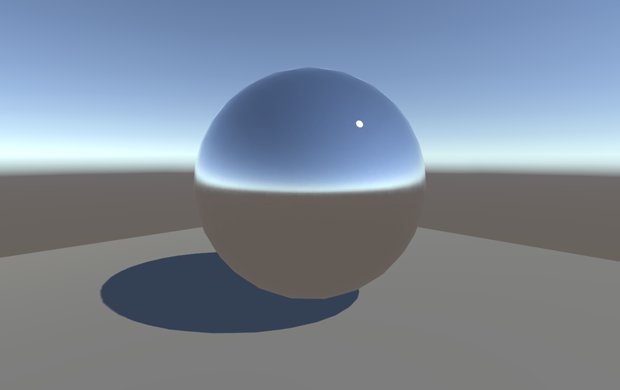 By default, highly Specular/Metal materials in your scene will reflect the Skybox, defined by the Reflection Source property of the Environment Lighting Panel. This behaviour can be changed by choosing a different source, or by adding a Reflection Probe to your scene.
默认情况下,场景中的高度镜面/金属材质将反映由环境照明面板的反射源属性定义的Skybox。这种行为可以通过选择不同的来源或通过向场景添加反射探针来改变。
By default, objects in a Unity scene will reflect the Skybox. However, this behaviour can be changed globally in the Lighting window using the ‘Reflection Source’ property. The Skybox, or alternatively, a custom cubemap may be used. This ‘Reflection Source’ can be thought of as a scene-wide cubemap used by all objects in the scene, unless overridden - by adding a Reflection Probe.
默认情况下,Unity场景中的对象将反映Skybox。但是,这种行为可以在照明窗口中使用“反射源”属性进行全局更改。可以使用Skybox或者自定义立方体贴图。这个“反射源”可以被认为是场景中所有对象使用的场景范围的立方体贴图,除非通过添加反射探测器覆盖这个反射源。
Reflection Probes 反射探针
Often it is undesirable for objects to simply reflect the Skybox in a Unity scene. In many instances, objects may be blocked or ‘occluded’ from the sky. They may be indoors or underneath an architectural feature like a bridge or tunnel . To create more accurate reflections we need to sample what objects ‘see’ using a ‘Reflection Probe’. These probes render the world from their position in 3D space and write the results to a cubemap. This can then be used by nearby objects to give the impression that they are reflecting the world around them.
通常情况下,对象只能在Unity场景中反射Skybox是不可取的。在很多情况下,物体可能被遮挡或从天空“遮挡”。它们可能在室内或建筑特征如桥或隧道下。为了创建更精确的反射,我们需要使用“反射探针”来对什么物体进行“观察”。这些探测器从3D空间中的位置渲染世界,并将结果写入立方体贴图。这可以被附近的物体使用,给人的感觉是他们正在反射周围的世界。
A reflection probe can be added via (GameObject>Light>Reflection Probe).
反射探针可以通过(GameObject>Light>Reflection Probe)添加。
The position of a Reflection Probe will determine what the generated cubemap looks like, and therefore what is ‘seen’ in the reflections. Generally, for performance reasons it is better to use as few probes as possible. Remember, reflection probes are not meant to give physically accurate results, but instead give the impression of reflections in the game world. A few well placed probes throughout your scene will be sufficient in most cases.
反射探针的位置将决定生成的立方体贴图的外观,以及反射中“看到”的内容。一般来说,出于性能原因,最好尽可能少地使用探针。请记住,反射探测器并不是为了给出物理上准确的结果,而是给游戏世界带来反思的印象。在大多数情况下,整个场景中的几个放置好的探头就足够了。
 Left: Our scene with default reflections. Right: With a Reflection Probe added.
左:我们的场景具有默认反射。右图:添加了反射探针。
In the Inspector panel for a Reflection Probe we can set the ‘Type’ property of the probe to choose between ‘Baked’, ‘Custom’ or ‘Realtime’. It should be noted that Realtime Reflection Probes are extremely detrimental to performance as we are effectively rendering the scene an additional 6 times for each probe. There are specific cases where a realtime reflection probe is required and this expense is justified, but as a general rule, Baked Reflection Probes are preferable as they are considerably more performant.
在用于反射探针的Inspector面板中,我们可以设置探针的'Type'属性以在'烘焙','自定义'或'实时'之间进行选择。应该注意的是,实时反射探头对性能极其不利,因为我们有效地为每个探头再现了6次场景。有些特殊情况需要实时反射探头,而且这种费用是合理的,但作为一般规则,烘烤反射探头是更可取的,因为它们性能更高。
Note that GameObjects are only visible to Baked Reflection Probes if marked as ‘Reflection Probe Static’ from the ‘Static’ drop-down at the top of the Inspector panel. Conversely, ‘Realtime’ probes render all visible GameObjects in the world unless a culling mask is applied.
请注意,只有在检查器面板顶部的“Static”下拉列表中标记为“Reflection Probe Static(反射探针静态)”时,GameObjects才会对“Baked Reflection Probes(烘烤反射探针)”可见。相反,除非应用了剔除掩码,否则“实时”探针将呈现世界上所有可见的GameObjects。
<wiz_tmp_tag id="wiz-table-range-border" contenteditable="false" style="display: none;">
Unity Lighting - Reflections 反射(六)的更多相关文章
- Unity Lighting(一)光照练习
Unity 2018.1.2f1 原文链接:https://www.youtube.com/watch?v=VnG2gOKV9dw Unity Lighting练习最终效果 眼睛.光源与物体 光学基础 ...
- 关于Unity中的光照(六)
反射探头 1:镜子金属等具有光滑表面的物体都会反射,而游戏中计算实时反射非常消耗CPU的资源, unity5.0新增了一个反射探头的技术,通过采样点,生成反射Cubemap,然后通过特定的着色器从Cu ...
- 【Unity Shader】(六) ------ 复杂的光照(上)
笔者使用的是 Unity 2018.2.0f2 + VS2017,建议读者使用与 Unity 2018 相近的版本,避免一些因为版本不一致而出现的问题. [Unity Sha ...
- Unity Lighting - Light Types 灯光类型(八)
Light Types 灯光类型 We have now covered some of the project settings which need to be considered befo ...
- Unity Lighting - The Precompute Process 预计算过程(二)
The Precompute Process 预计算过程 In Unity, precomputed lighting is calculated in the background - eith ...
- Unity Lighting - Choosing a Lighting Technique 选择照明技术(一)
Choosing a Lighting Technique 选择照明技术 https://unity3d.com/cn/learn/tutorials/topics/graphics/choosi ...
- Unity Lighting - Lighting overview 照明概述
Lighting overview 照明概述 In order to calculate the shading of a 3D object, Unity needs to know the ...
- Unity插件 - MeshEditor(六) 变形动画状态机
变形动画状态机--MeshAnimator,是针对MeshAnimation的状态管理器,有大量类似Unity animator的功能,但MeshAnimator操作会更加简便,更加直观,居家旅(zh ...
- Unity Lighting - Light Probes 光照探针(十)
Light Probes 光照探针 Only static objects are considered by Unity’s Baked or Precomputed Realtime GI s ...
随机推荐
- Git--查看,删除,添加远程分支
1. 查看远程分支: $ git branch -a 2. 删除远程分支: $ git push origin --delete <branch name> 或者 git push --d ...
- linux mysql access denied for user ‘root’@’localhost'(using password:YES)
linux安装完mysql后,使用程序连接报以上错误解决方法,重新设置密码,步骤如下 1.先停掉原来的服务 service mysqld stop 2.使用安全模式登陆,跳过密码验证 mysqld_s ...
- Objective-C 方法交换实践(三) - Aspects 源码解析
一.类与变量 AspectOptions typedef NS_OPTIONS(NSUInteger, AspectOptions) { AspectPositionAfter = 0, /// 原方 ...
- redis 安装 配置 及启动
linux下安装redis及其中遇到的问题的解决方法1.将下载好的压缩包放到/usr/local目录下# tar xzf redis-3.0.2.tar.gz# cd redis-3.0.2# mak ...
- 一位老手关于HTML5的见解
HTML5新特性总结 HTML5属于上一代HTML的新迭代语言,设计HTML5最主要的目的是为了在移动设备上支持多媒体!!!例如: video 标签和 audio 及 canvas 标记 HTM ...
- PHP中使用RabiitMQ---各项参数的使用方法
RabbitMQ在PHP使用,我在这里对RabbitMQ的各项方法和参数进行了一些梳理,有不足的地方还望各位大神指点. 想要使用rabbitMQ消息队列,首先需要安装 php_amqp.dll 扩展 ...
- Golddata如何采集需要登录/会话的数据?
概要 本文将介绍使用GoldData半自动登录功能,来采集需要登录网站的数据.GoldData半自动登录功能,就是指通过脚本来执行登录,如果需要验证码或者其它内容需要人工输入时,可以通过收发邮件来执行 ...
- linux介绍及基本命令
linux简介 Linux内核最初只是由芬兰人李纳斯·托瓦兹(Linus Torvalds)在赫尔辛基大学上学时出于个人爱好而编写的. Linux是一套免费使用和自由传播的类Unix操作系统,是一个基 ...
- Zeta--S3 Linux抓取一帧YUV图像后使用硬件编码器编码成H.264
#include <stdio.h> #include <stdlib.h> #include <string.h> #include <getopt.h&g ...
- SSL&TlS握手
SSL/TLS简介 •SSL:安全套接字层(secure socket layer) •TLS:传输层安全协议(transport layer security) SSL和TLS都是加密协议,旨在基于 ...