
MySQL数据库之单双表查询
单表查询
先创建表
#创建表

create table employee(

id int not null unique auto_increment,

name varchar(20) not null,

sex enum('male','female') not null default 'male', #大部分是男的

age int(3) unsigned not null default 28,

hire_date date not null,

post varchar(50),

post_comment varchar(100),

salary double(15,2),

office int, #一个部门一个屋子

depart_id int

);

#查看表结构

mysql> desc employee;

+--------------+-----------------------+------+-----+---------+----------------+

| Field        | Type                  | Null | Key | Default | Extra          |

+--------------+-----------------------+------+-----+---------+----------------+

| id           | int(11)               | NO   | PRI | NULL    | auto_increment |

| name         | varchar(20)           | NO   |     | NULL    |                |

| sex          | enum('male','female') | NO   |     | male    |                |

| age          | int(3) unsigned       | NO   |     | 28      |                |

| hire_date    | date                  | NO   |     | NULL    |                |

| post         | varchar(50)           | YES  |     | NULL    |                |

| post_comment | varchar(100)          | YES  |     | NULL    |                |

| salary       | double(15,2)          | YES  |     | NULL    |                |

| office       | int(11)               | YES  |     | NULL    |                |

| depart_id    | int(11)               | YES  |     | NULL    |                |

+--------------+-----------------------+------+-----+---------+----------------+

#插入记录

#三个部门:教学,销售,运营

insert into employee(name,sex,age,hire_date,post,salary,office,depart_id) values

('egon','male',18,'','teacher',7300.33,401,1), #以下是教学部

('alex','male',78,'','teacher',1000000.31,401,1),

('wupeiqi','male',81,'','teacher',8300,401,1),

('yuanhao','male',73,'','teacher',3500,401,1),

('liwenzhou','male',28,'','teacher',2100,401,1),

('jingliyang','female',18,'','teacher',9000,401,1),

('jinxin','male',18,'','teacher',30000,401,1),

('成龙','male',48,'','teacher',10000,401,1),

('歪歪','female',48,'','sale',3000.13,402,2),#以下是销售部门

('丫丫','female',38,'','sale',2000.35,402,2),

('丁丁','female',18,'','sale',1000.37,402,2),

('星星','female',18,'','sale',3000.29,402,2),

('格格','female',28,'','sale',4000.33,402,2),

('张野','male',28,'','operation',10000.13,403,3), #以下是运营部门

('程咬金','male',18,'','operation',20000,403,3),

('程咬银','female',18,'','operation',19000,403,3),

('程咬铜','male',18,'','operation',18000,403,3),

('程咬铁','female',18,'','operation',17000,403,3)

;
1.注意:

    select * from t1 where 条件 group by 分组字段

    1.分组只能查询分组字段,要想查看其余的利用聚合函数

    2.聚合函数的分类:count,min,max,avg,group_concat,sum等。

    3.模糊匹配:用like关键字。

      select * from t1 where name like '%eg%'; #%表示任意字符

      select * from t1 where name like 'd__l'; #一个下划线表示一个字符,两个下划线就表示两个字符

    4.拷贝表 :create table t2 select * from t1;

               create table t2 select * from t1 where 1=2 ;
小知识
一.查询语法
SELECT 字段1,字段2... FROM 表名

                  WHERE 条件

                  GROUP BY field

                  HAVING 筛选

                  ORDER BY field

                  LIMIT 限制条数
二.简单查询
#简单查询

    SELECT id,name,sex,age,hire_date,post,post_comment,salary,office,depart_id

    FROM employee;

    SELECT * FROM employee;

    SELECT name,salary FROM employee;

#避免重复DISTINCT

    SELECT DISTINCT post FROM employee;

#通过四则运算查询

    SELECT name, salary*12 FROM employee;

    SELECT name, salary*12 AS Annual_salary FROM employee;

    SELECT name, salary*12 Annual_salary FROM employee;

#定义显示格式

   CONCAT() 函数用于连接字符串

   SELECT CONCAT('姓名: ',name,'  年薪: ', salary*12)  AS Annual_salary

   FROM employee;

   CONCAT_WS() 第一个参数为分隔符

   SELECT CONCAT_WS(':',name,salary*12)  AS Annual_salary

   FROM employee;
小练习:
1 查出所有员工的名字,薪资,格式为

    <名字:egon>    <薪资:3000>

select concat('<名字:',name,'> '  ,'<薪资:',salary,'>' ) from employee;

2 查出所有的岗位(去掉重复)

select distinct depart_id from employee;

3 查出所有员工名字,以及他们的年薪,年薪的字段名为年薪

select name,salary*12 年薪 from employee;
三.where约束
where字句中可以使用:
1. 比较运算符:> < >= <= <> !=
2. between 80 and 100 值在10到20之间
3. in(80,90,100) 值是80或90或100
4. like 'eg%'
可以是%或_,
%表示任意多字符
_表示一个字符
like 'e__n' :
5. 逻辑运算符:在多个条件直接可以使用逻辑运算符 and or not
#1:单条件查询

    SELECT name FROM employee

        WHERE post='sale';

#2:多条件查询

    SELECT name,salary FROM employee

        WHERE post='teacher' AND salary>10000;

#3:关键字BETWEEN AND

    SELECT name,salary FROM employee

        WHERE salary BETWEEN 10000 AND 20000;

    SELECT name,salary FROM employee

        WHERE salary NOT BETWEEN 10000 AND 20000;

#4:关键字IS NULL(判断某个字段是否为NULL不能用等号,需要用IS)

    SELECT name,post_comment FROM employee

        WHERE post_comment IS NULL;

    SELECT name,post_comment FROM employee

        WHERE post_comment IS NOT NULL;

    SELECT name,post_comment FROM employee

        WHERE post_comment=''; 注意''是空字符串,不是null

    ps:

        执行

        update employee set post_comment='' where id=2;

        再用上条查看,就会有结果了

#5:关键字IN集合查询

    SELECT name,salary FROM employee

        WHERE salary=3000 OR salary=3500 OR salary=4000 OR salary=9000 ;

    SELECT name,salary FROM employee

        WHERE salary IN (3000,3500,4000,9000) ;

    SELECT name,salary FROM employee

        WHERE salary NOT IN (3000,3500,4000,9000) ;

#6:关键字LIKE模糊查询

    通配符’%’

    SELECT * FROM employee

            WHERE name LIKE 'eg%';

    通配符’_’

    SELECT * FROM employee

            WHERE name LIKE 'al__';
四.having过滤
having和where语法上是一样的。
select * from employee where id>15;

select * from employee having id>15;
不同点:
#!!!执行优先级从高到低:where > group by > 聚合函数 > having >order by

1.where和having的区别

     1. Where 是一个约束声明,使用Where约束来自数据库的数据,Where是在结果返回之前起作用的

     (先找到表,按照where的约束条件,从表(文件)中取出数据),Where中不能使用聚合函数

     2.Having是一个过滤声明,是在查询返回结果集以后对查询结果进行的过滤操作

     (先找到表,按照where的约束条件,从表(文件)中取出数据,然后group by分组,

      如果没有group by则所有记录整体为一组,然后执行聚合函数,然后使用having对聚合的结果进行过滤),

      在Having中可以使用聚合函数。

     3.where的优先级比having的优先级高

     4.having可以放到group by之后,而where只能放到group by 之前。
验证:
1.查看员工的id>15的有多少个

select count(id) from employee where id>15;#正确,分析:where先执行,后执行聚合count(id),

                                            然后select出结果

select count(id) from employee having id>15; #报错,分析:先执行聚合count(id),后执行having过滤,

                                            #无法对id进行id>15的过滤

#以上两条sql的顺序是

1:找到表employee--->用where过滤---->没有分组则默认一组执行聚合count(id)--->select执行查看组内id数目

2:找到表employee--->没有分组则默认一组执行聚合count(id)---->having 基于上一步聚合的结果(此时只有count(id)字段了)

进行id>15的过滤,很明显,根本无法获取到id字段
小练习
1. 查询各岗位内包含的员工个数小于2的岗位名、岗位内包含员工名字、个数

select post,group_concat(name) 员工姓名,count(id) 个数 from employee group by post having count(id)<2;

2. 查询各岗位平均薪资大于10000的岗位名、平均工资

select post,avg(salary) from employee group by post having avg(salary)>10000;

3. 查询各岗位平均薪资大于10000且小于20000的岗位名、平均工资

select post,avg(salary)  from employee group by post having  avg(salary) between 10000 and 20000;
五、分组查询 group by
大前提:可以按照任意字段分组,但分完组后,只能查看分组的那个字段,要想取的组内的其他字段信息,需要借助函数
单独使用GROUP BY关键字分组

    select post from employee group by post;

    注意:我们按照post字段分组,那么select查询的字段只能是post,想要获取组内的其他相关信息,需要借助函数

GROUP BY关键字和group_concat()函数一起使用

      select post,group_concat(name) from  employee group by post;#按照岗位分组,并查看组内成员名

      select  post,group_concat(name) as emp_members FROM employee group by post;

GROUP BY与聚合函数一起使用

    select post,count(id) as count from employee group by post;#按照岗位分组,并查看每个组有多少人
强调:
分组:一般相同的多的话就可以分成一组(一定是有重复的字段)
小练习:
1. 查询岗位名以及岗位包含的所有员工名字

select post,group_concat(name) from employee group by post;

2. 查询岗位名以及各岗位内包含的员工个数

select post,count(id) from employee group by post;

3. 查询公司内男员工和女员工的个数

select sex,count(id) from employee group by sex;

4. 查询岗位名以及各岗位的平均薪资

select post,max(salary) from employee group by post;

5. 查询岗位名以及各岗位的最高薪资

select post,max(salary) from employee group by post;

6. 查询岗位名以及各岗位的最低薪资

select post,min(salary) from employee group by post;

7. 查询男员工与男员工的平均薪资,女员工与女员工的平均薪资

 select sex,avg(salary) from employee group by sex;
六、关键字的执行优先级(重点)
重点中的重点:关键字的执行优先级

from

where

group by

having

select

distinct

order by

limit
1.找到表:from
2.拿着where指定的约束条件,去文件/表中取出一条条记录
3.将取出的一条条记录进行分组group by,如果没有group by,则整体作为一组
4.如果有聚合函数,则将组进行聚合
5.将4的结果过滤:having
6.查出结果:select
7.去重
8.将6的结果按条件排序:order by
9.将7的结果限制显示条数
七、查询排序order by
按单列排序

    SELECT * FROM employee ORDER BY salary;

    SELECT * FROM employee ORDER BY salary ASC;

    SELECT * FROM employee ORDER BY salary DESC;

按多列排序:先按照age排序,如果年纪相同,则按照薪资排序

    SELECT * from employee

        ORDER BY age,

        salary DESC;

===========order by==========

1.select * from employee order by salary;#如果不指定,默认就是升序

2.select * from employee order by salary asc;

3.select * from employee order by salary desc;

#先按照年龄升序,当年龄相同的太多,分不清大小时,在按照工资降序

4.select * from employee order by age asc, salary desc;
多表查询
一.介绍
首先先准备表
员工表和部门表
#建表

create table department(

id int,

name varchar(20)

);

create table employee1(

id int primary key auto_increment,

name varchar(20),

sex enum('male','female') not null default 'male',

age int,

dep_id int

);

#插入数据

insert into department values

(200,'技术'),

(201,'人力资源'),

(202,'销售'),

(203,'运营');

insert into employee1(name,sex,age,dep_id) values

('egon','male',18,200),

('alex','female',48,201),

('wupeiqi','male',38,201),

('yuanhao','female',28,202),

('liwenzhou','male',18,200),

('jingliyang','female',18,204)

;
查看
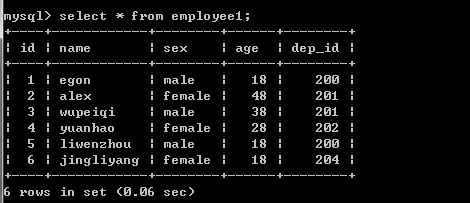
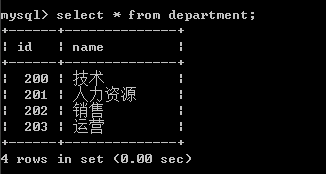
二、多表连接查询
1.交叉连接:不适用任何匹配条件。生成笛卡尔积、
select * from employee1 ,department;
2.内连接:找两张表共有的部分,相当于利用条件从笛卡尔积结果中筛选出了正确的结果。(只连接匹配的行)
#找两张表共有的部分,相当于利用条件从笛卡尔积结果中筛选出了正确的结果

#department没有204这个部门,因而employee表中关于204这条员工信息没有匹配出来

select * from employee1,department where employee1.dep_id=department.id;

#上面用where表示的可以用下面的内连接表示,建议使用下面的那种方法

select * from employee1 inner join department on employee1.dep_id=department.id;

#也可以这样表示哈

select employee1.id,employee1.name,employee1.age,employee1.sex,department.name from

employee1,department where employee1.dep_id=department.id;
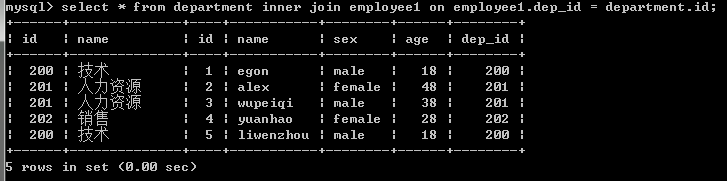
注意:内连接的join可以忽略不写,但是还是加上看起来清楚点
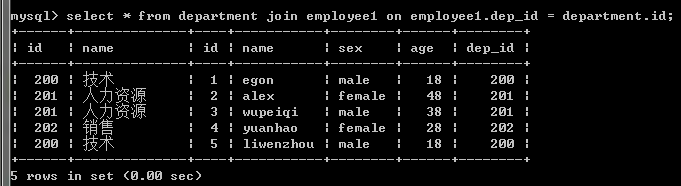
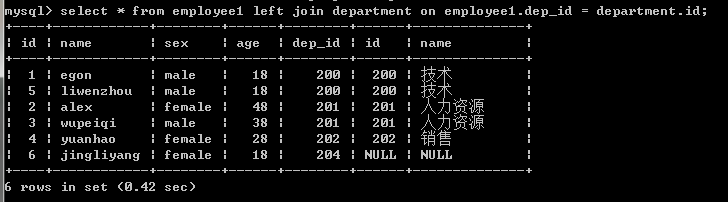
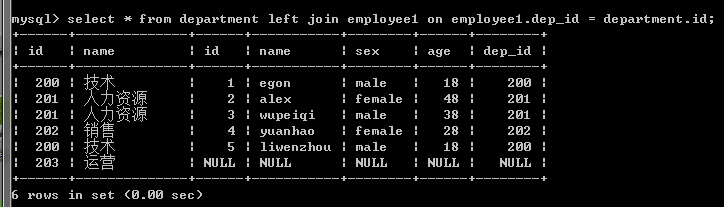
3.左连接:优先显示左表全部记录。
#左链接:在按照on的条件取到两张表共同部分的基础上,保留左表的记录

select * from employee1 left join department on department.id=employee1.dep_id;

select * from department left join  employee1 on department.id=employee1.dep_id;
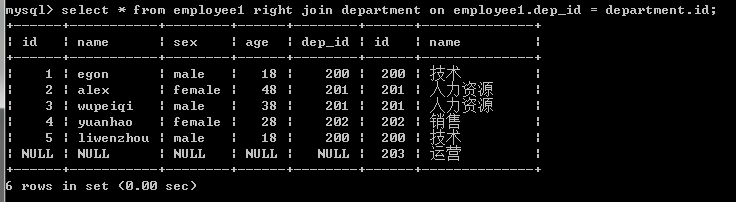
4.右链接:优先显示右表全部记录。
#右链接:在按照on的条件取到两张表共同部分的基础上,保留右表的记录

select * from employee1 right join department on department.id=employee1.dep_id;

select * from department right join employee1 on department.id=employee1.dep_id;

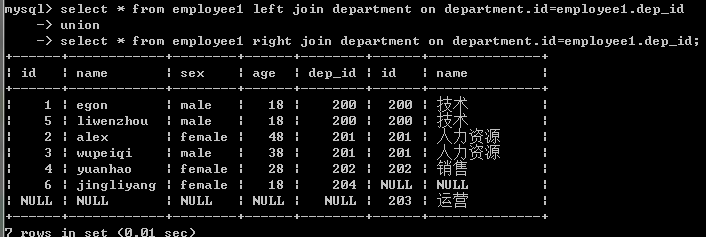
5.全外连接:显示左右两个表的全部记录。
注意:mysql不支持全外连接 full join

强调:mysql可以使用union间接实现全外连接
select * from employee1 left join department on department.id=employee1.dep_id

union

select * from employee1 right join department on department.id=employee1.dep_id;
三、符合条件连接查询
示例1:以内连接的方式查询employee和department表,并且employee表中的age字段值必须大于25,
即找出公司所有部门中年龄大于25岁的员工
select * from employee1 inner join department on employee1.dep_id=department.id

and age>25;
示例2:以内连接的方式查询employee和department表,并且以age字段的升序方式显示
select * from employee1 inner join department on employee1.dep_id=department.id

=

and age>25 and age>25 order by age asc;
四、子查询
#1:子查询是将一个查询语句嵌套在另一个查询语句中。

#2:内层查询语句的查询结果,可以为外层查询语句提供查询条件。

#3:子查询中可以包含:IN、NOT IN、ANY、ALL、EXISTS 和 NOT EXISTS等关键字

#4:还可以包含比较运算符:= 、 !=、> 、<等
MySQL数据库之单双表查询的更多相关文章
- MySQL数据库之单表查询中关键字的执行顺序
目录 MySQL数据库之单表查询中关键字的执行顺序 1 语法顺序 2 执行顺序 3 关键字使用语法 MySQL数据库之单表查询中关键字的执行顺序 1 语法顺序 select distinct from ...
- MySQL数据库语法-单表查询练习
MySQL数据库语法-单表查询练习 作者:尹正杰 版权声明:原创作品,谢绝转载!否则将追究法律责任. 本篇博客主要是对聚合函数和分组的练习. 一.数据表和测试数据准备 /* @author :yinz ...
- mysql数据库之单表查询多表查询
单表查询 前期表准备 create table emp( id int not null unique auto_increment, name varchar(20) not null, sex e ...
- mysql数据库之单表查询
单标查询 单表查询语句 关键字执行的优先级 简单查询 where约束 group by 聚合函数 HAVING过滤 order by 查询排序 LIMIT限制查询的记录数 使用正则表达式查询 单表查询 ...
- mysql 基础入门 单表查询
单表查询 select 表头,表头 as 别名 ,表头(+-*/的运算) from table_a 1.条件查询 where + 条件 <> , != 不等于 = 等于,也可以表示字符串值 ...
- Java对MySQL数据库进行连接、查询和修改(转)
Java对MySQL数据库进行连接.查询和修改 0. 一般过程: (1) 调用Class.forName()方法加载驱动程序. (2) 调用DriverManager对象的getConnection( ...
- mysql 数据操作 单表查询 目录
mysql 数据操作 单表查询 mysql 数据操作 单表查询 简单查询 避免重复DISTINCT mysql 数据操作 单表查询 通过四则运算查询 mysql 数据操作 单表查询 concat()函 ...
- MySQL数据库语法-多表查询练习一
MySQL数据库语法-多表查询练习一 作者:尹正杰 版权声明:原创作品,谢绝转载!否则将追究法律责任. 本篇博客主要介绍的多表查询的外键约束,以及如何使用外链接和内连接查询数据信息. 一.数据表和测试 ...
- mysql 数据操作 单表查询 where 约束 目录
mysql 数据操作 单表查询 where约束 between and or mysql 数据操作 单表查询 where约束 is null in mysql 数据操作 单表查询 where约束 li ...
随机推荐
- 了解Session的本质
有一点我们必须承认,大多数web应用程序都离不开session的使用.这篇文章将会结合php以及http协议来分析如何建立一个安全的会话管理机制. AD: 有一点我们必须承认,大多数web应用程序都离 ...
- Kali-linux使用假冒令牌
使用假冒令牌可以假冒一个网络中的另一个用户进行各种操作,如提升用户权限.创建用户和组等.令牌包括登录会话的安全信息,如用户身份识别.用户组和用户权限.当一个用户登录Windows系统时,它被给定一个访 ...
- WOSign API
[HttpGet] public ActionResult WoSign() { // System.IO.FileStream fs = System.IO.File.OpenRead(System ...
- 框架 Hibernate
Hibernate 在test01右键新建其他找到hibernate文件夹下的Hibernate Configuration File(cfg.xml) <?xml version=" ...
- Oracle 日志挖掘(LogMiner)使用
Logminer依赖于2个包:DBMS_LOGMNR和DBMS_LOGMNR_D,Oracle 11g默认已安装 Logminer 基本使用步骤 <1>. Specify a LogMin ...
- oracle自动冷备份脚本
根据自己网上的资料和自己的需求,写的oracle冷备份脚本. 整体思路: 1.停止服务 2.文件拷贝 3.启动服务 保存以为文件为BAT格式,点击可以用下. rem ----------------- ...
- iOS笔记,开发经验总结【持续更新】
1. 设置navigationBar 背景颜色有色差, 原因:如果单纯的设置背景颜色也是有高斯模糊处理的效果,对纯色高斯模糊处理过后相当于纯色的70%(猜测)透明化处理,但是反正就是有色差 解决方法一 ...
- js获取今天,明天,本周五,下周五日期的函数
代码比较简单,随便写写 /** * a连接快速选择日期函数 */ function timeChooseSimple(key, me) { //today,tomorrow,thisWeek,next ...
- 小程序 组件 Component
一.组件模板和样式 类似于页面,自定义组件拥有自己的 wxml 和模板 wxss 样式. 1.组件模板 组件的写法和页面的写法相同,组件模板与组件数据结合后生成的数节点, 将被插入到组件的引用位置.在 ...
- 搭建kafka高级消费 (high-consumer)php7
说明:有很多同学在服务器上搭建好,kafka,在应用端使用kafka时候出现很多问题,这里提供下我的kafka生产和消费的php函数 环境说明: 1:首先php要有kafka扩展,在命令行中输入 ph ...