
js灵活处理日期(函实例)
基础方法:
var dd = new Date()

dd.getFullYear()

dd.getMonth()

dd.getDate()

dd.getDay()    //获取星期几(0~6)

dd.getTime()
进阶方法:
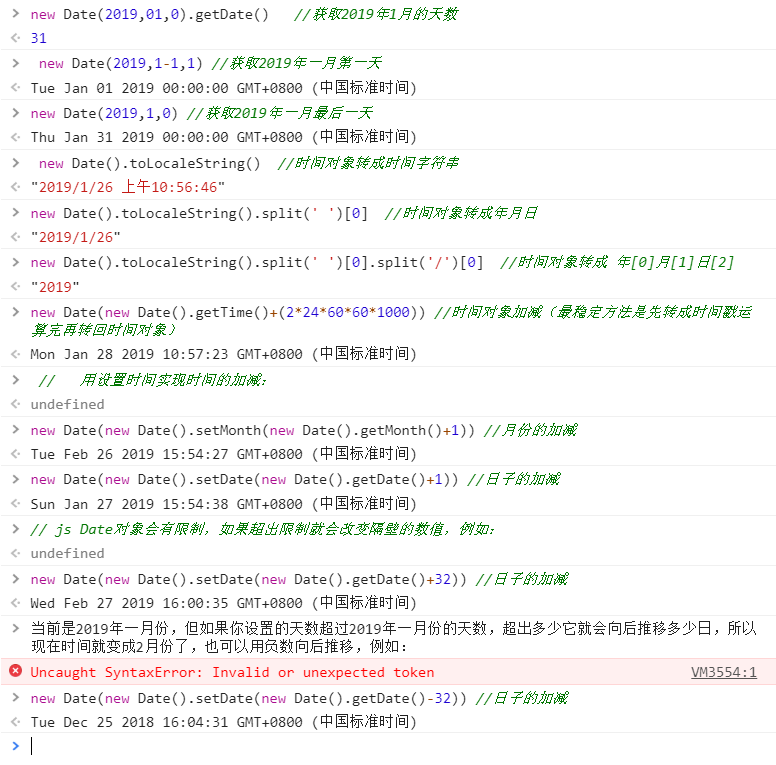
new Date(2019,01,0).getDate()   //获取2019年1月的天数

new Date(2019,1-1,1) //获取2019年一月第一天

new Date(2019,1,0) //获取2019年一月最后一天

new Date().toLocaleString()  //时间对象转成时间字符串
灵活应用:
new Date().toLocaleString().split(' ')[0]  //时间对象转成年月日

new Date().toLocaleString().split(' ')[0].split('/')[0]  //时间对象转成 年[0]月[1]日[2]

new Date(new Date().getTime()+(2*24*60*60*1000)) //时间对象加减(最稳定方法是先转成时间戳运算完再转回时间对象)

//   用设置时间实现时间的加减:(js Date对象会有限制,如果超出限制就会改变隔壁的数值)

new Date(new Date().setMonth(new Date().getMonth()+1)) //月份的加减

new Date(new Date().setDate(new Date().getDate()+1)) //日子的加减
附加console图:
实例:(主要需求:把每个月按照星期一为一周的第一天进行周期的分割,方便用户快速定位到某月的第几周数据,每个月的第一周第一天必定为此月的1号,最后一周的最后一天必定为此月的最后一天,不能出现其他月份的日子。)说明一下,这个需求完全是真实项目需求,有时候,客户的需求就是这么稀奇八怪。。。。
```css

<style>

    * {

        margin: 0;

        padding: 0;

        -webkit-box-sizing: border-box;

        -moz-box-sizing: border-box;

        box-sizing: border-box;

    }

    .main {

        margin: 0 auto;

        width: 1000px;

    }

    /*日期*/

    .date-content {

        width: 100%;

        height: 45px;

        display: flex;

        justify-content: flex-start;

        align-items: center;

        color: #000000;

    }

    .date-content p {

        margin: 0 5px;

    }

    .date-content a {

        width: 20px;

        height: 20px;

        background-image: url('./day-.png');

        -webkit-background-size: contain;

        background-size: contain;

    }

    .date-content .right {

        -webkit-transform: rotate(180deg);

        -moz-transform: rotate(180deg);

        -ms-transform: rotate(180deg);

        -o-transform: rotate(180deg);

        transform: rotate(180deg);

    }

    .date-content span{

        border-radius: 10px;

        padding: 2px 8px;

        margin: 0 10px;

        color: #333;

    }

    .date-content .actions{

        background: #56a9fe;

        color: #fff;

    }

</style>
```html

    <div class="date-content">

        <a class="left" onclick="x.decreaseMonth()">-</a>

        <div>

            <p class="time"></p>

        </div>

        <a class="right" onclick="x.addMonth()">+</a>

        <span class="btn" onclick="x.getClickDate(0)">全月</span>

        <span class="btn" onclick="x.getClickDate(1)"></span>

        <span class="btn" onclick="x.getClickDate(2)"></span>

        <span class="btn" onclick="x.getClickDate(3)"></span>

        <span class="btn" onclick="x.getClickDate(4)"></span>

        <span class="btn" onclick="x.getClickDate(5)"></span>

        <span class="btn" onclick="x.getClickDate(6)"></span>

    </div>

    <div>

    </div>
    <script>

        class cdDate {

            constructor() {

                // 报餐列表数据

                this.today = new Date();

                this.y = '';

                this.m = '';

                this.todaystamp = '';

                this.datestampList = [];

            }

            // 月份加减

            addMonth() {

                this.today.setMonth(this.m + 1)

                this.initialize()

                fillhtml()

                console.log('add')

            }

            decreaseMonth() {

                this.today.setMonth(this.m - 1)

                this.initialize()

                fillhtml()

                console.log('decrease')

            }

            // 初始化函数:

            initialize() {

                this.y = this.today.getFullYear()

                this.m = this.today.getMonth()

                this.todaystamp =this.today.getTime()

                this.datestampList = []

                let firstStampList = []

                let endStampList = []

                // 按钮还原:

                for(let i of document.querySelectorAll('.btn')){

                    i.className  = 'btn'

                    i.innerHTML = ''

                }

                document.querySelectorAll('.btn')[0].className  += ' actions'

                document.querySelectorAll('.btn')[0].innerHTML  = '全月'

                let dayNum = new Date(this.y,this.m+1,0).getDate();  //获取这个月的天数

                let firstday =new Date(this.y,this.m,1)   //获取这个月的第一天

                if(firstday.getDay()!=1){

                        firstStampList.push(firstday)

                }

                for(let i=0;i<dayNum;i++){

                    if(firstday.getDay()==1){

                        firstStampList.push(firstday)

                    }

                    if(firstday.getDay()==0){

                        endStampList.push(firstday)

                    }

                    firstday = new Date(firstday.getTime()+(24*60*60*1000))

                }

                let endday =new Date(this.y,this.m+1,0)   //获取这个月的最后一天

                if(endday.getDay()!=0){

                    endStampList.push(endday)

                }

                console.log(dayNum,firstStampList,'end',endStampList)

                for(var i=0;i<firstStampList.length;i++){

                    let dateStr0 =firstStampList[i].toLocaleString().split(' ')[0]

                    console.log(dateStr0)

                    let dateStr1 =endStampList[i].toLocaleString().split(' ')[0]

                    this.datestampList.push([dateStr0,dateStr1])

                    document.querySelectorAll('.btn')[i+1].innerHTML = dateStr0.split('/')[1]+'月'+dateStr0.split('/')[2]+'日'+' '+'至'+' '+dateStr1.split('/')[1]+'月'+dateStr1.split('/')[2]+'日'

                }

                console.log('dayNum',dayNum);

            }

            fill() {

                this.initialize()

                var result = {

                    month: this.m + 1,

                    year: this.y,

                }

                return result

            }

            // 获取点击日期

            getClickDate(index){

                for(let i of document.querySelectorAll('.btn')){

                    i.className  = 'btn'

                }

                document.querySelectorAll('.btn')[index].className  += ' actions'

                if(index==0){

                    alert(this.y+'/'+(this.m+1))

                }else{

                    alert(this.datestampList[index-1])

                }

            }

        }

        var x = new cdDate()

        // console.log(x.fill())

        function fillhtml() {

            var add = x.addMonth

            var decrease = x.decreaseMonth

            var de = x.fill()

            var yy = de.year

            var mm = de.month

            console.log(yy, mm)

            // alert(yy + '-' + mm)

            document.querySelector('.time').innerHTML = yy + '年' + mm + '月'

        }

        fillhtml()

    </script>
效果:
每日菜单
* {
margin: 0;
padding: 0;
-webkit-box-sizing: border-box;
-moz-box-sizing: border-box;
box-sizing: border-box;
}
    .main {

        margin: 0 auto;

        width: 1000px;

    }

    /*日期*/

    .date-content {

        width: 100%;

        height: 45px;

        display: flex;

        justify-content: flex-start;

        align-items: center;

        color: #000000;

    }

    .date-content p {

        margin: 0 5px;

    }

    .date-content a {

        width: 20px;

        height: 20px;

        background-image: url('./day-.png');

        -webkit-background-size: contain;

        background-size: contain;

    }

    .date-content .right {

        -webkit-transform: rotate(180deg);

        -moz-transform: rotate(180deg);

        -ms-transform: rotate(180deg);

        -o-transform: rotate(180deg);

        transform: rotate(180deg);

    }

    .date-content span{

        border-radius: 10px;

        padding: 2px 8px;

        margin: 0 10px;

        color: #333;

    }

    .date-content .actions{

        background: #56a9fe;

        color: #fff;

    }

</style>
<div class="date-content">

    <a class="left" onclick="x.decreaseMonth()">-</a>

    <div>

        <p class="time"></p>

    </div>

    <a class="right" onclick="x.addMonth()">+</a>

    <span class="btn" onclick="x.getClickDate(0)">全月</span>

    <span class="btn" onclick="x.getClickDate(1)"></span>

    <span class="btn" onclick="x.getClickDate(2)"></span>

    <span class="btn" onclick="x.getClickDate(3)"></span>

    <span class="btn" onclick="x.getClickDate(4)"></span>

    <span class="btn" onclick="x.getClickDate(5)"></span>

    <span class="btn" onclick="x.getClickDate(6)"></span>

</div>

<div>

</div>

<script>

    class cdDate {

        constructor() {

            // 报餐列表数据

            this.today = new Date();

            this.y = '';

            this.m = '';

            this.todaystamp = '';

            this.datestampList = [];

        }

        // 月份加减

        addMonth() {

            this.today.setMonth(this.m + 1)

            this.initialize()

            fillhtml()

            console.log('add')

        }

        decreaseMonth() {

            this.today.setMonth(this.m - 1)

            this.initialize()

            fillhtml()

            console.log('decrease')

        }

        // 初始化函数:

        initialize() {

            this.y = this.today.getFullYear()

            this.m = this.today.getMonth()

            this.todaystamp =this.today.getTime()

            this.datestampList = []

            let firstStampList = []

            let endStampList = []

            // 按钮还原:

            for(let i of document.querySelectorAll('.btn')){

                i.className  = 'btn'

                i.innerHTML = ''

            }

            document.querySelectorAll('.btn')[0].className  += ' actions'

            document.querySelectorAll('.btn')[0].innerHTML  = '全月'

            let dayNum = new Date(this.y,this.m+1,0).getDate();  //获取这个月的天数

            let firstday =new Date(this.y,this.m,1)   //获取这个月的第一天

            if(firstday.getDay()!=1){

                    firstStampList.push(firstday)

            }

            for(let i=0;i<dayNum;i++){

                if(firstday.getDay()==1){

                    firstStampList.push(firstday)

                }

                if(firstday.getDay()==0){

                    endStampList.push(firstday)

                }

                firstday = new Date(firstday.getTime()+(24*60*60*1000))

            }

            let endday =new Date(this.y,this.m+1,0)   //获取这个月的最后一天

            if(endday.getDay()!=0){

                endStampList.push(endday)

            }

            console.log(dayNum,firstStampList,'end',endStampList)

            for(var i=0;i<firstStampList.length;i++){

                let dateStr0 =firstStampList[i].toLocaleString().split(' ')[0]

                console.log(dateStr0)

                let dateStr1 =endStampList[i].toLocaleString().split(' ')[0]

                this.datestampList.push([dateStr0,dateStr1])

                document.querySelectorAll('.btn')[i+1].innerHTML = dateStr0.split('/')[1]+'月'+dateStr0.split('/')[2]+'日'+' '+'至'+' '+dateStr1.split('/')[1]+'月'+dateStr1.split('/')[2]+'日'

            }

            console.log('dayNum',dayNum);

        }

        fill() {

            this.initialize()

            var result = {

                month: this.m + 1,

                year: this.y,

            }

            return result

        }

        // 获取点击日期

        getClickDate(index){

            for(let i of document.querySelectorAll('.btn')){

                i.className  = 'btn'

            }

            document.querySelectorAll('.btn')[index].className  += ' actions'

            if(index==0){

                alert(this.y+'/'+(this.m+1))

            }else{

                alert(this.datestampList[index-1])

            }

        }

    }

    var x = new cdDate()

    // console.log(x.fill())

    function fillhtml() {

        var add = x.addMonth

        var decrease = x.decreaseMonth

        var de = x.fill()

        var yy = de.year

        var mm = de.month

        console.log(yy, mm)

        // alert(yy + '-' + mm)

        document.querySelector('.time').innerHTML = yy + '年' + mm + '月'

    }

    fillhtml()

</script>
js灵活处理日期(函实例)的更多相关文章
- js快捷输入日期
点击这里查看效果http://keleyi.com/keleyi/phtml/jstexiao/10.htm 以下式代码: <!DOCTYPE html> <html> < ...
- Date类型-演示JS中的日期
<script type="text/javascript"> /* *演示JS中的日期 */ var date = new Date(); document.writ ...
- [js开源组件开发]js多选日期控件
js多选日期控件 详情请见:http://www.lovewebgames.com/jsmodule/calendar.html 它的github地址:https://github.com/tianx ...
- js生成随机数的方法实例总结 [收藏]
js生成随机数的方法实例总结 js生成随机数主要用到了内置的Math对象的random()方法.用法如:Math.random().它返回的是一个 0 ~ 1 之间的随机数.有了这么一个方法,那生成任 ...
- js 时间戳转为日期格式
原文:js 时间戳转为日期格式 js 时间戳转为日期格式 什么是Unix时间戳(Unix timestamp): Unix时间戳(Unix timestamp),或称Unix时间(Unix time) ...
- js字符串转日期,js字符串解析成日期,js日期解析, Date.parse小时是8点,Date.parse时间多了8小时
js字符串转日期,js字符串解析成日期,js日期解析, Date.parse小时是8点,Date.parse时间多了8小时 >>>>>>>>>&g ...
- js强大的日期格式化函数,不仅可以格式化日期,还可以查询星期,一年中第几天等
js强大的日期格式化,timestamp支持10位或13位的时间戳,或是时间字符串,同时支持android ios的处理,不只是日期的格式化还有其它方法,比如获 获取某月有多少天 .获取某个日期在这一 ...
- Js中处理日期加减天数
Js的处理日期还是很方便的. 一. 格式化日期为2017-07-04的格式 function formatTime(date) { var year = date.getFullYear(); var ...
- js获取选中日期的当周的周一和周日
js获取选中日期的当周的周一和周日 第一种方法(推荐): function getWeekStr(str) { // 将字符串转为标准时间格式 str2 = Date.parse(str); let ...
随机推荐
- python不用正则过渡括号
- 基于cookie和session的登录验证
settings.py MIDDLEWARE = [ 'django.middleware.security.SecurityMiddleware', 'django.contrib.sessions ...
- Hadoop学习之路(十八)MapReduce框架Combiner分区
对combiner的理解 combiner其实属于优化方案,由于带宽限制,应该尽量map和reduce之间的数据传输数量.它在Map端把同一个key的键值对合并在一起并计算,计算规则与reduce一致 ...
- 【bbs】index、post
列表 奇数行和偶数行设置不同的背景 http://blog.csdn.net/facecrazy/article/details/51252850 实现ul li中的内容上下左右居中,不用设置li宽度 ...
- linux 下 chkconfig安装与使用详解
chkconfig 安装 开始的时候因为Raspbian的原因,系统是不自带chkconfig这个命令的, root@raspberrypi:~# chkconfig-bash: chkconfig: ...
- sping全家桶笔记
1.curl 用于在终端命令模式下访问一个URL地址 例如在idea的Terminal中访问URL,健康检查(需要加入actuator依赖)curl http://localhost:8080/act ...
- 搞懂JVM类加载机制
有这样一道面试题: class Singleton{ private static Singleton singleton = new Singleton(); public static int v ...
- nginx详解反向代理、负载均衡、LNMP架构上线动态网站
简介 Nginx是俄罗斯人编写的十分轻量级的HTTP服务器,Nginx,它的发音为“engine X”,是一个高性能的HTTP和反向代理服务器,同时也是一个IMAP/POP3/SMTP 代理服务器.N ...
- python使用ctypes模块下的windll.LoadLibrary报OSError: [WinError 193] % 不是有效的 Win32 应用程序
原因:python是64位的python,而windll.LoadLibrary只能由32位的python使用 参考: 64位Python调用32位DLL方法(一) 解决方法:使用32位的python ...
- com.alibaba.druid检测排查数据库连接数不释放定位代码
1.可能标题说的很不明白,其实就是这样一个情况,一个工程项目错误日志出现GetConnectionTimeoutException: wait millis 90000, active 22000的异 ...