
PyQt5 signal and slot
PyQt5 的 signal 与 slot 有所改变,例如,先定义一个 ZeroSignal 类:
class ZeroSignal(QObject):

    atzero = pyqtSignal(int)
使用时,一是绑定 slot 如下:
    self.zerosig = ZeroSignal()

       self.zerosig.atzero[int].connect(self.countZero)
然后是找个机会发动之:
def checkZero(self):

        if self.value() == 0:

            self.zerosig.atzero.emit(self.value())
大约如此,完整代码如下:
import os

import sys

from PyQt5.QtCore import *

from PyQt5.QtGui import *

from PyQt5.QtWidgets import *

class ZeroSignal(QObject):

    atzero = pyqtSignal(int)

class ZeroSpinBox(QSpinBox):

    def __init__(self, parent=None):

        super(ZeroSpinBox, self).__init__(parent)

        self.zeros = 0

        self.valueChanged[int].connect(self.checkZero)

        self.zerosig = ZeroSignal()

        self.zerosig.atzero[int].connect(self.countZero)

    def countZero(self, v):

        if v == 0:

            self.zeros += 1

            print(self.zeros)

    def checkZero(self):

        if self.value() == 0:

            self.zerosig.atzero.emit(self.value())

class Form(QDialog):

    def __init__(self, parent=None):

        super(Form, self).__init__(parent)

        dial = QDial()

        dial.setNotchesVisible(True)

        spin = ZeroSpinBox()

        layout = QHBoxLayout()

        layout.addWidget(dial)

        layout.addWidget(spin)

        self.setLayout(layout)

        dial.valueChanged.connect(spin.setValue)

        spin.valueChanged.connect(dial.setValue)

        spin.valueChanged.connect(self.emitZero)

        self.setWindowTitle("Sinal and Solt")

        self.zerobox = spin

        self.zerobox.zerosig.atzero[int].connect(self.annouce)

    def emitZero(self, v):

        if v == 0:

            self.zerobox.zerosig.atzero.emit(self.zerobox.zeros)

    def annouce(self, v):

        print("zero count: %d" % v)  # print two times because add ZeroSpinBox emit once

def run():

    app = QApplication(sys.argv)

    form = Form()

    form.show()

    app.exec_()

if __name__ == '__main__':

    run()
关于对话框的代码如下,尤其 NumberLiveDialog 值得推荐:
import sys,math,random,string

from PyQt5.QtCore import *

from PyQt5.QtGui import *

from PyQt5.QtWidgets import *

class NumberDialog(QDialog):

    def __init__(self, format, parent=None):

        super(NumberDialog, self).__init__(parent)

        thousandsLabel = QLabel("&Thousands separator:")

        self.thousandsEdit = QLineEdit(format["thousandsseparator"])

        thousandsLabel.setBuddy(self.thousandsEdit)

        decimalMarkerLabel = QLabel("Decimal $marker:")

        self.decimalMarkerEdit = QLineEdit(format["decimalmarker"])

        decimalMarkerLabel.setBuddy(self.decimalMarkerEdit)

        decimalPlacesLabel = QLabel("&Decimal places:")

        self.decimalPlacesSpinBox = QSpinBox()

        decimalPlacesLabel.setBuddy(self.decimalPlacesSpinBox)

        self.decimalPlacesSpinBox.setRange(0, 6)

        self.decimalPlacesSpinBox.setValue(format["decimalplaces"])

        self.redNegativesCheckBox = QCheckBox("&Red negative numbers")

        self.redNegativesCheckBox.setChecked(format["rednegatives"])

        buttonBox = QDialogButtonBox(QDialogButtonBox.Ok | QDialogButtonBox.Cancel)

        self.format = format.copy()

        grid = QGridLayout()

        grid.addWidget(thousandsLabel, 0, 0)

        grid.addWidget(self.thousandsEdit, 0, 1)

        grid.addWidget(decimalMarkerLabel, 1, 0)

        grid.addWidget(self.decimalMarkerEdit, 1, 1)

        grid.addWidget(decimalPlacesLabel, 2, 0)

        grid.addWidget(self.decimalPlacesSpinBox, 2, 1)

        grid.addWidget(self.redNegativesCheckBox, 3, 0, 1, 2)

        grid.addWidget(buttonBox, 4, 0, 1, 2)

        self.setLayout(grid)

        buttonBox.accepted.connect(self.accept)

        buttonBox.rejected.connect(self.reject)

        self.setWindowTitle("Number format")

    def accept(self):

        class ThousandsError(Exception): pass

        class DecimalError(Exception): pass

        Punctuation = frozenset(" ,;:.")

        thousands = str(self.thousandsEdit.text())

        decimal = str(self.decimalMarkerEdit.text())

        try:

            if len(decimal) == 0:

                raise DecimalError("The decimal marker may not be empty.")

            if len(thousands) > 1:

                raise ThousandsError("The thousands separator may only be empty or one charactor.")

            if len(decimal) > 1:

                raise DecimalError("The decimal marker must be one character.")

            if thousands == decimal:

                raise ThousandsError("The thousands separator and decimal marker must be different.")

            if thousands and thousands not in Punctuation:

                raise ThousandsError("The thousands separator must be in Punctuation.")

            if decimal and decimal not in Punctuation:

                raise DecimalError("The decimal marker must be a punctuation symbol.")

        except ThousandsError as e:

            QMessageBox.warning(self, "Thousands separator error:", str(e))

            self.thousandsEdit.selectAll()

            self.thousandsEdit.setFocus()

            return

        except DecimalError as e:

            QMessageBox.warning(self, "Decimal marker error:", str(e))

            self.decimalMarkerEdit.selectAll()

            self.decimalMarkerEdit.setFocus()

            return

        self.format["thousandsseparator"] = thousands

        self.format["decimalmarker"] = decimal

        self.format["decimalplaces"] = self.decimalPlacesSpinBox.value()

        self.format["rednegatives"] = self.redNegativesCheckBox.isChecked()

        QDialog.accept(self)

    def numberFormat(self):

        return self.format

class NumberModelessDialog(QDialog):

    changed = pyqtSignal()

    def __init__(self, format, parent=None):

        super(NumberModelessDialog, self).__init__(parent)

        self.setAttribute(Qt.WA_DeleteOnClose)

        punctuationRe = QRegularExpression(r"[ ,;:.]")

        thousandsLabel = QLabel("&Thousands separator:")

        self.thousandsEdit = QLineEdit(format["thousandsseparator"])

        thousandsLabel.setBuddy(self.thousandsEdit)

        self.thousandsEdit.setMaxLength(1)

        self.thousandsEdit.setValidator(QRegularExpressionValidator(punctuationRe, self))

        decimalMarkerLabel = QLabel("Decimal $marker:")

        self.decimalMarkerEdit = QLineEdit(format["decimalmarker"])

        decimalMarkerLabel.setBuddy(self.decimalMarkerEdit)

        self.decimalMarkerEdit.setMaxLength(1)

        self.decimalMarkerEdit.setValidator(QRegularExpressionValidator(punctuationRe, self))

        decimalPlacesLabel = QLabel("&Decimal places:")

        self.decimalPlacesSpinBox = QSpinBox()

        decimalPlacesLabel.setBuddy(self.decimalPlacesSpinBox)

        self.decimalPlacesSpinBox.setRange(0, 6)

        self.decimalPlacesSpinBox.setValue(format["decimalplaces"])

        self.redNegativesCheckBox = QCheckBox("&Red negative numbers")

        self.redNegativesCheckBox.setChecked(format["rednegatives"])

        buttonBox = QDialogButtonBox(QDialogButtonBox.Apply | QDialogButtonBox.Close)

        self.format = format

        grid = QGridLayout()

        grid.addWidget(thousandsLabel, 0, 0)

        grid.addWidget(self.thousandsEdit, 0, 1)

        grid.addWidget(decimalMarkerLabel, 1, 0)

        grid.addWidget(self.decimalMarkerEdit, 1, 1)

        grid.addWidget(decimalPlacesLabel, 2, 0)

        grid.addWidget(self.decimalPlacesSpinBox, 2, 1)

        grid.addWidget(self.redNegativesCheckBox, 3, 0, 1, 2)

        grid.addWidget(buttonBox, 4, 0, 1, 2)

        self.setLayout(grid)

        buttonBox.button(QDialogButtonBox.Apply).clicked.connect(self.apply)

        buttonBox.rejected.connect(self.reject)

        self.setWindowTitle("Number format")

    def apply(self):

        thousands = str(self.thousandsEdit.text())

        decimal = str(self.decimalMarkerEdit.text())

        if thousands == decimal:

            QMessageBox.warning(self, "Thousands separator error")

            self.thousandsEdit.selectAll()

            self.thousandsEdit.setFocus()

            return

        if len(decimal) == 0:

            QMessageBox.warning(self, "Decimal marker cannot is empty.")

            self.decimalMarkerEdit.selectAll()

            self.decimalMarkerEdit.setFocus()

            return

        self.format["thousandsseparator"] = thousands

        self.format["decimalmarker"] = decimal

        self.format["decimalplaces"] = self.decimalPlacesSpinBox.value()

        self.format["rednegatives"] = self.redNegativesCheckBox.isChecked()

        self.changed.emit()

class NumberLiveDialog(QDialog):

    changed = pyqtSignal()

    def __init__(self, format, callback, parent=None):

        super(NumberLiveDialog, self).__init__(parent)

        self.format = format

        self.callback = callback

        self.setAttribute(Qt.WA_DeleteOnClose)

        punctuationRe = QRegularExpression(r"[ ,;:.]")

        thousandsLabel = QLabel("&Thousands separator:")

        self.thousandsEdit = QLineEdit(format["thousandsseparator"])

        thousandsLabel.setBuddy(self.thousandsEdit)

        self.thousandsEdit.setMaxLength(1)

        self.thousandsEdit.setValidator(QRegularExpressionValidator(punctuationRe, self))

        decimalMarkerLabel = QLabel("Decimal $marker:")

        self.decimalMarkerEdit = QLineEdit(format["decimalmarker"])

        decimalMarkerLabel.setBuddy(self.decimalMarkerEdit)

        self.decimalMarkerEdit.setMaxLength(1)

        self.decimalMarkerEdit.setValidator(QRegularExpressionValidator(punctuationRe, self))

        decimalPlacesLabel = QLabel("&Decimal places:")

        self.decimalPlacesSpinBox = QSpinBox()

        decimalPlacesLabel.setBuddy(self.decimalPlacesSpinBox)

        self.decimalPlacesSpinBox.setRange(0, 6)

        self.decimalPlacesSpinBox.setValue(format["decimalplaces"])

        self.redNegativesCheckBox = QCheckBox("&Red negative numbers")

        self.redNegativesCheckBox.setChecked(format["rednegatives"])

        grid = QGridLayout()

        grid.addWidget(thousandsLabel, 0, 0)

        grid.addWidget(self.thousandsEdit, 0, 1)

        grid.addWidget(decimalMarkerLabel, 1, 0)

        grid.addWidget(self.decimalMarkerEdit, 1, 1)

        grid.addWidget(decimalPlacesLabel, 2, 0)

        grid.addWidget(self.decimalPlacesSpinBox, 2, 1)

        grid.addWidget(self.redNegativesCheckBox, 3, 0, 1, 2)

        self.setLayout(grid)

        self.thousandsEdit.textEdited.connect(self.checkAndFix)

        self.decimalMarkerEdit.textEdited.connect(self.checkAndFix)

        self.decimalPlacesSpinBox.valueChanged.connect(self.apply)

        self.redNegativesCheckBox.toggled.connect(self.apply)

        self.setWindowTitle("Number format")

    def checkAndFix(self):

        thousands = self.thousandsEdit.text()

        decimal = self.decimalMarkerEdit.text()

        if thousands == decimal:

            self.thousandsEdit.clear()

            self.thousandsEdit.setFocus()

        if len(decimal) == 0:

            self.decimalMarkerEdit.setText(".")

            self.decimalMarkerEdit.selectAll()

            self.decimalMarkerEdit.setFocus()

        self.apply()

    def apply(self):

        thousands = self.thousandsEdit.text()

        decimal = self.decimalMarkerEdit.text()

        self.format["thousandsseparator"] = thousands

        self.format["decimalmarker"] = decimal

        self.format["decimalplaces"] = self.decimalPlacesSpinBox.value()

        self.format["rednegatives"] = self.redNegativesCheckBox.isChecked()

        self.callback()

class Form(QDialog):

    X_MAX = 26

    Y_MAX = 60

    def __init__(self, parent=None):

        super(Form, self).__init__(parent)

        self.numberDlg = None

        self.format = { "thousandsseparator":",", "decimalmarker":".",

            "decimalplaces":2, "rednegatives": False }

        self.numbers = {}

        for x in range(self.X_MAX):

            for y in range(self.Y_MAX):

                self.numbers[(x,y)] = 10000 * random.random() - 5000

        self.table = QTableWidget()

        modalButton = QPushButton("Set numbe format...(&Modal)")

        modelessButton = QPushButton("Set number format...(M&odeless)")

        liveButton = QPushButton("Set number format...(&Live)")

        buttonLayout = QHBoxLayout()

        buttonLayout.addStretch()

        buttonLayout.addWidget(modalButton)

        buttonLayout.addWidget(modelessButton)

        buttonLayout.addWidget(liveButton)

        layout = QVBoxLayout()

        layout.addWidget(self.table)

        layout.addLayout(buttonLayout)

        self.setLayout(layout)

        modalButton.clicked.connect(self.setNumberFormatByModal)

        modelessButton.clicked.connect(self.setNumberFormatByModeless)

        liveButton.clicked.connect(self.setNumberFormatByLive)

        self.setWindowTitle("Set Number Format")

        self.refreshTable()

    def refreshTable(self):

        self.table.clear()

        self.table.setRowCount(self.Y_MAX)

        self.table.setColumnCount(self.X_MAX)

        self.table.setHorizontalHeaderLabels(list(string.ascii_uppercase))

        for x in range(self.X_MAX):

            for y in range(self.Y_MAX):

                fraction, whole = math.modf(self.numbers[(x,y)])

                sign = "-" if whole < 0 else ""

                whole = "{0}".format(int(math.floor(abs(whole))))

                digits = []

                for i, digit in enumerate(reversed(whole)):

                    if i and i % 3 == 0:

                        digits.insert(0, self.format["thousandsseparator"])

                    digits.insert(0, digit)

                if self.format["decimalplaces"]:

                    fraction = "{0:.7f}".format(abs(fraction))

                    fraction = self.format["decimalmarker"] + fraction[2:self.format["decimalplaces"]+2]

                else:

                    fraction = ""

                text = "{0}{1}{2}".format(sign, "".join(digits), fraction)

                item = QTableWidgetItem(text)

                item.setTextAlignment(Qt.AlignRight | Qt.AlignVCenter)

                if sign and self.format["rednegatives"]:

                    item.setBackground(Qt.red)

                self.table.setItem(y, x, item)

    def setNumberFormatByModal(self):

        dlg = NumberDialog(self.format, self)

        if dlg.exec_():

            self.format = dlg.numberFormat()

            self.refreshTable()

    def setNumberFormatByModeless(self):

        dlg = NumberModelessDialog(self.format, self)

        dlg.show()

        dlg.changed.connect(self.refreshTable)

    def setNumberFormatByLive(self):

        if self.numberDlg is None:

            self.numberDlg = NumberLiveDialog(self.format, self.refreshTable, self)

        self.numberDlg.show()

        self.numberDlg.raise_()

        self.numberDlg.activateWindow()

if __name__ == "__main__":

    app = QApplication(sys.argv)

    form = Form()

    form.show()

    app.exec_()
numberdlg.py
关于主窗口 (fileload function need add a bool parameter for recentfiles) 的代码:imagechanger
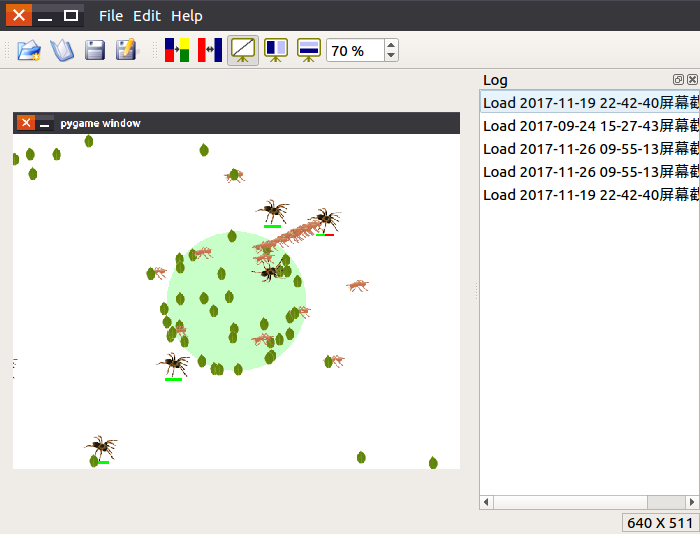
运行效果图如下:
《Python GUI Qt 快速开放指南》部分例子:PyQt5-Code
PyQt5 signal and slot的更多相关文章
- 深入了解Qt(三)之元signal和slot
深入了解Qt主要内容来源于Inside Qt系列,本文做了部分删改,以便于理解.在此向原作者表示感谢! 在Qt 信号和槽函数这篇文章中已经详细地介绍了信号和槽的使用及注意事项.在这里对其使用方面的知识 ...
- 【golang-GUI开发】qt之signal和slot(一)
想了很久,我决定还是先从signal和slot(信号槽)开始讲起. signal和slot大家一定不陌生,先看一段示例(选自文档): class Counter : public QObject { ...
- Qt Signal and Slot
Qt4中的信号槽 Qt4中的信号槽是通过SIGNAL,SLOT两个宏,将参数转换成字符串.Qt编译前,会从源码的头文件中提取由signal和slot声明的信号和槽的函数, 将其组成一张信号和槽对应的字 ...
- qt的signal和slot机制
signal和slot是QT中的一大特点 signal/slot是Qt对象以及其派生类对象之间的一种高效通信接口 用户可以将N多个信号和单个槽相连接, 或者将将N个槽和单个信号连接, 甚至是一个信号和 ...
- [C++_QT] Error: Not a signal or slot declaration
问题: 在Qt工程中添加了一个新的窗口之后 一直报错 如下 单单从错误描述上看 是缺少信号或者槽 但是我确定没有缺少啊 然后第二个错误显示了一个mox_xxxx文件 然后我就去那个目录下去找那个文件 ...
- 【golang-GUI开发】qt之signal和slot(二)
上一篇文章里我们详细介绍了signal的用法. 今天我们将介绍slot的使用.在qt中slot和signal十分相像,这次我们将实现一个能显示16进制数字的SpinBox,它继承自QSpinbox并重 ...
- QT 中 关键字讲解(emit,signal,slot)
Qt中的类库有接近一半是从基类QObject上继承下来,信号与反应槽(signals/slot)机制就是用来在QObject类或其子类间通讯的方法.作为一种通用的处理机制,信号与反应槽非常灵活,可以携 ...
- qt信号signal和槽slot机制
内容: 一.概述 二.信号 三.槽 四.信号与槽的关联 五.元对象工具 六.程序样例 七.应注意的问题 信号与槽作为QT的核心机制在QT编程中有着广泛的应用,本文介绍了信号与槽的一些基本概念.元对象工 ...
- signal & slot
The Qt signals/slots and property system are based on the ability to introspect the objects at runti ...
随机推荐
- 沉淀再出发:OpenStack初探
沉淀再出发:OpenStack初探 一.前言 OpenStack是IaaS的一种平台,通过各种虚拟化来提供服务.我们主要看一下OpenStack的基本概念和相应的使用方式. 二.OpenStack的框 ...
- Redis 拒绝连接
1.本地防火墙是否关闭 2.服务器的防火墙是否关闭 检查方法: service iptables status 查看防火墙状态 service iptables s ...
- 缓存MEMCACHE php调用
在项目中,涉及大访问量时,合理的使用缓存能减轻数据库的压力,同时提升用户体验.即在非实时性的需求的前提下,一小段时间内(若干秒),用于显示的数据从缓存中获取的,而不用直接读取数据库,能有效的减少数据库 ...
- IDEA 常用插件收藏
1.maven helper 查看maven依赖,解决jar包冲突. 2.Alibaba Java Coding Guidelines 代码风格遵循阿里java规范. 3.Lombok 简化实体中的 ...
- angularJs中的模块化操作
一.全局的写法 有可能会跟其他程序有冲突 <!DOCTYPE HTML> <html ng-app="myApp"> <head> <me ...
- 死磕salt系列-salt配置文件
这篇文件主要用来解释一下salt配置中常用的参数,其他的参数可以参考官网文档. 基础参数 interface: 服务器监听地址. ipv6: 是否启用ipv6. max_open_files: 最大文 ...
- [Java123] JDBC and Multi-Threading 多线程编程学习笔记
项目实际需求:DB交互使用多线程实现 多线程编程基础:1.5 :( (假设总分10) 计划一个半月从头学习梳理Java多线程编程基础以及Oracle数据库交互相关的多线程实现 学习如何通过代码去验证 ...
- 1、RabbitMQ入门
RabbitMQ 可以参考官网进行学习! 开发语言:Erlang – 面向并发的编程语言. AMQP:是消息队列的一个协议. mysql 是 java 写的吗?不是 那么 java 能不能访问?可以, ...
- AOP各种的实现
1 AOP各种的实现 AOP就是面向切面编程,我们可以从几个层面来实现AOP. 在编译器修改源代码,在运行期字节码加载前修改字节码或字节码加载后动态创建代理类的字节码,以下是各种实现机制的比较. 类别 ...
- Linux Ubuntu安装sogou中文输入法
在linux下开发,有时还是需要使用中文输入法的,每次安装的时候都觉得痛苦,这次做下记录,方便下次安装. 安装fcitx 安装sogou输入法之前,需要安装fcitx(Free Chinese Inp ...