
TypeScript学习笔记(八) - 声明文件
本篇将介绍TypeScript的声明文件,并简单演示一下如何编写和使用声明文件。本篇也是这个系列的最后一篇。
一、声明文件简介
TypeScript作为JavaScript的超集,在开发过程中不可避免要引用其他第三方的JavaScript的库。虽然通过直接引用可以调用库的类和方法,但是却无法使用TypeScript诸如类型检查等特性功能。为了解决这个问题,需要将这些库里的函数和方法体去掉后只保留导出类型声明,而产生了一个描述JavaScript库和模块信息的声明文件。通过引用这个声明文件,就可以借用TypeScript的各种特性来使用库文件了。
二、常见库的结构
有以下几种:全局库、CommonJS、AMD、UMD
全局库:
早期版本的jQuery就是使用了全局库的使用方式:
 (function( window, undefined ) {

     var jQuery = function( selector, context ) {

         return new jQuery.fn.init( selector, context, rootjQuery );

     }

     // ......

     window.jQuery = window.$ = jQuery;

 })(window);
通常会看到:
- 顶级的声明是 var 或者 function
- 有 window 或者 document 这些DOM对象存在
- 对象一般会赋值到 window 上
CommonJS
NodeJs模块化采用的规范,声明和使用方式如下:
 // 模块定义文件

 exports.module_name = {};

 // 模块调用文件

 var module = require('模块定义文件名');
通常会看到:
- 赋值给 exports 或者 module.exports
- 无条件调用 require
AMD
前端框架普遍采用的模块化的规范,声明和使用方式如下:
 // 定义模块

 define('模块名', ['jquery', ...], function($){

     // ......

 });

 // 调用模块

 require(['模块名'], function(module) {

     // ......

 });
通常会看到:
- 无条件调用 define 或者 require
UMD
为了能同时支持上述所有风格的库声明方式,就有了通用模块规范(UMD)。一般会有下面这种声明方式:
 // moment.js

 (function (global, factory) {

     typeof exports === 'object' && typeof module !== 'undefined' ? module.exports = factory() :

     typeof define === 'function' && define.amd ? define(factory) :

     global.moment = factory()

 }(this, function() {

     function hooks() {

         // ......

     }

     // ......

     return hooks;

 }));
通常会看到:
- 在文件顶端会有一大串 typeof XXX 的判断
- 同时有 exports 、 define 这种关键词
通过识别库的结构,采用不用的声明方式来编写声明文件。
三、如何编写声明文件
linq.js实现了在JavaScript里使用Linq语法,在C#有的Linq方法,在它里面几乎都有。下面将在nodejs环境里演示如何编写和使用linq.js的一个简单的声明文件。
1. 创建一个nodejs工程,并通过 npm install linq --save 下载插件包。工程结构如下所示:

 {

   "name": "tstest",

   "version": "1.0.0",

   "description": "",

   "main": "index.js",

   "scripts": {

     "test": "echo \"Error: no test specified\" && exit 1",

     "start": "node dist\\main.js"

   },

   "author": "",

   "license": "ISC",

   "dependencies": {

     "linq": "^3.0.5"

   }

 }
package.json
 {

     "compilerOptions": {

         "target": "es5",

         "noImplicitAny": false,

         "module": "commonjs",

         "removeComments": true,

         "sourceMap": false,

         "outDir": "dist"

     }

 }
tsconfig.json
2. 在src目录下新建文件linq.d.ts
 interface IEnumerator {

     current: () => any;

     moveNext: () => void;

     dispose: () => void;

 }

 interface Enumerable {

     getEnumerator: () => IEnumerator;

     from: (obj: any) => Enumerable;

     where: (predicate: string | ((x: any) => boolean)) => Enumerable;

     toArray: () => Array<any>;

 }

 declare let linq: Enumerable;

 declare module 'linq' {

     export = linq;

 }
3. 还是在src目录下新建文件main.ts
 /// <reference path="linq.d.ts" />

 import * as Enumerable from 'linq';

 let result1 = Enumerable.from([1, 2, 3]).where('$>1').toArray();

 console.log(`result1 is ${result1}`);

 let result2 = Enumerable.from([1, 2, 3]).where(x => { return x > 2; }).toArray();

 console.log(`result2 is ${result2}`);
4. 按下快捷键 Ctrl+Shift+B 编译main.ts文件到dist目录,生成main.js文件
 "use strict";

 var Enumerable = require('linq');

 var result1 = Enumerable.from([1, 2, 3]).where('$>1').toArray();

 console.log("result1 is " + result1);

 var result2 = Enumerable.from([1, 2, 3]).where(function (x) { return x > 2; }).toArray();

 console.log("result2 is " + result2);
在控制台执行命令 npm run start ,查看输出结果
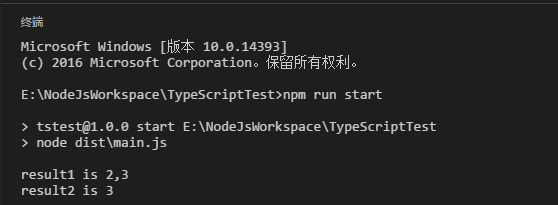
从这个例子里可以看出,声明文件linq.d.ts里只定义了linq的类型和方法名称,在这里我称之为“骨架”。在引用了声明文件后,即可以通过智能感知和强类型检查等特性使用linq模块。编译时会根据配置文件指定的模块标准( "module": "commonjs" )生成对应的文件。因为这个例子的运行环境是nodejs,所以采用commonjs标准。
如果是在前端使用,则要采用AMD标准。下面是采用这个标准后编译生成的文件:
 define(["require", "exports", 'linq'], function (require, exports, Enumerable) {

     "use strict";

     var result1 = Enumerable.from([1, 2, 3]).where('$>1').toArray();

     console.log("result1 is " + result1);

     var result2 = Enumerable.from([1, 2, 3]).where(function (x) { return x > 2; }).toArray();

     console.log("result2 is " + result2);

 });
linq模块也支持全局库的引用方式。通过修改linq.d.ts,支持全局库引用
 interface IEnumerator {

     current: () => any;

     moveNext: () => void;

     dispose: () => void;

 }

 interface Enumerable {

     getEnumerator: () => IEnumerator;

     from: (obj: any) => Enumerable;

     where: (predicate: string | ((x: any) => boolean)) => Enumerable;

     toArray: () => Array<any>;

 }

 declare let linq: Enumerable;

 // 全局库引用

 export as namespace Enumerable;

 export = linq;
main.ts调用方式也要修改
 /// <reference path="linq.d.ts" />

 let result1 = Enumerable.from([1, 2, 3]).where('$>1').toArray();

 console.log(`result1 is ${result1}`);

 let result2 = Enumerable.from([1, 2, 3]).where(x => { return x > 2; }).toArray();

 console.log(`result2 is ${result2}`);
编译生成的main.js
 var result1 = Enumerable.from([1, 2, 3]).where('$>1').toArray();

 console.log("result1 is " + result1);

 var result2 = Enumerable.from([1, 2, 3]).where(function (x) { return x > 2; }).toArray();

 console.log("result2 is " + result2);
四、声明文件下载
TypeScript2.0支持通过npm下载常用的模块的声明文件,下面借用async模块简单演示一下如何引用和使用常用模块的声明文件。
1. 通过 npm install async --save 下载async模块
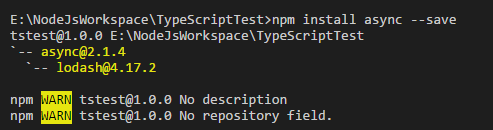
2. 使用 npm install @types/async --save-dev 下载async模块的声明文件。下载完成后会在工程的node_modules文件夹下生成存放声明文件的文件夹

3. main.ts引用声明文件
 /// <reference types="async" />

 import * as async from 'async';

 // 并行执行方法

 async.parallel([

     cb => { cb(null, 1); },

     cb => { cb(null, 2); },

     cb => { cb(null, 3); },

 ], (err, results) => {

     console.log(`results is ${results}`);

 });
这里的引用方式和上面的例子略有不同。上面的例子是用ref注释将文件名引用进来,通过npm下载的声明文件则是引用类型名称( /// <reference types="async" /> )
4. 编译之后生成main.js,控制台执行查看结果
 "use strict";

 var async = require('async');

 async.parallel([

     function (cb) { cb(null, 1); },

     function (cb) { cb(null, 2); },

     function (cb) { cb(null, 3); },

 ], function (err, results) {

     console.log("results is " + results);

 });
main.js
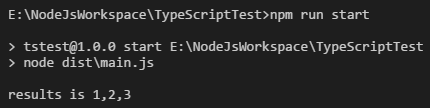
更多声明文件可以去 http://microsoft.github.io/TypeSearch/ 查找。也许有些模块现在暂时没有声明文件,我们也可以自己编写声明文件后上传到 https://github.com/DefinitelyTyped/DefinitelyTyped,一起共建TypeScript的声明文件仓库。
TypeScript学习笔记(八) - 声明文件的更多相关文章
- Python学习笔记八:文件操作(续),文件编码与解码,函数,递归,函数式编程介绍,高阶函数
文件操作(续) 获得文件句柄位置,f.tell(),从0开始,按字符数计数 f.read(5),读取5个字符 返回文件句柄到某位置,f.seek(0) 文件在编辑过程中改变编码,f.detech() ...
- SpringMVC学习笔记八:文件上传下载(转)
转自:http://www.cnblogs.com/WJ-163/p/6269409.html 一.关键步骤 ①引入核心JAR文件 SpringMVC实现文件上传,需要再添加两个jar包.一个是文件上 ...
- python学习笔记八:文件与目录
一.文件的打开和创建 1.打开 open(file,mode): >>>fo = open('test.txt', 'r') >>>fo.read() 'hello ...
- TypeScript学习笔记(八):1.5版本之后的模块和命名空间
我之前有写过TS1.5版本之前的“模块”的笔记:TypeScript学习笔记(七):模块 但是TS这里的模块和在ECMAScript 2015里的模块(即JS原生支持了模块的概念)概率出现了混淆,所以 ...
- go微服务框架kratos学习笔记八 (kratos的依赖注入)
目录 go微服务框架kratos学习笔记八(kratos的依赖注入) 什么是依赖注入 google wire kratos中的wire Providers injector(注入器) Binding ...
- Windows phone 8 学习笔记(2) 数据文件操作
原文:Windows phone 8 学习笔记(2) 数据文件操作 Windows phone 8 应用用于数据文件存储访问的位置仅仅限于安装文件夹.本地文件夹(独立存储空间).媒体库和SD卡四个地方 ...
- Typescript 学习笔记二:数据类型
中文网:https://www.tslang.cn/ 官网:http://www.typescriptlang.org/ 目录: Typescript 学习笔记一:介绍.安装.编译 Typescrip ...
- Typescript 学习笔记三:函数
中文网:https://www.tslang.cn/ 官网:http://www.typescriptlang.org/ 目录: Typescript 学习笔记一:介绍.安装.编译 Typescrip ...
- Typescript 学习笔记一:介绍、安装、编译
前言 整理了一下 Typescript 的学习笔记,方便后期遗忘某个知识点的时候,快速回忆. 为了避免凌乱,用 gitbook 结合 marketdown 整理的. github地址是:ts-gitb ...
- python3.4学习笔记(八) Python第三方库安装与使用,包管理工具解惑
python3.4学习笔记(八) Python第三方库安装与使用,包管理工具解惑 许多人在安装Python第三方库的时候, 经常会为一个问题困扰:到底应该下载什么格式的文件?当我们点开下载页时, 一般 ...
随机推荐
- WebService—CXF—实现接口发布和客户端调用
(一)接口发布的几种方式 定义接口: @WebService(targetNamespace="http://www.itfad.net/queryUser") public in ...
- 121. Best Time to Buy and Sell Stock(股票最大收益)
Say you have an array for which the ith element is the price of a given stock on day i. If you were ...
- Puppeteer前端自动化测试实践
本篇内容将记录并介绍使用Puppeteer进行自动化网页测试,并依靠约定来避免反复修改测试用例的方案.主要解决页面众多时,修改代码导致的牵连错误无法被发现的运行时问题.文章首发于个人博客.对前端感兴趣 ...
- 20145329 《网络对抗技术》MS08_067远程漏洞攻击
MS08_067远程漏洞攻击:shell 实现攻击的前提是:攻击机和靶机在同一个网段下,首先将kali的ip改为与winxp的ip一样,二者能ping通 两台虚拟机: kali ip:192.168. ...
- 在pom.xml中使用distributionManagement将项目打包上传到nexus私服
本文介绍 如何在pom.xml中使用distributionManagement将项目打包上传到nexus私服 1.pom.xml文件添加distributionManagement节点 <!- ...
- xss总结(一直更新)
反射型: 在表单输入jack网页源代码:<pre>Hello jack</pre> 测试: 低级别:<script>alert('xss')</script& ...
- SqlBulkCopy 批量导入数据 转换表字段类型
在使用SqlBulkCopy导入数据时,要有一个跟数据库里面同样的DataTable 要赋值表名 要求每个列跟数据库中列同名,并且列的类型要赋值跟数据库中列的类型对应的NET类型 要求数据库中为Nul ...
- HttpContext.Current and Web Api
Using HttpContext.Current in WebApi is dangerous because of async HttpContext.Current gets the curre ...
- Google V8 引擎 原理详解
V8 引擎概览 V8 引擎简介 Google V8 引擎使用 C++ 代码编写,实现了 ECMAScript 规范的第五版,可以运行在所有的主流 操作系统中,甚至可以运行在移动终端 ( 基于 ARM ...
- key寻址算法
分布式寻址算法 hash 算法(大量缓存重建) 一致性 hash 算法(自动缓存迁移)+ 虚拟节点(自动负载均衡) redis cluster 的 hash slot 算法 hash 算法 来了一个 ...