
10、Web Service-IDEA-jaxrs 整合spring
1、服务端的开发
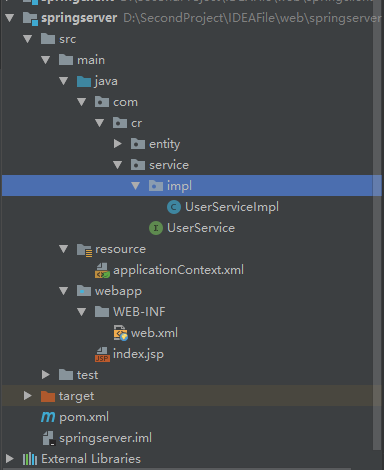
2、pom
<?xml version="1.0" encoding="UTF-8"?>

<project xmlns="http://maven.apache.org/POM/4.0.0" xmlns:xsi="http://www.w3.org/2001/XMLSchema-instance"

  xsi:schemaLocation="http://maven.apache.org/POM/4.0.0http://maven.apache.org/xsd/maven-4.0.0.xsd">

  <modelVersion>4.0.</modelVersion>

  <groupId>com.cr</groupId>

  <artifactId>springserver</artifactId>

  <version>1.0-SNAPSHOT</version>

  <packaging>war</packaging>

  <name>springserver Maven Webapp</name>

  <!-- FIXME change it to the project's website -->

  <url>http://www.example.com</url>

  <properties>

    <project.build.sourceEncoding>UTF-</project.build.sourceEncoding>

    <maven.compiler.source>1.7</maven.compiler.source>

    <maven.compiler.target>1.7</maven.compiler.target>

  </properties>

  <dependencies>

    <dependency>

      <groupId>org.apache.cxf</groupId>

      <artifactId>cxf-rt-frontend-jaxrs</artifactId>

      <version>3.0.</version>

    </dependency>

    <dependency>

      <groupId>org.apache.cxf</groupId>

      <artifactId>cxf-rt-frontend-jaxws</artifactId>

      <version>3.0.</version>

    </dependency>

    <!--日志-->

    <dependency>

      <groupId>org.slf4j</groupId>

      <artifactId>slf4j-log4j12</artifactId>

      <version>1.7.</version>

      <scope>test</scope>

    </dependency>

    <!--restful风格客户端调用所需要的 -->

    <dependency>

      <groupId>org.apache.cxf</groupId>

      <artifactId>cxf-rt-rs-client</artifactId>

      <version>3.0.</version>

    </dependency>

    <!--对json的支持 -->

    <dependency>

      <groupId>org.apache.cxf</groupId>

      <artifactId>cxf-rt-rs-extension-providers</artifactId>

      <version>3.0.</version>

    </dependency>

    <dependency>

      <groupId>org.codehaus.jettison</groupId>

      <artifactId>jettison</artifactId>

      <version>1.3.</version>

    </dependency>

    <dependency>

      <groupId>junit</groupId>

      <artifactId>junit</artifactId>

      <version>4.11</version>

      <scope>test</scope>

    </dependency>

    <dependency>

      <groupId>org.springframework</groupId>

      <artifactId>spring-context</artifactId>

      <version>4.3..RELEASE</version>

    </dependency>

    <dependency>

      <groupId>org.springframework</groupId>

      <artifactId>spring-web</artifactId>

      <version>4.3..RELEASE</version>

    </dependency>

    <dependency>

      <groupId>org.springframework</groupId>

      <artifactId>spring-test</artifactId>

      <version>4.3..RELEASE</version>

    </dependency>

    <dependency>

      <groupId>org.springframework</groupId>

      <artifactId>spring-beans</artifactId>

      <version>4.3..RELEASE</version>

    </dependency>

    <dependency>

      <groupId>org.springframework</groupId>

      <artifactId>spring-aspects</artifactId>

      <version>4.3..RELEASE</version>

    </dependency>

    <dependency>

      <groupId>org.springframework</groupId>

      <artifactId>spring-webmvc</artifactId>

      <version>4.3..RELEASE</version>

    </dependency>

  </dependencies>

  <build>

    <plugins>

      <plugin>

        <groupId>org.apache.maven.plugins</groupId>

        <artifactId>maven-compiler-plugin</artifactId>

        <version>3.2</version>

        <configuration>

          <source>1.8</source>

          <target>1.8</target>

          <encoding>UTF-</encoding>

          <showWarnings>true</showWarnings>

        </configuration>

      </plugin>

    </plugins>

  </build>

</project>
web.xml
<?xml version="1.0" encoding="UTF-8"?>

<web-app xmlns:xsi="http://www.w3.org/2001/XMLSchema-instance" xmlns="http://xmlns.jcp.org/xml/ns/javaee" xsi:schemaLocation="http://xmlns.jcp.org/xml/ns/javaeehttp://xmlns.jcp.org/xml/ns/javaee/web-app_3_1.xsd" version="3.1">

  <display-name>cxf</display-name>

  <context-param>

    <param-name>contextConfigLocation</param-name>

    <param-value>classpath:/applicationContext.xml</param-value>

  </context-param>

  <listener>

    <listener-class>org.springframework.web.context.ContextLoaderListener</listener-class>

  </listener>

<servlet>

  <servlet-name>cxf</servlet-name>

  <servlet-class>org.apache.cxf.transport.servlet.CXFServlet</servlet-class>

</servlet>

<servlet-mapping>

  <servlet-name>cxf</servlet-name>

  <url-pattern>/cr/*</url-pattern>

</servlet-mapping>

</web-app>
applicationContext.xml
<?xml version="1.0" encoding="UTF-8"?>

<beans  xmlns="http://www.springframework.org/schema/beans"

        xmlns:context="http://www.springframework.org/schema/context"

        xmlns:xsi="http://www.w3.org/2001/XMLSchema-instance"

        xmlns:cxf="http://cxf.apache.org/core"

        xmlns:jaxws="http://cxf.apache.org/jaxws"

        xmlns:jaxrs="http://cxf.apache.org/jaxrs"

        xsi:schemaLocation="

http://www.springframework.org/schema/beans

http://www.springframework.org/schema/beans/spring-beans.xsd

http://www.springframework.org/schema/context

http://www.springframework.org/schema/spring-context.xsd

http://cxf.apache.org/core

http://cxf.apache.org/schema/core.xsd

http://cxf.apache.org/jaxws

http://cxf.apache.org/schemas/jaxws.xsd

http://cxf.apache.org/jaxrs

http://cxf.apache.org/schemas/jaxrs.xsd">

    <!---->

    <!--服务地址 -->

    <!--服务类-->

    <jaxrs:server address="/userService">

        <jaxrs:serviceBeans>

            <bean class="com.cr.service.impl.UserServiceImpl"></bean>

        </jaxrs:serviceBeans>

    </jaxrs:server>

</beans>
UserService
package com.cr.service;

import com.cr.entity.User;

import javax.ws.rs.*;

import java.util.List;

//访问当前服务接口对应的路径

@Path("/userService")

@Produces("*/*")//支持任意类型

public interface UserService {

    @POST

    @Path("/user")//访问当前端方法对应的路径

    @Consumes({"application/xml","application/json"})//服务器支持的请求数据格式类型

    public void save(User user);

    @GET

    @Path("/user")

    @Consumes({"application/xml","application/json"})

    @Produces("application/xml")

    public List<User> findUser();

}
UserServiceImpl
package com.cr.service.impl;

import com.cr.entity.User;

import com.cr.service.UserService;

import java.util.ArrayList;

import java.util.List;

public class UserServiceImpl implements UserService {

    public void save(User user){

        System.out.println("save:"+user);

    }

    public List<User> findUser(){

        List<User> uList = new ArrayList<>();

        User u1 = new User("aa","qwe");

        User u2 = new User("bb","asd");

        uList.add(u1);

        uList.add(u2);

        System.out.println(uList);

        return uList;

    }

}
User
package com.cr.entity;

import javax.xml.bind.annotation.XmlRootElement;

//基于restful风格的webservice

//客户端与服务的之间通讯可以传到xml、json

//该注解指定对象序列化为xml或者json数据时根节点的名称

//xml:  <User><id></id></User>

//json:效率更高   {"User":"",pwd:""}

@XmlRootElement(name = "User")

public class User {

    private  String name;

    private  String  pwd;

  //...

}
配置tomcat,启动服务
2、客户端的实现
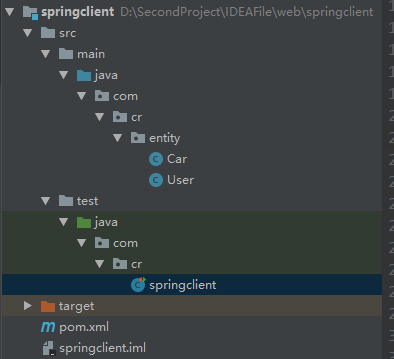
2、pom
<?xml version="1.0" encoding="UTF-8"?>

<project xmlns="http://maven.apache.org/POM/4.0.0" xmlns:xsi="http://www.w3.org/2001/XMLSchema-instance"

  xsi:schemaLocation="http://maven.apache.org/POM/4.0.0http://maven.apache.org/xsd/maven-4.0.0.xsd">

  <modelVersion>4.0.</modelVersion>

  <groupId>com.cr</groupId>

  <artifactId>springclient</artifactId>

  <version>1.0-SNAPSHOT</version>

  <name>springclient</name>

  <!-- FIXME change it to the project's website -->

  <url>http://www.example.com</url>

  <properties>

    <project.build.sourceEncoding>UTF-</project.build.sourceEncoding>

    <maven.compiler.source>1.7</maven.compiler.source>

    <maven.compiler.target>1.7</maven.compiler.target>

  </properties>

  <dependencies>

    <dependency>

      <groupId>org.apache.cxf</groupId>

      <artifactId>cxf-rt-frontend-jaxrs</artifactId>

      <version>3.0.</version>

    </dependency>

    <dependency>

      <groupId>org.apache.cxf</groupId>

      <artifactId>cxf-rt-frontend-jaxws</artifactId>

      <version>3.0.</version>

    </dependency>

    <!--日志-->

    <dependency>

      <groupId>org.slf4j</groupId>

      <artifactId>slf4j-log4j12</artifactId>

      <version>1.7.</version>

      <scope>test</scope>

    </dependency>

    <!--restful风格客户端调用所需要的 -->

    <dependency>

      <groupId>org.apache.cxf</groupId>

      <artifactId>cxf-rt-rs-client</artifactId>

      <version>3.0.</version>

    </dependency>

    <!--对json的支持 -->

    <dependency>

      <groupId>org.apache.cxf</groupId>

      <artifactId>cxf-rt-rs-extension-providers</artifactId>

      <version>3.0.</version>

    </dependency>

    <dependency>

      <groupId>org.codehaus.jettison</groupId>

      <artifactId>jettison</artifactId>

      <version>1.3.</version>

    </dependency>

    <dependency>

      <groupId>junit</groupId>

      <artifactId>junit</artifactId>

      <version>4.11</version>

      <scope>test</scope>

    </dependency>

    <dependency>

      <groupId>org.springframework</groupId>

      <artifactId>spring-context</artifactId>

      <version>4.3..RELEASE</version>

    </dependency>

    <dependency>

      <groupId>org.springframework</groupId>

      <artifactId>spring-web</artifactId>

      <version>4.3..RELEASE</version>

    </dependency>

    <dependency>

      <groupId>org.springframework</groupId>

      <artifactId>spring-test</artifactId>

      <version>4.3..RELEASE</version>

    </dependency>

    <dependency>

      <groupId>org.springframework</groupId>

      <artifactId>spring-beans</artifactId>

      <version>4.3..RELEASE</version>

    </dependency>

    <dependency>

      <groupId>org.springframework</groupId>

      <artifactId>spring-aspects</artifactId>

      <version>4.3..RELEASE</version>

    </dependency>

    <dependency>

      <groupId>org.springframework</groupId>

      <artifactId>spring-webmvc</artifactId>

      <version>4.3..RELEASE</version>

    </dependency>

  </dependencies>

  <build>

    <plugins>

      <plugin>

        <groupId>org.apache.maven.plugins</groupId>

        <artifactId>maven-compiler-plugin</artifactId>

        <version>3.2</version>

        <configuration>

          <source>1.8</source>

          <target>1.8</target>

          <encoding>UTF-</encoding>

          <showWarnings>true</showWarnings>

        </configuration>

      </plugin>

    </plugins>

  </build>

</project>
3、类
package com.cr.entity;

import javax.xml.bind.annotation.XmlRootElement;

//基于restful风格的webservice

//客户端与服务的之间通讯可以传到xml、json

//该注解指定对象序列化为xml或者json数据时根节点的名称

//xml:  <User><id></id></User>

//json:效率更高   {"User":"",pwd:""}

@XmlRootElement(name = "User")

public class User {

    private  String name;

    private  String  pwd;

    public String getName() {

        return name;

    }

    public void setName(String name) {

        this.name = name;

    }

    public String getPwd() {

        return pwd;

    }

    public void setPwd(String pwd) {

        this.pwd = pwd;

    }

    public User() {

    }

    public User(String name, String pwd) {

        this.name = name;

        this.pwd = pwd;

    }

}
测试:
   @Test

    public void save(){

        //远程调用服务端

        WebClient.

                create("http://localhost:8082/cr/userService/userService/user").

                type("application/json").

                post(new User("qq",""));

    }

查询:
    //查询

    @Test

    public void find(){

        WebClient.create("http://localhost:8082/cr/userService/userService/user").get();

    }

10、Web Service-IDEA-jaxrs 整合spring的更多相关文章
- JAX-RS 方式的 RESTful Web Service 开发
JAX-RS 方式的 RESTful Web Service 开发 ——基于 CXF+Spring 的实现 Web Service 目前在风格上有两大类,一个是基于 SOAP 协议,一个是完全遵循 H ...
- 使用JAX-RS创建RESTful Web Service
guice resteasy http://www.cnblogs.com/ydxblog/p/7891224.html http://blog.csdn.net/withiter/article/d ...
- [C#]動態叫用Web Service
http://www.dotblogs.com.tw/jimmyyu/archive/2009/04/22/8139.aspx 摘要 Web Service對大家來說想必都不陌生,也大都了解Web S ...
- 新手Axis2 发布Web Service之路
由于公司的需求,需要写几个银行接口写模拟器(Mock Server),此次接口需要发布成一个WEB Service. 一开始,我以为只要负责写接口的业务层就行了,具体的框架或是环境搭建可以不用管.在与 ...
- Spring 4 集成Apache CXF开发JAX-RS Web Service
什么是JAX-RS 在JSR-311规范中定义,即Java API for RESTful Web Services,一套Java API,用于开发 RESTful风格的Webservice. 工程概 ...
- Apache CXF实现Web Service(4)——Tomcat容器和Spring实现JAX-RS(RESTful) web service
准备 我们仍然使用 Apache CXF实现Web Service(2)——不借助重量级Web容器和Spring实现一个纯的JAX-RS(RESTful) web service 中的代码作为基础,并 ...
- Apache CXF实现Web Service(3)——Tomcat容器和不借助Spring的普通Servlet实现JAX-RS(RESTful) web service
起步 参照这一系列的另外一篇文章: Apache CXF实现Web Service(2)——不借助重量级Web容器和Spring实现一个纯的JAX-RS(RESTful) web service 首先 ...
- Apache CXF实现Web Service(2)——不借助重量级Web容器和Spring实现一个纯的JAX-RS(RESTful) web service
实现目标 http://localhost:9000/rs/roomservice 为入口, http://localhost:9000/rs/roomservice/room为房间列表, http: ...
- JAX-RS和 Spring 整合开发
JAX-RS 和 和 Spring 整合开发 1.建立maven项目 2.导入maven坐标 <dependencies> <!-- cxf 进行rs开发 必须导入 --> & ...
- 浅谈WebService之JAX-RS与spring整合
背景:首先谈一下webservice: 1.Web service是一个平台独立的,低耦合的,自包含的.基于可编程的web的应用程序, 可使用开放的XML(标准通用标记语言下的一个子集)标准来描述.发 ...
随机推荐
- Miller-Rabbin随机性素数测试算法
//**************************************************************** // Miller_Rabin 算法进行素数测试 //速度快,而且 ...
- git杂记-打标签
列出标签 $ git tag v0. v1. 创建标签 --添加附注标签(推荐):加上-a选项(annotated) $ git tag -a v1. -m 'my version 1.4' --添加 ...
- border实现三角形的原理
前言:网上最普遍的实现三角形的方法,就是通过控制border来实现,那为什么可以呢? 原理 我们先来看看border的表现形式. #box{ width:100px; height:100px; ba ...
- Java线程的周期及五种状态
线程的生命周期及五种基本状态 关于Java中线程的生命周期,首先看一下下面这张较为经典的图: 上图中基本上囊括了Java中多线程各重要知识点.掌握了上图中的各知识点,Java中的多线程也就基本上掌握了 ...
- CSS属性之margin
0.对自身可视宽度的影响 1>改变处于标准文档流中,未设置width值的block元素的可视宽度 在标准文档流中,对于没有设置宽度的block元素,当其具有内容或者设置高度后,其自身宽度为父元素 ...
- bootstrap学习笔记(菜单.按钮)
下拉菜单 <div class="dropdown"> <button class="btn btn-default dropdown-toggle&q ...
- Conda常用命令整理
主要参考Anaconda官方指南Using Conda:https://conda.io/docs/using/index.html 环境:Win10 64bit with conda 4.3.14 ...
- java线程面试手写题
1.设计4个线程,其中两个线程每次对j增加1,另外两个线程对j每次减少1.写出程序. public class Question1 { private int j = 0; /** * @param ...
- asp.net的HTTP请求处理过程
1.asp.net的HTTP请求处理过程 说明: (1).客户端浏览器向服务器发出一个http请求,此请求会被inetinfo.exe进程截获,然后转交给aspnet_isapi.dll进程,接着它又 ...
- APRoundedButton
APRoundedButton https://github.com/elpsk/APRoundedButton 效果: 源码: APRoundedButton.h // // Created by ...