
几组不错的X264自定义编码<转>
转帖地址:http://tieba.baidu.com/p/4201033507
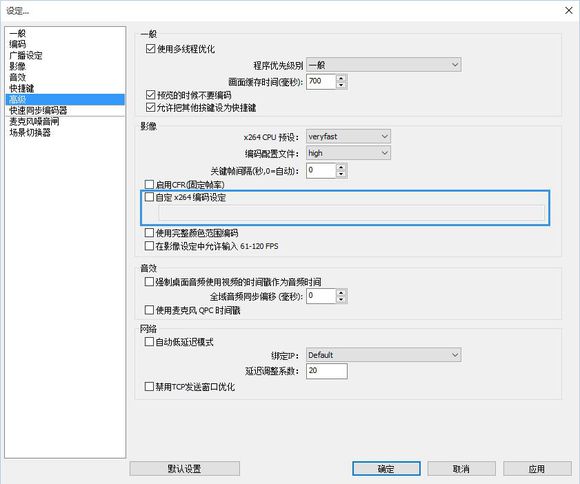
一般直播时使用A设定即可。
你尝试设置并找出你最满意的设定
A为最需最低CPU资源,E为最高。
A
8x8dct=1 aq-mode=2 bframes=1 chroma-qp-offset=1 colormatrix=smpte170m deblock=0:0 direct=auto ipratio=1.41 keyint=240 level=3.1 me=hex merange=16 min-keyint=auto mixed-refs=1 no-mbtree=0 partitions=i4x4,p8x8,b8x8 profile=main psy-rd=0.5:0.0 qcomp=0.6 qpmax=51 qpmin=10 qpstep=4 ratetol=10 rc-lookahead=30 ref=1 scenecut=40 subme=5 threads=0 trellis=2 weightb=1 weightp=2
B
8x8dct=1 aq-mode=2 bframes=1 chroma-qp-offset=1 colormatrix=smpte170m deblock=0:0 direct=auto ipratio=1.41 keyint=240 level=3.1 me=hex merange=16 min-keyint=auto mixed-refs=1 no-mbtree=0 partitions=i4x4,p8x8,b8x8 profile=main psy-rd=0.5:0.0 qcomp=0.6 qpmax=51 qpmin=10 qpstep=4 ratetol=10 rc-lookahead=30 ref=1 scenecut=40 subme=6 threads=0 trellis=2 weightb=1 weightp=2
C
8x8dct=1 aq-mode=2 bframes=1 chroma-qp-offset=2 colormatrix=smpte170m deblock=0:0 direct=auto ipratio=1.41 keyint=240 level=3.1 me=hex merange=16 min-keyint=auto mixed-refs=1 no-mbtree=0 partitions=i4x4,p8x8,b8x8 profile=main psy-rd=0.5:0.0 qcomp=0.6 qpmax=51 qpmin=10 qpstep=4 ratetol=10 rc-lookahead=30 ref=1 scenecut=40 subme=7 threads=0 trellis=2 weightb=1 weightp=2
D
8x8dct=1 aq-mode=2 b-adapt=2 bframes=1 chroma-qp-offset=2 colormatrix=smpte170m deblock=0:0 direct=auto ipratio=1.41 keyint=240 level=3.1 me=umh merange=16 min-keyint=auto mixed-refs=1 no-mbtree=0 partitions=all profile=high psy-rd=0.5:0.0 qcomp=0.6 qpmax=51 qpmin=10 qpstep=4 ratetol=10 rc-lookahead=30 ref=1 scenecut=40 subme=8 threads=0 trellis=2 weightb=1 weightp=2
E
8x8dct=1 aq-mode=2 b-adapt=2 bframes=1 chroma-qp-offset=2 colormatrix=smpte170m deblock=0:0 direct=auto ipratio=1.41 keyint=240 level=3.1 me=umh merange=16 min-keyint=auto mixed-refs=1 no-mbtree=0 partitions=all profile=high psy-rd=0.5:0.0 qcomp=0.6 qpmax=51 qpmin=10 qpstep=4 ratetol=10 rc-lookahead=30 ref=1 scenecut=40 subme=10 threads=0 trellis=2 weightb=1 weightp=2
================================================
这给PC极差用户.. 不推荐超过1000kbps..
L
8x8dct=1 aq-mode=2 bframes=1 chroma-qp-offset=1 colormatrix=smpte170m deblock=0:0 direct=auto ipratio=1.41 keyint=240 level=3.1 me=hex merange=16 min-keyint=auto mixed-refs=1 no-mbtree=0 partitions=i4x4,p8x8,b8x8 profile=main psy-rd=0.5:0.0 qcomp=0.6 qpmax=51 qpmin=10 qpstep=4 ratetol=10 rc-lookahead=30 ref=1 scenecut=40 subme=1 threads=0 trellis=2 weightb=1 weightp=2
================================================
这给网宽不足者使用,上传不足1m者..
设置500kbps,并使用以下自定义x264编码
8x8dct=1 aq-mode=2 b-adapt=2 bframes=1 chroma-qp-offset=2 colormatrix=smpte170m deblock=0:0 direct=auto ipratio=1.41 keyint=240 level=3.1 me=umh merange=16 min-keyint=auto mixed-refs=1 no-mbtree=0 partitions=all profile=high psy-rd=0.5:0.0 qcomp=0.6 qpmax=51 qpmin=10 qpstep=4 ratetol=10 rc-lookahead=30 ref=1 scenecut=40 subme=10 threads=0 trellis=2 weightb=1 weightp=2
↑國外有人使用這組,並以500kbps的上傳,以720P直播BF3...
几组不错的X264自定义编码<转>的更多相关文章
- 基于 WebRTC 实现自定义编码分辨率发送
2020年如果问什么技术领域最火?毫无疑问:音视频.2020年远程办公和在线教育的强势发展,都离不开音视频的身影,视频会议.在线教学.娱乐直播等都是音视频的典型应用场景. 更加丰富的使用场景更需要我们 ...
- netty系列之:自定义编码和解码器要注意的问题
目录 简介 自定义编码器和解码器的实现 ReplayingDecoder 总结 简介 在之前的系列文章中,我们提到了netty中的channel只接受ByteBuf类型的对象,如果不是ByteBuf对 ...
- 【LINT】cpplint修改版:自定义编码风格检查工具lint
github:https://github.com/skullboyer/code-check Code Check 本仓介绍的内容涉及代码静态检查和编码风格检查 但主要放在编码风格检查,lint是基 ...
- FFmpeg X264 H264编码指南[译]
本文目标:如何创建一个高质量的H.264视频 x264 是一个 H.264 编码器. 通常有2种码率控制(rate control)模式:Constant Rate Factor (CRF) or T ...
- 视频编解码---x264用于编码,ffmpeg用于解码
项目要用到视频编解码,最近半个月都在搞,说实话真是走了很多弯路,浪费了很多时间.将自己的最终成果记录于此,期望会给其他人提供些许帮助. 参考教程: http://ffmpeg.org/trac/ffm ...
- 160912、工具类:spring+springmvc自定义编码转换
一.自定义的类(注意其中的属性,web.xml中的配置就是根据这个类的) import org.springframework.web.filter.OncePerRequestFilter; imp ...
- 测试x264编码器的低延时编码和非延时编码
最近在学x264的编码,经过大量的测试,编码1080P的视频,编码10000帧数据. 在设置为低延时编码的时候: 编码线程0,一帧耗时:7.000000 ms.编码线程0,一帧耗时:8.000000 ...
- 视频x264编码浅析
声明 x264_param_t 结构体变量: x264_param_t params; x264_param_default_preset(¶ms, "ultrafast&q ...
- x264 编码数配置
记录项目中用到一组x264快速编码参数配置,具体如下: param->i_frame_reference = 1; param->i_scenecut_threshold = 0; par ...
随机推荐
- hdu 1385 floyd字典序
Minimum Transport Cost Time Limit: 2000/1000 MS (Java/Others) Memory Limit: 65536/32768 K (Java/O ...
- 使用POI导入小数变成浮点数异常
例如 我在Excel中的数据为17.2, 导入到表中就变成了17.1999999或者17.20000001 原因是我用double接收了17.2,然后直接用了String去转换,精度就丢失了. 代 ...
- 在不同的浏览器使用不同的css样式,解决浏览器兼容问题
区别IE6与FF: background:orange; *background:blue; 区别IE6与IE7: background:green !import ...
- BZOJ2958 序列染色
果然清华集训的题目...显然的DP题但是不会做... 我们令f[i][j][w]表示状态方程 w表示到了字符串的第w个 i = 0, 1, 2分别表示k个B和k个W都没填上.k个B填上了k个W没填上. ...
- vue2 简单的留言板
没有写样式,只是写个功能 <template> <div class="headers"> <div class="form"&g ...
- (C#基础)深浅拷贝理解
一方面感觉实在无趣,不知道做什么了,纯粹来个打字练习,于是有了这个. 二方面深感自己C#基础之薄弱,于是对着园友的文章一边看,一边练习,因为很多次看了,没有多久就忘了,还有练习过程中会出现一些问题,这 ...
- Windows 7 IIS7.5上部署MVC实例
这段时间在用MVC写一个导游网站,在Window7上部署的时候,遇到和处理了一些问题. 现将完整的过程整理出来,供大家参考: 一.部署准备: 1.安装Microsoft .net FrameWork ...
- 知名第三方编译版tete009 Firefox 24.0
Firefox除了官方版本上还有许多由爱好者自己编译修改的第三方版本. 其中 tete009 是十分流行的一个版本,目前tete009 Firefox 24.0 版本发布. tete009版Firef ...
- DIY远程监控室内温度设备(tiny6410+ds18b20+yeelink+curl)
春节了,趁着假期的空闲时间,抽空捣鼓了下tiny6410开发板,发现这个东东尘封许久,很长时间没用过了.貌似最近物联网大热,谷歌收购Nest,其设计的恒温器能够智能调节和远程控制房间的温度,UI和设计 ...
- mysql alter修改字段的长度 类型sql语句
在mysql中alter命令可以修改字段类型,长度,名称或一些其它的参数,下面我来给大家介绍alter函数修改字段长度与类型的两个命令,希望文章来给各位带来帮助. mysql 修改字段长度 a ...