
C++操作Windows WIFI
原文链接地址:https://blog.csdn.net/just_do_1122/article/details/78031024
- WLAN_NOTIFICATION_CALLBACK
- WlanAllocateMemory
- WlanCloseHandle
- WlanConnect
- WlanDeleteProfile
- WlanDisconnect
- WlanEnumInterfaces
- WlanExtractPsdIEDataList
- WlanFreeMemory
- WlanGetAvailableNetworkList
- WlanGetFilterList
- WlanGetInterfaceCapability
- WlanGetNetworkBssList
- WlanGetProfile
- WlanGetProfileCustomUserData
- WlanGetProfileList
- WlanGetSecuritySettings
- WlanHostedNetworkForceStart
- WlanHostedNetworkForceStop
- WlanHostedNetworkInitSettings
- WlanHostedNetworkQueryProperty
- WlanHostedNetworkQuerySecondaryKey
- WlanHostedNetworkQueryStatus
- WlanHostedNetworkRefreshSecuritySettings
- WlanHostedNetworkSetProperty
- WlanHostedNetworkSetSecondaryKey
- WlanHostedNetworkStartUsing
- WlanHostedNetworkStopUsing
- WlanIhvControl
- WlanOpenHandle
- WlanQueryAutoConfigParameter
- WlanQueryInterface
- WlanReasonCodeToString
- WlanRegisterNotification
- WlanRegisterVirtualStationNotification
- WlanRenameProfile
- WlanSaveTemporaryProfile
- WlanScan
- WlanSetAutoConfigParameter
- WlanSetFilterList
- WlanSetInterface
- WlanSetProfile
- WlanSetProfileCustomUserData
- WlanSetProfileEapUserData
- WlanSetProfileEapXmlUserData
- WlanSetProfileList
- WlanSetProfilePosition
- WlanSetPsdIeDataList
- WlanSetSecuritySettings
- WlanUIEditProfile
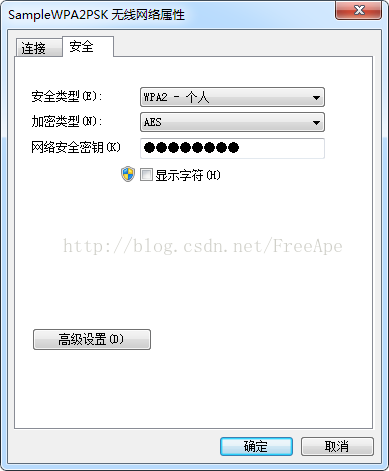
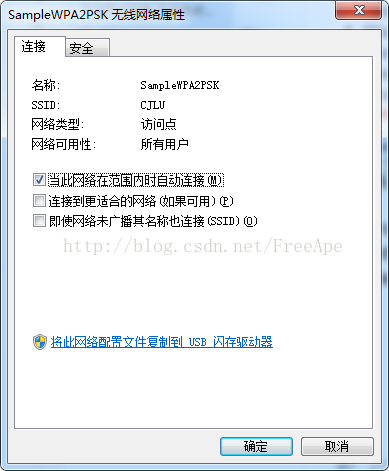
WLAN_profile Schema Elements [xml配置文件编写格式]:
- WLANProfile
- name (WLANProfile)
- SSIDConfig (WLANProfile)
- connectionType (WLANProfile)
- connectionMode (WLANProfile)
- autoSwitch (WLANProfile)
- MSM (WLANProfile)
- IHV (WLANProfile)
Wireless Profile Samples[无线配置文件例程]
- Bootstrap Profile Sample
- FIPS Profile Sample
- Non-Broadcast Profile Sample
- Single Sign-On Profile Sample
- WPA-Enterprise with PEAP-MSCHAPv2 Profile Sample
- WPA-Enterprise with TLS Profile Sample
- WPA-Personal Profile Sample
- WPA2-Enterprise with PEAP-MSCHAPv2 Profile Sample
- WPA2-Enterprise with TLS Profile Sample
- WPA2-Personal Profile Sample
 <?xml version="1.0" encoding="US-ASCII"?>

 <WLANProfile xmlns="http://www.microsoft.com/networking/WLAN/profile/v1">

     <name>SampleWPA2PSK</name>

     <SSIDConfig>

         <SSID>

             <name>SampleWPA2PSK</name>

         </SSID>

     </SSIDConfig>

     <connectionType>ESS</connectionType>

     <connectionMode>auto</connectionMode>

     <autoSwitch>false</autoSwitch>

     <MSM>

         <security>

             <authEncryption>

                 <authentication>WPA2PSK</authentication>

                 <encryption>AES</encryption>

                 <useOneX>false</useOneX>

             </authEncryption>

  <sharedKey>

      <keyType>passPhrase</keyType>

      <protected>false</protected>

      <keyMaterial> <!-- insert key here --> </keyMaterial>

  </sharedKey>

          </security>

     </MSM>

 </WLANProfile>
【加密类型设置】
<encryption>AES</encryption>
【安全类型设置】
<authentication>WPAPSK</authentication>
| Value | Description |
|---|---|
| open | Open 802.11 authentication. |
| shared | Shared 802.11 authentication. |
| WPA | WPA-Enterprise 802.11 authentication. |
| WPAPSK | WPA-Personal 802.11 authentication. |
| WPA2 | WPA2-Enterprise 802.11 authentication. |
| WPA2PSK | WPA2-Personal 802.11 authentication. |
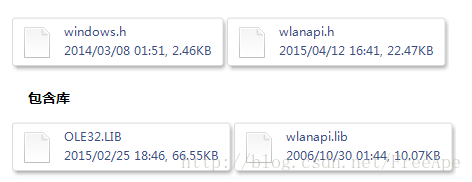
.pro文件
LIBS+=$$quote(E:/qt/2015-4-9/WlanGetProfileTest/WlanGetProfileTest/lib/wlanapi.lib)
LIBS+=$$quote(E:/qt/2015-4-9/WlanGetProfileTest/WlanGetProfileTest/lib/OLE32.lib)
包含头文件
#include<windows.h>
#include<wlanapi.h>
 程序实现(终端打印信息)

 #include<windows.h>

 #include<wlanapi.h>

 #include<string>

 #include<stdio.h>

 //无线连接状态

 intlistenStatus()

 {

     HANDLEhClient=NULL;

     DWORDdwMaxClient=;

     DWORDdwCurVersion=;

     DWORDdwResult=;

     intiRet=;

     WCHARGuidString[]={};

     //ListenthestatusoftheAPyouconnected.

     while(){

         Sleep();

         PWLAN_INTERFACE_INFO_LISTpIfList=NULL;

         PWLAN_INTERFACE_INFOpIfInfo=NULL;

         dwResult=WlanOpenHandle(dwMaxClient,NULL,&dwCurVersion,&hClient);

         if(dwResult!=ERROR_SUCCESS){

             wprintf(L"WlanOpenHandlefailedwitherror:%u\n",dwResult);

             return1;

         }

         //获取无线网卡列表

         dwResult=WlanEnumInterfaces(hClient,NULL,&pIfList);

         if(dwResult!=ERROR_SUCCESS){

             wprintf(L"WlanEnumInterfacesfailedwitherror:%u\n",dwResult);

             return1;

         }else{

             wprintf(L"NumEntries:%lu\n",pIfList->dwNumberOfItems);

             wprintf(L"CurrentIndex:%lu\n\n",pIfList->dwIndex);

             inti;

             for(i=;i<(int)pIfList->dwNumberOfItems;i++){

                 pIfInfo=(WLAN_INTERFACE_INFO*)&pIfList->InterfaceInfo[i];

                 wprintf(L"InterfaceIndex[%u]:\t%lu\n",i,i);

                 iRet=StringFromGUID2(pIfInfo->InterfaceGuid,(LPOLESTR)&GuidString,

                     sizeof(GuidString)/sizeof(*GuidString));

                 if(iRet==)

                     wprintf(L"StringFromGUID2failed\n");

                 else{

                     wprintf(L"InterfaceGUID[%d]:%S\n",i,GuidString);

                 }

                 wprintf(L"InterfaceDescription[%d]:%S",i,

                     pIfInfo->strInterfaceDescription);

                 wprintf(L"\n");

                 wprintf(L"InterfaceState[%d]:\t",i);

                 switch(pIfInfo->isState){

 casewlan_interface_state_not_ready:

                     wprintf(L"Notready\n");

                     break;

 casewlan_interface_state_connected:

                     wprintf(L"Connected\n");

                     break;

 casewlan_interface_state_ad_hoc_network_formed:

                     wprintf(L"Firstnodeinaadhocnetwork\n");

                     break;

 casewlan_interface_state_disconnecting:

                     wprintf(L"Disconnecting\n");

                     break;

 casewlan_interface_state_disconnected:

                     wprintf(L"Notconnected\n");

                     break;

 casewlan_interface_state_associating:

                     wprintf(L"Attemptingtoassociatewithanetwork\n");

                     break;

 casewlan_interface_state_discovering:

                     wprintf(L"Autoconfigurationisdiscoveringsettingsforthenetwork\n");

                     break;

 casewlan_interface_state_authenticating:

                     wprintf(L"Inprocessofauthenticating\n");

                     break;

 default:

     wprintf(L"Unknownstate%ld\n",pIfInfo->isState);

     break;

                 }

             }

         }

     }

 }

 intmain()

 {

     HANDLEhClient=NULL;

     DWORDdwMaxClient=;

     DWORDdwCurVersion=;

     DWORDdwResult=;

     PWLAN_INTERFACE_INFO_LISTpIfList=NULL;

     //opensaconnectiontotheserver.

     dwResult=WlanOpenHandle(dwMaxClient,NULL,&dwCurVersion,&hClient);

     if(dwResult!=ERROR_SUCCESS){

         wprintf(L"WlanOpenHandlefailedwitherror:%u\n",dwResult);

         return1;

     }

     //enumeratesallofthewirelessLANinterfacescurrentlyenabledonthelocalcomputer.

     dwResult=WlanEnumInterfaces(hClient,NULL,&pIfList);

     if(dwResult!=ERROR_SUCCESS){

         wprintf(L"WlanEnumInterfacesfailedwitherror:%u\n",dwResult);

         return1;

     }else{

         //disconnectsaninterfacefromitscurrentnetwork.

         dwResult=WlanDisconnect(hClient,&pIfList->InterfaceInfo[].InterfaceGuid,NULL);//DISCONNECTFIRST

         if(dwResult!=ERROR_SUCCESS)

         {

             printf("WlanDisconnectfailedwitherror:%lu\n",dwResult);

             return-;

         }

         //retrievethelistofavailablenetworksonawirelessLANinterface.

         PWLAN_AVAILABLE_NETWORK_LISTpWLAN_AVAILABLE_NETWORK_LIST=NULL;

         dwResult=WlanGetAvailableNetworkList(hClient,&pIfList->InterfaceInfo[].InterfaceGuid,

             ,

             NULL,&pWLAN_AVAILABLE_NETWORK_LIST);

         if(dwResult!=ERROR_SUCCESS)

         {

             printf("WlanGetAvailableNetworkListfailedwitherror:%lu\n",dwResult);

             WlanFreeMemory(pWLAN_AVAILABLE_NETWORK_LIST);

             return-;

         }

         //connectawlan

         LPCWSTRprofileXml;

         std::wstringstrHead=

             L"<?xmlversion=\"1.0\"encoding=\"US-ASCII\"?>\

              <WLANProfilexmlns=\"http://www.microsoft.com/networking/WLAN/profile/v1\">\

              <name>SampleWPA2PSK</name>\

              <SSIDConfig>\

              <SSID>\

              <name>CJLU</name>\

              </SSID>\

              </SSIDConfig>\

              <connectionType>ESS</connectionType>\

              <connectionMode>auto</connectionMode>\

              <autoSwitch>false</autoSwitch>\

              <MSM>\

              <security>\

              <authEncryption>\

              <authentication>WPA2PSK</authentication>\

              <encryption>AES</encryption>\

              <useOneX>false</useOneX>\

              </authEncryption>\

              <sharedKey>\

              <keyType>passPhrase</keyType>\

              <protected>false</protected>\

              <keyMaterial></keyMaterial>\

              </sharedKey>\

              </security>\

              </MSM>\

              </WLANProfile>";

         profileXml=strHead.c_str();

         WLAN_REASON_CODEWlanreason;

         //如果<connectionMode>auto</connectionMode>,为自动连接,则下面的一步可以连接上无线

         dwResult=WlanSetProfile(hClient,

             &(pIfList->InterfaceInfo[].InterfaceGuid),

             ,profileXml,NULL,TRUE,NULL,&Wlanreason);

         if(ERROR_SUCCESS!=dwResult)

         {

             printf("wlansetprofilefailed%lu.\r\n",dwResult);

         }

         //删除无线配置文件

         /*

         LPCWSTRprofileName;

         LPCWSTRnewProfileName;

         std::wstringstrprofileName=L"SampleWPA2PSK";

         std::wstringstrNewProfileName=L"test";

         profileName=strprofileName.c_str();

         newProfileName=strNewProfileName.c_str();

         dwResult=WlanDeleteProfile(hClient,

         &(pIfList->InterfaceInfo[0].InterfaceGuid),

         profileName,NULL);

         if(ERROR_SUCCESS!=dwResult)

         {

         printf("wlandeleteprofilefailed%lu.\r\n",dwResult);

         }

         */

         /*

         //重命名无线配置文件,其实只是新建了一个配置文件,并无重命名(更改了wlanapi.h,将此函数换了条件编译位置)

         dwResult=WlanRenameProfile(hClient,

         &(pIfList->InterfaceInfo[0].InterfaceGuid),

         profileName,

         newProfileName,

         NULL

         );

         if(ERROR_SUCCESS!=dwResult)

         {

         printf("wlanRenameprofilefailed%lu.\r\n",dwResult);

         }

         */

         //网卡关闭和开启(关闭了,就开不了了,除非获取了InterfaceGuid

         //然后可以关闭再开启。用fn+F2手动开启)

         WLAN_PHY_RADIO_STATEstate;

         state.dwPhyIndex=;

         state.dot11SoftwareRadioState=dot11_radio_state_on;

         PVOIDpData=&state;

         dwResult=WlanSetInterface(hClient,&pIfList->InterfaceInfo[].InterfaceGuid,

             wlan_intf_opcode_radio_state,sizeof(WLAN_PHY_RADIO_STATE),pData,NULL);

         if(dwResult!=ERROR_SUCCESS)

         {

             wprintf(L"setstatefailed!erris%d\n",dwResult);

         }

     }

     dwResult=WlanCloseHandle(hClient,NULL);

     if(dwResult!=ERROR_SUCCESS)

     {

         wprintf(L"WlanCloseHandlefailed%lu.\r\n",dwResult);

     }

     listenStatus();

     if(pIfList!=NULL){

         WlanFreeMemory(pIfList);

         pIfList=NULL;

     }

     return0;

 }
C++操作Windows WIFI的更多相关文章
- winreg操作windows注册表详解示例
#coding:utf-8 #=====================================================================#=====本程序演示了WINR ...
- C语言操作WINDOWS系统存储区数字证书相关函数详解及实例
C语言操作WINDOWS系统存储区数字证书相关函数详解及实例 以下代码使用C++实现遍历存储区证书及使用UI选择一个证书 --使用CertOpenSystemStore打开证书存储区. --在循环中 ...
- C# 操作windows服务[启动、停止、卸载、安装]
主要宗旨:不已命令形式操作windows服务 static void Main(string[] args) { var path = @"E:\开发辅助项目\WCF\WCF.Test\WC ...
- 全键盘操作Windows
计算机机用户在使用计算机的时候,是用键盘多一点?还是用鼠标多一点?如果是专业打字员,应该会说他使用键盘多一点,除此之外,多数人都会告诉你,他已经离不开鼠标了,没有鼠标,就不会操作电脑. 如果某一天 ...
- C#通过SC命令和静态公共类来操作Windows服务
调用的Windows服务应用程序网址:http://www.cnblogs.com/pingming/p/5115304.html 一.引用 二.公共静态类:可以单独放到类库里 using Syste ...
- cmd命令行和bat批处理操作windows服务(转载)
一.cmd命令行---进行Windows服务操作 1.安装服务 sc create 服务名 binPath= "C:\Users\Administrator\Desktop\win32srv ...
- (转)Python 操作 Windows 粘贴板
转自: http://outofmemory.cn/code-snippet/3939/Python-operation-Windows-niantie-board Python 操作 Windows ...
- C#使用DirectoryEntry类操作Windows帐户
1.创建windows帐户 1 2 3 4 5 6 7 8 9 10 11 12 13 14 15 /// <summary> /// 创建Windows帐户 /// </summa ...
- [经验分享]C# 操作Windows系统计划任务
背景:我做了一个事情是要自己提前创建好很多要定时执行的任务,在我不在的时候自动执行这些程序,以保证我的工作能无人值守,那么我就需要建立系统计划任务来帮我完成这件事情,当然用脑子想想如何实现,很简单,每 ...
随机推荐
- R Language Learn Notes
One #install package install.packages("ggplot2") #load library library(ggplot2) #update.pa ...
- Android开源的精美日历控件,热插拔设计的万能自定义UI
Android开源的精美日历控件,热插拔设计的万能自定义UI UI框架应该逻辑与界面实现分离,该日历控件使用了热插拔的设计 ,简单几步即可实现你需要的UI效果,热插拔的思想是你提供你的实现,我提供我的 ...
- PHP:Iterator(迭代器)接口和生成器
迭代器 可在内部迭代自己的外部迭代器或类的接口.详情:http://php.net/manual/zh/class.iterator.php 接口摘要 Iterator extends Travers ...
- appium+python自动化☞环境搭建
前言:appium可以说是做app最火的一个自动化框架,它的主要优势是支持android和ios,另外脚本语言也是支持java和Python.略懂Python,所以接下来的教程是 appium+pyt ...
- JavaScript学习笔记(三)——对象
第四章 理解对象 1 说明 对象的状态:属性,行为:方法: 对象定义放在花括号内: 用冒号分隔属性名和属性值: 用逗号分隔属性名和属性值对,包括方法: 最后一个属性值后面不加逗号: 属性名可以是任何字 ...
- Liunx expect 基础
a script for study except #!/usr/bin/expect 声明文件内的语法使用 expect 的语法来执行. send send: 向进程发送字符串,用于模拟用户的输入. ...
- 剑指 Offer——和为 S 的两个数字
1. 题目 2. 解答 由于数组是已经排好序的,我们可以定义两个指针,第一个指针指向第一个元素,第二个指针指向最后一个元素,然后求出这两个元素的和,与目标和进行比较.若小于目标和,第一个指针向前移动: ...
- hadoop的safemode 安全模式
hadoop启动检查副本块数,就会进入safemode safemode的相关情况 虽然不能进行修改文件的操作,但是可以浏览目录结构.查看文件内容的. 在命令行下是可以控制安全模式的进入.退出和查看的 ...
- static块的本质
在网上看到了下面的一段代码: public class Test { static { _i = 20; } public static int _i = 10; public static void ...
- P4环境搭建
P4环境搭建 执行仓库中所有脚本,即可即可安装所有依赖项. GitHub链接 脚本执行顺序:deps,p4c-bm,bmv2,p4c