
mybatis由浅入深day02_9.3.5使用生成的代码_9.4逆向工程注意事项
9.3.5 使用生成的代码
需要将生成工程中所生成的代码拷贝到自己的工程中。
拷这4个到我们原来的spring_mybatis1216工程下
ItemsMapper.java
package cn.itcast.ssm.mapper;

import cn.itcast.ssm.po.Items;

import cn.itcast.ssm.po.ItemsExample;

import java.util.List;

import org.apache.ibatis.annotations.Param;

public interface ItemsMapper {

    int countByExample(ItemsExample example);

    //删除符合条件的记录

    int deleteByExample(ItemsExample example);

    //根据主键删除

    int deleteByPrimaryKey(Integer id);

    //插入对象所有字段

    int insert(Items record);

    //插入对象不为空的字段

    int insertSelective(Items record);

    List<Items> selectByExampleWithBLOBs(ItemsExample example);

    //自定义查询条件查询结果集

    List<Items> selectByExample(ItemsExample example);

    //根据主键查询

    Items selectByPrimaryKey(Integer id);

    int updateByExampleSelective(@Param("record") Items record, @Param("example") ItemsExample example);

    int updateByExampleWithBLOBs(@Param("record") Items record, @Param("example") ItemsExample example);

    int updateByExample(@Param("record") Items record, @Param("example") ItemsExample example);

    //根据主键将对象中不为空的值更新至数据库

    int updateByPrimaryKeySelective(Items record);

    int updateByPrimaryKeyWithBLOBs(Items record);

    //根据主键将对象中所有字段的值更新至数据库

    int updateByPrimaryKey(Items record);

}
ItemsMapper.xml
<?xml version="1.0" encoding="UTF-8" ?>

<!DOCTYPE mapper PUBLIC "-//mybatis.org//DTD Mapper 3.0//EN" "http://mybatis.org/dtd/mybatis-3-mapper.dtd" >

<mapper namespace="cn.itcast.ssm.mapper.ItemsMapper" >

  <resultMap id="BaseResultMap" type="cn.itcast.ssm.po.Items" >

    <id column="id" property="id" jdbcType="INTEGER" />

    <result column="name" property="name" jdbcType="VARCHAR" />

    <result column="price" property="price" jdbcType="REAL" />

    <result column="pic" property="pic" jdbcType="VARCHAR" />

    <result column="createtime" property="createtime" jdbcType="TIMESTAMP" />

  </resultMap>

  <resultMap id="ResultMapWithBLOBs" type="cn.itcast.ssm.po.Items" extends="BaseResultMap" >

    <result column="detail" property="detail" jdbcType="LONGVARCHAR" />

  </resultMap>

  <sql id="Example_Where_Clause" >

    <where >

      <foreach collection="oredCriteria" item="criteria" separator="or" >

        <if test="criteria.valid" >

          <trim prefix="(" suffix=")" prefixOverrides="and" >

            <foreach collection="criteria.criteria" item="criterion" >

              <choose >

                <when test="criterion.noValue" >

                  and ${criterion.condition}

                </when>

                <when test="criterion.singleValue" >

                  and ${criterion.condition} #{criterion.value}

                </when>

                <when test="criterion.betweenValue" >

                  and ${criterion.condition} #{criterion.value} and #{criterion.secondValue}

                </when>

                <when test="criterion.listValue" >

                  and ${criterion.condition}

                  <foreach collection="criterion.value" item="listItem" open="(" close=")" separator="," >

                    #{listItem}

                  </foreach>

                </when>

              </choose>

            </foreach>

          </trim>

        </if>

      </foreach>

    </where>

  </sql>

  <sql id="Update_By_Example_Where_Clause" >

    <where >

      <foreach collection="example.oredCriteria" item="criteria" separator="or" >

        <if test="criteria.valid" >

          <trim prefix="(" suffix=")" prefixOverrides="and" >

            <foreach collection="criteria.criteria" item="criterion" >

              <choose >

                <when test="criterion.noValue" >

                  and ${criterion.condition}

                </when>

                <when test="criterion.singleValue" >

                  and ${criterion.condition} #{criterion.value}

                </when>

                <when test="criterion.betweenValue" >

                  and ${criterion.condition} #{criterion.value} and #{criterion.secondValue}

                </when>

                <when test="criterion.listValue" >

                  and ${criterion.condition}

                  <foreach collection="criterion.value" item="listItem" open="(" close=")" separator="," >

                    #{listItem}

                  </foreach>

                </when>

              </choose>

            </foreach>

          </trim>

        </if>

      </foreach>

    </where>

  </sql>

  <sql id="Base_Column_List" >

    id, name, price, pic, createtime

  </sql>

  <sql id="Blob_Column_List" >

    detail

  </sql>

  <select id="selectByExampleWithBLOBs" resultMap="ResultMapWithBLOBs" parameterType="cn.itcast.ssm.po.ItemsExample" >

    select

    <if test="distinct" >

      distinct

    </if>

    <include refid="Base_Column_List" />

    ,

    <include refid="Blob_Column_List" />

    from items

    <if test="_parameter != null" >

      <include refid="Example_Where_Clause" />

    </if>

    <if test="orderByClause != null" >

      order by ${orderByClause}

    </if>

  </select>

  <select id="selectByExample" resultMap="BaseResultMap" parameterType="cn.itcast.ssm.po.ItemsExample" >

    select

    <if test="distinct" >

      distinct

    </if>

    <include refid="Base_Column_List" />

    from items

    <if test="_parameter != null" >

      <include refid="Example_Where_Clause" />

    </if>

    <if test="orderByClause != null" >

      order by ${orderByClause}

    </if>

  </select>

  <select id="selectByPrimaryKey" resultMap="ResultMapWithBLOBs" parameterType="java.lang.Integer" >

    select

    <include refid="Base_Column_List" />

    ,

    <include refid="Blob_Column_List" />

    from items

    where id = #{id,jdbcType=INTEGER}

  </select>

  <delete id="deleteByPrimaryKey" parameterType="java.lang.Integer" >

    delete from items

    where id = #{id,jdbcType=INTEGER}

  </delete>

  <delete id="deleteByExample" parameterType="cn.itcast.ssm.po.ItemsExample" >

    delete from items

    <if test="_parameter != null" >

      <include refid="Example_Where_Clause" />

    </if>

  </delete>

  <insert id="insert" parameterType="cn.itcast.ssm.po.Items" >

    insert into items (id, name, price,

      pic, createtime, detail

      )

    values (#{id,jdbcType=INTEGER}, #{name,jdbcType=VARCHAR}, #{price,jdbcType=REAL},

      #{pic,jdbcType=VARCHAR}, #{createtime,jdbcType=TIMESTAMP}, #{detail,jdbcType=LONGVARCHAR}

      )

  </insert>

  <insert id="insertSelective" parameterType="cn.itcast.ssm.po.Items" >

    insert into items

    <trim prefix="(" suffix=")" suffixOverrides="," >

      <if test="id != null" >

        id,

      </if>

      <if test="name != null" >

        name,

      </if>

      <if test="price != null" >

        price,

      </if>

      <if test="pic != null" >

        pic,

      </if>

      <if test="createtime != null" >

        createtime,

      </if>

      <if test="detail != null" >

        detail,

      </if>

    </trim>

    <trim prefix="values (" suffix=")" suffixOverrides="," >

      <if test="id != null" >

        #{id,jdbcType=INTEGER},

      </if>

      <if test="name != null" >

        #{name,jdbcType=VARCHAR},

      </if>

      <if test="price != null" >

        #{price,jdbcType=REAL},

      </if>

      <if test="pic != null" >

        #{pic,jdbcType=VARCHAR},

      </if>

      <if test="createtime != null" >

        #{createtime,jdbcType=TIMESTAMP},

      </if>

      <if test="detail != null" >

        #{detail,jdbcType=LONGVARCHAR},

      </if>

    </trim>

  </insert>

  <select id="countByExample" parameterType="cn.itcast.ssm.po.ItemsExample" resultType="java.lang.Integer" >

    select count(*) from items

    <if test="_parameter != null" >

      <include refid="Example_Where_Clause" />

    </if>

  </select>

  <update id="updateByExampleSelective" parameterType="map" >

    update items

    <set >

      <if test="record.id != null" >

        id = #{record.id,jdbcType=INTEGER},

      </if>

      <if test="record.name != null" >

        name = #{record.name,jdbcType=VARCHAR},

      </if>

      <if test="record.price != null" >

        price = #{record.price,jdbcType=REAL},

      </if>

      <if test="record.pic != null" >

        pic = #{record.pic,jdbcType=VARCHAR},

      </if>

      <if test="record.createtime != null" >

        createtime = #{record.createtime,jdbcType=TIMESTAMP},

      </if>

      <if test="record.detail != null" >

        detail = #{record.detail,jdbcType=LONGVARCHAR},

      </if>

    </set>

    <if test="_parameter != null" >

      <include refid="Update_By_Example_Where_Clause" />

    </if>

  </update>

  <update id="updateByExampleWithBLOBs" parameterType="map" >

    update items

    set id = #{record.id,jdbcType=INTEGER},

      name = #{record.name,jdbcType=VARCHAR},

      price = #{record.price,jdbcType=REAL},

      pic = #{record.pic,jdbcType=VARCHAR},

      createtime = #{record.createtime,jdbcType=TIMESTAMP},

      detail = #{record.detail,jdbcType=LONGVARCHAR}

    <if test="_parameter != null" >

      <include refid="Update_By_Example_Where_Clause" />

    </if>

  </update>

  <update id="updateByExample" parameterType="map" >

    update items

    set id = #{record.id,jdbcType=INTEGER},

      name = #{record.name,jdbcType=VARCHAR},

      price = #{record.price,jdbcType=REAL},

      pic = #{record.pic,jdbcType=VARCHAR},

      createtime = #{record.createtime,jdbcType=TIMESTAMP}

    <if test="_parameter != null" >

      <include refid="Update_By_Example_Where_Clause" />

    </if>

  </update>

  <update id="updateByPrimaryKeySelective" parameterType="cn.itcast.ssm.po.Items" >

    update items

    <set >

      <if test="name != null" >

        name = #{name,jdbcType=VARCHAR},

      </if>

      <if test="price != null" >

        price = #{price,jdbcType=REAL},

      </if>

      <if test="pic != null" >

        pic = #{pic,jdbcType=VARCHAR},

      </if>

      <if test="createtime != null" >

        createtime = #{createtime,jdbcType=TIMESTAMP},

      </if>

      <if test="detail != null" >

        detail = #{detail,jdbcType=LONGVARCHAR},

      </if>

    </set>

    where id = #{id,jdbcType=INTEGER}

  </update>

  <update id="updateByPrimaryKeyWithBLOBs" parameterType="cn.itcast.ssm.po.Items" >

    update items

    set name = #{name,jdbcType=VARCHAR},

      price = #{price,jdbcType=REAL},

      pic = #{pic,jdbcType=VARCHAR},

      createtime = #{createtime,jdbcType=TIMESTAMP},

      detail = #{detail,jdbcType=LONGVARCHAR}

    where id = #{id,jdbcType=INTEGER}

  </update>

  <update id="updateByPrimaryKey" parameterType="cn.itcast.ssm.po.Items" >

    update items

    set name = #{name,jdbcType=VARCHAR},

      price = #{price,jdbcType=REAL},

      pic = #{pic,jdbcType=VARCHAR},

      createtime = #{createtime,jdbcType=TIMESTAMP}

    where id = #{id,jdbcType=INTEGER}

  </update>

</mapper>
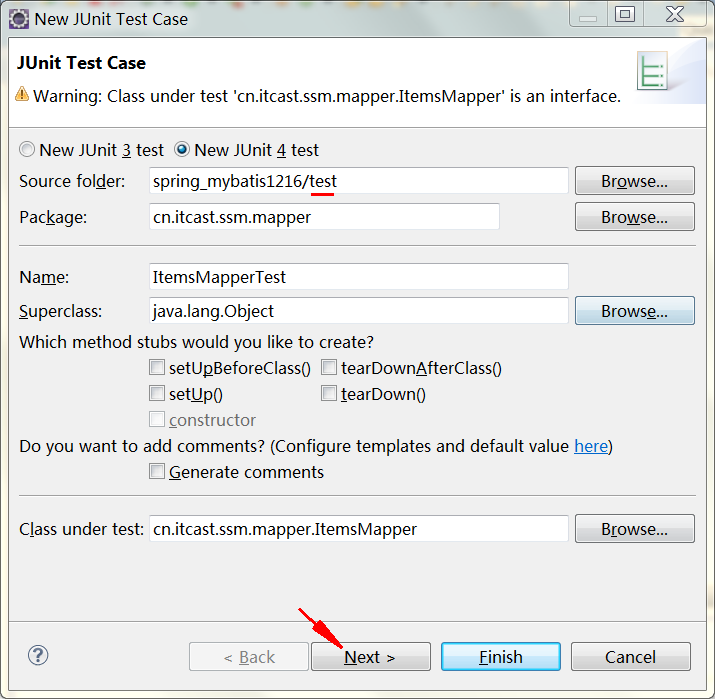
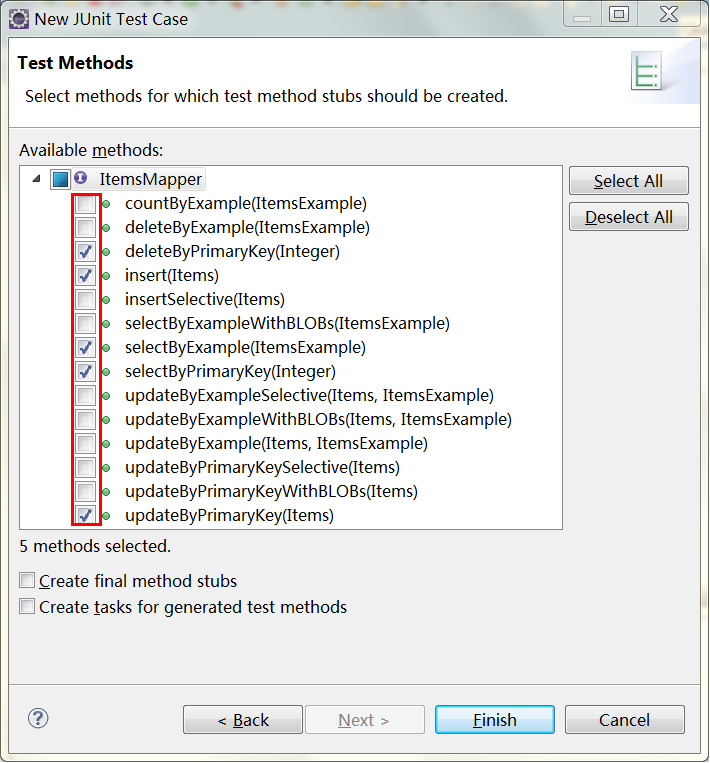
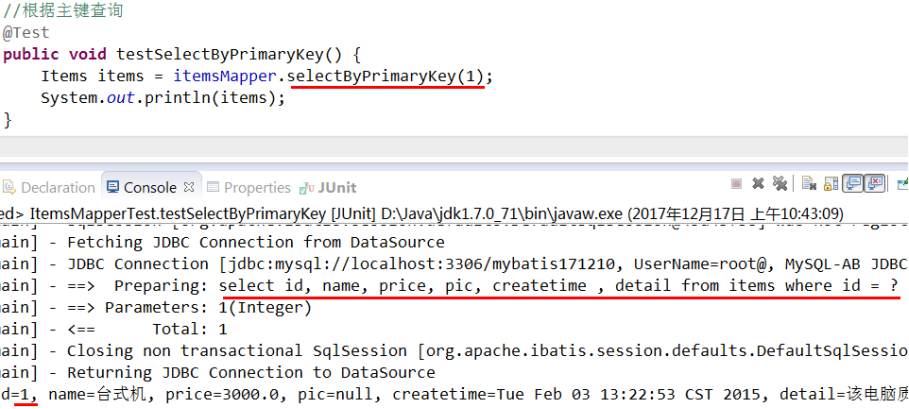
测试ItemsMapper中的方法


ItemsMapperTest.java
package cn.itcast.ssm.mapper;

import java.util.Date;

import java.util.List;

import org.junit.Before;

import org.junit.Test;

import org.springframework.context.ApplicationContext;

import org.springframework.context.support.ClassPathXmlApplicationContext;

import cn.itcast.ssm.po.Items;

import cn.itcast.ssm.po.ItemsExample;

public class ItemsMapperTest {

    private ApplicationContext applicationContext;

    private ItemsMapper itemsMapper;

    //在setUp()这个方法得到spring容器

    @Before

    public void setUp() throws Exception {

        applicationContext = new ClassPathXmlApplicationContext("classpath:spring/applicationContext.xml");

        itemsMapper = (ItemsMapper) applicationContext.getBean("itemsMapper");

    }

    //自定义条件查询

    @Test

    public void testSelectByExample() {

        ItemsExample itemsExample = new ItemsExample();

        //通过criteria构造查询条件

        ItemsExample.Criteria criteria = itemsExample.createCriteria();

        criteria.andNameEqualTo("笔记本");

        //可能返回多条记录

        List<Items> list = itemsMapper.selectByExample(itemsExample);

        System.out.println(list);

    }

    //根据主键查询

    @Test

    public void testSelectByPrimaryKey() {

        Items items = itemsMapper.selectByPrimaryKey(1);

        System.out.println(items);

    }

    //插入

    @Test

    public void testInsert() {

        //构造items对象

        Items items = new Items();

        items.setName("手机");

        items.setPrice(900f);

        items.setDetail("不错");

        items.setCreatetime(new Date());

        itemsMapper.insert(items);

    }

    //根据主键删除

    @Test

    public void testDeleteByPrimaryKey() {

        itemsMapper.deleteByPrimaryKey(4);

    }

    //更新数据

    @Test

    public void testUpdateByPrimaryKey() {

        //对所有字段进行更新,需要先查询出来再更新

        Items items = itemsMapper.selectByPrimaryKey(1);

        items.setName("水杯");

        itemsMapper.updateByPrimaryKey(items);

        //如果传入字段不空为才更新,在批量更新中使用此方法,不需要先查询再更新

        //itemsMapper.updateByPrimaryKeySelective(record);

    }

}
9.4 逆向工程注意事项
9.4.1 Mapper文件内容不覆盖而是追加
XXXMapper.xml文件已经存在时,如果进行重新生成则mapper.xml文件内容不被覆盖而是进行内容追加,结果导致mybatis解析失败。
解决方法:删除原来已经生成的mapper xml文件再进行生成。
Mybatis自动生成的po及mapper.java文件不是内容而是直接覆盖没有此问题。
9.4.2 Table schema问题
下边是关于针对oracle数据库表生成代码的schema问题:
Schma即数据库模式,oracle中一个用户对应一个schema,可以理解为用户就是schema。
当Oralce数据库存在多个schema可以访问相同的表名时,使用mybatis生成该表的mapper.xml将会出现mapper.xml内容重复的问题,结果导致mybatis解析错误。
解决方法:在table中填写schema,如下:
<table schema="XXXX" tableName=" " >
XXXX即为一个schema的名称,生成后将mapper.xml的schema前缀批量去掉,如果不去掉当oracle用户变更了sql语句将查询失败。
快捷操作方式:mapper.xml文件中批量替换:“from XXXX.”为空
Oracle查询对象的schema可从dba_objects中查询,如下:
select * from dba_objects
mybatis由浅入深day02_9.3.5使用生成的代码_9.4逆向工程注意事项的更多相关文章
- mybatis由浅入深day02_9逆向工程
9 逆向工程 9.1 什么是逆向工程 mybaits需要程序员自己编写sql语句,mybatis官方提供逆向工程 可以针对单表自动生成mybatis执行所需要的代码(mapper.java,mappe ...
- MyBatis Generator作为maven插件自动生成增删改查代码及配置文件例子
什么是MyBatis Generator MyBatis Generator (MBG) 是一个Mybatis的代码生成器,可以自动生成一些简单的CRUD(插入,查询,更新,删除)操作代码,model ...
- myBatis自动生成相关代码文件配置(Maven)
pom.xml文件添加配置 <build> <finalName>generator</finalName> <plugins> <!-- mav ...
- Mybatis上路_06-使用Java自动生成[转]
Mybatis上路_06-使用Java自动生成 11人收藏此文章, 我要收藏发表于1个月前(2013-04-24 23:05) , 已有151次阅读 ,共0个评论 目录:[ - ] 1.编写Gener ...
- mybatis自动生成java代码
SSM框架没有DB+Record模式,写起来特别费劲,只能用下面的方法勉强凑合. 上图中,*.jar为下载的,src为新建的空白目录,.xml配置如下. <?xml version=" ...
- Mybatis MapperScannerConfigurer 自动扫描 将Mapper接口生成代理注入到Spring
Mybatis MapperScannerConfigurer 自动扫描 将Mapper接口生成代理注入到Spring 非原创[只为记录],原博文地址:https://www.cnblogs.com/ ...
- (转)Mybatis MapperScannerConfigurer 自动扫描 将Mapper接口生成代理注入到Spring
Mybatis MapperScannerConfigurer 自动扫描 将Mapper接口生成代理注入到Spring Mybatis在与Spring集成的时候可以配置MapperFactoryBea ...
- Mybatis MapperScannerConfigurer 自动扫描 将Mapper接口生成代理注入到Spring - 大新博客 - 推酷 - 360安全浏览器 7.1
Mybatis MapperScannerConfigurer 自动扫描 将Mapper接口生成代理注入到Spring - 大新博客 时间 2014-02-11 21:08:00 博客园-所有随笔区 ...
- 使用mybatis-generator生成自动代码
2019-02-22 配置文件: pom.xml 添加 dependency plugin 基于mybatis-plus <dependency> <groupId>o ...
随机推荐
- PHP5.4新特性之上传进度支持Upload progress
在PHP5.4版本当中给我们提供了好用的特性,上传进度的支持,我们可以配合Ajax动态获取SESSION当中的上传进度: 在使用这一特性之前,需要现在php.ini文件当中进行相应的设置: 1 2 ...
- Django视图层之路由配置系统(urls)
视图层之路由配置系统(urls) URL配置(URLconf)就像Django 所支撑网站的目录.它的本质是URL与要为该URL调用的视图函数之间的映射表:你就是以这种方式告诉Django,对于这个U ...
- 将Java项目从maven迁移到gradle
将Java项目从maven迁移到gradle 如何将一个java项目从maven迁移到gradle呢?gradle集成了一个很方便的插件:Build Init Plugin,使用这个插件可以很方便地创 ...
- . net 源代码调试
对于 .net framework 中的代码,光拿 Reflector 看是不够过瘾的,如果能够调试进去就好了! 其实,微软是提供了一套 sourcecode 的下载的: http://referen ...
- navicat如何导入sql文件和导出sql文件
http://jingyan.baidu.com/article/a65957f4976aad24e67f9b9b.html ************************************* ...
- Hadoop 新 MapReduce 框架 Yarn 详解【转】
[转自:http://www.ibm.com/developerworks/cn/opensource/os-cn-hadoop-yarn/] 简介: 本文介绍了 Hadoop 自 0.23.0 版本 ...
- SharePoint自动化系列——Error features自动deactivate
转载请注明出自天外归云的博客园:http://www.cnblogs.com/LanTianYou/ SharePoint Content Deployment prerequisite——Error ...
- 后台js返回验证登陆绕过
思路: 程序员通过JS的返回数据来决定是否登陆成功.返回码为0000的时候表示登陆成功,将返回数据改为其登陆成功的即可. 具体过程: 后台登陆地址http://127.0.0.1/manager/ad ...
- 图片上传裁剪(asp.net)
图片在线裁剪功能 前台展现用jquery.Jcrop实现,后台使用 System.Drawing.Image类来进行裁剪 完整dome下载 http://download.csdn.net/detai ...
- ansible register when: result | succeeded when: item.rc != 0
ansible register 这个功能非常有用.当我们需要判断对执行了某个操作或者某个命令后,如何做相应的响应处理(执行其他 ansible 语句),则一般会用到register . 举个例子: ...