
Python Django 之 Template 模板的使用
一、模板样式
注意:
1、url
urlpatterns = {
    path('admin/', admin.site.urls),
    path('order/', views.order),
    path('shopping_car/', views.shopping_car),
}
2、views
from django.shortcuts import render, render_to_response, redirect
from django.http import HttpResponse
import datetime
from blog import models

def order(req):

    return render(req,"order.html")

def shopping_car(req):

    return render(req,"shopping_car.html")
3、templates
1)order
<!DOCTYPE html>
<html lang="en">
<head>
    <meta charset="UTF-8">
    <title>Title</title>
    <style>
        .page-header{
            height:50px;
            background-color: rebeccapurple;
        }
        .page-body .menu{
            height: 500px;
            background-color: antiquewhite;
            float:left;
            width: 15%;
        }
        .page-body .content{
            height: 500px;
            background-color: cornflowerblue;
            float: left;
            width: 85%;
        }
        .page-footer{
            height: 30px;
            background-color: darkblue;
            clear: both;
        }
    </style>
</head>
<body>
<div>
    <div class="page-header"></div>
    <div class="page-body">
        <div class="menu">
            <a href="/order/">订单</a><br>
            <a href="/shoping_car/">购物车</a>
        </div>
        <div class="content">订单</div>

    </div>
    <div class="page-footer"></div>
</div>
</body>
</html>
2)shopping_car
<!DOCTYPE html>
<html lang="en">
<head>
    <meta charset="UTF-8">
    <title>Title</title>
    <style>
        .page-header{
            height:50px;
            background-color: rebeccapurple;
        }
        .page-body .menu{
            height: 500px;
            background-color: antiquewhite;
            float:left;
            width: 10%;
        }
        .page-body .content{
            height: 500px;
            background-color: cornflowerblue;
            float: left;
            width: 90%;
        }
        .page-footer{
            height: 30px;
            background-color: darkblue;
            clear: both;
        }
    </style>
</head>
<body>
<div>
    <div class="page-header"></div>
    <div class="page-body">
        <div class="menu">
            <a href="/order/">订单</a><br>
            <a href="/shoping_car/">购物车</a>
        </div>
        <div class="content"> 购物车</div>

    </div>
    <div class="page-footer"></div>
</div>
</body>
</html>
二、引入模板
注意:
1)设置模板--非公共部分使用此种方法代替
{% block content %}

{% endblock %}
2)引入模板
extends引入模板
{% block content %}包含私有部分
{% extends "base.html" %}
{% block content %}
        <div class="content">订单</div>
{% endblock %}
1、url
urlpatterns = {
    path('admin/', admin.site.urls),
    # path('cur_time/', views.cur_time),
    # # path('userInfo/',views.userInfo),
    # path('login/', views.login),
    # path('home/', views.home),
    # path('hello/',views.hello),
    path('order/', views.order),
    path('shopping_car/', views.shopping_car),
}
2、views
from django.shortcuts import render, render_to_response, redirect
from django.http import HttpResponse
import datetime
from blog import models

def order(req):

    return render(req,"order.html")

def shopping_car(req):

    return render(req,"shopping_car.html")
3、templates
1)base
<!DOCTYPE html>
<html lang="en">
<head>
    <meta charset="UTF-8">
    <title>Title</title>
    <style>
        .page-header{
            height:50px;
            background-color: rebeccapurple;
        }
        .page-body .menu{
            height: 500px;
            background-color: antiquewhite;
            float:left;
            width: 15%;
        }
        .page-body .content{
            height: 500px;
            background-color: cornflowerblue;
            float: left;
            width: 85%;
        }
        .page-footer{
            height: 30px;
            background-color: darkblue;
            clear: both;
        }
    </style>
</head>
<body>
<div>
    <div class="page-header"></div>
    <div class="page-body">
        <div class="menu">
            <a href="/order/">订单</a><br>
            <a href="/shoping_car/">购物车</a>
        </div>
        {% block content %}

        {% endblock %}

    </div>
    <div class="page-footer"></div>
</div>
</body>
</html>
2)order
{% extends "base.html" %}
{% block content %}
        <div class="content">订单</div>
{% endblock %}
3)shopping_car
{% extends "base.html" %}
{% block content %}
        <div class="content"> 购物车</div>
{% endblock %}
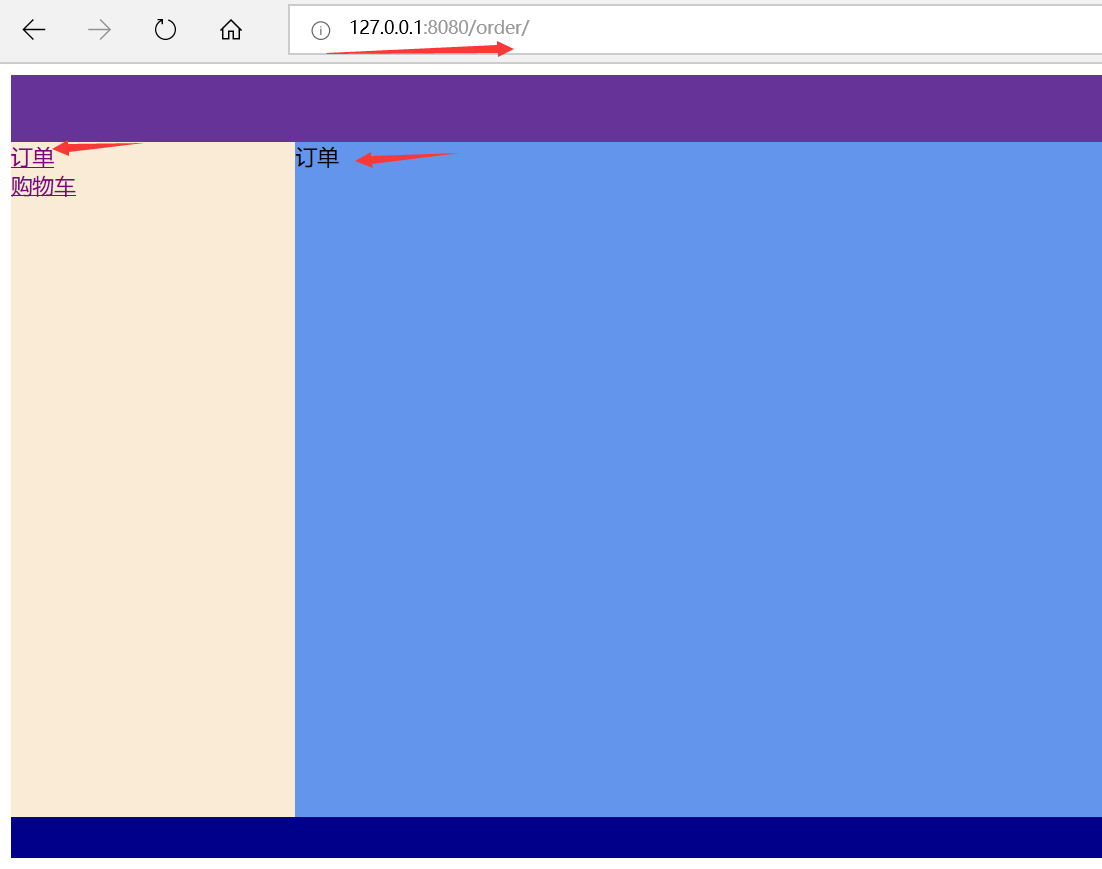
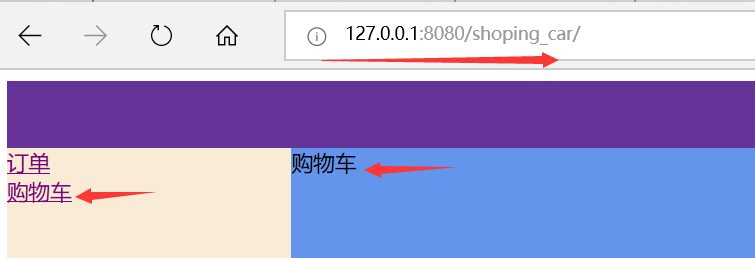
三、展示效果
点击订单或者购物车,行营的url链接、右边显示的内容随之改变
Python Django 之 Template 模板的使用的更多相关文章
- Python Django 之 Template 模板语言简介
一.什么事模板语言 html+逻辑控制语句 二.模板语言的作用 帮助前端处理后端发来的数据,方便前端展示(杂糅渲染) 三.模板语言语法 1.{{变量}} 变量使用双大括号{{}} 2.万能的句点号. ...
- python Django教程 之模板渲染、循环、条件判断、常用的标签、过滤器
python3.5 manage.py runserver python Django教程 之模板渲染.循环.条件判断.常用的标签.过滤器 一.Django模板渲染模板 1. 创建一个 zqxt_tm ...
- python - django 解决 templates 模板语言语法冲突
# 在使用某个框架时发现语法与Django的模板语法冲突了,于是找到解决方案: {% verbatim %} // 被 verbatim 包裹起来的地方是不会被 django 渲染的 {% endve ...
- python框架Django中MTV框架之Template(模板/界面)
MTV框架之Template(模板/界面) 关注公众号"轻松学编程"了解更多. 1.模板目录位置 应用下 不需要注册 无法跨应用地进行复用 工程下 需要注册 settings.py ...
- Python Web框架篇:Django templates(模板)
为什么用templates? views.py视图函数是用来写Python代码的,HTML可以被直接硬编码在views.py之中.如下: import datetime def current_tim ...
- Python Django框架笔记(六):模板
(一){%%}和{{ }} {% for post in posts %} <a href=""><h2>{{ post.title }}</h2&g ...
- Python菜鸟之路:Django 路由、模板、Model(ORM)
Django路由系统 Django的路由系统让Django可以根据URI进行匹配,进而发送至特定的函数去处理用户请求.有点类似nginx的location功能. Django的路由关系分为三种:普通关 ...
- django基础2: 路由配置系统,URLconf的正则字符串参数,命名空间模式,View(视图),Request对象,Response对象,JsonResponse对象,Template模板系统
Django基础二 request request这个参数1. 封装了所有跟请求相关的数据,是一个对象 2. 目前我们学过1. request.method GET,POST ...2. reques ...
- python :Django url /views /Template 文件介绍
1,Django URL 路由系统 URL配置(URLconf)就像Django 所支撑网站的目录.它的本质是URL模式以及要为该URL模式调用的视图函数之间的映射表:你就是以这种方式告诉Django ...
随机推荐
- AD中设置PCB线间距
Design->Rules->Electrical->Clearance->Clearance
- 清理SuperMap iclient 三维插件的缓存批处理
在windows任何位置,新建一个文本文件,将下面内容复制到文本文件中并保存,然后修改该文本文件后缀为.bat,鼠标点击执行即可完成清理工作~ @echo off title 清理三维缓存 @echo ...
- mui体验理解
1. mui简介 1.1 缘起 1.基于jq的jqmobile,性能低的无法忍受,且UI难看 2.bootstrap这种响应式设计,性能在低端机不足,而且UI风格一看就是网页,不是App的 ...
- php后台操作以及一些减缓服务器压力的问题
上次提到一个微信投票系统,做了一个微信重定向解决了,一个授权复用的问题,昨天投票系统正式投入使用:测试的时候没有问题,上线后出现了一点小问题, 一:php页面参数接受和php中 switch 那个先执 ...
- Unity --- 如何降低UI的填充率
1.首先简单介绍一下什么叫填充率: Fill Rate(填充率)是指显卡每帧或者说每秒能够渲染的像素数.在每帧绘制中,如果一个像素被反复绘制的次数越多,那么它占用的资源也必然更多.目前在移动设备上,F ...
- centos 下卸载mysql
查看当前已安装服务 [root@localhost]# rpm -qa|grep -i mysqlMySQL-server-5.6.36-1.rhel5.x86_64qt-mysql-4.8.5-13 ...
- 20190102xlVBA_多表按姓名同时拆分
Sub 多表按姓名同时拆分20190102() AppSettings Dim StartTime As Variant Dim UsedTime As Variant StartTime = VBA ...
- 6 Django REST framework JWT 和登录功能实现
JWT 在用户注册或登录后,我们想记录用户的登录状态,或者为用户创建身份认证的凭证. 我们不再使用Session认证机制,而使用Json Web Token认证机制. Json web token ( ...
- 微信小程序选择图片,查看图片信息,浏览图片,图片上传
依次点击链接请查看以下步骤 选择图片: https://mp.weixin.qq.com/debug/wxadoc/dev/api/media-picture.html#wxchooseimageob ...
- python生成随机整数
python生成随机不重复的整数,用random中的sample index = random.sample(range(0,10),10) 上面是生成不重复的10个从1~10的整数 python生成 ...